navigation system TOYOTA TUNDRA 2013 2.G Owners Manual
[x] Cancel search | Manufacturer: TOYOTA, Model Year: 2013, Model line: TUNDRA, Model: TOYOTA TUNDRA 2013 2.GPages: 752, PDF Size: 15.87 MB
Page 29 of 752
29
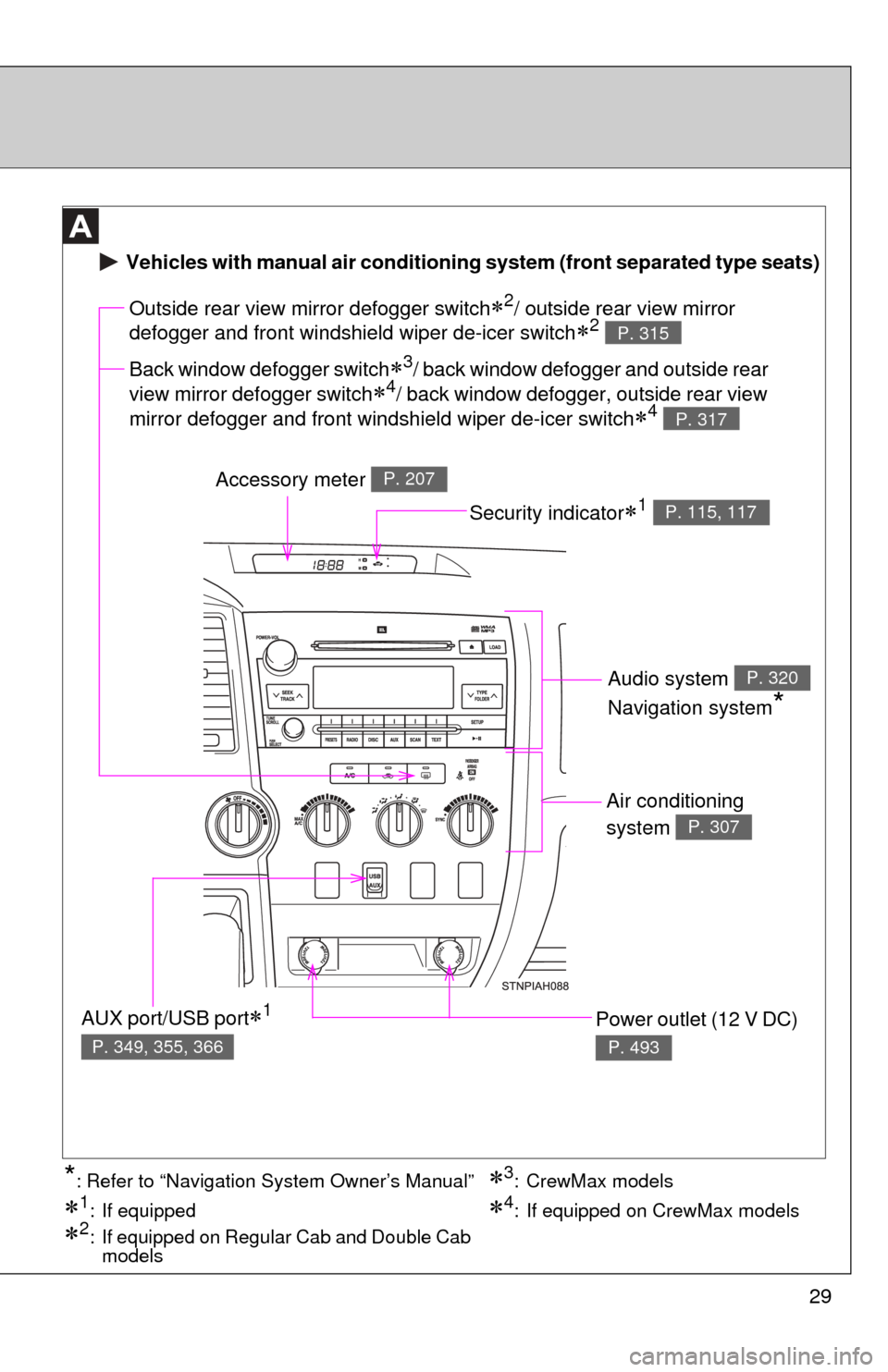
Air conditioning
system
P. 307
Power outlet (12 V DC)
P. 493
Outside rear view mirror defogger switch2/ outside rear view mirror
defogger and front windshield wiper de-icer switch
2 P. 315
Accessory meter P. 207
AUX port/USB port1
P. 349, 355, 366
Vehicles with manual air conditioning system (front separated type seats)
Back window defogger switch3/ back window defogger and outside rear
view mirror defogger switch
4/ back window defogger, outside rear view
mirror defogger and front windshield wiper de-icer switch
4 P. 317
Security indicator1 P. 115, 117
Audio system
Navigation system
*
P. 320
3: CrewMax models
1: If equipped
2: If equipped on Regular Cab and Double Cab models
4: If equipped on CrewMax models
*: Refer to “Navigation System Owner’s Manual”
Page 30 of 752
30
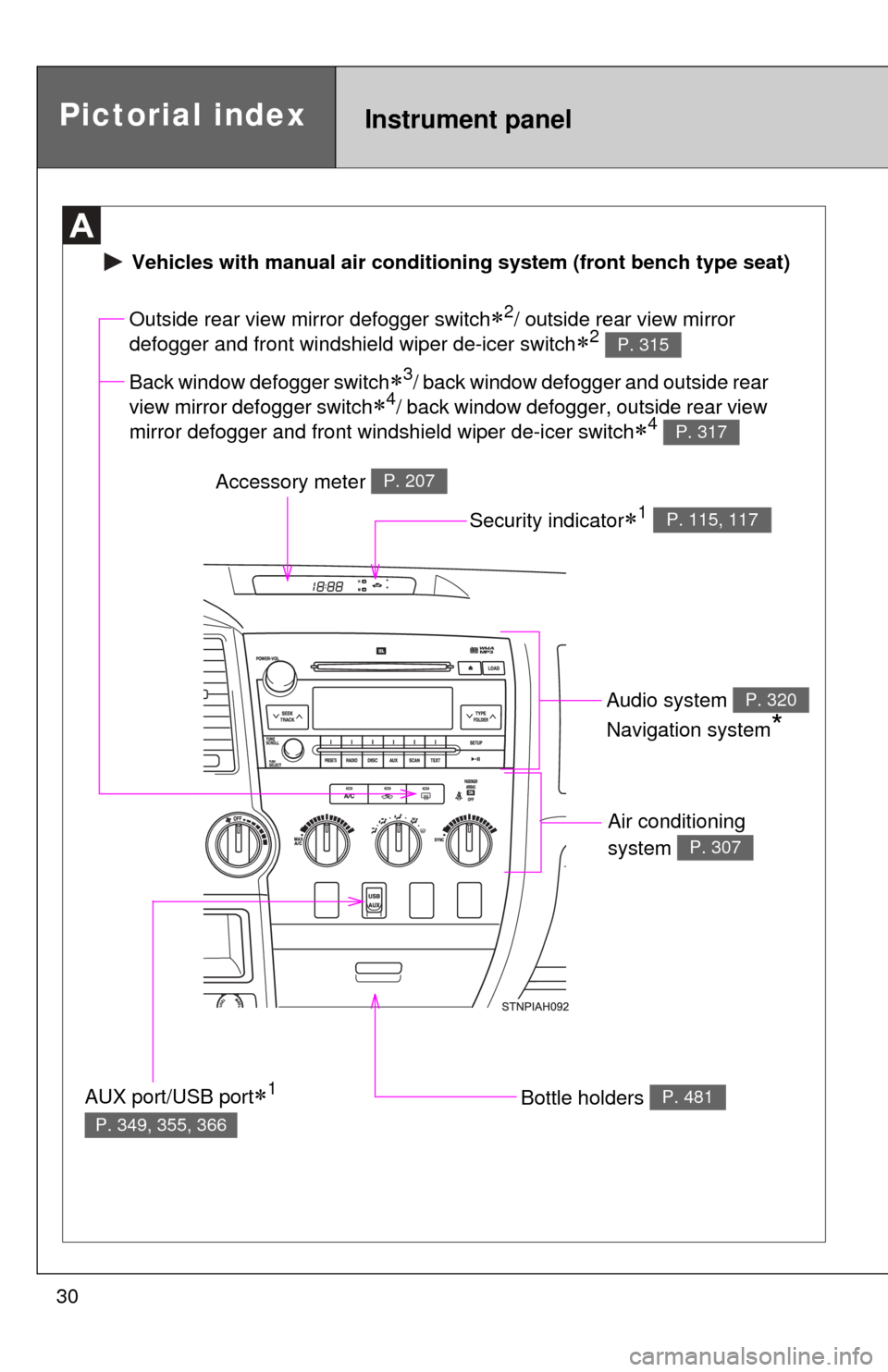
Air conditioning
system
P. 307
Bottle holders P. 481
Outside rear view mirror defogger switch2/ outside rear view mirror
defogger and front windshield wiper de-icer switch
2 P. 315
Accessory meter P. 207
AUX port/USB port1
P. 349, 355, 366
Vehicles with manual ai r conditioning system (front bench type seat)
Back window defogger switch3/ back window defogger and outside rear
view mirror defogger switch
4/ back window defogger, outside rear view
mirror defogger and front windshield wiper de-icer switch
4 P. 317
Security indicator1 P. 115, 117
Audio system
Navigation system
*
P. 320
Pictorial indexInstrument panel
Page 31 of 752
31
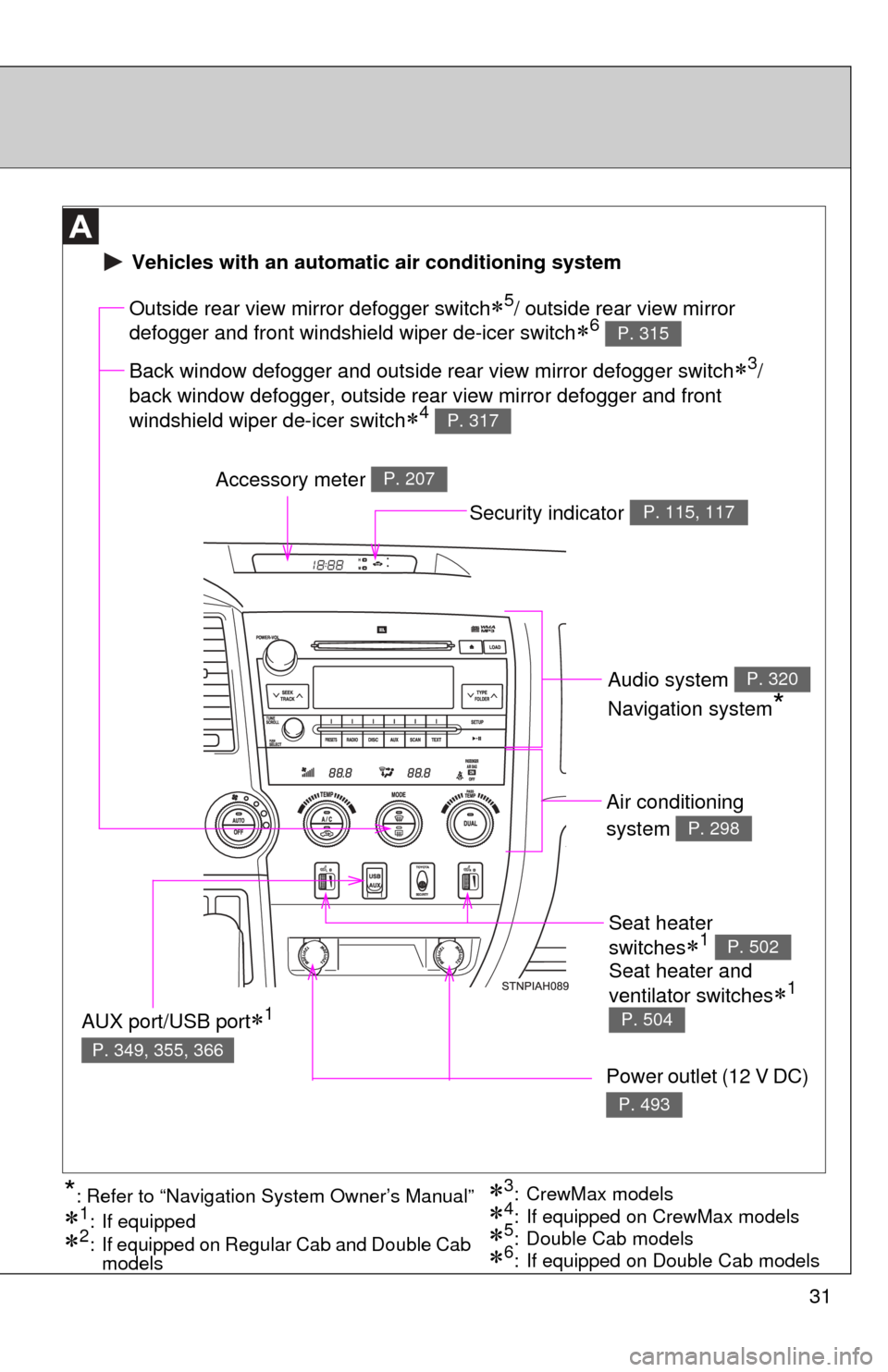
Seat heater
switches
1 P. 502
Air conditioning
system
P. 298
Power outlet (12 V DC)
P. 493
Outside rear view mirror defogger switch5/ outside rear view mirror
defogger and front windshield wiper de-icer switch
6 P. 315
Accessory meter P. 207
AUX port/USB port1
P. 349, 355, 366
3: CrewMax models
1: If equipped
2: If equipped on Regular Cab and Double Cab models5: Double Cab models4: If equipped on CrewMax models*: Refer to “Navigation System Owner’s Manual”
Vehicles with an automatic air conditioning system
Back window defogger and outside rear view mirror defogger switch3/
back window defogger, outside rear view mirror defogger and front
windshield wiper de-icer switch
4 P. 317
6: If equipped on Double Cab models
Security indicator P. 115, 117
Audio system
Navigation system
*
P. 320
Seat heater and
ventilator switches
1
P. 504
Page 234 of 752
234
2-4. Using other driving systems
Rear view monitor system
: If equipped
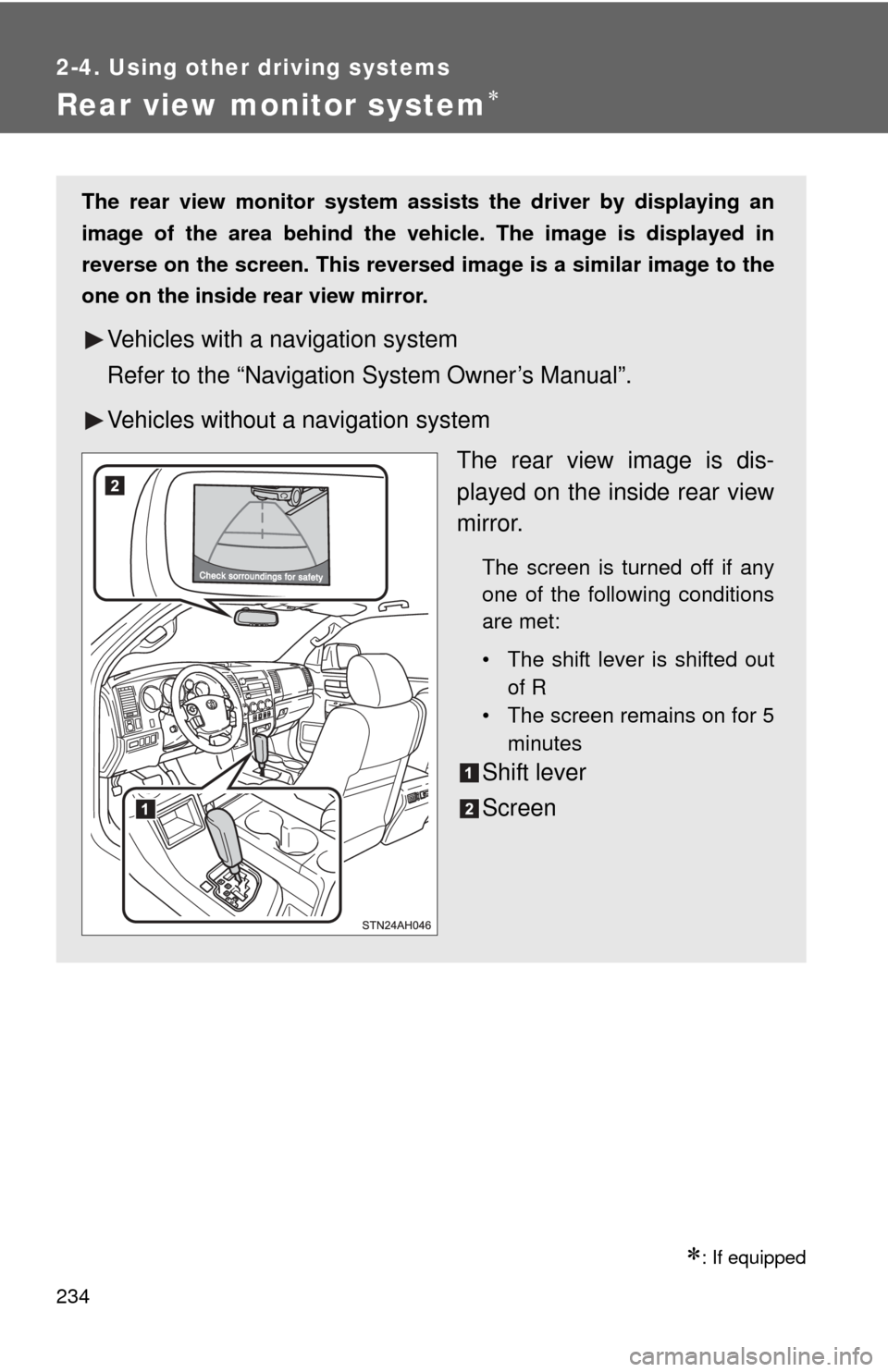
The rear view monitor system assists the driver by displaying an
image of the area behind the vehicle. The image is displayed in
reverse on the screen. This reversed im age is a similar image to the
one on the inside rear view mirror.
Vehicles with a navigation system
Refer to the “Navigation System Owner’s Manual”.
Vehicles without a navigation system
The rear view image is dis-
played on the inside rear view
mirror.
The screen is turned off if any
one of the following conditions
are met:
• The shift lever is shifted outof R
• The screen remains on for 5
minutes
Shift lever
Screen
Page 320 of 752
320
3-2. Using the audio system
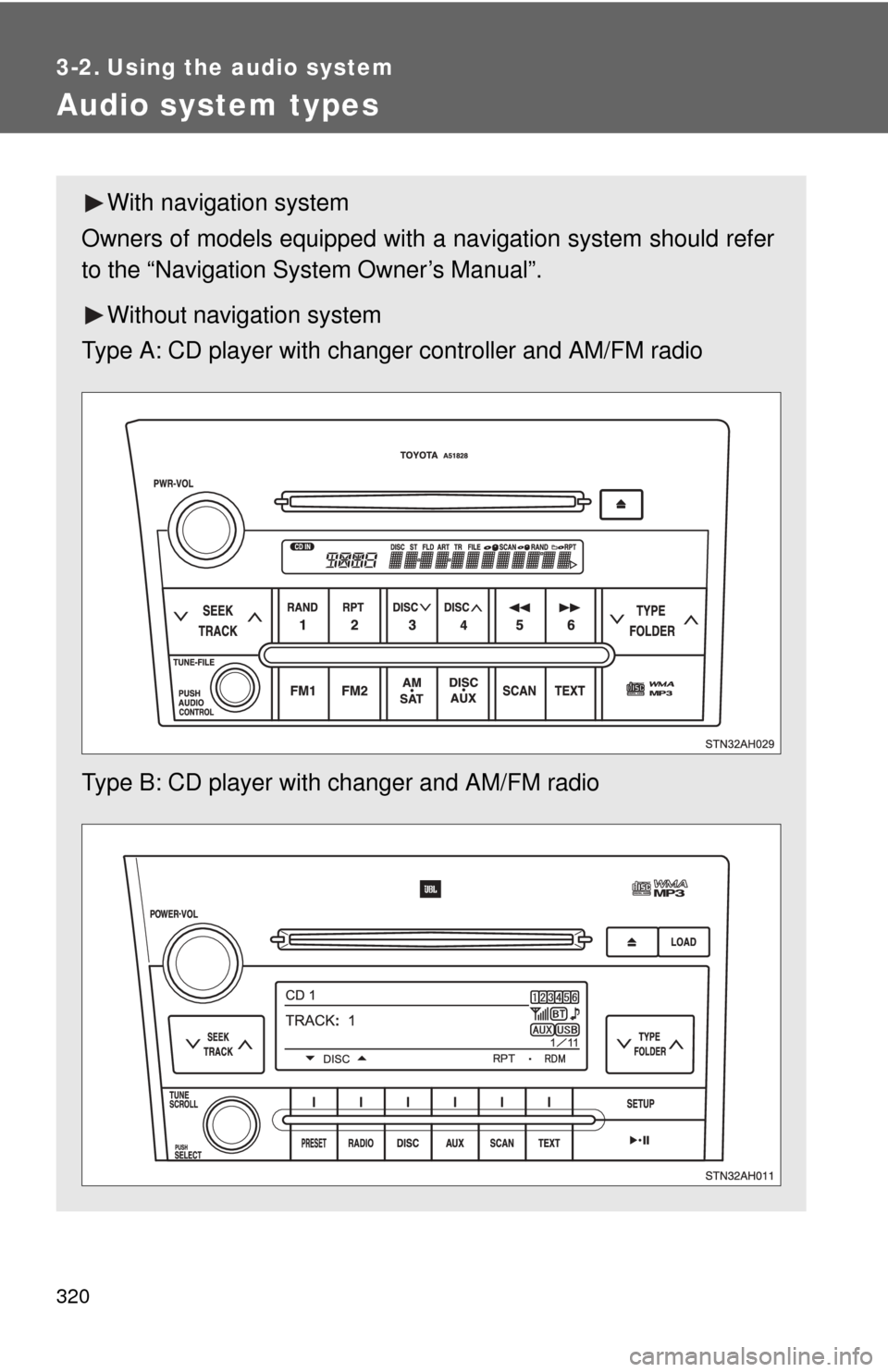
Audio system types
With navigation system
Owners of models equipped with a navigation system should refer
to the “Navigation System Owner’s Manual”.
Without navig ation system
Type A: CD player with changer controller and AM/FM radio
Type B: CD player with changer and AM/FM radio
Page 368 of 752
368
3-2. Using the audio system
Using the steering wheel audio switches
: If equipped
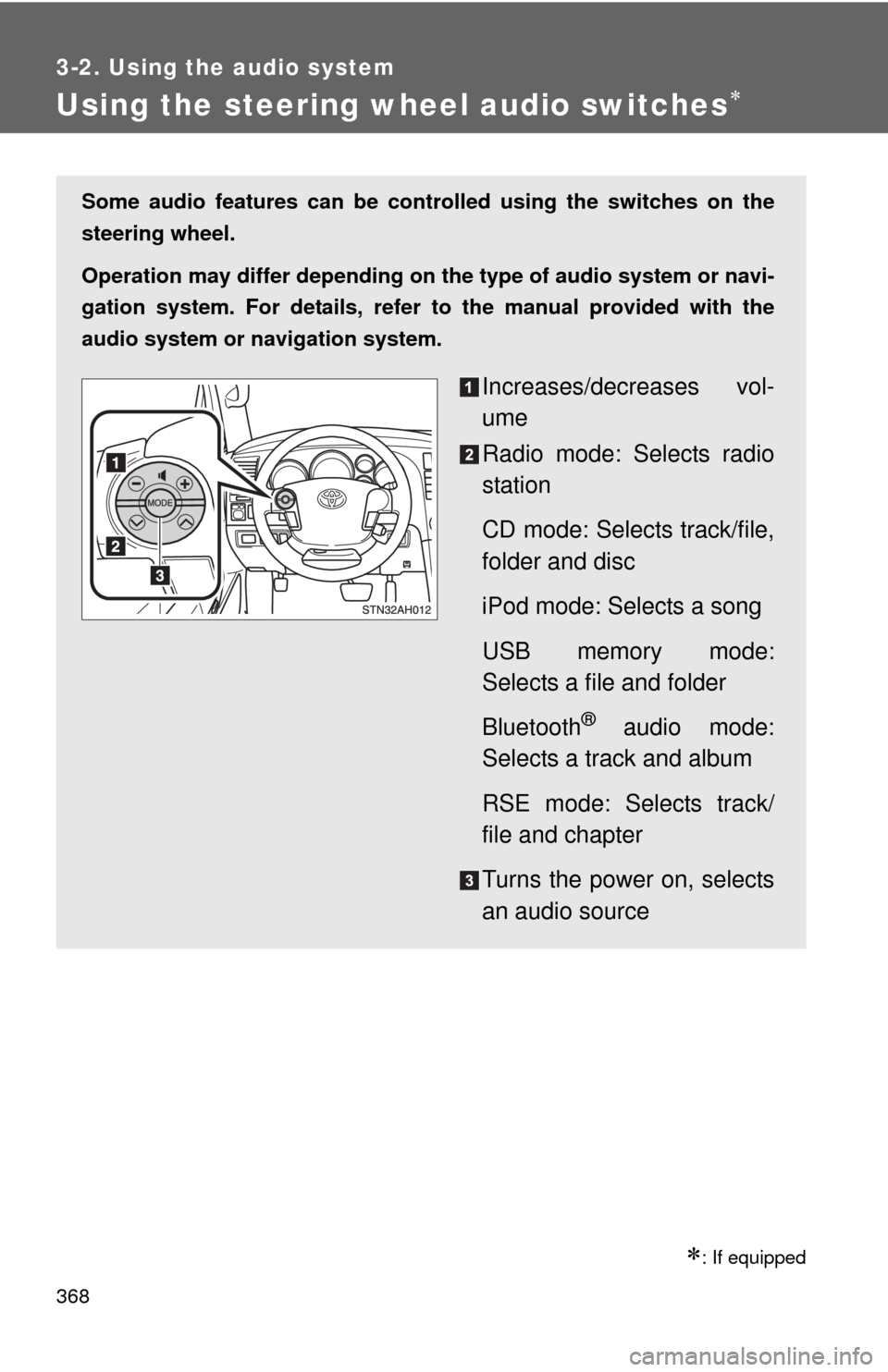
Some audio features can be controlled using the switches on the
steering wheel.
Operation may differ depending on th e type of audio system or navi-
gation system. For details, refer to the manual provided with the
audio system or navigation system.
Increases/decreases vol-
ume
Radio mode: Selects radio
station
CD mode: Selects track/file,
folder and disc
iPod mode: Selects a song
USB memory mode:
Selects a file and folder
Bluetooth
® audio mode:
Selects a track and album
RSE mode: Selects track/
file and chapter
Turns the power on, selects
an audio source
Page 374 of 752
374
3-3. Using the Bluetooth® audio system
Bluetooth® audio system
: If equipped
■Conditions under which th e system will not operate
● If using a portable player that does not support Bluetooth
®
●If the portable player is switched off
● If the portable player is not connected
● If the portable player’s battery is low
● If the portable player is behind the seat or in the glove box or console box
● If metal is covering or touching the portable player
The Bluetooth® audio system enables you to enjoy music played on
a portable digital audio player (portable player) from the vehicle
speakers via wireless communication.
This audio system supports Bluetooth
®, a wireless data system
capable of playing portable audio music without cables. If your por-
table player does not support Bluetooth
®, the Bluetooth® audio sys-
tem will not function.
Owners of models equipped with a navigation system should refer to
the “Navigation System Owner’s Manual”.
TitlePage
Using the Bluetooth® audio systemP. 377
Operating a Bluetooth® enabled portable playerP. 382
Setting up a Bluetooth® enabled portable playerP. 384
Bluetooth® audio system setupP. 389
Page 426 of 752
426
3-5. Using the hands-free phone system (for cellular phone)
Hands-free phone system (for cellular phone) features
: If equipped
This system supports Bluetooth®, which allows you to make or
receive calls without using cables to connect a cellular phone and
the system, and without oper ating the cellular phone.
Owners of models equipped with a navigation system should refer to
the “Navigation System Owner’s Manual”.
■ Hands-free system quick guide
Setting a cellular phone. ( P. 430)
Adding an entry to the phonebook (Up to 20 names can be
stored). ( P. 449)
Dialing by inputting a name. ( P. 439)
Page 583 of 752
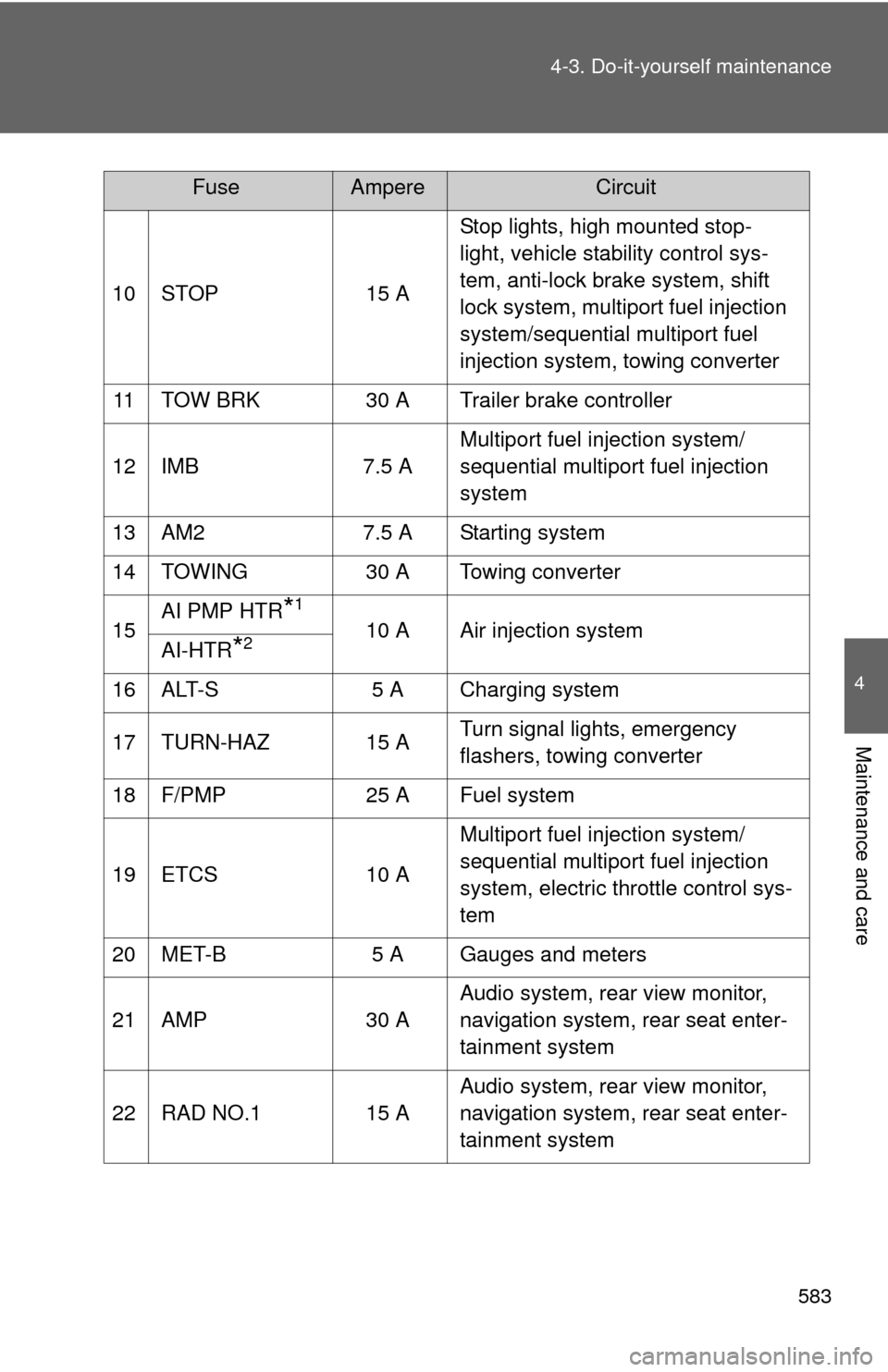
583
4-3. Do-it-yourself maintenance
4
Maintenance and care
10 STOP
15 AStop lights, high mounted stop-
light, vehicle stability control sys-
tem, anti-lock brake system, shift
lock system, multiport fuel injection
system/sequential multiport fuel
injection system, towing converter
11 TOW BRK 30 A Trailer brake controller
12 IMB 7.5 AMultiport fuel injection system/
sequential multiport fuel injection
system
13 AM2 7.5 A Starting system
14 TOWING 30 A Towing converter
15 AI PMP HTR
*1
10 A Air injection system
AI-HTR*2
16 ALT-S 5 A Charging system
17 TURN-HAZ 15 A Turn signal lights, emergency
flashers, towing converter
18 F/PMP 25 A Fuel system
19 ETCS 10 AMultiport fuel injection system/
sequential multiport fuel injection
system, electric throttle control sys-
tem
20 MET-B 5 A Gauges and meters
21 AMP 30 AAudio system, rear view monitor,
navigation system, rear seat enter-
tainment system
22 RAD NO.1 15 A Audio system, rear view monitor,
navigation system, rear seat enter-
tainment system
FuseAmpereCircuit
Page 587 of 752
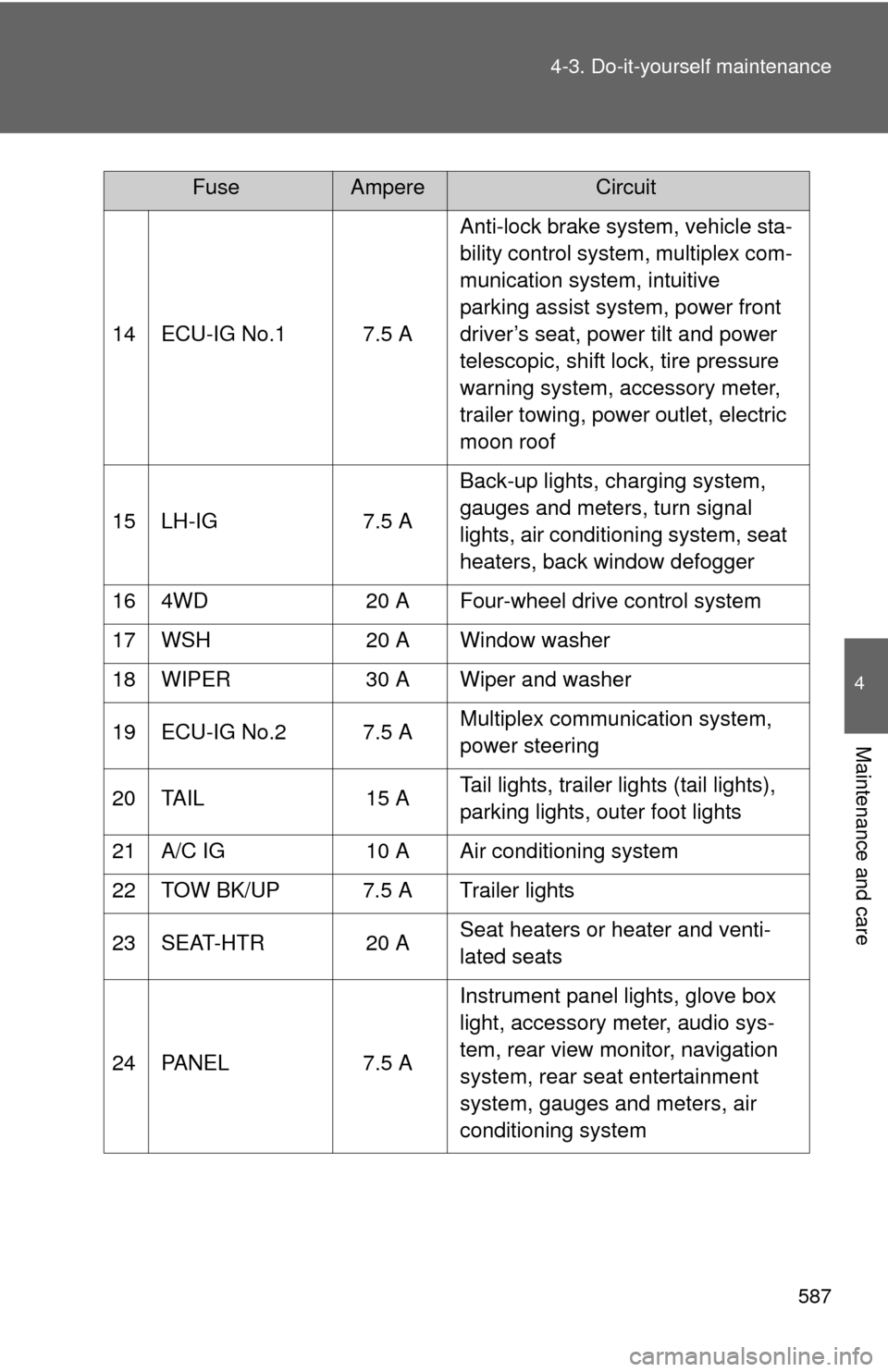
587
4-3. Do-it-yourself maintenance
4
Maintenance and care
14 ECU-IG No.1 7.5 A
Anti-lock brake system, vehicle sta-
bility control system, multiplex com-
munication system, intuitive
parking assist system, power front
driver’s seat, power tilt and power
telescopic, shift lock, tire pressure
warning system, accessory meter,
trailer towing, power outlet, electric
moon roof
15 LH-IG 7.5 A Back-up lights, charging system,
gauges and meters, turn signal
lights, air conditioning system, seat
heaters, back window defogger
16 4WD 20 A Four-wheel drive control system
17 WSH 20 A Window washer
18 WIPER 30 A Wiper and washer
19 ECU-IG No.2 7.5 A Multiplex communication system,
power steering
20 TAIL 15 A Tail lights, trailer lights (tail lights),
parking lights, outer foot lights
21 A/C IG 10 A Air conditioning system
22 TOW BK/UP 7.5 A Trailer lights
23 SEAT-HTR 20 A Seat heaters or heater and venti-
lated seats
24 PANEL 7.5 A Instrument panel lights, glove box
light, accessory meter, audio sys-
tem, rear view monitor, navigation
system, rear seat entertainment
system, gauges and meters, air
conditioning system
FuseAmpereCircuit