USB TOYOTA TUNDRA 2014 2.G Navigation Manual
[x] Cancel search | Manufacturer: TOYOTA, Model Year: 2014, Model line: TUNDRA, Model: TOYOTA TUNDRA 2014 2.GPages: 276, PDF Size: 19.84 MB
Page 106 of 276
106
4. AUDIO REMOTE CONTROLS
1. STEERING SWITCHES
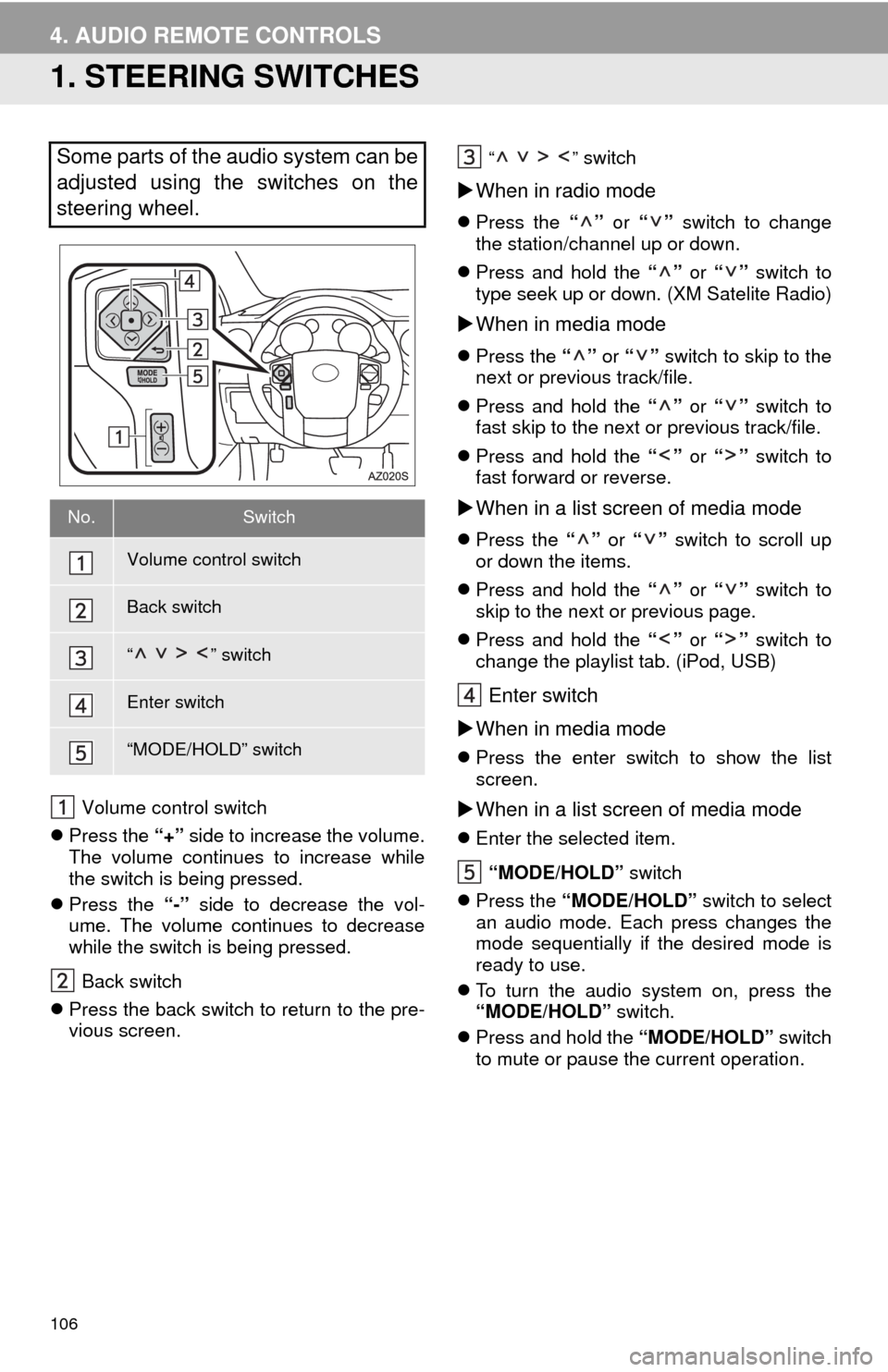
Volume control switch
Press the “+” side to increase the volume.
The volume continues to increase while
the switch is being pressed.
Press the “-” side to decrease the vol-
ume. The volume continues to decrease
while the switch is being pressed.
Back switch
Press the back switch to return to the pre-
vious screen.
“” switch
When in radio mode
Press the “” or “” switch to change
the station/channel up or down.
Press and hold the “” or “” switch to
type seek up or down. (XM Satelite Radio)
When in media mode
Press the “” or “” switch to skip to the
next or previous track/file.
Press and hold the “” or “” switch to
fast skip to the next or previous track/file.
Press and hold the “” or “” switch to
fast forward or reverse.
When in a list screen of media mode
Press the “” or “” switch to scroll up
or down the items.
Press and hold the “” or “” switch to
skip to the next or previous page.
Press and hold the “” or “” switch to
change the playlist tab. (iPod, USB)
Enter switch
When in media mode
Press the enter switch to show the list
screen.
When in a list screen of media mode
Enter the selected item.
“MODE/HOLD” switch
Press the “MODE/HOLD” switch to select
an audio mode. Each press changes the
mode sequentially if the desired mode is
ready to use.
To turn the audio system on, press the
“MODE/HOLD” switch.
Press and hold the “MODE/HOLD” switch
to mute or pause the current operation.
Some parts of the audio system can be
adjusted using the switches on the
steering wheel.
No.Switch
Volume control switch
Back switch
“” switch
Enter switch
“MODE/HOLD” switch
Page 113 of 276
113
6. TIPS FOR OPERATING THE AUDIO SYSTEM
3
AUDIO SYSTEM
The following iPod®, iPod nano®, iPod
classic®, iPod touch® and iPhone® devic-
es can be used with this system.
Made for
• iPod touch (5th generation)
• iPod touch (4th generation)
• iPod touch (3rd generation)
• iPod touch (2nd generation)
• iPod touch (1st generation)
• iPod classic
• iPod with video
• iPod nano (7th generation)
• iPod nano (6th generation)
• iPod nano (5th generation)
• iPod nano (4th generation)
• iPod nano (3rd generation)
• iPod nano (2nd generation)
• iPod nano (1st generation)
• iPhone 5
• iPhone 4S
• iPhone 4
• iPhone 3GS
• iPhone 3G
• iPhone
Depending on differences between mod-
els or software versions etc., some models
might be incompatible with this system.
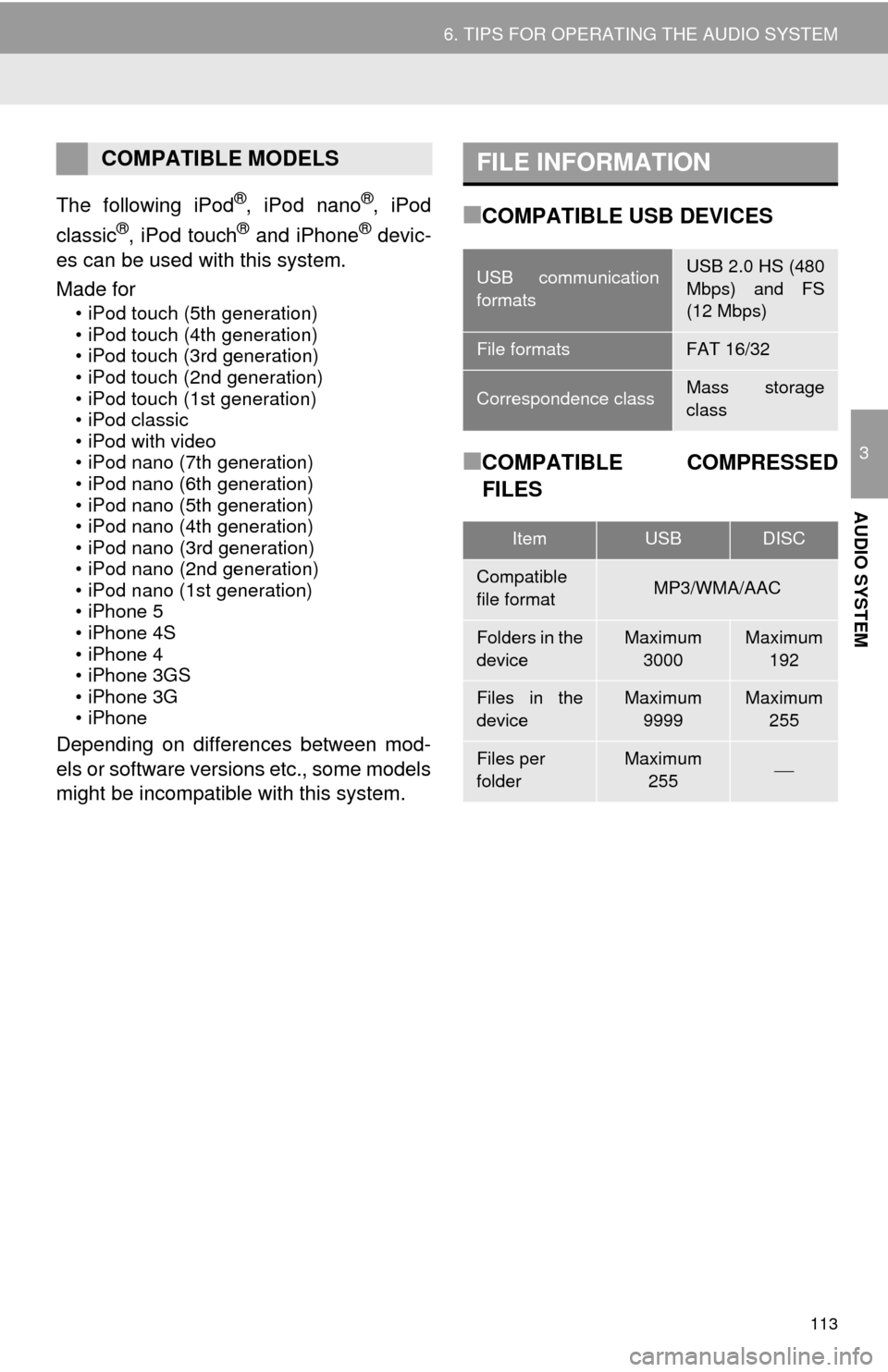
■COMPATIBLE USB DEVICES
■COMPATIBLE COMPRESSED
FILES
COMPATIBLE MODELSFILE INFORMATION
USB communication
formatsUSB 2.0 HS (480
Mbps) and FS
(12 Mbps)
File formatsFAT 16/32
Correspondence classMass storage
class
ItemUSBDISC
Compatible
file formatMP3/WMA/AAC
Folders in the
deviceMaximum
3000Maximum
192
Files in the
deviceMaximum
9999Maximum
255
Files per
folderMaximum
255
Page 114 of 276
114
6. TIPS FOR OPERATING THE AUDIO SYSTEM
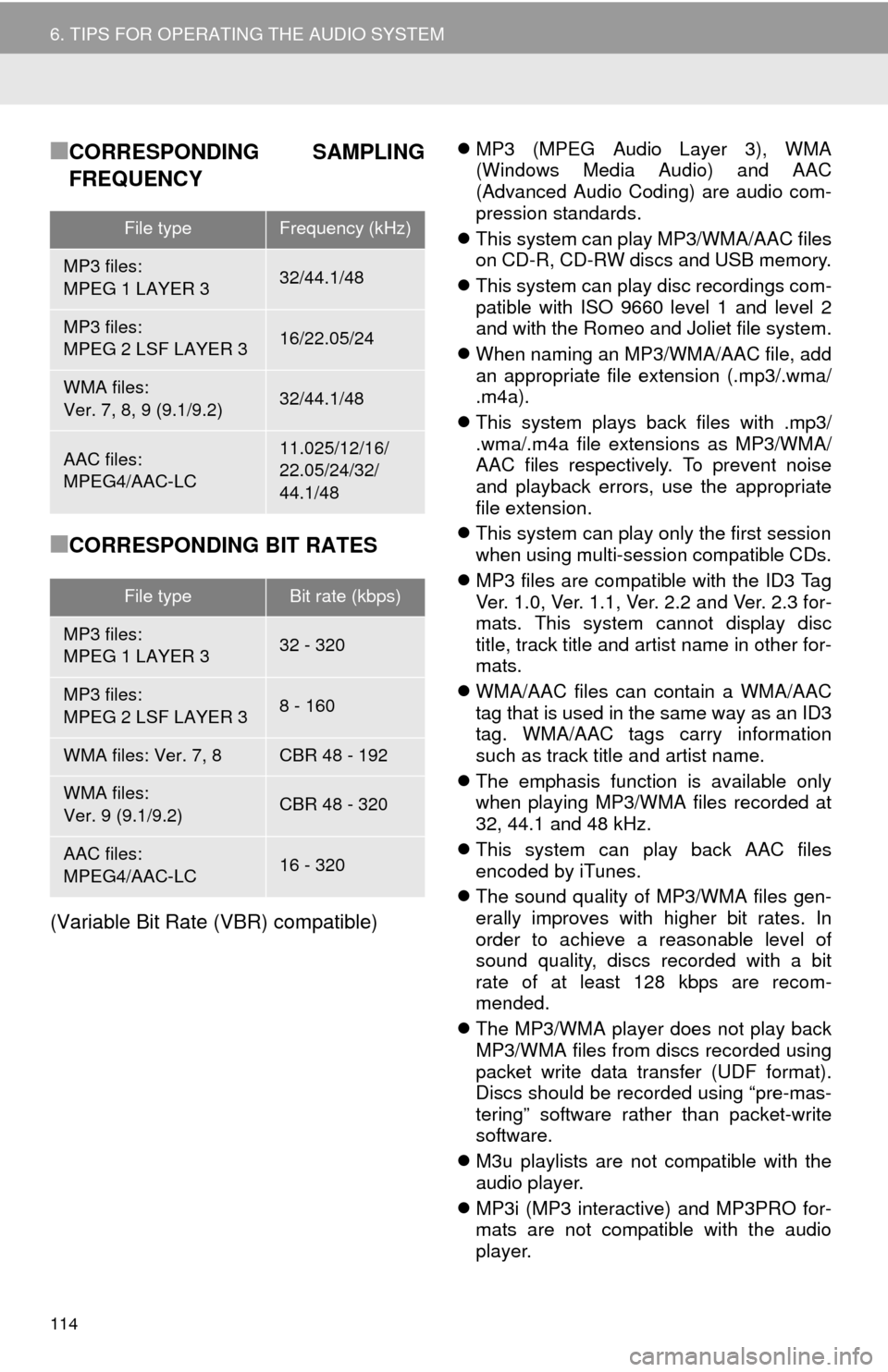
■CORRESPONDING SAMPLING
FREQUENCY
■CORRESPONDING BIT RATES
(Variable Bit Rate (VBR) compatible)
MP3 (MPEG Audio Layer 3), WMA
(Windows Media Audio) and AAC
(Advanced Audio Coding) are audio com-
pression standards.
This system can play MP3/WMA/AAC files
on CD-R, CD-RW discs and USB memory.
This system can play disc recordings com-
patible with ISO 9660 level 1 and level 2
and with the Romeo and Joliet file system.
When naming an MP3/WMA/AAC file, add
an appropriate file extension (.mp3/.wma/
.m4a).
This system plays back files with .mp3/
.wma/.m4a file extensions as MP3/WMA/
AAC files respectively. To prevent noise
and playback errors, use the appropriate
file extension.
This system can play only the first session
when using multi-session compatible CDs.
MP3 files are compatible with the ID3 Tag
Ver. 1.0, Ver. 1.1, Ver. 2.2 and Ver. 2.3 for-
mats. This system cannot display disc
title, track title and artist name in other for-
mats.
WMA/AAC files can contain a WMA/AAC
tag that is used in the same way as an ID3
tag. WMA/AAC tags carry information
such as track title and artist name.
The emphasis function is available only
when playing MP3/WMA files recorded at
32, 44.1 and 48 kHz.
This system can play back AAC files
encoded by iTunes.
The sound quality of MP3/WMA files gen-
erally improves with higher bit rates. In
order to achieve a reasonable level of
sound quality, discs recorded with a bit
rate of at least 128 kbps are recom-
mended.
The MP3/WMA player does not play back
MP3/WMA files from discs recorded using
packet write data transfer (UDF format).
Discs should be recorded using “pre-mas-
tering” software rather than packet-write
software.
M3u playlists are not compatible with the
audio player.
MP3i (MP3 interactive) and MP3PRO for-
mats are not compatible with the audio
player.
File typeFrequency (kHz)
MP3 files:
MPEG 1 LAYER 332/44.1/48
MP3 files:
MPEG 2 LSF LAYER 316/22.05/24
WMA files:
Ver. 7, 8, 9 (9.1/9.2)32/44.1/48
AAC files:
MPEG4/AAC-LC11.025/12/16/
22.05/24/32/
44.1/48
File typeBit rate (kbps)
MP3 files:
MPEG 1 LAYER 332 - 320
MP3 files:
MPEG 2 LSF LAYER 38 - 160
WMA files: Ver. 7, 8CBR 48 - 192
WMA files:
Ver. 9 (9.1/9.2)CBR 48 - 320
AAC files:
MPEG4/AAC-LC16 - 320
Page 117 of 276
117
6. TIPS FOR OPERATING THE AUDIO SYSTEM
3
AUDIO SYSTEM
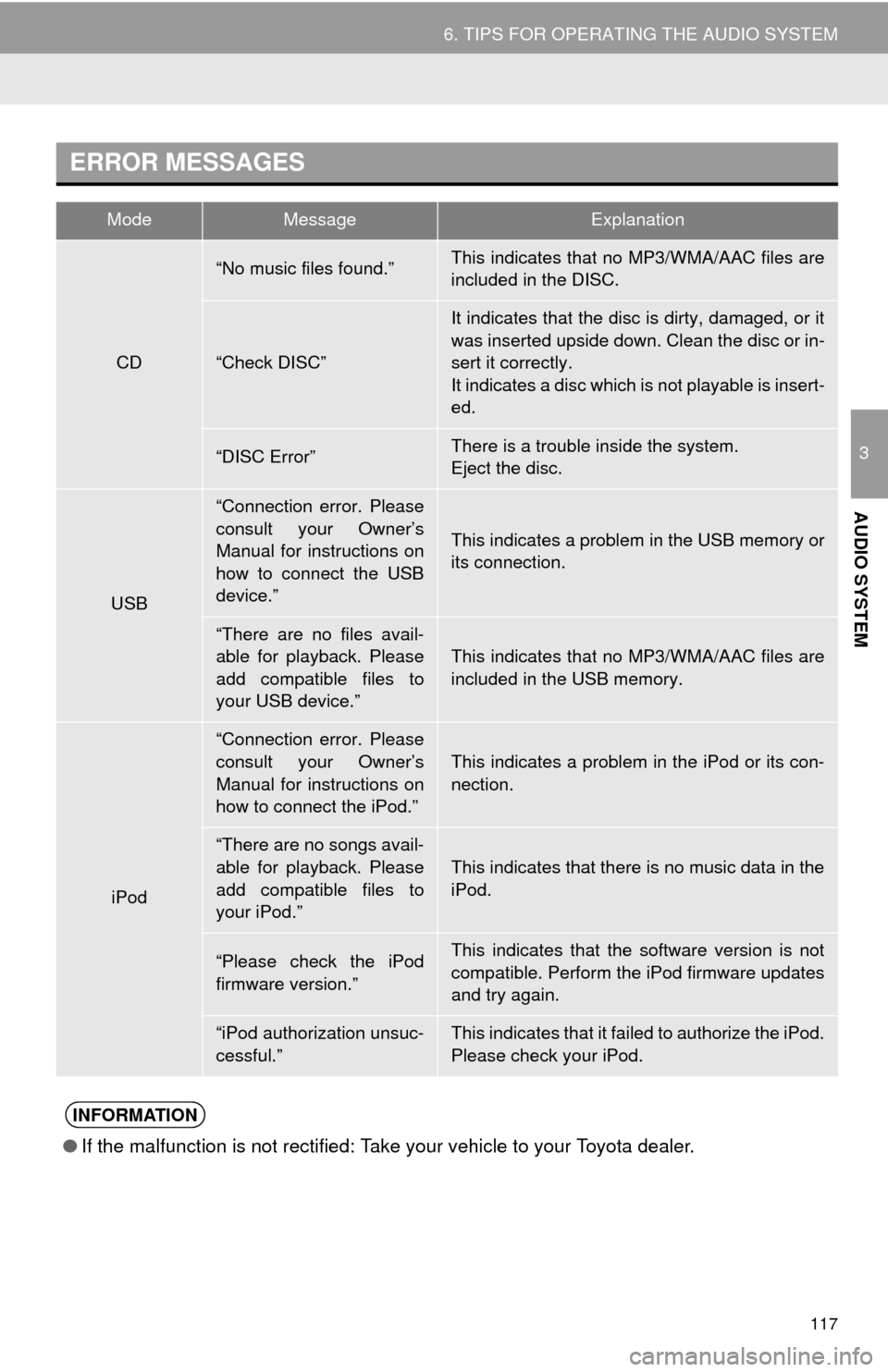
ERROR MESSAGES
ModeMessageExplanation
CD
“No music files found.”This indicates that no MP3/WMA/AAC files are
included in the DISC.
“Check DISC”
It indicates that the disc is dirty, damaged, or it
was inserted upside down. Clean the disc or in-
sert it correctly.
It indicates a disc which is not playable is insert-
ed.
“DISC Error”There is a trouble inside the system.
Eject the disc.
USB
“Connection error. Please
consult your Owner’s
Manual for instructions on
how to connect the USB
device.”
This indicates a problem in the USB memory or
its connection.
“There are no files avail-
able for playback. Please
add compatible files to
your USB device.”
This indicates that no MP3/WMA/AAC files are
included in the USB memory.
iPod
“Connection error. Please
consult your Owner’s
Manual for instructions on
how to connect the iPod.”
This indicates a problem in the iPod or its con-
nection.
“There are no songs avail-
able for playback. Please
add compatible files to
your iPod.”This indicates that there is no music data in the
iPod.
“Please check the iPod
firmware version.”This indicates that the software version is not
compatible. Perform the iPod firmware updates
and try again.
“iPod authorization unsuc-
cessful.”This indicates that it failed to authorize the iPod.
Please check your iPod.
INFORMATION
●If the malfunction is not rectified: Take your vehicle to your Toyota dealer.
Page 123 of 276
123
1. VOICE COMMAND SYSTEM OPERATION
4
VOICE COMMAND SYSTEM
1Press the talk switch.
2Say “Play song
A confirmation screen will be displayed
showing the recognition results. If multiple
matching items are found, a selection
screen will be displayed. Say “
The system starts playing music and the
song lists are displayed.
INFORMATION
●The voice command recognition is
designed to recognize the main body of
the official street name.
For example: if the official street name is
“East Main Street”, the voice command
recognition will recognize
“Main”.
●Say the desired number, cardinal/direc-
tion etc. in the place of the “<>”.
For example: Say “West 555”.
●Inputting the house number can be
skipped.
●Even if the state set using voice recogni-
tion is different from the set state in the
“Address” screen (which was set when a
destination was set manually), the set
state in the “Address” screen will not
change. (P.202)
●The house number voice recognition
conditions are outlined below:
• Numerals: 10 digits or less
• Numerals and cardinal/direction or a
hyphen and numerals: A total of 9
digits or less (Do not say “and”.)
• Cardinal/direction or a hyphen and
numerals: A total of 9 digits or less
(Do not say “and”.)
• Numerals are recognized as single
digits only.
• The cardinal/direction and hyphens
are only recognized once.
• The following cardinal/directions can
be recognized: North, East, West and
South.
VOICE COMMAND EXAMPLE:
SEARCH FOR A SONG
INFORMATION
●The Gracenote database is only com-
patible with the USB or iPod mode.
●A USB memory or iPod must be con-
nected to enable track searching and
playback. (P.92, 96)
●When a USB memory or iPod is con-
nected, recognition data is created so
tracks can be searched using voice
commands.
●Recognition data is updated under the
following conditions:
• When the USB memory or iPod data
has changed.
• When the voice recognition language
is changed. (P. 5 3 )
●While the recognition data is being cre-
ated or being updated, a track search
cannot be performed using a voice com-
mand.
Page 254 of 276
254
1. ENTUNE OVERVIEW
1Download the Entune application using
to cellular phone.
2Run the Entune application on your
cellular phone.
3Enter the information required into the
Entune application. Login to the appli-
cation.
1The actions on P.253 need to be per-
formed before Entune applications can
be downloaded.
2Once your phone is running the Entune
application with a valid account logged
in and is connected to the multimedia
system, an on-screen pop-up will be
displayed offering to begin download-
ing Entune applications to the multime-
dia system. After download has
started, see P.256 for more informa-
tion.
REGISTERING THE ENTUNE
APPLICATION
INFORMATION
●Applications can only be used when the
Entune application has been down-
loaded to your cellular phone and the
application is running.
●Entune operational procedures can also
be confirmed by visiting http://
www.toyota.com/entune/.
●In order to use applications, it is neces-
sary to run the Entune application on
your cellular phone.
●If an iPhone is connected via Bluetooth
®
and USB at the same time, the Entune
applications may become unusable. If
connected via USB after Bluetooth
®
connection, it is necessary to reconnect
the iPhone via Bluetooth®.
●If a Entune application is used while
iPod audio is being played back, system
operation may become unstable.
DOWNLOADING ENTUNE
APPLICATION
Page 267 of 276

267
S
Satellite Radio.......................................... 82
Screen adjustment ................................... 39
SD card ................................................... 247
Search operation ................................... 200
Searching by address ........................ 202
Searching by address book................ 207
Searching by coordinates................... 210
Searching by emergency ................... 208
Searching by intersection and
freeway ........................................... 208
Searching by map .............................. 210
Searching by point of interest............. 203
Searching from previous
destinations .................................... 207
Selecting search area ........................ 201
Setting home as destination ............... 201
Setting preset destinations
as destination ................................. 201
Setting Bluetooth
® details ........................ 46
“Bluetooth Setup” screen ..................... 46
Connecting a Bluetooth
® device .......... 48
Deleting a Bluetooth® device ............... 48
Editing the Bluetooth® device
information ........................................ 50
Registering a Bluetooth
® device .......... 47
“System Settings” screen ..................... 51
Setting home as the destination .............. 26
“Setup” screen ......................................... 20
Sound setting ............................................ 53
Starting route guidance.......................... 211
Steering switches................................... 106
T
Talking on the Bluetooth® phone ........... 154
Touch screen gestures ............................ 32
Touch screen operation ........................... 33
Traffic information .................................. 195
Traffic map information ........................... 131
Traffic settings........................................ 238
Auto avoid traffic................................. 239
My traffic routes .................................. 240
Screen for traffic settings.................... 238
Troubleshooting ..................................... 174
TUNE·SCROLL button............................. 12
Typical voice guidance prompts............. 220
U
USB/AUX port .......................................... 70
USB memory............................................ 92
V
Vehicle settings ........................................ 59
Voice command system ......................... 120
Voice settings........................................... 58
W
Weather information................................ 130
WMA ........................................................ 89
X
XM Satellite Radio ................................... 82