key TOYOTA TUNDRA 2015 2.G Owner's Manual
[x] Cancel search | Manufacturer: TOYOTA, Model Year: 2015, Model line: TUNDRA, Model: TOYOTA TUNDRA 2015 2.GPages: 576, PDF Size: 9.71 MB
Page 142 of 576

1423-5. Opening, closing the windows and moon roof
■Sunshade
The sunshade can be opened and closed manually. However, the sunshade
will open automatically when the moon roof is opened.
■ Door lock linked moon roof operation
The moon roof can be opened and closed using the key. ( P. 100)
■ When the moon roof do es not close normally
Perform the following procedure:
● If the moon roof closes but then re-opens slightly
Stop the vehicle.
Press and hold the “ ▼” (sliding close) switch.
*1
The moon roof will close, reopen and pause for approximately 10 sec-
onds.
*2 Then it will close again, tilt up and pause for approximately 1 sec-
ond. Finally, it will tilt down, open and close.
Check to make sure that the moon roof is completely closed and then
release the switch.
● If the moon roof tilts down but then tilts back up
Stop the vehicle.
Press and hold the “UP” (tilt up) switch
*1 until the moon roof moves into
the tilt up position and stops.
Release the “UP” (tilt up) switch once and then press and hold the “UP”
(tilt up) switch again.
*1
The moon roof will pause for approximately 10 seconds in the tilt up posi-
tion.
*2 Then it will adjust slightly and pause for approximately 1 second.
Finally, it will tilt down, open and close.
Check to make sure that the moon roof is completely closed and then
release the switch.
*1: If the switch is released at the incorrect time, the procedure will have to
be performed again from the beginning.
*2: If the switch is released after the above mentioned 10 seconds pause,automatic operation will be disabled. In that case, press and hold the “ ▼”
(sliding close) or “UP” (tilt up) switch, and the moon roof will tilt up and
pause for approximately 1 second. Then it will tilt down, open and close.
Check to make sure that the moon roof is completely closed and then
release the switch.
If the moon roof does not fully close even after performing the above proce-
dure correctly, have the vehicle inspected by your Toyota dealer.
1
2
3
1
2
3
4
Page 143 of 576
1433-5. Opening, closing the windows and moon roof
3
Operation of each component
■Moon roof open reminder function
The buzzer sounds when the engine switch is turned to the “LOCK” position
and the driver’s door is opened with the moon roof open.
■ When the battery is disconnected
The moon roof must be initialized in order to ensure proper operation.
Push and hold the switch toward the “UP” (tilt up) side or “ ▼” (sliding
close) side.
After the moon roof will tilt up and down, release the switch.
To ensure the initialization is complete, make sure automatic opening and
closing functions work properly.
■ Customization that can be co nfigured at Toyota dealer
Settings (e.g. linked door lock operation) can be changed.
(Customizable features: P. 534)
CAUTION
Observe the following precautions.
Failure to do so may cause death or serious injury.
■Opening the moon roof
● Do not allow any passengers to put their hands or heads outside the vehi-
cle while it is moving.
● Do not sit on top of the moon roof.
■ Closing the moon roof
● The driver is responsible for moon roof opening and closing operations. In
order to prevent accidental operation, especially by a child, do not let a
child operate the moon roof. It is possible for children and other passen-
gers to have body parts caught in the moon roof.
● Check to make sure that all passengers do not have any part of their body
in a position where it could be caught when the moon roof is being oper-
ated.
● When using the key and operating the moon roof, operate the moon roof
after checking to make sure that there is no possibility of any passenger
having any of their body parts caught in the moon roof. Also, do not let a
child operate moon roof by the key. It is possible for children and other
passengers to get caught in the moon roof.
● When exiting the vehicle, turn the engine switch off, carry the key and exit
the vehicle along with the child. There may be accidental operation, due to
mischief, etc., that may possibly lead to an accident.
■ Jam protection function
● Never use any part of your body to intentionally activate the jam protection
function.
● The jam protection function may not work if something gets caught just
before the moon roof fully closes.
1
2
3
Page 146 of 576
1464-1. Before driving
Driving the vehicle
P. 1 7 9
With the brake pedal depressed, shift the shift lever to D. ( P. 181)
Release the parking brake. ( P. 187)
Gradually release the brake pedal and gently depress the accelera-
tor pedal to accelerate the vehicle.
With the shift lever in D, depress the brake pedal.
If necessary, set the parking brake.
If the vehicle is to be stopped for an extended period of time, shift the shift
lever to P or N. ( P. 181)
With the shift lever in D, depress the brake pedal.
Set the parking brake. ( P. 187)
Shift the shift lever to P. ( P. 181)
Turn the engine switch to the “L OCK” position to stop the engine.
Lock the door, making sure that you have the key on your person.
If parking on a hill, block the wheels as needed.
Make sure that the parking brake is set and shift the shift lever to D.
Gently depress the accelerator pedal.
Release the parking brake.
The following procedures should be observed to ensure safe
driving:
Starting the engine
Driving
Stopping
Parking the vehicle
Starting off on a steep uphill
1
2
3
1
2
1
2
3
4
5
1
2
3
Page 179 of 576
1794-2. Driving procedures
4
Driving
Engine (ignition) switch
Check that the parking brake is set.
Check that the shift lever is set in P.
Firmly depress the brake pedal.
Turn the engine switch to the “START” position to start the engine.
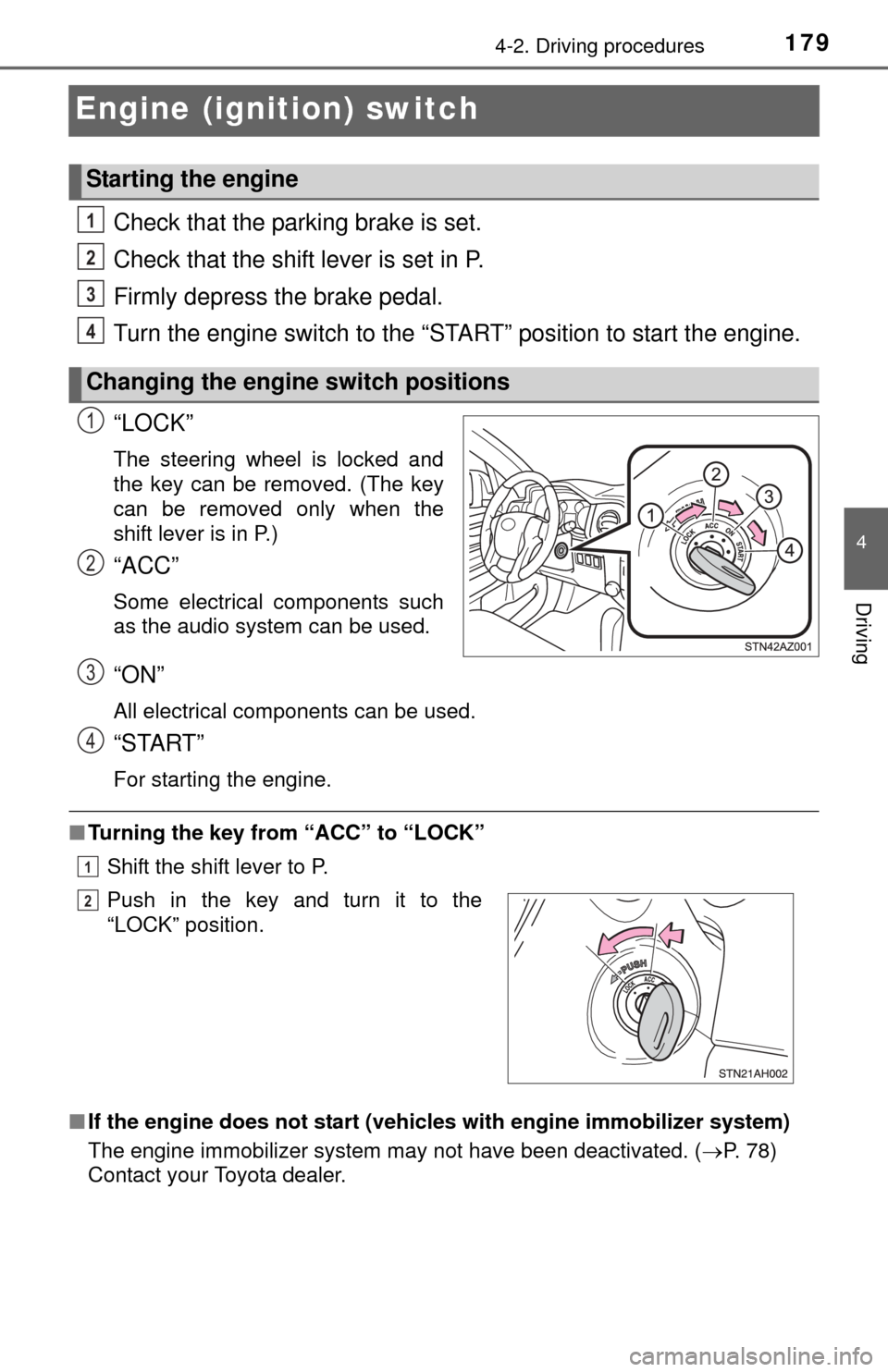
“LOCK”
The steering wheel is locked and
the key can be removed. (The key
can be removed only when the
shift lever is in P.)
“ACC”
Some electrical components such
as the audio system can be used.
“ON”
All electrical components can be used.
“START”
For starting the engine.
■Turning the key from “ACC” to “LOCK”
Shift the shift lever to P.
■ If the engine does not start (vehic les with engine immobilizer system)
The engine immobilizer system may not have been deactivated. ( P. 78)
Contact your Toyota dealer.
Starting the engine
Changing the engine switch positions
1
2
3
4
1
2
Push in the key and turn it to the
“LOCK” position.
3
4
1
2
Page 180 of 576
1804-2. Driving procedures
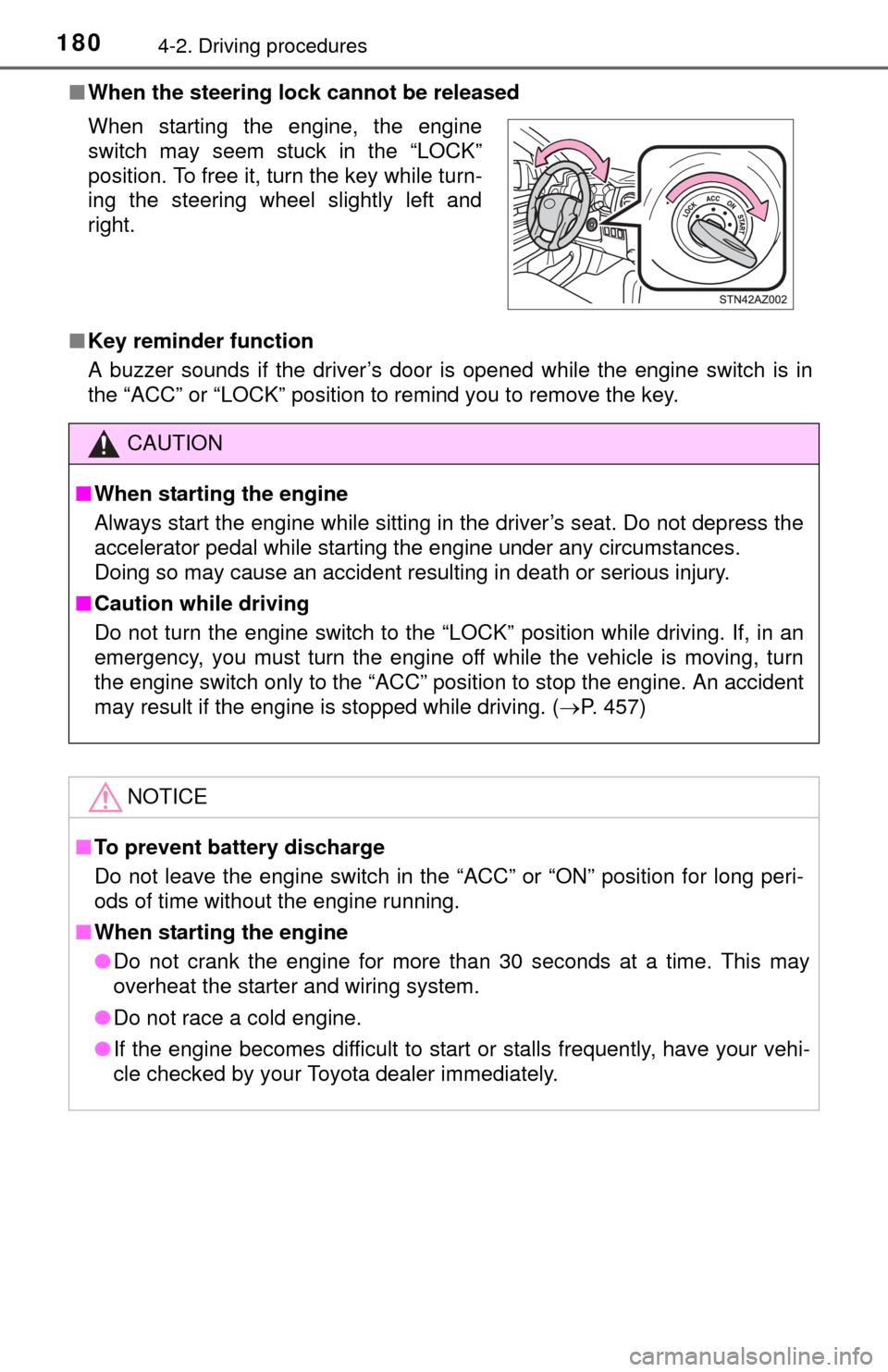
■When the steering lock cannot be released
■ Key reminder function
A buzzer sounds if the driver’s door is opened while the engine switch is in
the “ACC” or “LOCK” position to remind you to remove the key. When starting the engine, the engine
switch may seem stuck in the “LOCK”
position. To free it, turn the key while turn-
ing the steering wheel slightly left and
right.
CAUTION
■When starting the engine
Always start the engine while sitting in the driver’s seat. Do not depress the
accelerator pedal while starting the engine under any circumstances.
Doing so may cause an accident resulting in death or serious injury.
■ Caution while driving
Do not turn the engine switch to the “LOCK” position while driving. If, in an
emergency, you must turn the engine off while the vehicle is moving, turn
the engine switch only to the “ACC” position to stop the engine. A\
n accident
may result if the engine is stopped while driving. ( P. 457)
NOTICE
■To prevent battery discharge
Do not leave the engine switch in the “ACC” or “ON” position for long peri-
ods of time without the engine running.
■ When starting the engine
● Do not crank the engine for more than 30 seconds at a time. This may
overheat the starter and wiring system.
● Do not race a cold engine.
● If the engine becomes difficult to star t or stalls frequently, have your vehi-
cle checked by your Toyota dealer immediately.
Page 190 of 576
1904-3. Operating the lights and wipers
■Daytime running light system (if equipped)
●To make your vehicle more visible to other drivers, the daytime running
lights turn on automatically whenever the engine is started and the parking
brake is released. Daytime running lights are not designed for use at night.
● Compared to turning on the headlights, the daytime running light system
offers greater durability and consumes less electricity, so it can help improve
fuel economy.
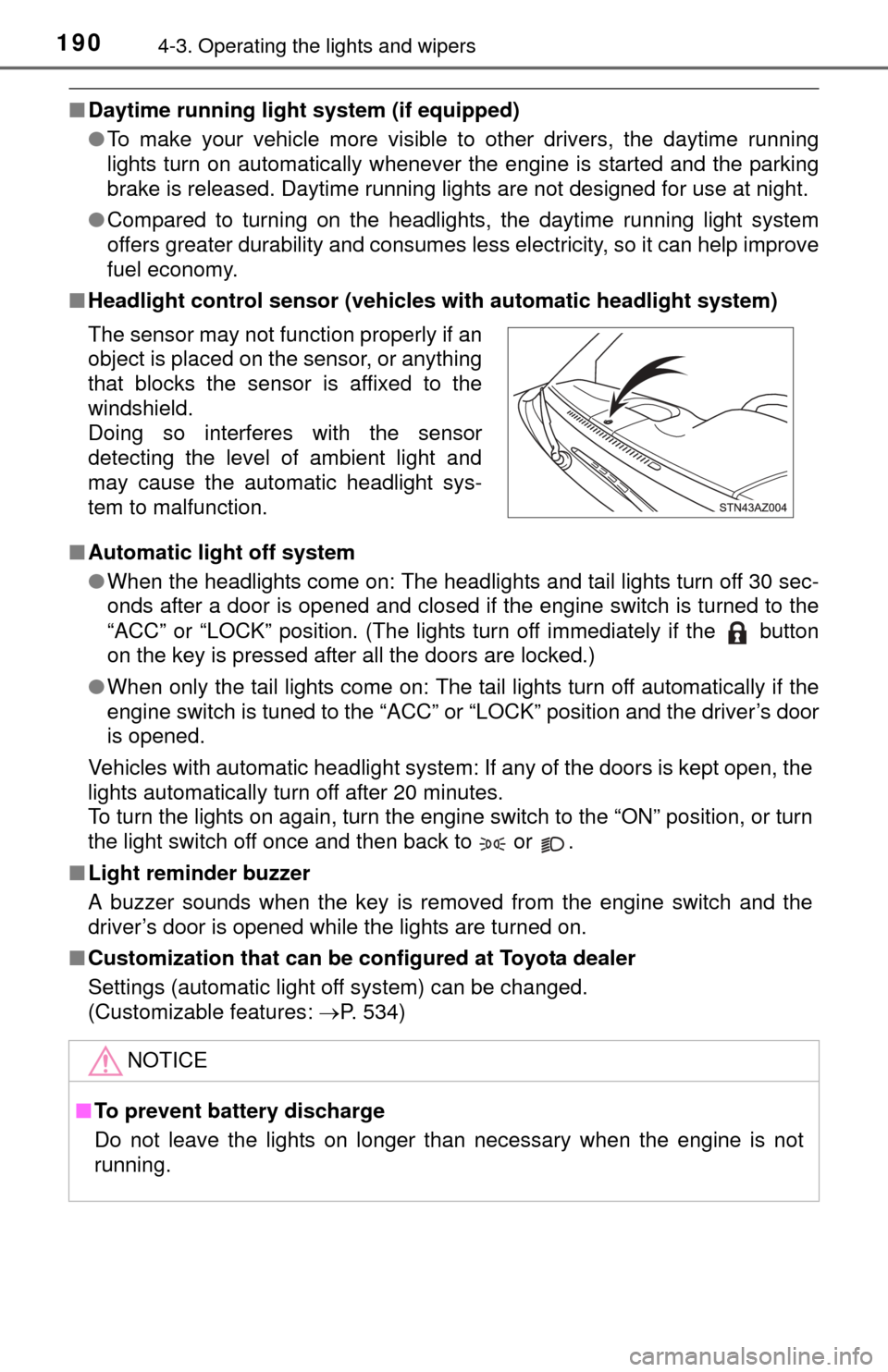
■ Headlight control sensor (vehicl es with automatic headlight system)
■ Automatic light off system
●When the headlights come on: The headlights and tail lights turn off 30 sec-
onds after a door is opened and closed if the engine switch is turned to the
“ACC” or “LOCK” position. (The lights turn off immediately if the button
on the key is pressed after all the doors are locked.)
● When only the tail lights come on: The tail lights turn off automatically if the
engine switch is tuned to the “ACC” or “LOCK” position and the driver’s door
is opened.
Vehicles with automatic headlight system: If any of the doors is kept open, the
lights automatically turn off after 20 minutes.
To turn the lights on again, turn the engine switch to the “ON” position, or turn
the light switch off once and then back to or .
■ Light reminder buzzer
A buzzer sounds when the key is removed from the engine switch and the
driver’s door is opened while the lights are turned on.
■ Customization that can be co nfigured at Toyota dealer
Settings (automatic light off system) can be changed.
(Customizable features: P. 534)
The sensor may not function properly if an
object is placed on the sensor, or anything
that blocks the sensor is affixed to the
windshield.
Doing so interferes with the sensor
detecting the level of ambient light and
may cause the automatic headlight sys-
tem to malfunction.
NOTICE
■
To prevent battery discharge
Do not leave the lights on longer than necessary when the engine is not
running.
Page 257 of 576
2575-2. Setup
5
Multimedia
General settings
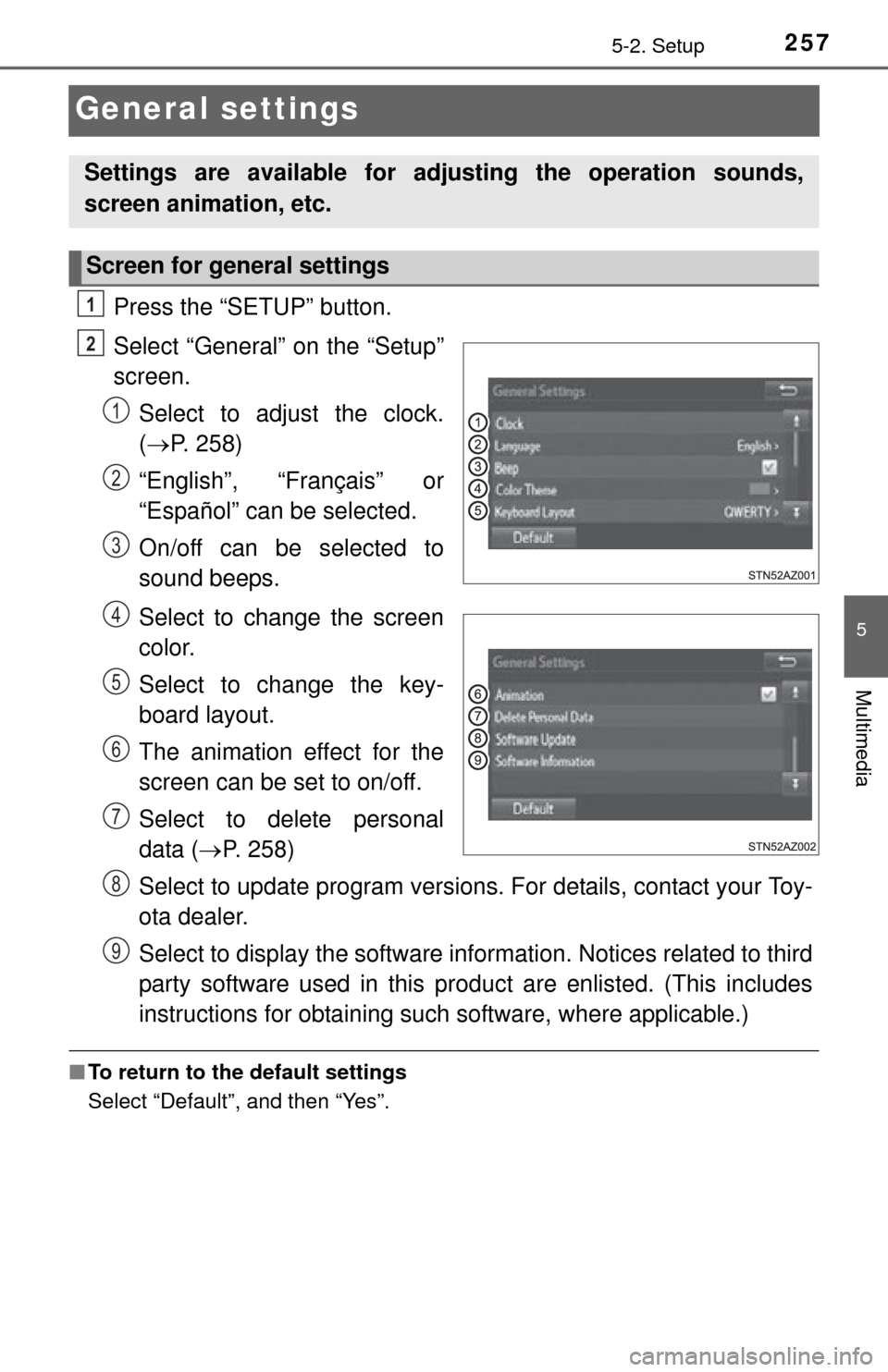
Press the “SETUP” button.
Select “General” on the “Setup”
screen.Select to adjust the clock.
( P. 258)
“English”, “Français” or
“Español” can be selected.
On/off can be selected to
sound beeps.
Select to change the screen
color.
Select to change the key-
board layout.
The animation effect for the
screen can be set to on/off.
Select to delete personal
data ( P. 258)
Select to update program versions. For details, contact your Toy-
ota dealer.
Select to display the software info rmation. Notices related to third
party software used in this pr oduct are enlisted. (This includes
instructions for obtaining such software, where applicable.)
■ To return to the default settings
Select “Default”, and then “Yes”.
Settings are available for adjusting the operation sounds,
screen animation, etc.
Screen for general settings
1
2
1
2
3
4
5
6
7
8
9
Page 434 of 576

4347-3. Do-it-yourself maintenance
■Use a CR2032 lithium battery
●Batteries can be purchased at your Toyota dealer, local electrical appliance
shops or camera stores.
● Replace only with the same or equivalent type recommended by the manu-
facturer.
● Dispose of used batteries according to local laws.
■ If the key battery is depleted
The following symptoms may occur:
●The wireless remote control will not function properly.
● The operational range will be reduced.
CAUTION
■Removed battery and other parts
Keep away from children. These parts are small and if swallowed by a child,
they can cause choking. Failure to do so could result in death or serious
injury.
NOTICE
■For normal operation after replacing the battery
Observe the following precautions to prevent accidents:
● Always work with dry hands.
Moisture may cause the battery to rust.
● Do not touch or move any other component inside the remote control.
● Do not bend either of the battery terminals.
Page 457 of 576
457
8
When trouble arises
8-1. Essential information
If your vehicle has to be stopped in an
emergency
Steadily step on the brake pedal wi th both feet and firmly depress it.
Do not pump the brake pedal repeatedly as this will increase the effort
required to slow the vehicle.
Shift the shift lever to N.
If the shift lever is shifted to N
After slowing down, stop the vehicle in a safe place by the road.
Stop the engine.
If the shift lever cannot be shifted to N
Keep depressing the brake pedal with both feet to reduce vehicle
speed as much as possible.
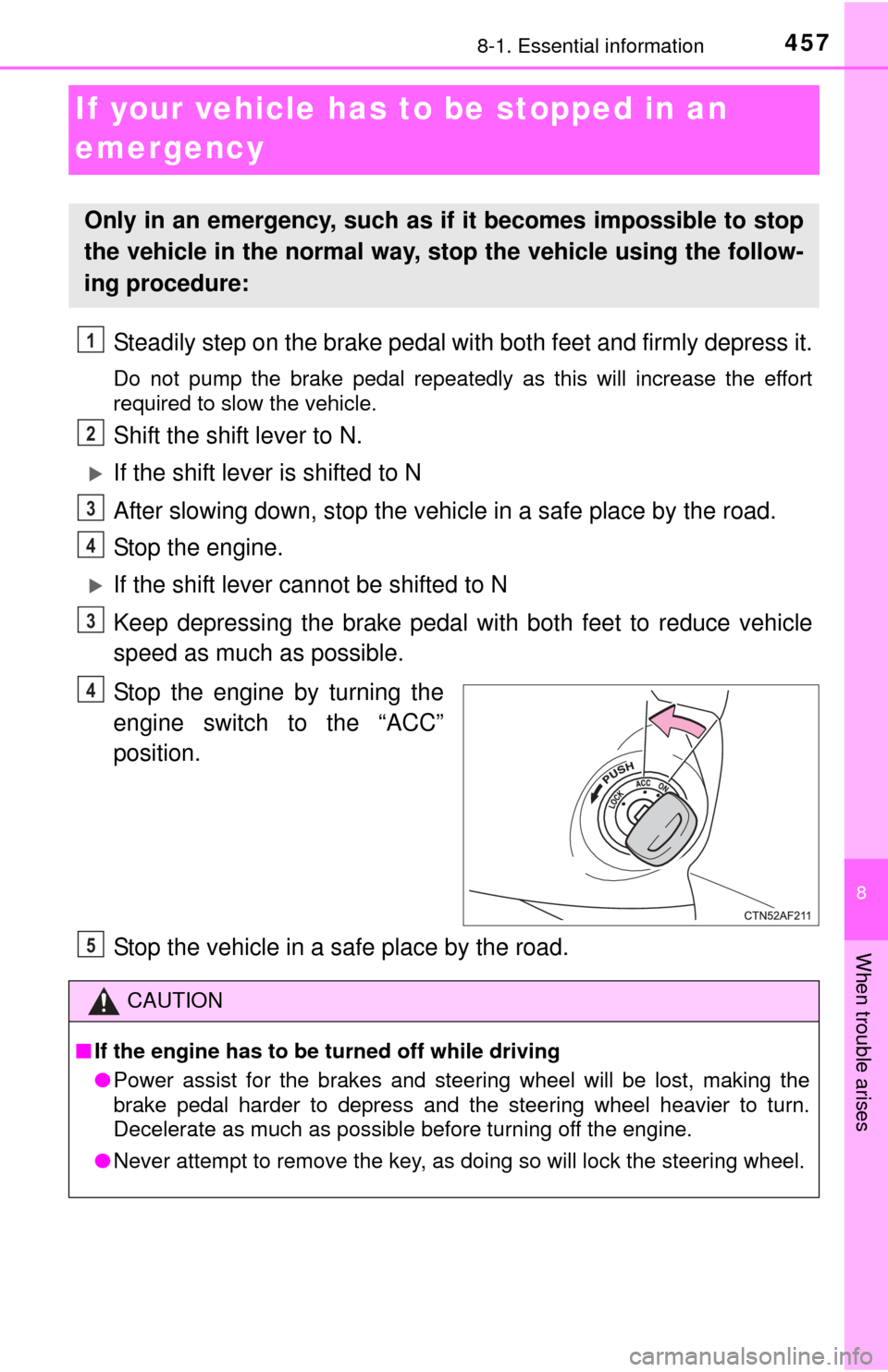
Stop the engine by turning the
engine switch to the “ACC”
position.
Stop the vehicle in a safe place by the road.
Only in an emergency, such as if it becomes impossible to stop
the vehicle in the normal way, st op the vehicle using the follow-
ing procedure:
1
2
3
4
3
4
CAUTION
■ If the engine has to be turned off while driving
● Power assist for the brakes and steering wheel will be lost, making the
brake pedal harder to depress and the steering wheel heavier to turn.
Decelerate as much as possible before turning off the engine.
● Never attempt to remove the key, as doing so will lock the steering wheel.
5
Page 462 of 576

4628-2. Steps to take in an emergency
NOTICE
■To prevent damage to the vehicle when towing using a wheel-lift type
truck
● Do not tow the vehicle from the rear when the engine switch is in the
“LOCK” position or the key is removed.
The steering lock mechanism is not strong enough to hold the front wheels
straight.
● 2WD models: When raising the vehicle from the rear, ensure adequate
ground clearance for towing at the opposite end of the raised vehicle.
Without adequate clearance, the vehicle could be damaged while being
towed from the rear.
● 4WD models: When raising the vehicle, ensure adequate ground clear-
ance for towing at the opposite end of the raised vehicle. Without ade-
quate clearance, the vehicle could be damaged while being towed.