USB TOYOTA TUNDRA 2015 2.G Owners Manual
[x] Cancel search | Manufacturer: TOYOTA, Model Year: 2015, Model line: TUNDRA, Model: TOYOTA TUNDRA 2015 2.GPages: 576, PDF Size: 9.71 MB
Page 3 of 576

3
1
9 8
7 5 4
3
2
10
6
4-1. Before drivingDriving the vehicle ............. 146
Cargo and luggage............ 153
Vehicle load limits ............. 156
Trailer towing..................... 158
Dinghy towing.................... 178
4-2. Driving procedures Engine (ignition) switch ..... 179
Automatic transmission ..... 181
Turn signal lever................ 186
Parking brake .................... 187
4-3. Operating the lights and wipers
Headlight switch ................ 188
Fog light switch ................. 191
Windshield wipers and washer ............................ 192
4-4. Refueling Opening the fuel tank cap .................................. 195
4-5. Using the driving support systems
Cruise control .................... 199
Intuitive parking assist ....... 202
Rear view monitor system............................. 208
BSM (Blind Spot Monitor) ........ 217
Four-wheel drive system ... 225
AUTO LSD system ............ 228
Driving assist systems....... 230
Trailer brake controller ...... 237
4-6. Driving tips Winter driving tips.............. 240
Off-road precautions ......... 244 5-1. Basic Operations
Multimedia system types ... 250
Entune Audio ..................... 252
USB Port/AUX Port............ 255
5-2. Setup Setup menu ....................... 256
General settings ................ 257
Audio settings .................... 259
Display settings ................. 260
Voice settings .................... 261
5-3. Using the audio system Basic audio operations ...... 262
Selecting the audio source.............................. 263
List screen operation ......... 264
Sound settings ................... 266
5-4. Using the radio Radio operation ................. 267
5-5. Playing an audio CD and MP3/WMA/AAC discs
CD player operation........... 269
5-6. Using an external device Listening to an iPod ........... 274
Listening to a USB memory device ................ 278
Using the AUX port ............ 282
4Driving5Multimedia
Page 22 of 576
22Pictorial index
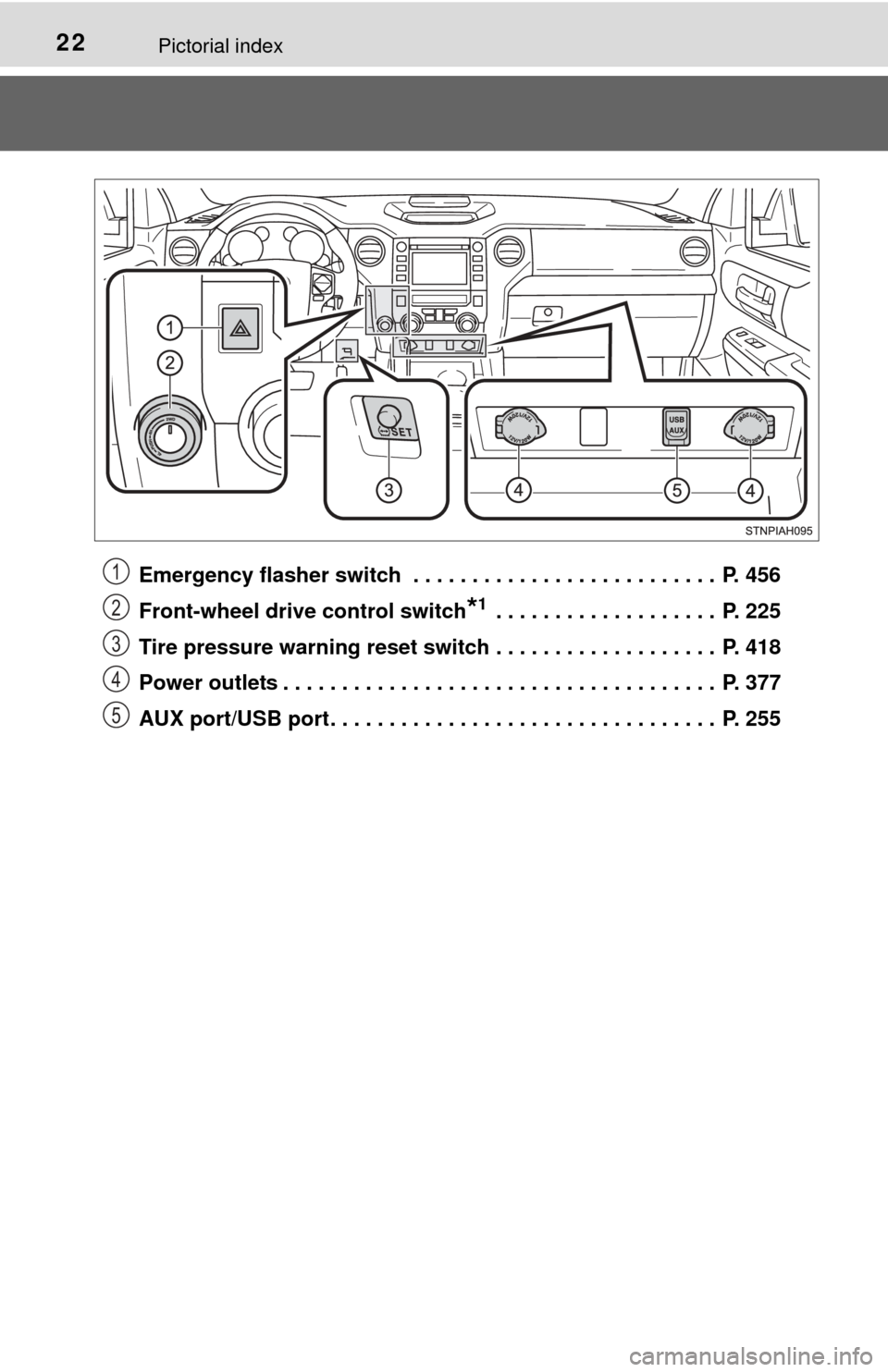
Emergency flasher switch . . . . . . . . . . . . . . . . . . . . . . . . . . P. 456
Front-wheel drive control switch
*1 . . . . . . . . . . . . . . . . . . . P. 225
Tire pressure warning reset switch . . . . . . . . . . . . . . . . . . . P. 418
Power outlets . . . . . . . . . . . . . . . . . . . . . . . . . . . . . . . . . . . . . P. 377
AUX port/USB port . . . . . . . . . . . . . . . . . . . . . . . . . . . . . . . . . P. 255
1
2
3
4
5
Page 248 of 576

248
5-1. Basic OperationsMultimedia system types... 250
Entune Audio .................... 252
USB Port/AUX Port ........... 255
5-2. Setup Setup menu....................... 256
General settings ................ 257
Audio settings ................... 259
Display settings ................. 260
Voice settings.................... 261
5-3. Using the audio system Basic audio operations...... 262
Selecting the audio source ............................. 263
List screen operation......... 264
Sound settings .................. 266
5-4. Using the radio Radio operation................. 267
5-5. Playing an audio CD and MP3/WMA/AAC discs
CD player operation .......... 269
5Multimedia
Page 249 of 576

249
5Multimedia
5-6. Using an external deviceListening to an iPod .......... 274
Listening to a USB memory device................ 278
Using the AUX port ........... 282
5-7. Connecting Bluetooth
®
Preparations to use wireless
communication ................ 283
Registering a Bluetooth
®
audio player
for the first time ............... 287
Registering a Bluetooth
®
phone for the first time ... 288
Registering a Bluetooth
®
device.............................. 289
Connecting a Bluetooth
®
device.............................. 291
Displaying a Bluetooth
®
device details .................. 293
Detailed Bluetooth
®
system settings ............... 294
5-8. Bluetooth
® audio
Listening to Bluetooth®
audio ............................... 295 5-9. Bluetooth
® phone
Using a Bluetooth®
phone .............................. 296
Making a call ..................... 298
Receiving a call ................. 301
Speaking on the phone ..... 302
Bluetooth
® phone
message function ............ 305
Using the steering wheel switches .......................... 309
Bluetooth
® phone
settings ........................... 310
Contact/Call History Settings ........................... 312
What to do if... (Troubleshooting) ............ 321
5-10. Using the voice command system
Voice command system .... 325
5-11. Bluetooth
®
Bluetooth®......................... 327
5-12. Antenna Antenna............................. 332
Page 255 of 576
2555-1. Basic Operations
5
Multimedia
USB Por t/AUX Port
■iPod
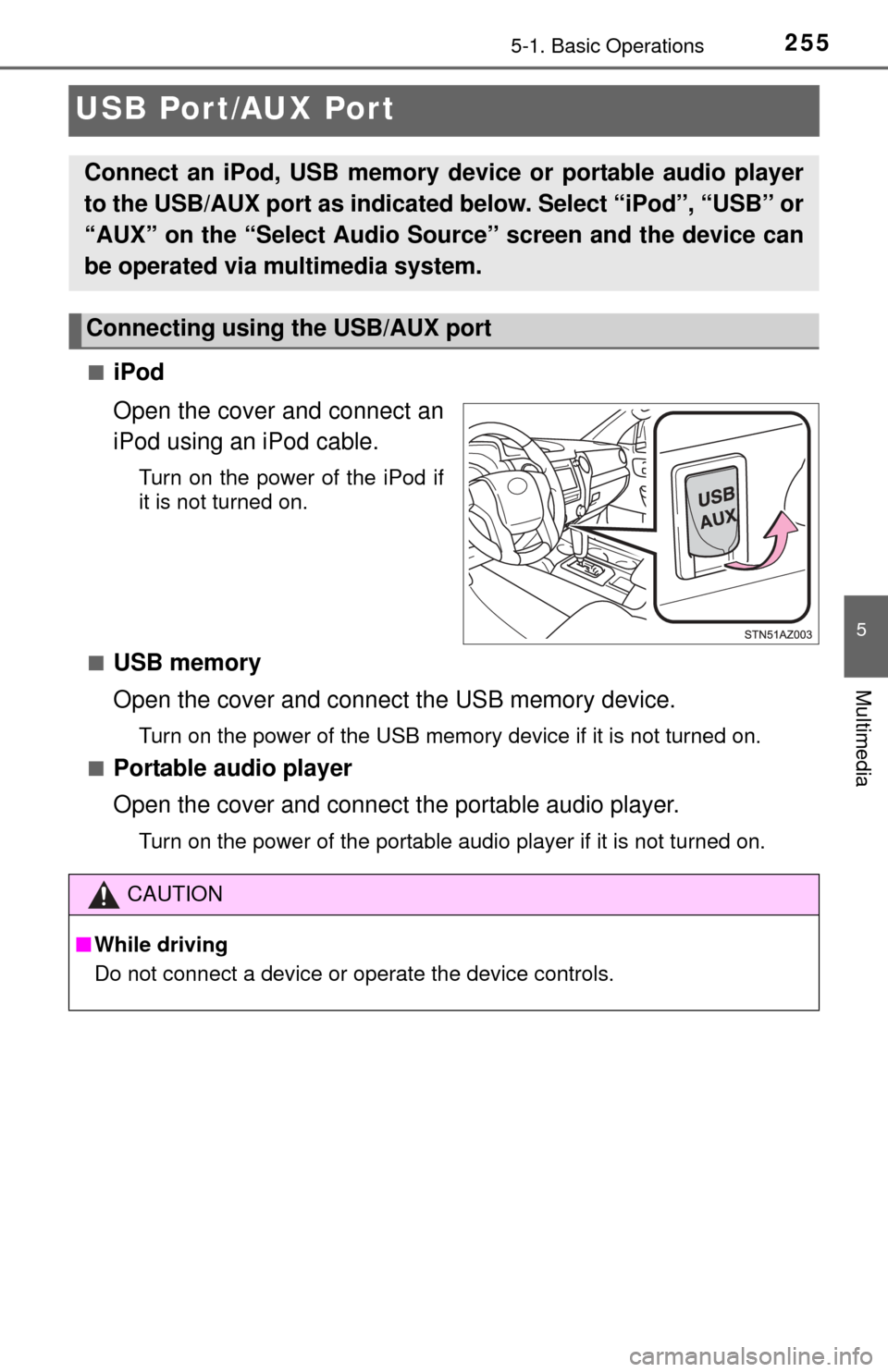
Open the cover and connect an
iPod using an iPod cable.
Turn on the power of the iPod if
it is not turned on.
■
USB memory
Open the cover and connect the USB memory device.
Turn on the power of the USB memory device if it is not turned on.
■
Portable audio player
Open the cover and connect the portable audio player.
Turn on the power of the portable audio player if it is not turned on.
Connect an iPod, USB memory device or portable audio player
to the USB/AUX port as indicated below. Select “iPod”, “USB” or
“AUX” on the “Select Audio Source ” screen and the device can
be operated via multimedia system.
Connecting using the USB/AUX port
CAUTION
■ While driving
Do not connect a device or operate the device controls.
Page 265 of 576
2655-3. Using the audio system
5
Multimedia
■Selecting a track/file/song
Press the “” or “ ” button on “SEEK/TRACK” or turn the
“TUNE·SCROLL” knob to select the desired track/file/song number.
To fast-forward or reverse, press and hold the “ ” or “ ” button on
“SEEK/TRACK”.
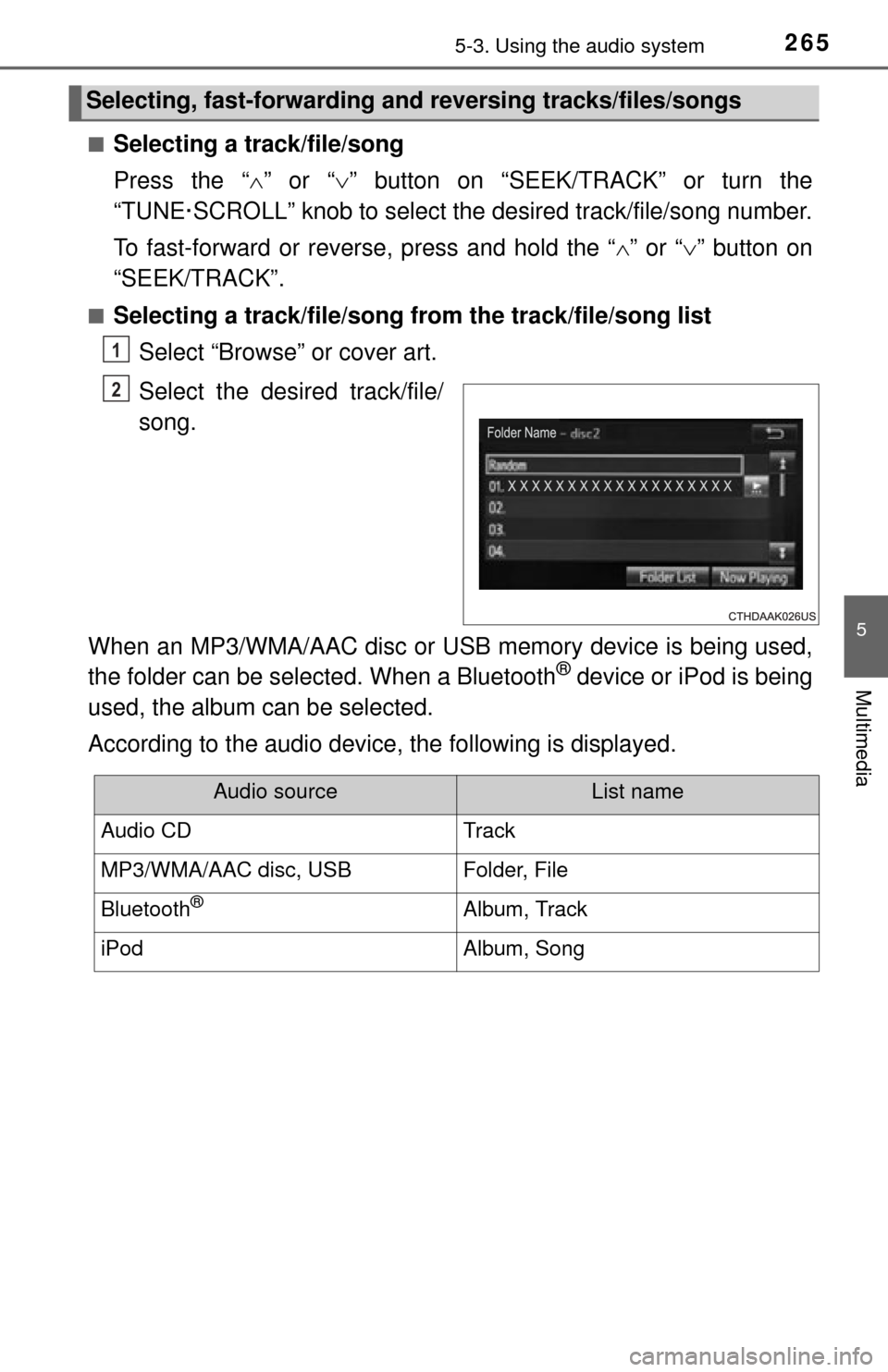
■Selecting a track/file/song from the track/file/song list
Select “Browse” or cover art.
Select the desired track/file/
song.
When an MP3/WMA/AAC disc or USB memory device is being used,
the folder can be selected. When a Bluetooth
® device or iPod is being
used, the album can be selected.
According to the audio device, the following is displayed.
Selecting, fast-forwarding a nd reversing tracks/files/songs
1
2
Audio sourceList name
Audio CDTrack
MP3/WMA/AAC disc, USBFolder, File
Bluetooth®Album, Track
iPodAlbum, Song
Page 278 of 576
2785-6. Using an external device
Listening to a USB memor y device
P. 2 5 5
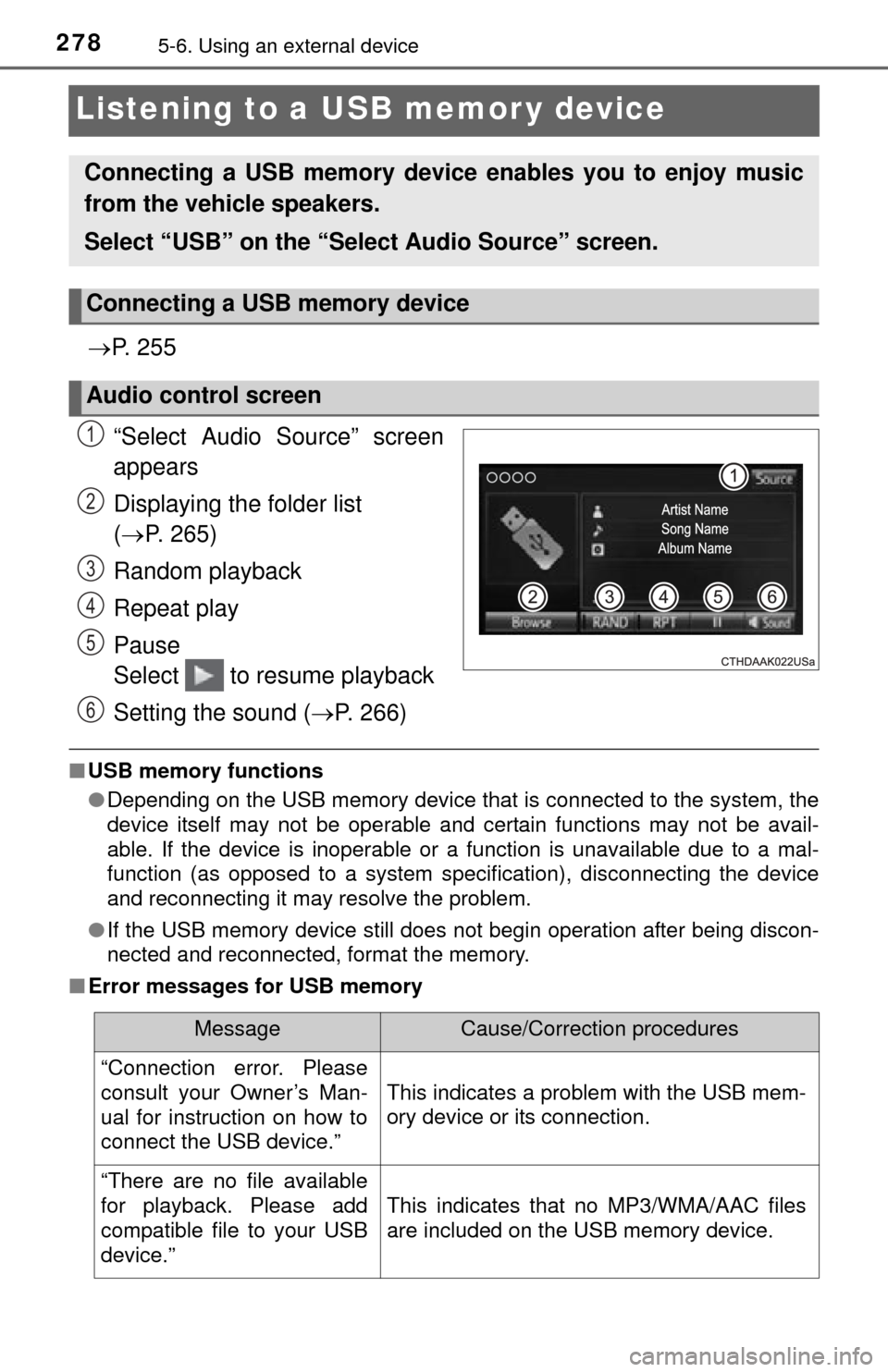
“Select Audio Source” screen
appears
Displaying the folder list
( P. 265)
Random playback
Repeat play
Pause
Select to resume playback
Setting the sound ( P. 266)
■USB memory functions
●Depending on the USB memory device that is connected to the system, the
device itself may not be operable and certain functions may not be avail-
able. If the device is inoperable or a function is unavailable due to a mal-
function (as opposed to a system specification), disconnecting the device
and reconnecting it may resolve the problem.
● If the USB memory device still does not begin operation after being discon-
nected and reconnected, format the memory.
■ Error messages for USB memory
Connecting a USB memory device enables you to enjoy music
from the vehicle speakers.
Select “USB” on the “Select Audio Source” screen.
Connecting a USB memory device
Audio control screen
1
2
3
4
5
6
MessageCause/Correction procedures
“Connection error. Please
consult your Owner’s Man-
ual for instruction on how to
connect the USB device.”
This indicates a problem with the USB mem-
ory device or its connection.
“There are no file available
for playback. Please add
compatible file to your USB
device.”
This indicates that no MP3/WMA/AAC files
are included on the USB memory device.
Page 279 of 576

2795-6. Using an external device
5
Multimedia
■USB memory
●Compatible devices
USB memory device that can be used for MP3, WMA and AAC playback.
● Compatible device formats
The following device format can be used:
• USB communication format: USB2.0 FS (12 Mbps), USB2.0 HS
(480 Mbps)
• File system format: FAT16/32 (Windows)
• Correspondence class: Mass storage class MP3, WMA and AAC files written to a device with any format other than
those listed above may not play correctly, and their file names and folder
names may not be displayed correctly.
Items related to standards and limitations are as follows:
• Maximum directory hierarchy: 8 levels
• Maximum number of folders in a device: 3000 (including the root)
• Maximum number of files in a device: 9999
• Maximum number of files per folder: 255
● MP3, WMA and AAC files
MP3 (MPEG Audio LAYER 3) is a standard audio compression format.
Files can be compressed to approximately 1/10 of their original size using
MP3 compression.
WMA (Windows Media Audio) is a Microsoft audio compression format.
This format compresses audio data to a size smaller than that of the MP3
format.
AAC is short for Advanced Audio Coding and refers to an audio compres-
sion technology standard used with MPEG2 and MPEG4.
MP3, WMA and AAC file and media/formats compatibility are limited.
● MP3 file compatibility
• Compatible standards
MP3 (MPEG1 AUDIO LAYER3, MPEG2 AUDIO LAYER3)
• Compatible sampling frequencies MPEG1 AUDIO LAYER3: 32, 44.1, 48 (kHz)
MPEG2 AUDIO LAYER3: 16, 22.05, 24 (kHz)
• Compatible bit rates (compatible with VBR) MPEG1 AUDIO LAYER3: 32-320 (kbps)
MPEG2 AUDIO LAYER3: 8-160 (kbps)
• Compatible channel modes: stereo, joint stereo, dual channel and mon- aural
● WMA file compatibility
• Compatible standards
WMA Ver. 7, 8, 9
• Compatible sampling frequencies
HIGH PROFILE 32, 44.1, 48 (kHz)
• Compatible bit rates HIGH PROFILE 48-320 (kbps, VBR)
Page 280 of 576

2805-6. Using an external device
●AAC file compatibility
• Compatible standards
MPEG4/AAC-LC
• Compatible sampling frequencies 11.025/12/16/22.05/24/32/44.1/48 (kHz)
• Compatible bit rates 16-320 (kbps)
• Compatible channel modes: 1 ch and 2 ch
● File names
The only files that can be recognized as MP3/WMA/AAC and played are
those with the extension .mp3 or .wma.
● ID3, WMA and AAC tags
ID3 tags can be added to MP3 files, making it possible to record the track
title, artist name, etc.
The system is compatible with ID3 Ver. 1.0, 1.1, and Ver. 2.2, 2.3 ID3 tags.
(The number of characters is based on ID3 Ver. 1.0 and 1.1.)
WMA tags can be added to WMA files, making it possible to record the
track title and artist name in the same way as with ID3 tags.
AAC tags can be added to AAC files, making it possible to record the track
title and artist name in the same way as with ID3 tags.
● MP3, WMA and AAC playback
• When a device containing MP3, WMA and AAC files is connected, all
files in the USB memory device are checked. Once the file check is fin-
ished, the first MP3, WMA and AAC file is played. To make the file check
finish more quickly, we recommend that you do not include any files other
than MP3, WMA and AAC files or create any unnecessary folders.
• When a USB memory device is connected and the audio source is
changed to USB memory mode, the USB memory device will start play-
ing the first file in the first folder. If the same device is removed and
reconnected (and the contents have not been changed), the USB mem-
ory device will resume play from the same point in which it was last used.
● Extensions
If the file extensions .mp3, .wma and .m4a are used for files other than
MP3, WMA and AAC files, they will be skipped (not played).
● Playback
• To play MP3 files with steady sound quality, we recommend a fixed bit
rate of at least 128 kbps and a sampling frequency of 44.1 kHz.
• There is a wide variety of freeware and other encoding software for MP3, WMA and AAC files on the market, and depending on the status of the
encoding and the file format, poor sound quality or noise at the start of
playback may result. In some cases, playback may not be possible at all.\
• Microsoft, Windows, and Windows Media are the registered trademarks of Microsoft Corporation in the U.S.A. and other countries.
Page 281 of 576

2815-6. Using an external device
5
Multimedia
CAUTION
■While driving
Do not connect a USB memory device or operate the device controls.
NOTICE
■To prevent damage to the USB memory device or its terminals
● Do not leave the USB memory device in the vehicle. The temperature
inside the vehicle may become high, resulting in damage to the USB
memory device.
● Do not push down on or apply unnecessary pressure to the USB memory
device while it is connected.
● Do not insert foreign objects into the port.