4WD TOYOTA TUNDRA 2016 2.G User Guide
[x] Cancel search | Manufacturer: TOYOTA, Model Year: 2016, Model line: TUNDRA, Model: TOYOTA TUNDRA 2016 2.GPages: 588, PDF Size: 13.44 MB
Page 169 of 588
1694-1. Before driving
4
Driving
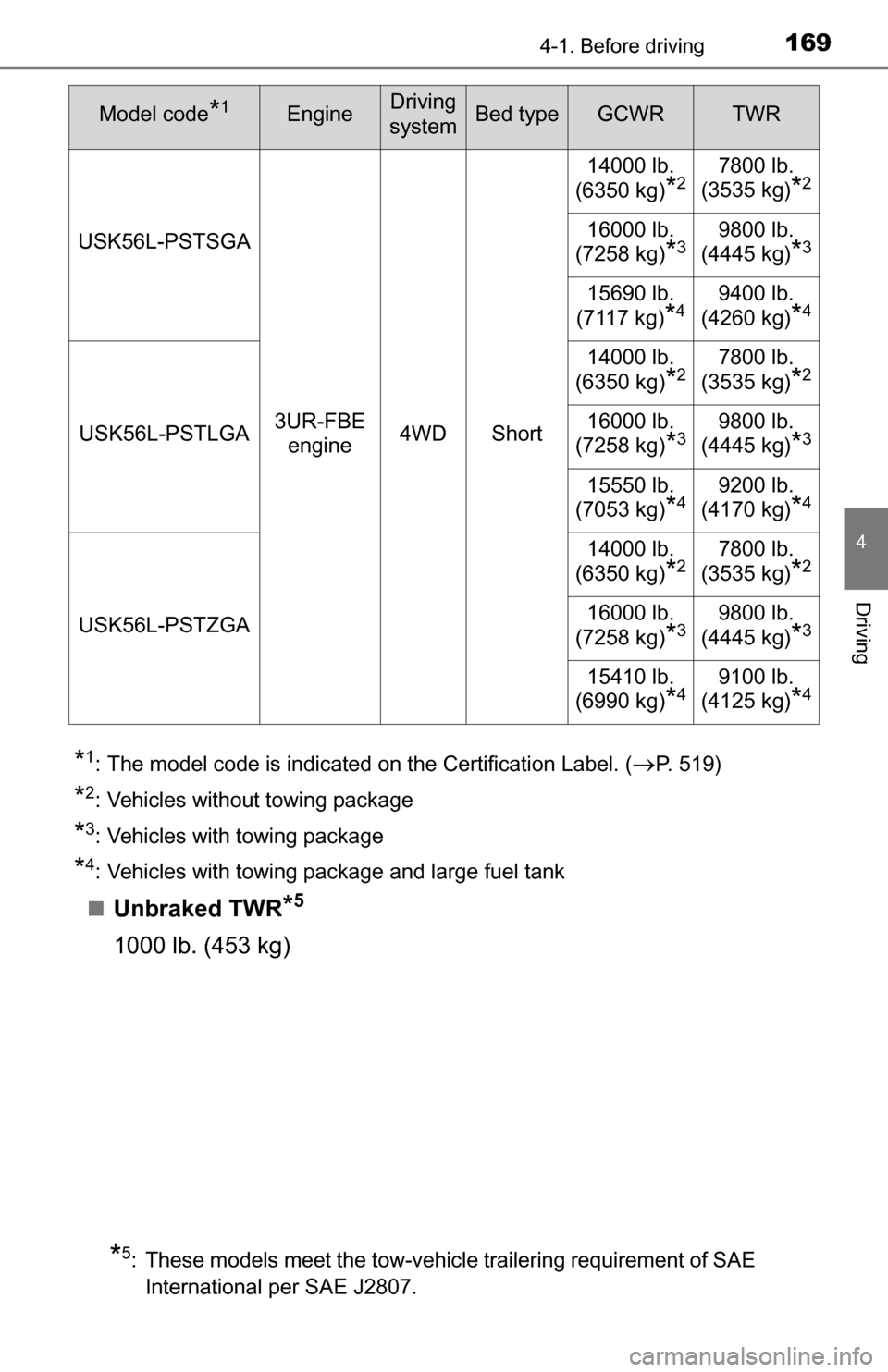
*1: The model code is indicated on the Certification Label. (P. 519)
*2: Vehicles without towing package
*3: Vehicles with towing package
*4: Vehicles with towing package and large fuel tank
■
Unbraked TWR*5
1000 lb. (453 kg)
USK56L-PSTSGA
3UR-FBE engine 4WD Short 14000 lb.
(6350 kg)
*27800 lb.
(3535 kg)
*2
16000 lb.
(7258 kg)
*39800 lb.
(4445 kg)
*3
15690 lb.
(7117 kg)
*49400 lb.
(4260 kg)
*4
USK56L-PSTLGA 14000 lb.
(6350 kg)
*27800 lb.
(3535 kg)
*2
16000 lb.
(7258 kg)
*39800 lb.
(4445 kg)
*3
15550 lb.
(7053 kg)
*49200 lb.
(4170 kg)
*4
USK56L-PSTZGA 14000 lb.
(6350 kg)
*27800 lb.
(3535 kg)
*2
16000 lb.
(7258 kg)
*39800 lb.
(4445 kg)
*3
15410 lb.
(6990 kg)
*49100 lb.
(4125 kg)
*4
*5: These models meet the tow-vehicle trailering requirement of SAE
International per SAE J2807.
Model code*1EngineDriving
systemBed typeGCWRTWR
Page 204 of 588
2044-5. Using the driving support systems
■Cruise control can be set when
●The shift lever is in D or range 4 or higher of S has been selected.
● Vehicle speed is above approximately 25 mph (40 km/h).
■ Accelerating after setting the vehicle speed
●The vehicle can be accelerated normally. After acceleration, the set speed
resumes.
● Even without canceling the cruise control, the set speed can be increased
by first accelerating the vehicle to the desired speed and then pushing the
lever down to set the new speed.
■ Automatic cruise control cancellation
Cruise control will stop maintaining the vehicle speed in any of the following
situations.
●Actual vehicle speed falls more than approximately 10 mph (16 km/h) below
the preset vehicle speed.
At this time, the memorized set speed is not retained.
● Actual vehicle speed is below approximately 25 mph (40 km/h).
● VSC is activated.
● 4WD models: The operation cannot be switched for 5 seconds or more after
operating the front-wheel drive control switch.
■ If the cruise control indicator light flashes
Press the “ON-OFF” button once to deactivate the system, and then press
the button again to reactivate the system.
If the cruise control speed cannot be set or if the cruise control cancels imme-
diately after being activated, there may be a malfunction in the cruise control
system. Have the vehicle inspected by your Toyota dealer.
CAUTION
■ To avoid operating the cruise control by mistake
Switch the cruise control off using the “ON-OFF” button when not in use.
■ Situations unsuitable for cruise control
Do not use cruise control in any of the following situations.
Doing so may result in loss of control and could cause an accident resulting
in death or serious injury.
● In heavy traffic
● On roads with sharp bends
● On winding roads
● On slippery roads, such as those covered with rain, ice or snow
● On steep hills
Vehicle speed may exceed the set speed when driving down a steep hill.
● When your vehicle is towing a trailer or during emergency towing
Page 231 of 588
2314-5. Using the driving support systems
4
Driving
AUTO LSD system
The system can be used on 2WD models and in 2WD mode on 4WD
models.
The system is activated when driving at a speed under 62 mph (100
km/h).
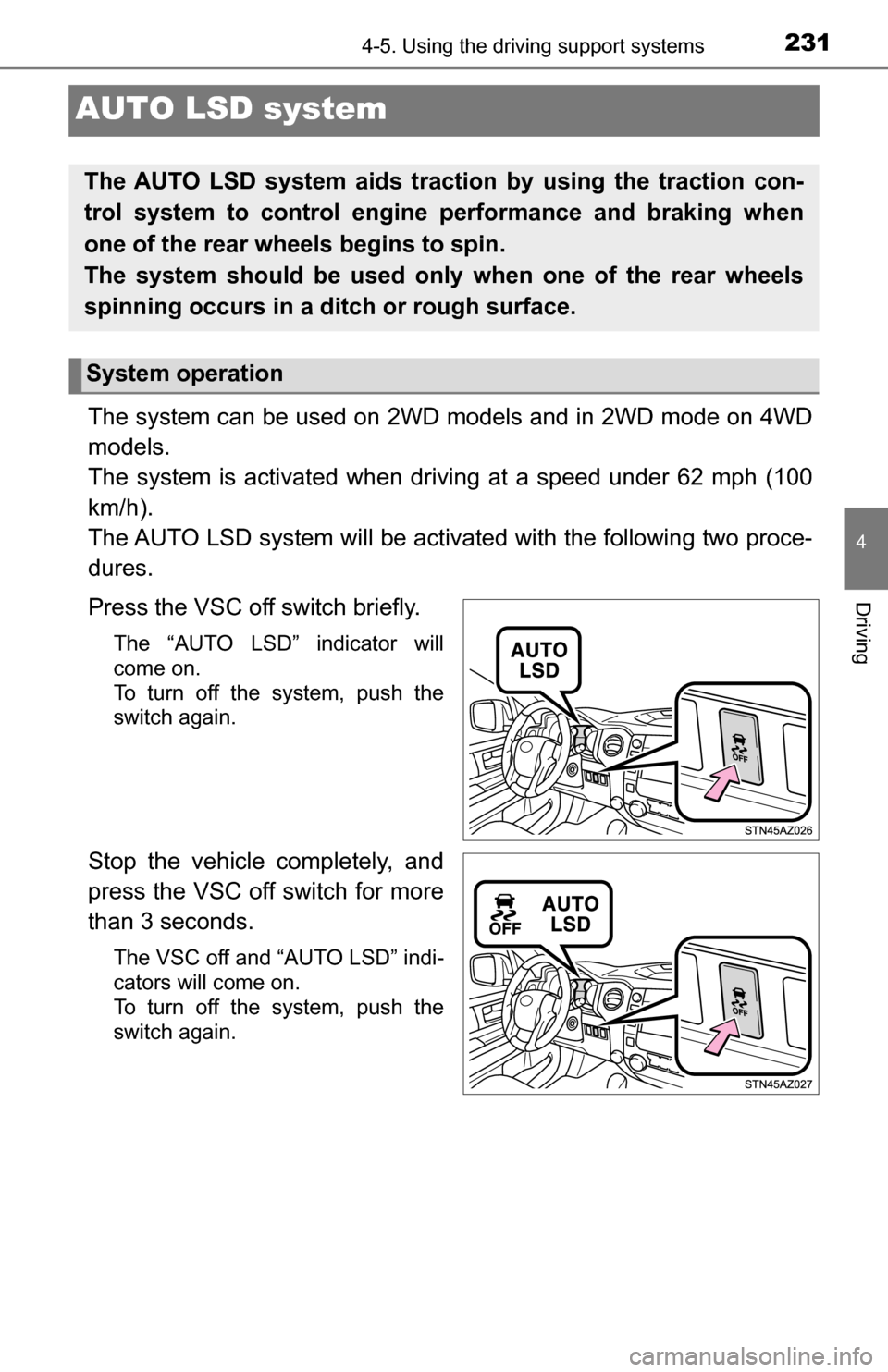
The AUTO LSD system will be activa ted with the following two proce-
dures.
Press the VSC off switch briefly.
The “AUTO LSD” indicator will
come on.
To turn off the system, push the
switch again.
Stop the vehicle completely, and
press the VSC off switch for more
than 3 seconds.
The VSC off and “AUTO LSD” indi-
cators will come on.
To turn off the system, push the
switch again.
The AUTO LSD system aids trac tion by using the traction con-
trol system to control engine performance and braking when
one of the rear wheels begins to spin.
The system should be used only when one of the rear wheels
spinning occurs in a ditch or rough surface.
System operation
Page 233 of 588
2334-5. Using the driving support systems
4
Driving
Driving assist systems
◆ABS (Anti-lock Brake System)
Helps to prevent wheel lock when the brakes are applied suddenly,
or if the brakes are applied while driving on a slippery road surface
◆Brake assist
Generates an increased level of braking force after the brake pedal
is depressed when the system detects a panic stop situation
◆VSC (Vehicle Stability Control)
Helps the driver to control skidding when swerving suddenly or
turning on slippery road surfaces
◆Trailer Sway Control
Helps the driver to control trailer sway by selectively applying brake
pressure for individual wheels and reducing engine torque when
trailer sway is detected.
Trailer Sway Control is part of the VSC system and will not operate if
VSC system is turned off or experiences a malfunction.
◆TRAC (Traction Control) for 2WD models and 2WD mode on
4WD models
Helps to maintain drive power and prevent the drive wheels from
spinning when starting the vehicle or accelerating on slippery roads
◆A-TRAC (Active Traction Control) for 4WD mode on 4WD mod-
els
Maintains drive power and prevents all wheels from spinning when
starting the vehicle or accelerating on slippery roads.
To help enhance driving safety and performance, the following
systems operate automatically in response to various driving
situations. Be aware, however, that these systems are supple-
mentary and should not be relied upon too heavily when operat-
ing the vehicle.
Page 234 of 588
2344-5. Using the driving support systems
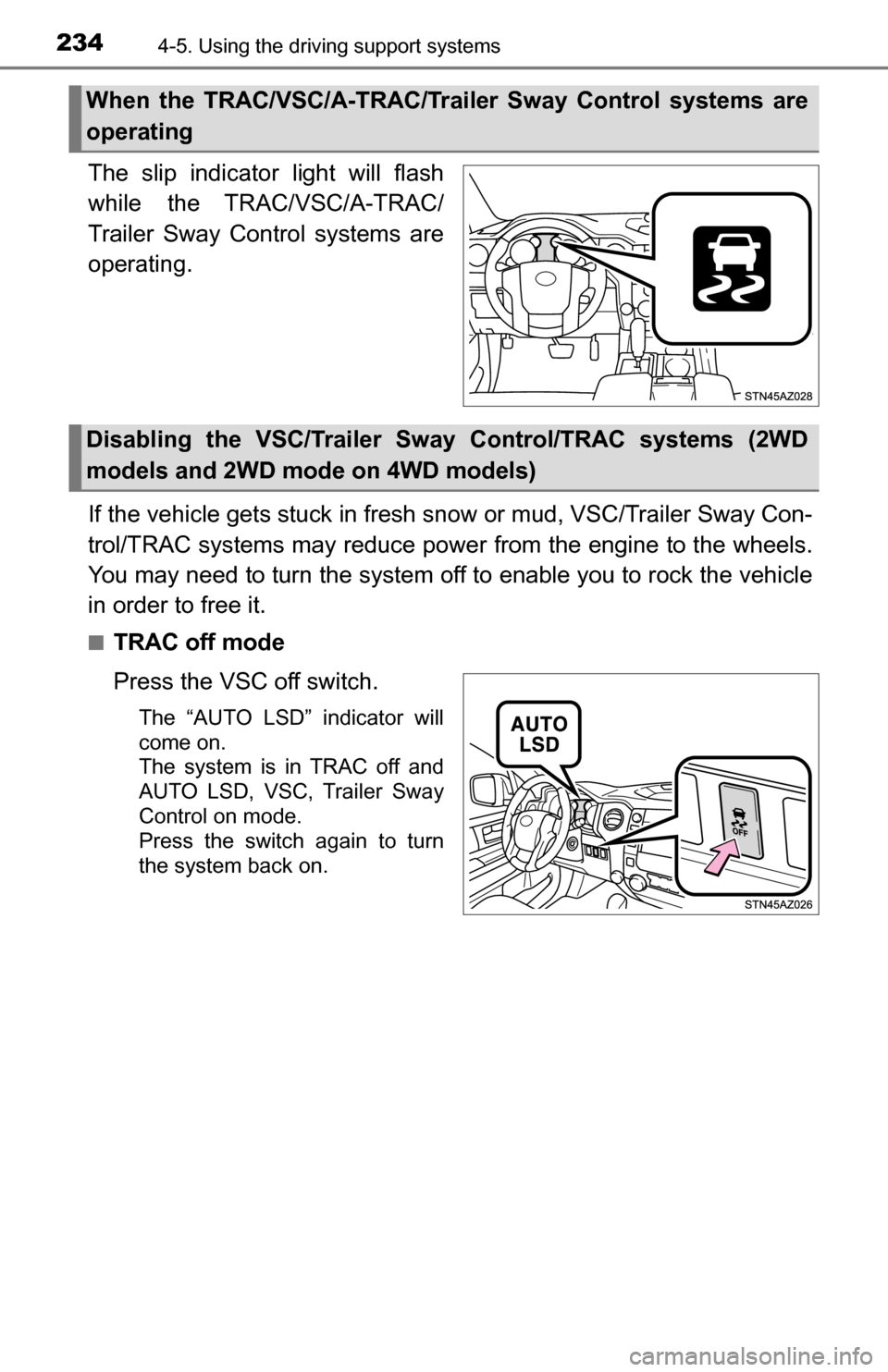
The slip indicator light will flash
while the TRAC/VSC/A-TRAC/
Trailer Sway Control systems are
operating.
If the vehicle gets stuck in fresh snow or mud, VSC/Trailer Sway Con-
trol/TRAC systems may reduce power from the engine to the wheels.
You may need to turn the system off to enable you to rock the vehicle
in order to free it.
■TRAC off mode
Press the VSC off switch.
The “AUTO LSD” indicator will
come on.
The system is in TRAC off and
AUTO LSD, VSC, Trailer Sway
Control on mode.
Press the switch again to turn
the system back on.
When the TRAC/VSC/A-TRAC/Trailer Sway Control systems are
operating
Disabling the VSC/Trailer Sw ay Control/TRAC systems (2WD
models and 2WD mode on 4WD models)
Page 236 of 588
2364-5. Using the driving support systems
If the vehicle gets stuck in fresh snow or mud, VSC/Trailer Sway Con-
trol/A-TRAC systems may reduce power from the engine to the
wheels. You may need to turn the system off to enable you to rock the
vehicle in order to free it.
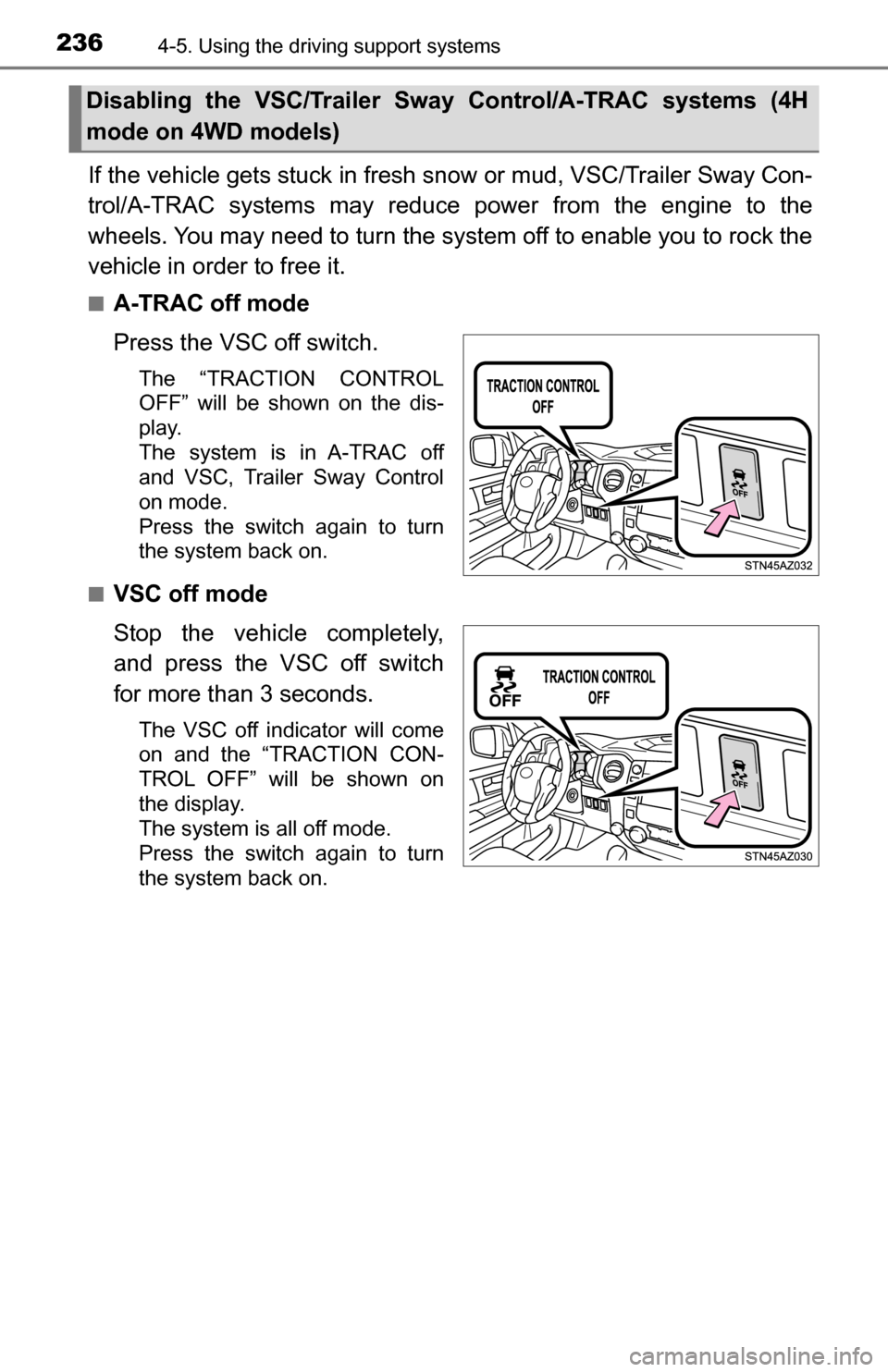
■A-TRAC off mode
Press the VSC off switch.
The “TRACTION CONTROL
OFF” will be shown on the dis-
play.
The system is in A-TRAC off
and VSC, Trailer Sway Control
on mode.
Press the switch again to turn
the system back on.
■
VSC off mode
Stop the vehicle completely,
and press the VSC off switch
for more than 3 seconds.
The VSC off indicator will come
on and the “TRACTION CON-
TROL OFF” will be shown on
the display.
The system is all off mode.
Press the switch again to turn
the system back on.
Disabling the VSC/Trailer Sway Control/A-TRAC systems (4H
mode on 4WD models)
Page 237 of 588
2374-5. Using the driving support systems
4
Driving
If the vehicle gets stuck in fresh snow or mud, A-TRAC system may
reduce power from the engine to the wheels. You may need to turn
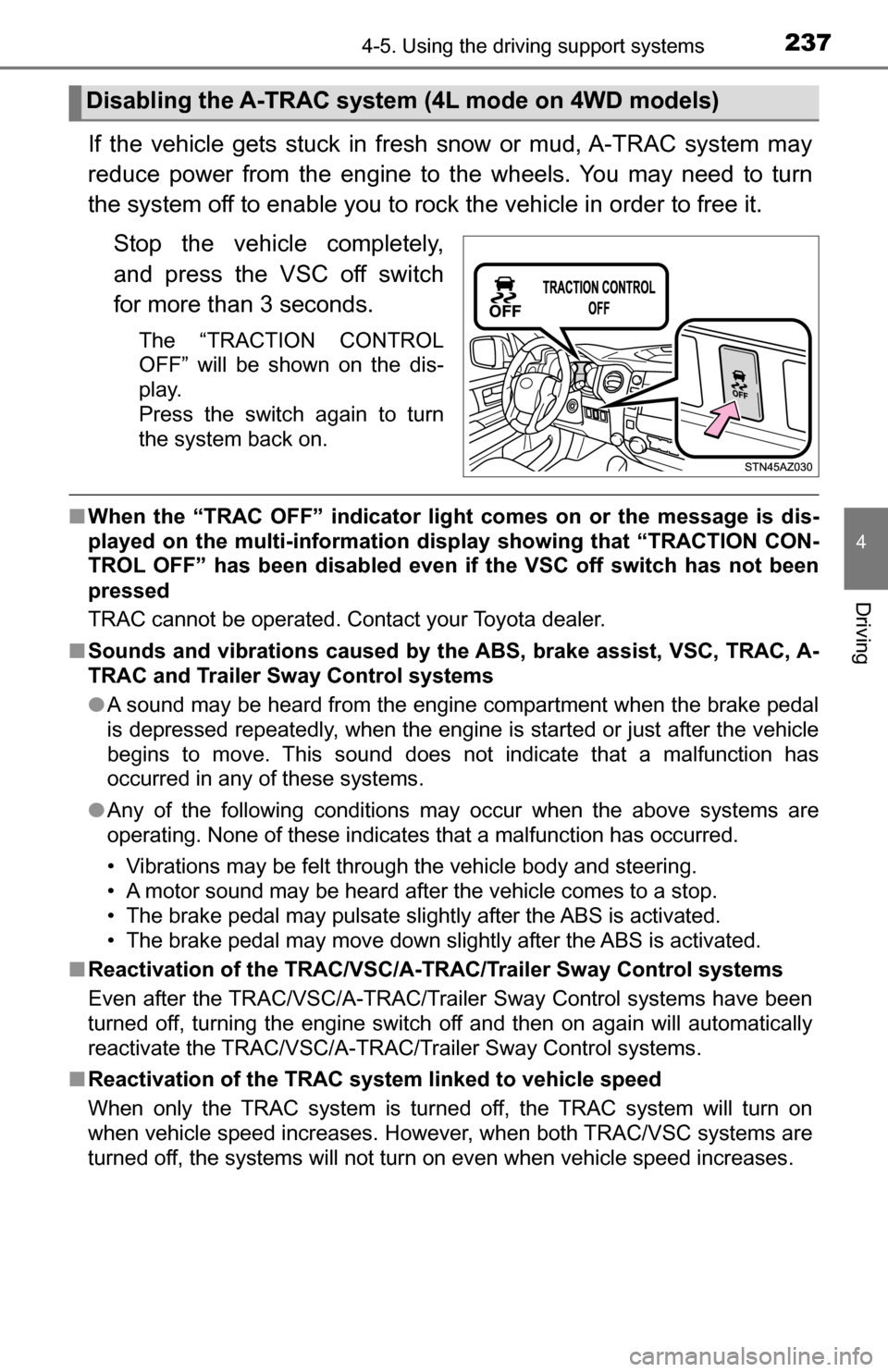
the system off to enable you to rock the vehicle in order to free it.Stop the vehicle completely,
and press the VSC off switch
for more than 3 seconds.
The “TRACTION CONTROL
OFF” will be shown on the dis-
play.
Press the switch again to turn
the system back on.
■When the “TRAC OFF” indicator light comes on or the message is dis-
played on the multi-information disp lay showing that “TRACTION CON-
TROL OFF” has been disabled even if the VSC off switch has not been
pressed
TRAC cannot be operated. Contact your Toyota dealer.
■ Sounds and vibrations caused by the ABS, brake assist, VSC, TRAC, A-
TRAC and Trailer Sway Control systems
●A sound may be heard from the engine compartment when the brake pedal
is depressed repeatedly, when the engine is started or just after the vehicle
begins to move. This sound does not indicate that a malfunction has
occurred in any of these systems.
● Any of the following conditions may occur when the above systems are
operating. None of these indicates that a malfunction has occurred.
• Vibrations may be felt through the vehicle body and steering.
• A motor sound may be heard after the vehicle comes to a stop.
• The brake pedal may pulsate slightly after the ABS is activated.
• The brake pedal may move down slightly after the ABS is activated.
■ Reactivation of the TRAC/VSC/A-T RAC/Trailer Sway Control systems
Even after the TRAC/VSC/A-TRAC/Trailer Sway Control systems have been
turned off, turning the engine switch off and then on again will automatically
reactivate the TRAC/VSC/A-TRAC/Trailer Sway Control systems.
■ Reactivation of the TRAC system linked to vehicle speed
When only the TRAC system is turned off, the TRAC system will turn on
when vehicle speed increases. However, when both TRAC/VSC systems are
turned off, the systems will not turn on even when vehicle speed increases.
Disabling the A-TRAC system (4L mode on 4WD models)
Page 245 of 588
2454-6. Driving tips
4
Driving
■Tire chain installation
Observe the following precautions when installing and removing chains:
●Install and remove tire chains in a safe location.
● Install tire chains on the rear tires. Do not install tire chains on the front tires.
● Install tire chains on rear tires as tightly as possible. Retighten chains after
driving 1/4 1/2 mile (0.5 1.0 km).
● Install tire chains following the instructions provided with the tire chains.
CAUTION
■ Driving with snow tires
Observe the following precautions to reduce the risk of accidents.
Failure to do so may result in a loss of vehicle control and cause death or
serious injury.
● Use tires of the specified size.
● Maintain the recommended level of air pressure.
● Do not drive in excess of 75 mph (120 km/h), regardless of the type of
snow tires being used.
● Use snow tires on all, not just some wheels.
● 4WD models: Do not mix tires of different makes, models, tread patterns
or treadwear.
■ Driving with tire chains
Observe the following precautions to reduce the risk of accidents.
Failure to do so may result in the vehicle being unable to be driven safely,
and may cause death or serious injury.
● Do not drive in excess of the speed limit specified for the tire chains being
used, or 30 mph (50 km/h), whichever is lower.
● Avoid driving on bumpy road surfaces or over potholes.
● Avoid sudden acceleration, abrupt steering, sudden braking and shifting
operations that cause sudden engine braking.
● Slow down sufficiently before entering a curve to ensure that vehicle con-
trol is maintained.
Page 468 of 588
4688-2. Steps to take in an emergency
If a tow truck is not available in an emergency, your vehicle may be
temporarily towed using cables or chains secured to the emergency
towing hooks. This should only be attempted on hard surfaced roads
for at most 50 miles (80 km) at 18 mph (30km/h).
A driver must be in the vehicle to steer and operate the brakes. The
vehicle’s wheels, drive train, axles, steering and brakes must be in
good condition.
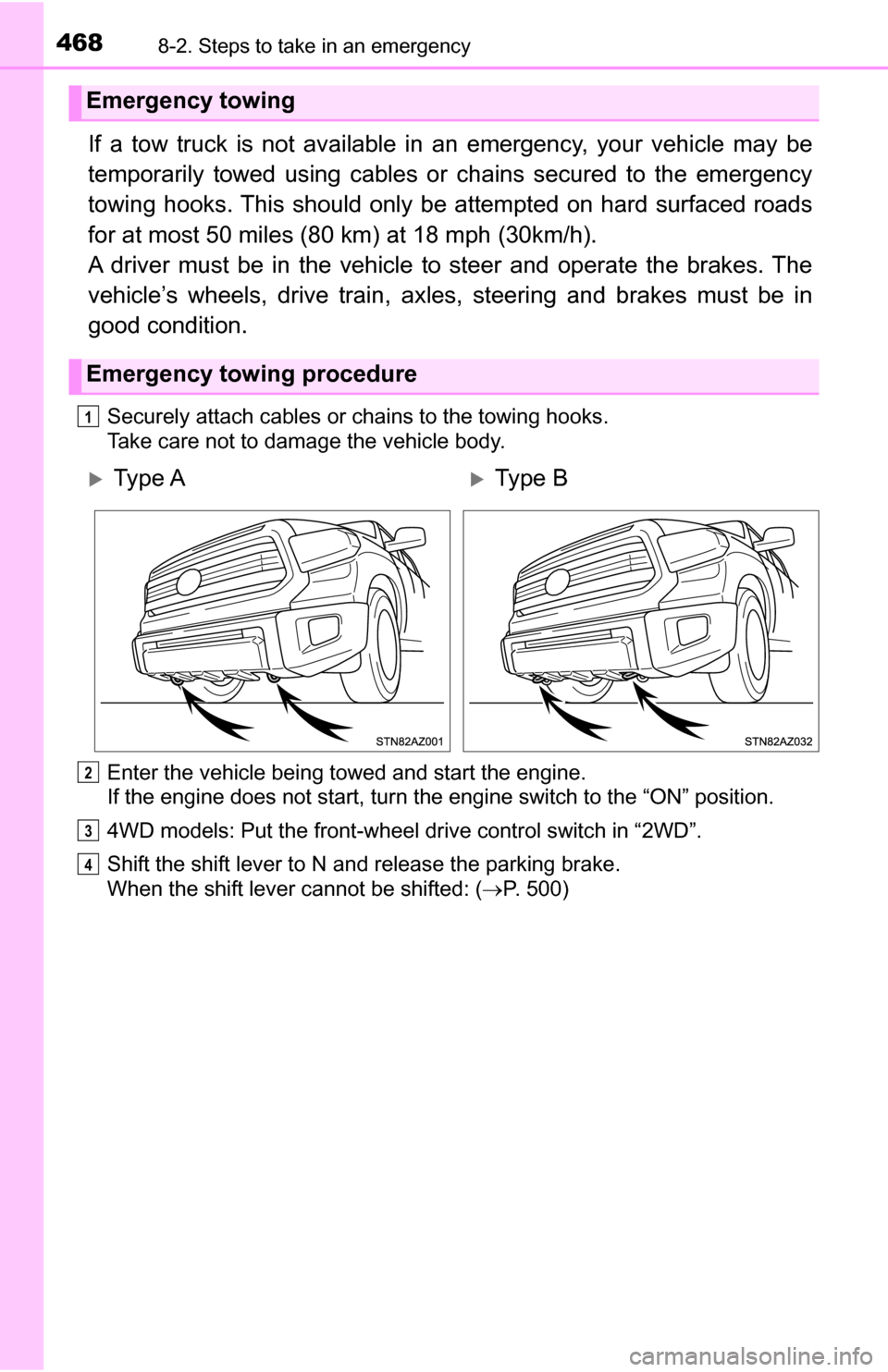
Securely attach cables or chains to the towing hooks.
Take care not to damage the vehicle body.
Enter the vehicle being towed and start the engine.
If the engine does not start, turn the engine switch to the “ON” position.
4WD models: Put the front-wheel drive control switch in “2WD”.
Shift the shift lever to N and release the parking brake.
When the shift lever cannot be shifted: (P. 500)
Emergency towing
Emergency towing procedure
1
Ty p e AType B
2
3
4
Page 469 of 588
4698-2. Steps to take in an emergency
8
When trouble arises
CAUTION
Observe the following precautions.
Failure to do so may result in death or serious injury.
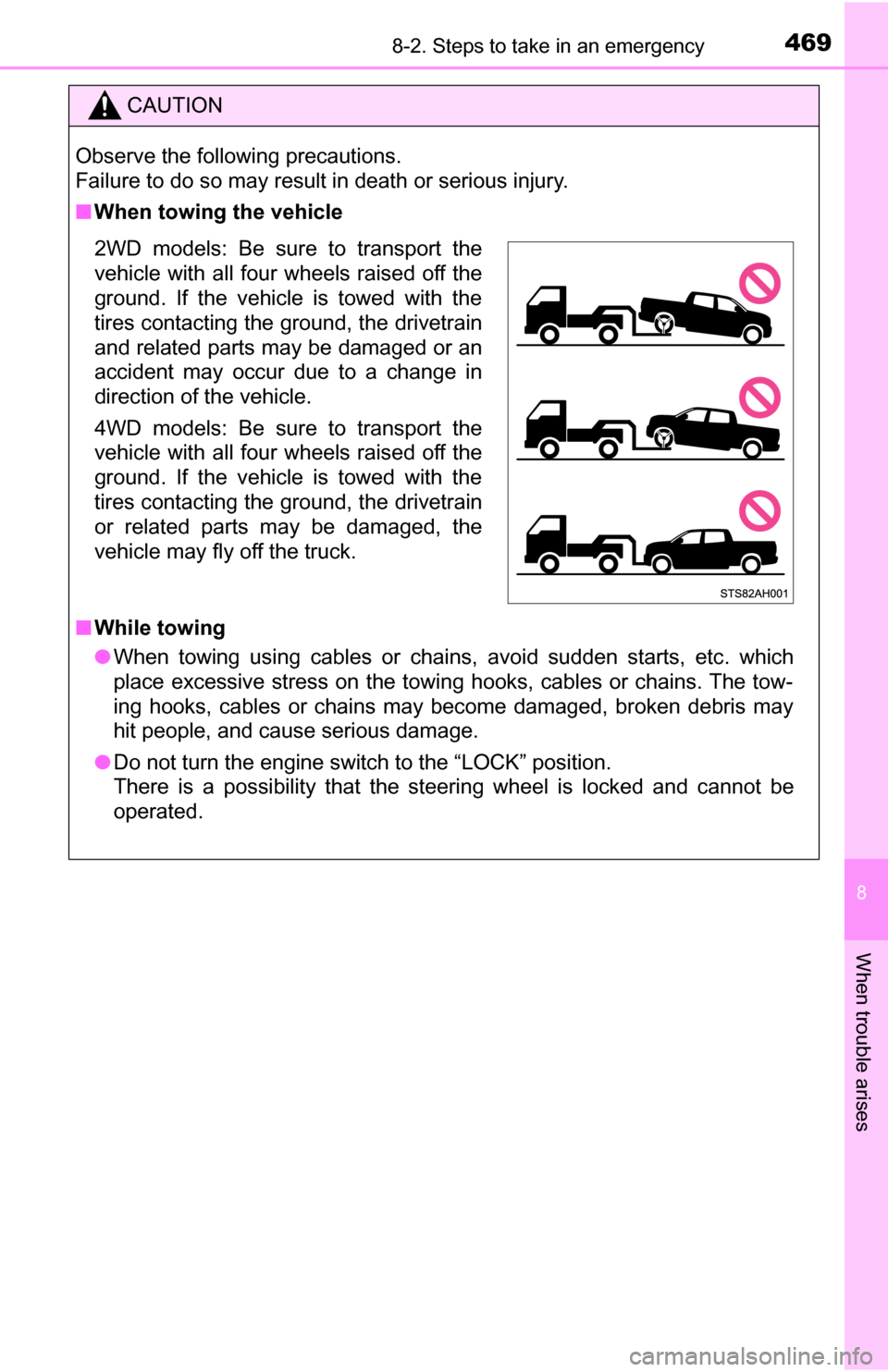
■When towing the vehicle
2WD models: Be sure to transport the
vehicle with all four wheels raised off the
ground. If the vehicle is towed with the
tires contacting the ground, the drivetrain
and related parts may be damaged or an
accident may occur due to a change in
direction of the vehicle.
4WD models: Be sure to transport the
vehicle with all four wheels raised off the
ground. If the vehicle is towed with the
tires contacting the ground, the drivetrain
or related parts may be damaged, the
vehicle may fly off the truck.
■While towing
● When towing using cables or chains, avoid sudden starts, etc. which
place excessive stress on the towing hooks, cables or chains. The tow-
ing hooks, cables or chains may become damaged, broken debris may
hit people, and cause serious damage.
● Do not turn the engine switch to the “LOCK” position.
There is a possibility that the steering wheel is locked and cannot be
operated.