high TOYOTA TUNDRA 2019 Accessories, Audio & Navigation (in English)
[x] Cancel search | Manufacturer: TOYOTA, Model Year: 2019, Model line: TUNDRA, Model: TOYOTA TUNDRA 2019Pages: 282, PDF Size: 6.64 MB
Page 32 of 282
32
1. BASIC INFORMATION BEFORE OPERATION
2. TOUCH SCREEN GESTURES
Operation methodOutline Main use
Scrolling the lists
Scrolling the ma p scree
n*2
Scrolling the main screen page
Scrolling the map screen*2
*1: The operations may not be performed on all screens.
*
2: Entune Premium Audio only
●The system may not recognize fli ck operations in high altitude.
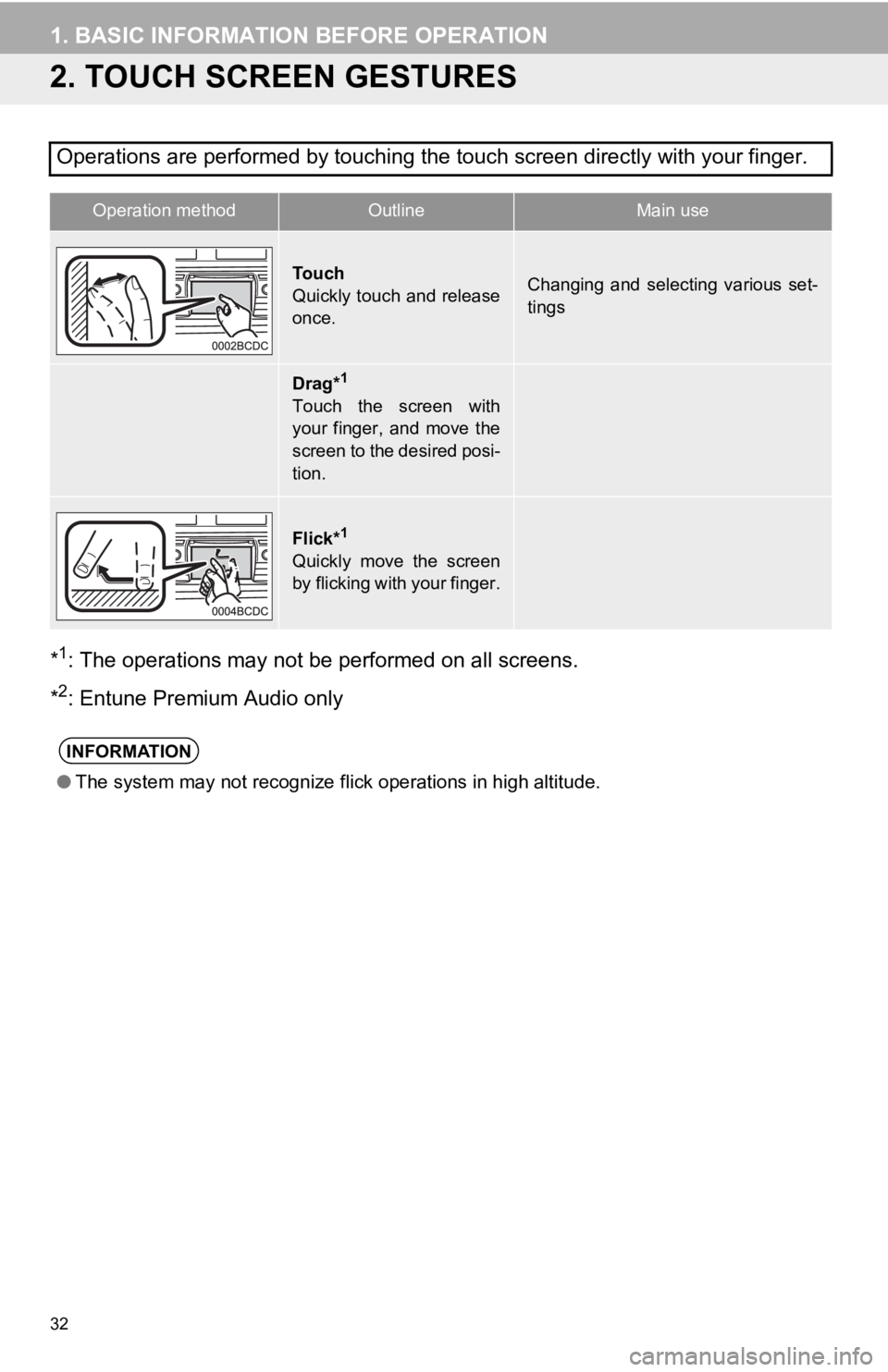
Operations are performed by touching the touch screen directly with your finger.
To u c h
Quickly touch and release
once.Changing and selecting various set-
tings
Drag*1
Touch the screen with
your finger, and move the
screen to the desired posi-
tion.
Flick*1
Quickly move the screen
by flicking with your finger.
INFORMATION
Page 75 of 282
SOUND SETTINGS
75
1. BASIC OPERATION
AUDIO SYSTEM
3
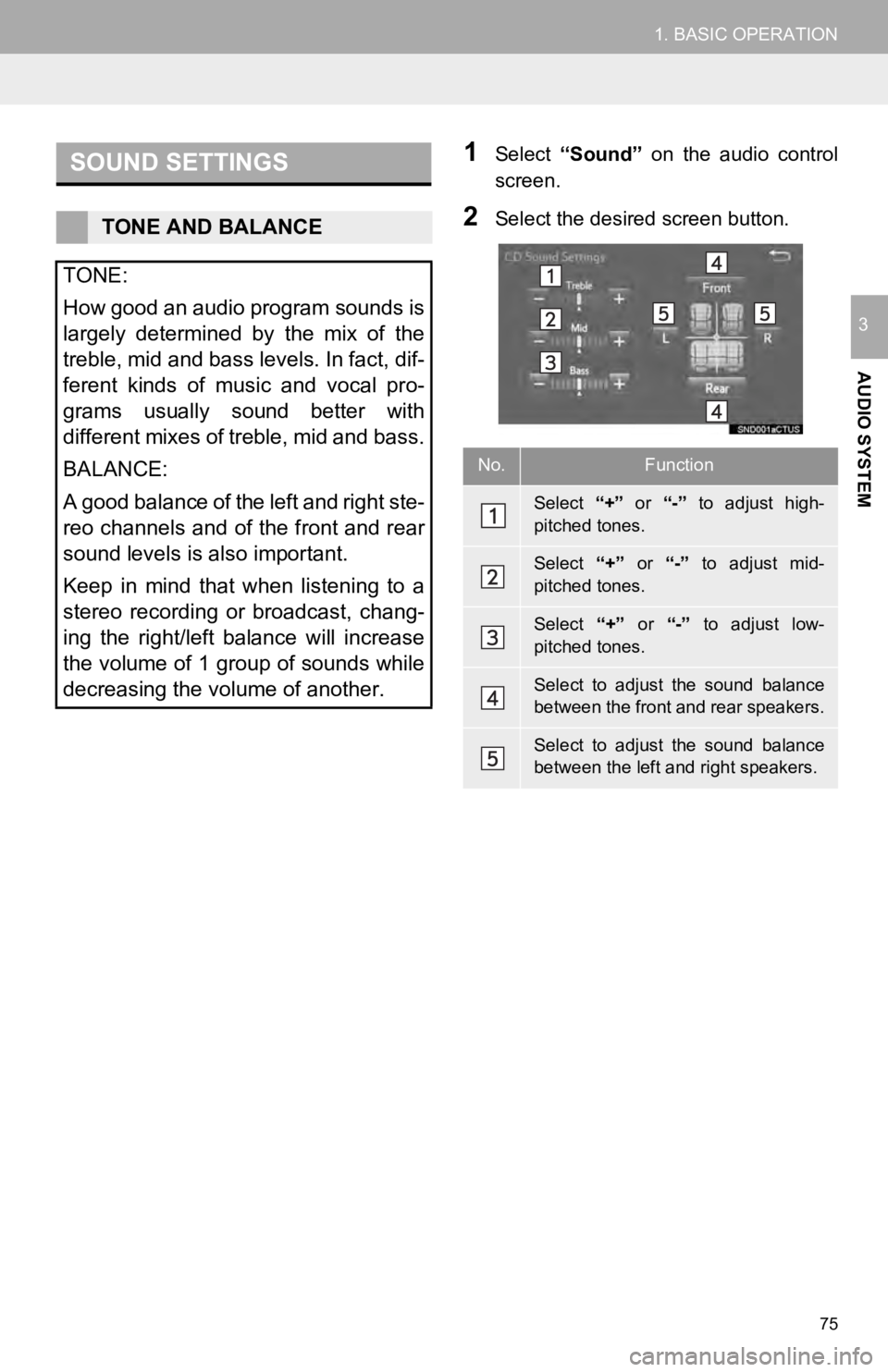
1Select “Sound” on the audio control
screen.
2Select the desired screen button.TONE AND BALANCE
TONE:
How good an audio program sounds is
largely determined by the mix of the
treble, mid and bass levels. In fact, dif-
ferent kinds of music and vocal pro-
grams usually sound better with
different mixes of treble, mid and bass.
BALANCE:
A good balance of the left and right ste-
reo channels and of the front and rear
sound levels is also important.
Keep in mind that when listening to a
stereo recording or broadcast, chang-
ing the right/left balance will increase
the volume of 1 group of sounds while
decreasing the volume of another.
No.Function
Select “+” or “-” to adjust high-
pitched tones.
Select “+” or “-” to adjust mid-
pitched tones.
Select “+” or “-” to adjust low-
pitched tones.
Select to adjust the sound balance
between the front and rear speakers.
Select to adjust the sound balance
between the left and right speakers.
Page 107 of 282
●Do not operate the player’s controls or connect to the Bluetooth® audio system while driv -
ing.
● Your audio unit is fitted with Bluetooth
® antennas. People with implantable cardiac pace -
makers, cardiac resynchronization therapy-pacemakers or implant able cardioverter
defibrillators should maintain a reasonable distance between th emselves and the Blue-
tooth
® antennas. The radio waves may affect the operation of such dev ices.
● Before using Bluetooth
® devices, users of any electrical medical device other than
implantable cardiac pacemakers, cardiac resynchronization thera py-pacemakers or
implantable cardioverter defibrillators should consult the manu facturer of the device for
information about its operation under the influence of radio wa ves. Radio waves could
have unexpected effects on the operation of such medical device s.
●Do not leave your portable player in the vehicle. In particular, high temperatures inside
the vehicle may damage the portable player.
●Depending on the Bluetooth® device that is connected to the system, the music may start
playing when selecting
while it is paused. Conversely, the music may pause when
selecting
while it is playing.
● In the following conditions, the system may not function:
● It may take time to connect the phone when Blueto oth
® audio is being played.
● For operating the portable player, see the instruction manual t hat c
omes with it.
● If the Bluetooth
® device is disconnected due to poor reception from the Bluetoot h® net-
work when the engine switch is turned to the “ACC” or “ON” posi tion, t he system auto-
matically reconnects the portable player.
● If the system is attempting to connect to a Bluetooth
® device and the Bluetooth® device is
turned off and then bac k on, the system will attempt to reconne ct.
● Bluetooth
® device information is registered when the Bluetooth® device is connected to
the Blueto oth® audio system. When selling or disposing of the vehicle, remove the
Blueto oth® audio information from the system. (P. 6 1 )
107
3. MEDIA OPERATION
AUDIO SYSTEM
3
WA R N I N G
NOTICE
INFORMATION
• The Bluetooth® device is turned off.
• The Bluetooth
® device is not connected.
• The Bluetooth
® device has a low battery.
Page 110 of 282
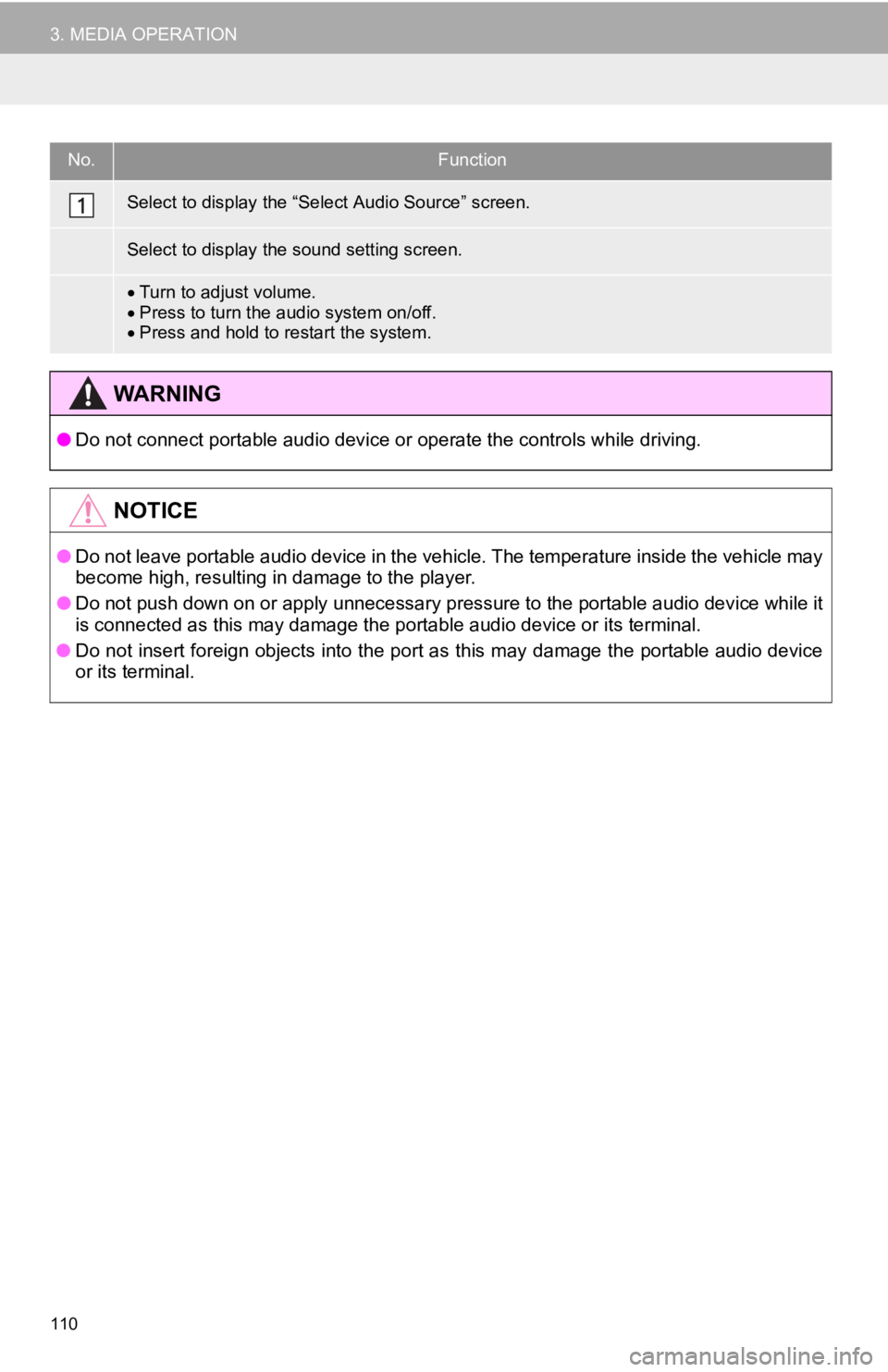
No.Function
Turn to adjust volume.
Press to turn the audio system on/off.
Press and hold to restart the system.
● Do not connect portable audio device or operate the controls wh ile driving.
●Do not leave portable audio device in the vehicle. The temperature inside the vehicle may
become high, resulting in damage to the player.
● Do not push down on or apply unnecessary pressure to the portab le
au
dio device while it
is connected as this may damage the portable audio device or it s terminal.
● Do not insert foreign objects into the port as this may damage the
po
rtable audio device
or its terminal.
110
3. MEDIA OPERATION
Select to display the “Select Audio Source” screen.
Select to display the sound setting screen.
WA R N I N G
NOTICE
Page 113 of 282
113
5. SETUP
AUDIO SYSTEM
3
1Display the “Audio Settings” screen.
(P.112 )
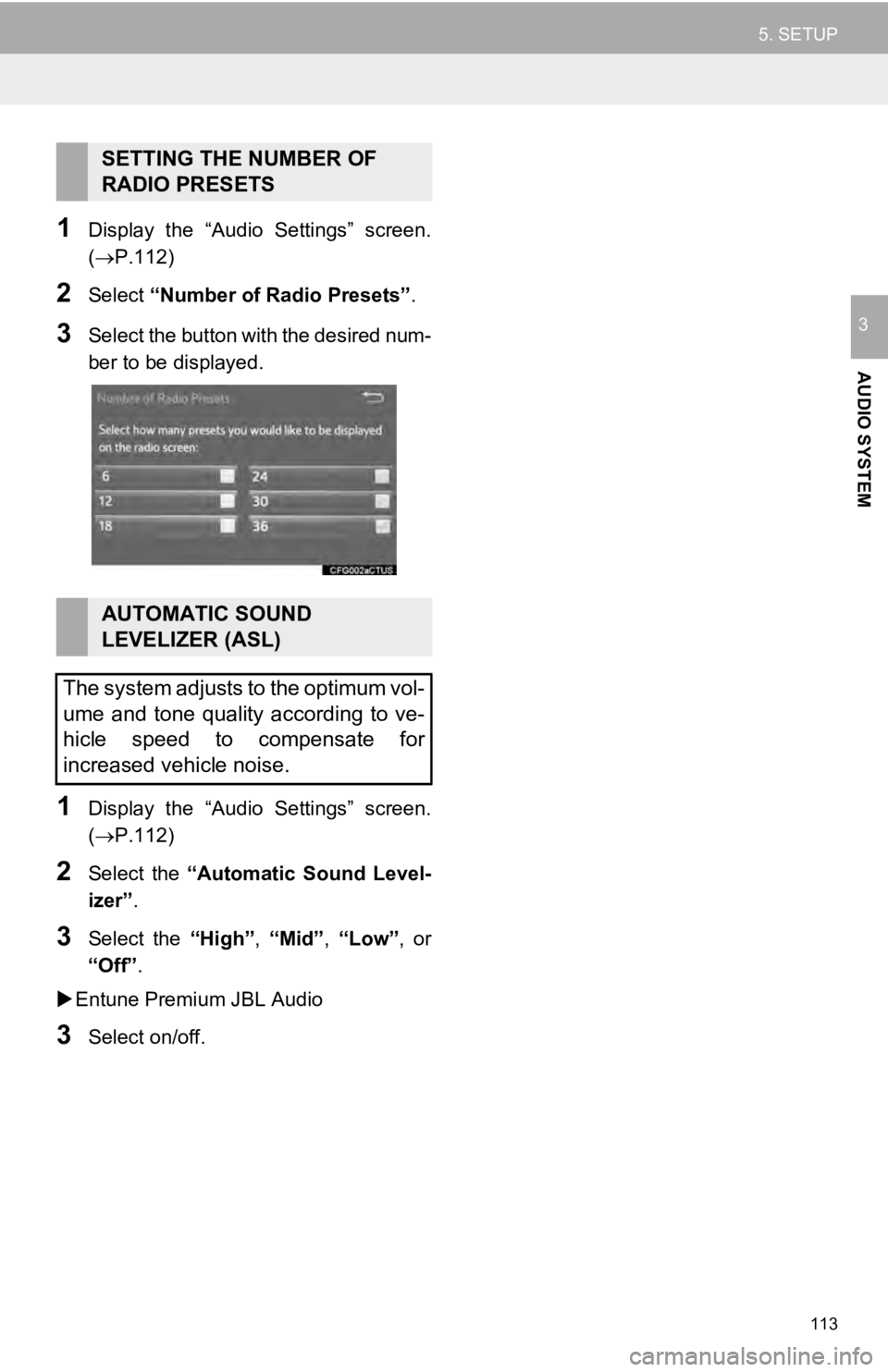
2Select “Number of Radio Presets” .
3Select the button with the desired num -
ber to be displayed.
1Display the “Audio Settings” screen.
(P.112 )
2Select the “Automatic Sound Level -
izer” .
3Select the “High”, “Mid”, “Low”, or
“Off” .
Entune Premium JBL Audio
3Select on/off.
SETTING THE NUMBER OF
RADIO PRESETS
AUTOMATIC SOUND
LEVELIZER (ASL)
The system adjusts to the optimum vol-
ume and tone quality according to ve-
hicle speed to compensate for
increased vehicle noise.
Page 114 of 282
114
6. TIPS FOR OPERATING THE AUDIO SYSTEM
1. OPERATING INFORMATION
RADIO
Fading and drifting stations: Generally, the
effective range of FM is about 25 miles (40
km). Once outside this range, you may no-
tice fading and drifting, which increase with
the distance from the radio transmitter.
They are often accompanied by distortion.
Multi-path: FM signals are reflective, mak-
ing it possible for 2 signals to reach the ve-
hicle’s antenna at the same time. If this
happens, the signals will cancel each other
out, causing a momentar y flutter or loss of
reception.
Static and fluttering: These occur when
signals are blocked by buildings, trees or
other large objects. Increasing the bass
level may reduce static and fluttering.
Station swapping: If the FM signal being
listened to is interrupted or weakened, and
there is another strong station nearby on
the FM band, the radio may tune in the
second station until the original signal can
be picked up again.
Fading: AM broadcasts are reflected by
the upper atmosphere — especially at
night. These reflected signals can interfere
with those received directly from the radio
station, causing the radio station to sound
alternately st rong and weak.
Station interference: When a reflected sig-
nal and a signal received directly from a ra-
dio station are very nearly the same
frequency, they can interfere with each
other, making it difficult to hear the broad-
cast.
Static: AM is easily affected by external
sources of electrical noise, such as high
tension power lines, lightening or electrical
motors. This results in static.
NOTICE
● To avoid damage to the audio system:
• Be careful not to spill beverages over
the audio system.
• Do not put anything other than an
appropriate disc into the disc slot.
INFORMATION
● The use of a cellular phone inside or
near the vehicle may cause a noise from
the speakers of the audio system which
you are listening to. However, this does
not indicate a malfunction.
Usually, a problem with radio reception
does not mean there is a problem with
the radio — it is just the normal result
of conditions outside the vehicle.
For example, nearby buildings and ter-
rain can interfere with FM reception.
Power lines or phone wires can inter-
fere with AM signals. And of course, ra-
dio signals have a limited range. The
farther the vehicle is from a station, the
weaker its signal will be. In addition, re-
ception conditions change constantly
as the vehicle moves.
Here, some common reception prob-
lems that probably do not indicate a
problem with the radio are described.
FM
AM
Page 115 of 282
115
6. TIPS FOR OPERATING THE AUDIO SYSTEM
AUDIO SYSTEM
3
Cargo loaded on the roof luggage carrier,
especially metal objects, may adversely
affect the reception of XM Satellite Radio.
Alt ernation or modifications carried out
wi tho
ut appropriate authorization may
invalidate the user’s right to operate the
equipment.
CD PLAYER AND DISC
This CD player is intended for use with 4.7
in. (12 cm). discs only.
Ext remely high temperatures can keep the
CD pl
ayer from working. On hot days, use
the air conditioning system to cool the
inside of the vehicle before using the
player.
Bumpy roads or other vibrations may
ma ke
the CD player skip.
If moisture gets into the CD player, the
d i
scs may not be able to be played.
Remove the discs from the player and
wait until it dries.
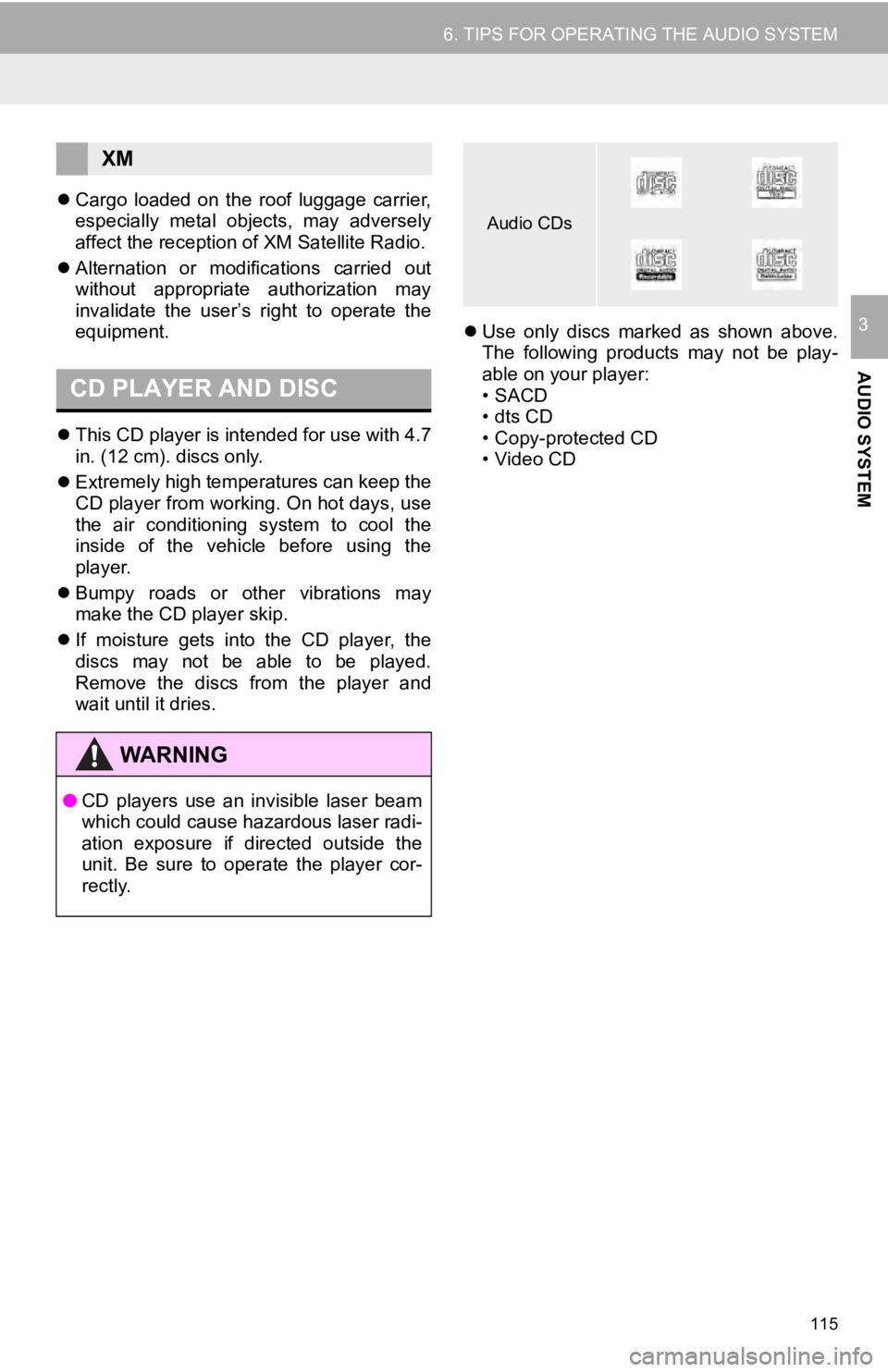
Use only discs marked as shown above.
The following products may not be play -
able on your player:
•SACD
• dts CD
• Copy-protected CD
• Video CD
XM
WA R N I N G
● CD players use an invisible laser beam
which could cause hazardous laser radi-
ation exposure if directed outside the
unit. Be sure to operate the player cor-
rectly.
Audio CDs
Page 117 of 282
117
6. TIPS FOR OPERATING THE AUDIO SYSTEM
AUDIO SYSTEM
3
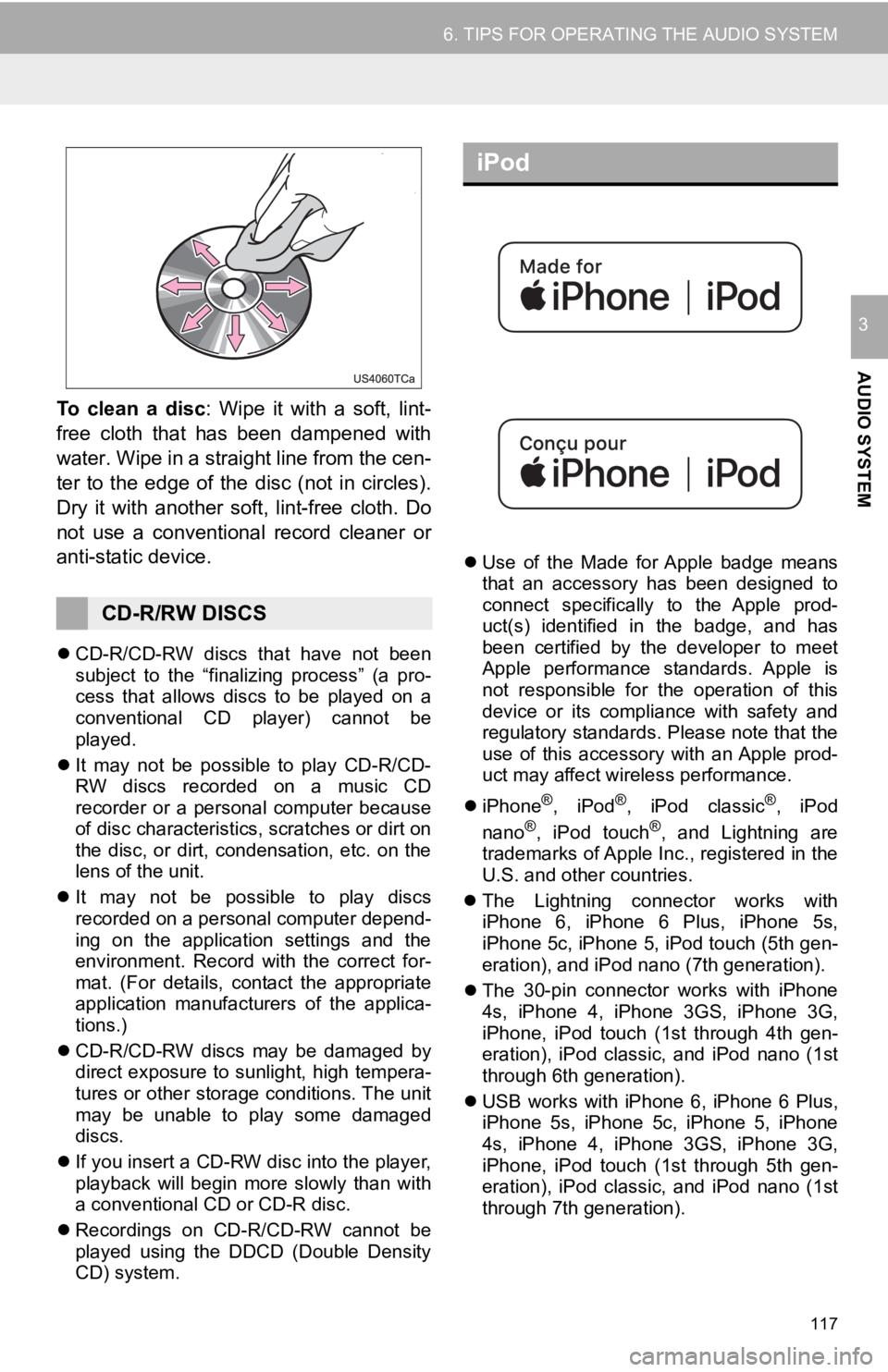
To clean a disc: Wipe it with a soft, lint-
free cloth that has been dampened with
water. Wipe in a straight line from the cen-
ter to the edge of the disc (not in circles).
Dry it with another sof t, lint-free cloth. Do
not use a conventional record cleaner or
anti-static device.
CD-R/CD-RW discs that have not been
subject to the “finalizing process” (a pro -
cess that allows discs to be played on a
co nven
ti
onal CD player) cannot be
played.
It may not be possible to play CD-R/CD-
R W
discs recorded on a music CD
recorder or a personal computer because
of disc characteristics, scratches or dirt on
the disc, or dirt, condensation, etc. on the
lens of the unit.
It may not be possible to play discs
rec orded
on a personal computer depend -
ing on the application settings and the
e nviro
nment
. Record with the correct for -
mat. (For details, contact the appropriate
a ppl
ica
tion manufacturers of the applica -
tions.)
CD-R/CD-R W
di
scs may be damaged by
direct exposure to sunlight, high tempera -
tures or other storage conditions. The unit
ma y
be
unable to play some damaged
discs.
If you insert a CD-RW disc into the player,
pl a
yback will begin more slowly than with
a conventional CD or CD-R disc.
Recor dings on CD-R/CD-RW cannot be
p l
ayed using the DDCD (Double Density
CD) system.
iPod
Use of the Made for Apple badge means
that an accessory has been designed to
connect specifically to the Apple prod-
uct(s) identified in the badge, and has
been
c
ertified by the developer to meet
Apple performance standards. Apple is
not responsible for the operation of this
device or its compliance with safety and
regulatory standards. Please note that the
use of this accessory with an Apple prod-
uct may affect wireless performance.
iPhone
®, iPod®, iPod classic®, iPod
nano®, iPod touch®, and Lightning are
trademarks of Apple Inc., registered in the
U.S. and other countries.
The Lightning connector works with
iPhone
6, iPhone 6 Plus, iPhone 5s,
iPhone 5c, iPhone 5, iPod touch (5th gen -
eration), and iPod nano (7th generation).
The 30-pin connector works with iPhone
4s,
iPhone 4, iPhone 3GS, iPhone 3G,
iPhone, iPod touch (1st through 4th gen -
eration), iPod classic, and iPod nano (1st
throu gh
6t
h generation).
USB works with iPhone 6, iPhone 6 Plus,
iPhone
5s, iPhone 5c, iPhone 5, iPhone
4s, iPhone 4, iPhone 3GS, iPhone 3G,
iPhone, iPod touch (1st through 5th gen -
eration), iPod classic, and iPod nano (1st
throu gh
7t
h generation).
CD-R/RW DISCS
Page 119 of 282
119
6. TIPS FOR OPERATING THE AUDIO SYSTEM
AUDIO SYSTEM
3
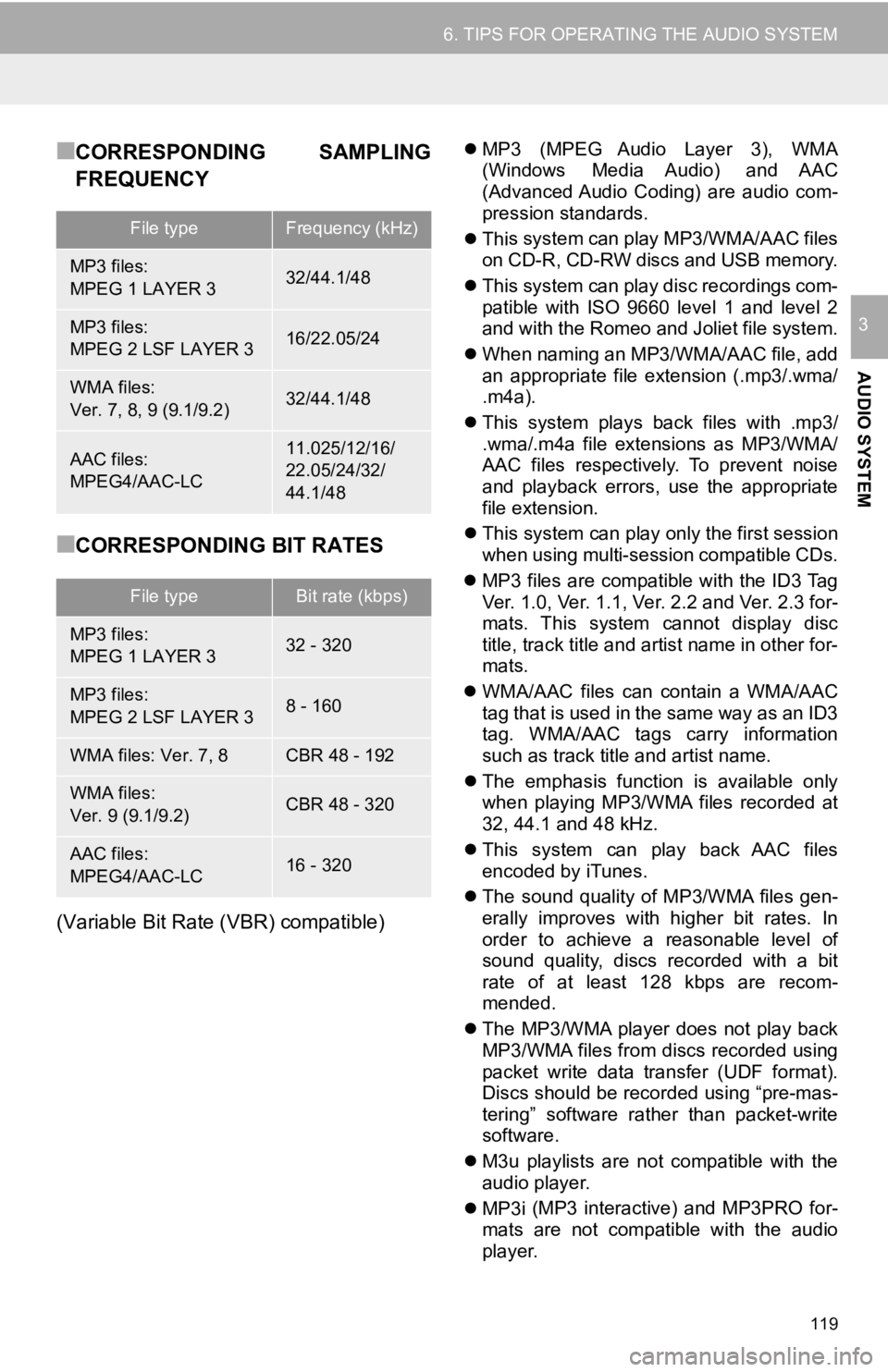
■CORRESPONDING SAMPLING
FREQUENCY
■CORRESPONDING BIT RATES
(Variable Bit Rate (VBR) compatible)
MP3 (MPEG Audio Layer 3), WMA
(Windows Media Audio) and AAC
(Advanced Audio Coding) are audio com -
pression standards.
Thi s system can play MP3/WMA/AAC files
on
CD-R, CD-RW discs and USB memory.
Thi s system can play disc recordings com-
pat
ible with ISO 9660 level 1 and level 2
and with
the Romeo and Joliet file system.
When naming an MP3/WMA/AAC file, add
an
appropriate file extension (.mp3/.wma/
.m4a).
Thi s system plays back files with .mp3/
.wma/.m4
a file extensions as MP3/WMA/
AAC files respectively. To prevent noise
and playback errors, use the appropriate
file extension.
Thi s system can play onl
y
the first session
when using multi-session compatible CDs.
MP3 files are compatible with the ID3 Tag
V
er. 1.0, Ver. 1.1, Ver. 2.2 and Ver. 2.3 for -
mats. This system cannot display disc
ti tl
e, track title and artist name in other for -
mats.
WMA/ AAC files can contain a WMA/AAC
t
ag that is used in the same way as an ID3
tag. WMA/AAC tags carry information
such as track title and artist name.
The emphasis function is available only
wh
en playing MP3/WMA files recorded at
32, 44.1 and 48 kHz.
Thi s system can play back AAC files
encod
ed by iTunes.
The sound quality of MP3/WMA files gen
-
erall
y improves with higher bit rates. In
order t
o achieve a reasonable level of
sound quality, discs recorded with a bit
rate of at least 128 kbps are recom -
mended.
The MP3/WMA player does not play back
MP3/WMA
files from discs recorded using
packet write data transfer (UDF format).
Discs should be recorded using “pre-mas -
tering” software rather than packet-write
software.
M3u playlists are not compatible with the
audi
o player.
MP3i (MP3 interactive) and MP3PRO for
-
mats
are not compatible with the audio
pla y
er.
File typeFrequency (kHz)
MP3 files:
MPEG 1 LAYER 332/44.1/48
MP3 files:
MPEG 2 LSF LAYER 316/22.05/24
WMA files:
Ver. 7, 8, 9 (9.1/9.2)32/44.1/48
AAC files:
MPEG4/AAC-LC11.025/12/16/
22.05/24/32/
44.1/48
File typeBit rate (kbps)
MP3 files:
MPEG 1 LAYER 332 - 320
MP3 files:
MPEG 2 LSF LAYER 38 - 160
WMA files: Ver. 7, 8CBR 48 - 192
WMA files:
Ver. 9 (9.1/9.2)CBR 48 - 320
AAC files:
MPEG4/AAC-LC16 - 320
Page 124 of 282
124
1. VOICE COMMAND SYSTEM OPERATION
1. VOICE COMMAND SYSTEM
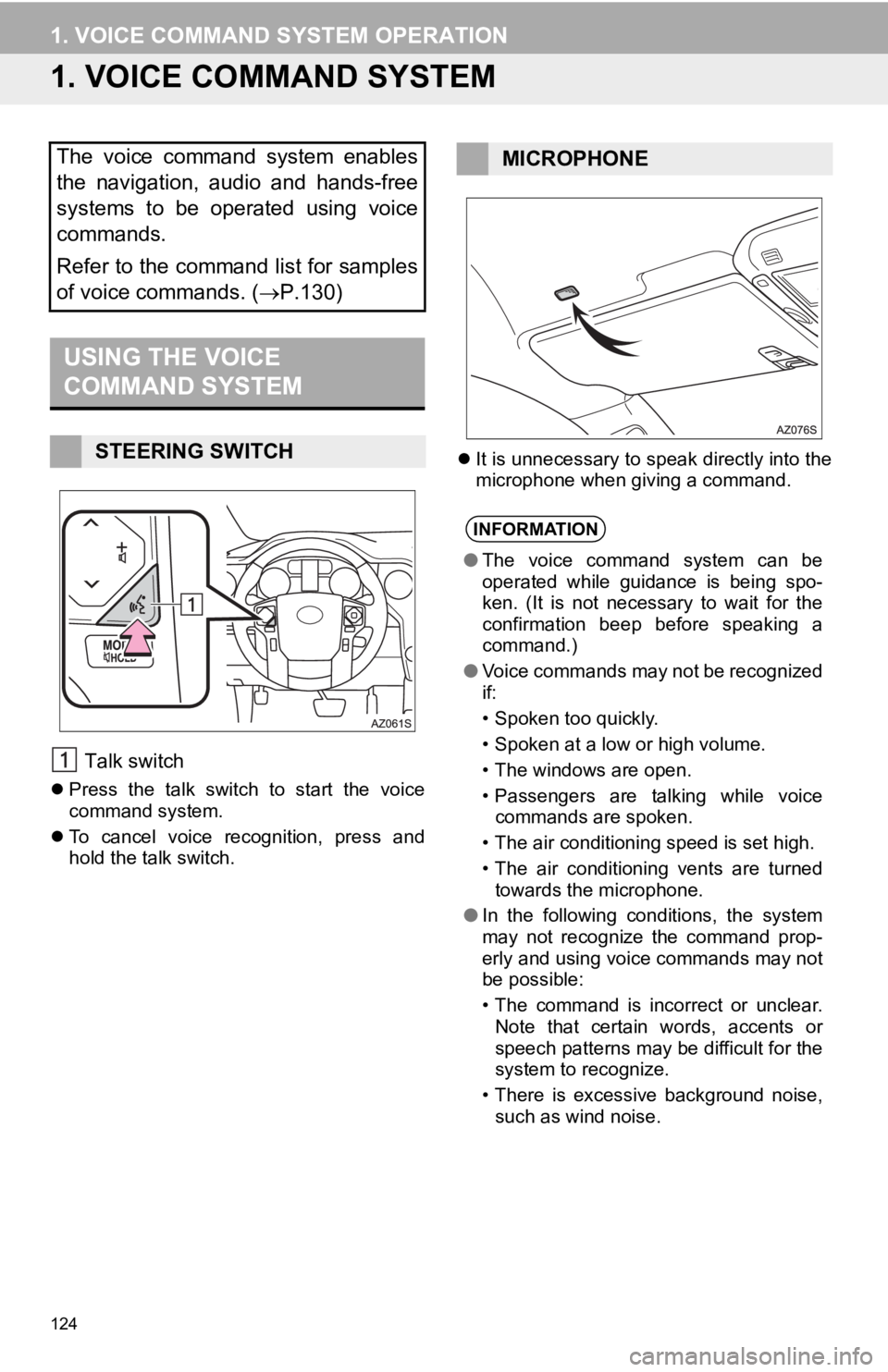
USING THE VOICE
COMMAND SYSTEM
Talk switch
Press the talk switch to start the voice
command system.
To cancel voice recognition, press and
hol d t
he talk switch.
It is unnecessary to speak directly into the
microphone when giving a command.
The voice command system enables
the navigation, audio and hands-free
systems to be operated using voice
commands.
Refer to the command list for samples
of voice commands. ( P.130)
STEERING SWITCH
MICROPHONE
INFORMATION
●The voice command system can be
operated while guidance is being spo-
ken. (It is not necessary to wait for the
confirmation beep before speaking a
command.)
● Voice commands may not be recognized
if:
• Spoken too quickly.
• Spoken at a low or high volume.
• The windows are open.
• Passengers are talking while voice
commands are spoken.
• The air conditioning speed is set high.
• The air conditioning vents are turned
towards the microphone.
● In the following conditions, the system
may not recognize the command prop-
erly and using voice commands may not
be possible:
• The command is incorrect or unclear.
Note that certain words, accents or
speech patterns may be difficult for the
system to recognize.
• There is excessive background noise,
such as wind noise.