navigation TOYOTA TUNDRA 2019 Owners Manual (in English)
[x] Cancel search | Manufacturer: TOYOTA, Model Year: 2019, Model line: TUNDRA, Model: TOYOTA TUNDRA 2019Pages: 56, PDF Size: 3.12 MB
Page 5 of 56
 3
OVERVIEW
FEATURES & OPERATIONS
TOYOTA SAFETY SENSE
SAFETY & EMERGENCY FEATURES
1 If equipped.2 For details, refer to the “Navigation and Multimedia System Owner’\
s Manual” and “2019
Entun")
3
OVERVIEW
FEATURES & OPERATIONS
TOYOTA SAFETY SENSE
SAFETY & EMERGENCY FEATURES
1 If equipped.2 For details, refer to the “Navigation and Multimedia System Owner’\
s Manual” and “2019
Entune™ Audio Quick Reference Guide.”
NOTE: Instrument panel features depend on the seat option, split seats o\
r bench.
Automatic transmission shift lever1
Windshield wiper and washer controls
Two and four-wheel drive selector
1
Display audio system2
Emergency flasher switch
Air conditioning controls
1
Tire Pressure Monitoring (warning)
System (TPMS) reset switch
Intuitive parking assist switch1
Trailer brake controller1
Power outlets-12V DC
Automatic shift lever
1
TOW/HAUL switch1
VSC OFF switch
Ignition
switch
Lane Departure Alert (LDA)
switch Dynamic Radar Cruise
Control (DRCC) switch
49087b_2019_Tundra_QRG_V2_ML_0714.indd 37/17/18 3:18 PM
Page 19 of 56
 17
SEAT HEATERS (IF EQUIPPED)
SEAT HEATERS & VENTILATORS (IF EQUIPPED)
The rear view monitor system displays an image of the view from the bump\
er of
the rear area of the vehicle. The camera for the")
17
SEAT HEATERS (IF EQUIPPED)
SEAT HEATERS & VENTILATORS (IF EQUIPPED)
The rear view monitor system displays an image of the view from the bump\
er of
the rear area of the vehicle. The camera for the rear view monitor syste\
m is located
above the license plate.
To adjust the image on the rear view monitor screen, press the “SETUP\
” button
and select “Display” on the “Setup” screen. Select “Came\
ra” to adjust the screen
contrast and brightness.
Refer to the Owner‘s Manual and Navigation and Multimedia System Owne\
r’s
Manual for limitations and more details on this system.
Rear view monitor system
Seat heaters/ventilators
OVERVIEW
FEATURES & OPERATIONS
TOYOTA SAFETY SENSE
SAFETY & EMERGENCY FEATURES
Seat heatersSeat ventilators
Hi
Hi
Mid
Mid
Low
Low
Off
Off
Driver seatDriver seatFront
passenger seatFront
passenger seat
Driver seatHi Mid Low OffFront passenger seat
The engine switch must be in the “IGNITION ON” mode.
49087b_2019_Tundra_QRG_V2_ML_0714.indd 177/17/18 3:18 PM
Page 20 of 56
18
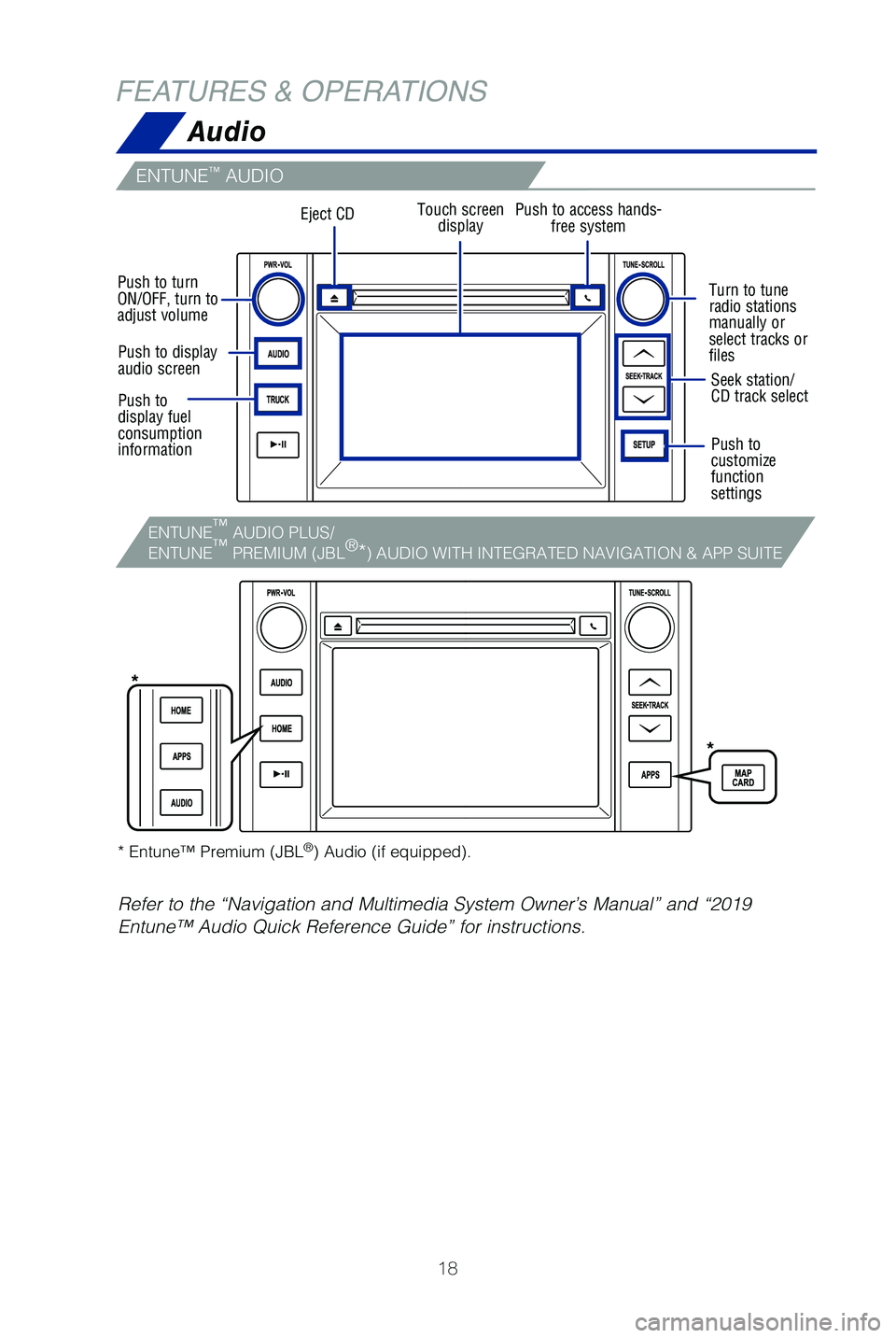
FEATURES & OPERATIONSAudio
ENTUNE™ AUDIO
Touch screendisplay
Turn to tune
radio stations
manually or
select tracks or
files
Push to turn
ON/OFF, turn to
adjust volume
Seek station/
CD track select
Push to
customize
function
settings
* Entune™ Premium (JBL
®) Audio (if equipped).
Refer to the “Navigation and Multimedia System Owner’s Manual” \
and “2019
Entune™ Audio Quick Reference Guide” for instructions.
Push to display
audio screen
Push to
display fuel
consumption
information
Eject CDPush to access hands- free system
*
*
ENTUNE™
AUDIO PLUS/
ENTUNE ™
PREMIUM (JBL ®
*) AUDIO WITH INTEGRATED NAVIGATION & APP SUITE
49087b_2019_Tundra_QRG_V2_ML_0714.indd 187/17/18 3:18 PM
Page 21 of 56
 19
USB media port
By connecting a USB-compatible portable audio device or USB memory stick\
into
the USB media port, you can listen to music through the vehicle’s spe\
aker system.
AUX port
By ins")
19
USB media port
By connecting a USB-compatible portable audio device or USB memory stick\
into
the USB media port, you can listen to music through the vehicle’s spe\
aker system.
AUX port
By inserting an AUX cable into the AUX port, you can listen to music fro\
m a
portable audio device through the vehicle’s speaker system while in A\
UX mode.
Multi-Information Display (MID)
Refer to your Owner’s Manual for complete details.
Push “DISP” to scroll through the following:
Trip information
Navigation system-linked display including compass display (if equipped)
Vehicle information Audio system-linked display
Warning message display
Settings display
“” and “” Press to select an item/change
pages
USB media/AUX port
OVERVIEW
FEATURES & OPERATIONS
TOYOTA SAFETY SENSE
SAFETY & EMERGENCY FEATURES
Enter/Set:
Press to enter/set,
press and hold to
reset
Return to
previous screen
Switch menus/Display top screen
49087b_2019_Tundra_QRG_V2_ML_0714.indd 197/17/18 3:18 PM
Page 23 of 56
 21
Bluetooth
® technology allows dialing or receipt of calls without taking hands from\
the steering wheel or using a cable to connect the compatible telephone \
and the
system.
* Push and hold to")
21
Bluetooth
® technology allows dialing or receipt of calls without taking hands from\
the steering wheel or using a cable to connect the compatible telephone \
and the
system.
* Push and hold to access Mobile Assistant. When a compatible smartphone\
is
Bluetooth® connected push and hold the off hook switch 2-3 seconds to access
Siri® Eyes Free.
Refer to the “Bluetooth
® Device Pairing Section” in this guide for more information
about phone connections and compatibility.
Refer to the “Owner’s Manual” and “Navigation and Multimedia\
System Owner’s
Manual” for more details.
Microphone
Steering wheel telephone switches
Steering wheel switches
& telephone controls (Bluetooth®)
NOTE: Concentrating on the road should always be your first priority while
driving. Do not use the Entune system if it will distract you.
OVERVIEW
FEATURES & OPERATIONS
TOYOTA SAFETY SENSE
SAFETY & EMERGENCY FEATURES
“MODE/HOLD”
Push and hold to mute or pause current
operation or change audio source.
“”Use to search within the selected
audio medium (radio, CD, etc.).
Microphone location may vary by vehicle.
• Make a call
• Receive a call
• Display “Phone” screen
• Mobile Assistant access*
• End a call
• Refuse a call
“-, +” Volume control
Voice command switch
49087b_2019_Tundra_QRG_V2_ML_0714.indd 217/17/18 3:18 PM