reset TOYOTA TUNDRA 2019 Owners Manual (in English)
[x] Cancel search | Manufacturer: TOYOTA, Model Year: 2019, Model line: TUNDRA, Model: TOYOTA TUNDRA 2019Pages: 56, PDF Size: 3.12 MB
Page 5 of 56
 3
OVERVIEW
FEATURES & OPERATIONS
TOYOTA SAFETY SENSE
SAFETY & EMERGENCY FEATURES
1 If equipped.2 For details, refer to the “Navigation and Multimedia System Owner’\
s Manual” and “2019
Entun")
3
OVERVIEW
FEATURES & OPERATIONS
TOYOTA SAFETY SENSE
SAFETY & EMERGENCY FEATURES
1 If equipped.2 For details, refer to the “Navigation and Multimedia System Owner’\
s Manual” and “2019
Entune™ Audio Quick Reference Guide.”
NOTE: Instrument panel features depend on the seat option, split seats o\
r bench.
Automatic transmission shift lever1
Windshield wiper and washer controls
Two and four-wheel drive selector
1
Display audio system2
Emergency flasher switch
Air conditioning controls
1
Tire Pressure Monitoring (warning)
System (TPMS) reset switch
Intuitive parking assist switch1
Trailer brake controller1
Power outlets-12V DC
Automatic shift lever
1
TOW/HAUL switch1
VSC OFF switch
Ignition
switch
Lane Departure Alert (LDA)
switch Dynamic Radar Cruise
Control (DRCC) switch
49087b_2019_Tundra_QRG_V2_ML_0714.indd 37/17/18 3:18 PM
Page 21 of 56
 19
USB media port
By connecting a USB-compatible portable audio device or USB memory stick\
into
the USB media port, you can listen to music through the vehicle’s spe\
aker system.
AUX port
By ins")
19
USB media port
By connecting a USB-compatible portable audio device or USB memory stick\
into
the USB media port, you can listen to music through the vehicle’s spe\
aker system.
AUX port
By inserting an AUX cable into the AUX port, you can listen to music fro\
m a
portable audio device through the vehicle’s speaker system while in A\
UX mode.
Multi-Information Display (MID)
Refer to your Owner’s Manual for complete details.
Push “DISP” to scroll through the following:
Trip information
Navigation system-linked display including compass display (if equipped)
Vehicle information Audio system-linked display
Warning message display
Settings display
“” and “” Press to select an item/change
pages
USB media/AUX port
OVERVIEW
FEATURES & OPERATIONS
TOYOTA SAFETY SENSE
SAFETY & EMERGENCY FEATURES
Enter/Set:
Press to enter/set,
press and hold to
reset
Return to
previous screen
Switch menus/Display top screen
49087b_2019_Tundra_QRG_V2_ML_0714.indd 197/17/18 3:18 PM
Page 34 of 56
 32
TOYOTA SAFETY SENSE™
TURNING THE LDA SYSTEM ON/OFF
Press the LDA switch to turn the LDA system on. Depress again to turn it\
off.
Note: Operation of the LDA system and setting adjustments contin")
32
TOYOTA SAFETY SENSE™
TURNING THE LDA SYSTEM ON/OFF
Press the LDA switch to turn the LDA system on. Depress again to turn it\
off.
Note: Operation of the LDA system and setting adjustments continues in the
same condition regardless of Ignition cycle until changed by the driver or the
system is reset.
Refer to a Toyota Owner’s Manual for additional information on LDA op\
eration,
settings adjustments, limitations, and precautions before attempting to \
use it.
LANE DEPARTURE ALERT
LDA function display
Lane marker
(2)
(1)
Lane Departure Alert (LDA) indicator flashes orange when operating.
49087b_2019_Tundra_QRG_V2_ML_0714.indd 327/17/18 3:19 PM
Page 35 of 56
33
ADJUSTING LDA ALERT SENSITIVITY
The driver can adjust the sensitivity of the LDA (warning) function from the
Multi-Information Display (MID) customization screen.High - Is designed to warn approximately before the front
tire crosses the lane marker.
Normal - Is designed to warn approximately when the front
tire crosses the lane marker.
(1) Press “SETUP” or “APPS” switches on the multimedia system.
If you have Entune AudIo Plus, select “Setup” on the “Apps” \
screen.
(2) Select “Vehicle” on the “Setup” screen.
(3) Select “Vehicle Customization” on the “Vehicle Settings” screen.
(4) Choose a category to display the settings.
(5) Select the setting to be changed.
(6) Select “+” or “-” to choose the desired level, then select “OK.”
Note: Operation of the LDA system and setting adjustments continues in the
same condition regardless of Ignition cycle until changed by the driver or the
system is reset.
LANE DEPARTURE ALERT (CONTINUED)
The LDA function displays when the Multi-Information Display (MID) is switched to
the driving assist system information screen.
(1) The system displays solid white lines on the LDA indicator when visible lane
markers on the road are detected. A side flashes orange to alert the dri\
ver when
the vehicle deviates from its lane.
(2) The system displays outlines on the LDA indicator when lane markers on the
road are not detected or the function is temporarily cancelled.
Note: When operation conditions are no longer met, a function may be
temporarily canceled. However, when the operation conditions are met again,
operation of the function is automatically restored. For example, LDA may not
function on the side(s) where white/yellow lines are not detectable.
OVERVIEW
FEATURES & OPERATIONS
TOYOTA SAFETY SENSE
SAFETY & EMERGENCY FEATURES
49087b_2019_Tundra_QRG_V2_ML_0714.indd 337/17/18 3:19 PM
Page 36 of 56
 34
TOYOTA SAFETY SENSE™
SWAY WARNING SYSTEM
SWS is a function of LDA and is designed to detect swaying based on the \
vehicle
location in the lane and the driver’s steering wheel operation. To he")
34
TOYOTA SAFETY SENSE™
SWAY WARNING SYSTEM
SWS is a function of LDA and is designed to detect swaying based on the \
vehicle
location in the lane and the driver’s steering wheel operation. To he\
lp prevent
swaying, the system alerts the driver using a buzzer sound and a warning\
displays
in the MID.
Continuous lane deviations from
swaying.
Gentle swaying from driver’s
inattentiveness.
Acute steering wheel operation after the
number of operations decrease due to driver’s
inattentiveness.
DISABLING LDA SWAY WARNING SYSTEM
ADJUSTING SWAY ALERT SENSITIVITY
(1) Press “” switches and select from the Multi-Information Display (MID).
(2) Press “
” switches and select the setting function and then press “.”
(3) Press “
” to go back to the menu. Also, use “” to switch menus or display
top screen.
(1) Press “SETUP” or “APPS” switches on the multimedia system.
If you have Entune AudIo Plus, select “Setup” on the “Apps” \
screen.
(2) Select “Vehicle” on the “Setup” screen.
(3) Select “Vehicle Customization” on the “Vehicle Settings” screen.
(4) Choose a category to display the settings.
(5) Select the setting to be changed.
(6) Select “+” or “-” to choose the desired level, then select “OK.”
Note: Operation of the LDA system and setting adjustments continues in the
same condition regardless of Ignition cycle until changed by the driver or the
system is reset.
49087b_2019_Tundra_QRG_V2_ML_0714.indd 347/17/18 3:19 PM
Page 38 of 56

36
TOYOTA SAFETY SENSE™
ADJUSTING DISTANCE
To change the vehicle-to-
vehicle distance
Push the “
” button
to cycle through the
settings, which will change
progressively.
This mode employs a radar sensor to detect the presence of a preceding v\
ehicle
up to approximately 328 ft (100 m) ahead, determines the current vehicle-to-vehicle
following distance and operates to maintain a preset following distance \
from the
vehicle ahead. These distances vary based on vehicle speed.
(1) (2) (3)
(1) Constant speed cruising when there are no vehicles ahead
The vehicle travels at the speed set by the driver. The desired vehicle-\
to-
vehicle distance can also be set by operating the vehicle-to-vehicle dis\
tance
control.
(2) Deceleration cruising and follow-up cruising when a preceding vehicle
driving slower than the set speed appears When a vehicle is detected running ahead of you, the system automaticall\
y
decelerates your vehicle. When a greater reduction in vehicle speed is
necessary, the system applies the brakes (the brake lights will come on at this
time). The system will respond to changes in the speed of the vehicle ahead
in order to maintain the vehicle-to-vehicle distance set by the driver. \
A warning
tone warns you when the system cannot decelerate sufficiently to prevent\
your
vehicle from closing in on the vehicle ahead.
Note: Vehicle-to-vehicle distance will close in when traveling on long downhill
slopes.
Preceding
vehicle mark LONG
(default setting) MIDDLE SHORT
49087b_2019_Tundra_QRG_V2_ML_0714.indd 367/17/18 3:19 PM
Page 41 of 56
39
Seat belts
SAFETY & EMERGENCY FEATURES
baT
Keep as low on
hips as possible
Take up slack
Too high
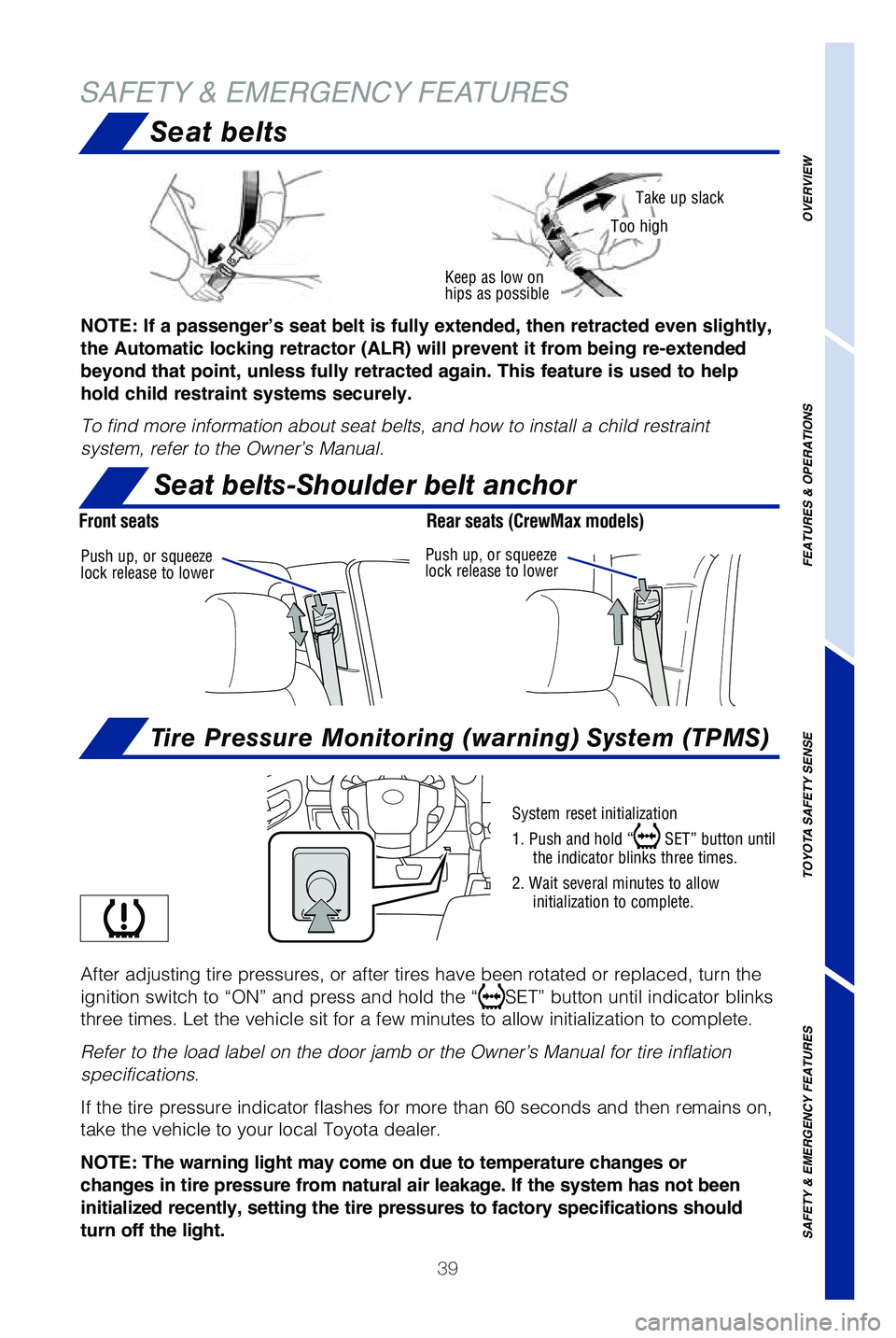
System reset initialization
1. Push and hold “
SET” button until
the indicator blinks three times.
2. Wait several minutes to allow initialization to complete.
After adjusting tire pressures, or after tires have been rotated or repl\
aced, turn the
ignition switch to “ON” and press and hold the “
SET” button until indicator blinks
three times. Let the vehicle sit for a few minutes to allow initializati\
on to complete.
Refer to the load label on the door jamb or the Owner’s Manual for ti\
re inflation
specifications.
If the tire pressure indicator flashes for more than 60 seconds and then\
remains on,
take the vehicle to your local Toyota dealer.
NOTE: The warning light may come on due to temperature changes or
changes in tire pressure from natural air leakage. If the system has not been
initialized recently, setting the tire pressures to factory specificatio\
ns should
turn off the light.
Push up, or squeeze
lock release to lower Push up, or squeeze
lock release to lower
NOTE: If a passenger’s seat belt is fully extended, then retracted even slightly,
the Automatic locking retractor (ALR) will prevent it from being re-extended
beyond that point, unless fully retracted again. This feature is used to help
hold child restraint systems securely.
To find more information about seat belts, and how to install a child re\
straint
system, refer to the Owner’s Manual.
Seat belts-Shoulder belt anchor
Tire Pressure Monitoring (warning) System (TPMS)
Front seats
Rear seats (CrewMax models)
OVERVIEW
FEATURES & OPERATIONS
TOYOTA SAFETY SENSE
SAFETY & EMERGENCY FEATURES
49087b_2019_Tundra_QRG_V2_ML_0714.indd 397/17/18 3:19 PM