wheel TOYOTA TUNDRA 2019 Owners Manual (in English)
[x] Cancel search | Manufacturer: TOYOTA, Model Year: 2019, Model line: TUNDRA, Model: TOYOTA TUNDRA 2019Pages: 56, PDF Size: 3.12 MB
Page 3 of 56
1
OVERVIEW
FEATURES & OPERATIONS
TOYOTA SAFETY SENSE
SAFETY & EMERGENCY FEATURES
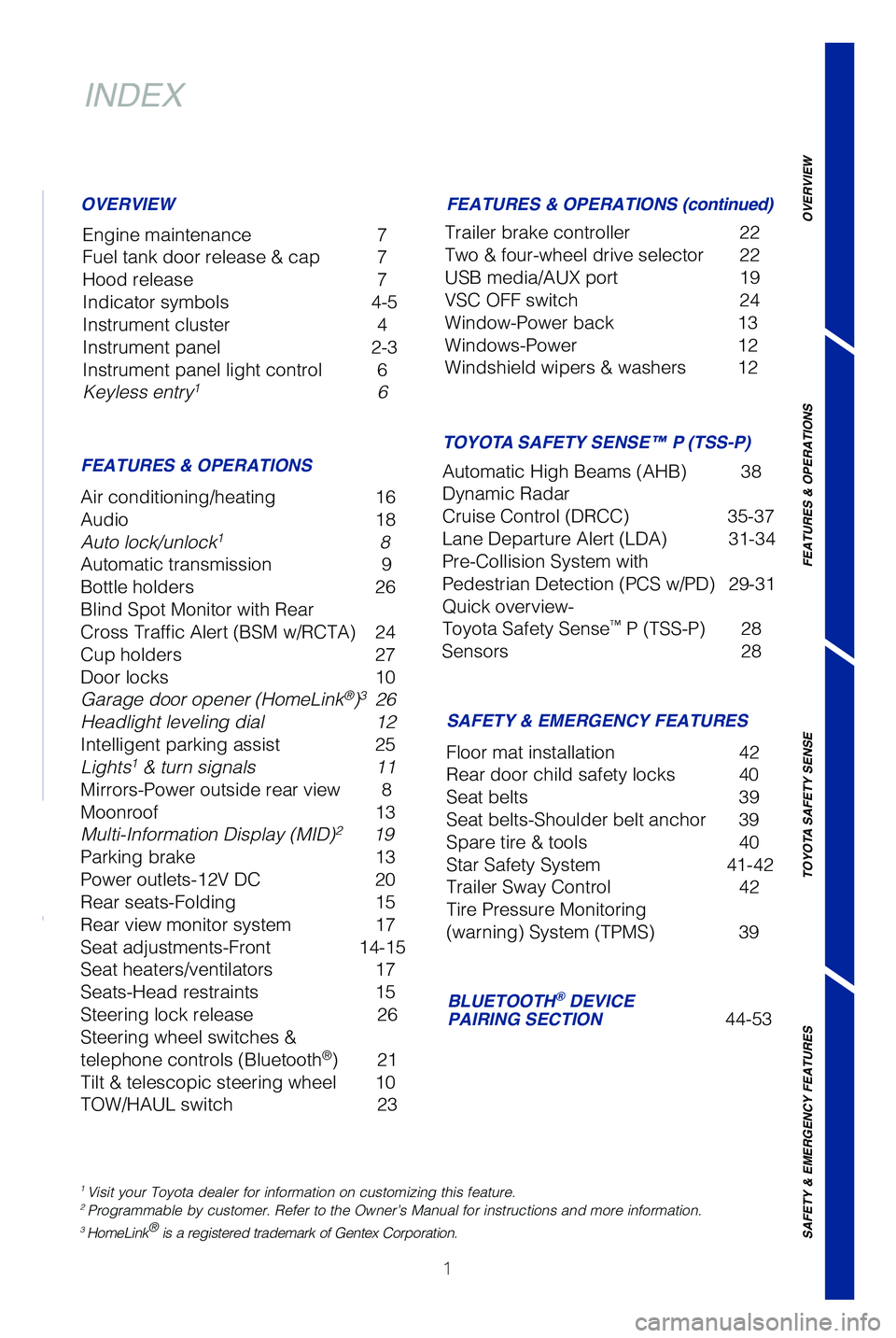
INDEX
Engine maintenance 7
Fuel tank door release & cap 7
Hood release 7
Indicator symbols 4-5
Instrument cluster 4
Instrument panel 2-3
Instrument panel light control 6
Keyless entry
1 6
OVERVIEW
FEATURES & OPERATIONS FEATURES & OPERATIONS (continued)
SAFETY & EMERGENCY FEATURES
Air conditioning/heating
16
Audio 18
Auto lock/unlock
1 8
Automatic transmission 9
Bottle holders 26
Blind Spot Monitor with Rear
Cross Traffic Alert (BSM w/RCTA) 24
Cup holders 27
Door locks 10
Garage door opener (HomeLink
®)3 26
Headlight leveling dial 12
Intelligent parking assist 25
Lights
1 & turn signals 11
Mirrors-Power outside rear view 8
Moonroof 13
Multi-Information Display (MID)
2 19
Parking brake 13
Power outlets-12V DC 20
Rear seats-Folding 15
Rear view monitor system 17
Seat adjustments-Front 14-15
Seat heaters/ventilators 17
Seats-Head restraints 15
Steering lock release 26
Steering wheel switches &
telephone controls (Bluetooth
®) 21
Tilt & telescopic steering wheel 10
TOW/HAUL switch 23Trailer brake controller
22
Two & four-wheel drive selector 22
USB media/AUX port 19
VSC OFF switch 24
Window-Power back 13
Windows-Power 12
Windshield wipers & washers 12
Floor mat installation 42
Rear door child safety locks 40
Seat belts 39
Seat belts-Shoulder belt anchor 39
Spare tire & tools 40
Star Safety System 41-42
Trailer Sway Control 42
Tire Pressure Monitoring
(warning) System (TPMS) 39
BLUETOOTH® DEVICE
PAIRING SECTION 44-53
1 Visit your Toyota dealer for information on customizing this feature.2 Programmable by customer. Refer to the Owner’s Manual for instruction\
s and more information.3 HomeLink® is a registered trademark of Gentex Corporation.
TOYOTA SAFETY SENSE™ P (TSS-P)
Automatic High Beams (AHB) 38
Dynamic Radar
Cruise Control (DRCC) 35-37
Lane Departure Alert (LDA) 31-34
Pre-Collision System with
Pedestrian Detection (PCS w/PD) 29-31
Quick overview-
Toyota Safety Sense
™ P (TSS-P) 28
Sensors 28
49087b_2019_Tundra_QRG_V2_ML_0714.indd 17/17/18 3:18 PM
Page 4 of 56
2
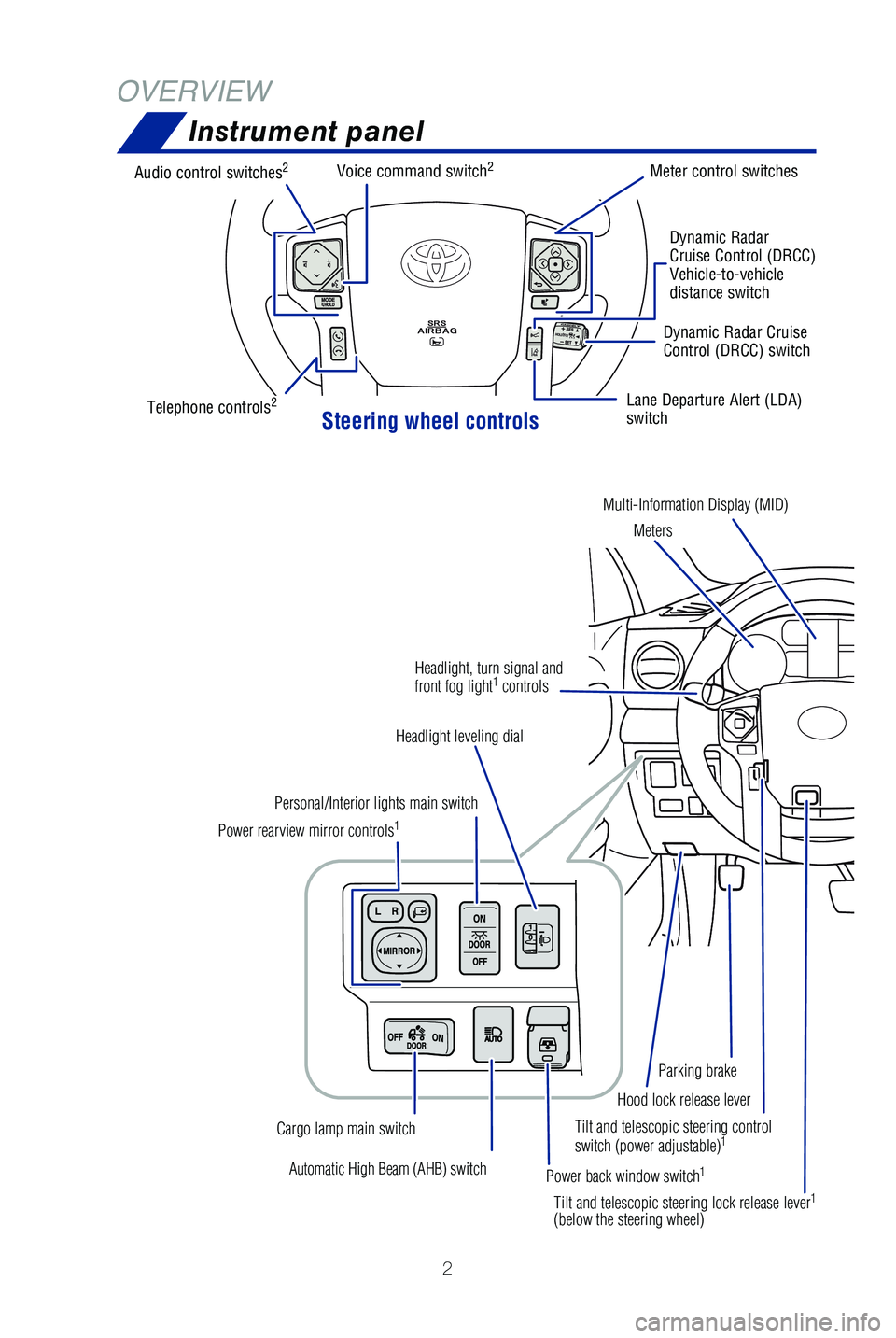
Instrument panel
OVERVIEW
Tilt and telescopic steering control
switch (power adjustable)1
Automatic High Beam (AHB) switch
Power rearview mirror controls
1
Personal/Interior lights main switch
Headlight leveling dial
Power back window switch
1
Cargo lamp main switch Tilt and telescopic steering lock release lever
1
(below the steering wheel)Hood lock release lever
Parking brake
Headlight, turn signal and
front fog light
1
controls
Steering wheel controls
Audio control switches2
Telephone controls2
Voice command switch2Meter control switches
Dynamic Radar
Cruise Control (DRCC)
Vehicle-to-vehicle
distance switch
Lane Departure Alert (LDA)
switch Dynamic Radar Cruise
Control (DRCC) switch
Multi-Information Display (MID) Meters
49087b_2019_Tundra_QRG_V2_ML_0714.indd 27/17/18 3:18 PM
Page 5 of 56
 3
OVERVIEW
FEATURES & OPERATIONS
TOYOTA SAFETY SENSE
SAFETY & EMERGENCY FEATURES
1 If equipped.2 For details, refer to the “Navigation and Multimedia System Owner’\
s Manual” and “2019
Entun")
3
OVERVIEW
FEATURES & OPERATIONS
TOYOTA SAFETY SENSE
SAFETY & EMERGENCY FEATURES
1 If equipped.2 For details, refer to the “Navigation and Multimedia System Owner’\
s Manual” and “2019
Entune™ Audio Quick Reference Guide.”
NOTE: Instrument panel features depend on the seat option, split seats o\
r bench.
Automatic transmission shift lever1
Windshield wiper and washer controls
Two and four-wheel drive selector
1
Display audio system2
Emergency flasher switch
Air conditioning controls
1
Tire Pressure Monitoring (warning)
System (TPMS) reset switch
Intuitive parking assist switch1
Trailer brake controller1
Power outlets-12V DC
Automatic shift lever
1
TOW/HAUL switch1
VSC OFF switch
Ignition
switch
Lane Departure Alert (LDA)
switch Dynamic Radar Cruise
Control (DRCC) switch
49087b_2019_Tundra_QRG_V2_ML_0714.indd 37/17/18 3:18 PM
Page 7 of 56
5
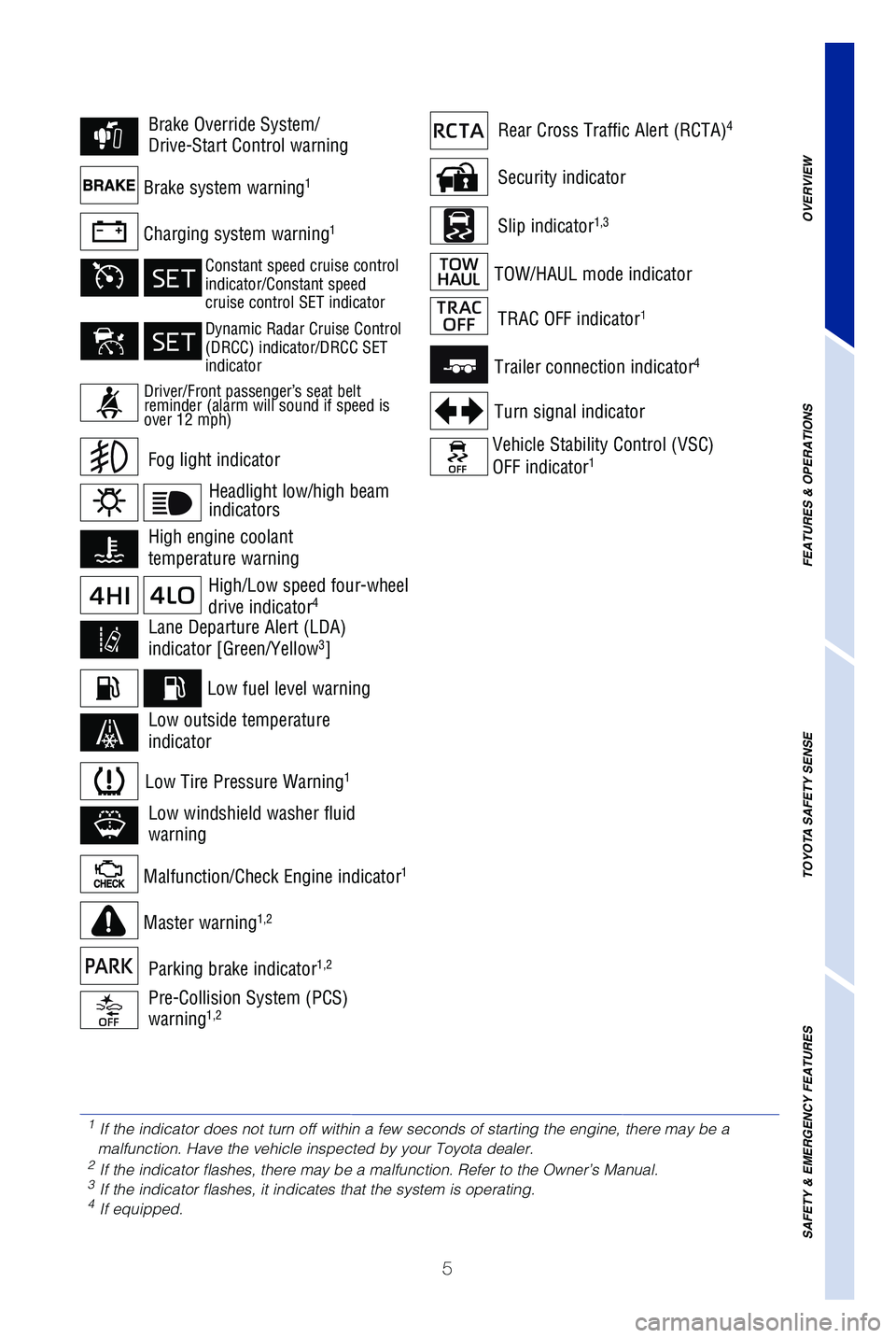
Security indicator
Slip indicator1,3Charging system warning1
Brake system warning1
Malfunction/Check Engine indicator1
Low fuel level warning
Master warning1,2
Trailer connection indicator4
Turn signal indicator
Vehicle Stability Control (VSC)
OFF indicator1
TOW/HAUL mode indicator
Low Tire Pressure Warning1
Fog light indicator
Brake Override System/
Drive-Start Control warningRear Cross Traffic Alert (RCTA)4
High engine coolant
temperature warning
TRAC OFF indicator1
Lane Departure Alert (LDA)
indicator [Green/Yellow3]
Pre-Collision System (PCS)
warning1,2
Low windshield washer fluid
warning
Low outside temperature
indicator
Parking brake indicator1,2
High/Low speed four-wheel
drive indicator4
1 If the indicator does not turn off within a few seconds of starting the \
engine, there may be a
malfunction. Have the vehicle inspected by your Toyota dealer.
2 If the indicator flashes, there may be a malfunction. Refer to the Owner\
’s Manual.3 If the indicator flashes, it indicates that the system is operating.4 If equipped.
Driver/Front passenger’s seat belt
reminder (alarm will sound if speed is
over 12 mph)
Constant speed cruise control
indicator/Constant speed
cruise control SET indicator
Dynamic Radar Cruise Control
(DRCC) indicator/DRCC SET
indicator
Headlight low/high beam
indicators
OVERVIEW
FEATURES & OPERATIONS
TOYOTA SAFETY SENSE
SAFETY & EMERGENCY FEATURES
49087b_2019_Tundra_QRG_V2_ML_0714.indd 57/17/18 3:18 PM
Page 12 of 56
10
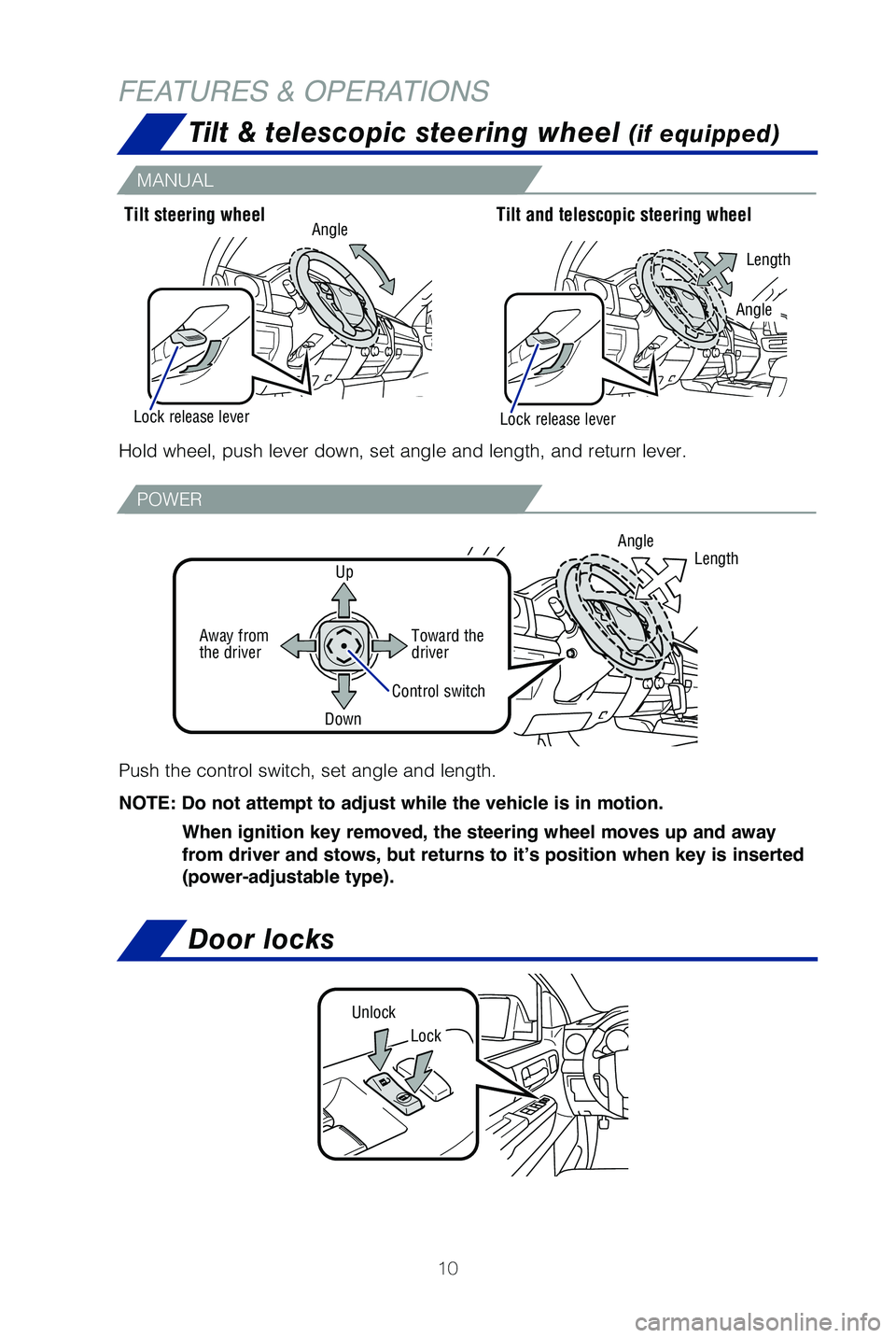
Tilt & telescopic steering wheel (if equipped)
Door locks
Lock
Unlock
Hold wheel, push lever down, set angle and length, and return lever.Tilt steering wheel
Tilt and telescopic steering wheel
Length
Lock release lever
Lock release lever Angle
Push the control switch, set angle and length.
NOTE: Do not attempt to adjust while the vehicle is in motion.
When ignition key removed, the steering wheel moves up and away
from driver and stows, but returns to it’s position when key is inserted
(power-adjustable type).
Angle
Control switchLength
Up
Toward the
driver
Away from
the driver
Down
Angle
FEATURES & OPERATIONS
MANUAL
POWER
49087b_2019_Tundra_QRG_V2_ML_0714.indd 107/17/18 3:18 PM
Page 23 of 56
 21
Bluetooth
® technology allows dialing or receipt of calls without taking hands from\
the steering wheel or using a cable to connect the compatible telephone \
and the
system.
* Push and hold to")
21
Bluetooth
® technology allows dialing or receipt of calls without taking hands from\
the steering wheel or using a cable to connect the compatible telephone \
and the
system.
* Push and hold to access Mobile Assistant. When a compatible smartphone\
is
Bluetooth® connected push and hold the off hook switch 2-3 seconds to access
Siri® Eyes Free.
Refer to the “Bluetooth
® Device Pairing Section” in this guide for more information
about phone connections and compatibility.
Refer to the “Owner’s Manual” and “Navigation and Multimedia\
System Owner’s
Manual” for more details.
Microphone
Steering wheel telephone switches
Steering wheel switches
& telephone controls (Bluetooth®)
NOTE: Concentrating on the road should always be your first priority while
driving. Do not use the Entune system if it will distract you.
OVERVIEW
FEATURES & OPERATIONS
TOYOTA SAFETY SENSE
SAFETY & EMERGENCY FEATURES
“MODE/HOLD”
Push and hold to mute or pause current
operation or change audio source.
“”Use to search within the selected
audio medium (radio, CD, etc.).
Microphone location may vary by vehicle.
• Make a call
• Receive a call
• Display “Phone” screen
• Mobile Assistant access*
• End a call
• Refuse a call
“-, +” Volume control
Voice command switch
49087b_2019_Tundra_QRG_V2_ML_0714.indd 217/17/18 3:18 PM
Page 24 of 56
 22
FEATURES & OPERATIONS
Push and turn
Turn
Shifting between “2WD” and “4H”
Reduce speed to less than 62 mph, then turn control to “2WD” or “\
4H.”
Shifting between “4H” and “4Lâ")
22
FEATURES & OPERATIONS
Push and turn
Turn
Shifting between “2WD” and “4H”
Reduce speed to less than 62 mph, then turn control to “2WD” or “\
4H.”
Shifting between “4H” and “4L”
When stopped shift to “N” position, then push and turn to “4L”\
from “4H.”
NOTE: For best fuel economy and performance under normal driving
conditions, keep in “2WD” position. 2WD
High speed (2WD) Normal driving on dry hard-surfaced roads.
4HHigh speed (4WD) For driving only on roads that permit the tires to
slide, like off-road, icy or snow-covered roads.
4LLow speed (4WD)
For maximum power and traction when climbing or descending steep
hills, off-road driving, and hard pulling in sand, mud or deep snow.
Turn
Two & four-wheel drive selector (if equipped)
The trailer brakes can be controlled by the Trailer brake controller via\
the 7-pin
connector. By selecting the type of brakes that are being used on the tr\
ailer
(electric or electric-over-hydraulic) and setting the gain for the controller, the
manual TRAILER BRAKE OUTPUT slider is used to slow just the trailer. The\
vehicle
brake pedal will also slow down as well as stop the trailer when applied\
. Gain
values, manual brake outputs, trailer brake types and the trailer connec\
tion status
are displayed in the multi-information display.
Refer to the Owner’s Manual for more details.
Trailer brake controller (if equipped)
Trailer
connector
indicator
Trailer brake type
GAIN (+/-) selection button
Manual TRAILER
BRAKE OUTPUT slider
49087b_2019_Tundra_QRG_V2_ML_0714.indd 227/17/18 3:18 PM
Page 28 of 56
26
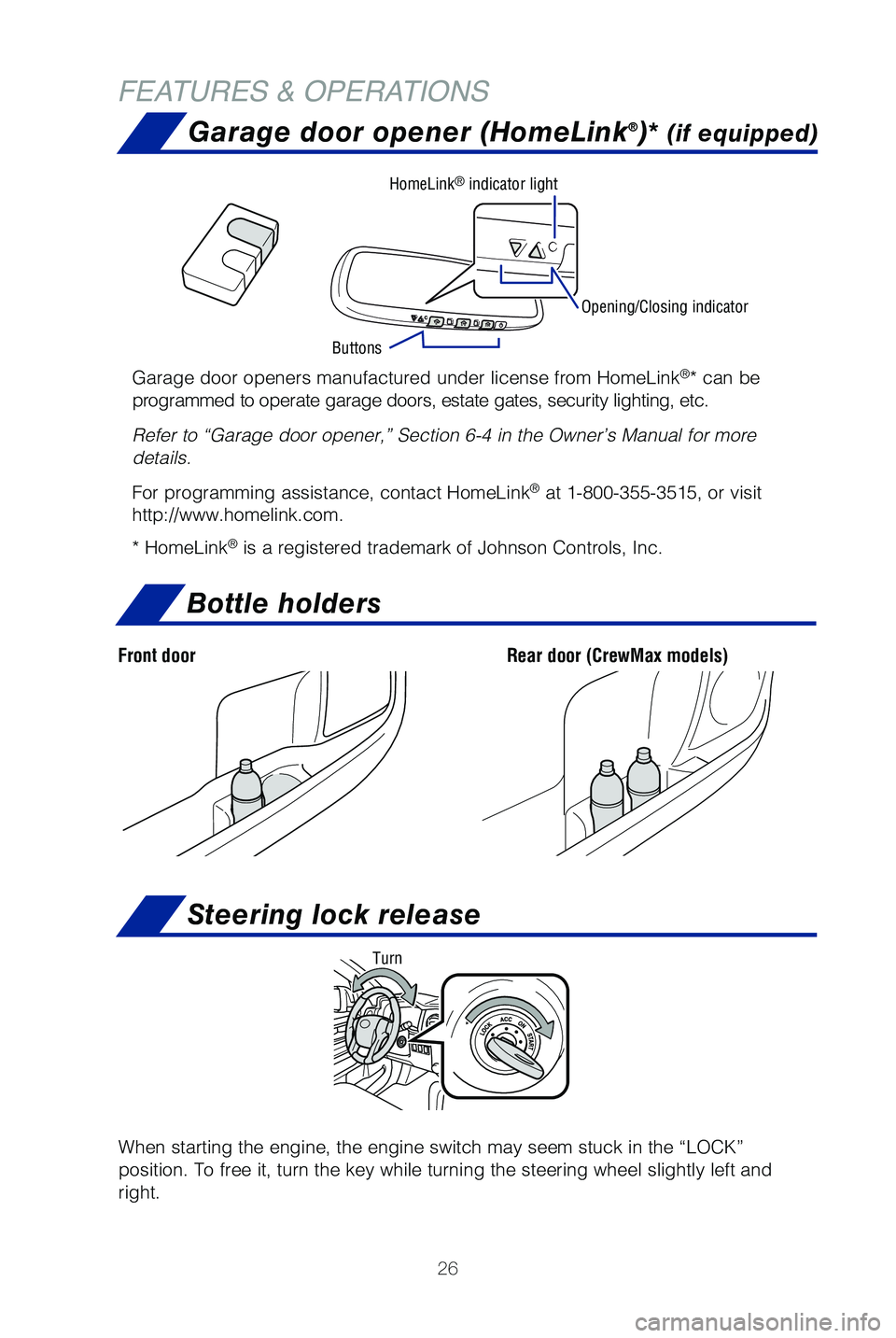
Bottle holders
FEATURES & OPERATIONS
Rear door (CrewMax models)Front door
Garage door opener (HomeLink®)* (if equipped)
Garage door openers manufactured under license from HomeLink®* can be
programmed to operate garage doors, estate gates, security lighting, etc\
.
Refer to “Garage door opener,” Section 6-4 in the Owner’s Manua\
l for more
details.
For programming assistance, contact HomeLink
® at 1-800-355-3515, or visit
http://www.homelink.com.
* HomeLink
® is a registered trademark of Johnson Controls, Inc.
Opening/Closing indicator
Buttons HomeLink
® indicator light
Steering lock release
When starting the engine, the engine switch may seem stuck in the “LO\
CK”
position. To free it, turn the key while turning the steering wheel slig\
htly left and
right.
Turn
49087b_2019_Tundra_QRG_V2_ML_0714.indd 267/17/18 3:18 PM
Page 33 of 56

31
DISABLING PRE-COLLISION SYSTEM (PCS)
(1) Press “” switches and select from the Multi-Information Display (MID).
(2) Press “
” switches and select “PCS” from the MID and then press “”.
(3) Press “
” switches and select “PCS” and then press “” to select the desired
setting ON/OFF.
(4) Press “
” to go back to the menu. Also, use “” to switch menus or display
top screen.
Refer to a Toyota Owner’s Manual for additional information on PCS op\
eration,
settings adjustments, limitations, and precautions before attempting to \
use it.
Lane Departure Alert (LDA)
LDA in TSS-P uses an in-vehicle camera designed to detect visible white \
and yellow
lane markers in front of the vehicle and the vehicle’s position on th\
e road. If the
system determines that the vehicle is starting to unintentionally deviat\
e from its lane,
the system alerts the driver with an audio and visual alert. When the al\
erts occur, the
driver must check the surrounding road situation and carefully operate t\
he steering
wheel to move the vehicle back to the center part of their lane.
LDA is designed to function at speeds of approximately 32 mph (50 km/h) or higher
on relatively straight roadways.
OVERVIEW
FEATURES & OPERATIONS
TOYOTA SAFETY SENSE
SAFETY & EMERGENCY FEATURES
49087b_2019_Tundra_QRG_V2_ML_0714.indd 317/17/18 3:19 PM
Page 36 of 56
 34
TOYOTA SAFETY SENSE™
SWAY WARNING SYSTEM
SWS is a function of LDA and is designed to detect swaying based on the \
vehicle
location in the lane and the driver’s steering wheel operation. To he")
34
TOYOTA SAFETY SENSE™
SWAY WARNING SYSTEM
SWS is a function of LDA and is designed to detect swaying based on the \
vehicle
location in the lane and the driver’s steering wheel operation. To he\
lp prevent
swaying, the system alerts the driver using a buzzer sound and a warning\
displays
in the MID.
Continuous lane deviations from
swaying.
Gentle swaying from driver’s
inattentiveness.
Acute steering wheel operation after the
number of operations decrease due to driver’s
inattentiveness.
DISABLING LDA SWAY WARNING SYSTEM
ADJUSTING SWAY ALERT SENSITIVITY
(1) Press “” switches and select from the Multi-Information Display (MID).
(2) Press “
” switches and select the setting function and then press “.”
(3) Press “
” to go back to the menu. Also, use “” to switch menus or display
top screen.
(1) Press “SETUP” or “APPS” switches on the multimedia system.
If you have Entune AudIo Plus, select “Setup” on the “Apps” \
screen.
(2) Select “Vehicle” on the “Setup” screen.
(3) Select “Vehicle Customization” on the “Vehicle Settings” screen.
(4) Choose a category to display the settings.
(5) Select the setting to be changed.
(6) Select “+” or “-” to choose the desired level, then select “OK.”
Note: Operation of the LDA system and setting adjustments continues in the
same condition regardless of Ignition cycle until changed by the driver or the
system is reset.
49087b_2019_Tundra_QRG_V2_ML_0714.indd 347/17/18 3:19 PM