air conditioning TOYOTA TUNDRA 2019 (in English) Owner's Manual
[x] Cancel search | Manufacturer: TOYOTA, Model Year: 2019, Model line: TUNDRA, Model: TOYOTA TUNDRA 2019Pages: 672, PDF Size: 14.1 MB
Page 424 of 672
4246-1. Using the air conditioning system
■Using automatic mode
Fan speed is adjusted automatically according to the temperatur e setting and
the ambient conditions.
Therefore, the fan may stop for a while until warm or cool air is ready to flow
immediately after is pressed.
■ Fogging up of the windows
●The windows will easily fog up when the humidity in the vehicle is high.
Turning on will dehumidify the air from the outlets and defog the
windshield effectively.
● If you turn off, the windows may fog up more easily.
● The windows may fog up if the recirculated air mode is used.
■ Outside/recirculated air mode
●When driving on dusty roads such as tunnels or in heavy traffic, set the out-
side/recirculated air mode button to the recirculated air mode. This is effec-
tive in preventing outside air from entering the vehicle interi or. During
cooling operation, setting the recirculated air mode will also cool the vehicle
interior effectively.
● Outside/recirculated air mode may automatically switch dependin g on the
temperature setting or the inside temperature.
■ When the outside temperature exceeds 75°F (24°C) and the air co ndition-
ing system is on
● In order to reduce the air conditioning power consumption, the air condition-
ing system may switch to recirculated air mode automatically. This may also
reduce fuel consumption.
● Recirculated air mode is selected as a default mode when the en gine switch
is in the “ON” position.
● It is possible to switch to outside air mode at any time by pre ssing .
■ When the outside tempera ture falls to nearly 32F (0 C)
The dehumidification function may not operate even when is selected.
Page 425 of 672
4256-1. Using the air conditioning system
6
Interior features
■Ventilation and air conditioning odors
●To let fresh air in, set the air conditioning system to the out side air mode.
● During use, various odors from inside and outside the vehicle m ay enter into
and accumulate in the air conditioning system. This may then ca use odor to
be emitted from the vents.
● To reduce potential odors from occurring:
• It is recommended that the air conditioning system be set to o utside air
mode prior to turning the vehicle off.
• The start timing of the blower may be delayed for a short peri od of time
immediately after the air conditioning system is started in aut omatic
mode.
■ Air conditioning filter
P. 513
WARNING
■To prevent the windshield from fogging up
● Do not use
during cool air operation in extremely humid weather.
The difference between the temperature of the outside air and t hat of the
windshield can cause the outer surface of the windshield to fog up, block-
ing your vision.
■ To prevent burns (vehicles with rear view mirror defoggers and wind-
shield wiper de-icer)
● Do not touch the rear view mirror surfaces when the outside rear view mir-
ror defoggers are on.
● Do not touch the glass at lower part of the windshield or to th e side of the
front pillars, when the windshield wiper de-icer is on.
NOTICE
■ To prevent battery discharge
Do not leave the air conditioning system on longer than necessa ry when the
engine is stopped.
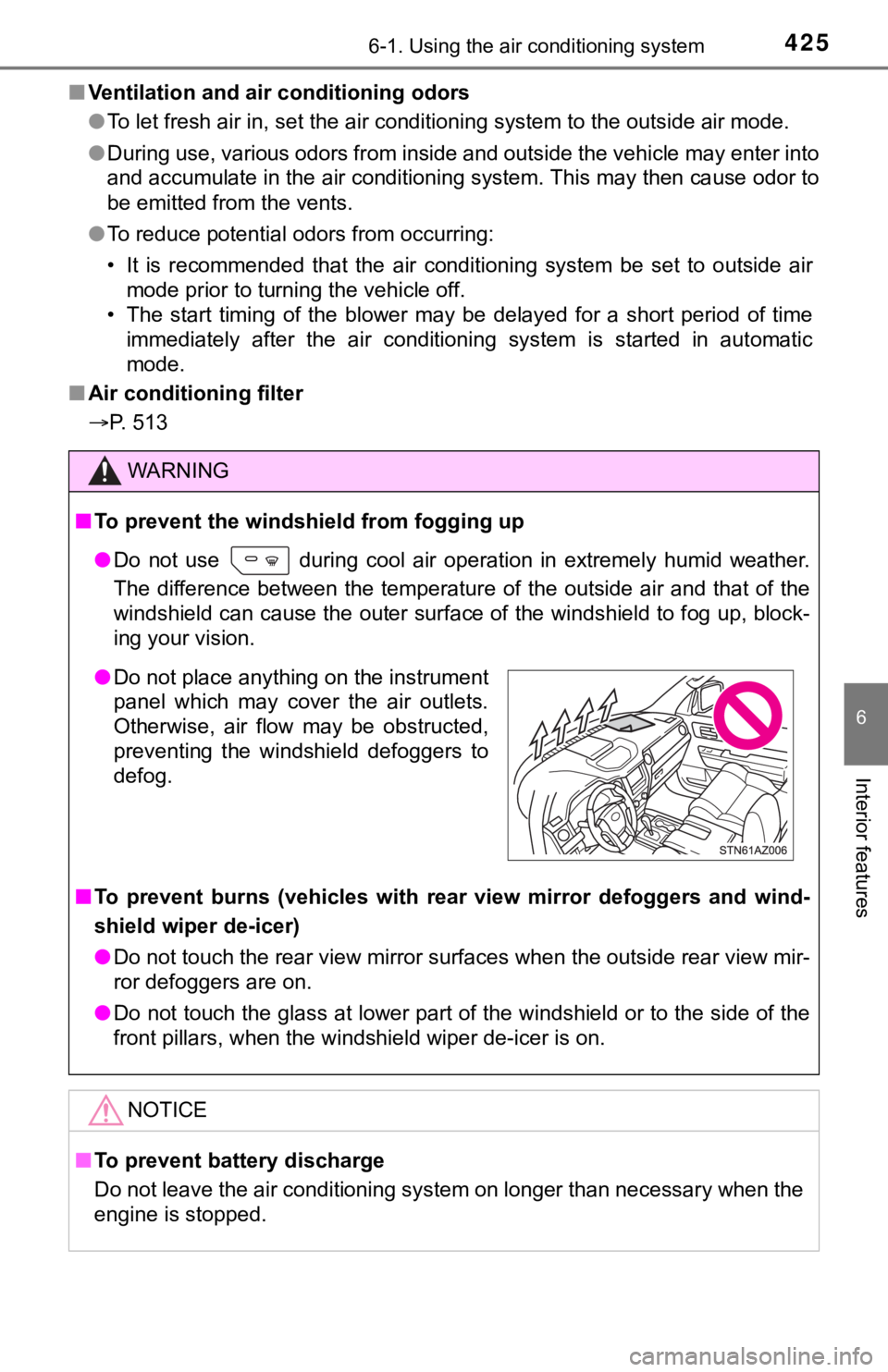
● Do not place anything on the instrument
panel which may cover the air outlets.
Otherwise, air flow may be obstructed,
preventing the windshield defoggers to
defog.
Page 426 of 672
4266-1. Using the air conditioning system
Seat heaters/seat ventilators
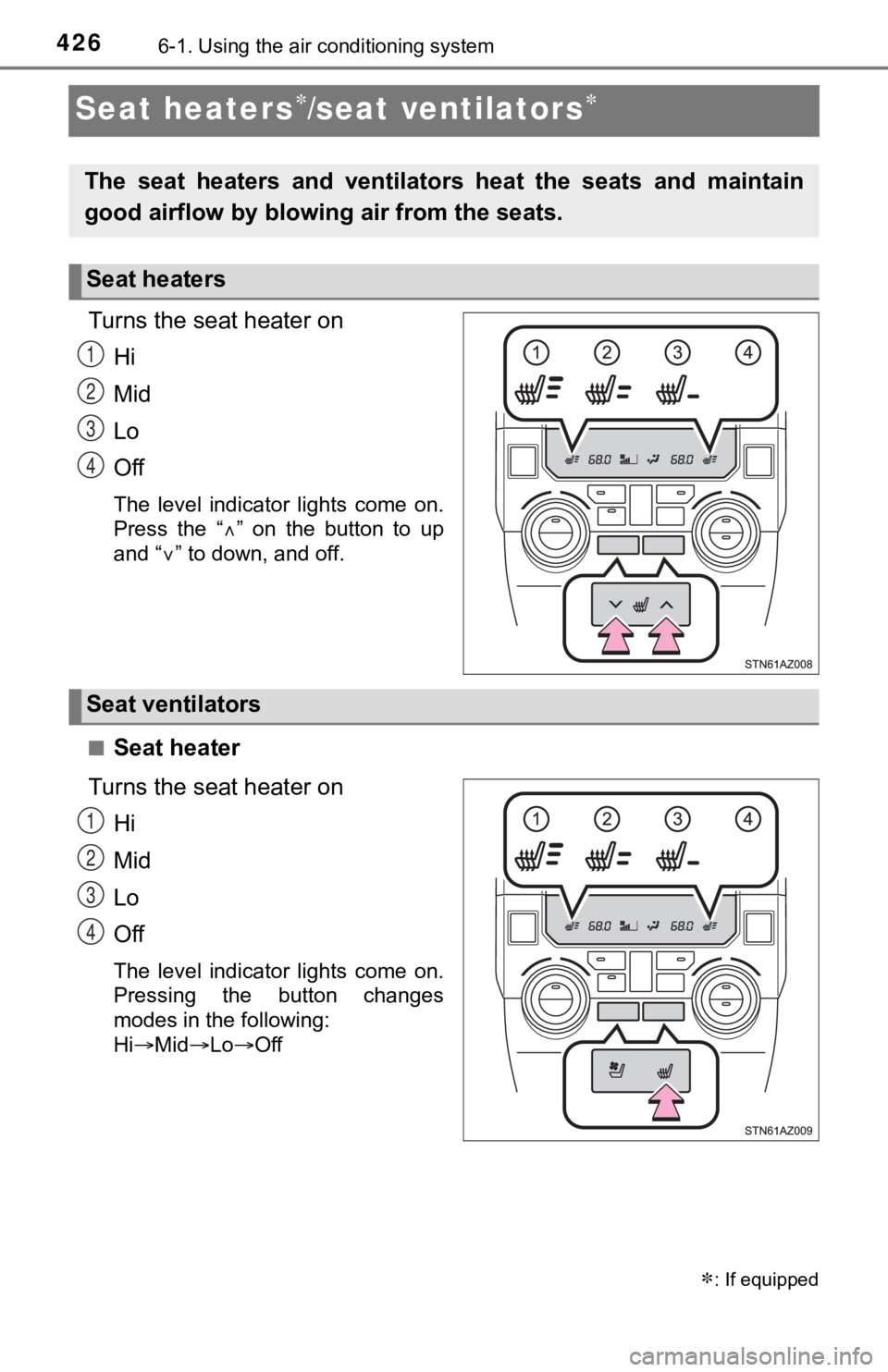
Turns the seat heater on
Hi
Mid
Lo
Off
The level indicator lights come on.
Press the “ ” on the button to up
and “ ” to down, and off.
■
Seat heater
Turns the seat heater on Hi
Mid
Lo
Off
The level indicator lights come on.
Pressing the button changes
modes in the following:
HiMid LoOff
: If equipped
The seat heaters and ventilator s heat the seats and maintain
good airflow by blowing air from the seats.
Seat heaters
1
2
3
4
Seat ventilators
1
2
3
4
Page 427 of 672
4276-1. Using the air conditioning system
6
Interior features
■Seat ventilators
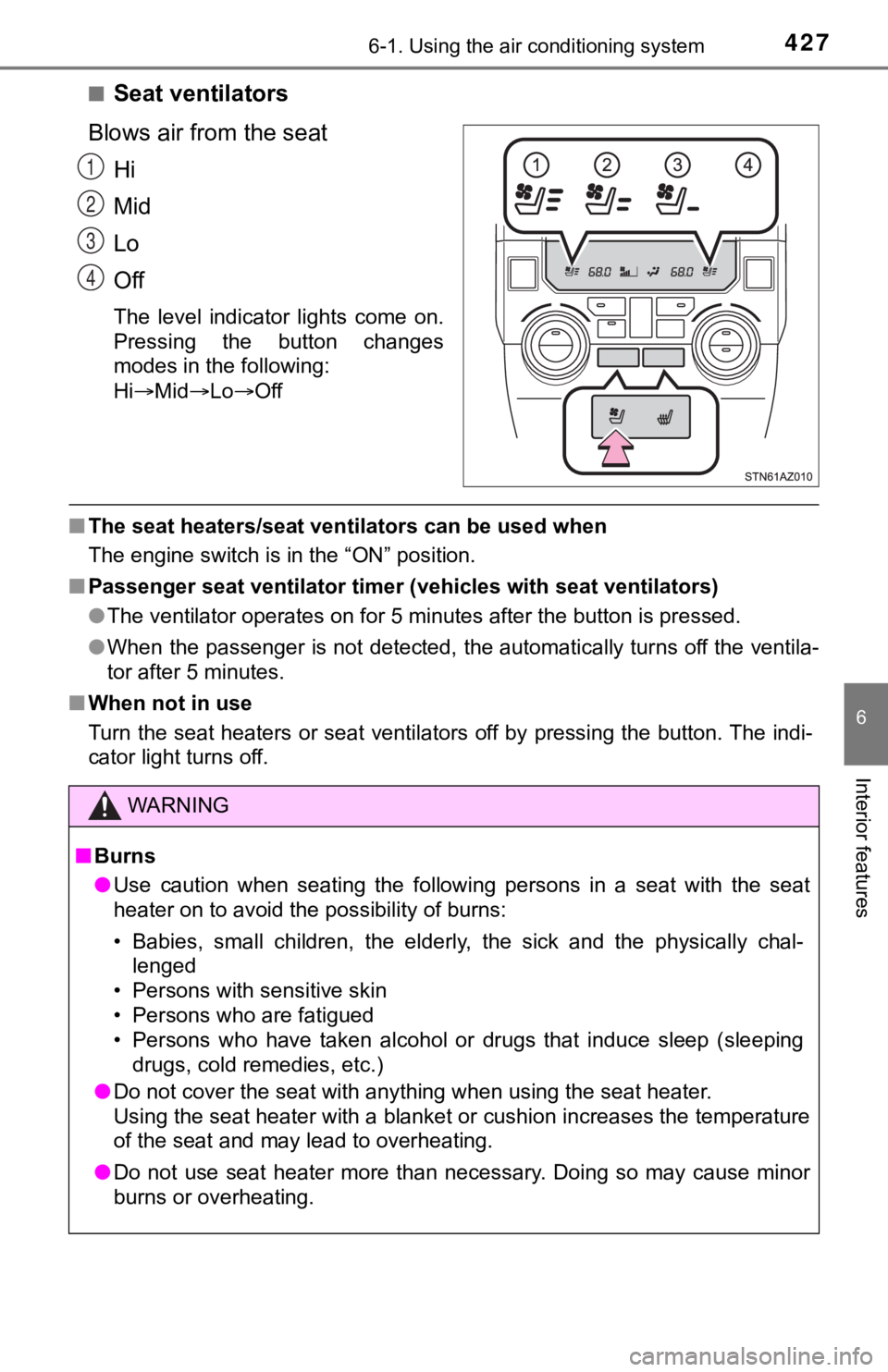
Blows air from the seat Hi
Mid
Lo
Off
The level indicator lights come on.
Pressing the button changes
modes in the following:
HiMid LoOff
■The seat heaters/seat ventilators can be used when
The engine switch is in the “ON” position.
■ Passenger seat ventilator timer (vehicles with seat ventilators )
● The ventilator operates on for 5 minutes after the button is pr essed.
● When the passenger is not detected, the automatically turns off the ventila-
tor after 5 minutes.
■ When not in use
Turn the seat heaters or seat ventilators off by pressing the b utton. The indi-
cator light turns off.
1
2
3
4
WARNING
■ Burns
● Use caution when seating the following persons in a seat with t he seat
heater on to avoid the possibility of burns:
• Babies, small children, the elderly, the sick and the physical ly chal-
lenged
• Persons with sensitive skin
• Persons who are fatigued
• Persons who have taken alcohol or drugs that induce sleep (sle eping
drugs, cold remedies, etc.)
● Do not cover the seat with anything when using the seat heater.
Using the seat heater with a blanket or cushion increases the t emperature
of the seat and may lead to overheating.
● Do not use seat heater more than necessary. Doing so may cause minor
burns or overheating.
Page 428 of 672

4286-1. Using the air conditioning system
NOTICE
■To prevent damage to the seat heaters/seat ventilators
Do not put heavy objects that have an uneven surface on the sea t and do
not stick sharp objects (needles, nails, etc.) into the seat.
■ To prevent battery discharge
Turn the seat heaters/seat ventilators off when the engine is n ot running.
Page 469 of 672

469
7Maintenance and care
7-1. Maintenance and careCleaning and protecting the vehicle exterior .......... 470
Cleaning and protecting the vehicle interior ........... 473
7-2. Maintenance Maintenance requirements ................... 476
General maintenance ........ 478
Emission inspection and maintenance (I/M)
programs ......................... 481 7-3. Do-it-yourself maintenance
Do-it-yourself service precautions ..................... 482
Hood ................................. 484
Engine compartment ......... 485
Tires .................................. 495
Tire inflation pressure ....... 507
Wheels .............................. 510
Air conditioning filter.......... 513
Wireless remote control battery ............................. 516
Checking and replacing fuses ............................... 518
Light bulbs......................... 521
Page 483 of 672
4837-3. Do-it-yourself maintenance
7
Maintenance and care
WARNING
The engine compartment contains many mechanisms and fluids that may
move suddenly, become hot, or become electrically energized. To avoid death
or serious injury, observe the following precautions.
■When working on the engine compartment
● Keep hands, clothing and tools away from the moving fan and eng ine
drive belt.
● Be careful not to touch the engine, radiator, exhaust manifold, etc., right
after driving as they may be hot. Oil and other fluids may also be hot.
● Do not leave anything that may burn easily, such as paper and r ags, in the
engine compartment.
● Do not smoke, cause sparks or expose an open flame to fuel or t he bat-
tery. Fuel and battery fumes are flammable.
● Be extremely cautious when working on the battery. It contains poisonous
and corrosive sulfuric acid.
■ When working near the electric cooling fan or radiator grille
Be sure the engine switch is off.
With the engine switch in the “ON” position, the electric cooli ng fan may
automatically start to run if the air conditioning is on and/or the coolant tem-
perature is high. ( P. 490)
■ Safety glasses
Wear safety glasses to prevent flying or falling material, fluid spray, etc.,
from getting in your eyes.
NOTICE
■If you remove the air cleaner filter
Driving with the air cleaner filter removed may cause excessive engine wear
due to dirt in the air.
Page 513 of 672
5137-3. Do-it-yourself maintenance
7
Maintenance and care
Air conditioning filter
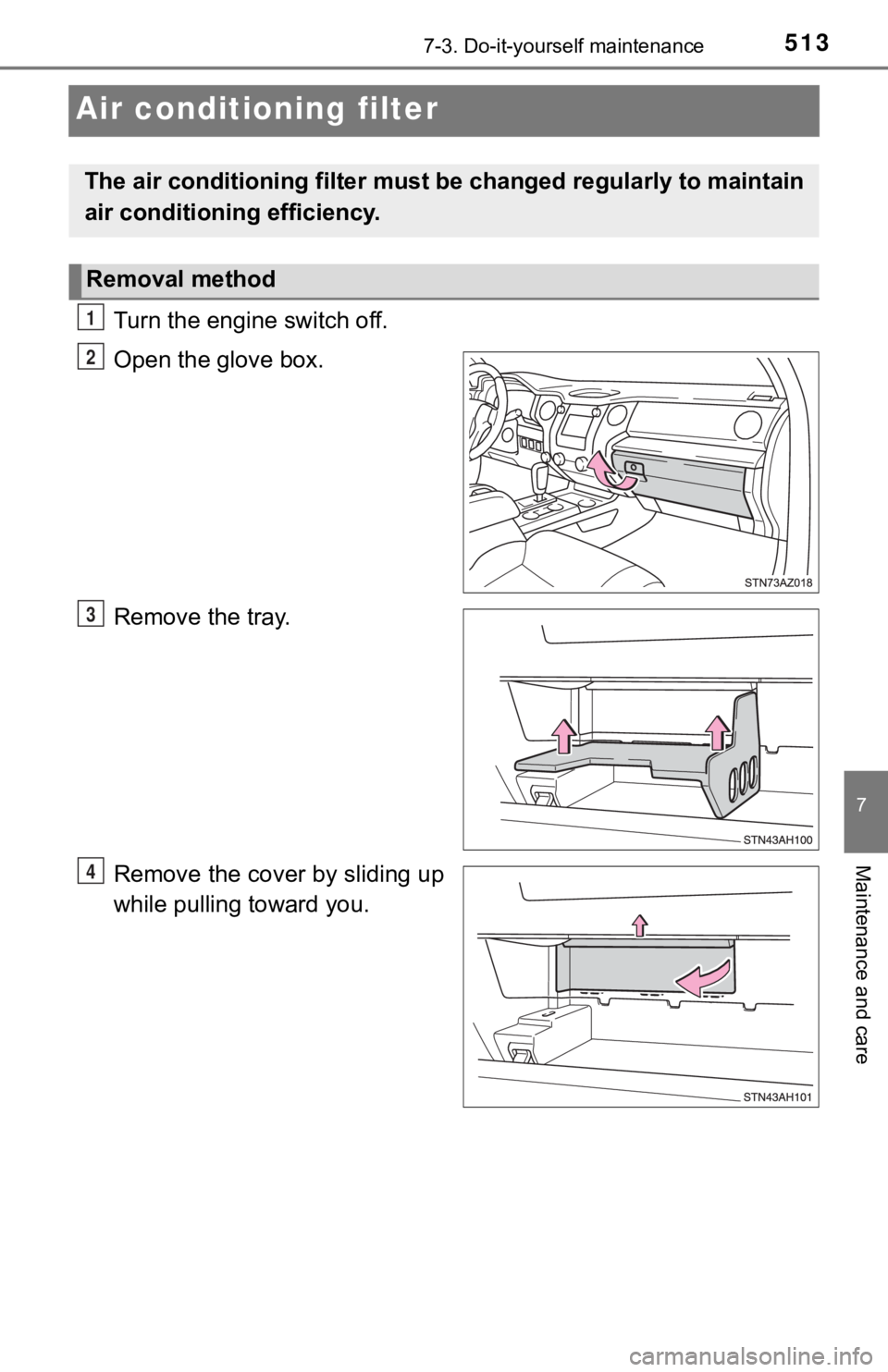
Turn the engine switch off.
Open the glove box.
Remove the tray.
Remove the cover by sliding up
while pulling toward you.
The air conditioning filter must be changed regularly to maintain
air conditioning efficiency.
Removal method
1
2
3
4
Page 514 of 672
5147-3. Do-it-yourself maintenance
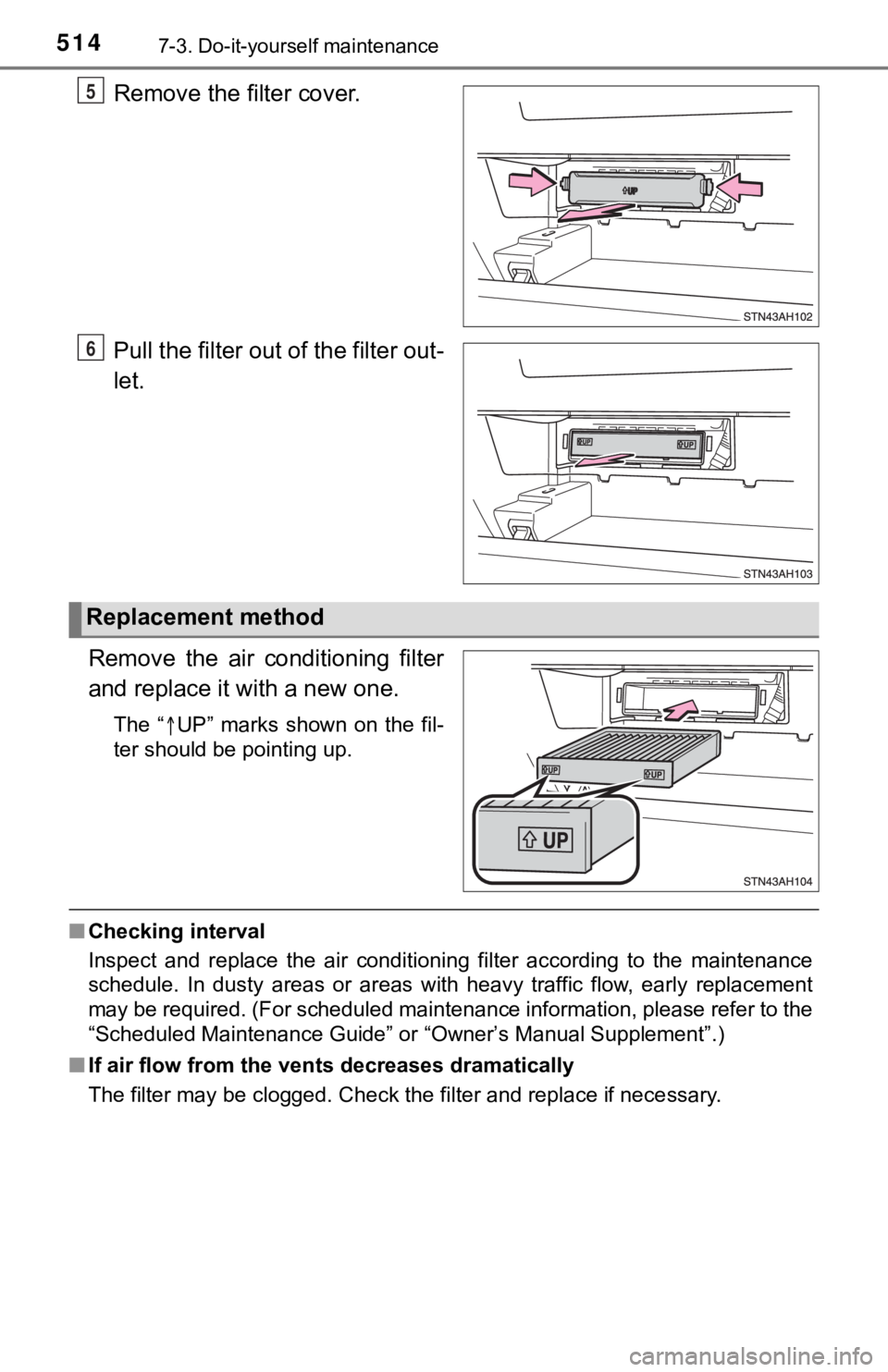
Remove the filter cover.
Pull the filter out of the filter out-
let.
Remove the air conditioning filter
and replace it with a new one.
The “UP” marks shown on the fil-
ter should be pointing up.
■ Checking interval
Inspect and replace the air conditioning filter according to th e maintenance
schedule. In dusty areas or areas with heavy traffic flow, earl y replacement
may be required. (For scheduled maintenance information, please refer to the
“Scheduled Maintenance Guide” or “Owner’s Manual Supplement”.)
■ If air flow from the ven ts decreases dramatically
The filter may be clogged. Check the filter and replace if nece ssary.
5
6
Replacement method
Page 515 of 672
5157-3. Do-it-yourself maintenance
7
Maintenance and care
NOTICE
■When using the air conditioning system
Make sure that a filter is always installed.
Using the air conditioning system without a filter may cause da mage to the
system.