warning light TOYOTA TUNDRA 2019 (in English) Owner's Manual
[x] Cancel search | Manufacturer: TOYOTA, Model Year: 2019, Model line: TUNDRA, Model: TOYOTA TUNDRA 2019Pages: 672, PDF Size: 14.1 MB
Page 90 of 672
902. Instrument cluster
Warning lights and indicators
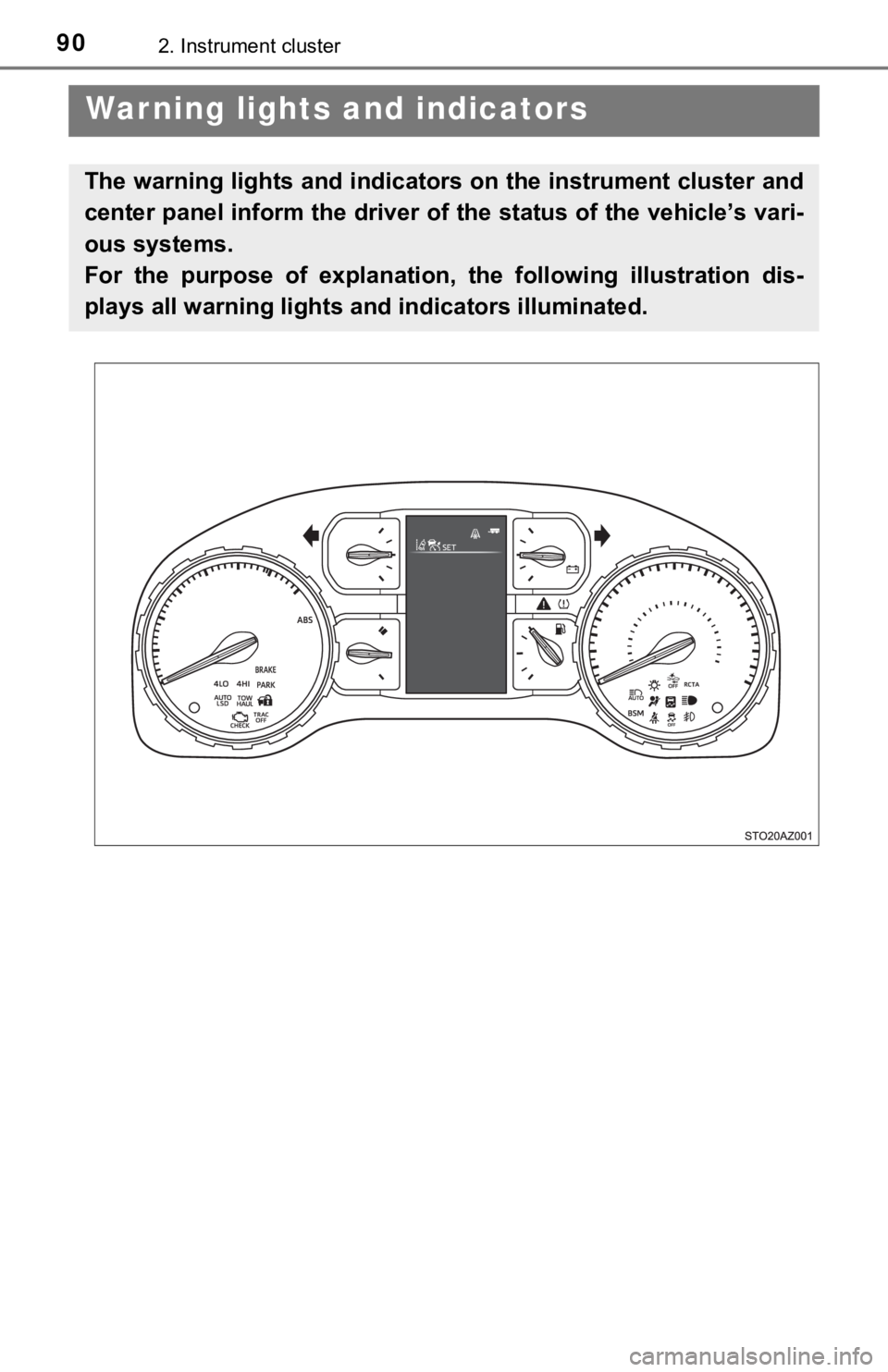
The warning lights and indicators on the instrument cluster and
center panel inform the driver of the status of the vehicle’s vari-
ous systems.
For the purpose of explanation, t he following illustration dis-
plays all warning lights a nd indicators illuminated.
Page 91 of 672
912. Instrument cluster
2
Instrument cluster
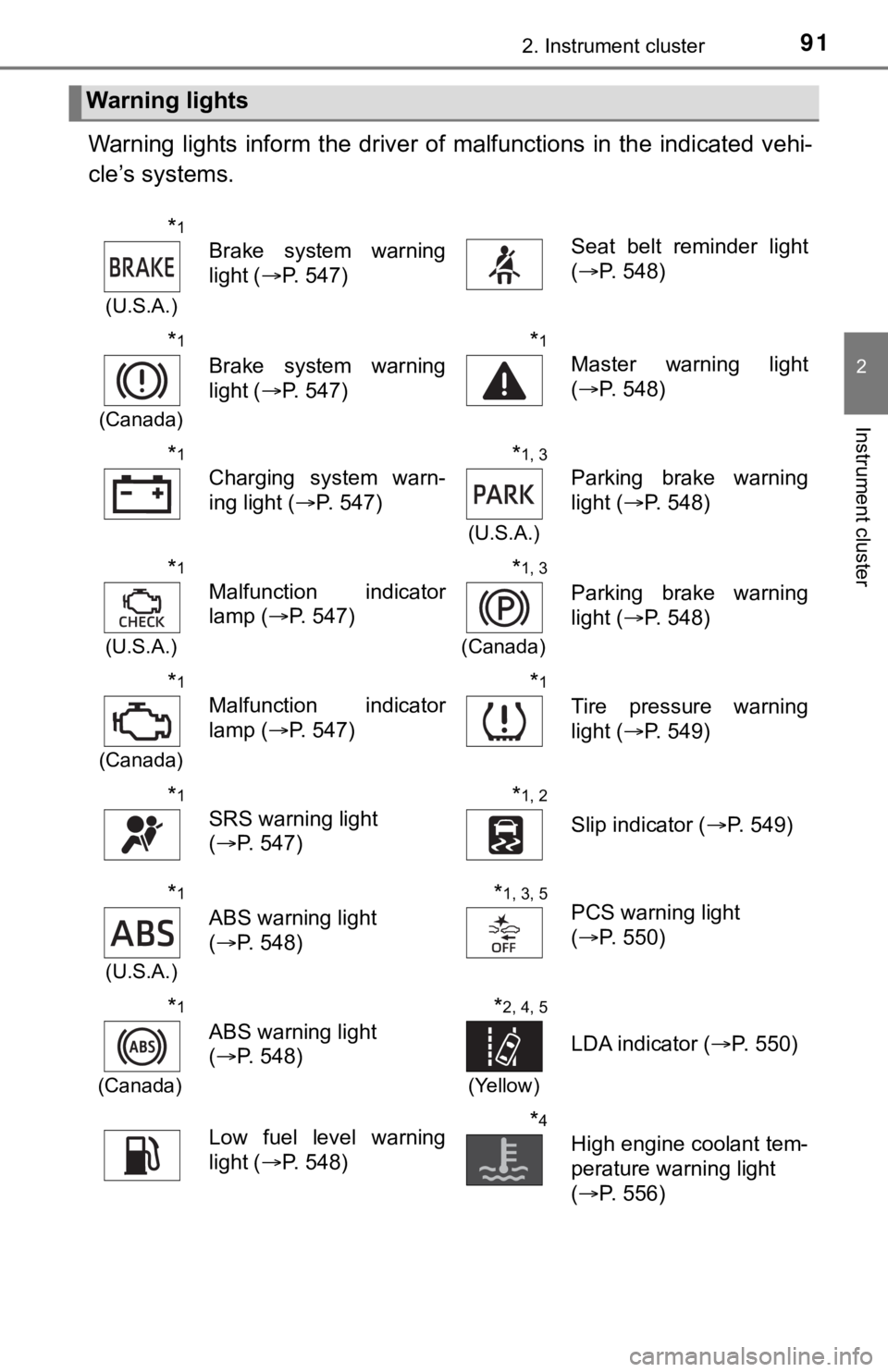
Warning lights inform the driver of malfunctions in the indicated vehi-
cle’s systems.
Warning lights
*1
(U.S.A.)
Brake system warning
light ( P. 547)Seat belt reminder light
(P. 548)
*1
(Canada)
Brake system warning
light ( P. 547)
*1
Master warning light
(P. 548)
*1
Charging system warn-
ing light ( P. 547)
*1, 3
(U.S.A.)
Parking brake warning
light (P. 548)
*1
(U.S.A.)
Malfunction indicator
lamp ( P. 547)
*1, 3
(Canada)
Parking brake warning
light (P. 548)
*1
(Canada)
Malfunction indicator
lamp ( P. 547)
*1
Tire pressure warning
light (P. 549)
*1
SRS warning light
(P. 547)
*1, 2
Slip indicator ( P. 549)
*1
(U.S.A.)
ABS warning light
(P. 548)
*1, 3, 5PCS warning light
(P. 550)
*1
(Canada)
ABS warning light
(P. 548)
*2, 4, 5
(Yellow)
LDA indicator ( P. 550)
Low fuel level warning
light (P. 548)*4
High engine coolant tem-
perature warning light
(P. 556)
Page 92 of 672
922. Instrument cluster
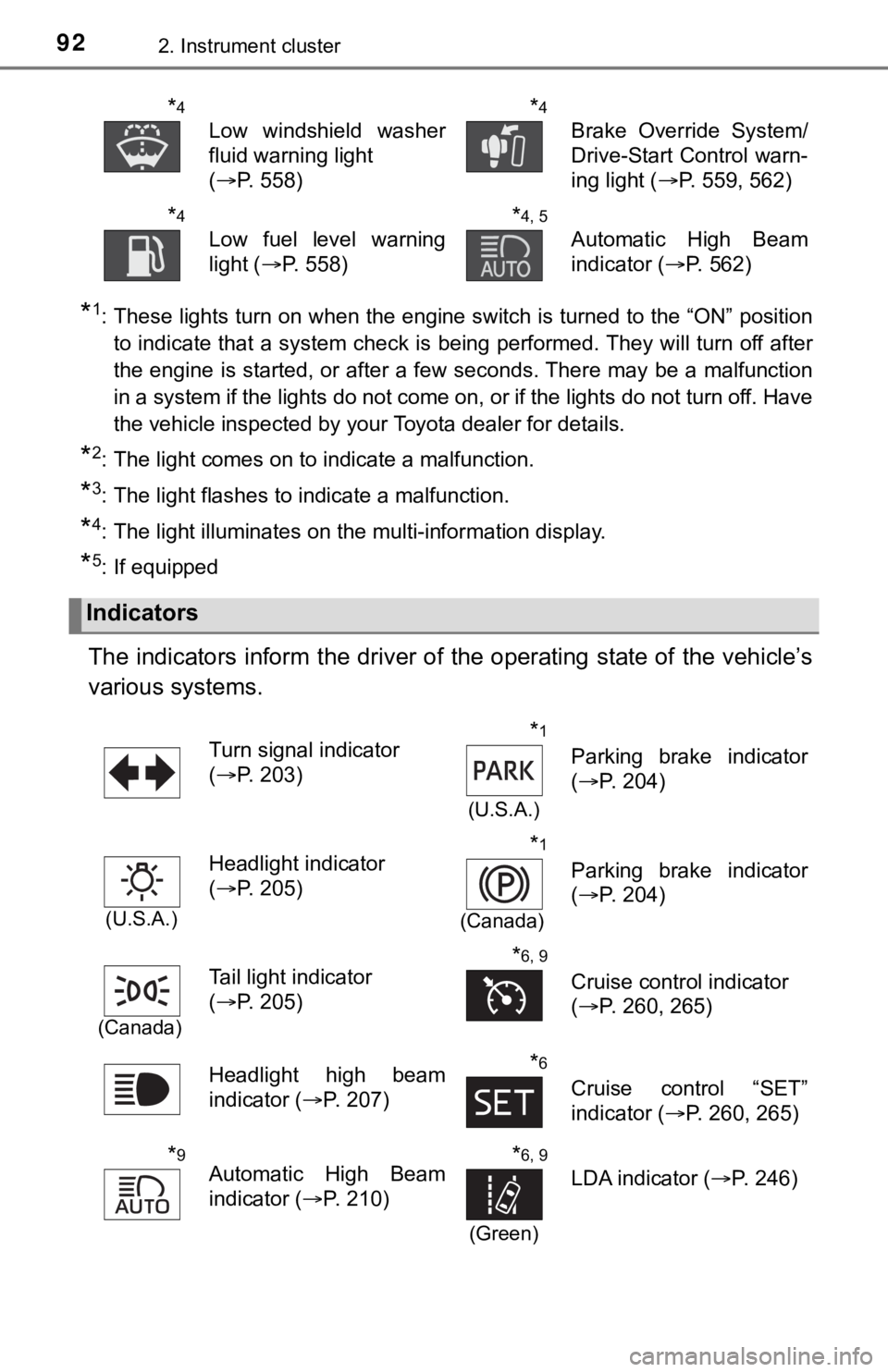
*1: These lights turn on when the engine switch is turned to the “ON” positionto indicate that a system check is being performed. They will turn off after
the engine is started, or after a few seconds. There may be a m alfunction
in a system if the lights do not come on, or if the lights do n ot turn off. Have
the vehicle inspected by your Toyota dealer for details.
*2: The light comes on to indicate a malfunction.
*3: The light flashes to indicate a malfunction.
*4: The light illuminates on the multi-information display.
*5: If equipped
The indicators inform the driver of the operating state of the vehicle’s
various systems.
*4
Low windshield washer
fluid warning light
( P. 558)
*4
Brake Override System/
Drive-Start Control warn-
ing light ( P. 559, 562)
*4
Low fuel level warning
light (P. 558)
*4, 5
Automatic High Beam
indicator ( P. 562)
Indicators
Turn signal indicator
(P. 203)*1
(U.S.A.)
Parking brake indicator
(P. 204)
(U.S.A.)
Headlight indicator
(P. 205)*1
(Canada)
Parking brake indicator
(P. 204)
(Canada)
Tail light indicator
(P. 205)*6, 9
Cruise control indicator
(P. 260, 265)
Headlight high beam
indicator ( P. 207)
*6
Cruise control “SET”
indicator (P. 260, 265)
*9Automatic High Beam
indicator ( P. 210)*6, 9
(Green)
LDA indicator ( P. 246)
Page 93 of 672
932. Instrument cluster
2
Instrument cluster
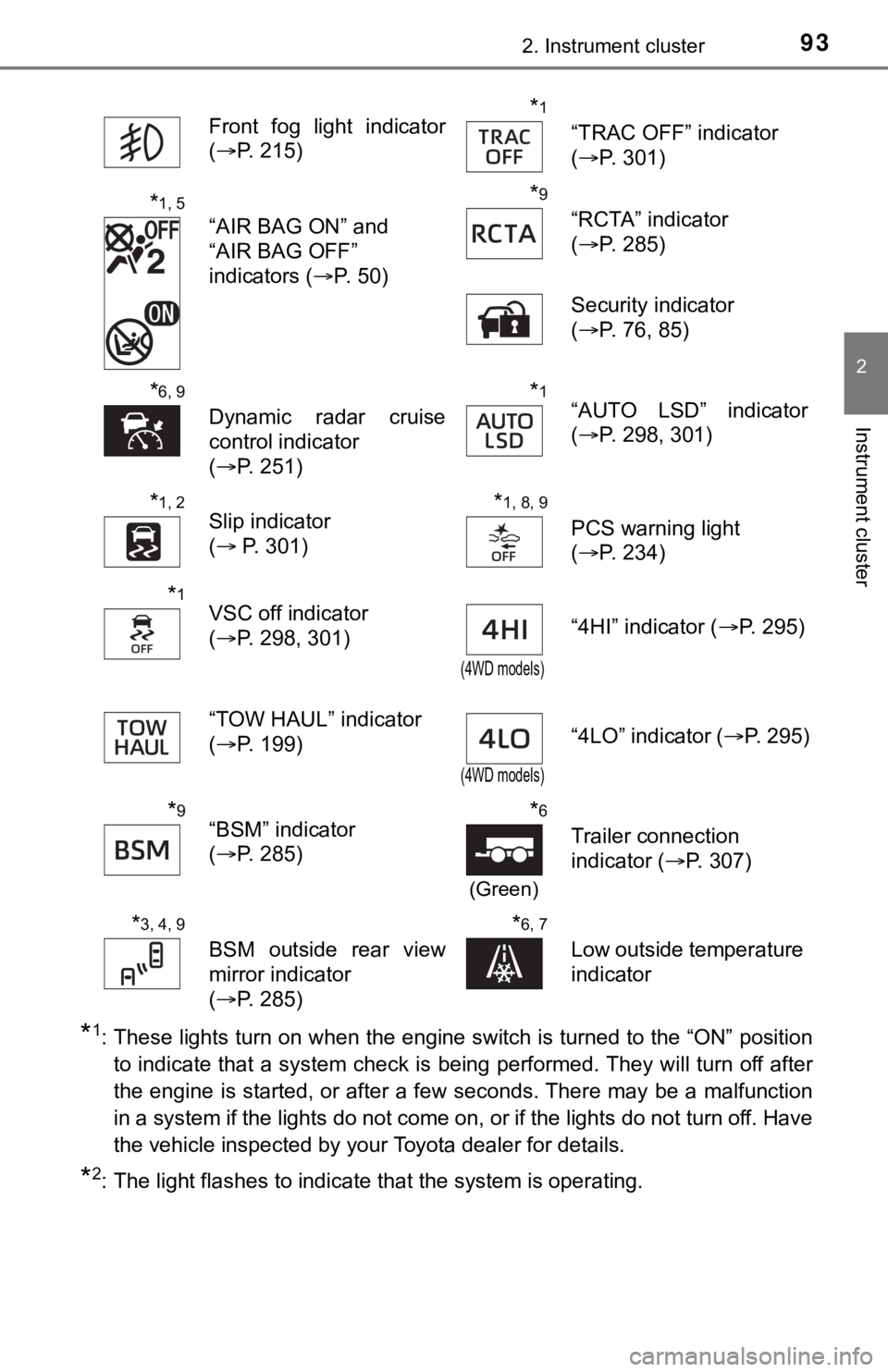
*1: These lights turn on when the engine switch is turned to the “ON” positionto indicate that a system check is being performed. They will turn off after
the engine is started, or after a few seconds. There may be a m alfunction
in a system if the lights do not come on, or if the lights do n ot turn off. Have
the vehicle inspected by your Toyota dealer for details.
*2: The light flashes to indicate that the system is operating. Front fog light indicator
(
P. 215)
*1
“TRAC OFF” indicator
(P. 301)
*1, 5
“AIR BAG ON” and
“AIR BAG OFF”
indicators ( P. 50)
*9
“RCTA” indicator
(P. 285)
Security indicator
( P. 76, 85)
*6, 9
Dynamic radar cruise
control indicator
(P. 251)
*1“AUTO LSD” indicator
(P. 298, 301)
*1, 2Slip indicator
( P. 301)*1, 8, 9
PCS warning light
(P. 234)
*1VSC off indicator
(P. 298, 301)
(4WD models)
“4HI” indicator ( P. 295)
“TOW HAUL” indicator
( P. 199)
(4WD models)
“4LO” indicator ( P. 295)
*9“BSM” indicator
(P. 285)*6
(Green)
Trailer connection
indicator ( P. 307)
*3, 4, 9
BSM outside rear view
mirror indicator
(P. 285)
*6, 7
Low outside temperature
indicator
Page 94 of 672

942. Instrument cluster
*3: In order to confirm operation, the BSM outside rear view mirror indicators
illuminate in the following situations:
• When the engine switch is turned to the “ON” position, the BSM function
is enabled on the screen of the multi-information display.
• When the BSM function is enabled on the screen of the multi-i nfor-
mation display, the engine switch is turned to the “ON” positio n.
If the system is functioning correctly, the BSM outside rear vi ew mirror indi-
cators will turn off after a few seconds.
If the BSM outside rear view mirror indicators do not illuminat e or do not
turn off, there may be a malfunction with the system.
If this occurs, have the vehicle inspected by your Toyota deale r.
*4: The light illuminates on the outside rear view mirrors.
*5: The light illuminates on the center panel.
*6: The light illuminates on the multi-information display.
*7: When the outside temperature is approximately 37°F (3°C) or lo wer, the
indicator will flash for 10 times, then comes on.
*8: The light comes on when the system is turned off.
*9: If equipped
WARNING
■ If a safety system warning light does not come on
Should a safety system light such as the ABS and SRS warning li ght not
come on when you start the engine, this could mean that these s ystems are
not available to help protect you in an accident, which could r esult in death
or serious injury. Have the vehicle inspected by your Toyota de aler immedi-
ately if this occurs.
Page 96 of 672

962. Instrument cluster
Fuel gauge
Displays the quantity of fuel remaining in the tank.
Shift position and shift range display
Displays the selected shift position or selected shift range. ( P. 196)
Odometer and trip meter display
Displays the following items.
Odometer:
Displays the total distance the vehicle has been driven.
Trip meter:
Displays the distance the vehicle has been driven since the met er was last
reset. Trip meters A and B can be used to record and display different dis-
tances independently.
Multi-information display
Presents the driver with a variety of driving-related data. ( P. 101)
Displays warning messages in case of a malfunction. ( P. 555)
Engine coolant temperature gauge
Displays the engine coolant temperature.
Instrument panel light control button
7
8
9
10
11
12
Page 98 of 672

982. Instrument cluster
■The multi-information display illuminate when
The engine switch is in the “ON” position.
■ The brightness of the in strument panel lights
When the tail lights are turned on, the display’s brightness will be reduced
slightly unless the meter brightness level adjustment is set to the brightest
setting.
■ Outside temperature display
●In the following situations, the correct outside temperature ma y not be dis-
played, or the display may take longer than normal to change.
• When stopped, or driving at low speeds (less than 12 mph [20 k m/h])
• When the outside temperature has changed suddenly (at the entr ance/
exit of a garage, tunnel, etc.)
● When “--” or “E” is displayed, the system may be malfunctioning .
Take your vehicle to your Toyota dealer.
■ Liquid crystal display
Small spots or light spots may appear on the display. This phen omenon is
characteristic of liquid crystal displays, and there is no prob lem continuing to
use the display.
WARNING
■ The information display at low temperatures
Allow the interior of the vehicle to warm up before using the liquid crystal
information display. At extremely low temperatures, the information display
monitor may respond slowly, and display changes may be delayed.
For example, there is a lag between the driver’s shifting and t he new gear
number appearing on the display. This lag could cause the drive r to down-
shift again, causing rapid and excessive engine braking and pos sibly an
accident resulting in personal death or injury.
Page 105 of 672

1052. Instrument cluster
2
Instrument cluster
■Setting items
●“Vehicle Settings” and “Meter Settings” setting items are not s electable
during driving and cannot be operated.
Also, the settings screen is temporarily canceled in the follow ing situations.
• When a warning message appears.
• When the vehicle begins to move.
● Settings for functions not equipped to the vehicle are not displayed.
● When a function is turned off, the related settings for that fu nction are not
selectable.
■ Pop-up display
In some situations, such as when a switch operation is performe d, a pop-up
display will be temporarily displayed on the multi-information display.
■ When disconnecting and reco nnecting battery terminals
The drive information will be reset.
■ Trip summary display
When the engine switch is turned off, each of the following wil l be displayed
on the multi-information display, and will clear after approximately 30 sec-
onds.
● Distance traveled
● Average fuel consumption
● Driving range
■ Tire inflation pressure
●It may take a few minutes to display the tire inflation pressur e after the
engine switch is turned to the “ON” position. It may also take a few minutes
to display the tire inflation pressure after inflation pressure has been
adjusted.
● “---” may be displayed if the tire position information cannot be determined
due to unfavorable radio wave conditions.
● Tire inflation pressure changes with temperature. The displayed values may
also be different from the values measured using a tire pressur e gauge.
■ Liquid crystal display
Small spots or light spots may appear on the display. This phen omenon is
characteristic of liquid crystal displays, and there is no prob lem continuing to
use the display.
Page 163 of 672

1634-1. Before driving
4
Driving
WARNING
Observe the following precautions.
Failure to do so may result in death or serious injury.
■When starting the vehicle
Always keep your foot on the brake pedal while stopped with the engine
running. This prevents the vehicle from creeping.
■ When driving the vehicle
● Do not drive if you are unfamiliar with the location of the brake and accel-
erator pedals to avoid depressing the wrong pedal.
• Accidentally depressing the accelerator pedal instead of the b rake
pedal will result in sudden acceleration that may lead to an accident.
• When backing up, you may twist your body around, leading to di fficulty
in operating the pedals. Make sure to operate the pedals proper ly.
• Make sure to keep a correct driving posture even when moving t he
vehicle only slightly. This allows you to depress the brake and accelera-
tor pedals properly.
• Depress the brake pedal using your right foot. Depressing the brake
pedal using your left foot may delay response in an emergency, result-
ing in an accident.
● Do not drive the vehicle over or stop the vehicle near flammable materials.
The exhaust system and exhaust gases can be extremely hot. Thes e hot
parts may cause a fire if there is any flammable material nearby.
● During normal driving, do not turn off the engine. Turning the engine off
while driving will not cause loss of steering or braking contro l, but the
power assist to these systems will be lost. This will make it m ore difficult to
steer and brake, so you should pull over and stop the vehicle a s soon as it
is safe to do so.
However, in the event of an emergency, such as if it becomes im possible
to stop the vehicle in the normal way: P. 539
● Use engine braking (downshift) to maintain a safe speed when driving
down a steep hill.
Using the brakes continuously may cause the brakes to overheat and lose
effectiveness. ( P. 196)
● Do not adjust the positions of the steering wheel, the seat, or the inside or
outside rear view mirrors while driving.
Doing so may result in a loss of vehicle control.
● Always check that all passengers’ arms, heads or other parts of their body
are not outside the vehicle.
Page 164 of 672

1644-1. Before driving
WARNING
Observe the following precautions.
Failure to do so may result in death or serious injury.
■When driving the vehicle
● Do not drive in excess of the speed limit. Even if the legal sp eed limit per-
mits it, do not drive over 85 mph (140 km/h) unless your vehicl e has high-
speed capability tires. Driving over 85 mph (140 km/h) may resu lt in tire
failure, loss of control and possible injury. Be sure to consult a tire dealer
to determine whether the tires on your vehicle are high-speed c apability
tires or not before driving at such speeds.
■ When driving on slippery road surfaces
● Sudden braking, acceleration and steering may cause tire slippa ge and
reduce your ability to control the vehicle.
● Sudden acceleration, engine braking due to shifting, or changes in engine
speed could cause the vehicle to skid.
● After driving through a puddle, lightly depress the brake pedal to make
sure that the brakes are functioning properly. Wet brake pads m ay prevent
the brakes from functioning properly. If the brakes on only one side are wet
and not functioning properly, steering control may be affected.
■ When shifting the shift lever
● Do not let the vehicle roll backward while the shift lever is i n a driving posi-
tion, or roll forward while the shift lever is in R.
Doing so may cause the engine to stall or lead to poor brake an d steering
performance, resulting in an accident or damage to the vehicle.
● Do not shift the shift lever to P while the vehicle is moving.
Doing so can damage the transmission and may result in a loss o f vehicle
control.
● Do not shift the shift lever to R while the vehicle is moving forward.
Doing so can damage the transmission and may result in a loss o f vehicle
control.
● Do not shift the shift lever to a driving position while the ve hicle is moving
backward.
Doing so can damage the transmission and may result in a loss o f vehicle
control.
● Moving the shift lever to N while the vehicle is moving will disengage the
engine from the transmission. Engine braking is not available w hen N is
selected.
● Be careful not to shift the shift lever with the accelerator pe dal depressed.
Shifting the shift lever to a gear other than P or N may lead t o moving
unexpectedly of the vehicle that may cause an accident.