change time TOYOTA TUNDRA 2019 Owners Manual (in English)
[x] Cancel search | Manufacturer: TOYOTA, Model Year: 2019, Model line: TUNDRA, Model: TOYOTA TUNDRA 2019Pages: 672, PDF Size: 14.1 MB
Page 8 of 672
8
For your infor mation
Please note that this manual applies to all models and all equipment, includ-
ing options. Therefore, you may find some explanations for equi pment not
installed on your vehicle.
All specifications provided in this manual are current at the t ime of printing.
However, because of the Toyota policy of continual product improvement, we
reserve the right to make changes at any time without notice.
Depending on specifications, the vehicle shown in the illustrat ions may differ
from your vehicle in terms of equipment.
Approximately five hours after the engine is turned off, you ma y hear sound
coming from under the vehicle for several minutes. This is the sound of a fuel
evaporation leakage check and it does not indicate a malfunctio n.
A wide variety of non-genuine spare parts and accessories for T oyota vehi-
cles are currently available in the market. You should know tha t Toyota does
not warrant these products and is not responsible for their per formance,
repair, or replacement, or for any damage they may cause to, or adverse
effect they may have on, your Toyota vehicle.
This vehicle should not be modified with non-genuine Toyota pro ducts. Modi-
fication with non-genuine Toyota products could affect its perf ormance, safety
or durability, and may even violate governmental regulations. In addition,
damage or performance problems resulting from the modification may not be
covered under warranty.
Main Owner’s Manual
Noise from under vehicle afte r turning off the engine
Accessories, spare parts and m odification of your Toyota
Page 102 of 672
1022. Instrument cluster
●Current
Displays the current rat e of fuel consumption
● Average Speed
*/Trip Average Speed
Displays the average since engine was started or the average si nce
the function was reset, respectively
● To t a l T i m e
*/Trip Time
Displays the engine was started or the elapsed time since the func-
tion was reset, respectively
● Trip distance
Displays the distance sin ce the engine was started
● Digital speedometer
● Display off
A blank screen is displayed
*: Resetting procedures:
• Select a function to be reset using the meter control switch a nd then
press and hold the center button to reset.
• If there is more than one function that can be reset, check bo xes will be
displayed next to the functions.
The settings of the following items can be changed, refer to P. 623.
For functions that can be enabled or disabled, the function swi tches
between on and off each time is pressed.
● LDA (Lane Departure Alert)*1 (→P. 626)
• LDA Sensitivity
Select to set up the LDA (Lane Departure Alert) sensitivity.
• Sway warning
Select to enable/disable the Sway warning function.
• Sway warning sensitivity
Select to set up the sway warning sensitivity.
● PCS (Pre-Collision System)*1 (→P. 626)
•PCS
Select to enable/disable the PCS (Pre-Collision System) function.
• Sensitivity
Select to set up the PCS (Pre-Collision System) sensitivity.
Settings display
Page 113 of 672
1133-1. Key information
3
Operation of each component
■Customization that can be configured at Toyota dealer
Settings (e.g. unlocking function using a key) can be changed.
(Customizable features: P. 623)
NOTICE
■To prevent key damage
● Do not drop the keys, subject them to strong shocks or bend them.
● Do not expose the keys to high temperatures for long periods of time.
● Do not get the keys wet or wash them in an ultrasonic washer, e tc.
● Do not attach metallic or magnetic materials to the keys or place the keys
close to such materials.
● Do not disassemble the keys.
● Do not attach a sticker or anything else to the surface of the key.
● Do not place the keys near objects that produce magnetic fields , such as
TVs, audio systems and induction cookers, or medical electrical equip-
ment, such as low-frequency therapy equipment.
Page 144 of 672
1443-4. Adjusting the steering wheel and mirrors
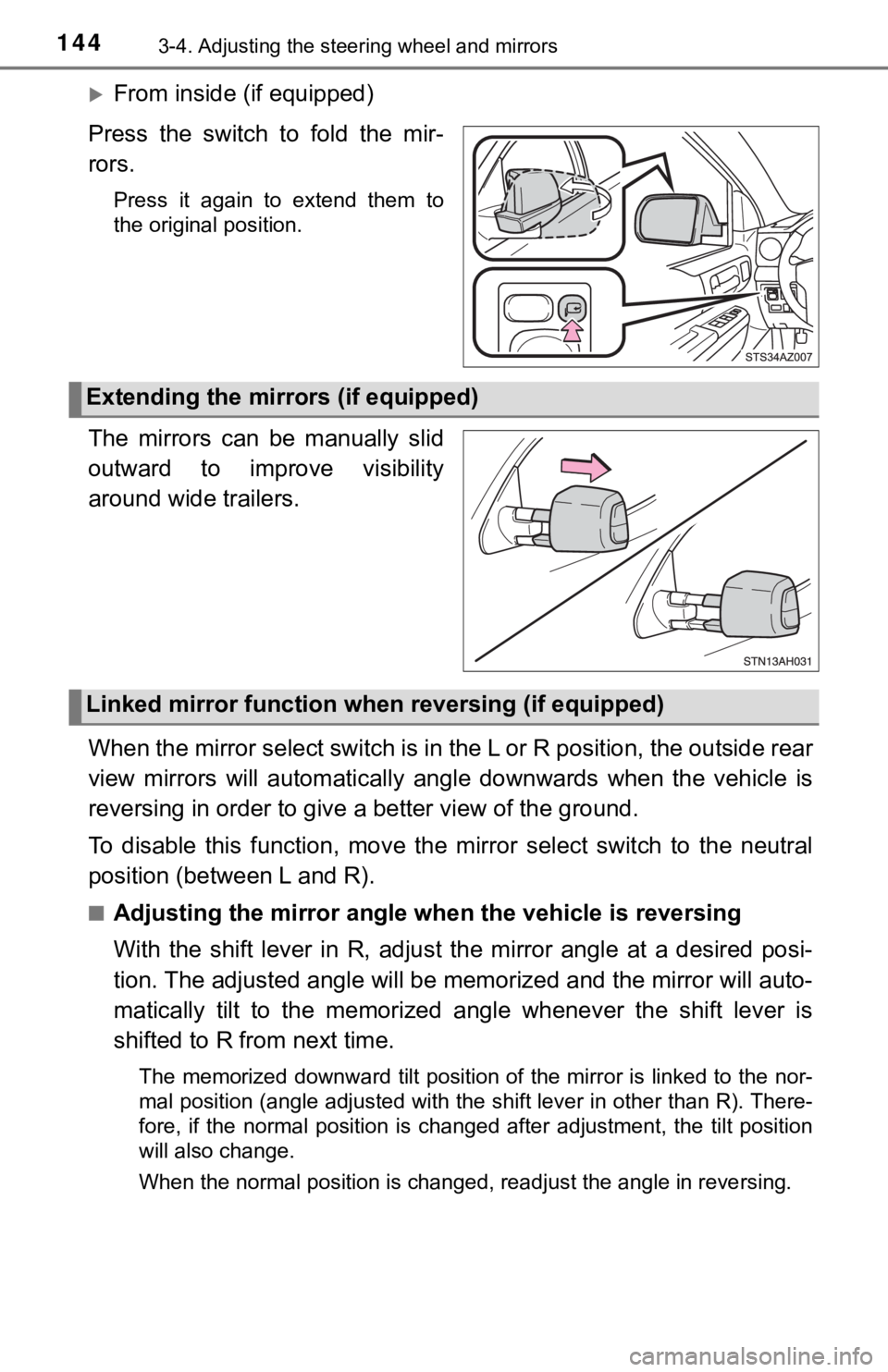
From inside (if equipped)
Press the switch to fold the mir-
rors.
Press it again to extend them to
the original position.
The mirrors can be manually slid
outward to improve visibility
around wide trailers.
When the mirror select switch is in the L or R position, the ou tside rear
view mirrors will automatically a ngle downwards when the vehicl e is
reversing in order to give a better view of the ground.
To disable this function, move the mirror select switch to the neutral
position (between L and R).
■Adjusting the mirror angle when the vehicle is reversing
With the shift lever in R, adjust the mirror angle at a desired posi-
tion. The adjusted angle will be memorized and the mirror will auto-
matically tilt to the memorized angle whenever the shift lever is
shifted to R from next time.
The memorized downward tilt position of the mirror is linked to the nor-
mal position (angle adjusted with the shift lever in other than R). There-
fore, if the normal position is changed after adjustment, the t ilt position
will also change.
When the normal position is changed, readjust the angle in reve rsing.
Extending the mirrors (if equipped)
Linked mirror function when reversing (if equipped)
Page 167 of 672
1674-1. Before driving
4
Driving
NOTICE
■When driving the vehicle
● Do not depress the accelerator and brake pedals at the same tim e during
driving, as this may restrain the engine output.
● Do not use the accelerator pedal or depress the accelerator and brake
pedals at the same time to hold the vehicle on a hill.
■ When parking the vehicle
Always set the parking brake, and shift the shift lever to P. F ailure to do so
may cause the vehicle to move or the vehicle may move suddenly if the
accelerator pedal is accidentally depressed.
■ Avoiding damage to vehicle parts
● Do not turn the steering wheel fully in either direction and ho ld it there for
an extended period of time.
Doing so may damage the power steering pump.
● When driving over bumps in the road, drive as slowly as possibl e to avoid
damaging the wheels, underside of the vehicle, etc.
■ If you get a flat tire while driving
A flat or damaged tire may cause the following situations. Hold the steering
wheel firmly and gradually depress the brake pedal to slow down the vehi-
cle.
● It may be difficult to control your vehicle.
● The vehicle will make abnormal sounds or vibrations.
● The vehicle will lean abnormally.
Information on what to do in case of a flat tire ( P. 565)
■ When encountering flooded roads
Do not drive on a road that has flooded after heavy rain, etc. Doing so may
cause the following serious damage to the vehicle:
● Engine stalling
● Short in electrical components
● Engine damage caused by water immersion
In the event that you drive on a flooded road and the vehicle i s flooded, be
sure to have your Toyota dealer check the following:
● Brake function
● Changes in quantity and quality of oil and fluid used for the engine, trans-
mission, transfer (4WD models) differentials, etc.
● Lubricant condition for the propeller shaft, bearings and suspe nsion joints
(where possible), and the function of all joints, bearings, etc .
Page 202 of 672

2024-2. Driving procedures
■If the “S” indicator does not come on even after shifting the s hift lever to
S
This may indicate a malfunction in the automatic transmission s ystem. Have
the vehicle inspected by your Toyota dealer, immediately.
(In this situation, the transmission will operate in the same m anner as when
the shift lever is in D.)
■ Downshifting restrictions warning buzzer (S mode)
To help ensure safety and driving performance, downshifting ope ration may
sometimes be restricted. In some circumstances, downshifting ma y not be
possible even when the shift lever is operated. (A buzzer will sound twice.)
■ Transmission protection function
If the tires spin continually when the vehicle becomes stuck in mud, dirt or
snow, the automatic transmission temperature may become too high and
cause damage.
To avoid the damaging the automatic transmission, the system may tempo-
rarily lock the gear in 1st.
If the automatic transmission temperature falls, the gear locki ng is canceled
and returns the automatic transmission to the normal operation.
WARNING
■ When driving on slippery road surfaces
Do not accelerate or shift gears suddenly.
Sudden changes in engine braking may cause the vehicle to spin or skid,
resulting in an accident.
■ To prevent an accident when releasing the shift lock
Before pressing the shift lock override button, make sure to se t the parking
brake and depress the brake pedal.
If the accelerator pedal is accidentally depressed instead of t he brake pedal
when the shift lock override button is pressed and the shift le ver is shifted
out of P, the vehicle may suddenly start, possibly leading to a n accident
resulting in death or serious injury.
Page 203 of 672
2034-2. Driving procedures
4
Driving
Turn signal lever
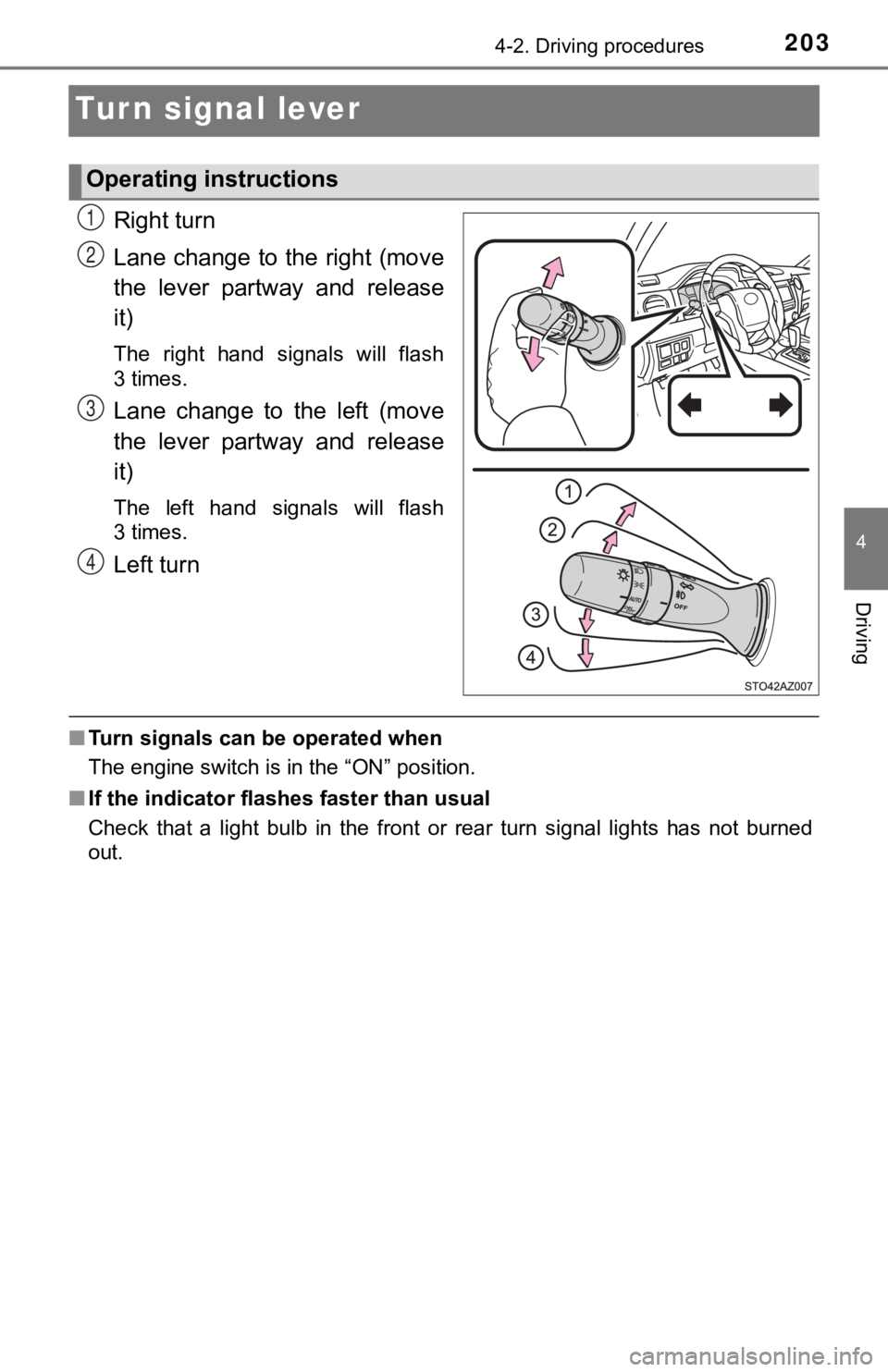
Right turn
Lane change to the right (move
the lever partway and release
it)
The right hand signals will flash
3times.
Lane change to the left (move
the lever partway and release
it)
The left hand signals will flash
3times.
Left turn
■Turn signals can be operated when
The engine switch is in the “ON” position.
■ If the indicator flashes faster than usual
Check that a light bulb in the front or rear turn signal lights has not burned
out.
Operating instructions
1
2
3
4
Page 214 of 672

2144-3. Operating the lights and wipers
■Temporarily lowering sensor sensitivity
The sensitivity of the sensor can be temporarily lowered.
Turn the engine switch off while the following conditions are m et.
• The headlight switch is in or .
• The headlight switch lever is in high beam position.
• Automatic High Beam switch is on.
Turn the engine switch to the “ON” position.
Within 30 seconds after , repeat pulling the headlight switch lever to the
original position then pushing it to the high beam position qui ckly 10 times,
then leave the lever in high beam position.
If the sensitivity is changed, the Automatic High Beam indicato r is turn on
and off 3 times.
Automatic High Beam (headlights) may turn on even the vehicle i s stopped.
■ If “Headlight System Malfunction. Visit Your Dealer.” is displayed on the
multi-information display
The system may be malfunctioning. Have the vehicle inspected by your
Toyota dealer.
1
2
32
4
Page 240 of 672
2404-5. Using the driving support systems
• If a vehicle ahead makes an abrupt maneuver (such as sudden sw erving,
acceleration or deceleration)
• When suddenly cutting behind a preceding vehicle
• When driving in inclement weather such as heavy rain, fog, snow or a sandstorm
• When the vehicle is hit by water, snow, dust, etc., from a veh icle ahead
• When driving through steam or smoke
• When driving in a place where the surrounding brightness changes sud-
denly, such as at the entrance or exit of a tunnel
• When a very bright light, such as the sun or the headlights of oncoming traffic, shines directly into the camera sensor
• When the surrounding area is dim, such as at dawn or dusk, or while at
night or in a tunnel
• After the engine has started the vehicle has not been driven for a certain
amount of time
• While making a left/right turn and for a few seconds after mak ing a left/
right turn
• While driving on a curve and for a few seconds after driving o n a curve
• If your vehicle is skidding
• If the wheels are misaligned
• If a wiper blade is blocking the camera sensor
• The vehicle is wobbling.
• The vehicle is being driven at extremely high speeds.
• When driving on a hill
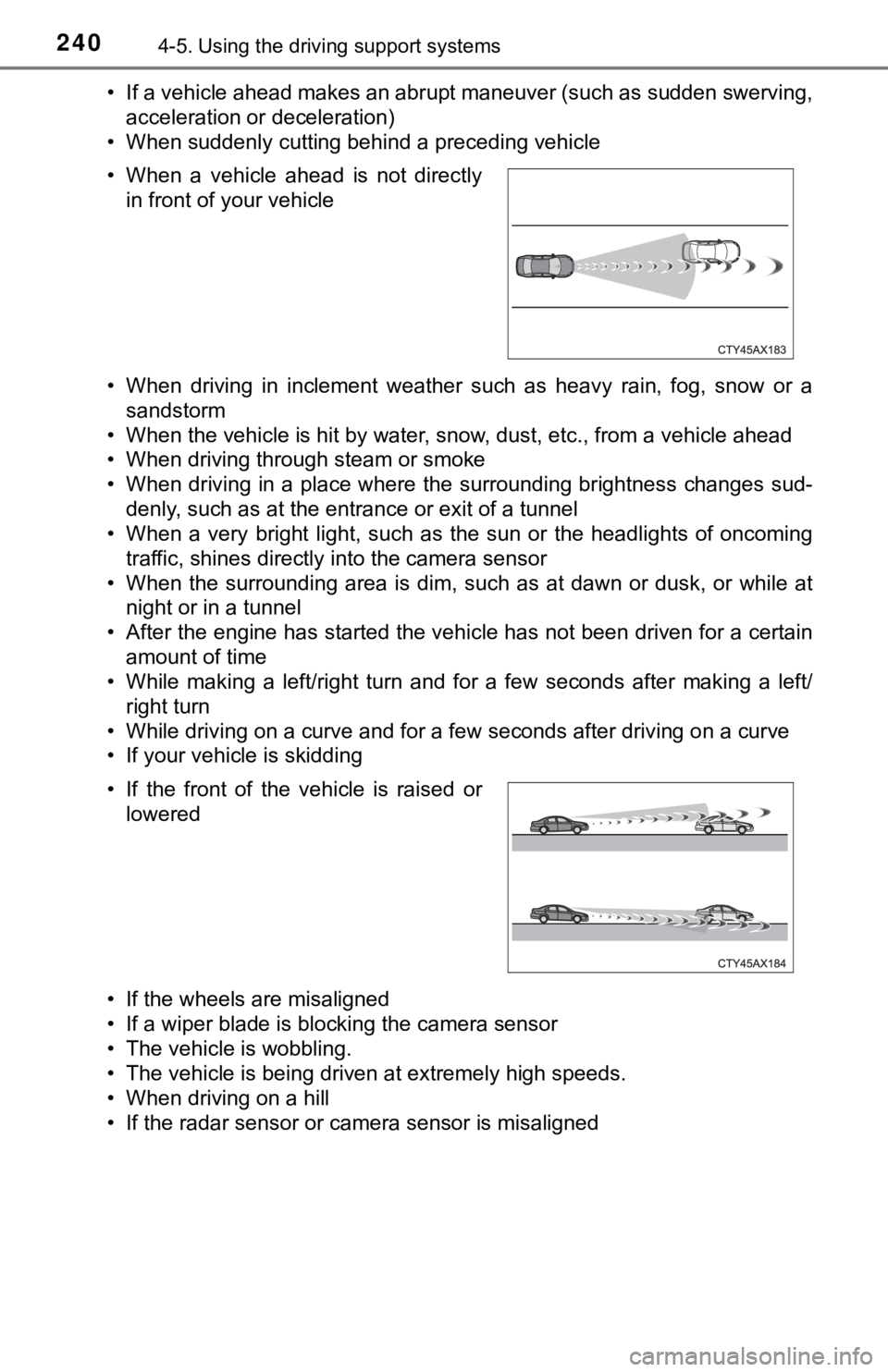
• If the radar sensor or camera sensor is misaligned • When a vehicle ahead is not directly in front of your vehicle
• If the front of the vehicle is raised or lowered
Page 255 of 672

2554-5. Using the driving support systems
4
Driving
Example of constant speed cruising
When there are no vehicles ahead
The vehicle travels at the speed set by the driver. The desired vehicle-to-
vehicle distance can also be set by operating the vehicle-to-ve hicle dis-
tance switch.
Example of deceleration crui sing and follow-up cruising
When a preceding vehicle driving slower than the set speed
appears
When a vehicle is detected running ahead of you, the system automatically
decelerates your vehicle. When a greater reduction in vehicle s peed is
necessary, the system applies the brakes (the stop lights will come on at
this time). The system will respond to changes in the speed of the vehicle
ahead in order to maintain the vehicle-to-vehicle distance set by the driver.
Approach warning warns you when the system cannot decelerate su ffi-
ciently to prevent your vehicle from closing in on the vehicle ahead.
Example of acceleration
When there are no longer any preceding vehicles driving slower
than the set speed
The system accelerates until the set speed is reached. The syst em then
returns to constant speed cruising.
1
2
3