ECU TOYOTA TUNDRA 2021 Accessories, Audio & Navigation (in English)
[x] Cancel search | Manufacturer: TOYOTA, Model Year: 2021, Model line: TUNDRA, Model: TOYOTA TUNDRA 2021Pages: 262, PDF Size: 8.13 MB
Page 37 of 262
372-2. Connectivity settings
2
Basic function
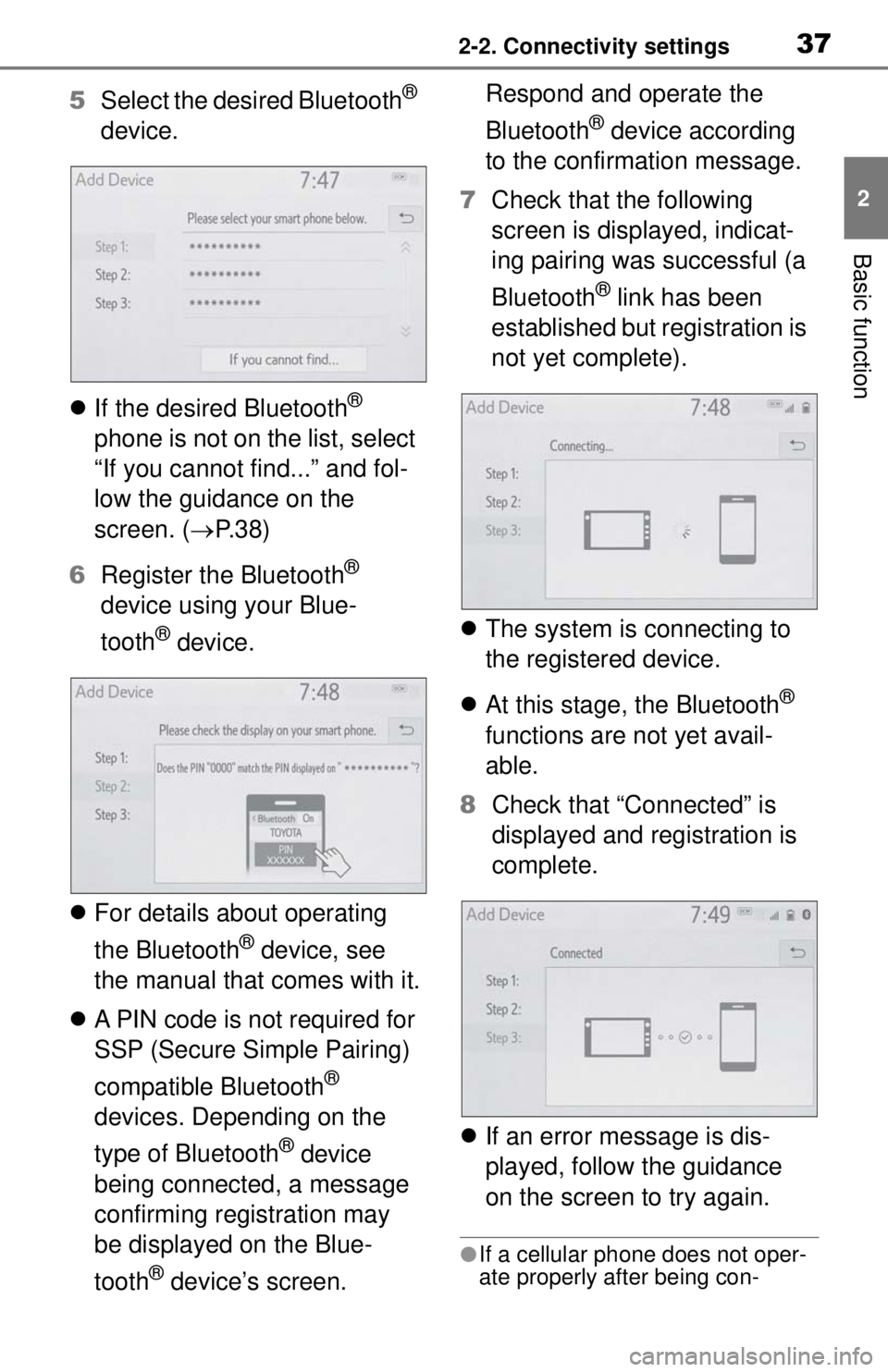
5Select the desired Bluetooth®
device.
If the desired Bluetooth
®
phone is not on the list, select
“If you cannot find...” and fol-
low the guidance on the
screen. ( P. 3 8 )
6 Register the Bluetooth
®
device using your Blue-
tooth
® device.
For details about operating
the Bluetooth
® device, see
the manual that comes with it.
A PIN code is not required for
SSP (Secure Simple Pairing)
compatible Bluetooth
®
devices. Depending on the
type of Bluetooth
® device
being connected, a message
confirming registration may
be displayed on the Blue-
tooth
® device’s screen. Respond and operate the
Bluetooth
® device according
to the confirmation message.
7 Check that the following
screen is displayed, indicat-
ing pairing was successful (a
Bluetooth
® link has been
established but registration is
not yet complete).
The system is connecting to
the registered device.
At this stage, the Bluetooth
®
functions are not yet avail-
able.
8 Check that “Connected” is
displayed and registration is
complete.
If an error message is dis-
played, follow the guidance
on the screen to try again.
●If a cellular phone does not oper-
ate properly after being con-
Page 38 of 262
382-2. Connectivity settings
nected, turn the cellular phone off
and on and then connect it again.
■Registering from phone
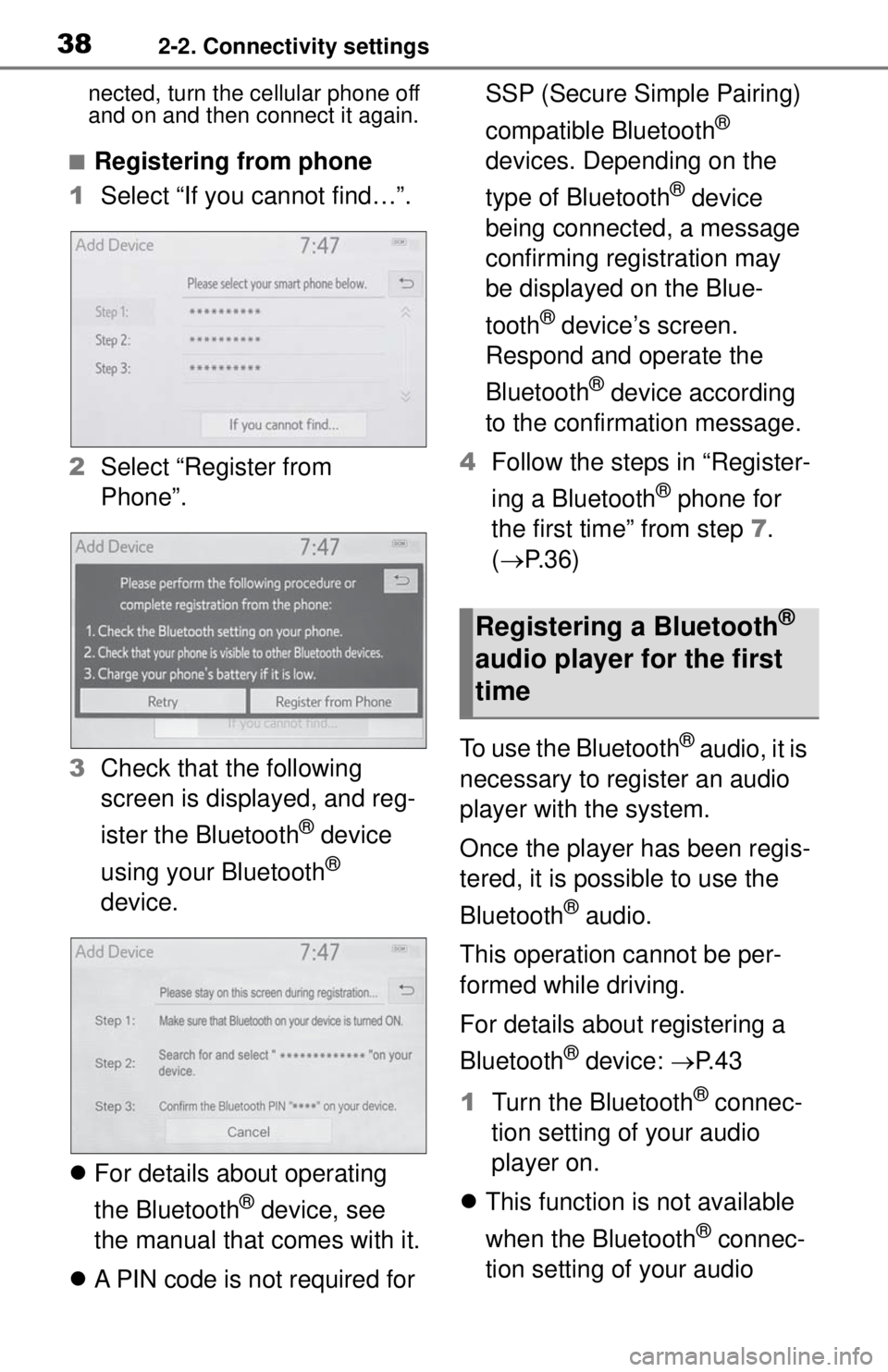
1 Select “If you cannot find…”.
2 Select “Register from
Phone”.
3 Check that the following
screen is displayed, and reg-
ister the Bluetooth
® device
using your Bluetooth
®
device.
For details about operating
the Bluetooth
® device, see
the manual that comes with it.
A PIN code is not required for SSP (Secure Simple Pairing)
compatible Bluetooth
®
devices. Depending on the
type of Bluetooth
® device
being connected, a message
confirming registration may
be displayed on the Blue-
tooth
® device’s screen.
Respond and operate the
Bluetooth
® device according
to the confirmation message.
4 Follow the steps in “Register-
ing a Bluetooth
® phone for
the first time” from step 7.
( P.36)
To use the Bluetooth
® audio, it is
necessary to register an audio
player with the system.
Once the player has been regis-
tered, it is possible to use the
Bluetooth
® audio.
This operation cannot be per-
formed while driving.
For details about registering a
Bluetooth
® device: P. 4 3
1 Turn the Bluetooth
® connec-
tion setting of your audio
player on.
This function is not available
when the Bluetooth
® connec-
tion setting of your audio
Registering a Bluetooth®
audio player for the first
time
Page 48 of 262
482-2. Connectivity settings
mentation which came with it.
4 Operate the device to con-
nect it to the vehicle access
point.
To check the vehicle access
point password, check “Pass-
word”. ( P.49)
●Hints for connecting to the vehicle
via Wi-Fi® can be displayed.
( P. 4 9 )
1 Enable the Wi-Fi® hotspot
function. ( P. 4 9 )
2 Enable the “Hide Access
Point” function. ( P.49)
3 Enter the access point name
(SSID) into the device you
wish to connect and connect
it.
To check the vehicle access
point password, check “Pass-
word”. ( P.49)
The security settings on the
device must be the same as
that displayed for “Security”.
( P. 4 9 )
For details about operating
the device, refer to the docu-
mentation which came with it. 1
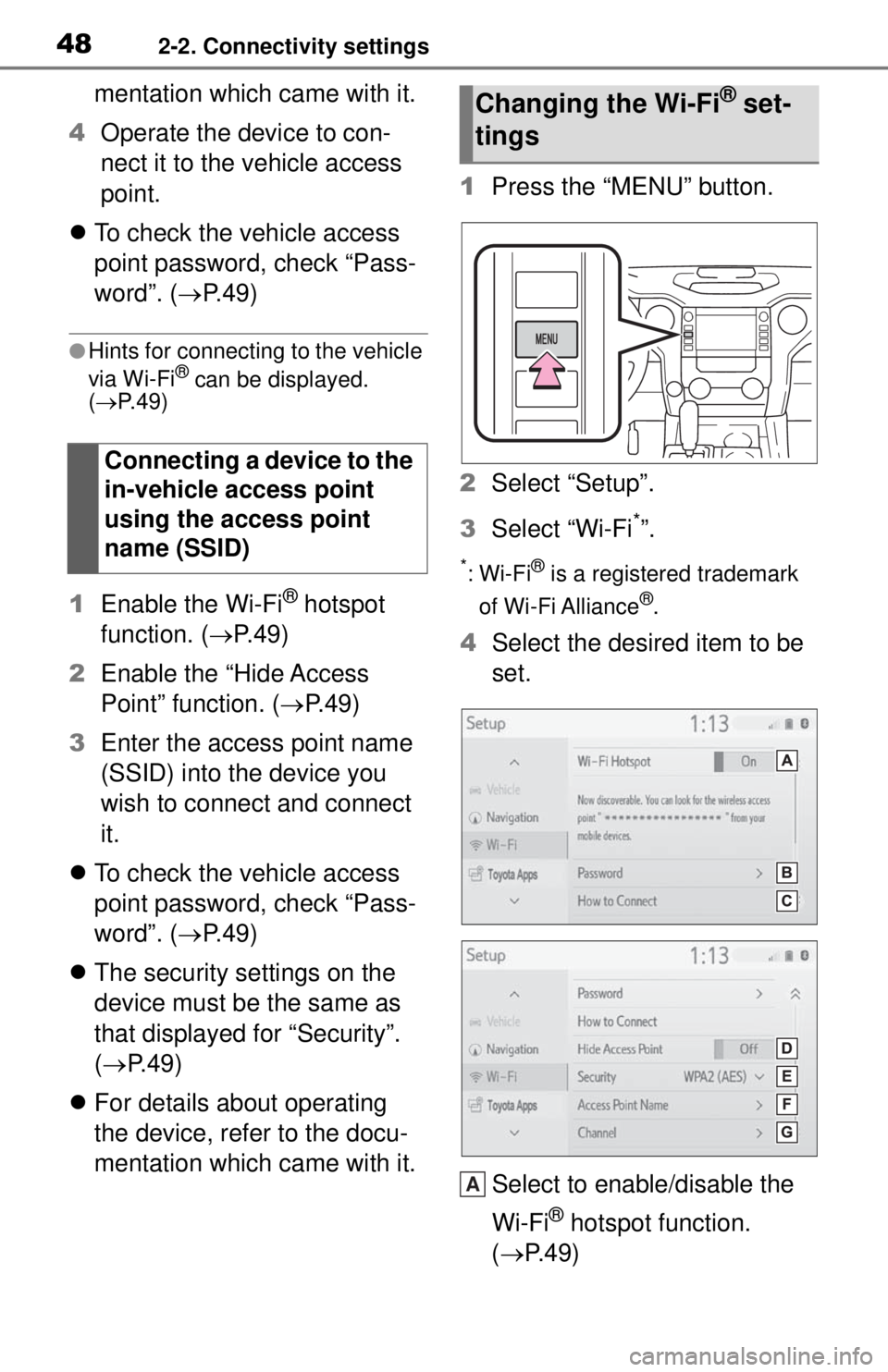
Press the “MENU” button.
2 Select “Setup”.
3 Select “Wi-Fi
*”.
*:Wi-Fi® is a registered trademark
of Wi-Fi Alliance
®.
4 Select the desired item to be
set.
Select to enable/disable the
Wi-Fi
® hotspot function.
( P.49)
Connecting a device to the
in-vehicle access point
using the access point
name (SSID)
Changing the Wi-Fi® set-
tings
A
Page 49 of 262
492-2. Connectivity settings
2
Basic function
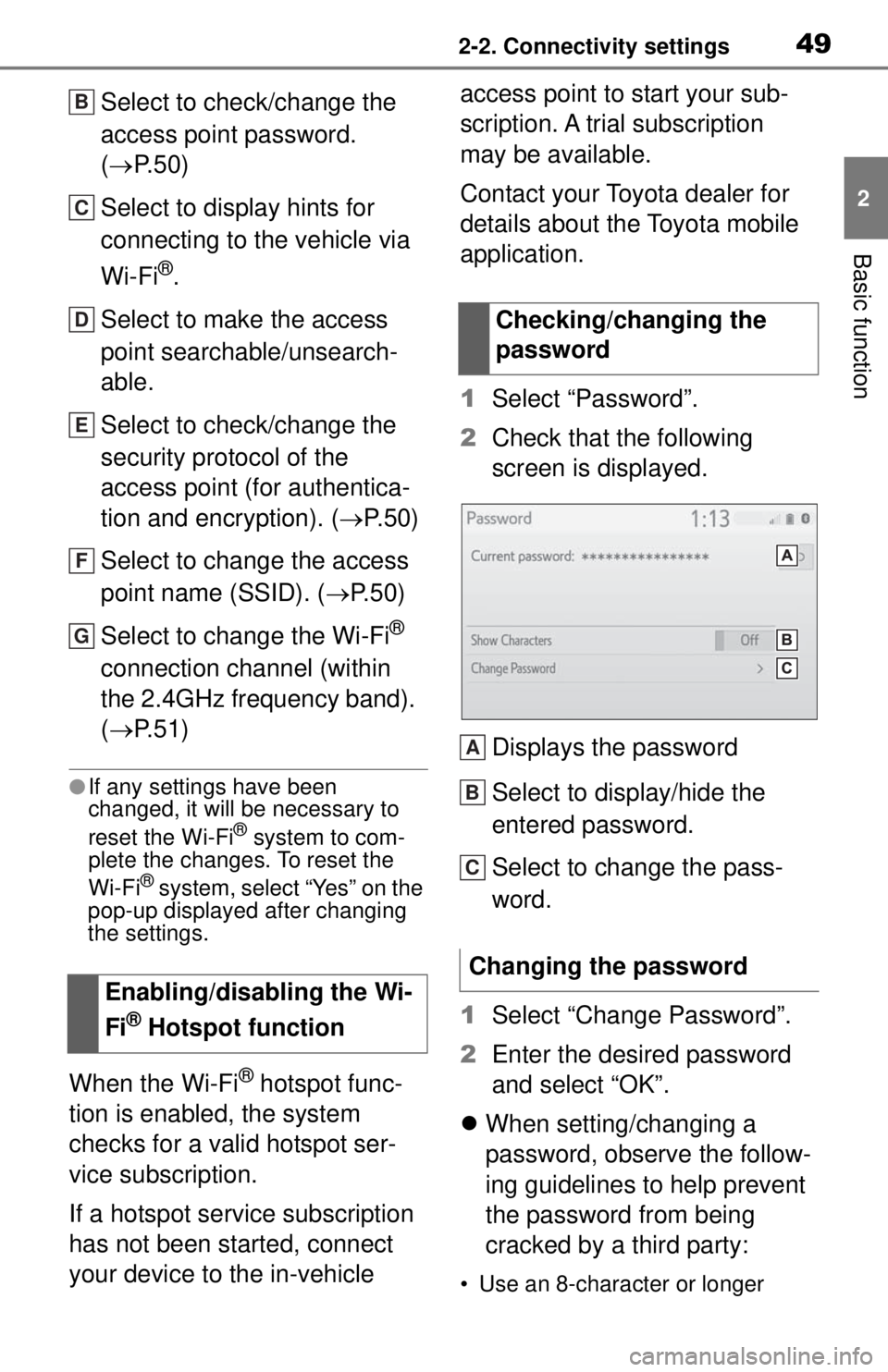
Select to check/change the
access point password.
(P. 5 0 )
Select to display hints for
connecting to the vehicle via
Wi-Fi
®.
Select to make the access
point searchable/unsearch-
able.
Select to check/change the
security protocol of the
access point (for authentica-
tion and encryption). ( P. 5 0 )
Select to change the access
point name (SSID). ( P. 5 0 )
Select to change the Wi-Fi
®
connection channel (within
the 2.4GHz frequency band).
( P. 5 1 )
●If any settings have been
changed, it will be necessary to
reset the Wi-Fi
® system to com-
plete the changes. To reset the
Wi-Fi
® system, select “Yes” on the
pop-up displayed after changing
the settings.
When the Wi-Fi® hotspot func-
tion is enabled, the system
checks for a valid hotspot ser-
vice subscription.
If a hotspot service subscription
has not been started, connect
your device to the in-vehicle access point to start your sub-
scription. A trial subscription
may be available.
Contact your Toyota dealer for
details about the Toyota mobile
application.
1
Select “Password”.
2 Check that the following
screen is displayed.
Displays the password
Select to display/hide the
entered password.
Select to change the pass-
word.
1 Select “Change Password”.
2 Enter the desired password
and select “OK”.
When setting/changing a
password, observe the follow-
ing guidelines to help prevent
the password from being
cracked by a third party:
• Use an 8-character or longer
Enabling/disabling the Wi-
Fi
® Hotspot function
B
C
D
E
F
G
Checking/changing the
password
Changing the password
A
B
C
Page 50 of 262
502-2. Connectivity settings
password consisting of letters
and numbers. (Non-ASCII char-
acters will not be recognized by
the system.)
• Change the password regularly.
• If you write the password down, do not leave it somewhere where
it would be visible.
• Do not use the same password for vehicle Wi-Fi
® hotspot as
other accounts already protected
by a password.
• Avoid using easy to identify words, such as your vehicle’s
model name or license plate
number, simple di ctionary words,
or words with simple obfuscation,
such as c@t (for cat), as your
password.
1 Select “Security”.
2 Select the desired security
protocol.
1 Select “Access Point Name”.
2 Enter the desired access
point name (SSID) and select
“OK”.
1 Select “Channel”. 2
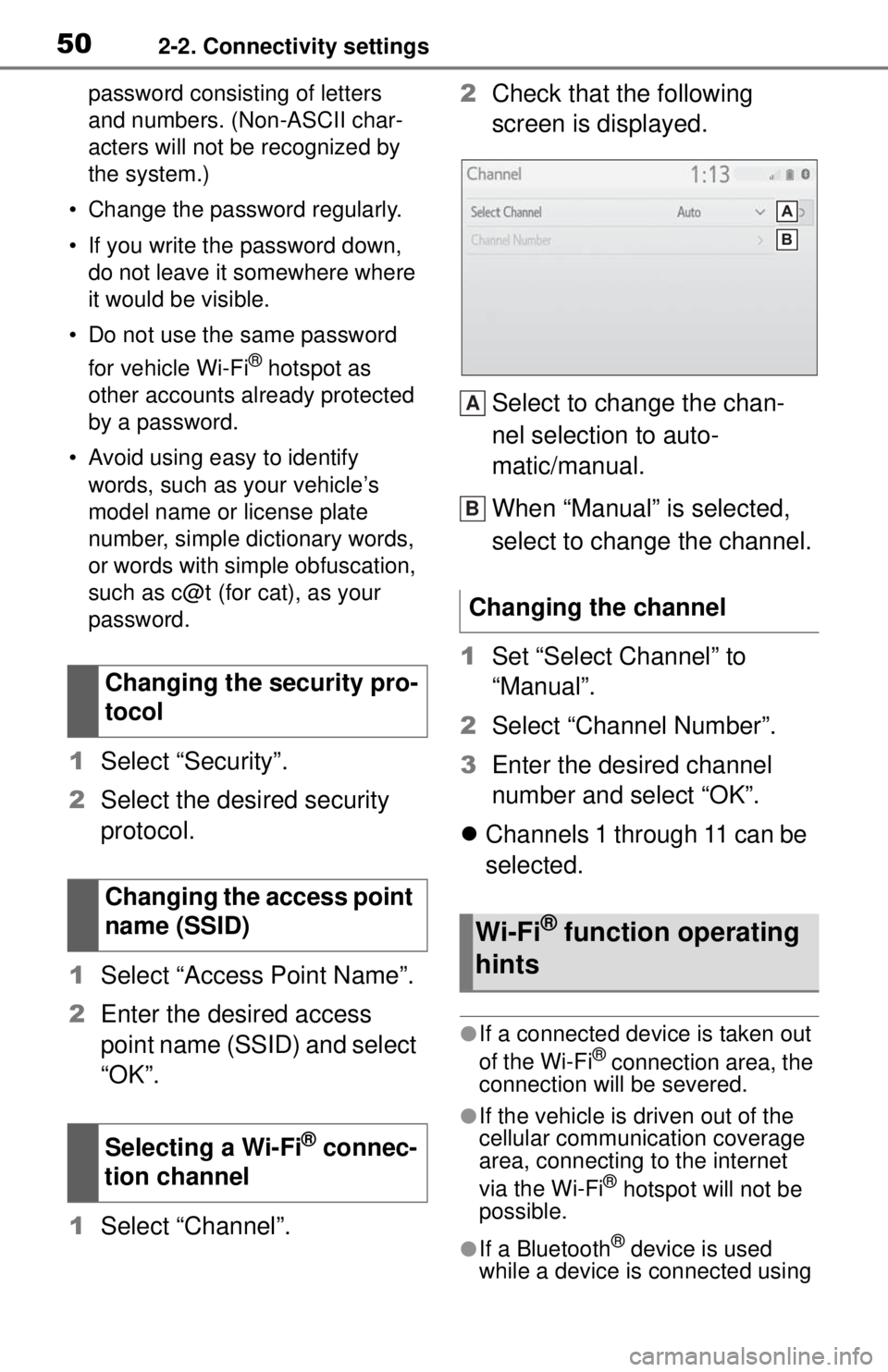
Check that the following
screen is displayed.
Select to change the chan-
nel selection to auto-
matic/manual.
When “Manual” is selected,
select to change the channel.
1 Set “Select Channel” to
“Manual”.
2 Select “Channel Number”.
3 Enter the desired channel
number and select “OK”.
Channels 1 through 11 can be
selected.
●If a connected device is taken out
of the Wi-Fi® connection area, the
connection will be severed.
●If the vehicle is driven out of the
cellular communic ation coverage
area, connecting to the internet
via the Wi-Fi
® hotspot will not be
possible.
●If a Bluetooth® device is used
while a device is connected using
Changing the security pro-
tocol
Changing the access point
name (SSID)
Selecting a Wi-Fi
® connec-
tion channel
Changing the channel
Wi-Fi® function operating
hints
A
B
Page 51 of 262
512-2. Connectivity settings
2
Basic function
the Wi-Fi® hotspot function, the
communication speed may
decrease.
●If the vehicle is near a radio
antenna, radio station or other
source of strong radio waves and
electrical noise, communication
may be slow or impossible.
The condition of Wi-Fi® connec-
tion appears on the right upper
side of the screen. ( P.16)
Communication standards
IEEE 802.11b
IEEE 802.11g
IEEE 802.11n (2.4GHz)
Security
WPA™
WPA2™
• WPA™ and WPA2™ are trade-
marks of Wi-Fi Alliance
®.
WARNING
●Use Wi-Fi® devices only when
safe and legal to do so.
●Your audio unit is fitted with Wi-
Fi® antennas. People with
implantable cardiac pacemak-
ers, cardiac resynchronization
therapy-pacemakers or implant-
able cardioverter defibrillators
should maintain a reasonable
distance between themselves
and the Wi-Fi
® antennas.
The radio waves may affect the
operation of such devices.
●Before using Wi-Fi® devices,
users of any electrical medical
device other than implantable
cardiac pacemakers, cardiac
resynchronization therapy-
pacemakers or implantable car-
dioverter defibr illators should
consult the manufacturer of the
device for information about its
operation under the influence of
radio waves.
Radio waves could have unex-
pected effects on the operation
of such medical devices.
Conditions displayed with
Wi-Fi
® icon
Specifications
Page 56 of 262
562-3. Apple CarPlay®/Android Auto™
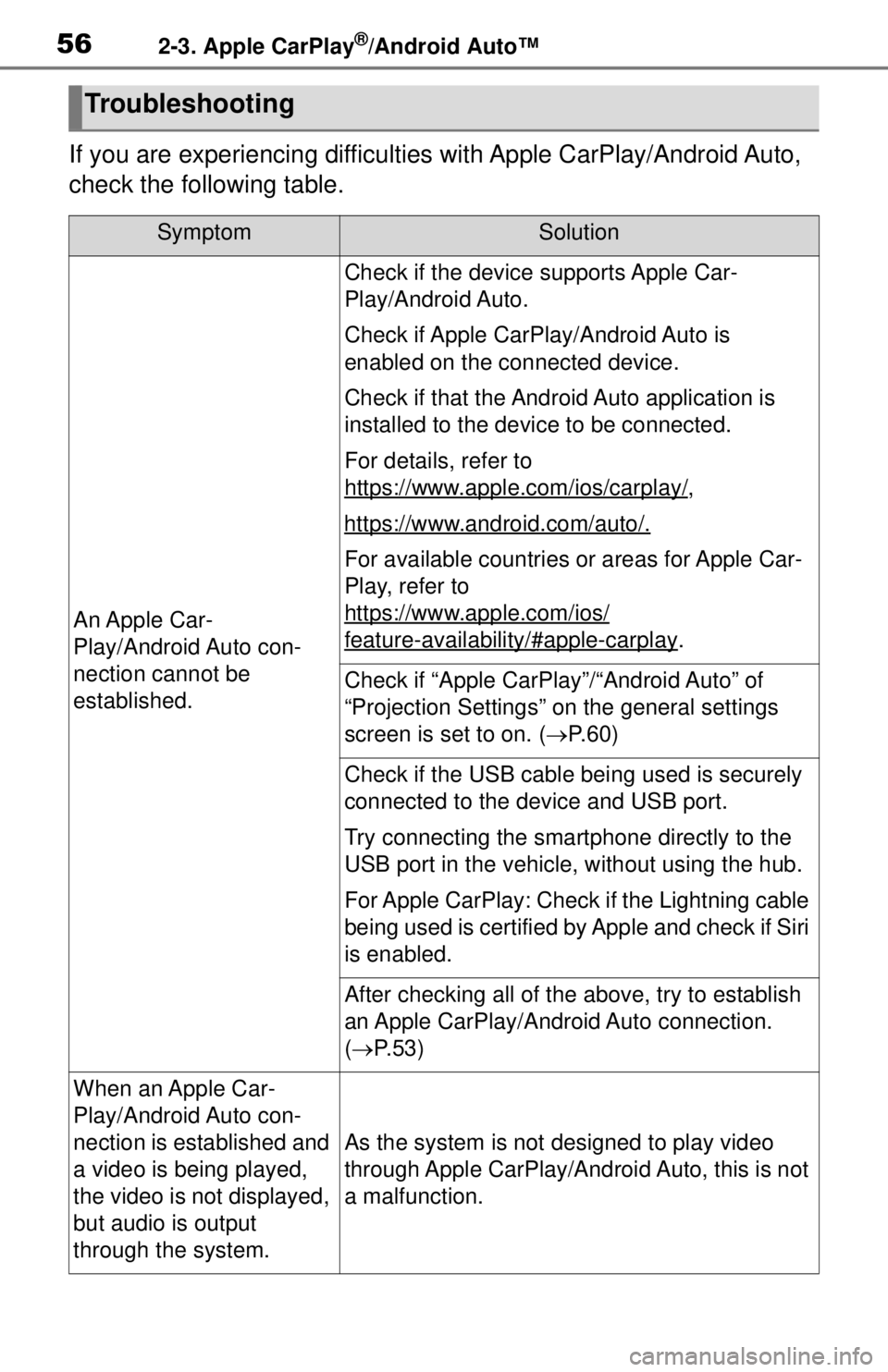
If you are experiencing difficulties with Apple CarPlay/Android Auto,
check the following table.
Troubleshooting
SymptomSolution
An Apple Car-
Play/Android Auto con-
nection cannot be
established.
Check if the device supports Apple Car-
Play/Android Auto.
Check if Apple CarPlay/Android Auto is
enabled on the connected device.
Check if that the Androi d Auto application is
installed to the device to be connected.
For details, refer to
https://www.apple.com/ios/carplay/
,
https://www.android.com/auto/.
For available countries or areas for Apple Car-
Play, refer to
https://www.apple.com/ios/
feature-availability/#apple-carplay.
Check if “Apple CarPlay”/“Android Auto” of
“Projection Settings” on the general settings
screen is set to on. ( P. 6 0 )
Check if the USB cable being used is securely
connected to the device and USB port.
Try connecting the smartphone directly to the
USB port in the vehicle, without using the hub.
For Apple CarPlay: Check if the Lightning cable
being used is certified by Apple and check if Siri
is enabled.
After checking all of the above, try to establish
an Apple CarPlay/Android Auto connection.
( P. 5 3 )
When an Apple Car-
Play/Android Auto con-
nection is established and
a video is being played,
the video is not displayed,
but audio is output
through the system.
As the system is not designed to play video
through Apple CarPlay/Android Auto, this is not
a malfunction.
Page 67 of 262
672-4. Other settings
2
Basic function
dealer. (P.68)
Select to enter the name of a
dealer member. ( P. 6 8 )
Select to set the location.
( P. 6 8 )
Select to enter the phone
number. ( P.68)
Select to delete the dealer
information displayed on the
screen.
Select to set the displayed
dealer as a destination.
( P. 9 1 )
1 Select “Dealer” or “Contact”.
2 Enter the name and select
“OK”.
1 Select “Location”.
2 Scroll the map to the desired
point ( P.75) and select
“Enter”.
1 Select “Phone #”.
2 Enter the phone number and
select “OK”.
The security system can be set to on by entering a security code
(4-digit number).
When set to on, the system will
become inoperative once the
electrical power source is dis-
connected until the security
code is entered.
1
Display the vehicle settings
screen. ( P. 6 6 )
2 Select “Valet Mode”.
3 Enter the 4-digit personal
code and select “OK”.
4 Enter the same 4-digit per-
sonal code again and select
“OK”.
The system will request that
you input the security code
again to confirm that you
remember it correctly.
When valet mode activates,
the system stops and a secu-
rity code (4-digit number)
standby screen is displayed.
●If the 4-digit personal code is for-
gotten, please contact your Toyota
dealer.
1 Enter the 4-digit personal
code and select “OK”.
●If an incorrect security code (4-
digit number) is entered 6 times,
the system will not accept another
security code (4-digit number) for
10 minutes.
Editing dealer or contact
name
Editing the location
Editing phone number
Setting the valet mode
B
C
D
E
F
If the valet mode has been
activated
Page 130 of 262
1324-2. Radio operation
(P.144).
1 Select channels registered to
smart favorites.
2 Select “SXM Replay”
*1 or
“Radio Replay”
*2.
*1: Audio with SiriusXM® Satellite
Radio/Audio Plus
*2: Premium Audio
●Caches up to 30 minutes for each Smart Favorite preset.
●The radio plays the track from
start when that track has not previ-
ously been heard by the user and
the station is registered as a smart
favorite.
●When “SXM Tune Start” is turned
on (
P.127), the current song is
played from the beginning when
you select the channel.
●Displays icons on the channels
registered to smart favorites.
( P.125)
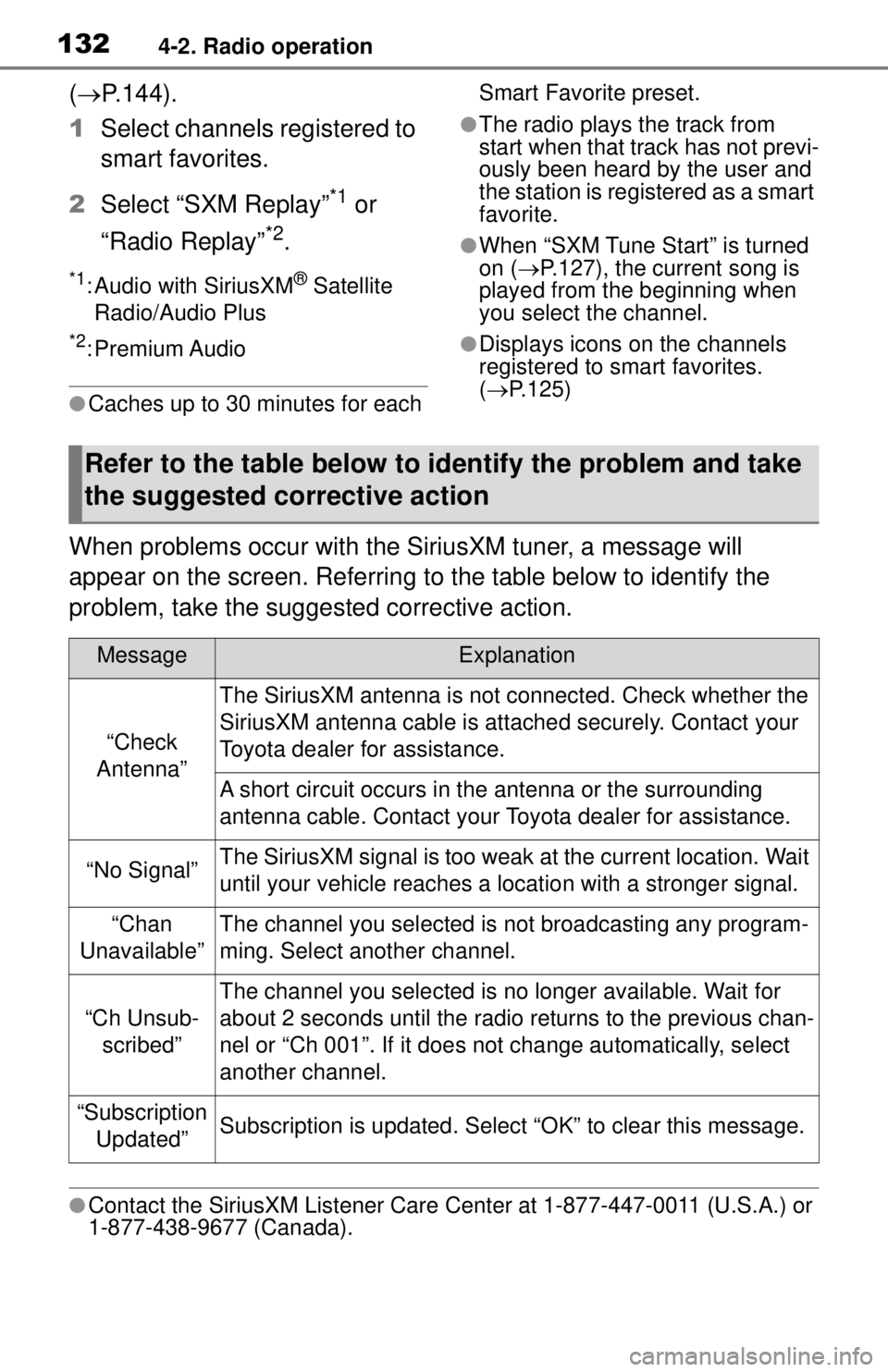
When problems occur with the SiriusXM tuner, a message will
appear on the screen. Referring to the table below to identify the
problem, take the suggested corrective action.
●Contact the SiriusXM Listener Care Ce nter at 1-877-447-0011 (U.S.A.) or
1-877-438-9677 (Canada).
Refer to the table below to identify the problem and take
the suggested corrective action
MessageExplanation
“Check
Antenna”
The SiriusXM antenna is not connected. Check whether the
SiriusXM antenna cable is attached securely. Contact your
Toyota dealer for assistance.
A short circuit occurs in the antenna or the surrounding
antenna cable. Contact your Toyota dealer for assistance.
“No Signal”The SiriusXM signal is too weak at the current location. Wait
until your vehicle reaches a location with a stronger signal.
“Chan
Unavailable”The channel you selected is not broadcasting any program-
ming. Select another channel.
“Ch Unsub- scribed”
The channel you selected is no longer available. Wait for
about 2 seconds until the radio returns to the previous chan-
nel or “Ch 001”. If it does not change automatically, select
another channel.
“Subscription Updated”Subscription is updated. Select “OK” to clear this message.
Page 156 of 262
1585-1. Voice command system operation
say “Pause”. To resume the
voice command operation,
select “Resume” or press the
talk switch.
●If the system does not respond or
the confirmation screen does not
disappear, press the talk switch
and try again.
●If a voice command cannot be rec-
ognized 3 consecutive times,
voice recognition will be canceled.
●Voice recognition prompts can be
changed on the voice settings
screen. (P. 6 4 )
This function can be used to cancel
voice guidance by turning the voice
prompts off. When you press the
talk switch while using this setting, a
beep sounds, and then you can
immediately say a command.
●Some voice guidance can be can-
celed by setting voice prompts to
off. Use this setting when it is
desirable to say a command
immediately after pressing the talk
switch and hearing a beep.
To increase voice recognition
performance, use the “Tutori-
als” and “Voice Training” func-
tions on the “Getting Started
with Voice” screen. These func-
tions are only available when
the vehicle is not moving.
The “Tutorials” and “Voice Train-
ing” functions can also be
started on the voice settings
screen. ( P. 6 4 )
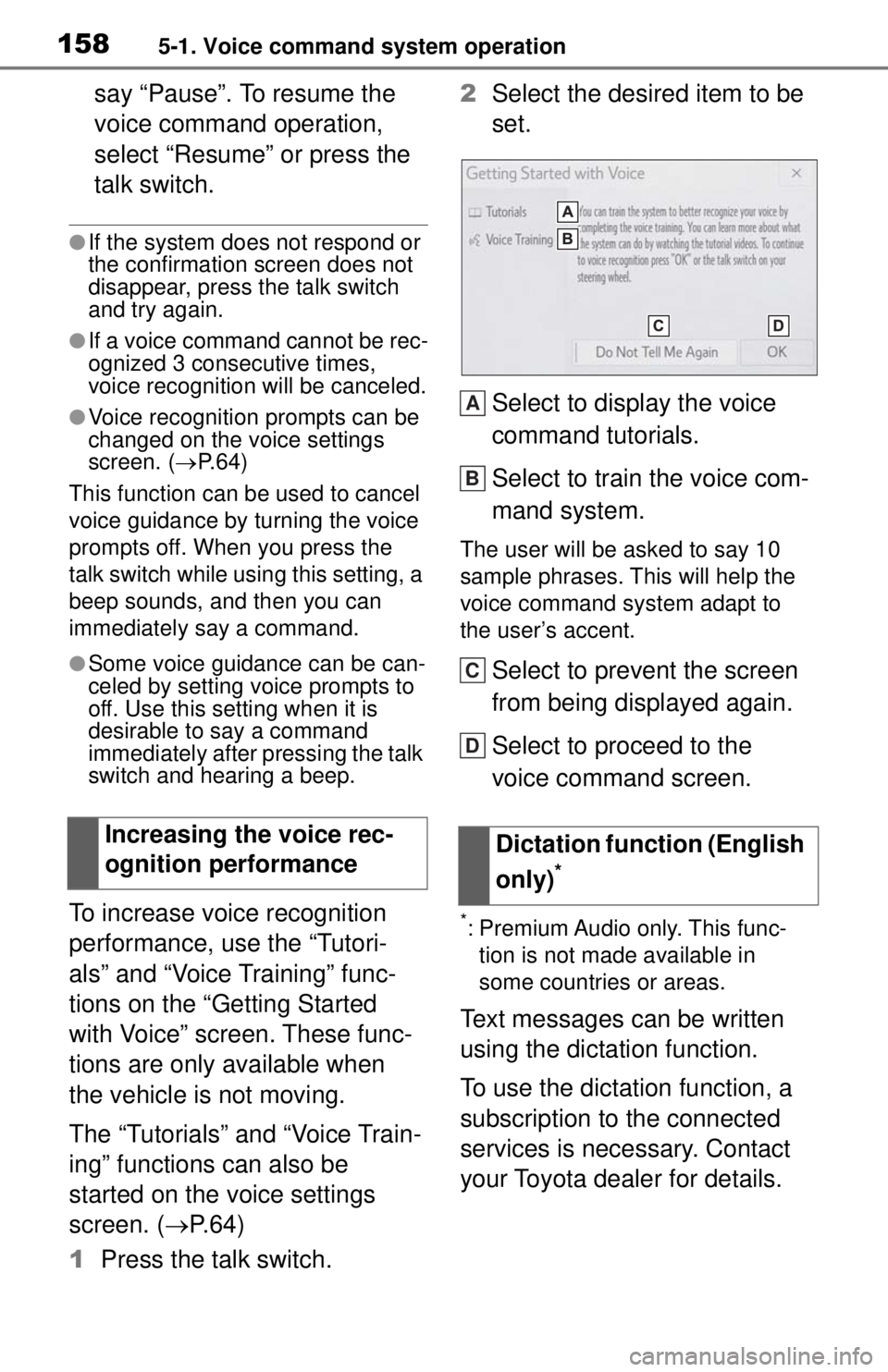
1 Press the talk switch. 2
Select the desired item to be
set.
Select to display the voice
command tutorials.
Select to train the voice com-
mand system.
The user will be asked to say 10
sample phrases. This will help the
voice command system adapt to
the user’s accent.
Select to prevent the screen
from being displayed again.
Select to proceed to the
voice command screen.
*: Premium Audio only. This func-
tion is not made available in
some countries or areas.
Text messages can be written
using the dictation function.
To use the dictation function, a
subscription to the connected
services is necessary. Contact
your Toyota dealer for details.
Increasing the voice rec-
ognition performance
Dictation function (English
only)
*
A
B
C
D