USB port TOYOTA TUNDRA 2021 Accessories, Audio & Navigation (in English)
[x] Cancel search | Manufacturer: TOYOTA, Model Year: 2021, Model line: TUNDRA, Model: TOYOTA TUNDRA 2021Pages: 262, PDF Size: 8.13 MB
Page 52 of 262
522-3. Apple CarPlay®/Android Auto™
2-3.Apple CarPlay®/Android Auto™
*: This function is not made avail-able in some countries or areas
1 Enable Siri on the device to
be connected. 2
Connect the device to the
USB port. ( P.122)
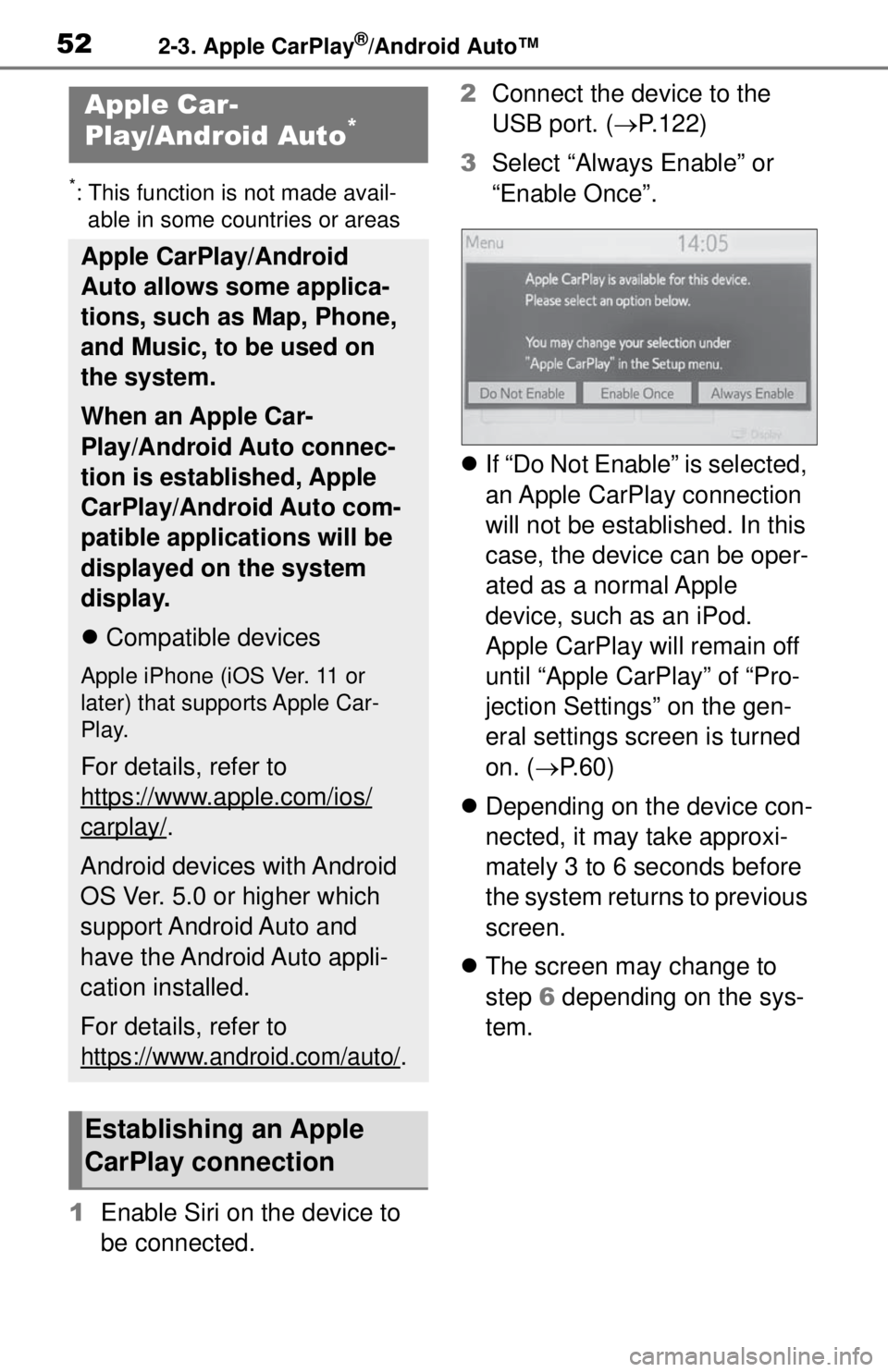
3 Select “Always Enable” or
“Enable Once”.
If “Do Not Enable” is selected,
an Apple CarPlay connection
will not be established. In this
case, the device can be oper-
ated as a normal Apple
device, such as an iPod.
Apple CarPlay will remain off
until “Apple CarPlay” of “Pro-
jection Settings” on the gen-
eral settings screen is turned
on. ( P. 6 0 )
Depending on the device con-
nected, it may take approxi-
mately 3 to 6 seconds before
the system returns to previous
screen.
The screen may change to
step 6 depending on the sys-
tem.
Apple Car-
Play/Android Auto*
Apple CarPlay/Android
Auto allows some applica-
tions, such as Map, Phone,
and Music, to be used on
the system.
When an Apple Car-
Play/Android Auto connec-
tion is established, Apple
CarPlay/Android Auto com-
patible applications will be
displayed on the system
display.
Compatible devices
Apple iPhone (iOS Ver. 11 or
later) that supports Apple Car-
Play.
For details, refer to
https://www.apple.com/ios/
carplay/.
Android devices with Android
OS Ver. 5.0 or higher which
support Android Auto and
have the Android Auto appli-
cation installed.
For details, refer to
https://www.android.com/auto/.
Establishing an Apple
CarPlay connection
Page 53 of 262
532-3. Apple CarPlay®/Android Auto™
2
Basic function
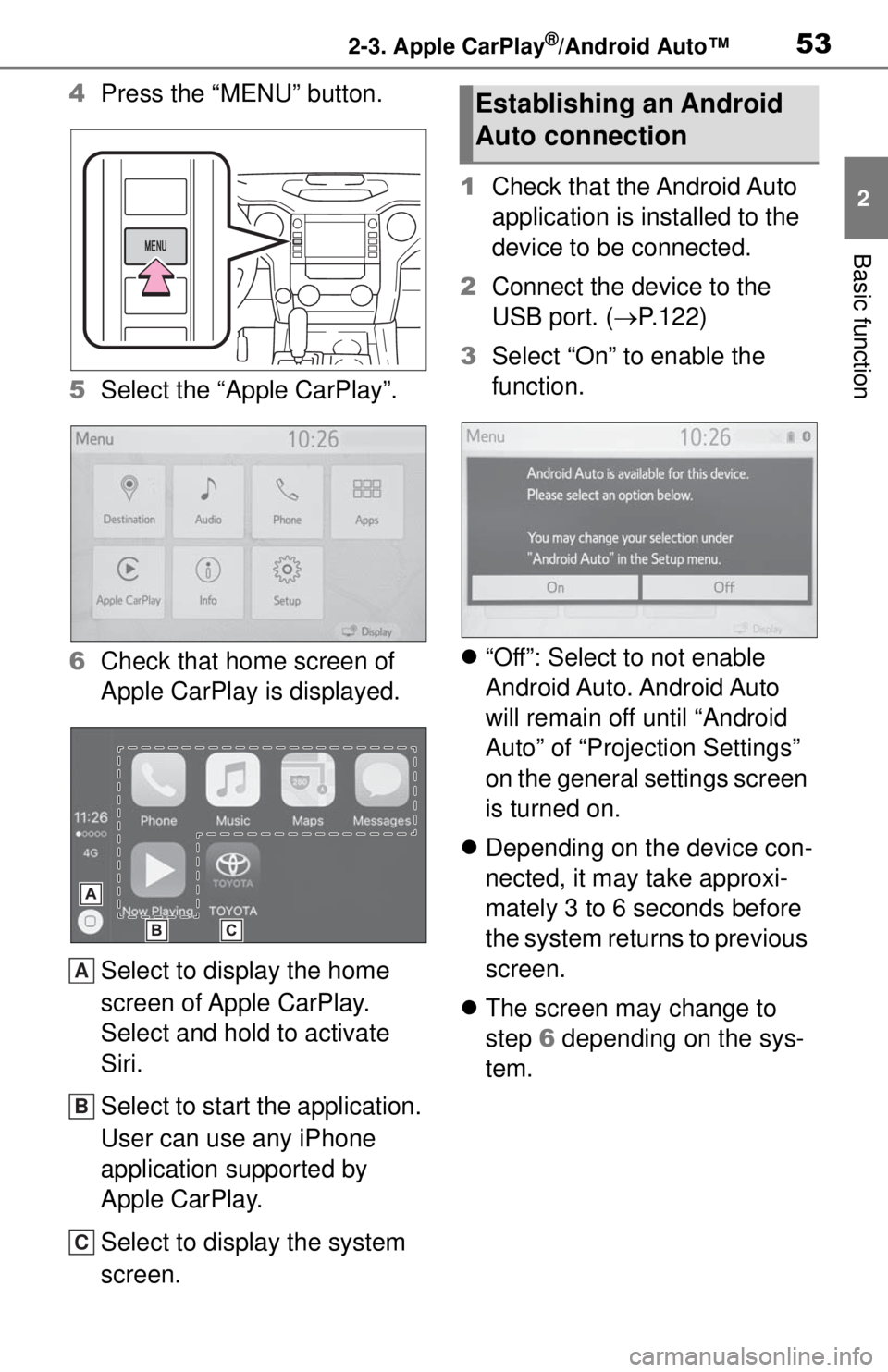
4Press the “MENU” button.
5 Select the “Apple CarPlay”.
6 Check that home screen of
Apple CarPlay is displayed.
Select to display the home
screen of Apple CarPlay.
Select and hold to activate
Siri.
Select to start the application.
User can use any iPhone
application supported by
Apple CarPlay.
Select to display the system
screen. 1
Check that the Android Auto
application is installed to the
device to be connected.
2 Connect the device to the
USB port. ( P.122)
3 Select “On” to enable the
function.
“Off”: Select to not enable
Android Auto. Android Auto
will remain off until “Android
Auto” of “Projection Settings”
on the general settings screen
is turned on.
Depending on the device con-
nected, it may take approxi-
mately 3 to 6 seconds before
the system returns to previous
screen.
The screen may change to
step 6 depending on the sys-
tem.
A
B
C
Establishing an Android
Auto connection
Page 54 of 262
542-3. Apple CarPlay®/Android Auto™
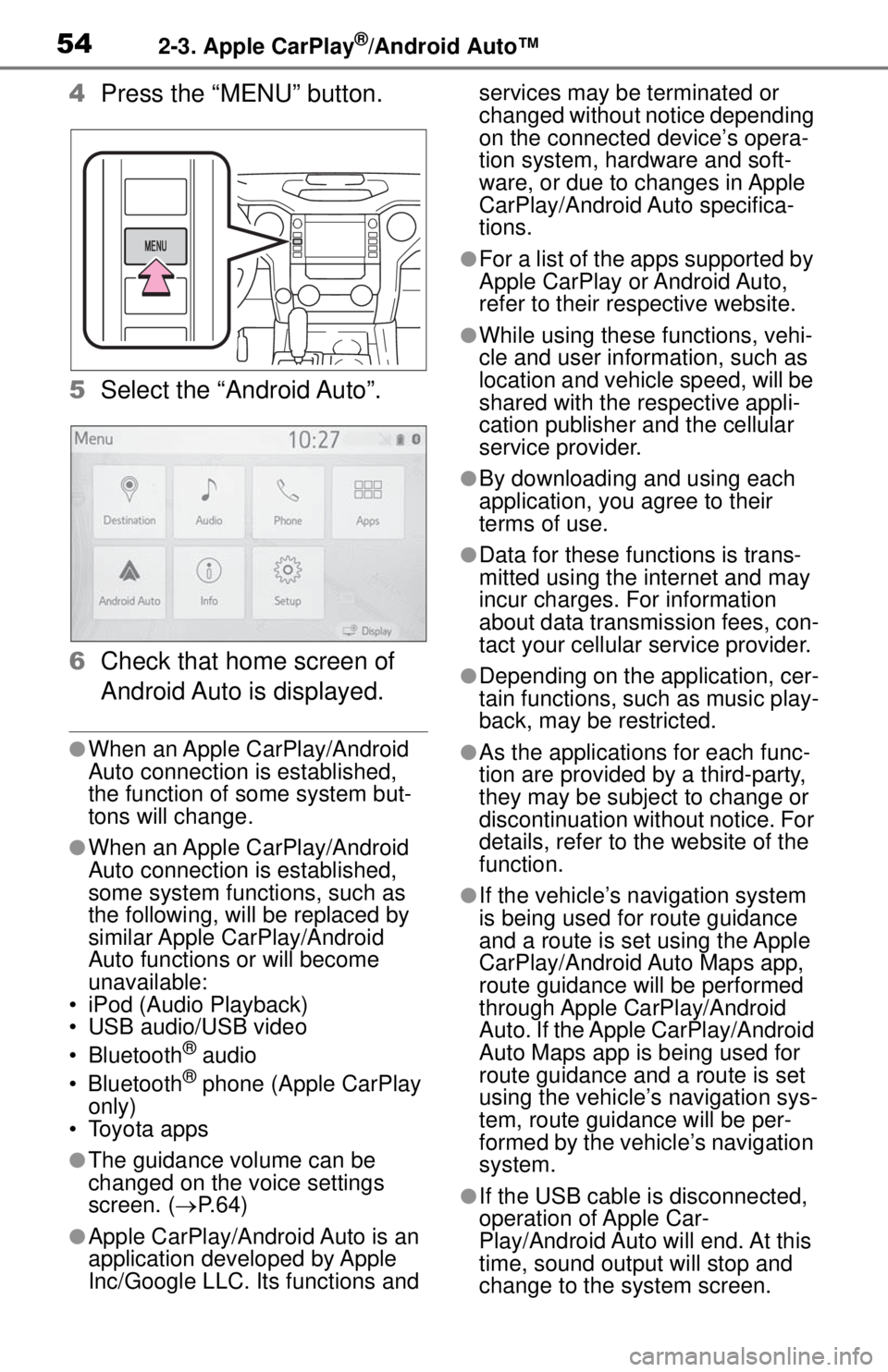
4Press the “MENU” button.
5 Select the “Android Auto”.
6 Check that home screen of
Android Auto is displayed.
●When an Apple CarPlay/Android
Auto connection is established,
the function of some system but-
tons will change.
●When an Apple CarPlay/Android
Auto connection is established,
some system functi ons, such as
the following, will be replaced by
similar Apple CarPlay/Android
Auto functions or will become
unavailable:
• iPod (Audio Playback)
• USB audio/USB video
• Bluetooth
® audio
• Bluetooth® phone (Apple CarPlay
only)
• Toyota apps
●The guidance volume can be
changed on the voice settings
screen. ( P. 6 4 )
●Apple CarPlay/Android Auto is an
application developed by Apple
Inc/Google LLC. Its functions and services may be terminated or
changed without notice depending
on the connected device’s opera-
tion system, hardware and soft-
ware, or due to changes in Apple
CarPlay/Android Auto specifica-
tions.
●For a list of the apps supported by
Apple CarPlay or Android Auto,
refer to their respective website.
●While using these functions, vehi-
cle and user information, such as
location and vehicle speed, will be
shared with the
respective appli-
cation publisher and the cellular
service provider.
●By downloading and using each
application, you agree to their
terms of use.
●Data for these fu nctions is trans-
mitted using the internet and may
incur charges. For information
about data transmission fees, con-
tact your cellular service provider.
●Depending on the application, cer-
tain functions, such as music play-
back, may be restricted.
●As the applications for each func-
tion are provided by a third-party,
they may be subject to change or
discontinuation without notice. For
details, refer to th e website of the
function.
●If the vehicle’s navigation system
is being used for route guidance
and a route is set using the Apple
CarPlay/Android Auto Maps app,
route guidance will be performed
through Apple CarPlay/Android
Auto. If the Apple CarPlay/Android
Auto Maps app is being used for
route guidance and a route is set
using the vehicle’s navigation sys-
tem, route guidan ce will be per-
formed by the vehicle’s navigation
system.
●If the USB cable is disconnected,
operation of Apple Car-
Play/Android Auto will end. At this
time, sound outp ut will stop and
change to the system screen.
Page 56 of 262
562-3. Apple CarPlay®/Android Auto™
If you are experiencing difficulties with Apple CarPlay/Android Auto,
check the following table.
Troubleshooting
SymptomSolution
An Apple Car-
Play/Android Auto con-
nection cannot be
established.
Check if the device supports Apple Car-
Play/Android Auto.
Check if Apple CarPlay/Android Auto is
enabled on the connected device.
Check if that the Androi d Auto application is
installed to the device to be connected.
For details, refer to
https://www.apple.com/ios/carplay/
,
https://www.android.com/auto/.
For available countries or areas for Apple Car-
Play, refer to
https://www.apple.com/ios/
feature-availability/#apple-carplay.
Check if “Apple CarPlay”/“Android Auto” of
“Projection Settings” on the general settings
screen is set to on. ( P. 6 0 )
Check if the USB cable being used is securely
connected to the device and USB port.
Try connecting the smartphone directly to the
USB port in the vehicle, without using the hub.
For Apple CarPlay: Check if the Lightning cable
being used is certified by Apple and check if Siri
is enabled.
After checking all of the above, try to establish
an Apple CarPlay/Android Auto connection.
( P. 5 3 )
When an Apple Car-
Play/Android Auto con-
nection is established and
a video is being played,
the video is not displayed,
but audio is output
through the system.
As the system is not designed to play video
through Apple CarPlay/Android Auto, this is not
a malfunction.
Page 120 of 262

1224-1. Basic operation
1Display the audio source
selection screen. ( P.121)
2 Select “Reorder”.
3 Select the desired audio
source then or to reor-
der.
4 Select “OK”.
1 Open the cover and connect
a device.
Turn on the power of the
device if it is not turned on.
●If a USB hub is plugged-in, two
devices can be connected at a
time.
●Even if a USB hub is used to con-
nect more than two USB devices,
only the first two connected
devices will be recognized.
●If a USB hub that has more than
two ports is connected to the USB
port, devices connected to the
USB hub may not charge or be
inoperable, as the supply of cur-
rent may be insufficient.
1 Display the audio control
screen. ( P.121)
2 Select “Sound”.
3 Select the desired item to be
set.
Select to set the tre-
ble/mid/bass. ( P.122)
Select to set the fader/bal-
ance. ( P.123)
Select to set the automatic
sound levelizer. ( P.123)
■Treble/Mid/Bass
How good an audio program
sounds is largely determined by
the mix of the treble, mid and
bass levels. In fact, different
kinds of music and vocal pro-
grams usually sound better with
different mixes of treble, mid
and bass.
1 Select “Treble/Mid/Bass”.
Reordering the audio
source
USB port
Sound settings
A
B
C
Page 121 of 262
1234-1. Basic operation
4
Audio/visual system
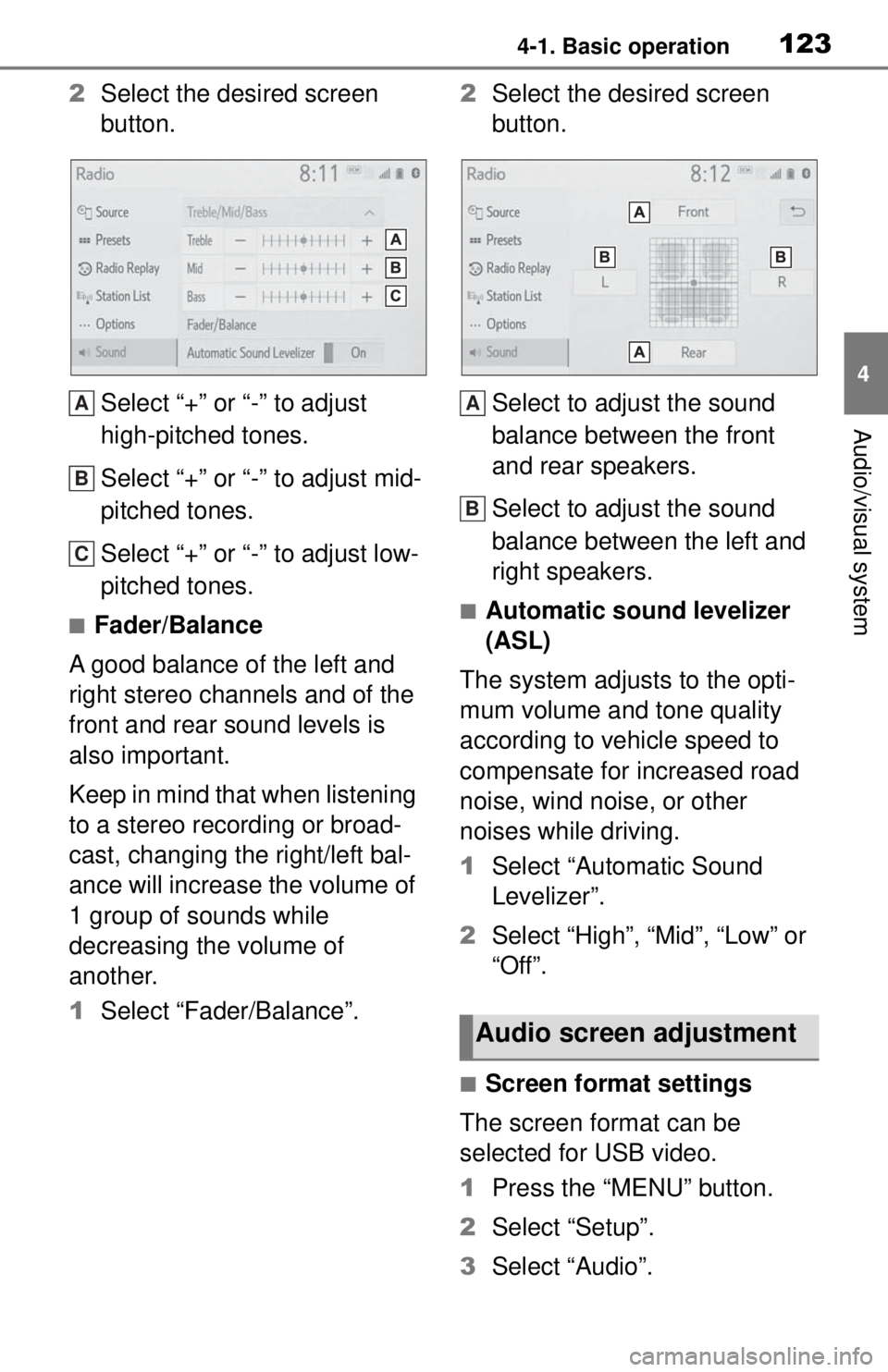
2Select the desired screen
button.
Select “+” or “-” to adjust
high-pitched tones.
Select “+” or “-” to adjust mid-
pitched tones.
Select “+” or “-” to adjust low-
pitched tones.
■Fader/Balance
A good balance of the left and
right stereo channels and of the
front and rear sound levels is
also important.
Keep in mind that when listening
to a stereo recording or broad-
cast, changing the right/left bal-
ance will increase the volume of
1 group of sounds while
decreasing the volume of
another.
1 Select “Fader/Balance”. 2
Select the desired screen
button.
Select to adjust the sound
balance between the front
and rear speakers.
Select to adjust the sound
balance between the left and
right speakers.■Automatic sound levelizer
(ASL)
The system adjusts to the opti-
mum volume and tone quality
according to vehicle speed to
compensate for increased road
noise, wind noise, or other
noises while driving.
1 Select “Automatic Sound
Levelizer”.
2 Select “High”, “Mid”, “Low” or
“Off”.
■Screen format settings
The screen format can be
selected for USB video.
1 Press the “MENU” button.
2 Select “Setup”.
3 Select “Audio”.
A
B
C
Audio screen adjustment
A
B
Page 135 of 262
1374-3. Media operation
4
Audio/visual system
●Depending on the iPod/iPhone
that is connected to the system,
certain functions may not be avail-
able.
●If an iPhone is connected via
Bluetooth® and USB at the same
time, system operation may
become unstable. For known
phone compatibilit y information,
refer to
https://www.toyota.com/
audio-multimedia.
●Tracks selected by operating a
connected iPod/iPhone may not
be recognized or displayed prop-
erly.
●The system may not function
properly if a conversion adapter is
used to connect a device.
The track currently being lis-
tened to can be repeated.
1 Select .
●Each time is selected, the
mode changes as follows:
When shuffle is off (iPhone 5 or
later)
• track repeat album repeat off
When shuffle is off (iPhone 4s or
earlier)
• track repeat off
When shuffle is on
• track repeat off
Tracks or albums can be auto-
matically and randomly
selected.
1Select .
●Each time is selected, the
mode changes as follows:
• shuffle (1 album shuffle) album
shuffle (all album shuffle) off
Repeating
Random order
WARNING
●Do not operate the player’s con-
trols or connect the iPod/iPhone
while driving.
NOTICE
●Do not leave your portable
player in the car. In particular,
high temperatures inside the
vehicle may damage the porta-
ble player.
●Do not push down on or apply
unnecessary pressure to the
portable player while it is con-
nected as this may damage the
portable player or its terminal.
●Do not insert foreign objects into
the port as this may damage the
portable player or its terminal.
Page 146 of 262
1484-6. Tips for operating the audio/visual system
• iPhone 7 Plus
• iPhone SE
• iPhone 6s
• iPhone 6s Plus
• iPhone 6
• iPhone 6 Plus
• iPhone 5s
• iPhone 5c
• iPhone 5
• iPod touch (6th generation)
• iPod touch (5th generation)
Audio Plus
Made for
• iPhone XS Max
• iPhone XS
• iPhone XR
• iPhone X
• iPhone 8
• iPhone 8 Plus
• iPhone 7
• iPhone 7 Plus
• iPhone SE
• iPhone 6s
• iPhone 6s Plus
• iPhone 6
• iPhone 6 Plus
• iPhone 5s
• iPhone 5c
• iPhone 5
• iPod touch (6th generation)
• iPod touch (5th generation)
• iPod nano (7th generation)
Premium Audio
Made for
• iPhone X
• iPhone 8
• iPhone 8 Plus
• iPhone 7
• iPhone 7 Plus • iPhone SE
• iPhone 6s
• iPhone 6s Plus
• iPhone 6
• iPhone 6 Plus
• iPhone 5s
• iPhone 5c
• iPhone 5
• iPhone 4s
• iPod touch (6th generation)
• iPod touch (5th generation)
• iPod nano (7th generation)
●This system only supports audio
playback.
●Depending on difference between
models or software versions etc.,
some models might be incompati-
ble with this system.
This device supports high-reso-
lution sound sources.
The definition of high-resolution
is based on the standards of
groups such as the CTA (Con-
sumer Technology Association).
Supported formats and play-
able media are as follows.
■Supported formats
WAV, FLAC, ALAC, OGG Vorbis
■Playable media
USB memory
High-resolution sound
source
Page 148 of 262
1504-6. Tips for operating the audio/visual system
*1: Variable Bit Rate (VBR) compati-ble
*2: Only compatible with Windows Media Audio Standard
MP3 (MPEG Audio Layer 3),
WMA (Windows Media Audio)
and AAC (Advanced Audio
Coding) are audio compres-
sion standards.
This system can play
MP3/WMA/AAC files on USB
memory.
MP4, WMV and AVI files can
use the following resolutions:
128x96, 160x120, 176x144
(QCIF), 320x240 (QVGA),
352x240 (SIF), 352x288
(CIF), 640x480 (VGA),
720x480 (NTSC), 720x576
(PAL)
When naming an
MP3/WMA/AAC file, add an
appropriate file extension
(.mp3/.wma/.m4a).
This system plays back files
with .mp3/.wma/.m4a file
extensions as
MP3/WMA/AAC files respec-
tively. To prevent noise and
playback errors, use the
appropriate file extension.
MP3 files are compatible with
the ID3 Tag Ver. 1.0, Ver. 1.1,
Ver. 2.2 and Ver. 2.3 formats.
This system cannot display
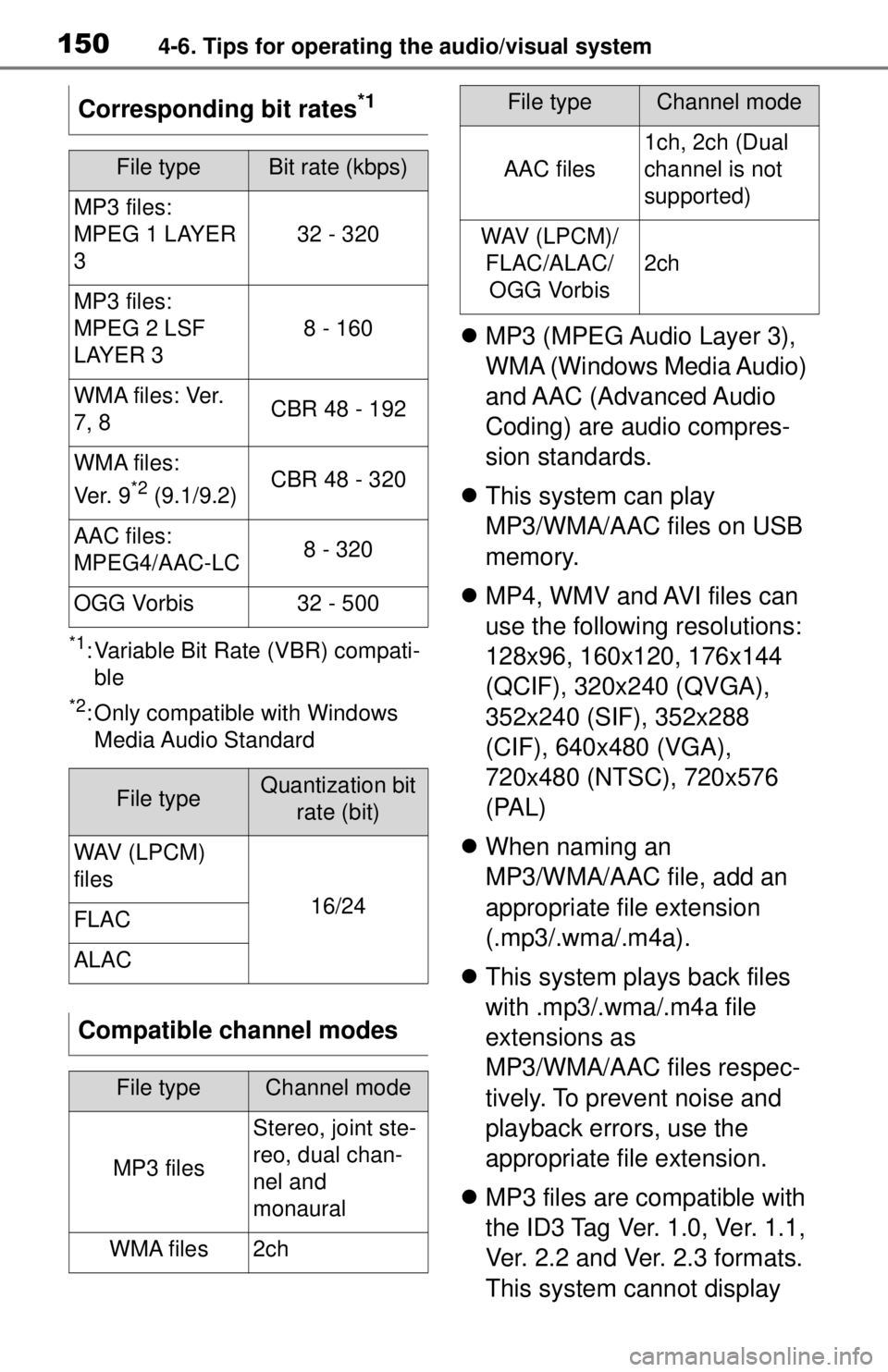
Corresponding bit rates
*1
File typeBit rate (kbps)
MP3 files:
MPEG 1 LAYER
3
32 - 320
MP3 files:
MPEG 2 LSF
LAYER 3
8 - 160
W M A f i l e s : Ve r.
7, 8CBR 48 - 192
WMA files:
Ve r. 9
*2 (9.1/9.2)CBR 48 - 320
AAC files:
MPEG4/AAC-LC8 - 320
OGG Vorbis32 - 500
File typeQuantization bit
rate (bit)
WAV (LPCM)
files
16/24FLAC
ALAC
Compatible channel modes
File typeChannel mode
MP3 files
Stereo, joint ste-
reo, dual chan-
nel and
monaural
WMA files2ch
AAC files
1ch, 2ch (Dual
channel is not
supported)
WAV (LPCM)/FLAC/ALAC/OGG Vorbis
2ch
File typeChannel mode
Page 152 of 262
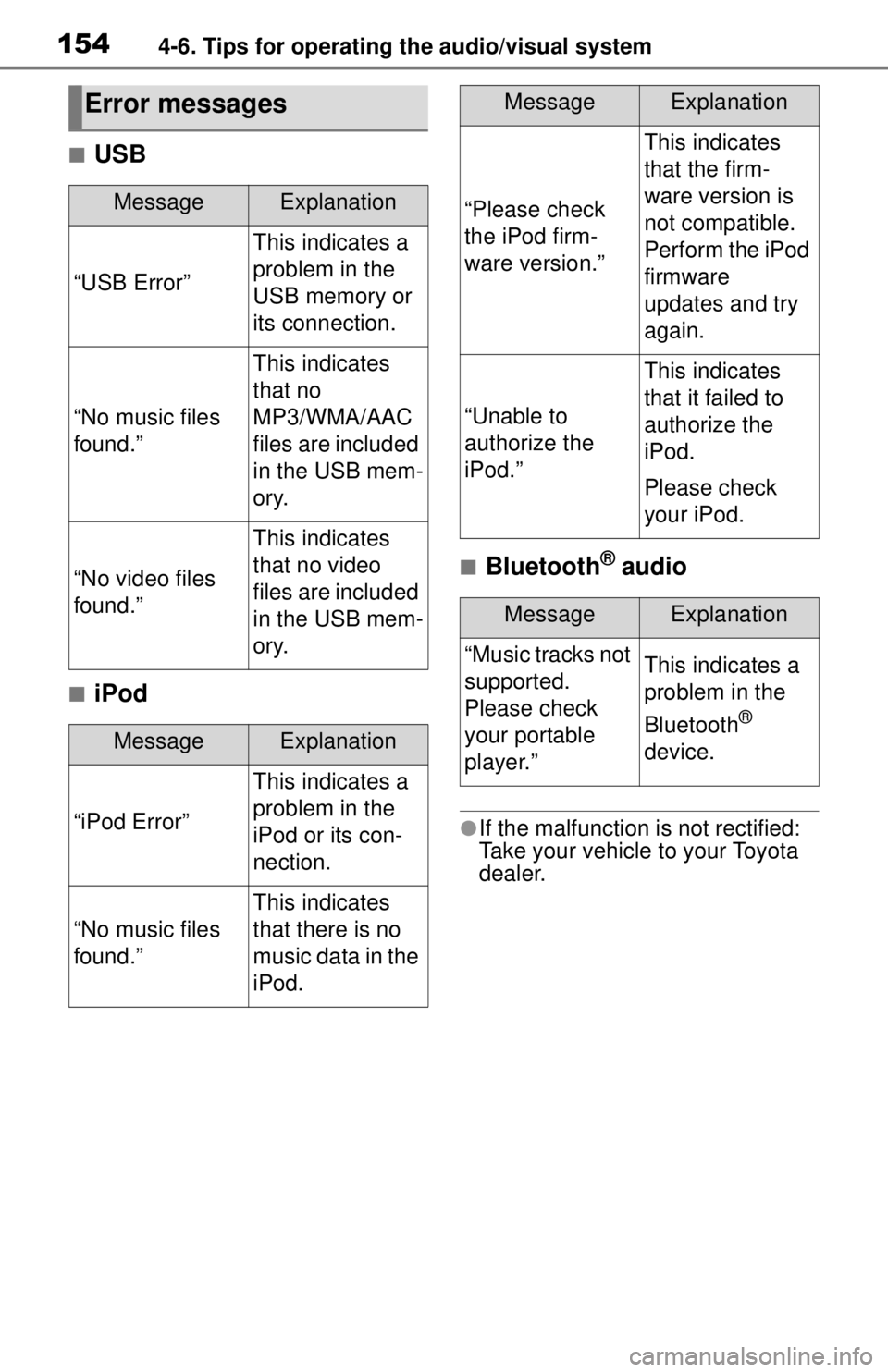
1544-6. Tips for operating the audio/visual system
■USB
■iPod
■Bluetooth® audio
●If the malfunction is not rectified:
Take your vehicle to your Toyota
dealer.
Error messages
MessageExplanation
“USB Error”
This indicates a
problem in the
USB memory or
its connection.
“No music files
found.”
This indicates
that no
MP3/WMA/AAC
files are included
in the USB mem-
ory.
“No video files
found.”
This indicates
that no video
files are included
in the USB mem-
ory.
MessageExplanation
“iPod Error”
This indicates a
problem in the
iPod or its con-
nection.
“No music files
found.”
This indicates
that there is no
music data in the
iPod.
“Please check
the iPod firm-
ware version.”
This indicates
that the firm-
ware version is
not compatible.
Perform the iPod
firmware
updates and try
again.
“Unable to
authorize the
iPod.”
This indicates
that it failed to
authorize the
iPod.
Please check
your iPod.
MessageExplanation
“Music tracks not
supported.
Please check
your portable
player.”This indicates a
problem in the
Bluetooth
®
device.
MessageExplanation