language TOYOTA TUNDRA 2021 Accessories, Audio & Navigation (in English)
[x] Cancel search | Manufacturer: TOYOTA, Model Year: 2021, Model line: TUNDRA, Model: TOYOTA TUNDRA 2021Pages: 262, PDF Size: 8.13 MB
Page 3 of 262
3TABLE OF CONTENTS
1
2
3
4
5
6
7
8
9
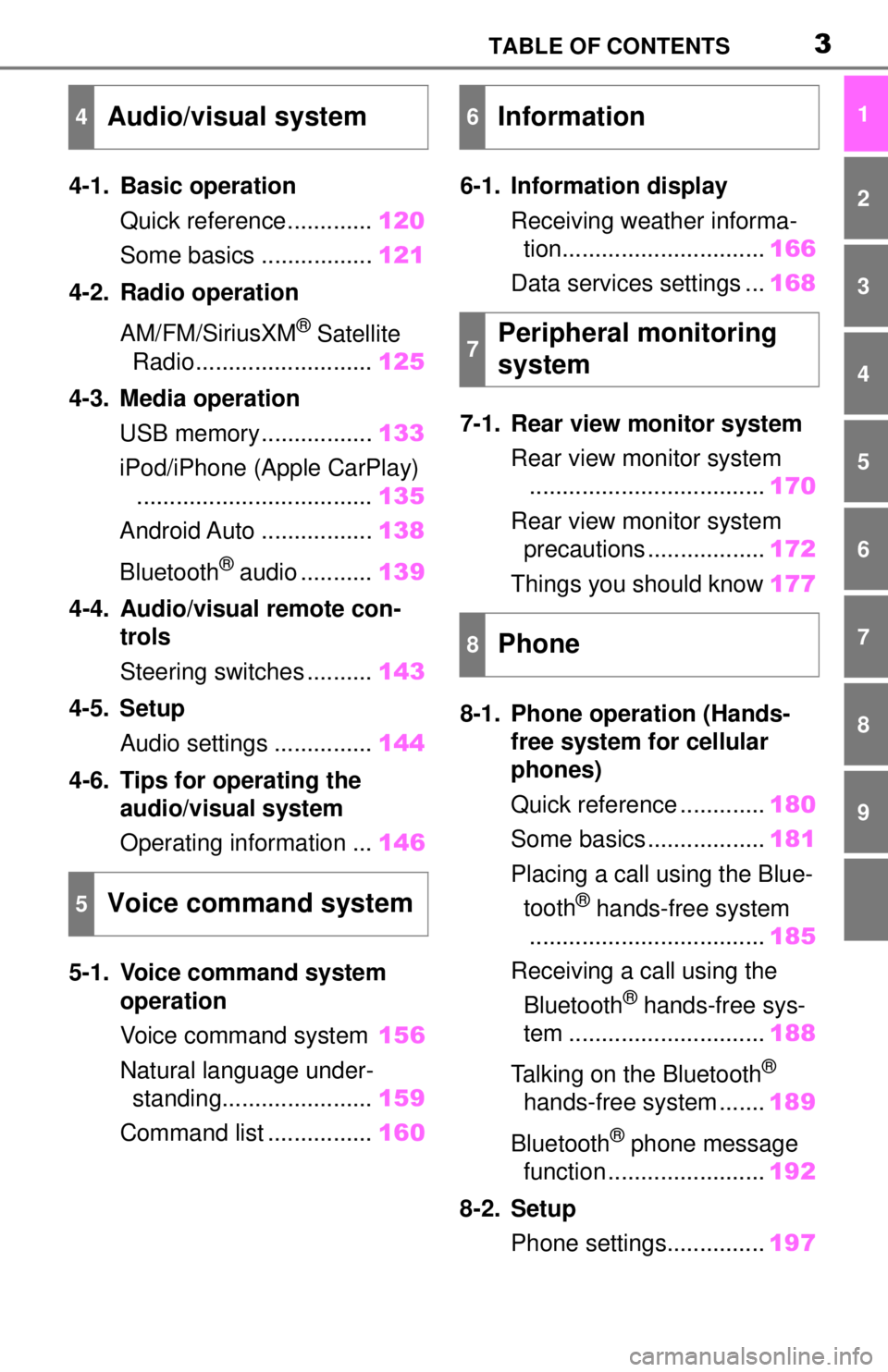
4-1. Basic operationQuick reference............. 120
Some basics ................. 121
4-2. Radio operation
AM/FM/SiriusXM
® Satellite
Radio ........................... 125
4-3. Media operation USB memory................. 133
iPod/iPhone (Apple CarPlay) .................................... 135
Android Auto ................. 138
Bluetooth
® audio ........... 139
4-4. Audio/visual remote con- trols
Steering switches .......... 143
4-5. Setup Audio settings ............... 144
4-6. Tips for operating the audio/visual system
Operating information ... 146
5-1. Voice command system operation
Voice command system 156
Natural language under- standing....................... 159
Command list ................ 1606-1. Information display
Receiving weather informa-tion............................... 166
Data services settings ... 168
7-1. Rear view monitor system Rear view monitor system.................................... 170
Rear view monitor system precautions .................. 172
Things you should know 177
8-1. Phone operation (Hands- free system for cellular
phones)
Quick reference ............. 180
Some basics .................. 181
Placing a call using the Blue- tooth
® hands-free system
.................................... 185
Receiving a call using the Bluetooth
® hands-free sys-
tem .............................. 188
Talking on the Bluetooth
®
hands-free system ....... 189
Bluetooth
® phone message
function ........................ 192
8-2. Setup Phone settings............... 197
4Audio/visual system
5Voice command system
6Information
7Peripheral monitoring
system
8Phone
Page 18 of 262
181-1. Basic function
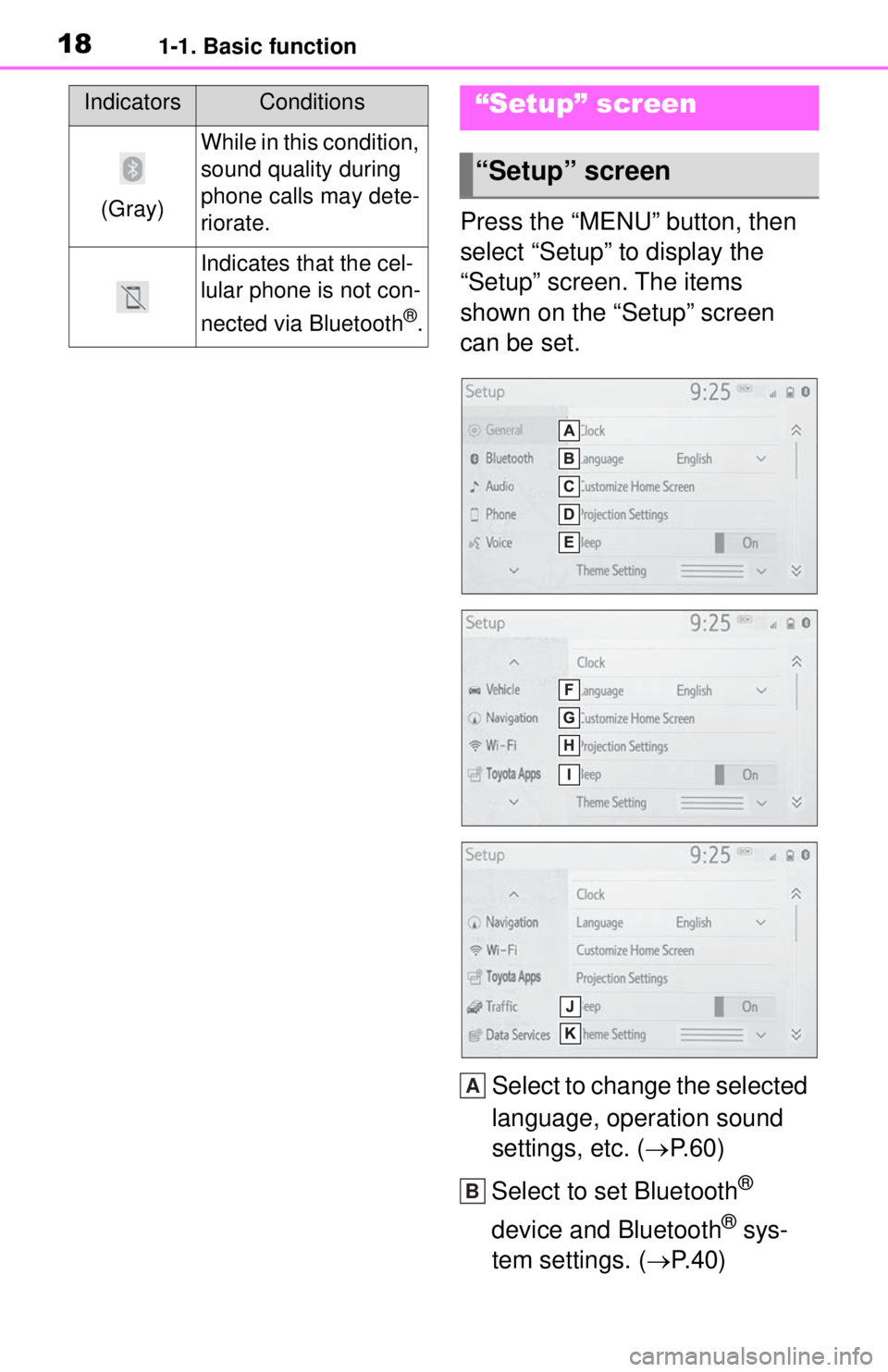
Press the “MENU” button, then
select “Setup” to display the
“Setup” screen. The items
shown on the “Setup” screen
can be set.Select to change the selected
language, operation sound
settings, etc. ( P.60)
Select to set Bluetooth
®
device and Bluetooth
® sys-
tem settings. ( P.40)
(Gray)
While in this condition,
sound quality during
phone calls may dete-
riorate.
Indicates that the cel-
lular phone is not con-
nected via Bluetooth
®.
IndicatorsConditions“Setup” screen
“Setup” screen
A
B
Page 59 of 262
592-4. Other settings
2
Basic function
2-4.Other settings
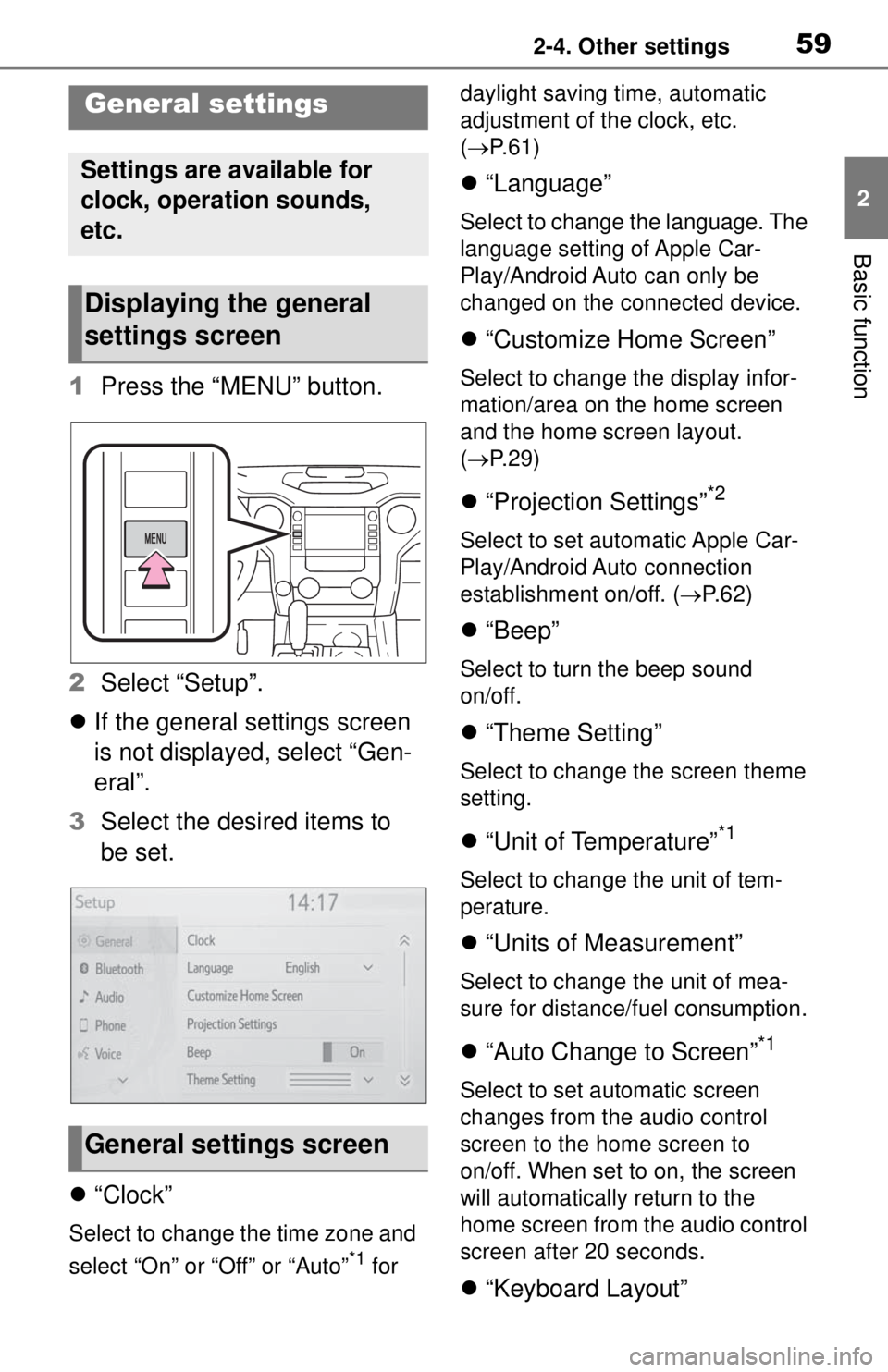
1Press the “MENU” button.
2 Select “Setup”.
If the general settings screen
is not displayed, select “Gen-
eral”.
3 Select the desired items to
be set.
“Clock”
Select to change the time zone and
select “On” or “Off” or “Auto”
*1 for daylight saving time, automatic
adjustment of the clock, etc.
(
P. 6 1 )
“Language”
Select to change the language. The
language setting of Apple Car-
Play/Android Auto can only be
changed on the connected device.
“Customize Home Screen”
Select to change the display infor-
mation/area on the home screen
and the home screen layout.
( P. 2 9 )
“Projection Settings”*2
Select to set automatic Apple Car-
Play/Android Auto connection
establishment on/off. ( P.62)
“Beep”
Select to turn the beep sound
on/off.
“Theme Setting”
Select to change the screen theme
setting.
“Unit of Temperature”*1
Select to change the unit of tem-
perature.
“Units of Measurement”
Select to change the unit of mea-
sure for distance/fuel consumption.
“Auto Change to Screen”*1
Select to set automatic screen
changes from the audio control
screen to the home screen to
on/off. When set to on, the screen
will automatically return to the
home screen from the audio control
screen after 20 seconds.
“Keyboard Layout”
General settings
Settings are available for
clock, operation sounds,
etc.
Displaying the general
settings screen
General settings screen
Page 62 of 262
622-4. Other settings
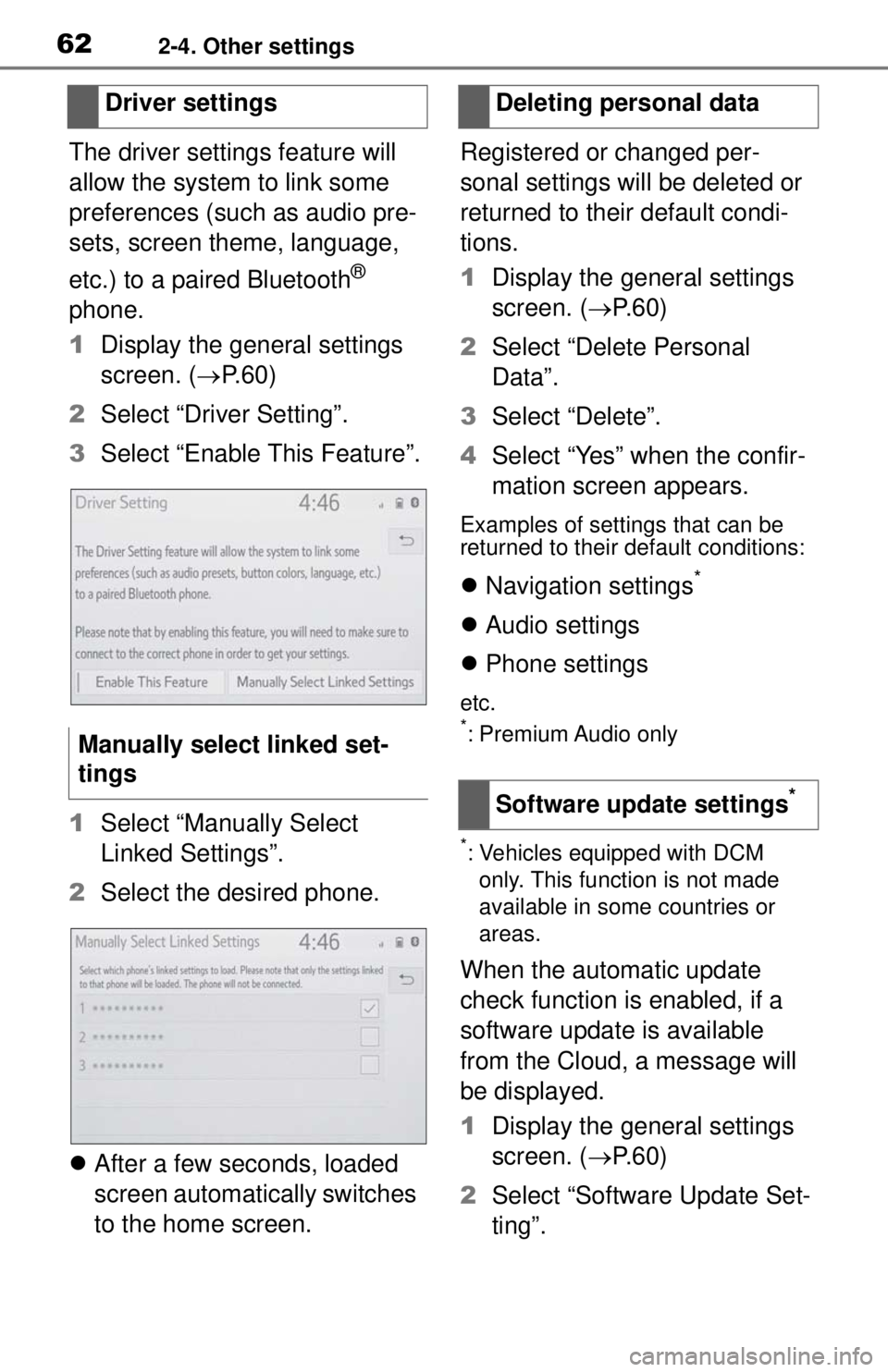
The driver settings feature will
allow the system to link some
preferences (such as audio pre-
sets, screen theme, language,
etc.) to a paired Bluetooth
®
phone.
1 Display the general settings
screen. ( P.60)
2 Select “Driver Setting”.
3 Select “Enable This Feature”.
1 Select “Manually Select
Linked Settings”.
2 Select the desired phone.
After a few seconds, loaded
screen automatically switches
to the home screen. Registered or changed per-
sonal settings will be deleted or
returned to their default condi-
tions.
1
Display the general settings
screen. ( P. 6 0 )
2 Select “Delete Personal
Data”.
3 Select “Delete”.
4 Select “Yes” when the confir-
mation screen appears.
Examples of settings that can be
returned to their default conditions:
Navigation settings*
Audio settings
Phone settings
etc.*: Premium Audio only
*: Vehicles equipped with DCM
only. This function is not made
available in some countries or
areas.
When the automatic update
check function is enabled, if a
software update is available
from the Cloud, a message will
be displayed.
1 Display the general settings
screen. ( P. 6 0 )
2 Select “Software Update Set-
ting”.
Driver settings
Manually select linked set-
tings
Deleting personal data
Software update settings
*
Page 153 of 262
155
5
5
Voice command system
Voice command sys-tem
5-1. Voice command system operation
Voice command system .................................. 156
Natural language under- standing..................... 159
Command list .............. 160
Page 157 of 262
1595-1. Voice command system operation
5
Voice command system
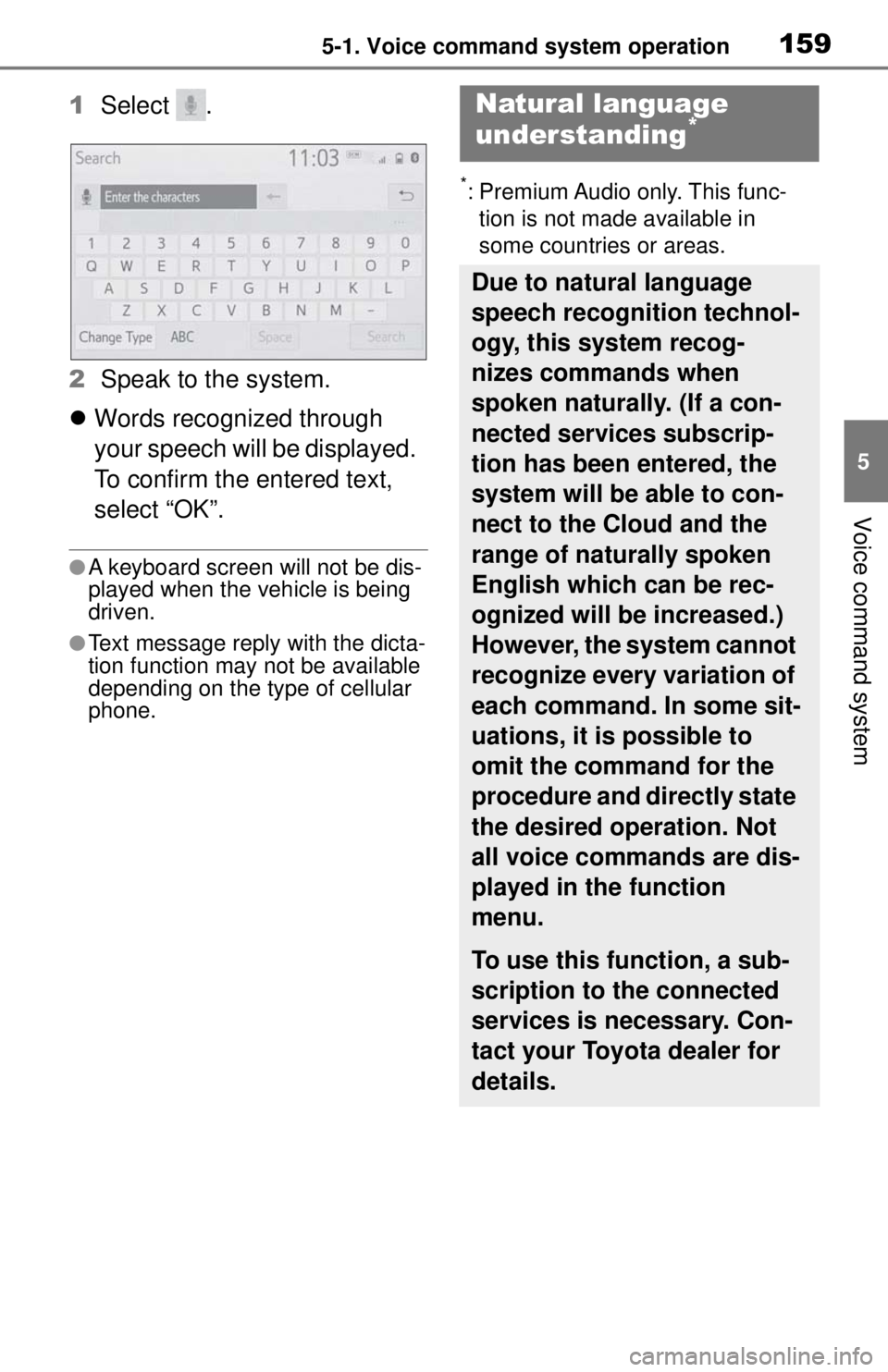
1Select .
2 Speak to the system.
Words recognized through
your speech will be displayed.
To confirm the entered text,
select “OK”.
●A keyboard screen will not be dis-
played when the vehicle is being
driven.
●Text message reply with the dicta-
tion function may not be available
depending on the type of cellular
phone.
*: Premium Audio only. This func-
tion is not made available in
some countries or areas.
Natural language
understanding*
Due to natural language
speech recognition technol-
ogy, this system recog-
nizes commands when
spoken naturally. (If a con-
nected services subscrip-
tion has been entered, the
system will be able to con-
nect to the Cloud and the
range of naturally spoken
English which can be rec-
ognized will be increased.)
However, the system cannot
recognize every variation of
each command. In some sit-
uations, it is possible to
omit the command for the
procedure and directly state
the desired operation. Not
all voice commands are dis-
played in the function
menu.
To use this function, a sub-
scription to the connected
services is necessary. Con-
tact your Toyota dealer for
details.
Page 158 of 262

1605-1. Voice command system operation
Recognizable voice commands
and their actions are shown
below.
Frequently used commands
are listed in the following
tables.
For devices that are not
installed to the vehicle, com-
mands relating to that device
may not be displayed on the
screen. Also, depending on
other conditions, such as
compatibility, some com-
mands may not be displayed
on the screen.
The functions available may
vary according to the system
installed.
Voice recognition language
can be changed. ( P.60)
When an Apple Car-
Play/Android Auto connec-
tion is established, some
commands will become
unavailable.
■Common
■Top menu
*: Vehicle must be parked
Command list
Command list overview
Command list
CommandAction
“Help”
Displays exam-
ples of some of
the available
commands
“Go back”Returns to the
previous screen
“Cancel”
Cancels the
voice command
system
“Start over”Returns to top
menu screen
“Pause”
Temporarily
pauses a voice
session until it is
resumed by
pressing the talk
switch again.
CommandAction
“Show com-
mand examples
for
Page 159 of 262
1615-1. Voice command system operation
5
Voice command system
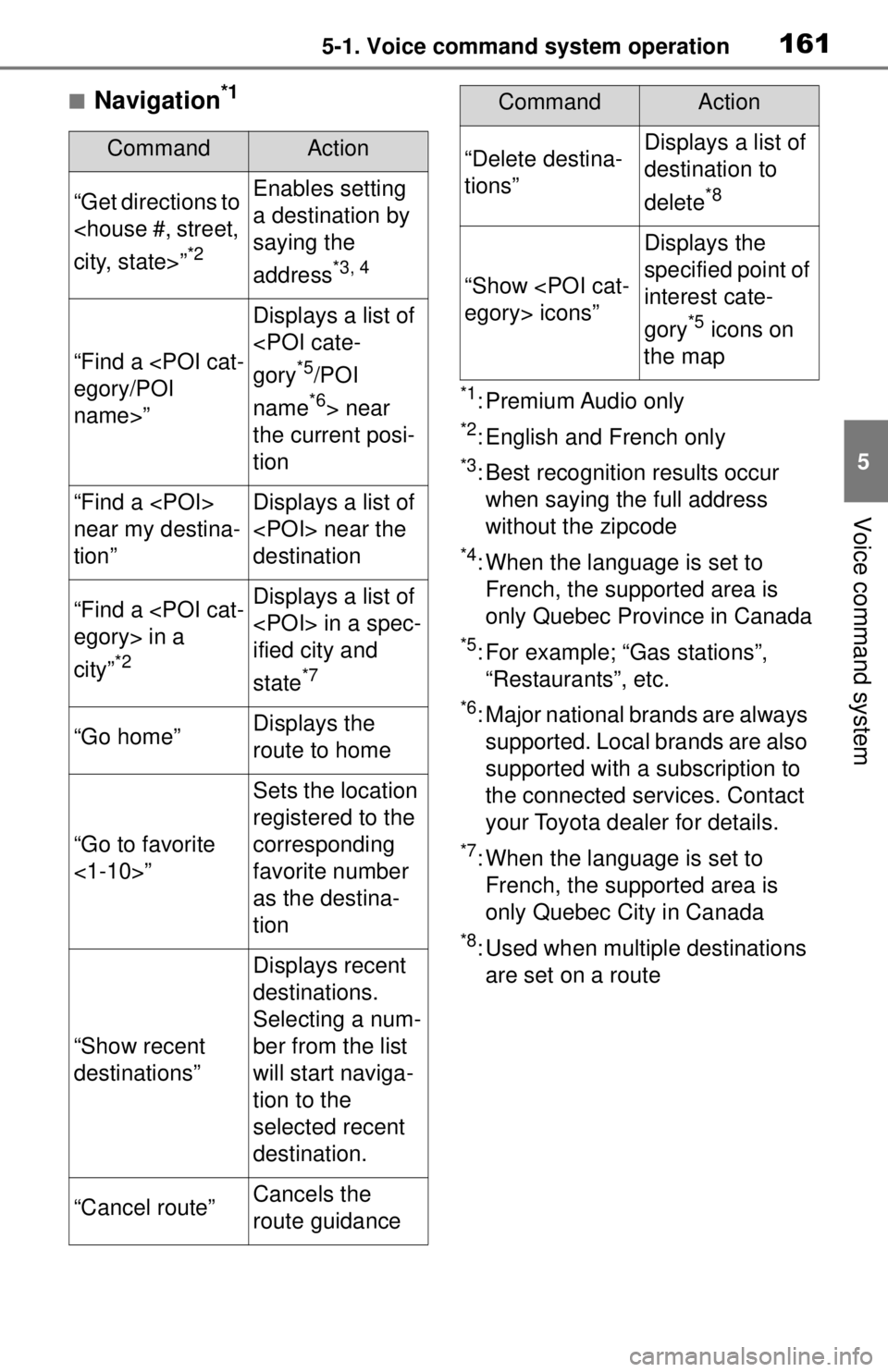
■Navigation*1
*1: Premium Audio only
*2: English and French only
*3: Best recognition results occur
when saying the full address
without the zipcode
*4: When the language is set to French, the supported area is
only Quebec Province in Canada
*5: For example; “Gas stations”, “Restaurants”, etc.
*6: Major national brands are always supported. Local brands are also
supported with a subscription to
the connected services. Contact
your Toyota dealer for details.
*7: When the language is set to French, the supported area is
only Quebec City in Canada
*8: Used when multiple destinations are set on a route
CommandAction
“Get directions to
*2
Enables setting
a destination by
saying the
address
*3, 4
“Find a
name>”
Displays a list of
*5/POI
name
*6> near
the current posi-
tion
“Find a
near my destina-
tion”Displays a list of
destination
“Find a
city”
*2
Displays a list of
ified city and
state
*7
“Go home”Displays the
route to home
“Go to favorite
<1-10>”
Sets the location
registered to the
corresponding
favorite number
as the destina-
tion
“Show recent
destinations”
Displays recent
destinations.
Selecting a num-
ber from the list
will start naviga-
tion to the
selected recent
destination.
“Cancel route”Cancels the
route guidance
“Delete destina-
tions”Displays a list of
destination to
delete
*8
“Show
Displays the
specified point of
interest cate-
gory
*5 icons on
the map
CommandAction
Page 203 of 262
2058-2. Setup
8
Phone
do so in a quiet area.
“Play”: Select to play the voice tag.
4Select “OK” when voice tag
registration is complete.
■Editing a voice tag
1 Select “Edit”.
2 Select the desired contact to
edit.
3 Follow the steps in “Register-
ing a voice tag” from step 3.
( P.204)
■Deleting the voice tag
1 Select “Delete”.
2 Select the desired contact
and select “Delete”.
3 Select “Yes” when the confir-
mation screen appears.
●Multiple data can be selected and
deleted at the same time.
●Voice tags are deleted when the
set language of the system is
changed. ( P. 6 0 )
1 Display the phone settings
screen. ( P.197)
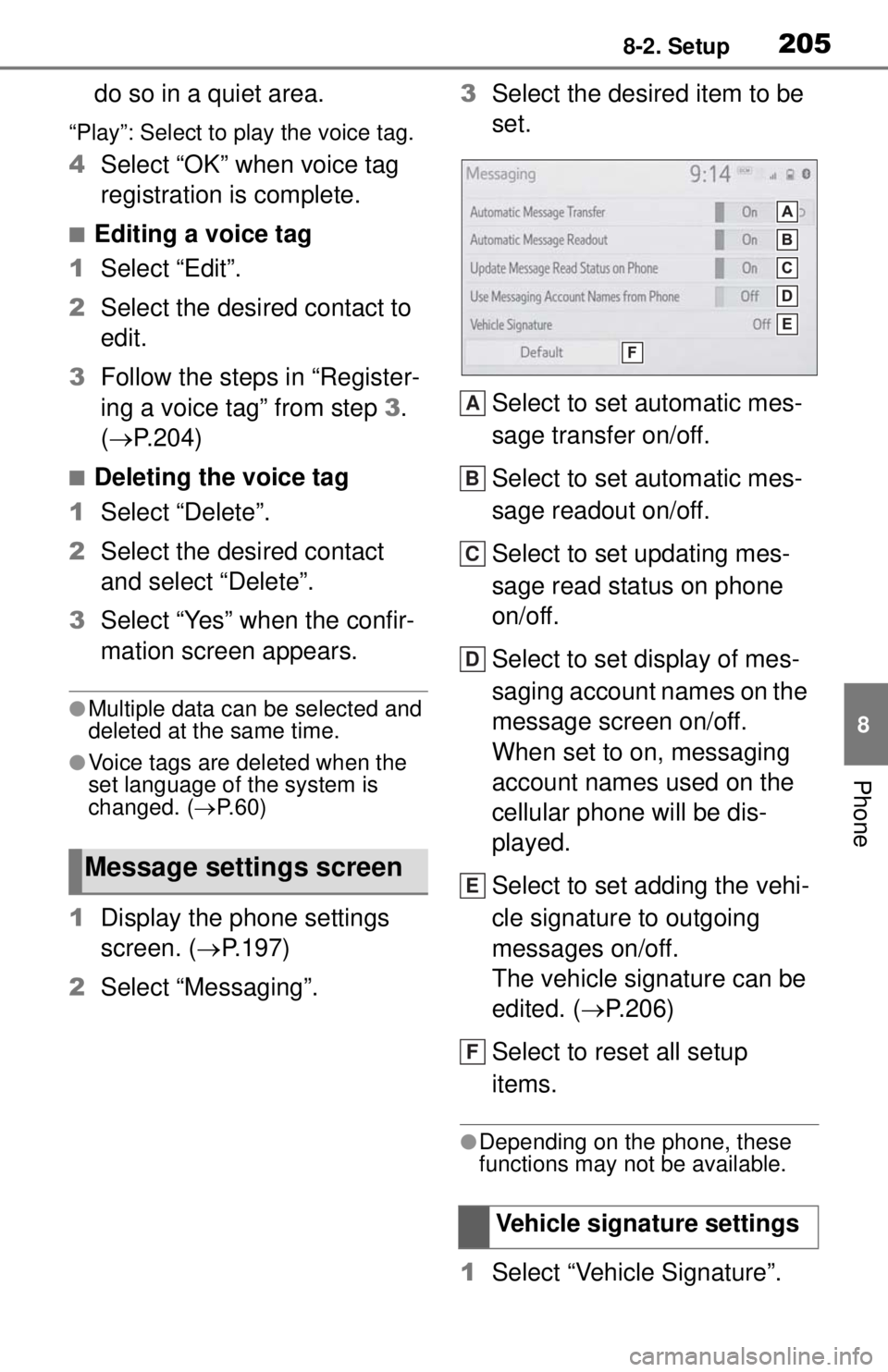
2 Select “Messaging”. 3
Select the desired item to be
set.
Select to set automatic mes-
sage transfer on/off.
Select to set automatic mes-
sage readout on/off.
Select to set updating mes-
sage read status on phone
on/off.
Select to set display of mes-
saging account names on the
message screen on/off.
When set to on, messaging
account names used on the
cellular phone will be dis-
played.
Select to set adding the vehi-
cle signature to outgoing
messages on/off.
The vehicle signature can be
edited. ( P.206)
Select to reset all setup
items.
●Depending on the phone, these
functions may not be available.
1 Select “Vehicle Signature”.
Message settings screen
Vehicle signature settings
A
B
C
D
E
F
Page 217 of 262
2199-1. Connected Services overview
9
Connected Services
*: Vehicles equipped with DCM
●Free/Open Source Software Infor-
mation
This product contains Free/Open
Source Software (FOSS).
The license information and/or the
source code of such FOSS can be
found at the following URL.
https://www.denso.com/global/en/
opensource/dcm/toyota/
●Exposure to radio frequency sig-
nals:
The Toyota audio multimedia sys-
tem installed in your vehicle
includes a low power radio trans-
mitter and receiver. The system
receives and also sends out radio
frequency (RF) signals.
●In August 1996, the Federal Com-
munications Commission (FCC)
adopted RF exposure guidelines
with safety levels for mobile wire-
less phones. Those guidelines are
consistent with the safety stan-
dards previously set by both U.S.
and international standards bod-
ies.
• ANSI (American National Stan- dards Institute) C95.1 [1992]
• NCRP (National Council on Radi- ation Protection and Measure-
ment) Report 86 [1986]
• ICNIRP (International Commis- sion on Non-Ionizing Radiation
Protection) [1996]
●These standards are based on
comprehensive and periodic eval-
uations of the relevant scientific lit-
erature. Over 120 scientists,
engineers, and physicians from
universities, government health
agencies, and industry reviewed
the available body of research to
develop the ANSI Standard
(C95.1).
●The design of Toyota audio multi-
media system complies with the
FCC guidelines in addition to
those standards.
●Contact with the Toyota response
center is dependent upon the
telematics device being in opera-
tive condition, cellular connection
availability, navigation map data,
and GPS satellite signal recep-
tion, which can limit the ability to
reach the Toyota response center
or receive support. Enrollment and
Telematics Subscription Service
Agreement required. A variety of
subscription terms are available;
charges vary by su bscription term
selected.
●The Toyota response center offers
support in mult iple languages.
●Select Safety Connect-sub-
scribed vehicles are capable of
communicating vehicle informa-
tion. Please see the terms and
conditions for additional details.
Owners who do not wish to have
their vehicle transm it this informa-
tion can opt out at the time of
enrollment or by calling 1-800-
331-4331 in the United States, 1-
888-869-6828 in Canada, and 1-
877-855-8377 in Puerto Rico, and
following the prompts for Safety
Connect.
●For further details about the ser-
vice, contact your Toyota dealer.
●Toyota audio multimedia func-
tions are not subject to section
255 of the Telecommunications
Act and the system is not TTY
compatible.
Type C: Function
achieved by using
DCM
*
The functionality of Safety
Connect is made possible
by the use of a DCM.
For details, refer to
“OWNER’S MANUAL”.