charging TOYOTA TUNDRA 2021 Owners Manual (in English)
[x] Cancel search | Manufacturer: TOYOTA, Model Year: 2021, Model line: TUNDRA, Model: TOYOTA TUNDRA 2021Pages: 52, PDF Size: 3.8 MB
Page 5 of 52
 3
OVERVIEW
FEATURES & OPERATIONS
TOYOTA SAFETY SENSE
SAFETY & EMERGENCY FEATURES
1 If equipped.2 For details, refer to the “Navigation and Multimedia System Owner’s M\
anual” or visit
www.toy")
3
OVERVIEW
FEATURES & OPERATIONS
TOYOTA SAFETY SENSE
SAFETY & EMERGENCY FEATURES
1 If equipped.2 For details, refer to the “Navigation and Multimedia System Owner’s M\
anual” or visit
www.toyota.com/audio-multimedia for additional resources.
NOTE: Instrument panel features depend on the seat option, split seats or ben\
ch.
Refer to the Owner’s Manual for more details.
Automatic transmission shift lever1
Power tilt and telescopic steering
control switch1
Windshield wiper and washer control
Two and four-wheel drive selector
1
Audio/Navigation system2
USB port2
USB charging portsVSC OFF switch Intuitive parking assist switch
1
Power outlte-12V DC
Emergency flasher switch
Air conditioning/heating controls
1
Tire Pressure Monitoring (warning)
System (TPMS) reset switch Trailer brake controller
1
Automatic shift lever1
TOW/HAUL switch1Ignition
switch1
“POWER”
button1
Tilt and telescopic steering lock release lever1
(below the steering wheel)Meter control switches
Dynamic Radar
Cruise Control (DRCC)
vehicle-to-vehicle
distance switch
Lane Departure Alert (LDA)
switch Dynamic Radar Cruise
Control (DRCC) switch
Multi-Information Display (MID)
MY21_Tundra_QRG_V2_ML_0709.indd 37/13/20 10:54 AM
Page 7 of 52
 5
Security indicator
Slip indicator1,3
For details, refer to “Warning lights and indicators,” Section 2, \
2021 Owner’s
Manual.
ODO/TRIP display switch
Charging system warning1
Brake system war")
5
Security indicator
Slip indicator1,3
For details, refer to “Warning lights and indicators,” Section 2, \
2021 Owner’s
Manual.
ODO/TRIP display switch
Charging system warning1
Brake system warning1
Malfunction/Check Engine indicator1
Low fuel level warning
Master warning1,2
Trailer connection indicator4 [green]
Turn signal indicator
Vehicle Stability Control (VSC)
OFF indicator1
TOW/HAUL mode indicator
Low tire pressure warning1
Fog light indicator
Brake Override System/
Drive-Start Control warning
High engine coolant temperature
warning
TRAC OFF indicator1
Lane Departure Alert (LDA)
indicator [Green/Yellow3]
Pre-Collision System (PCS)
warning1,2
Low windshield washer fluid
warning
Low outside temperature
indicator
Parking brake indicator1,2
High/Low speed four-wheel
drive indicator4
Fuel tank door position
1 If the indicator does not turn off within a few seconds of starting the \
engine, there may be a
malfunction. Have the vehicle inspected by your Toyota dealer.
2 If the indicator flashes, there may be a malfunction. Refer to the Owner\
’s Manual.3 If the indicator flashes, it indicates that the system is operating.4 If equipped.
Driver/Front passenger’s seat belt
reminder (alarm will sound when
the vehicle is on)
Constant speed cruise control
indicator/Constant speed
cruise control SET indicator
Dynamic Radar Cruise Control
(DRCC) indicator/DRCC SET
indicator
Headlight low/high beam
indicators
OVERVIEW
FEATURES & OPERATIONS
TOYOTA SAFETY SENSE
SAFETY & EMERGENCY FEATURES
Service indicators and warning lights
MY21_Tundra_QRG_V2_ML_0709.indd 57/13/20 10:54 AM
Page 22 of 52
20
FEATURES & OPERATIONSAudio
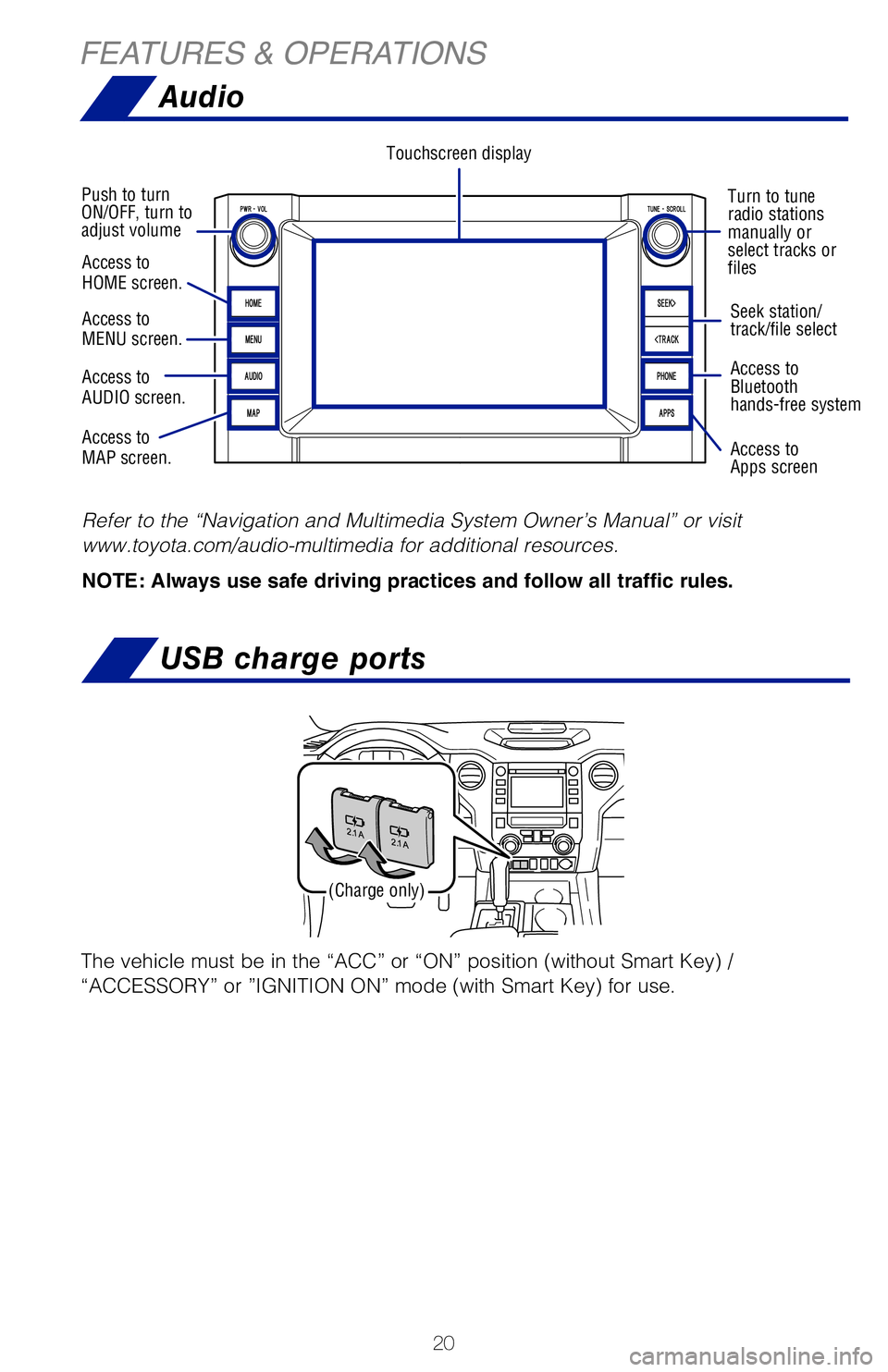
Touchscreen display
Turn to tune
radio stations
manually or
select tracks or
files
Push to turn
ON/OFF, turn to
adjust volume
Seek station/
track/file select
Access to
Bluetooth
hands-free system
Access to
Apps screen
Refer to the “Navigation and Multimedia System Owner’s Manual” or vi\
sit
www.toyota.com/audio-multimedia for additional resources.
NOTE: Always use safe driving practices and follow all traffic rules.
Access to
HOME screen.
Access to
MENU screen.
Access to
AUDIO screen.
Access to
MAP screen.
Connecting a compatible device and cable into the USB media port will support
charging and music playback through the audio multimedia system.
Refer to your Owner’s Manual for complete details.Press meter control switches to change and select information in the followin\
g:
USB charge ports
(Charge only)
The vehicle must be in the “ACC” or “ON” position (without Sma\
rt Key) /
“ACCESSORY” or ”IGNITION ON” mode (with Smart Key) for use.
MY21_Tundra_QRG_V2_ML_0709.indd 207/13/20 10:54 AM
Page 23 of 52
21
Turn to tune
radio stations
manually or
select tracks or
filesSeek station/
track/file select
Access to
Bluetooth
hands-free system
Access to
Apps screen
Refer to the “Navigation and Multimedia System Owner’s Manual” \
or visit
www.toyota.com/audio-multimedia for additional resources.
NOTE: Always use safe driving practices and follow all traffic rules.
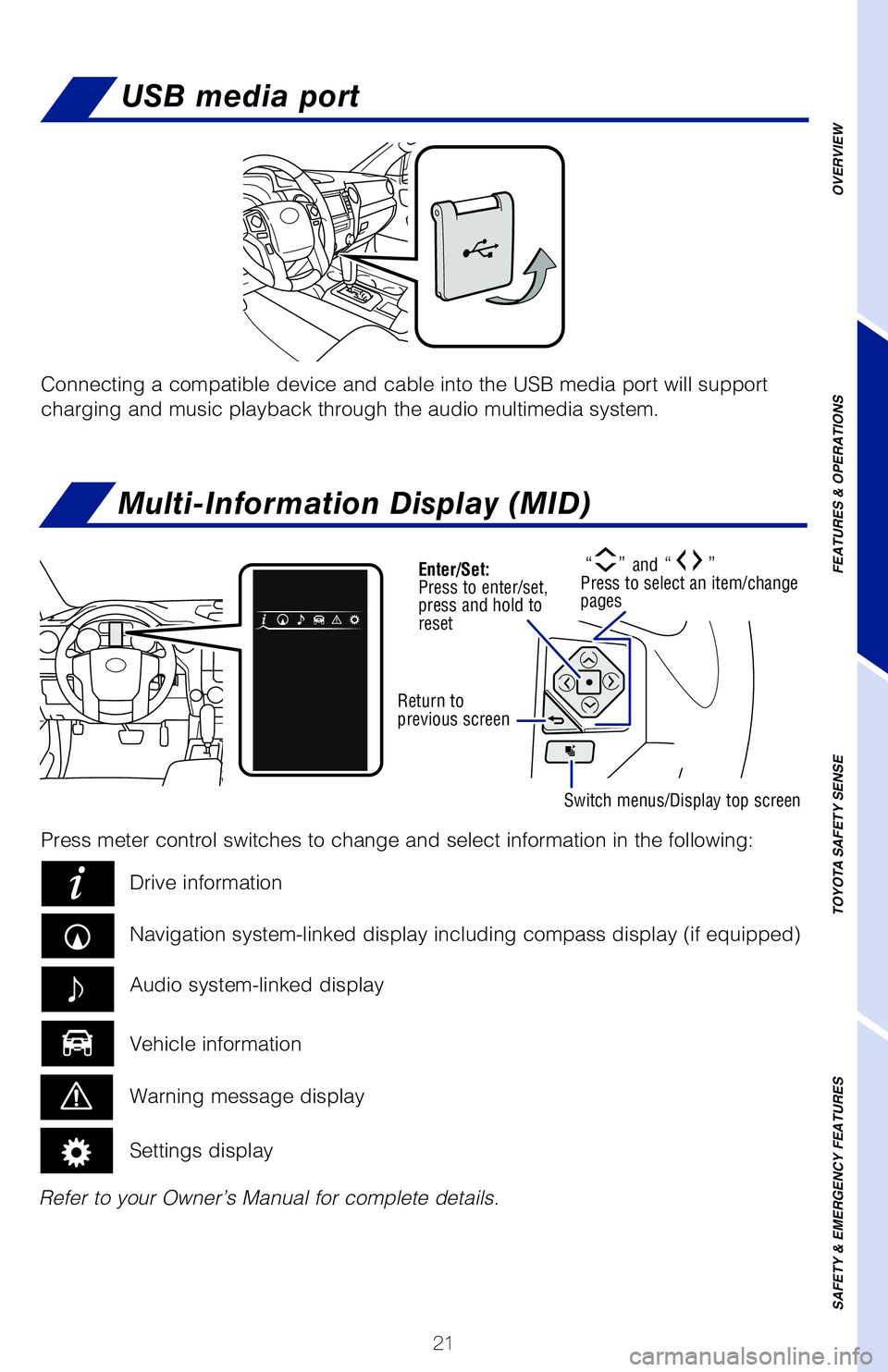
Connecting a compatible device and cable into the USB media port will su\
pport
charging and music playback through the audio multimedia system.
Multi-Information Display (MID)
Refer to your Owner’s Manual for complete details.Press meter control switches to change and select information in the fol\
lowing:
Drive information
Navigation system-linked display including compass display (if equipped\
)
Vehicle information Audio system-linked display
Warning message display
Settings display
“” and “” Press to select an item/change
pages
USB media port
OVERVIEW
FEATURES & OPERATIONS
TOYOTA SAFETY SENSE
SAFETY & EMERGENCY FEATURES
Enter/Set:
Press to enter/set,
press and hold to
reset
Return to
previous screen
Switch menus/Display top screen
The vehicle must be in the “ACC” or “ON” position (without \
Smart Key) /
“ACCESSORY” or ”IGNITION ON” mode (with Smart Key) for use\
.
MY21_Tundra_QRG_V2_ML_0709.indd 217/13/20 10:54 AM