air condition TOYOTA TUNDRA 2021 (in English) User Guide
[x] Cancel search | Manufacturer: TOYOTA, Model Year: 2021, Model line: TUNDRA, Model: TOYOTA TUNDRA 2021Pages: 612, PDF Size: 13.7 MB
Page 210 of 612

2104-1. Before driving
●Avoid sudden braking as you may skid, resulting in the trailer jack-
knifing and a loss of vehicle control. This is especially true on wet or
slippery surfaces.
● Avoid jerky starts or sudden acceleration.
● Avoid jerky steering and sharp turns, and slow down before maki ng
a turn.
● Note that when making a turn, the trailer wheels will be closer than
the vehicle wheels to the inside of the turn. Compensate by mak ing
a wider than normal turning radius.
● Slow down before making a turn, in crosswinds, on wet or slippe ry
surfaces, etc.
Increasing vehicle speed can destabilize the trailer.
● Take care when passing other vehicles. Passing requires consider-
able distance. After passing a vehicle, do not forget the lengt h of
your trailer, and be sure you have plenty of room before changi ng
lanes.
● To maintain engine braking efficiency and charging system perfo r-
mance when using engine braking, do not use the transmission in
D.
Transmission shift ra nge position must be in 4 in the S mode.
● Instability happens more frequently when descending steep or lo ng
downhill grades. Before descending, slow down and downshift. Do
not make sudden downshifts while descending steep or long down-
hill grades.
● Avoid holding the brake pedal down too long or applying the bra kes
too frequently. This could cause the brakes to overheat and result in
reduced braking efficiency.
● Due to the added load of the trailer, your vehicle’s engine may over-
heat on hot days (at temperatures over 85°F [30°C]) when drivin g
up a long or steep grade. If the engine coolant temperature gau ge
indicates overheating, immediately turn off the air conditionin g (if in
use), pull your vehicle off the road and stop in a safe spot.
( P. 529)
Page 258 of 612
2584-5. Using the driving support systems
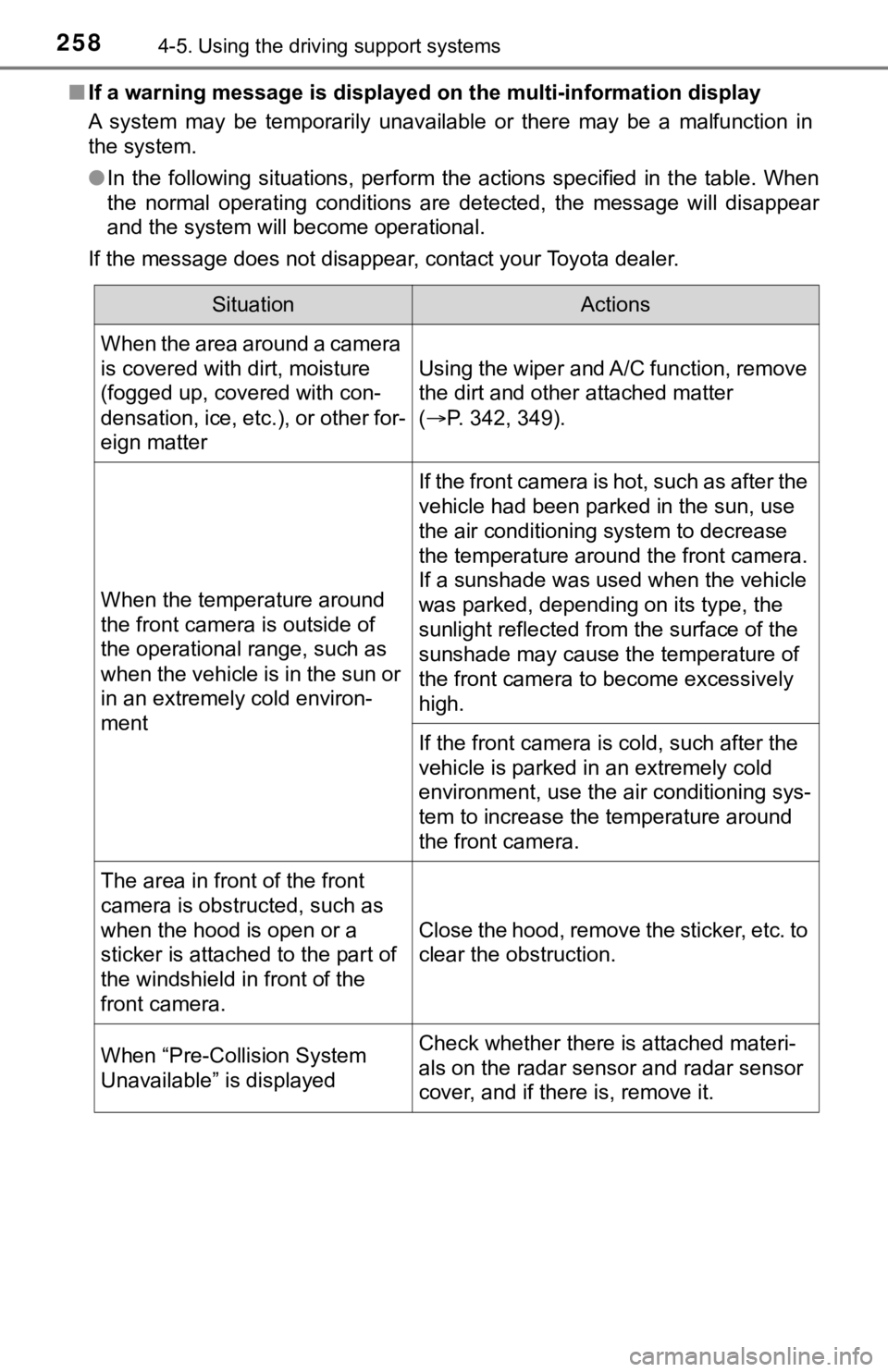
■If a warning message is displayed on the multi-information display
A system may be temporarily unavailable or there may be a malfu nction in
the system.
● In the following situations, perform the actions specified in t he table. When
the normal operating conditions are detected, the message will disappear
and the system will become operational.
If the message does not disappear, contact your Toyota dealer.
SituationActions
When the area around a camera
is covered with dirt, moisture
(fogged up, covered with con-
densation, ice, etc.), or other for-
eign matter
Using the wiper and A/C function, remove
the dirt and other attached matter
( P. 342, 349).
When the temperature around
the front camera is outside of
the operational range, such as
when the vehicle is in the sun or
in an extremely cold environ-
ment
If the front camera is hot, such as after the
vehicle had been parked in the sun, use
the air conditioning system to decrease
the temperature around the front camera.
If a sunshade was used when the vehicle
was parked, depending on its type, the
sunlight reflected from the surface of the
sunshade may cause the temperature of
the front camera to become excessively
high.
If the front camera is cold, such after the
vehicle is parked in an extremely cold
environment, use the air conditioning sys-
tem to increase the temperature around
the front camera.
The area in front of the front
camera is obstructed, such as
when the hood is open or a
sticker is attached to the part of
the windshield in front of the
front camera.
Close the hood, remove the sticker, etc. to
clear the obstruction.
When “Pre-Collision System
Unavailable” is displayedCheck whether there is attached materi-
als on the radar sensor and radar sensor
cover, and if there is, remove it.
Page 274 of 612

2744-5. Using the driving support systems
WARNING
■Before using LDA system
Do not rely solely upon the LDA system. The LDA system does not auto-
matically drive the vehicle or reduce the amount of attention t hat must be
paid to the area in front of the vehicle. The driver must alway s assume full
responsibility for driving safely by always paying careful atte ntion to the sur-
rounding conditions and operating the steering wheel to correct the path of
the vehicle. Also, the driver must take adequate breaks when fa tigued, such
as from driving for a long period of time.
Failure to perform appropriate driving operations and pay careful attention
may lead to an accident, resulting in death or serious injury.
■ To avoid operating LDA system by mistake
When not using the LDA system, use the LDA switch to turn the s ystem off.
■ Situations unsuitable for LDA system
Do not use the LDA system in the following situations.
The system may not operate properly and lead to an accident, re sulting in
death or serious injury.
● A spare tire, tire chains, etc., are equipped.
● Objects or patterns that could be mistaken for white (yellow) l ines are
present on the side of the road (guardrails, curbs, reflective poles, etc.).
● Vehicle is driven on a snow-covered road.
● White (yellow) lines are diffi cult to see due to rain, snow, fo g, dust, etc.
● Asphalt repair marks, white (yellow) line marks, etc., are present due to
road repair.
● Vehicle is driven in a temporary lane or restricted lane due to construction
work.
● Vehicle is driven in a construction zone.
Page 275 of 612
2754-5. Using the driving support systems
4
Driving
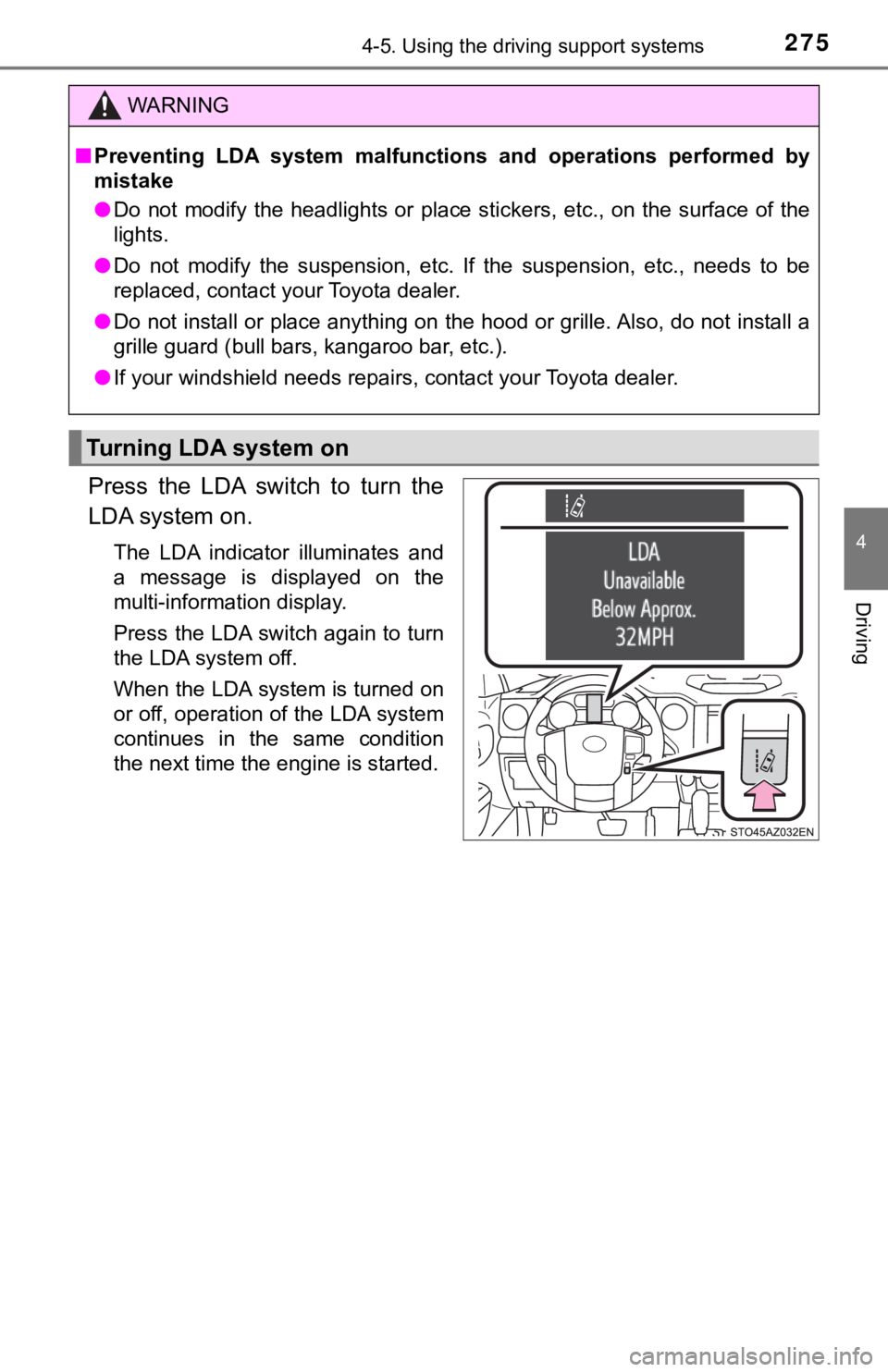
Press the LDA switch to turn the
LDA system on.
The LDA indicator illuminates and
a message is displayed on the
multi-information display.
Press the LDA switch again to turn
the LDA system off.
When the LDA system is turned on
or off, operation of the LDA system
continues in the same condition
the next time the engine is started.
WARNING
■Preventing LDA system malfunctio ns and operations performed by
mistake
● Do not modify the headlights or place stickers, etc., on the su rface of the
lights.
● Do not modify the suspension, etc. If the suspension, etc., needs to be
replaced, contact your Toyota dealer.
● Do not install or place anything on the hood or grille. Also, d o not install a
grille guard (bull bars, kangaroo bar, etc.).
● If your windshield needs repairs, contact your Toyota dealer.
Turning LDA system on
Page 302 of 612

3024-5. Using the driving support systems
WARNING
■Sensor detection information
Pay particular attention to the following instances in where th is may occur.
Failing to do so way result in the vehicle being unable to be d riven or parked
safety and possibly cause an accident.
● The sensor’s detection areas are limited to the areas around the vehicle’s
front corner and rear bumpers.
● Certain vehicle conditions and the surrounding environment may affect the
ability of the sensor to correctly detect obstacles. Particular instances
where this may occur are listed below.
• There is dirt, snow or ice on the sensor. (Wiping the sensors will resolve
this problem.)
• The sensor is frozen. (Thawing the area will resolve this prob lem.)
• The sensor is covered in any way.
• The vehicle is leaning considerably to one side.
• On an extremely bumpy road, on an incline, on gravel, or on grass.
• The vicinity of the vehicle is noisy due to vehicle horns, mot orcycle
engines, air brakes of large vehicles, or other loud noises pro ducing
ultrasonic waves.
• There is another vehicle equipped with parking assist sensors in the
vicinity.
• The sensor is coated with a sheet of spray or heavy rain.
• The vehicle is equipped with a fender pole or radio antenna.
• The bumper or sensor receives a strong impact.
• The vehicle is approaching a tall or curved curb.
• In harsh sunlight or intense cold weather.
• The area directly under the bumpers is not detected.
• If obstacles draw too close to the sensor.
• A non-genuine Toyota suspension (lowered suspension, etc.) is installed.
• A backlit license plate, license plate holder, etc., are insta lled.
• People may not be detected if they are wearing certain types a nd color-
ing of clothing.
• People, animals, and moving objects may not be able to be detected.
In addition to the examples above, there are instances in which , because of
their shape, signs and other objects may be judged by the senso r to be
closer than they are.
Page 303 of 612

3034-5. Using the driving support systems
4
Driving
WARNING
●The shape of the obstacle may prevent the sensor from detecting it. Pay
particular attention to the following obstacles:
• Wires, fences, ropes, etc.
• Cotton, snow and other materials that absorb sound waves
• Sharply-angled objects
• Low obstacles
• Tall obstacles with upper sections projecting outwards in the direction of
your vehicle
● The following situations may occur during use.
• Depending on the shape of the obstacle and other factors, the detection
distance may shorten, or detection may be impossible.
• Obstacles may not be detected if they are too close to the sen sor.
• There will be a short delay between obstacle detection and dis play.
Even at slow speeds, there is a possibility that the obstacle w ill come
within the sensor’s detection areas before the display is shown and the
warning beep sounds.
• Thin posts or objects lower than the sensor may not be detecte d for col-
lision when approached, even if they have been detected once.
• It might be difficult to hear beeps due to the volume of audio system or
air flow noise of air conditioning system.
Page 331 of 612

3314-6. Driving tips
4
Driving
Winter driving tips
●Use fluids that are appropriate t o the prevailing outside tempera-
tures. • Engine oil
• Engine coolant
• Washer fluid
● Have a service technician inspec t the condition of the battery.
● Have the vehicle fitted with four snow tires or purchase a set of tire
chains for the rear tires.
Ensure that all tires are the same size and brand, and that chains match
the size of the tires.
Perform the following according to the driving conditions:
● Do not try to forcibly open a window or move a wiper that is fr ozen.
Pour warm water over the frozen area to melt the ice. Wipe away
the water immediately to p revent it from freezing.
● To ensure proper operation of the climate control system fan,
remove any snow that has accumulated on the air inlet vents in
front of the windshield.
● Check for and remove any excess ic e or snow that may have accu-
mulated on the exterior lights, vehicle’s roof, chassis, around the
tires or on the brakes.
● Remove any snow or mud from the bottom of your shoes before
getting in the vehicle.
Accelerate the vehicle slowly, keep a safe distance between you and
the vehicle ahead, and drive at a reduced speed suitable to roa d con-
ditions.
Carry out the necessary preparations and inspections before
driving the vehicle in winter. Always drive the vehicle in a ma n-
ner appropriate to the prevailing weather conditions.
Preparation for winter
Before driving the vehicle
When driving the vehicle
Page 339 of 612

339
5Interior features
5-1. Using the air conditioning system
Manual air conditioning system............................. 340
Automatic air conditioning system............................. 347
Seat heaters/ seat ventilators ................ 354
5-2. Using the interior lights Interior lights list ................ 357• Personal/interior lightsmain switch ................... 357
• Personal/interior
lights ............................. 358
• Cargo lamp main switch ............................ 359 5-3. Using the storage features
List of storage features ..... 360• Glove box...................... 362
• Console box (front separated type seat) ..... 363
• Card holder ................... 364
• Map holder (front bench type seat) ........... 366
• Pen holder .................... 367
• Tissue pocket................ 368
• Overhead console......... 369
• Cup holders .................. 370
• Bottle holders ................ 372
• Auxiliary boxes (front bench type seat) ........... 373
• Storage box .................. 375
Luggage compartment features ........................... 377
5-4. Using the other interior fea- tures
Other interior features ....... 378 • Sun visors ..................... 378
• Vanity mirrors................ 378
• Power outlets ................ 379
• USB charging ports....... 382
• Armrest ......................... 383
• Assist grips ................... 384
Garage door opener.......... 385
Compass ........................... 394
Page 340 of 612
3405-1. Using the air conditioning system
Manual air conditioning system
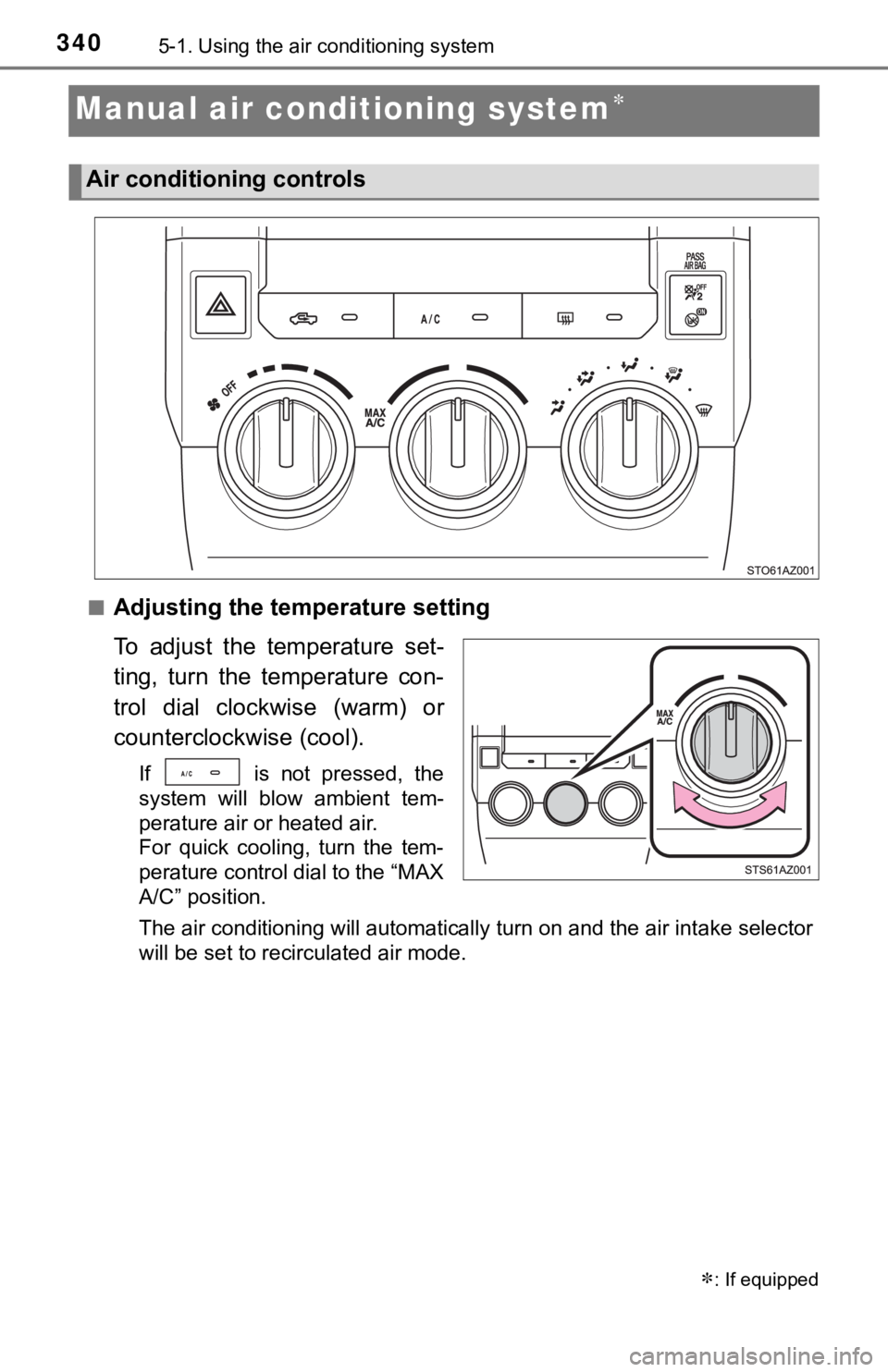
■Adjusting the temperature setting
To adjust the temperature set-
ting, turn the temperature con-
trol dial clockwise (warm) or
counterclockwise (cool).
If is not pressed, the
system will blow ambient tem-
perature air or heated air.
For quick cooling, turn the tem-
perature control dial to the “MAX
A/C” position.
The air conditioning will automatically turn on and the air int ake selector
will be set to recirculated air mode.
: If equipped
Air conditioning controls
Page 341 of 612
3415-1. Using the air conditioning system
5
Interior features
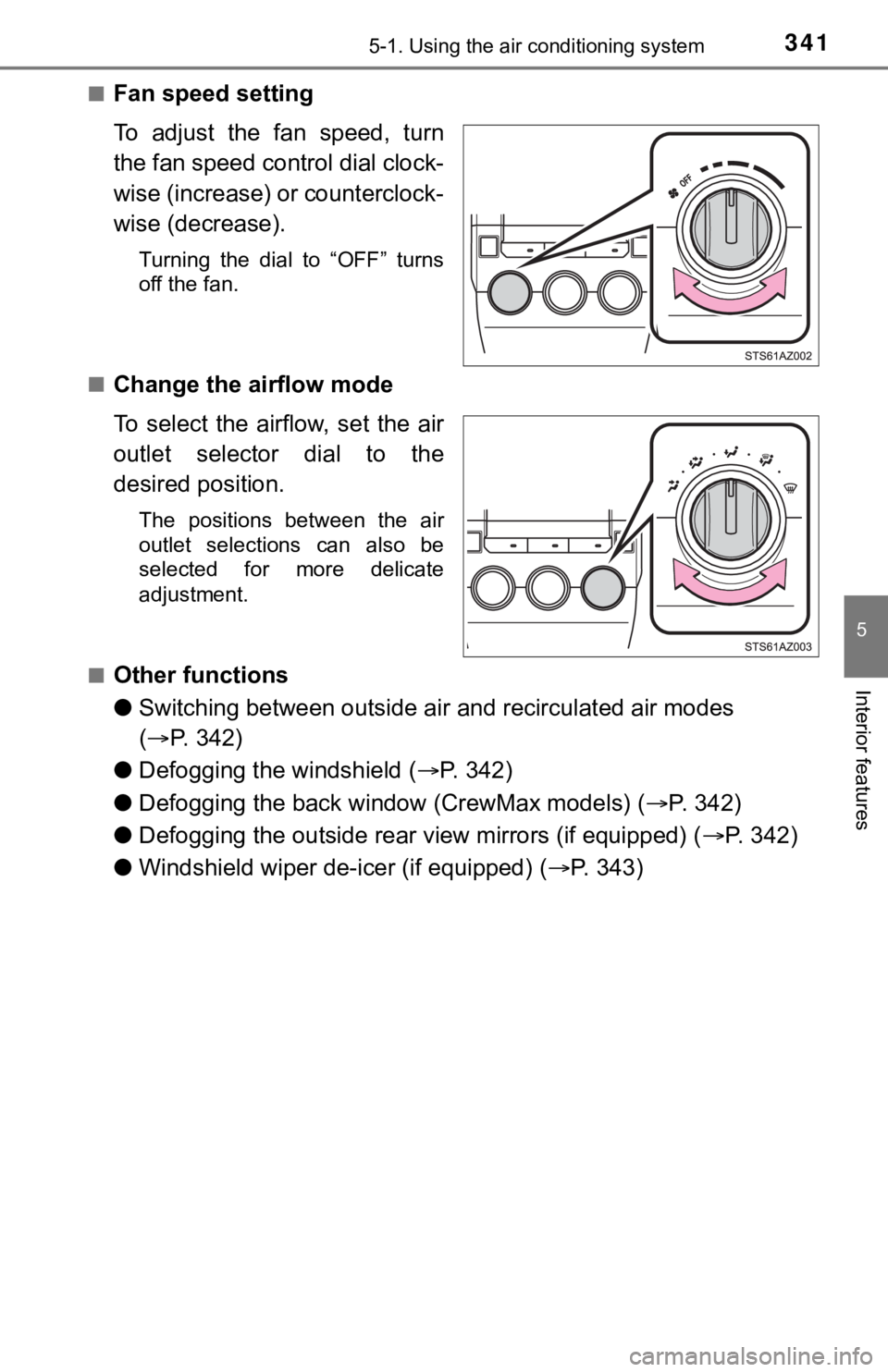
■Fan speed setting
To adjust the fan speed, turn
the fan speed control dial clock-
wise (increase) or counterclock-
wise (decrease).
Turning the dial to “OFF” turns
off the fan.
■
Change the airflow mode
To select the airflow, set the air
outlet selector dial to the
desired position.
The positions between the air
outlet selections can also be
selected for more delicate
adjustment.
■
Other functions
● Switching between outside air and recirculated air modes
( P. 342)
● Defogging the windshield ( P. 3 4 2 )
● Defogging the back window (CrewMax models) ( P. 342)
● Defogging the outside rear view mirrors (if equipped) ( P. 342)
● Windshield wiper de-icer (if equipped) ( P. 3 4 3 )