audio TOYOTA TUNDRA 2021 Owners Manual (in English)
[x] Cancel search | Manufacturer: TOYOTA, Model Year: 2021, Model line: TUNDRA, Model: TOYOTA TUNDRA 2021Pages: 612, PDF Size: 13.7 MB
Page 6 of 612
TABLE OF CONTENTS6
8-1. SpecificationsMaintenance data (fuel, oil level, etc.) .......... 536
Fuel information ................ 551
Tire information ................. 554
8-2. Customization Customizable features ...... 564
8-3. Items to initialize Items to initialize................ 574
Reporting safety defects for U.S. owners ........................ 576
Seat belt instructions for Canadian owners
(in French) ............................... 577
SRS airbag instructions for Canadian owners
(in French) .............................. 579
Camper information ................... 588 What to do if...
(Troubleshooting) ..................... 594
Alphabetical index ...................... 598
8Vehicle specifications
9For owners
Index
For vehicles with a navigation s ystem or a multimedia system, r efer
to the “NAVIGATION AND MULTIMEDIA SYSTEM OWNER’S MAN-
UAL” for information regarding the equipment listed below.
• Navigation system
• Audio system• Hands-free system
(for cellular phone)
• Rear view monitor system
Page 21 of 612
21Pictorial index
Parking brake pedal. . . . . . . . . . . . . . . . . . . . . . . . . . . . . . . . P. 233
Applying/releasing . . . . . . . . . . . . . . . . . . . . . . . . . . . . . . . . . . P. 233
Precautions against winter season . . . . . . . . . . . . . . . . . . . . . P. 332
Warning buzzer/message . . . . . . . . . . . . . . . . . . . . . . . . P. 486, 495
Turn signal lever . . . . . . . . . . . . . . . . . . . . . . . . . . . . . . . . . . P. 232
Headlight switch . . . . . . . . . . . . . . . . . . . . . . . . . . . . . . . . . . . . P. 234
Headlights/parking lights/tail lights/
daytime running lights . . . . . . . . . . . . . . . . . . . . . . . . . . . . . . . P. 234
Fog lights
*3 . . . . . . . . . . . . . . . . . . . . . . . . . . . . . . . . . . . . . . . P. 244
Windshield wiper and washer switch . . . . . . . . . . . . . . . . . P. 245
Usage . . . . . . . . . . . . . . . . . . . . . . . . . . . . . . . . . . . . . . . . . . . P. 245
Adding washer fluid . . . . . . . . . . . . . . . . . . . . . . . . . . . . . . . . . P. 425
Warning lights/warning messages . . . . . . . . . . . . . . . . . . . . . . P. 495
Hood lock release lever. . . . . . . . . . . . . . . . . . . . . . . . . . . . . P. 414
Tilt steering lock release lever . . . . . . . . . . . . . . . . . . . . . . . P. 161
Manual air conditioning system
*3 . . . . . . . . . . . . . . . . . . . . P. 340
Automatic air conditioning system
*3 . . . . . . . . . . . . . . . . . P. 347
Usage . . . . . . . . . . . . . . . . . . . . . . . . . . . . . . . . . . . . . . . P. 340, 347
Back window defogger
*4. . . . . . . . . . . . . . . . . . . . . . . . . P. 342, 349
Windshield wiper de-icer
*3 . . . . . . . . . . . . . . . . . . . . . . . P. 343, 350
Audio
*3,5
Audio Plus*3,5
Premium Audio*3,5
Clock*5
*1: Vehicles without a smart key system
*2: Vehicles with a smart key system
*3: If equipped
*4: For CrewMax models
*5: Refer to the “NAVIGATION AND MULTIMEDIA SYSTEM OWNER’S MANUAL”.
5
6
7
8
9
10
11
Page 23 of 612
23Pictorial index
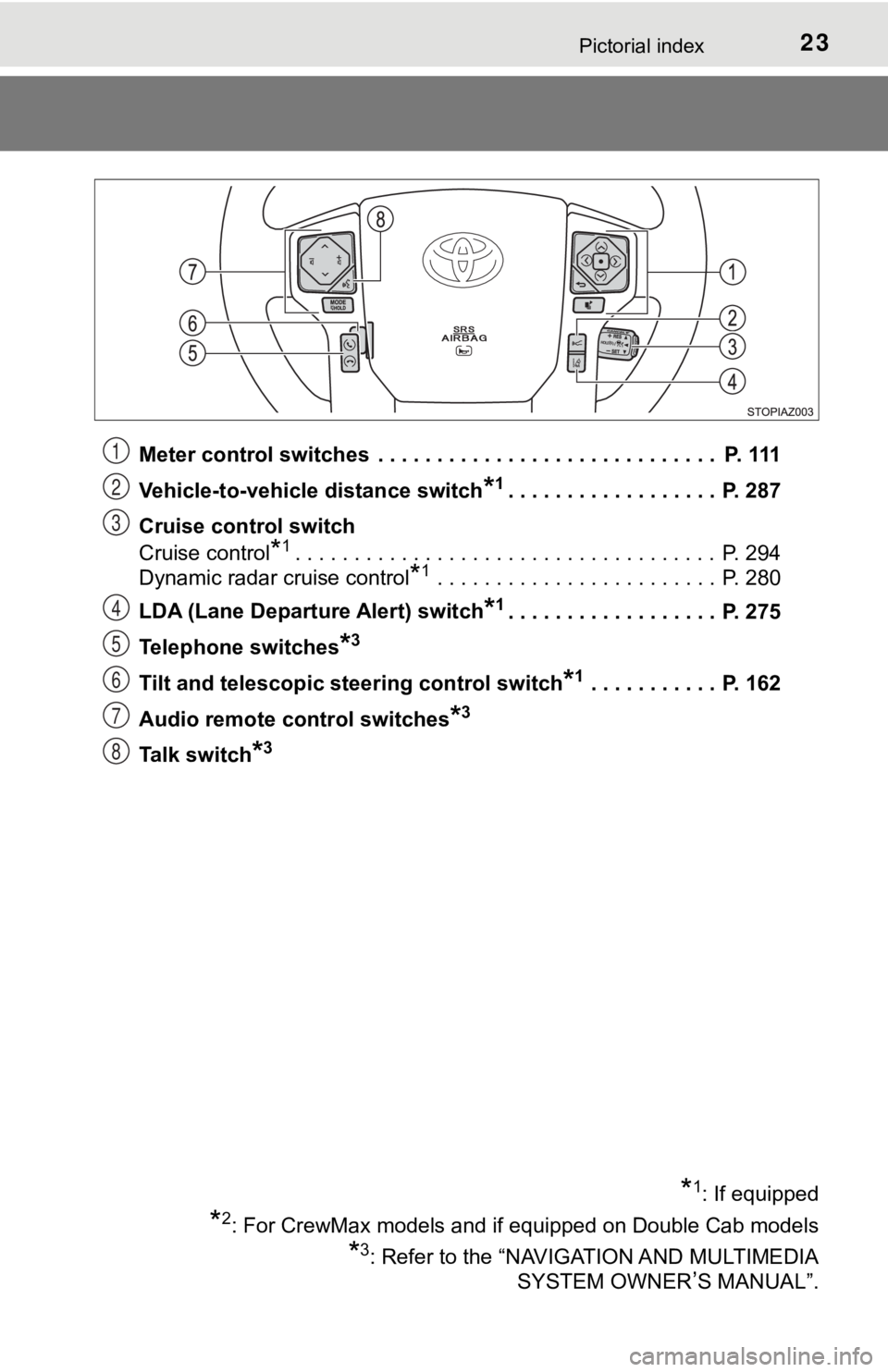
Meter control switches . . . . . . . . . . . . . . . . . . . . . . . . . . . . . P. 111
Vehicle-to-vehicle distance switch
*1. . . . . . . . . . . . . . . . . . P. 287
Cruise control switch
Cruise control
*1. . . . . . . . . . . . . . . . . . . . . . . . . . . . . . . . . . . . P. 294
Dynamic radar cruise control
*1 . . . . . . . . . . . . . . . . . . . . . . . . P. 280
LDA (Lane Departure Alert) switch
*1. . . . . . . . . . . . . . . . . . P. 275
Telephone switches
*3
Tilt and telescopic steering control switch*1 . . . . . . . . . . . P. 162
Audio remote control switches
*3
Talk switch*3
*1: If equipped
*2: For CrewMax models and if equipped on Double Cab models
*3: Refer to the “NAVIGATION AND MULTIMEDIA SYSTEM OWNER
’S MANUAL”.
1
2
3
4
5
6
7
8
Page 110 of 612
1102. Instrument cluster
Multi-infor mation display
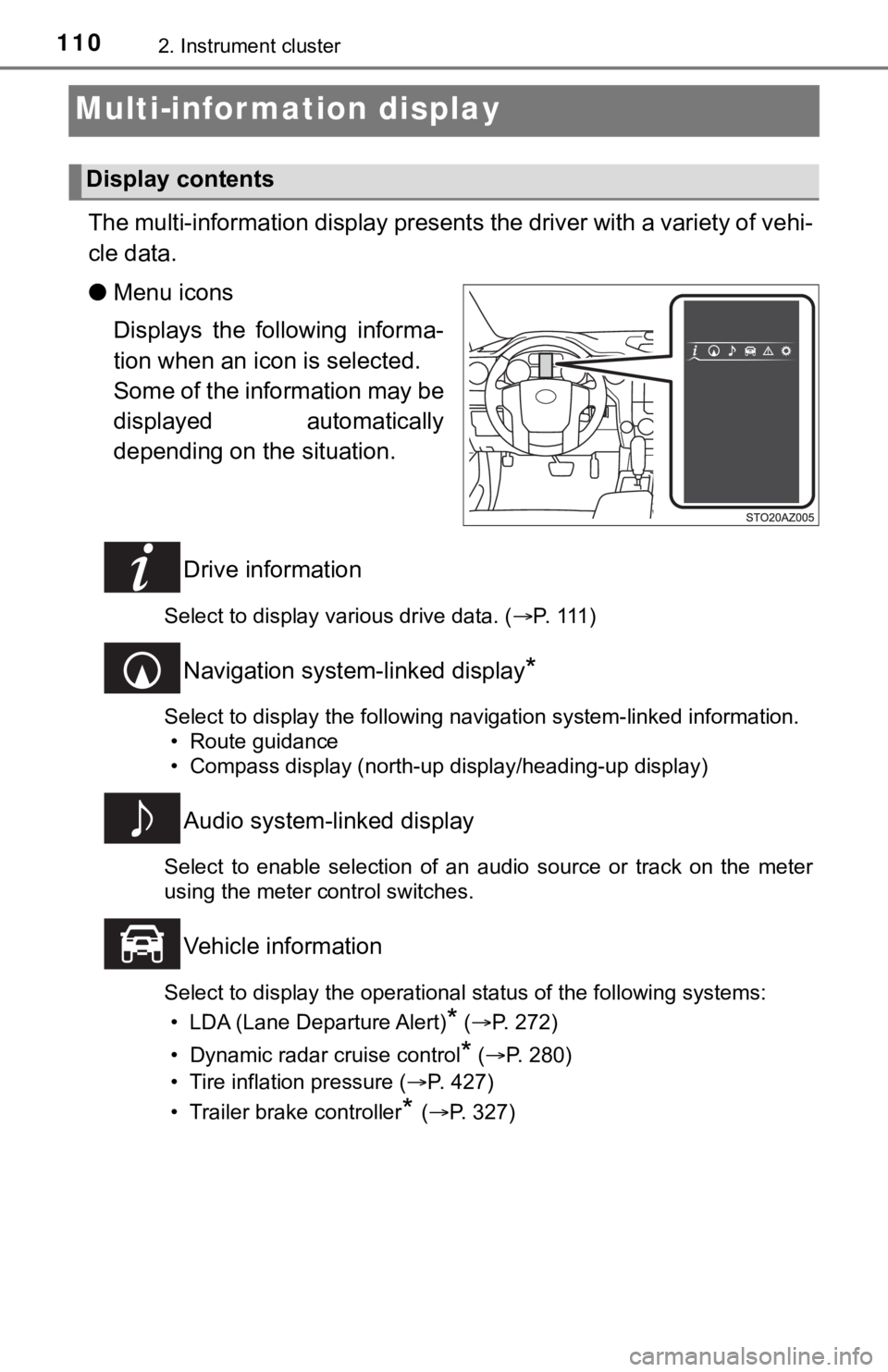
The multi-information display presents the driver with a variety of vehi-
cle data.
● Menu icons
Displays the following informa-
tion when an icon is selected.
Some of the information may be
displayed automatically
depending on the situation.
Drive information
Select to display various drive data. ( P. 1 1 1 )
Navigation system-linked display*
Select to display the following navigation system-linked information.
• Route guidance
• Compass display (north-up display/heading-up display)
Audio system-linked display
Select to enable selection of an audio source or track on the m eter
using the meter control switches.
Vehicle information
Select to display the operational status of the following syste ms:
• LDA (Lane Departure Alert)
* ( P. 272)
• Dynamic radar cruise control
* ( P. 280)
• Tire inflation pressure ( P. 427)
• Trailer brake controller
* ( P. 327)
Display contents
Page 117 of 612

1172. Instrument cluster
2
Instrument cluster
Fuel consumption information
Audio
Press the “TRUCK” button.
Premium Audio and Audio Plus
Press the “APPS” button, and t hen select “Eco” on the screen.
■Trip information
If the “Past Record” screen is displayed, select “Trip Informat ion”.
Resetting the consumption
data
Average vehicle speed since
the engine was started
Elapsed time since the
engine was started
Fuel consumption in the past
15 minutes
Cruising range ( P. 11 8 )
Current fuel consumption
Average fuel consumption for the past 15 minutes is divided by
color into past averages and averages attained since the engine
switch was last turned to ON. Use the displayed average fuel co n-
sumption as a reference.
These images are examples only.
: If equipped
The fuel consumption information can be displayed on Audio,
Premium Audio and Audio Plus screen.
Display the trip information or past record screen
Fuel consumption
1
2
3
4
5
6
Page 126 of 612
1263-1. Key information
NOTICE
■To prevent key damage
● Do not drop the keys, subject them to strong shocks or bend them.
● Do not expose the keys to high temperatures for long periods of time.
● Do not get the keys wet or wash them in an ultrasonic washer, e tc.
● Do not attach metallic or magnetic materials to the keys or place the keys
close to such materials.
● Do not disassemble the keys.
● Do not attach a sticker or anything else to the surface of the key.
● Do not place the keys near objects that produce magnetic fields , such as
TVs, audio systems and induction cookers, or medical electrical equip-
ment, such as low-frequency therapy equipment.
■ Carrying the electronic key on your person (type C)
Carry the electronic key 3.9 in. (10 cm) or more away from elec tric appli-
ances that are turned on. Radio waves emitted from electric app liances
within 3.9 in. (10 cm) of the electronic key may interfere with the key, caus-
ing the key to not function properly.
■ In case of a smart key system malfunction or other key-related prob-
lems (type C)
Take your vehicle with all the electronic keys provided with yo ur vehicle to
your Toyota dealer.
■ When an electronic key is lost (type C)
If the electronic key remains lost, the risk of vehicle theft i ncreases signifi-
cantly. Visit your Toyota dealer immediately with all remaining electronic
keys that was provided with your vehicle.
Page 142 of 612

1423-2. Opening, closing and locking the doors
■Conditions affecting operation
The smart key system uses weak radio waves. In the following si tuations, the
communication between the electronic key and the vehicle may be affected,
preventing the smart key system, wireless remote control and en gine immobi-
lizer system from operating properly. (Ways of coping: P. 523)
● When the electronic key battery is depleted
● Near a TV tower, electric power plant, gas station, radio stati on, large dis-
play, airport or other facility that generates strong radio wav es or electrical
noise
● When carrying a portable radio, cellular phone, cordless phone or other
wireless communication device
● When the electronic key is in contact with, or is covered by th e following
metallic objects
• Cards to which aluminum foil is attached
• Cigarette boxes that have aluminum foil inside
• Metallic wallets or bags
• Coins
• Hand warmers made of metal
• Media such as CDs and DVDs
● When multiple electronic keys are in the vicinity
● When other wireless keys (that emit radio waves) are being used nearby
● When carrying the electronic key together with the following devices that
emit radio waves
• Another vehicle’s electronic key or a wireless key that emits radio waves
• Personal computers or personal digital assistants (PDAs)
• Digital audio players
• Portable game systems
● If window tint with a metallic content or metallic objects are attached to the
back window
● When the electronic key is placed near a battery charger or ele ctronic
devices
■ Note for the entry function
●Even when the electronic key is within the effective range (detection areas),
the system may not operate properly in the following cases:
• The electronic key is too close to the window or outside door handle, near
the ground, or in a high place when the doors are locked or unl ocked.
• The electronic key is on the instrument panel or floor, or in the console
box or glove box when the engine is started or engine switch mo des are
changed.
Page 217 of 612
2174-2. Driving procedures
4
Driving
Engine (ignition) switch (vehicles without a
smart key system)
Check that the parking brake is set.
Check that the shift lever is set in P.
Firmly depress the brake pedal.
Turn the engine switch to the “S TART” position to start the engine.
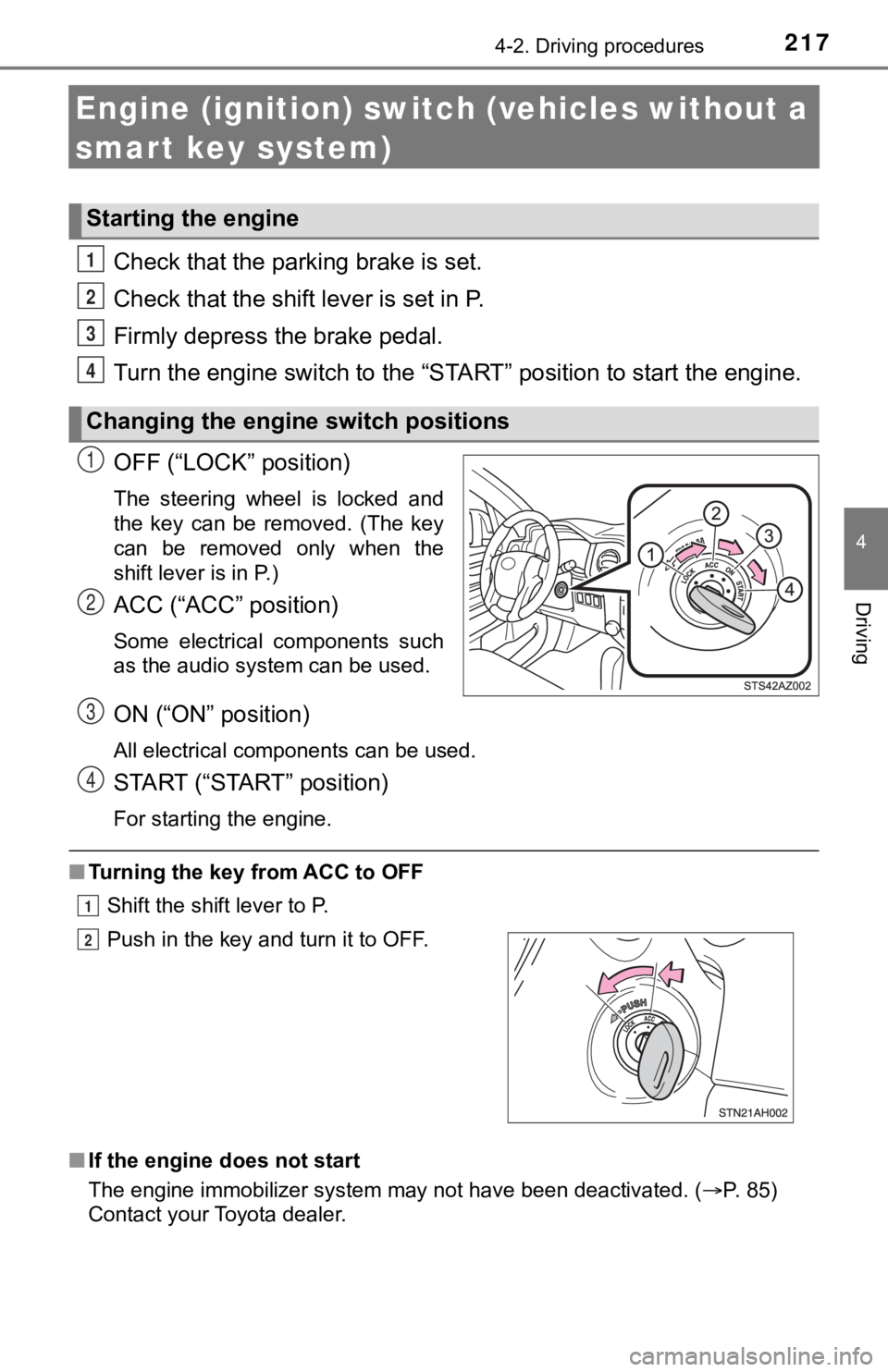
OFF (“LOCK” position)
The steering wheel is locked and
the key can be removed. (The key
can be removed only when the
shift lever is in P.)
ACC (“ACC” position)
Some electrical components such
as the audio system can be used.
ON (“ON” position)
All electrical components can be used.
START (“START” position)
For starting the engine.
■ Turning the key from ACC to OFF
Shift the shift lever to P.
■ If the engine does not start
The engine immobilizer system may not have been deactivated. ( P. 85)
Contact your Toyota dealer.
Starting the engine
Changing the engine switch positions
1
2
3
4
1
2
Push in the key and turn it to OFF.
3
4
1
2
Page 220 of 612
2204-2. Driving procedures
Stop the vehicle.
Set the parking brake (P. 233), and shift the shift lever to P.
Press the engine switch.
Release the brake pedal and chec k that the display on the instru-
ment cluster is off.
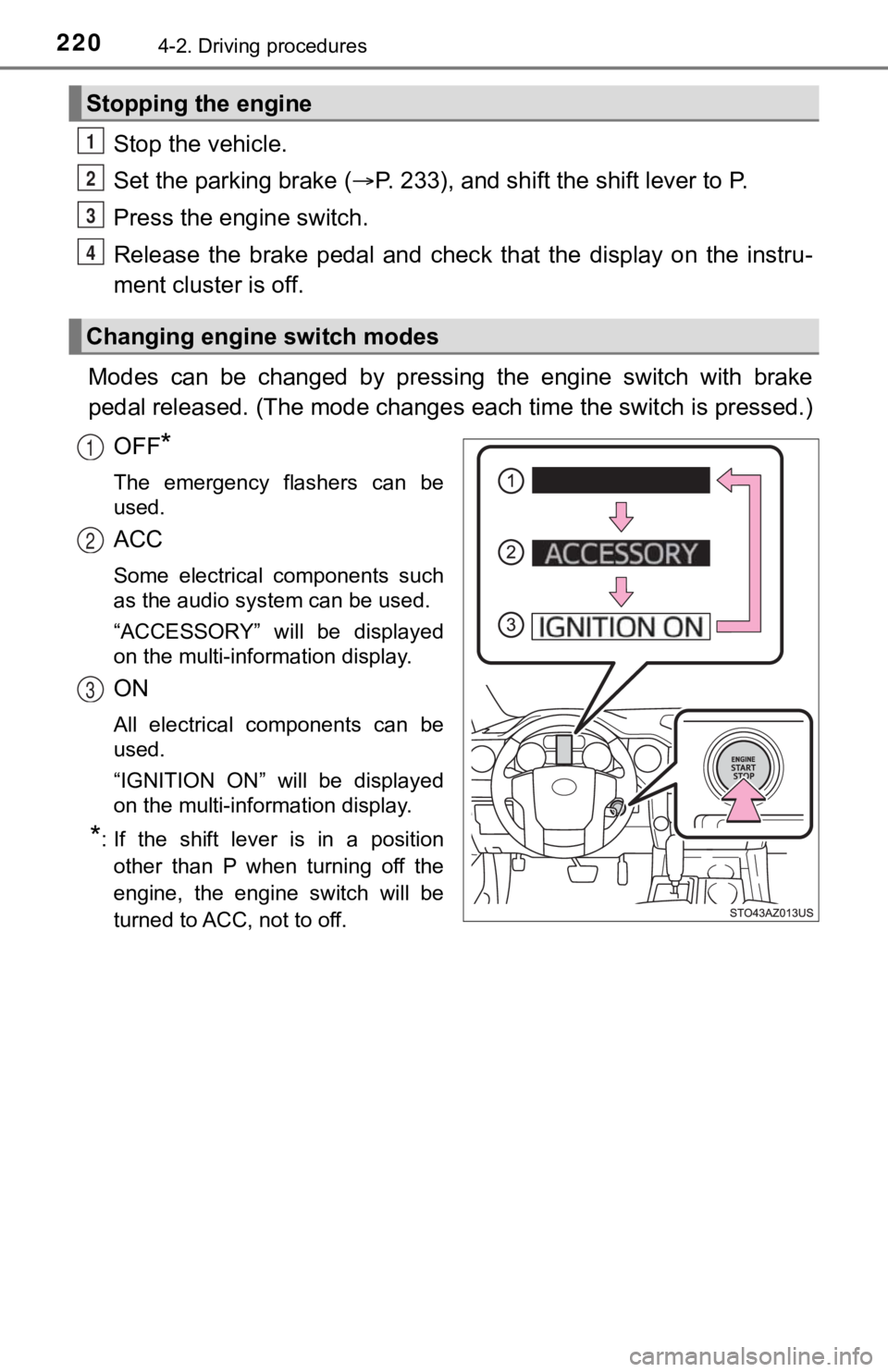
Modes can be changed by pressing the engine switch with brake
pedal released. (The mode changes each time the switch is pressed.)
OFF
*
The emergency flashers can be
used.
ACC
Some electrical components such
as the audio system can be used.
“ACCESSORY” will be displayed
on the multi-information display.
ON
All electrical components can be
used.
“IGNITION ON” will be displayed
on the multi-information display.
*: If the shift lever is in a position other than P when turning off the
engine, the engine switch will be
turned to ACC, not to off.
Stopping the engine
Changing engine switch modes
1
2
3
4
1
2
3
Page 277 of 612
2774-5. Using the driving support systems
4
Driving
■Operation conditio ns of each function
● Lane departure alert function
This function operates when all of the following conditions are met.
• LDA is turned on.
• Vehicle speed is approximately 32 mph (50 km/h) or more.
• System recognizes white (yellow) lines.
• Width of traffic lane is approximately 9.8 ft. (3 m) or more.
• Turn signal lever is not operated.
• Vehicle is driven on a straight road or around a gentle curve with a radius
of more than approximately 492 ft. (150 m).
• No system malfunctions are detected. ( P. 279)
● Vehicle sway warning function
This function operates when all of the following conditions are met.
• Setting for “
Warning” in screen of the multi-information display is
set to on. ( P. 111)
• Vehicle speed is approximately 32 mph (50 km/h) or more.
• Width of traffic lane is approximately 9.8 ft. (3 m) or more.
• No system malfunctions are detected. ( P. 279)
■ Temporary cancellation of functions
When the operation conditions are no longer met, a function may be tempo-
rarily canceled. However, when the operation conditions are met again, oper-
ation of the function is automatically restored. ( P. 277)
■ Lane departure alert function
The warning buzzer may be difficult to hear due to external noi se, audio play-
back, etc.
■ Vehicle sway warning function
Depending on the vehicle and road conditions, the warning may n ot operate.
■ White (yellow) lines are on ly on one side of road
The LDA system will not operate for the side on which white (ye llow) lines
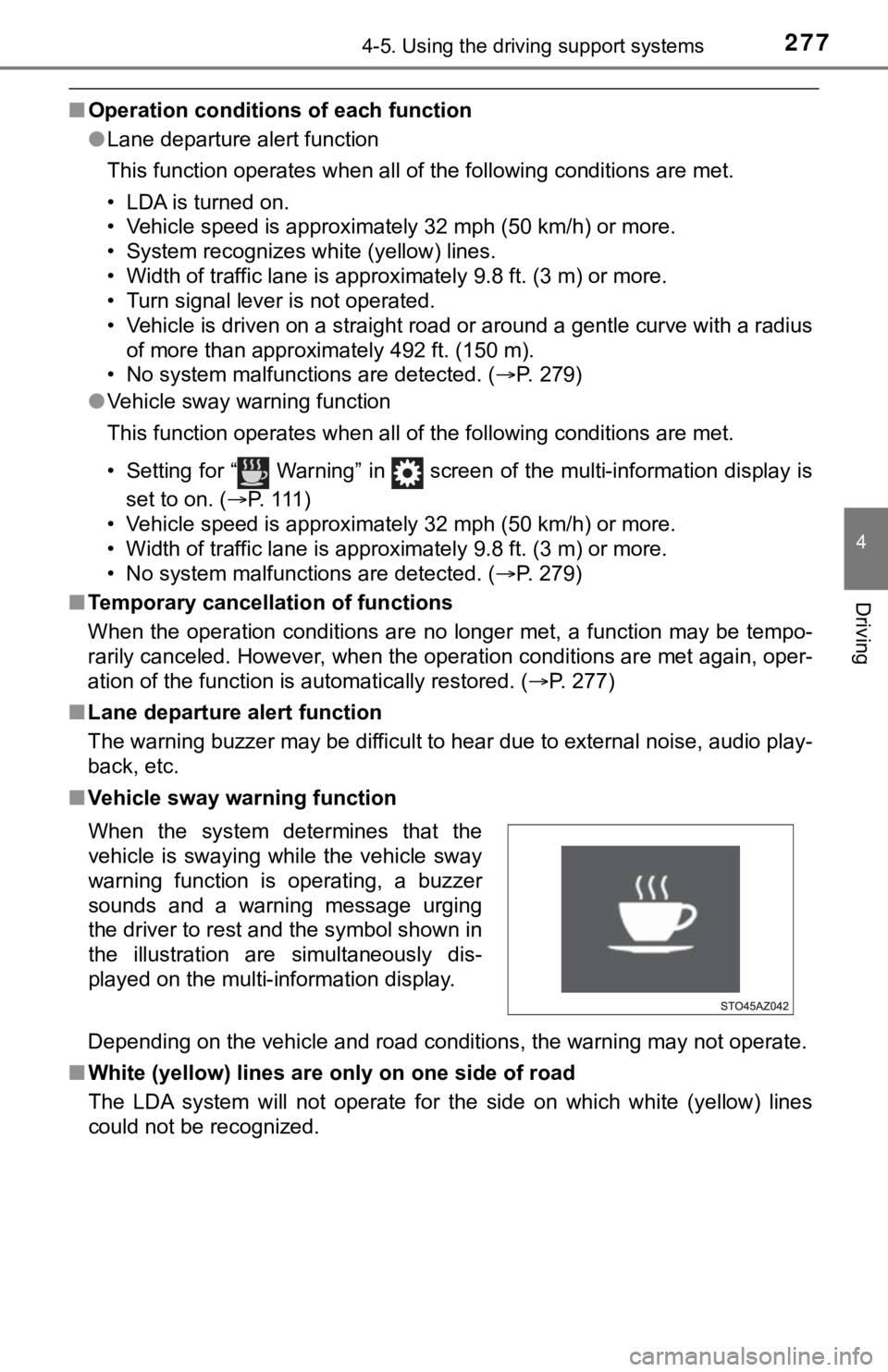
could not be recognized. When the system determines that the
vehicle is swaying while the vehicle sway
warning function is operating, a buzzer
sounds and a warning message urging
the driver to rest and the symbol shown in
the illustration are simultaneously dis-
played on the multi-information display.