engine TOYOTA TUNDRA 2022 Owners Manual
[x] Cancel search | Manufacturer: TOYOTA, Model Year: 2022, Model line: TUNDRA, Model: TOYOTA TUNDRA 2022Pages: 616, PDF Size: 11.13 MB
Page 306 of 616
3064-5. Using the driving support systems
AUTO LSD system
The system can be used on 2WD models and in 2WD mode on 4WD
models.
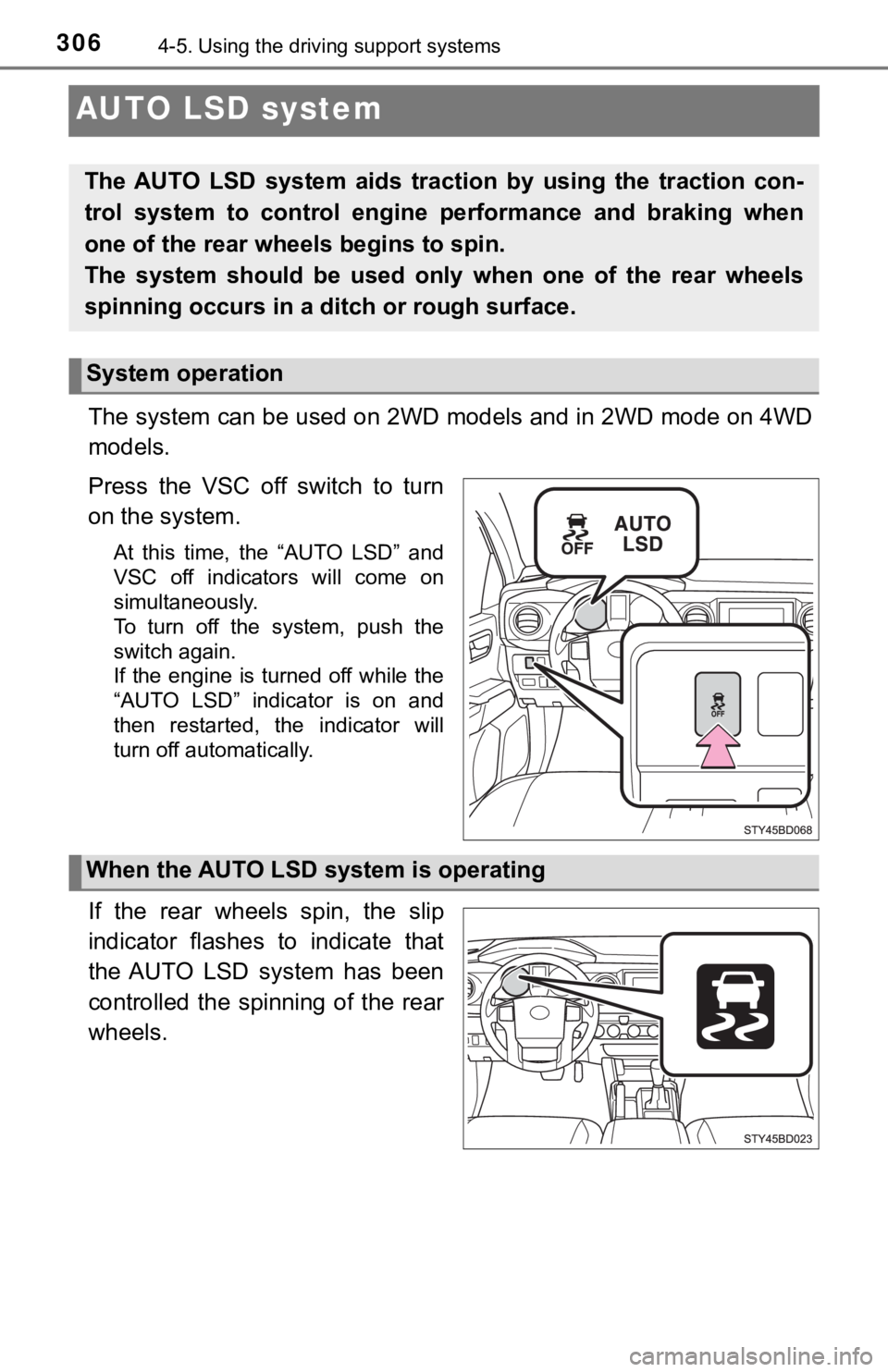
Press the VSC off switch to turn
on the system.
At this time, the “AUTO LSD” and
VSC off indicators will come on
simultaneously.
To turn off the system, push the
switch again.
If the engine is turned off while the
“AUTO LSD” indicator is on and
then restarted, the indicator will
turn off automatically.
If the rear wheels spin, the slip
indicator flashes to indicate that
the AUTO LSD system has been
controlled the spinning of the rear
wheels.
The AUTO LSD system aids trac tion by using the traction con-
trol system to control engine performance and braking when
one of the rear wheels begins to spin.
The system should be used only when one of the rear wheels
spinning occurs in a ditch or rough surface.
System operation
When the AUTO LSD system is operating
Page 307 of 616

3074-5. Using the driving support systems
4
Driving
■If the engine is turned off and restarted
The AUTO LSD system and the indicators are automatically turned off.
■ Reactivation of the VSC system linked to vehicle speed
When the AUTO LSD system is turned on, the VSC and TRAC systems will
turn on automatically if vehicle speed increases.
■ If the brake system overheats
The system will cease operation and a buzzer will sound to alert the driver.
Stop the vehicle in a safe place. (There is no problem with con tinuing normal
driving.) The system will be automatically restored after a sho rt time.
WARNING
■ To avoid an accident
● Do not use the AUTO LSD system in conditions other than the abo ve.
A much greater steering effort and more careful cornering control will be
required.
● Do not drive with the AUTO LSD system continuously turned on.
Page 309 of 616

3094-5. Using the driving support systems
4
Driving
Manual transmission
Before using the rear differential lock system.
Stop the vehicle or reduce your speed to less than 2 mph (3 km/h).
Depress the clutch pedal and turn the front-wheel drive control
switch in the “4L” position to see if this is sufficient. If th is has no
effect, additionally use the re ar differential lock system.
Be sure to stop the wheels.
Depress the clutch pedal.
Press the rear differential lock switch.
After the rear differential is locked, the indicator will come on.
Slowly release th e clutch pedal.
Unlock the rear differential as soon as the vehicle moves.
To unlock the rear different ial, press the switch again.
■Locking the rear differential
●When the rear differential is locked, VSC is automatically turn ed off.
(The rear differential lock and VSC off indicators come on.)
● The following systems do not operate when the rear differential is locked. It
is normal operation for the ABS warning light and VSC off indic ator to be on
at this time.
•ABS
• Multi Terrain ABS (if equipped)
• Brake assist system
•VSC
•TRAC
• Pre-Collision System (if equipped)
• Dynamic radar cruise control system (if equipped)
• Cruise control system (if equipped)
• Hill-start assist control (if equipped on 4WD models)
■ The rear differential lock is disengaged when
●Vehicles without a smart key system: When the engine switch is turned to
the “LOCK” position
● Vehicles with a smart key system: When the engine switch is tur ned off
● 4WD models only: Turn the front-wheel drive control switch to “ 2WD” or “4H”
position.
Never forget to turn off the switch after using this feature.
1
2
3
4
5
Page 310 of 616

3104-5. Using the driving support systems
■After unlocking the rear differential
Vehicles without a smart key system
To check that the indicator goes off, turn the engine switch to the “ON” posi-
tion, but do not start the engine.
Vehicles with a smart key system
To check that the indicator goes off, turn the engine switch to IGNITION ON
mode, but do not start the engine.
WARNING
■ To avoid an accident
● Do not use the rear differential lock system except when wheel spinning
occurs in a ditch or on a slippery or ragged surface. Large steering effort
and careful cornering control will be required.
● Do not lock the rear differential until the wheels have stopped spinning.
Otherwise, the vehicle may move in an unexpected direction when the dif-
ferential lock is engaged, resulting in an accident. This may also lead to
possible damage to differential lock component parts.
● Do not drive over 5 mph (8 km/h) when the differential is locke d.
● Do not keep driving with the rear differential lock switch on.
Page 312 of 616

3124-5. Using the driving support systems
■When the rear differential is locked (vehicles with the rear di fferential
lock system)
The active traction control system is activated only when the v ehicle speed is
less than 3 mph (6 km/h).
■ Sounds and vibrations caused by the active traction control sys tem
● A sound may be heard from the engine compartment when the engine is
started or just after the vehicle begins to move. This sound do es not indicate
that a malfunction has occurred in the system.
● Vibrations may be felt through the vehicle body and steering. It may occur
when the system is operating.
■ If the brake system overheats
The system will cease operation, a buzzer will sound to alert the driver. Stop
the vehicle in a safe place. (There is no problem with continuing normal driv-
ing.)
The system will be automatically restored after a short time.
WARNING
■ The active traction control system may not operate effectively when
Directional control and power may not be achievable while driving on slip-
pery road surfaces, even if the active traction control system is operating.
Do not drive the vehicle in conditions where stability and powe r may be lost.
Page 318 of 616
3184-5. Using the driving support systems
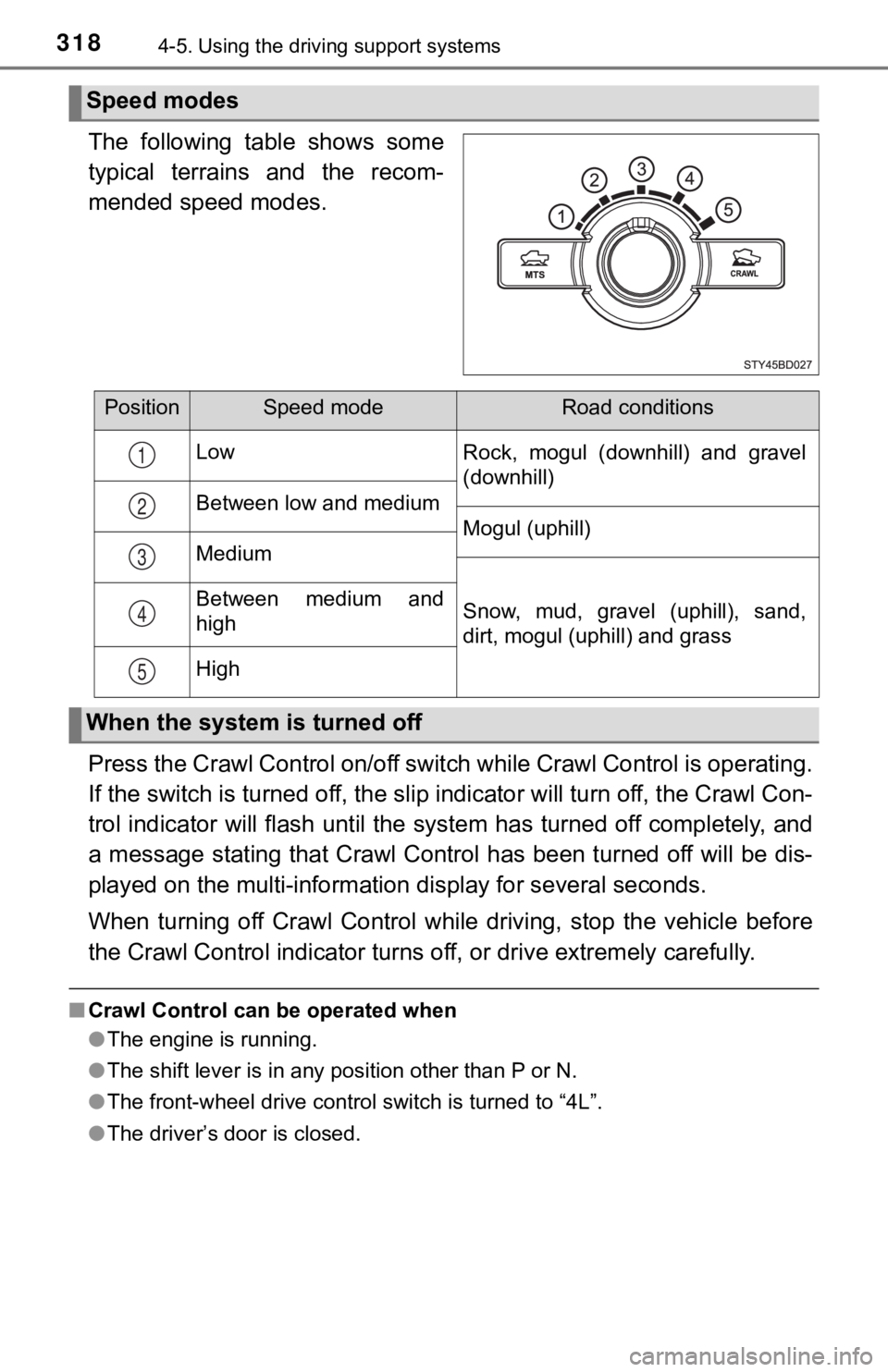
The following table shows some
typical terrains and the recom-
mended speed modes.
Press the Crawl Control on/off switch while Crawl Control is op erating.
If the switch is turned off, the slip indicator will turn off, the Crawl Con-
trol indicator will flash until the system has turned off compl etely, and
a message stating that Crawl Control has been turned off will b e dis-
played on the multi-informati on display for several seconds.
When turning off Crawl Control while driving, stop the vehicle before
the Crawl Control indi cator turns off, or drive extremely caref ully.
■Crawl Control can be operated when
●The engine is running.
● The shift lever is in any position other than P or N.
● The front-wheel drive control switch is turned to “4L”.
● The driver’s door is closed.
Speed modes
PositionSpeed modeRoad conditions
Low Rock, mogul (downhill) and gravel
(downhill)
Between low and medium Mogul (uphill)
Medium
Snow, mud, gravel (uphill), sand,
dirt, mogul (uphill) and grass
Between medium and
high
High
1
2
3
4
5
When the system is turned off
Page 319 of 616

3194-5. Using the driving support systems
4
Driving
■Automatic system cancelation
In the following situations, the buzzer will sound intermittently and Crawl Con-
trol will be canceled automatically. In this event, the Crawl C ontrol indicator
will flash and then goes off, and a message stating that Crawl Control has
been turned off will be displayed on the multi-information disp lay for several
seconds.
● When the shift lever is shifted to P or N
● When the front-wheel drive control switch is turned to “4H”
● When the driver’s door is opened
■ Function limitations
When the vehicle speed exceeds appr oximately 15 mph (25 km), engine con-
trol and brake control will stop temporarily. In this event, th e Crawl Control
indicator will flash.
■ When the Crawl Control system is operated continuously
● If Crawl Control is used continuously for a long time, the buzz er will sound, a
malfunction notification will be displayed on the multi-informa tion display,
the Crawl Control indicator goes off, and Crawl Control will be temporarily
inoperable as a result of the brake system overheating. In this event, stop
the vehicle immediately in a safe place, and allow the brake sy stem to cool
down sufficiently until the “TRAC OFF” indicator will goes off. (In the mean-
time, normal driving is possible.)
● If Crawl Control is used continuously for a long time, the buzz er will sound,
the system will be temporarily canceled, and a malfunction noti fication will
be displayed on the multi-information display as a result of th e automatic
transmission system overheating. Stop the vehicle in a safe pla ce until the
display goes off.
■ Sounds and vibrations caused by the Crawl Control system
● A sound may be heard from the engine compartment when the engin e is
started or just after the vehicle begins to move. This sound do es not indicate
that a malfunction has occurred in Crawl Control system.
● Either of the following conditions may occur when the Crawl Con trol system
is operating. None of these indicates that a malfunction has occurred.
• Vibrations may be felt through the vehicle body and steering.
• A motor sound may be heard after the vehicle comes to a stop.
■ When there is a malfunction in the system
Warning lights and/or warning messages will turn on. ( P. 489)
Page 321 of 616
3214-5. Using the driving support systems
4
Driving
Clutch star t cancel switch
Never use the switch for normal engine starting. Be sure to follow the
starting procedure. ( P. 2 0 1 )
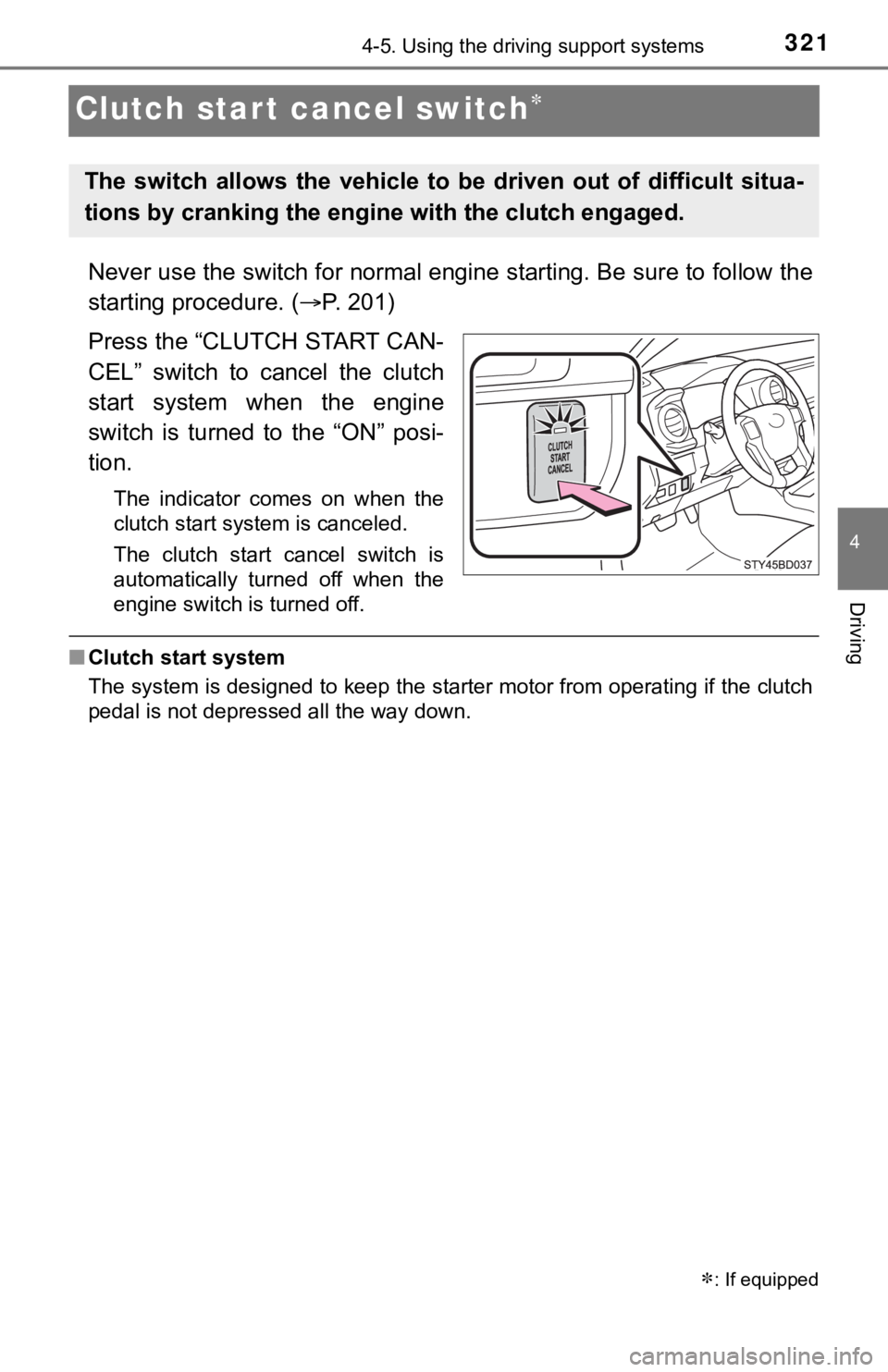
Press the “CLUTCH START CAN-
CEL” switch to cancel the clutch
start system when the engine
switch is turned to the “ON” posi-
tion.
The indicator comes on when the
clutch start system is canceled.
The clutch start cancel switch is
automatically turned off when the
engine switch is turned off.
■ Clutch start system
The system is designed to keep the starter motor from operating if the clutch
pedal is not depressed all the way down.
: If equipped
The switch allows the vehicle t o be driven out of difficult situa-
tions by cranking the engine with the clutch engaged.
Page 322 of 616
3224-5. Using the driving support systems
Driving assist systems
◆ABS (Anti-lock Brake System)
Helps to prevent wheel lock when the brakes are applied suddenl y,
or if the brakes are applied while driving on a slippery road surface
◆Multi Terrain ABS (Anti-lock Brake System) (if equipped)
Helps to prevent wheel lock when the brakes are applied suddenl y,
or if the brakes are applied while driving on a slippery road s urface,
or in off-road conditions (such as rough roads, sand and mud)
◆Brake assist
Generates an increased level of braking force after the brake p edal
is depressed when the system de tects a panic stop situation
◆VSC (Vehicle Stability)
Helps the driver to control skidding when swerving suddenly or
turning on slippery road surfaces
◆Trailer Sway Control (if equipped)
Helps the driver to control trailer sway by selectively applying brake
pressure for individual wheels and reducing engine torque when
trailer sway is detected.
Trailer Sway Control is part of the VSC system and will not ope rate if
VSC system is turned off or experiences a malfunction.
◆TRAC (Traction Control)
Helps to maintain drive power and prevent the drive wheels from
spinning when starting the vehicl e or accelerating on slippery roads
To help enhance driving safety and performance, the following
systems operate autom atically in response to various driving
situations. Be aware, however, that these systems are supple-
mentary and should not be relied upon too heavily when operat-
ing the vehicle.
Page 323 of 616
3234-5. Using the driving support systems
4
Driving
◆Hill-start assist control (if equipped)
Helps to prevent the vehicle from rolling backward when starting on
an incline or slippery slope
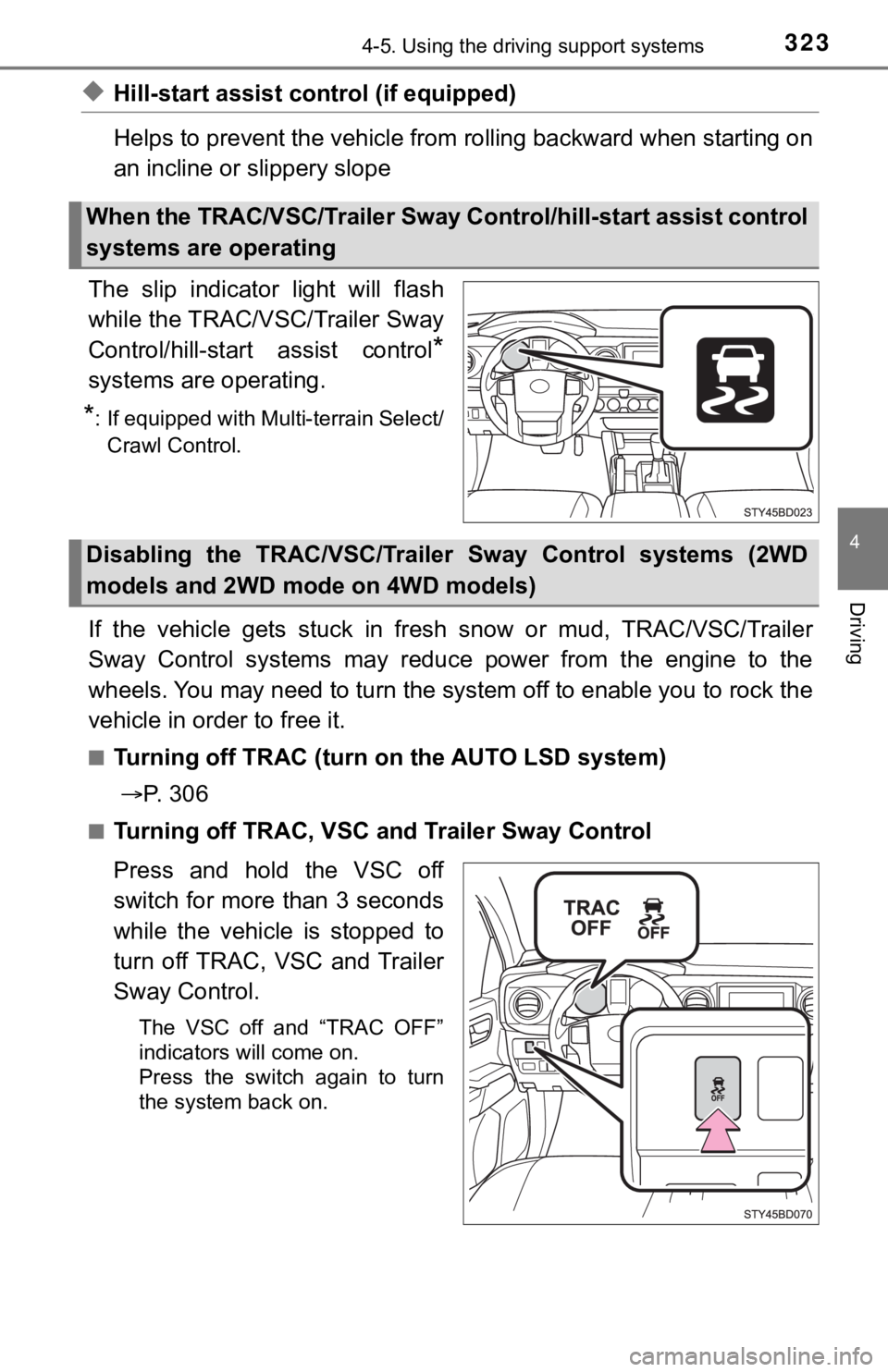
The slip indicator light will flash
while the TRAC/VSC/Trailer Sway
Control/hill-star t assist control
*
systems are operating.
*: If equipped with Multi-terrain Select/
Crawl Control.
If the vehicle gets stuck in fresh snow or mud, TRAC/VSC/Traile r
Sway Control systems may reduce power from the engine to the
wheels. You may need to turn the system off to enable you to rock the
vehicle in order to free it.
■Turning off TRAC (turn on the AUTO LSD system)
P. 3 0 6
■Turning off TRAC, VSC a nd Trailer Sway Control
Press and hold the VSC off
switch for more than 3 seconds
while the vehicle is stopped to
turn off TRAC, VSC and Trailer
Sway Control.
The VSC off and “TRAC OFF”
indicators will come on.
Press the switch again to turn
the system back on.
When the TRAC/VSC/Trailer Sway C ontrol/hill-start assist control
systems are operating
Disabling the TRAC/VSC/Traile r Sway Control systems (2WD
models and 2WD mode on 4WD models)