clutch TOYOTA TUNDRA 2023 User Guide
[x] Cancel search | Manufacturer: TOYOTA, Model Year: 2023, Model line: TUNDRA, Model: TOYOTA TUNDRA 2023Pages: 616, PDF Size: 11.14 MB
Page 274 of 616
2744-5. Using the driving support systems
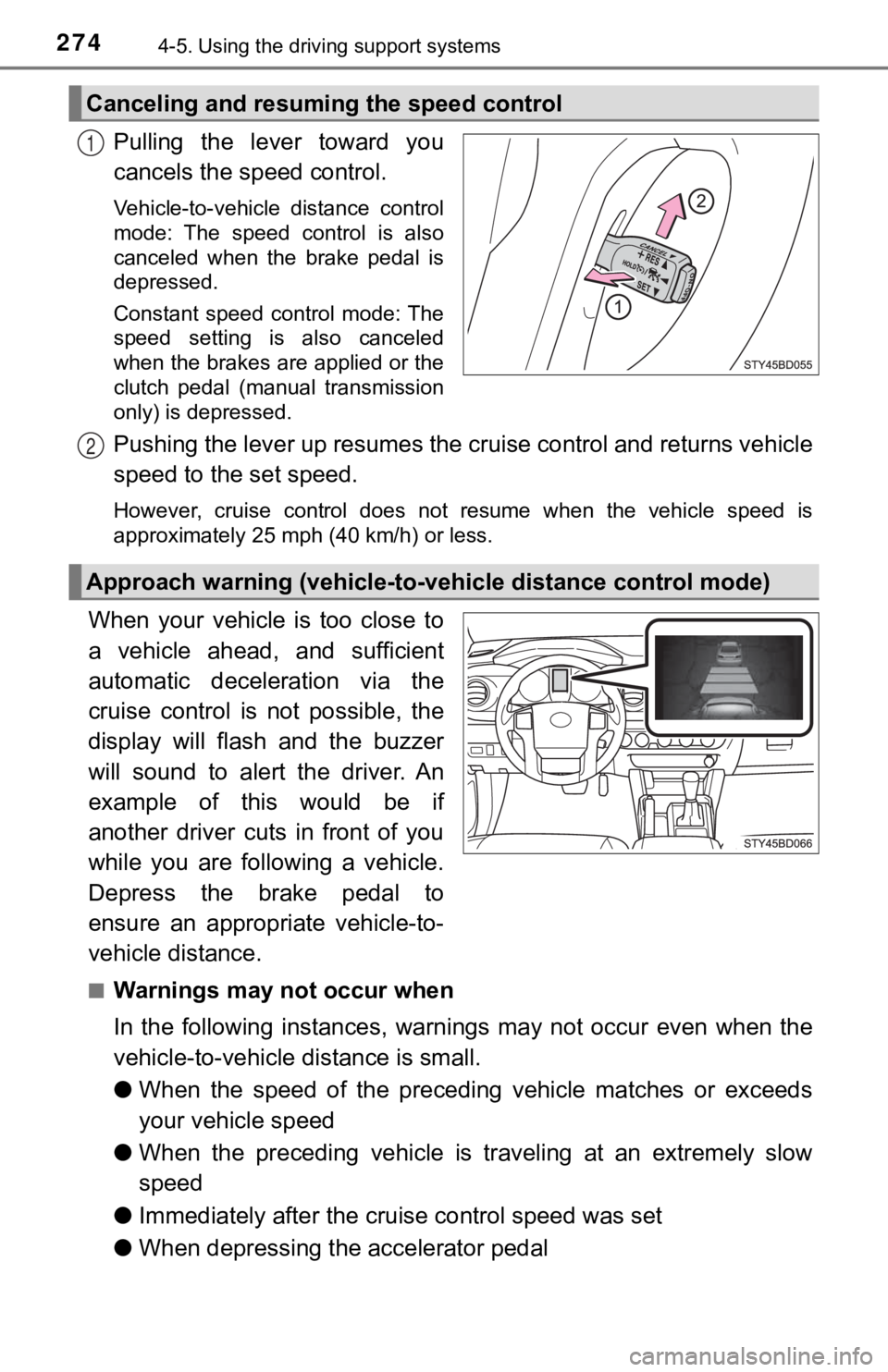
Pulling the lever toward you
cancels the speed control.
Vehicle-to-vehicle distance control
mode: The speed control is also
canceled when the brake pedal is
depressed.
Constant speed control mode: The
speed setting is also canceled
when the brakes are applied or the
clutch pedal (manual transmission
only) is depressed.
Pushing the lever up resumes the cruise control and returns veh icle
speed to the set speed.
However, cruise control does not resume when the vehicle speed is
approximately 25 mph (40 km/h) or less.
When your vehicle is too close to
a vehicle ahead, and sufficient
automatic deceleration via the
cruise control is not possible, the
display will flash and the buzzer
will sound to alert the driver. An
example of this would be if
another driver cuts in front of you
while you are following a vehicle.
Depress the brake pedal to
ensure an appropriate vehicle-to-
vehicle distance.
■Warnings may not occur when
In the following instances, war nings may not occur even when th e
vehicle-to-vehicle distance is small.
● When the speed of the preceding vehicle matches or exceeds
your vehicle speed
● When the preceding vehicle is traveling at an extremely slow
speed
● Immediately after the cruise control speed was set
● When depressing the accelerator pedal
Canceling and resuming the speed control
1
Approach warning (vehicle-to-v ehicle distance control mode)
2
Page 304 of 616

3044-5. Using the driving support systems
■Shifting from “2WD” to “4H”
Reduce vehicle speed to less than 62 mph (100 km/h).
Turn the front-wheel drive control switch to “4H”.
The four-wheel drive indicator will come on.
■
Shifting from “4H” to “2WD”
Turn the front-wheel drive co ntrol switch to “2WD”.
This can be done at any speed. Y ou need not depress the clutch
pedal. (manual transmission only)
The four-wheel drive indicator will go off.
■
Shifting from “4H” to “4L”
Automatic transmission
Stop the vehicle completely and continue to depress the brake
pedal.
Shift the shift lever to N.
Push and turn the front-wheel drive control switch to “4L”.
The “4LO” indicator will come on.
If the four-wheel drive indicator flashes and the buzzer sounds, try the
above steps again.
Manual transmission
Stop the vehicle or reduce your speed to less than 2 mph (3 km/ h).
Depress and hold the clutch pedal.
Push and turn the front-wheel drive control switch to “4L”.
The “4LO” indicator will come on.
If the four-wheel drive indicator flashes and the buzzer sounds, try the
above steps again.
Shifting between “2WD” and “4H”
Shifting between “4H” and “4L”
1
2
1
2
3
1
2
3
Page 305 of 616

3054-5. Using the driving support systems
4
Driving
■Shifting from “4L” to “4H”
Automatic transmission
Stop the vehicle completely and continue to depress the brake
pedal.
Shift the shift lever to N.
Push and turn the front-wheel drive control switch to “4H”.
The “4LO” indicator will go off.
If the four-wheel drive indicator flashes and the buzzer sounds, try the
above steps again.
Manual transmission
Stop the vehicle or reduce your speed to less than 2 mph (3 km/ h).
Depress and hold the clutch pedal.
Push and turn the front-wheel dr ive control switch to “4H”.
The “4LO” indicator will go off.
If the four-wheel drive indicator flashes and the buzzer sounds, try the
above steps again.
■If the four-wheel dri ve indicator light or the “4LO” indicator light blinks
● Shifting from “2WD” to “4H”
• If the four-wheel drive indicator continues to blink, drive straight ahead
while accelerating or decelerating.
• If the four-wheel drive indicator continues to blink and the b uzzer sounds,
stop the vehicle or reduce the vehicle speed to less than 62 mp h
(100 km/h). Operate the switch again.
● Shifting from “4H” to “2WD”
If the four-wheel drive indicator continues to blink, drive str aight ahead
while accelerating or decelerating, or drive forward or backwar d in a short
distance.
1
2
3
1
2
3
Page 306 of 616

3064-5. Using the driving support systems
●Shifting to “4H” or “4L”
Automatic transmission
If the “4LO” indicator continues to blink when you operate the front-wheel
drive control switch to the “4H” or “4L” position, drive forwar d or backward
in a short distance, then stop the vehicle completely, shift th e shift lever
securely to N and operate the switch again.
Manual transmission
If the “4LO” indicator continues to blink when you operate the front-wheel
drive control switch to the “4H” or “4L” position, drive forwar d or backward
in a short distance, then stop the vehicle completely, depress the clutch
pedal and operate the switch again.
If the indicator light continues to blink even if doing so, contact your Toyota
dealer as soon as possible. There may be a trouble in the four- wheel drive
system.
■ Shifting to “4L”
VSC is automatically turned off.
■ Four-wheel drive usage frequency
You should drive in four-wheel drive for at least 10 miles (16 km) each month.
This will assure that the front drive components are lubricated.
WARNING
■Caution while driving
● Never shift the front-wheel drive control switch from “2WD” to “4H” if the
wheels are slipping.
Stop the slipping or spinning before shifting.
● For normal driving on dry and hard surface roads, use “2WD” pos ition.
Driving on dry and hard surface roads in “4H” or “4L” position may cause
drive component oil leakage, seizure, or other problems resulti ng in an
accident. Further, it may cause tire wear and increased fuel consumption.
● Avoid turning suddenly in “4H” or “4L” position. If you do turn suddenly, the
difference in turning speeds between the front and rear wheels may have
a similar effect to braking, thus making driving difficult.
● Do not shift the front-wheel drive control switch when the vehicle is turning
or when its wheels are spinning freely off the ground.
Page 310 of 616

3104-5. Using the driving support systems
Manual transmission
Before using the rear differential lock system.
Stop the vehicle or reduce your speed to less than 2 mph (3 km/h ).
Depress the clutch pedal and turn the front-wheel drive control
switch in the “4L” position to see if this is sufficient. If th is has no
effect, additionally use the re ar differential lock system.
Be sure to stop the wheels.
Depress the clutch pedal.
Press the rear differential lock switch.
After the rear differential is locked, the indicator will come on.
Slowly release th e clutch pedal.
Unlock the rear differential as soon as the vehicle moves.
To unlock the rear different ial, press the switch again.
■Locking the rear differential
●When the rear differential is locked, VSC is automatically turn ed off.
(The rear differential lock and VSC off indicators come on.)
● The following systems do not operate when the rear differential is locked. It
is normal operation for the ABS warning light and VSC off indic ator to be on
at this time.
•ABS
• Multi Terrain ABS (if equipped)
• Brake assist system
•VSC
•TRAC
• Pre-Collision System (if equipped)
• Dynamic radar cruise control system (if equipped)
• Cruise control system (if equipped)
• Hill-start assist control (if equipped on 4WD models)
■ The rear differential lock is disengaged when
●Vehicles without a smart key system: When the engine switch is turned to
the “LOCK” position
● Vehicles with a smart key system: When the engine switch is tur ned off
● 4WD models only: Turn the front-wheel drive control switch to “ 2WD” or “4H”
position.
Never forget to turn off the switch after using this feature.
1
2
3
4
5
Page 312 of 616

3124-5. Using the driving support systems
Active traction control system
Stop the vehicle or reduce your speed to less than 2 mph (3 km/h ).
Depress the clutch pedal and turn the front-wheel drive control
switch in the “4L” position.
Press the “A-TRAC” switch to
activate the system.
At this time, the “A-TRAC” indicator
will come on.
To cancel the system, press the
switch again.
If four wheels spin, the slip indica-
tor flashes to indicate that the
active traction control system has
been engaged.
: If equipped
The active traction control syst em automatically helps prevent
the spinning of 4 wheels when the vehicle is started or acceler -
ated on slippery road surfaces.
System operation
1
2
When the active traction co ntrol system is operating
Page 322 of 616
3224-5. Using the driving support systems
Clutch star t cancel switch
Never use the switch for normal engine starting. Be sure to fol low the
starting procedure. ( P. 2 0 2 )
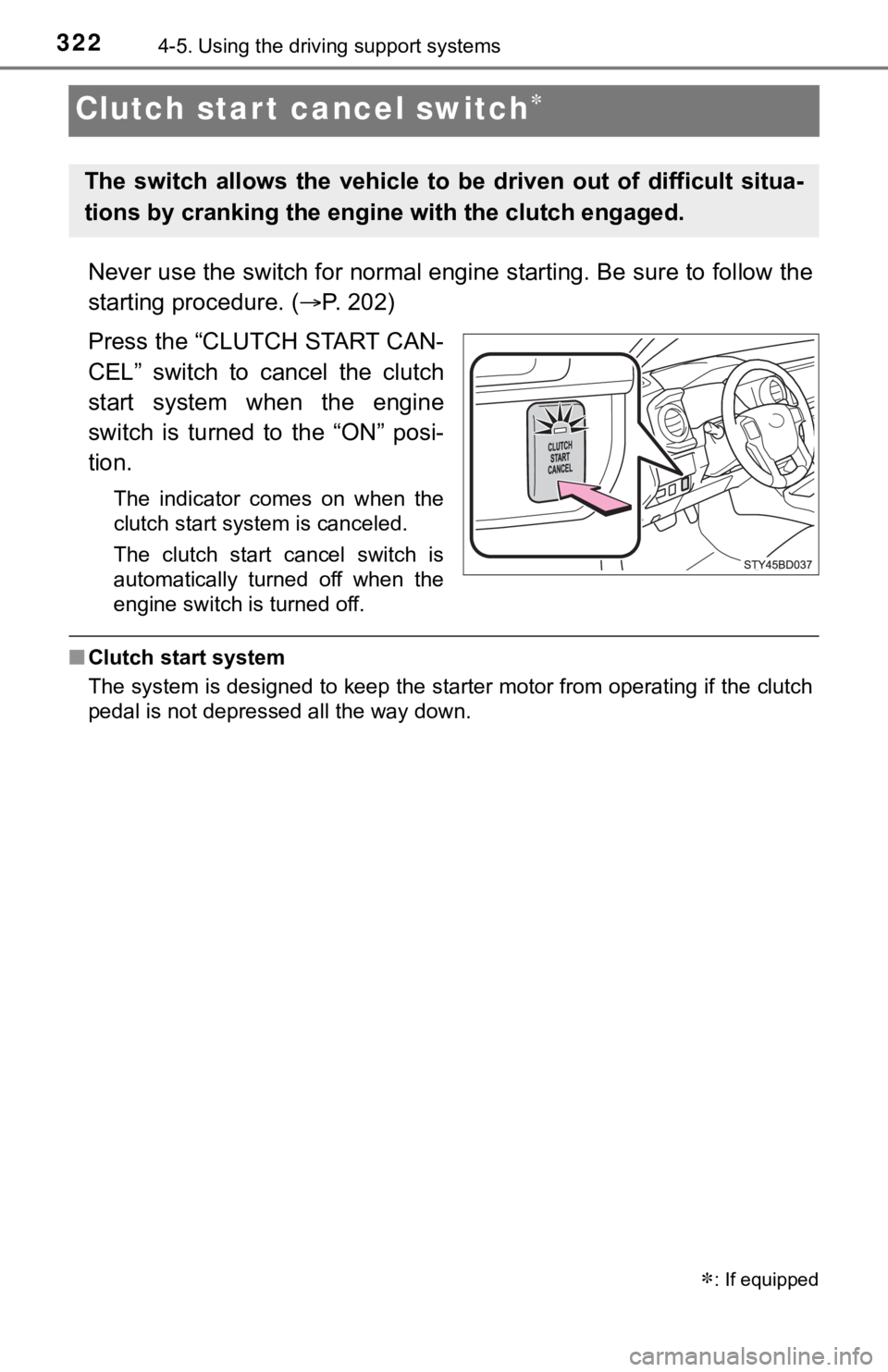
Press the “CLUTCH START CAN-
CEL” switch to cancel the clutch
start system when the engine
switch is turned to the “ON” posi-
tion.
The indicator comes on when the
clutch start system is canceled.
The clutch start cancel switch is
automatically turned off when the
engine switch is turned off.
■ Clutch start system
The system is designed to keep the starter motor from operating if the clutch
pedal is not depressed all the way down.
: If equipped
The switch allows the vehicle t o be driven out of difficult situa-
tions by cranking the engine with the clutch engaged.
Page 366 of 616
3665-3. Using the storage features
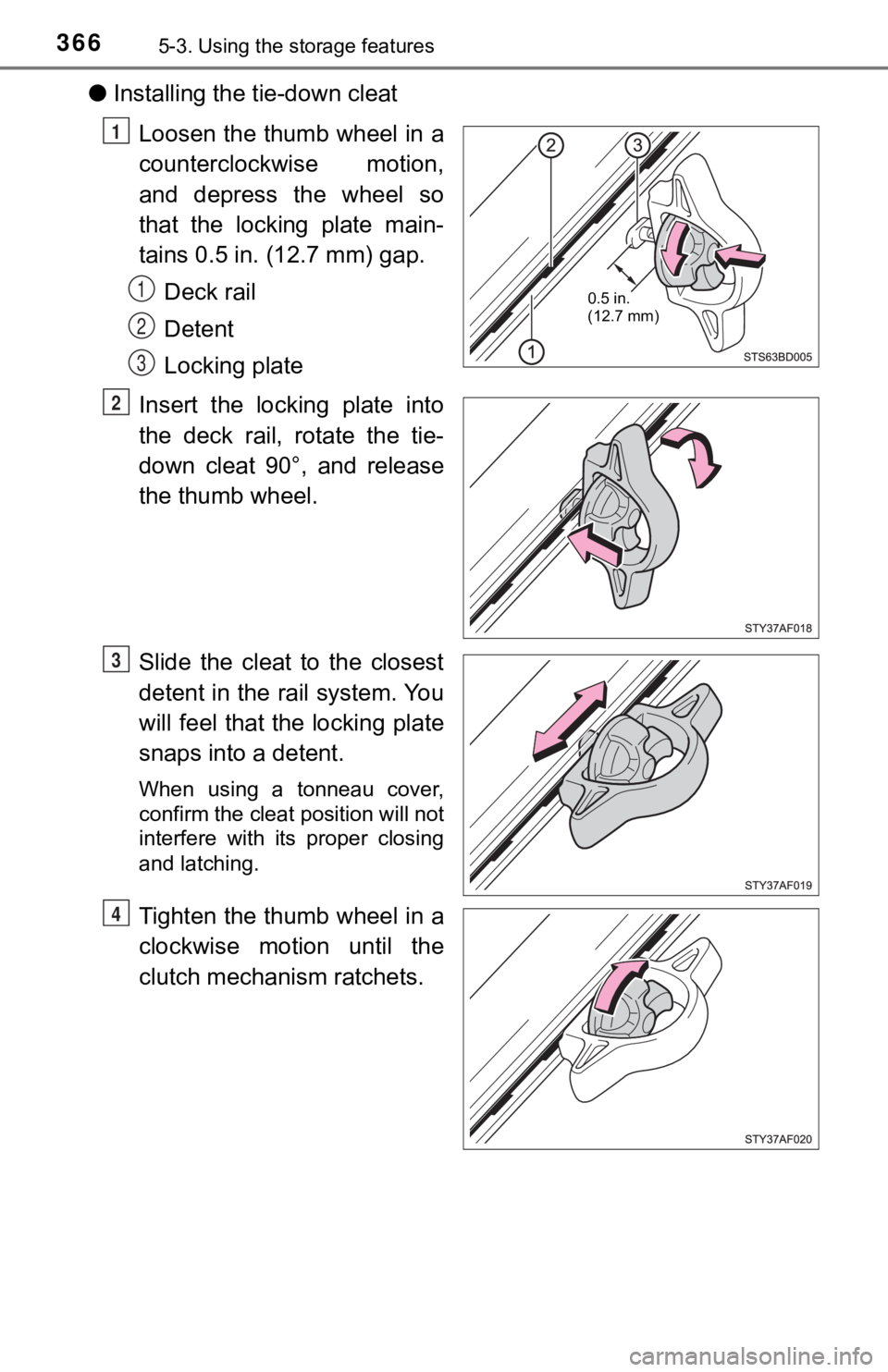
●Installing the tie-down cleat
Loosen the thumb wheel in a
counterclockwise motion,
and depress the wheel so
that the locking plate main-
tains 0.5 in. (12.7 mm) gap.Deck rail
Detent
Locking plate
Insert the locking plate into
the deck rail, rotate the tie-
down cleat 90°, and release
the thumb wheel.
Slide the cleat to the closest
detent in the rail system. You
will feel that the locking plate
snaps into a detent.
When using a tonneau cover,
confirm the cleat position will not
interfere with its proper closing
and latching.
Tighten the thumb wheel in a
clockwise motion until the
clutch mechanism ratchets.
0.5 in.
(12.7 mm)
1
1
2
3
2
3
4
Page 377 of 616
3775-4. Other interior features
5
Interior features
■Maximum available capacity of the power outlet
●While the vehicl e is being driven
The maximum capacity of the power outlet is always 120 V AC/
100 W.
● When the vehicle is stationary
The maximum capacity of the power outlet varies depending on
the following conditions:
• The maximum capacity is 120 V AC/100 W when the following conditions applies:
Vehicles with an automatic transmission
The shift lever is moved to any positions other than P and N.
Vehicles with a manual transmission
The clutch pedal is depressed.
• The maximum capacity is 120 V AC/400 W when the followingconditions applies:
Vehicles with an automatic transmission
The shift lever is in P or N.
Vehicles with a manual transmission
The shift lever is in N and the clutch pedal is not depressed.
The maximum capacity of 400 W can only be restored by turning the
power outlet main switch off and then on again under condition
described above.
■ The power outlet can be used when
The engine is running.
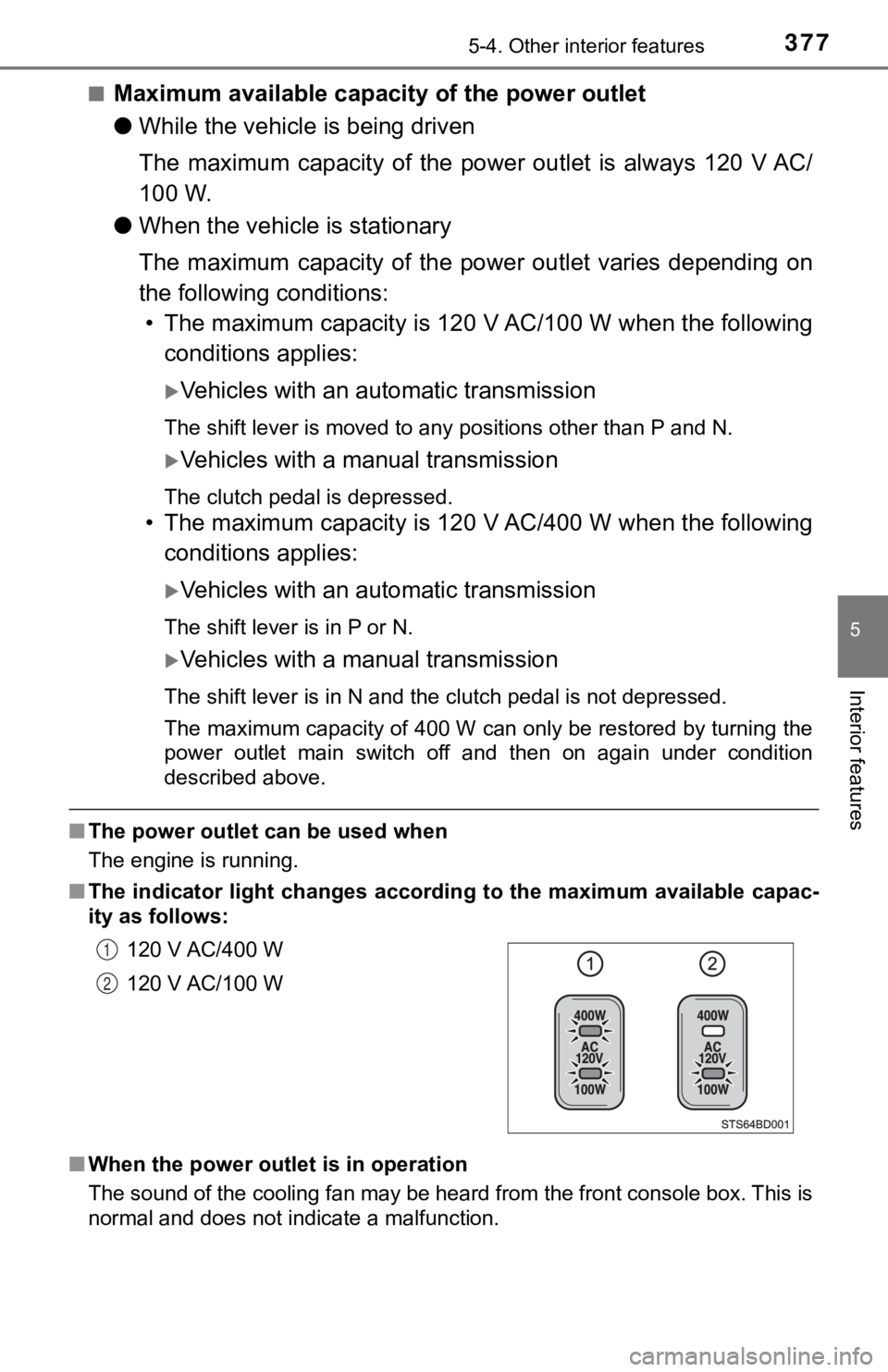
■ The indicator light changes according to the maximum available capac-
ity as follows:
■ When the power outlet is in operation
The sound of the cooling fan may be heard from the front consol e box. This is
normal and does not indicate a malfunction. 120 V AC/400 W
120 V AC/100 W
1
2
Page 378 of 616

3785-4. Other interior features
■If the engine is started with th e power outlet main switch on
The maximum capacity of the power supply may decrease to below the stan-
dard, or may be cut off completely, even when the vehicle is st ationary.
■ The protection circuit may be act ivated to cut the power supply if any of
the following conditions apply:
● The engine is started with the power outlet main switch on.
● Use of electrical appliances exceeding the maximum capacity is attempted.
A sound may be heard when the protection circuit is activated. This is nor-
mal and does not indicate a malfunction.
● Electrical appliances, which consume power exceeding 100 W, have been
used continuously for a long time period.
● The total power usage by all electrical features (headlights, a ir conditioning,
etc.) has exceeded the total vehicle maximum for an extended period of
time.
■ If the protection circuit is act ivated and the power supply is cut, conduct
the following procedure:
Park the vehicle in a safe place, and then securely apply the parking
brake.
Check and ensure the following conditions:
Vehicles with an automatic transmission
The shift lever is in P or N.
Vehicles with a manual transmission
The shift lever is in N and the clutch pedal is not depressed.
Make sure that the power consumption of the electric appliance is within
the maximum capacity of the power outlet and the appliance is n ot bro-
ken.
Press the power outlet main switch again.
When the cabin temperature is high, open the windows to cool th e tempera-
ture down. Once it reaches the normal temperature, turn the pow er outlet
main switch on again.
If the power supply does not resume even after the above procedure has
been performed, have the vehicle inspected by your Toyota deale r.
1
2
3
4