engine TOYOTA TUNDRA 2023 Owner's Manual
[x] Cancel search | Manufacturer: TOYOTA, Model Year: 2023, Model line: TUNDRA, Model: TOYOTA TUNDRA 2023Pages: 616, PDF Size: 11.14 MB
Page 103 of 616
1032. Instrument cluster
2
Instrument cluster
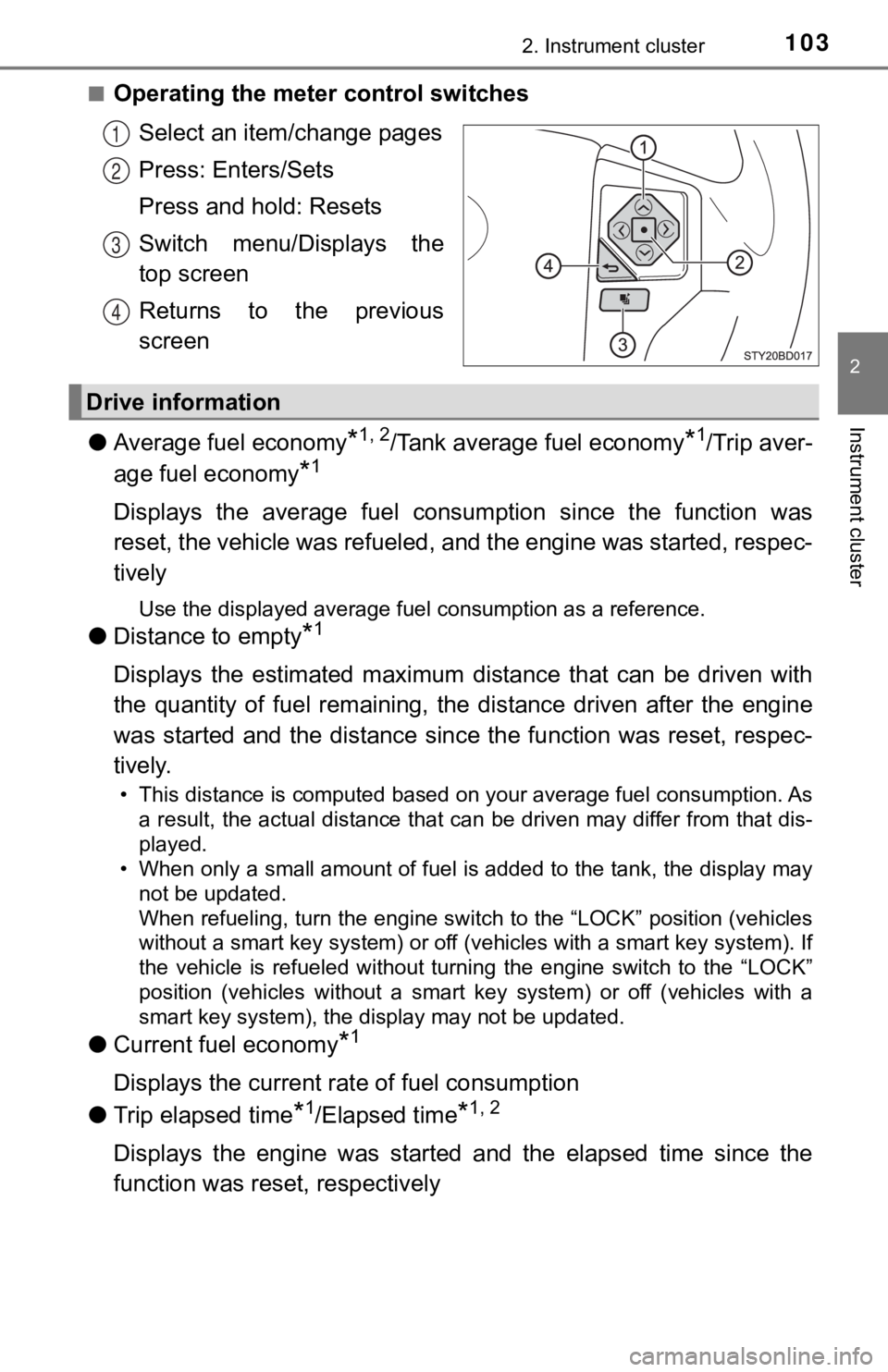
■Operating the meter control switchesSelect an item/change pages
Press: Enters/Sets
Press and hold: Resets
Switch menu/Displays the
top screen
Returns to the previous
screen
● Average fuel economy
*1, 2/Tank average fuel economy*1/Trip aver-
age fuel economy
*1
Displays the average fuel consum ption since the function was
reset, the vehicle was refueled, and the engine was started, respec-
tively
Use the displayed average fuel consumption as a reference.
● Distance to empty*1
Displays the estimated maximum distance that can be driven with
the quantity of fuel remaining, t he distance driven after the engine
was started and the distance sinc e the function was reset, respec-
tively.
• This distance is computed based on your average fuel consumpti on. As
a result, the actual distance that can be driven may differ fro m that dis-
played.
• When only a small amount of fuel is added to the tank, the dis play may
not be updated.
When refueling, turn the engine switch to the “LOCK” position ( vehicles
without a smart key system) or off (vehicles with a smart key system). If
the vehicle is refueled without turning the engine switch to th e “LOCK”
position (vehicles without a smart key system) or off (vehicles with a
smart key system), the display may not be updated.
● Current fuel economy*1
Displays the current rat e of fuel consumption
● Trip elapsed time
*1/Elapsed time*1, 2
Displays the engine was started and the elapsed time since the
function was reset, respectively
1
2
3
4
Drive information
Page 104 of 616
1042. Instrument cluster
●Trip average speed*1/Average speed*1, 2
Displays the engine was started and the average vehicle speed
since the function was reset, respectively
● Trip distance
*1/Distance*1, 2
Displays the engine was started and the distance since the func tion
was reset, respectively
● Digital speedometer
*1
●Display off*1
A blank screen is displayed
*1: Can be registered to Drive information 1 through 3.
*2: Resetting procedures:
• Select a function to be reset using the meter control switch a nd then
press and hold the center button to reset.
• If there is more than one function that can be reset, check bo xes will be
displayed next to the functions.
● Clinometer (if equipped)
Displays the longitudinal and lateral inclination of the vehicl e.
● LDA (Lane Departure Alert) (if equipped)
P. 2 5 8
● Dynamic radar cruise control (if equipped)
P. 2 6 6
● Intuitive parking a ssist (if equipped)
P. 2 8 4
● Multi-terrain select (if equipped)
P. 3 1 4
● Crawl control (if equipped)
P. 3 1 8
● Tire inflation pressure (if equipped)
P. 4 3 2
Vehicle information
Page 107 of 616

1072. Instrument cluster
2
Instrument cluster
■Setting items
●Setting items are not selectable during driving and cannot be o perated.
Also, the settings screen is temporarily canceled in the follow ing situations.
• A warning message is displayed.
• The vehicle starts off.
● Settings for functions not equipped to the vehicle are not displayed.
● When a function is turned off, the related settings for that fu nction are not
selectable.
■ Pop-up display
In some situations, such as when a switch operation is performe d, a pop-up
display will be temporarily displayed on the multi-information display.
■ When disconnecting and reco nnecting battery terminals
The drive information will be reset.
■ Ending display
When the engine switch is turned off, each of the following wil l be displayed
on the multi-information display, and will extinguish after app roximately
30 seconds.
● Distance traveled
● Average fuel economy
● Distance to empty
■ Tire inflation pressure (vehicles with tire pressure warning sy stem)
● It may take a few minutes to display the tire inflation pressur e after the
engine switch is turned to the “ON” position (vehicles without a smart key
system) or IGNITION ON mode (vehicles with a smart key system). It may
also take a few minutes to display the tire inflation pressure after inflation
pressure has been adjusted.
● “---” may be displayed if the tire position information cannot be determined
due to unfavorable radio wave conditions.
● Tire inflation pressure changes with temperature. The displayed values may
also be different from the values measured using a tire pressur e gauge.
■ Liquid crystal display
P. 100
Page 108 of 616
1082. Instrument cluster
WARNING
■Caution for use while driving
● When operating the multi-information display while driving, pay extra
attention to the safety of the area around the vehicle.
● Do not look continuously at the multi-information display while driving as
you may fail to see pedestrians, objects on the road, etc. ahea d of the
vehicle.
■ Cautions during setting up the display
As the engine needs to be running during setting up the display , ensure that
the vehicle is parked in a place with adequate ventilation. In a closed area
such as a garage, exhaust gases including harmful carbon monoxi de (CO)
may collect and enter the vehicle. This may lead to death or a serious
health hazard.
NOTICE
■ During setting up the display
To prevent battery discharge, ensure that the engine is running while setting
up the display features.
Page 109 of 616
1092. Instrument cluster
2
Instrument cluster
Fuel consumption information
Press the “APPS” button, and then select “Eco” on the screen.
■Trip information
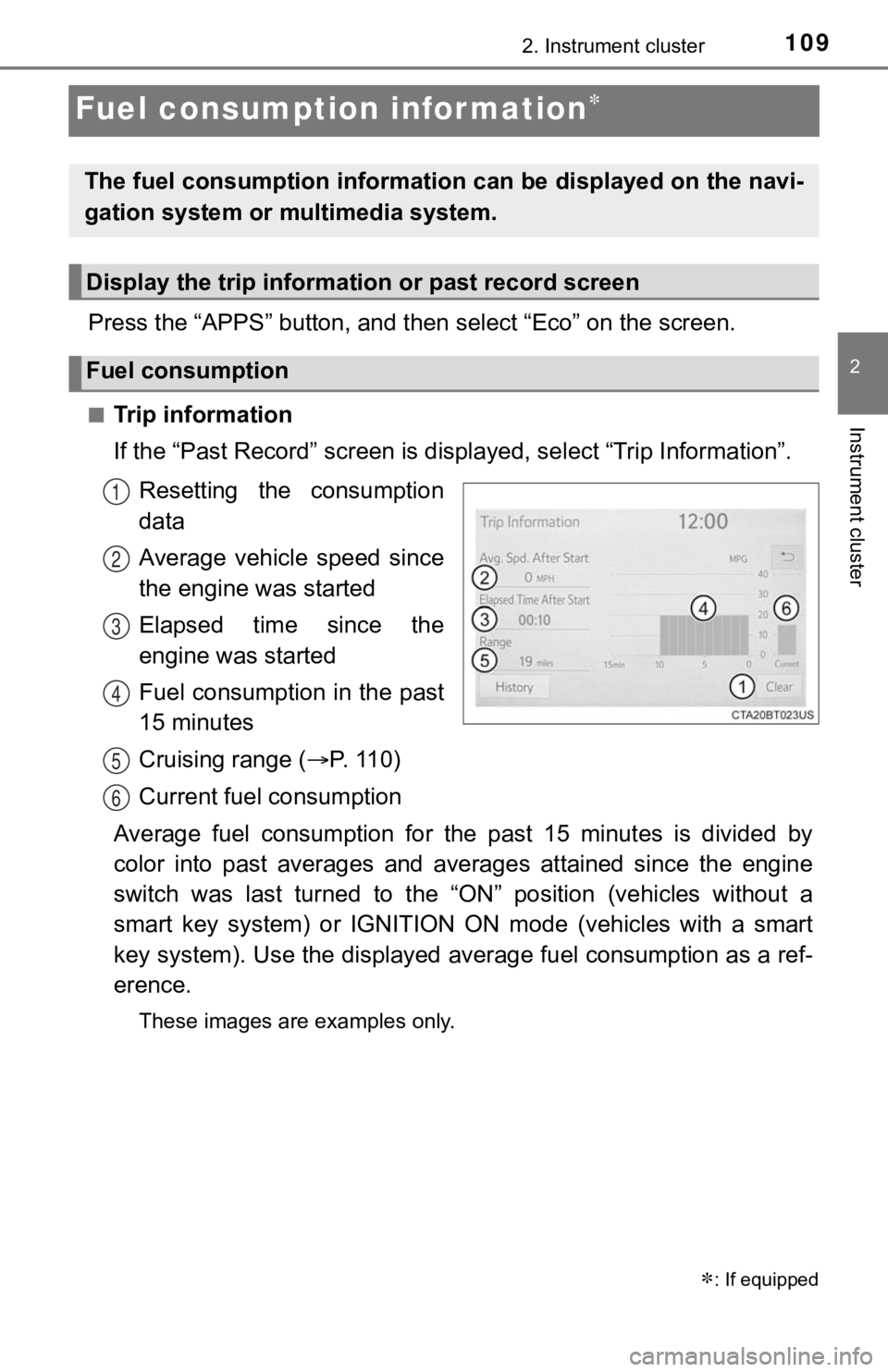
If the “Past Record” screen is displayed, select “Trip Informat ion”.
Resetting the consumption
data
Average vehicle speed since
the engine was started
Elapsed time since the
engine was started
Fuel consumption in the past
15 minutes
Cruising range ( P. 11 0 )
Current fuel consumption
Average fuel consumption for the past 15 minutes is divided by
color into past averages and averages attained since the engine
switch was last turned to the “ON” position (vehicles without a
smart key system) or IGNITION ON mode (vehicles with a smart
key system). Use the displayed a verage fuel consumption as a ref-
erence.
These images are examples only.
: If equipped
The fuel consumption information can be displayed on the navi-
gation system or multimedia system.
Display the trip information or past record screen
Fuel consumption
1
2
3
4
5
6
Page 116 of 616

1163-1. Key information
■Key battery depletion (type C or type D)
Type C
If the wireless remote control function does not operate, the b attery may be
depleted. Replace the battery when necessary. ( P. 451)
Type D
● The standard battery life is 1 to 2 years.
● If the battery becomes low, an alarm will sound in the cabin wh en the engine
stops. ( P. 508)
● As the electronic key always receives radio waves, the battery will become
depleted even if the electronic key is not used. The following symptoms indi-
cate that the electronic key battery may be depleted. Replace the battery
when necessary. ( P. 451)
• The smart key system or the wireless remote control does not o perate.
• The detection area becomes smaller.
• The LED indicator on the key surface does not turn on.
● To avoid serious deterioration, do not leave the electronic key within 1 m
(3 ft.) of the following electrical appliances that produce a ma gnetic field:
•TVs
• Personal computers
• Cellular phones, cordless phones and battery chargers
• Recharging cellular phones or cordless phones
• Table lamps
• Induction cookers
■ Replacing the battery (type C or type D)
P. 451
■ Confirmation of the registered key number
The number of keys already registered to the vehicle can be confirmed. Ask
your Toyota dealer for details.
■ Customization (type C or type D)
Settings (e.g. wireless remote control system) can be changed.
(Customizable features: P. 568)
Page 122 of 616
1223-2. Opening, closing and locking the doors
Move the inside lock button to the lock position.
Close the door.
Vehicles without a smart key system
The door cannot be locked if either of the front doors is open and the
key is in the engine switch.
Vehicles with a smart key system
The door cannot be locked if the engine switch is in ACCESSORY or
IGNITION ON mode, or the electronic key is left inside the vehi cle.
The key may not be detected correctly and the door may be locke d.
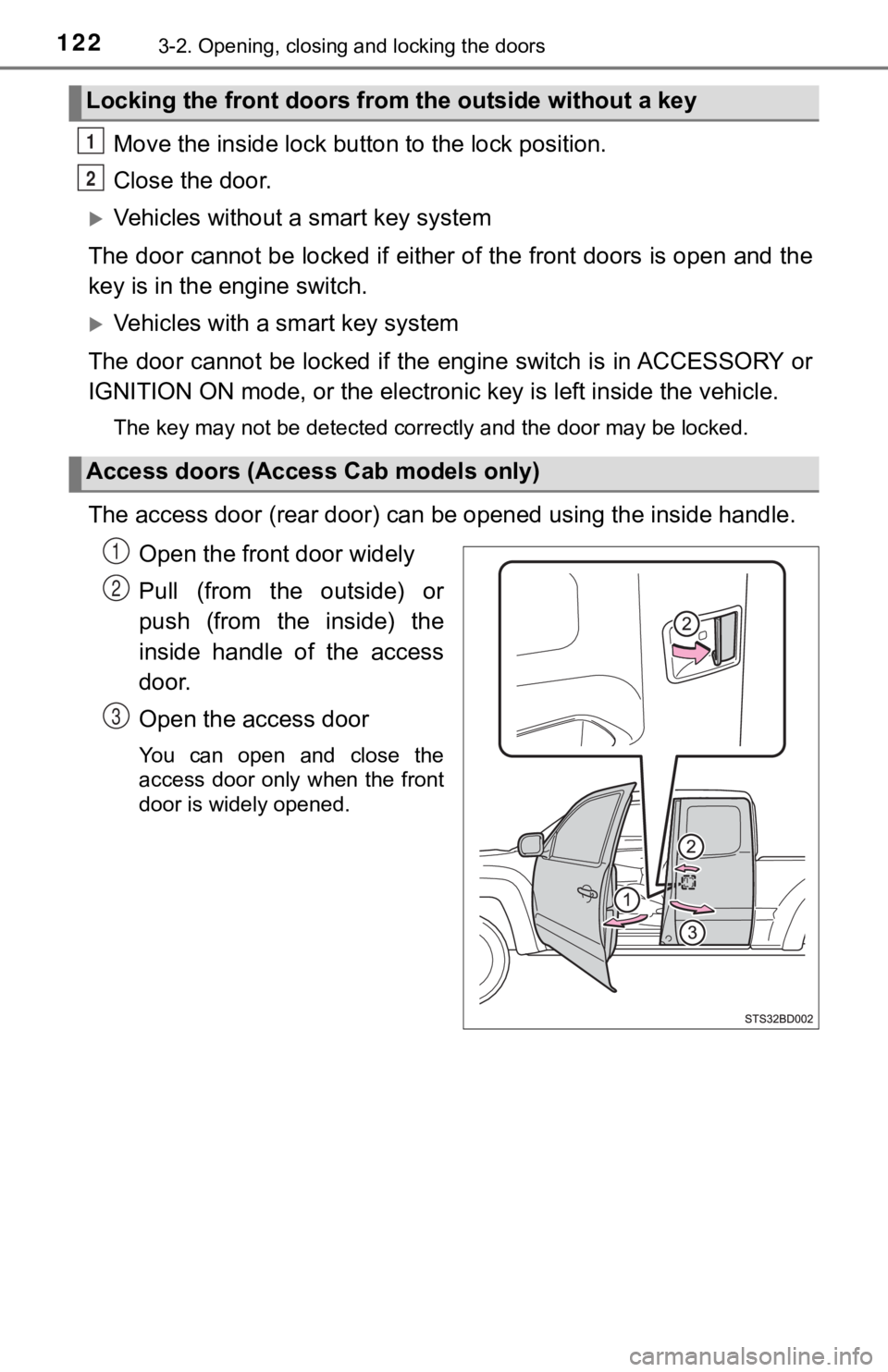
The access door (rear door) can be opened using the inside handle.
Open the front door widely
Pull (from the outside) or
push (from the inside) the
inside handle of the access
door.
Open the access door
You can open and close the
access door only when the front
door is widely opened.
Locking the front doors from the outside without a key
Access doors (Access Cab models only)
1
2
1
2
3
Page 123 of 616
1233-2. Opening, closing and locking the doors
3
Operation of each component
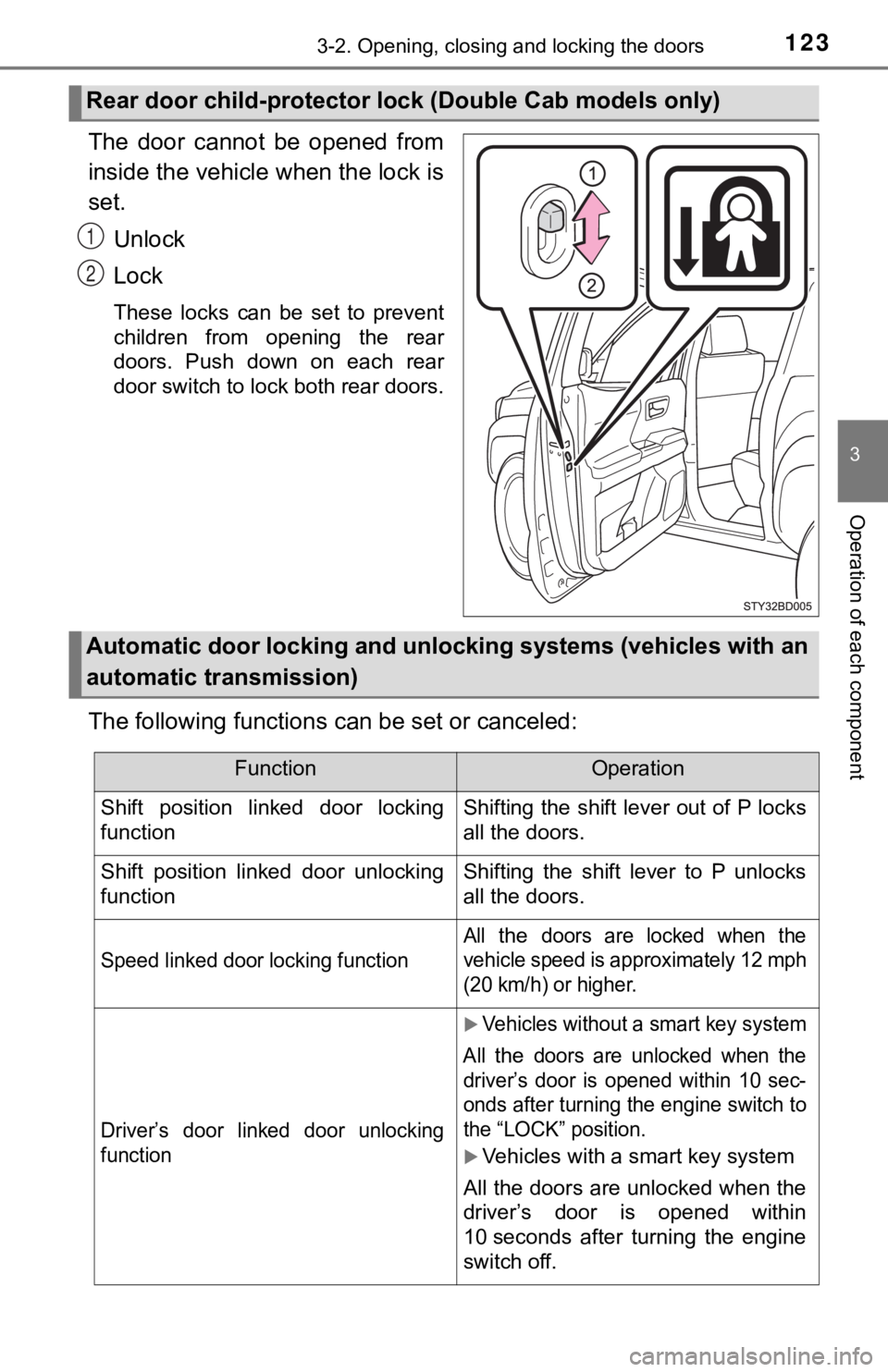
The door cannot be opened from
inside the vehicle when the lock is
set.
Unlock
Lock
These locks can be set to prevent
children from opening the rear
doors. Push down on each rear
door switch to lock both rear doors.
The following functions can be set or canceled:
Rear door child-protector l ock (Double Cab models only)
1
2
Automatic door locking and unlocki ng systems (vehicles with an
automatic transmission)
FunctionOperation
Shift position linked door locking
functionShifting the shift lever out of P locks
all the doors.
Shift position linked door unlocking
functionShifting the shift lever to P unlocks
all the doors.
Speed linked door locking function
All the doors are locked when the
vehicle speed is approximately 12 mph
(20 km/h) or higher.
Driver’s door linked door unlocking
function
Vehicles without a smart key system
All
the doors are unlocked when the
driver’s door is opened within 10 sec-
onds after turning the engine switch to
the “LOCK” position.
Vehicles with a smart key system
All the doors are unlocked when the
driver’s door is opened within
10 seconds after turning the engine
switch off.
Page 124 of 616
1243-2. Opening, closing and locking the doors
■Setting and canceling the functions
The automatic door locking and unlocking functions can be set o r
canceled on the Audio system screen ( P. 568) or by following the
procedure below.
Vehicles without a smart key system: Close all the doors and tu rn
the engine switch to the “ON” po sition. (Perform step within
10 seconds.)
Vehicles with a smart key system : Close all the doors and turn
the engine switch to IGNITION ON mode. (Perform step
within 10 seconds.)
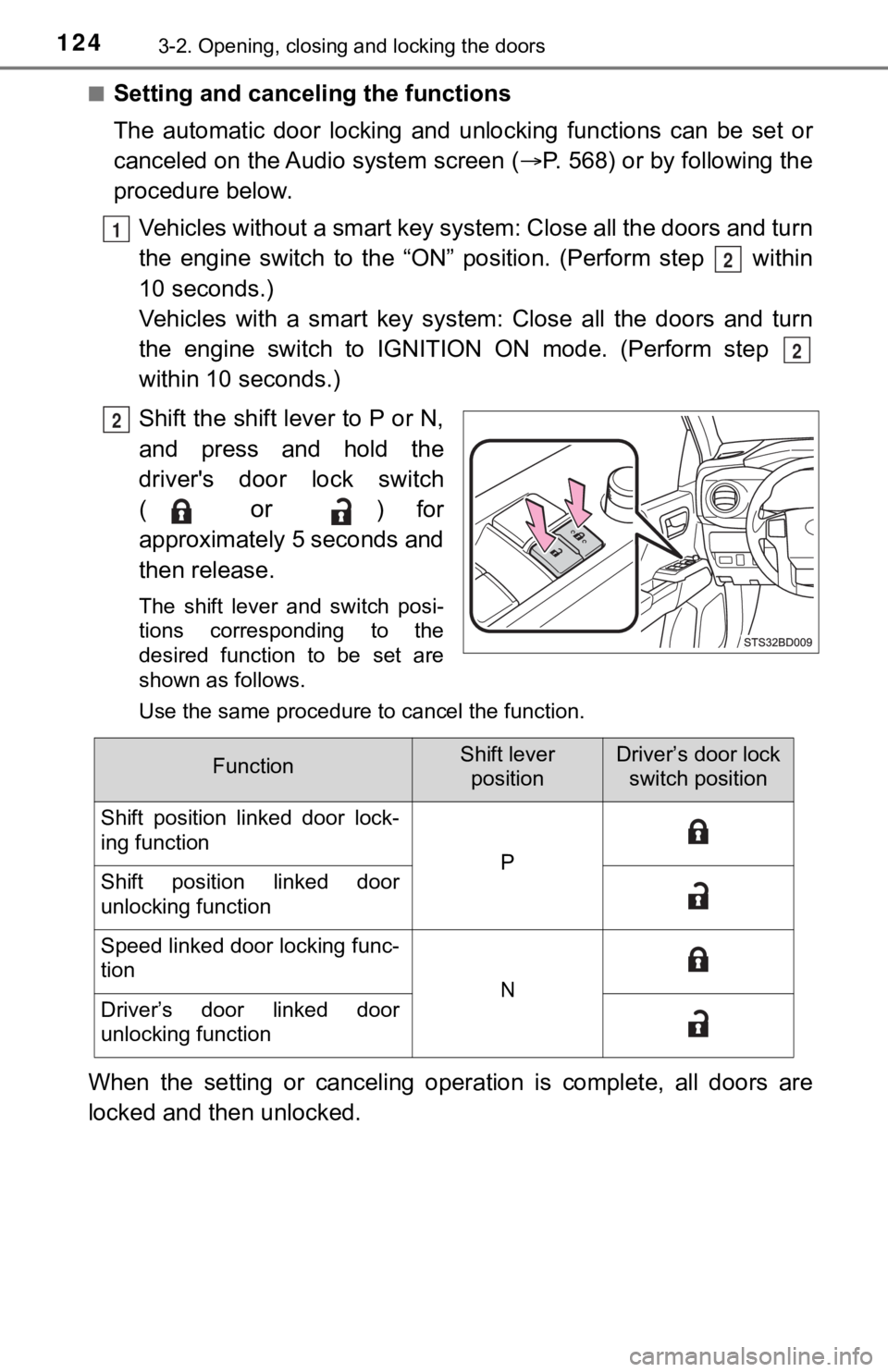
Shift the shift lever to P or N,
and press and hold the
driver's door lock switch
(
or ) for
approximately 5 seconds and
then release.
The shift lever and switch posi-
tions corresponding to the
desired function to be set are
shown as follows.
Use the same procedure to cancel the function.
When the setting or canceling oper ation is complete, all doors are
locked and then unlocked.
1
2
2
2
FunctionShift lever positionDriver’s door lock switch position
Shift position linked door lock-
ing function
PShift position linked door
unlocking function
Speed linked door locking func-
tion
NDriver’s door linked door
unlocking function
Page 125 of 616
1253-2. Opening, closing and locking the doors
3
Operation of each component
■Rear seat reminder function
●In order to remind you not to forget luggage, etc. in the rear seat, when the
engine switch is turned off after any of the following conditio ns are met, a
message will be displayed on the multi-information display for approximately
6 seconds.
• The engine is started within 10 minutes after opening and clos ing a rear
door.
• A rear door has been opened and closed after the engine was st arted.
However, if a rear door is opened and then closed within approx imately 2 sec-
onds, the rear seat reminder function may not operate.
● The rear seat reminder function determines that luggage, etc., has been
placed in a rear seat based on opening and closing of a rear door. There-
fore, depending on the situation, the rear seat reminder function may not
operate and you may still forget luggage, etc., in the rear seat, or it may
operate unnecessarily.
● The rear seat reminder function can be enabled/disabled. ( P. 574)
■ Customization that can be configured at Toyota dealer
Settings (e.g. unlocking function using a key) can be changed.
(Customizable features: P. 574)
WARNING
■ To prevent an accident
Observe the following precautions while driving the vehicle.
Failure to do so may result in a door opening and an occupant throwing out
of the vehicle, resulting in death or serious injury.
● Ensure that all doors are properly closed and locked.
● Do not pull the inside handle of the doors while driving.
Be especially careful for the front doors, as the doors may be opened even
if the inside lock buttons are in locked position.
● Double Cab models only: Set the rear door child-protector locks when chil-
dren are seated in the rear seats.
NOTICE
■When opening or closing the front door and access door (Access Cab
models only)
The front door and access door could be damaged if they hit each other
when being opened or closed.