door lock TOYOTA TUNDRA 2023 Service Manual
[x] Cancel search | Manufacturer: TOYOTA, Model Year: 2023, Model line: TUNDRA, Model: TOYOTA TUNDRA 2023Pages: 616, PDF Size: 11.14 MB
Page 209 of 616
2094-2. Driving procedures
4
Driving
WARNING
■When starting the engine
Always start the engine while sitting in the driver’s seat. Do not depress the
accelerator pedal while starting the engine under any circumstances.
Doing so may cause an accident resulting in death or serious in jury.
■ Caution while driving
If engine failure occurs while the vehicle is moving, do not lock or open the
doors until the vehicle reaches a safe and complete stop. Otherwise, the
steering lock function will activate and this may lead to an ac cident, result-
ing in death or serious injury.
■ Stopping the engine in an emergency
If you want to stop the engine in an emergency while driving th e vehicle,
press and hold the engine switch for more than 2 seconds, or press it briefly
3 times or more in succession. ( P. 473)
However, do not touch the engine switch while driving except in an emer-
gency. Turning the engine off while driving will not cause loss of steering or
braking control, however, power assist to the steering will be lost. This will
make it more difficult to steer smoothly, so you should pull ov er and stop the
vehicle as soon as it is safe to do so.
■ When parking (except for New Caledonia)
Exhaust gases include harmful carbon monoxide (CO), which is co lorless
and odorless. Observe the following precautions.
Failure to do so may cause exhaust gases to enter the vehicle a nd may
lead to an accident caused by light-headedness, or may lead to death or a
serious health hazard.
● If the vehicle is in a poorly ventilated area or a closed area, such as a
garage, stop the engine.
● Do not leave the vehicle with the engine running for a long time. If such a
situation cannot be avoided, park the vehicle in an open space and ensure
that exhaust fumes do not enter the vehicle interior.
● Do not leave the engine running in an area with snow build-up, or where it
is snowing. If snowbanks build up around the vehicle while the engine is
running, exhaust gases may collect and enter the vehicle.
Page 223 of 616
2234-3. Operating the lights and wipers
4
Driving
■Automatic light off system
When the light switch is in or : The lights turn off 30 secon ds after the
engine switch is turned to the “LOCK” position (vehicles withou t a smart key
system) or off (vehicles with a smart key system) and a door is opened and all
of the doors are closed. (Vehicles with a wireless remote control function: The
lights turn off immediately if on the key is pressed while all the doors are
locked.)
When the light switch is in : The lights turn off after the en gine switch is
turned to the “LOCK” position (vehicles without a smart key sys tem) or off
(vehicles with a smart key system) and the driver’s door is opened.
To turn the lights on again, turn the engine switch to the “ON” position (vehi-
cles without a smart key system) or to IGNITION ON mode (vehicles with a
smart key system), or turn the light switch off, then turn it to or to .
If any of the doors is kept open and the engine switch is in the “LOCK” posi-
tion (vehicles without a smart key system) or off (vehicles wit h a smart key
system), the lights automatically turn off after 20 minutes.
■ Light reminder function
An alarm will sound and message will be shown on the multi-information dis-
play when the driver 's door is opened with the lights are turned on and the
engine switch to the “LOCK” position (vehicles without a smart key system) or
off (vehicles with a smart key system).
■ Customization
Settings (e.g. light sensor sensitivity) can be changed.
(Customizable features: P. 568)
NOTICE
■To prevent battery discharge
Do not leave the lights on longer than necessary when the engin e is not
running.
Page 233 of 616
2334-4. Refueling
4
Driving
Opening the fuel tank cap
●Vehicles without a smart key system:
Turn the engine switch to the “LOCK” position and ensure that a ll
the doors and wind ows are closed.
● Vehicles with a smart key system:
Turn the engine switch off and ens ure that all the doors and win-
dows are closed.
● Confirm the type of fuel.
■Fuel types
P. 554
■ Fuel tank opening for unleaded gasoline
To help prevent incorrect fueling, your vehicle has a fuel tank opening that
only accommodates the special nozzle on unleaded fuel pumps.
■ If the malfunction indicator lamp illuminates
The malfunction indicator lamp may illuminate erroneously if re fueling is per-
formed repeatedly when the fuel tank is nearly full.
Perform the following steps to open the fuel tank cap:
Before refueling the vehicle
Page 355 of 616
3555-2. Using the interior lights
5
Interior features
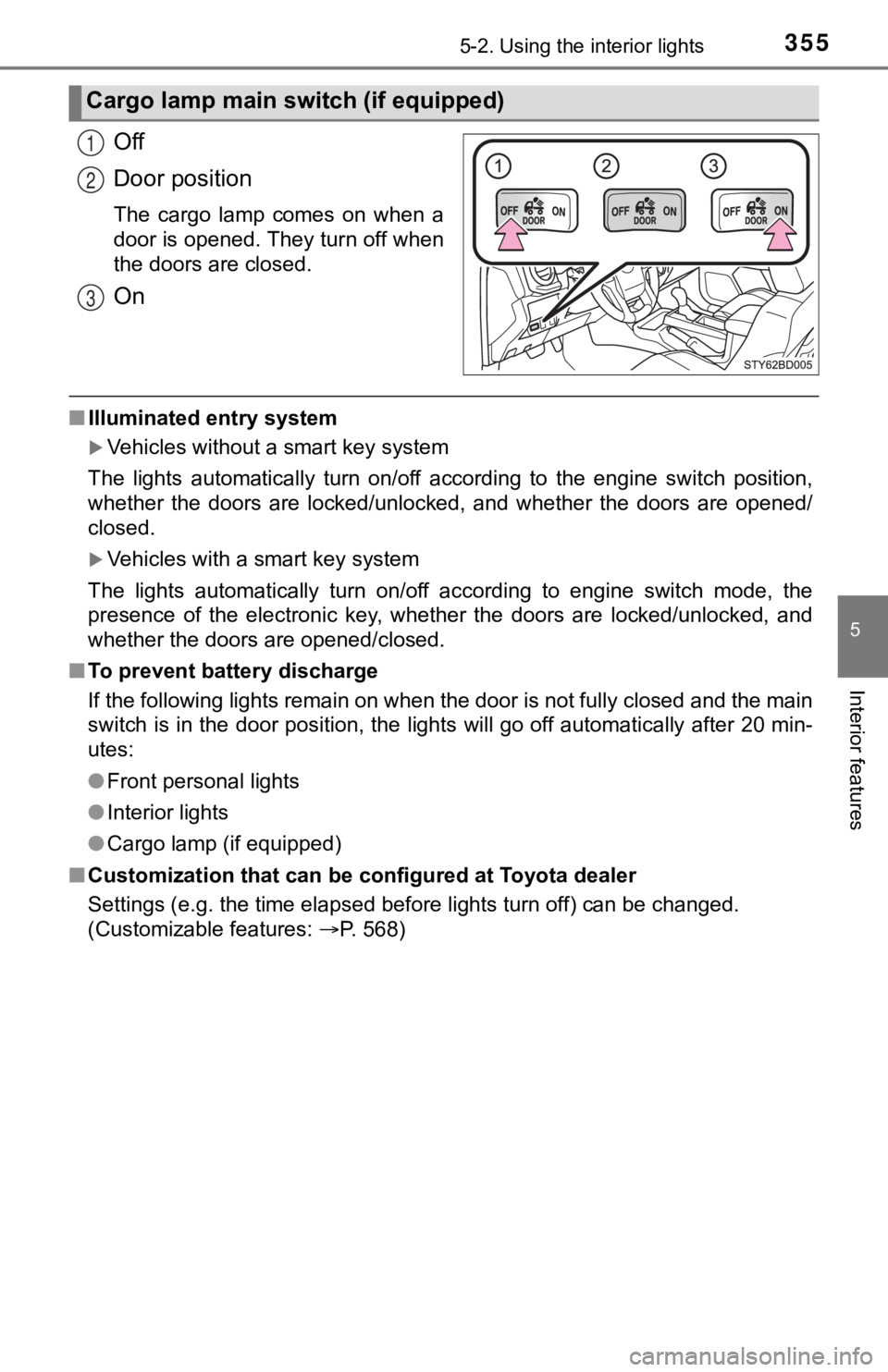
Off
Door position
The cargo lamp comes on when a
door is opened. They turn off when
the doors are closed.
On
■Illuminated entry system
Vehicles without a smart key system
The lights automatically turn on/off according to the engine sw itch position,
whether the doors are locked/unlocked, and whether the doors are opened/
closed.
Vehicles with a smart key system
The lights automatically turn on/off according to engine switch mode, the
presence of the electronic key, whether the doors are locked/un locked, and
whether the doors are opened/closed.
■ To prevent battery discharge
If the following lights remain on when the door is not fully closed and the main
switch is in the door position, the lights will go off automati cally after 20 min-
utes:
● Front personal lights
● Interior lights
● Cargo lamp (if equipped)
■ Customization that can be configured at Toyota dealer
Settings (e.g. the time elapsed before lights turn off) can be changed.
(Customizable features: P. 568)
Cargo lamp main switch (if equipped)
1
2
3
Page 384 of 616

3845-4. Other interior features
■If the wireless charger LED indicators flash
If the wireless charging surface of the tray becomes too hot, the LED indica-
tors will flash and charging is canceled. The LED indicators will be illuminated
if the surface of the tray cools down.
If the LED indicators flash even though the surface of the tray is not hot, the
wireless charger may be malfunctioning. Consult your Toyota dea ler.
■ When charging of the wireless charger stops temporarily
If any of the following operations are performed with the wirel ess key or elec-
tronic key present, charging may stop temporarily. Charging wil l start again
after a while.
• Locking/unlocking the doors by touching the door handle
(vehicles with a smart key system)
• Opening/closing the doors
• Starting the engine
• Locking the doors by pressing the lock button on the wireless key or elec-
tronic key
• When the electronic key is out of the detection area (vehicles with a smart key system)
■ Certification for the wireless charger
For vehicles sold in the U.S.A.
This device complies with Part 18 of the FCC Rules.
Toyota Motor Sales, U.S.A., Inc.
19001 S. Western Avenue
Torrance, CA 90501
For vehicles sold in Canada
This ISM device complies with Canadian ICES-001.
Cet appareil ISM est conforme à la norme NMB-001 du Canada.
Page 389 of 616
3895-4. Other interior features
5
Interior features
Garage door opener
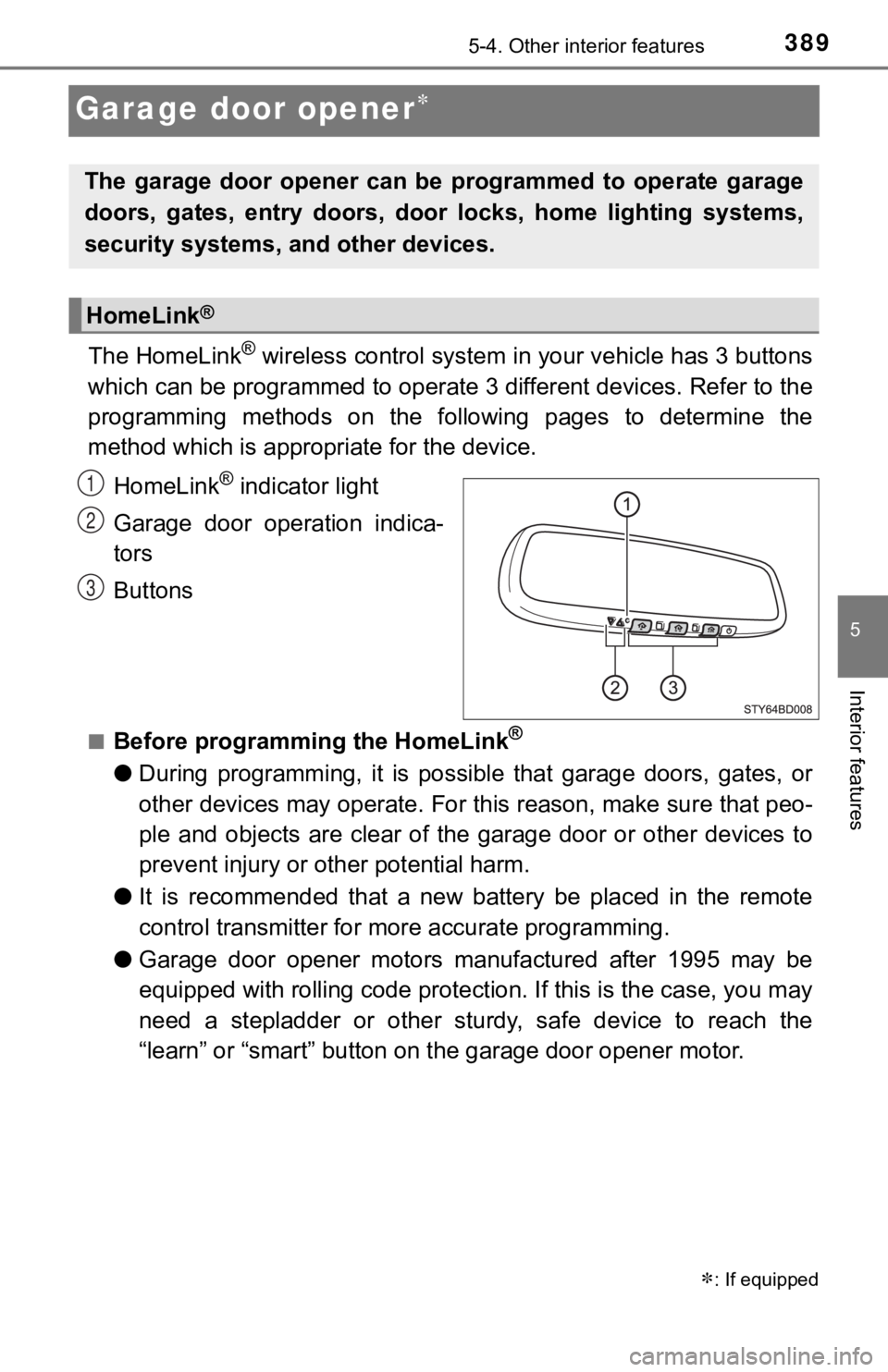
The HomeLink® wireless control system in your vehicle has 3 buttons
which can be programmed to operate 3 different devices. Refer to the
programming methods on the following pages to determine the
method which is approp riate for the device.
HomeLink
® indicator light
Garage door operation indica-
tors
Buttons
■Before programming the HomeLink®
● During programming, it is possible that garage doors, gates, or
other devices may operate. For this reason, make sure that peo-
ple and objects are clear of the garage door or other devices t o
prevent injury or other potential harm.
● It is recommended that a new battery be placed in the remote
control transmitter for mo re accurate programming.
● Garage door opener motors manufactured after 1995 may be
equipped with rolling code pro tection. If this is the case, you may
need a stepladder or other sturdy, safe device to reach the
“learn” or “smart” button on the garage door opener motor.
: If equipped
The garage door opener can be programmed to operate garage
doors, gates, entry doors, door locks, home lighting systems,
security systems, and other devices.
HomeLink®
1
2
3
Page 399 of 616
3995-4. Other interior features
5
Interior features
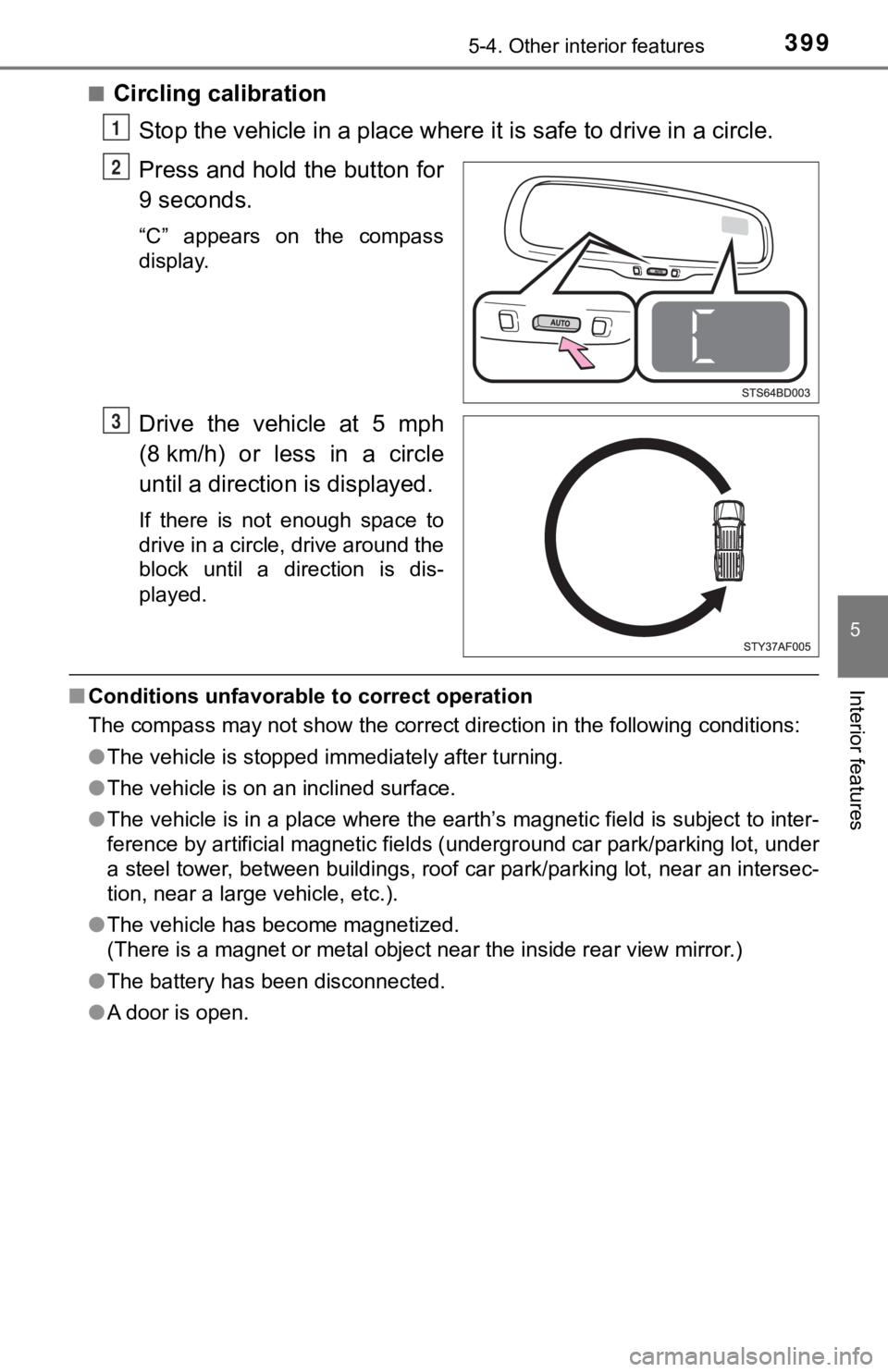
■Circling calibration
Stop the vehicle in a place where it is safe to drive in a circle.
Press and hold the button for
9 seconds.
“C” appears on the compass
display.
Drive the vehicle at 5 mph
(8 km/h) or less in a circle
until a direction is displayed.
If there is not enough space to
drive in a circle, drive around the
block until a direction is dis-
played.
■ Conditions unfavorable to correct operation
The compass may not show the correct direction in the following conditions:
● The vehicle is stopped immediately after turning.
● The vehicle is on an inclined surface.
● The vehicle is in a place where the earth’s magnetic field is subject to inter-
ference by artificial magnetic fields (underground car park/par king lot, under
a steel tower, between buildings, roof car park/parking lot, near an intersec-
tion, near a large vehicle, etc.).
● The vehicle has become magnetized.
(There is a magnet or metal object near the inside rear view mi rror.)
● The battery has been disconnected.
● A door is open.
1
2
3
Page 413 of 616
4136-2. Maintenance
6
Maintenance and care
Vehicle exterior
ItemsCheck points
Doors• Do the doors operate smoothly?
Engine hood• Does the engine hood lock system work prop-erly?
Fluid leaks• There should not be any signs of fluid leakageafter the vehicle has been parked.
Tires
• Is the tire inflati on pressure correct?
• The tires should not be damaged or exces- sively worn.
• Have the tires been rotated according to the maintenance schedule?
• The wheel nuts should not be loose.
Lights• Do all the lights come on?
Windshield wipers
• The wiper blades should not show any signs
of cracking, splitting, wear, contamination or
deformation.
• The wiper blades should clear the windshield without streaking or skipping.
WARNING
■If the engine is running
Turn the engine off and ensure that there is adequate ventilation before per-
forming maintenance checks.
Page 428 of 616
4286-3. Do-it-yourself maintenance
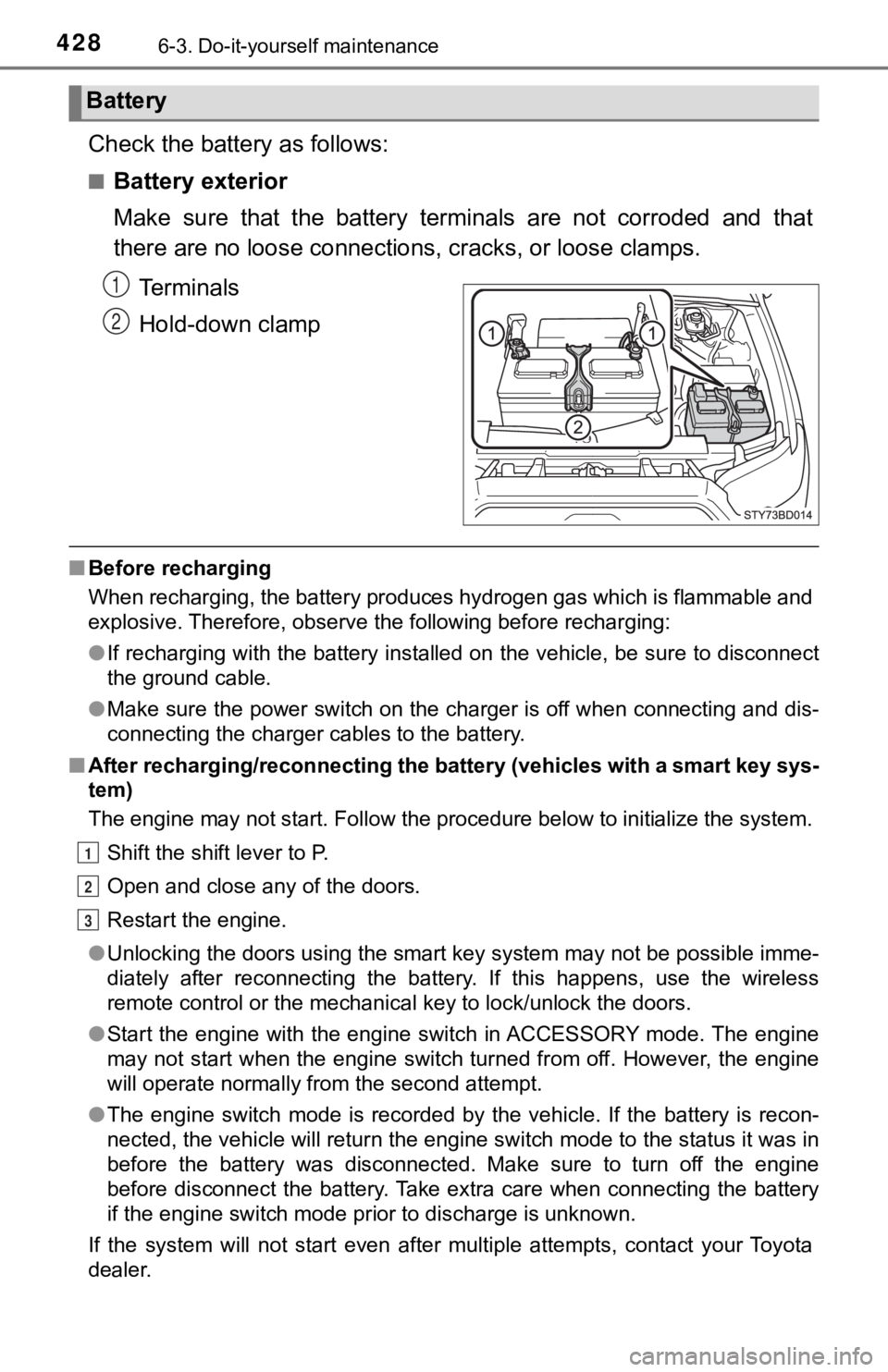
Check the battery as follows:
■Battery exterior
Make sure that the battery terminals are not corroded and that
there are no loose connections, cracks, or loose clamps.
Terminals
Hold-down clamp
■ Before recharging
When recharging, the battery produces hydrogen gas which is flammable and
explosive. Therefore, observe the following before recharging:
●If recharging with the battery installed on the vehicle, be sur e to disconnect
the ground cable.
● Make sure the power switch on the charger is off when connectin g and dis-
connecting the charger cables to the battery.
■ After recharging/reconnecting the battery (vehicles with a smar t key sys-
tem)
The engine may not start. Follow the procedure below to initial ize the system.
Shift the shift lever to P.
Open and close any of the doors.
Restart the engine.
● Unlocking the doors using the smart key system may not be possi ble imme-
diately after reconnecting the battery. If this happens, use the wireless
remote control or the mechanical key to lock/unlock the doors.
● Start the engine with the engine switch in ACCESSORY mode. The engine
may not start when the engine switch turned from off. However, the engine
will operate normally from the second attempt.
● The engine switch mode is recorded by the vehicle. If the batte ry is recon-
nected, the vehicle will return the engine switch mode to the s tatus it was in
before the battery was disconnected. Make sure to turn off the engine
before disconnect the battery. Take extra care when connecting the battery
if the engine switch mode prior to discharge is unknown.
If the system will not start even after multiple attempts, contact your Toyota
dealer.
Battery
1
2
1
2
3
Page 497 of 616
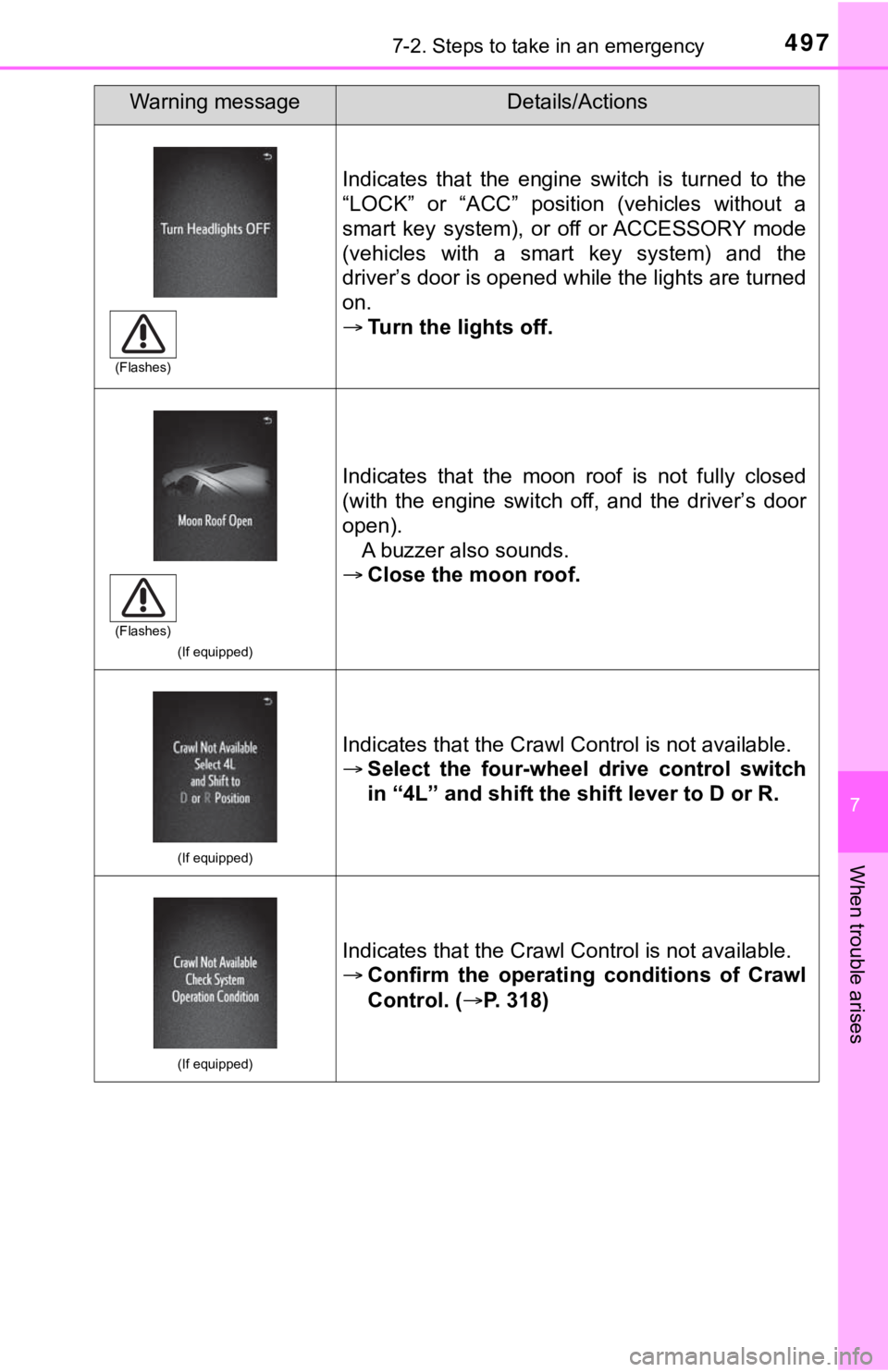
4977-2. Steps to take in an emergency
7
When trouble arises
Indicates that the engine switch is turned to the
“LOCK” or “ACC” position (vehicles without a
smart key system), or off or ACCESSORY mode
(vehicles with a smart key system) and the
driver’s door is opened while the lights are turned
on.
Turn the lights off.
(If equipped)
Indicates that the moon roof is not fully closed
(with the engine switch off, and the driver’s door
open).
A buzzer also sounds.
Close the moon roof.
(If equipped)
Indicates that the Crawl Control is not available.
Select the four-wheel drive control switch
in “4L” and shift the shift lever to D or R.
(If equipped)
Indicates that the Crawl Control is not available.
Confirm the operating conditions of Crawl
Control. ( P. 318)
Warning messageDetails/Actions
(Flashes)
(Flashes)