rear bumper TOYOTA TUNDRA 2023 Owners Manual
[x] Cancel search | Manufacturer: TOYOTA, Model Year: 2023, Model line: TUNDRA, Model: TOYOTA TUNDRA 2023Pages: 616, PDF Size: 11.14 MB
Page 42 of 616

421-1. For safe use
WARNING
■SRS airbag precautions
● Do not use seat accessories which cover the parts where the SRS side
airbags inflate as they may interfere with inflation of the air bags. Such
accessories may prevent the side airbags from activating correctly, disable
the system or cause the side airbags to inflate accidentally, resulting in
death or serious injury.
● Do not strike or apply significant levels of force to the area of the SRS air-
bag components.
Doing so can cause the SRS airbags to malfunction.
● Do not touch any of the component parts immediately after the SRS air-
bags have deployed (inflated) as they may be hot.
● If breathing becomes difficult after the SRS airbags have deployed, open a
door or window to allow fresh air in, or leave the vehicle if i t is safe to do
so. Wash off any residue as soon as possible to prevent skin ir ritation.
● If the areas where the SRS airbags are stored, such as the steering wheel
pad and front and rear pillar garnishes, are damaged or cracked, have
them replaced by your Toyota dealer.
● Do not place anything, such as a cushion, on the front passenger’s seat.
Doing so will disperse the passenger’s weight, which prevents the sensor
from detecting the passenger’s weight properly. As a result, the SRS front
airbags for the front passenger may not deploy in the event of a collision.
■ Modification and disposal of SRS airbag system components
Do not dispose of your vehicle or perform any of the following modifications
without consulting your Toyota dealer. The SRS airbags may malfunction or
deploy (inflate) accidentally, causing death or serious injury.
● Installation, removal, disassembly and repair of the SRS airbags
● Repairs, modifications, removal or replacement of the steering wheel,
instrument panel, dashboard, seats or seat upholstery, front, side and rear
pillars or roof side rails
● Repairs or modifications of the front fender, front bumper, or side of the
occupant compartment
● Installation of a grille guard (bull bars, kangaroo bar, etc.), snow plows,
winches or roof luggage carrier
● Modifications to the vehicle’s suspension system
● Installation of electronic devices such as mobile two-way radio s and CD
players
● Modifications to your vehicle for a person with a physical disability
Page 129 of 616
1293-2. Opening, closing and locking the doors
3
Operation of each component
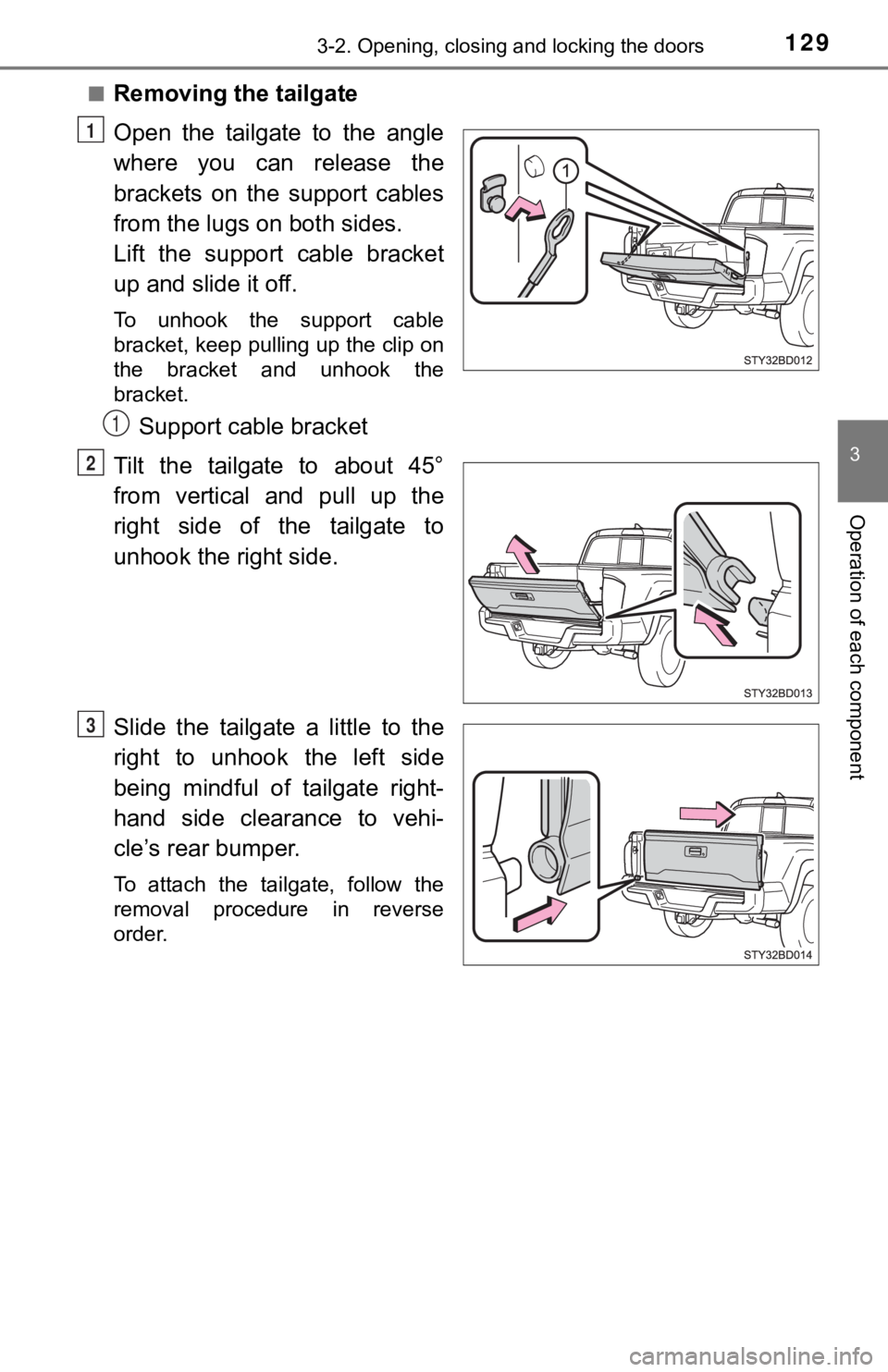
■Removing the tailgate
Open the tailgate to the angle
where you can release the
brackets on the support cables
from the lugs on both sides.
Lift the support cable bracket
up and slide it off.
To unhook the support cable
bracket, keep pulling up the clip on
the bracket and unhook the
bracket.
Support cable bracket
Tilt the tailgate to about 45°
from vertical and pull up the
right side of the tailgate to
unhook the right side.
Slide the tailgate a little to the
right to unhook the left side
being mindful of tailgate right-
hand side clearance to vehi-
cle’s rear bumper.
To attach the tailgate, follow the
removal procedure in reverse
order.
1
1
2
3
Page 130 of 616
1303-2. Opening, closing and locking the doors
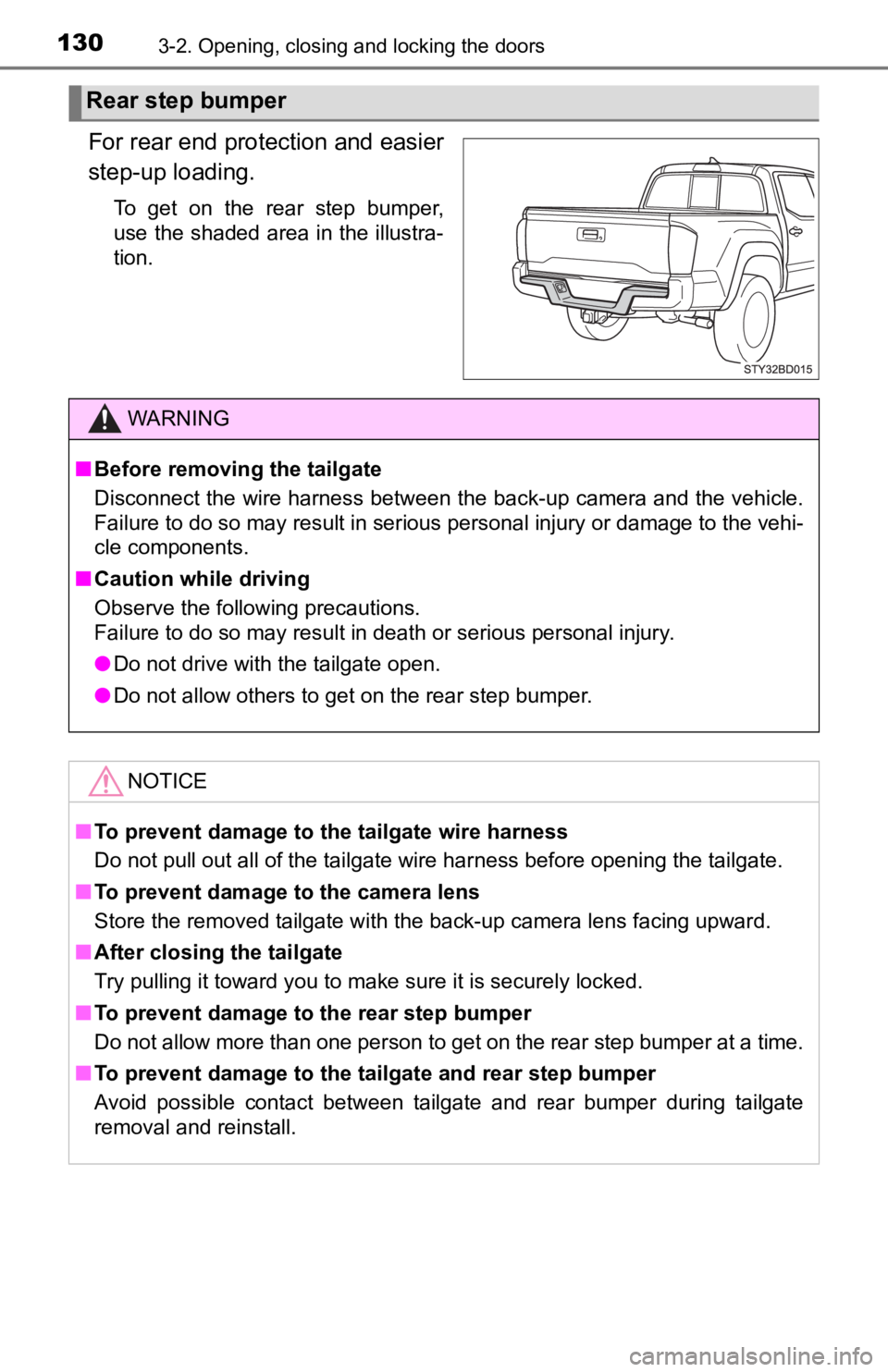
For rear end protection and easier
step-up loading.
To get on the rear step bumper,
use the shaded area in the illustra-
tion.
Rear step bumper
WARNING
■Before removing the tailgate
Disconnect the wire harness between the back-up camera and the vehicle.
Failure to do so may result in serious personal injury or damage to the vehi-
cle components.
■ Caution while driving
Observe the following precautions.
Failure to do so may result in death or serious personal injury.
● Do not drive with the tailgate open.
● Do not allow others to get on the rear step bumper.
NOTICE
■To prevent damage to the tailgate wire harness
Do not pull out all of the tailgate wire harness before opening the tailgate.
■ To prevent damage to the camera lens
Store the removed tailgate with the back-up camera lens facing upward.
■ After closing the tailgate
Try pulling it toward you to make sure it is securely locked.
■ To prevent damage to the rear step bumper
Do not allow more than one person to get on the rear step bumper at a time.
■ To prevent damage to the tailgate and rear step bumper
Avoid possible contact between tailgate and rear bumper during tailgate
removal and reinstall.
Page 190 of 616
1904-1. Before driving
Trailer hitch assemblies have different weight capacities. Toyota rec-
ommends the use of Toy ota hitch/bracket for your vehicle. For d etails,
contact your Toyota dealer.
● If you wish to install a trailer hitch, contact your Toyota dea ler.
● Use only a hitch that conforms to the gross trailer weight requ ire-
ment of your vehicle.
● Follow the directions suppli ed by the hitch manufacturer.
● Lubricate the hitch ball and kingpin with a light coating of gr ease.
● Remove the hitch ball whenever you are not towing a trailer.
Remove the trailer hitch if you do not need it. After removing the
hitch, seal any mounting hole in the vehicle body to prevent en try of
any substances into the vehicle.
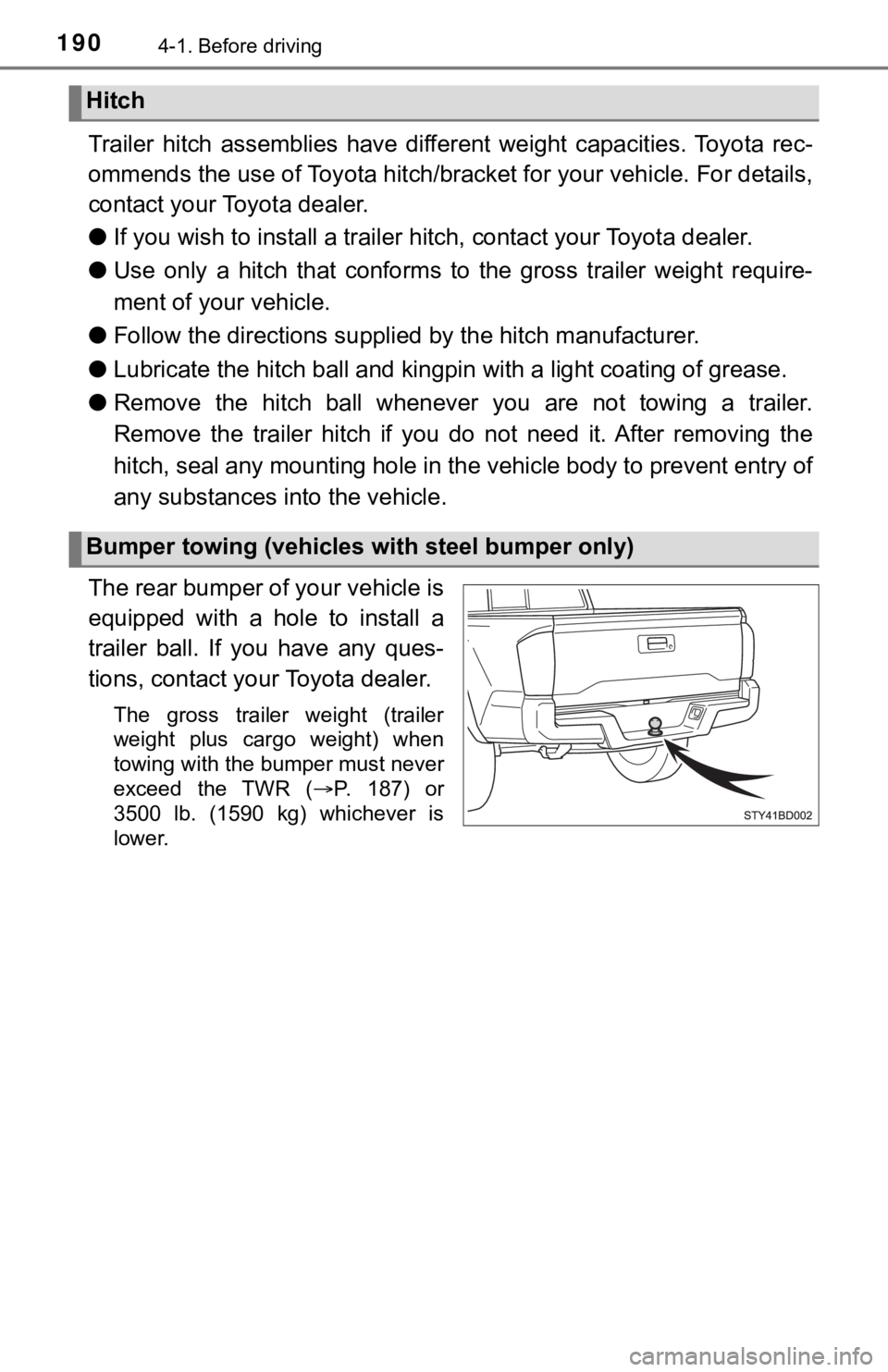
The rear bumper of your vehicle is
equipped with a hole to install a
trailer ball. If you have any ques-
tions, contact yo ur Toyota dealer.
The gross trailer weight (trailer
weight plus cargo weight) when
towing with the bumper must never
exceed the TWR ( P. 187) or
3500 lb. (1590 kg) whichever is
lower.
Hitch
Bumper towing (vehicles with steel bumper only)
Page 240 of 616
2404-5. Using the driving support systems
WARNING
●If the part of the windshield in front of the front camera is fogged up or cov-
ered with condensation, or ice, use the windshield defogger to remove the
fog, condensation, or ice. ( P. 340, 347)
● If water droplets cannot be properly removed from the area of t he wind-
shield in front of the front camera by the windshield wipers, replace the
wiper insert or wiper blade.
● Do not attach window tint to the windshield.
● Replace the windshield if it is damaged or cracked.
After replacing the windshield, the front camera must be recali brated. Con-
tact your Toyota dealer for details.
● Do not allow liquids to contact the front camera.
● Do not allow bright lights to shine into the front camera.
● Do not dirty or damage the front camera.
When cleaning the inside of the windshield, do not allow glass cleaner to
contact the lens of the front camera. Also, do not touch the lens.
If the lens is dirty or damaged, contact your Toyota dealer.
● Do not subject the front camera to a strong impact.
● Do not change the installation position or direction of the front camera or
remove it.
● Do not disassemble the front camera.
● Do not modify any components of the vehicle around the front ca mera
(inside rear view mirror, etc.) or ceiling.
● Do not attach any accessories to the hood, front grille or front bumper that
may obstruct the front camera. Contact your Toyota dealer for details.
● If a surfboard or other long object is to be mounted on the roo f, make sure
that it will not obstruct the front camera.
● Do not modify the headlights or other lights.
Page 255 of 616
2554-5. Using the driving support systems
4
Driving
• When there are patterns or paint on the road or a wall that may be mis-taken for a vehicle or pedestrian
• When driving near an object that reflects radio waves, such as a large
truck or guardrail
• When driving near a TV tower, broadcasting station, electric power plant,
or other location where strong radio waves or electrical noise may be
present
■ Situations in which the syst em may not operate properly
● In some situations such as the following, a vehicle may not be detected by
the radar sensor and front camera, preventing the system from operating
properly:
• If an oncoming vehicle is approaching your vehicle
• If a vehicle ahead is a motorcycle or bicycle
• When approaching the side or front of a vehicle
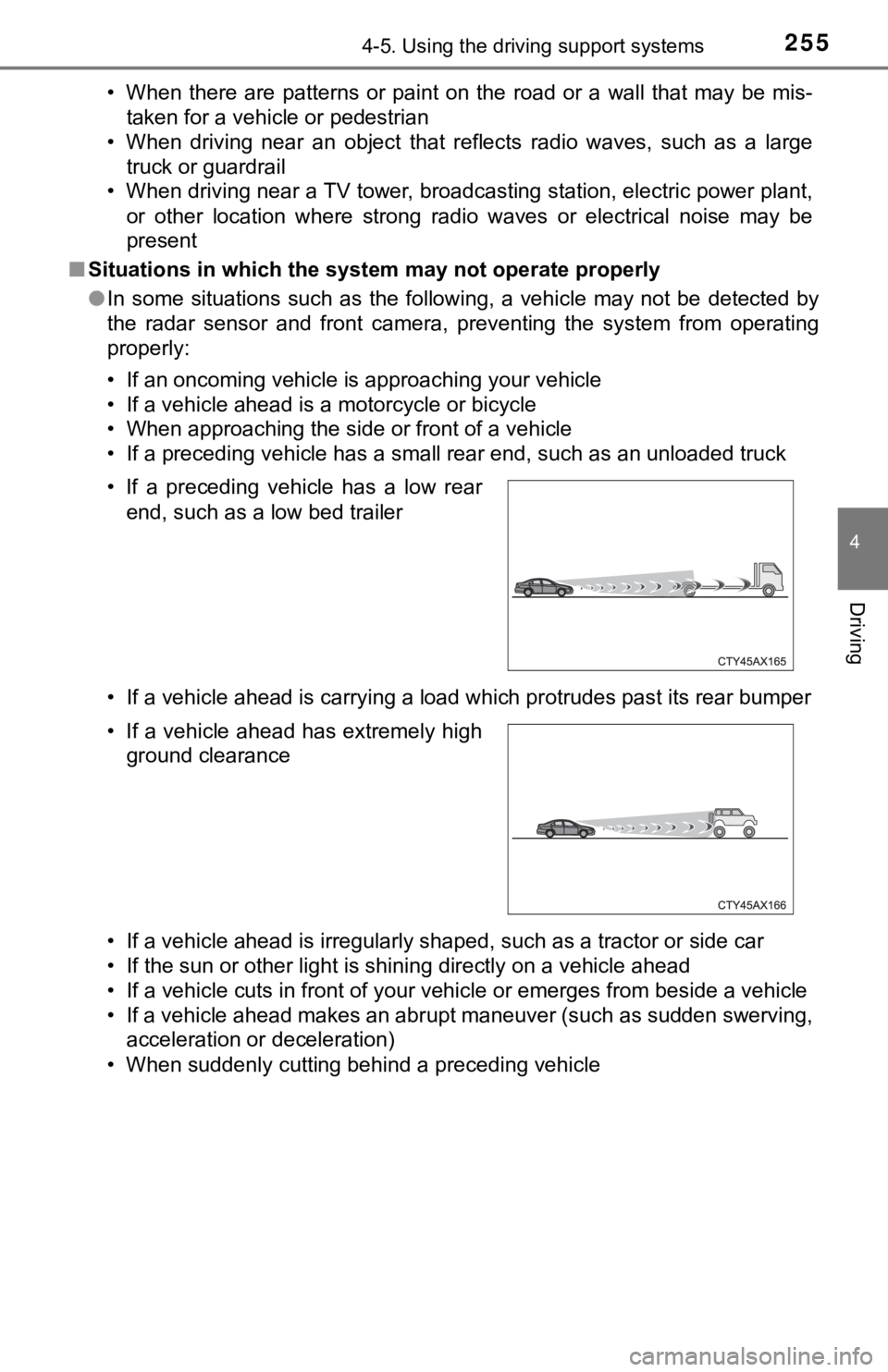
• If a preceding vehicle has a small rear end, such as an unload ed truck
• If a vehicle ahead is carrying a load which protrudes past its rear bumper
• If a vehicle ahead is irregularly shaped, such as a tractor or side car
• If the sun or other light is shining directly on a vehicle ahe ad
• If a vehicle cuts in front of your vehicle or emerges from bes ide a vehicle
• If a vehicle ahead makes an abrupt maneuver (such as sudden sw erving,
acceleration or deceleration)
• When suddenly cutting behind a preceding vehicle • If a preceding vehicle has a low rear end, such as a low bed trailer
• If a vehicle ahead has extremely high ground clearance
Page 287 of 616
2874-5. Using the driving support systems
4
Driving
■The system can be operated when
●The engine switch is in ON mode.
● Intuitive parking assist function is on.
● The vehicle speed is less than about 6 mph (10 km/h).
● A shift position other than P is selected.
■ Sensor detection information
●The sensor’s detection areas are limited to the areas around th e vehicle’
front and rear bumpers.
● The following situations may occur during use.
• Depending on the shape of the object and other factors, the de tection dis-
tance may shorten, or detection may be impossible.
• Detection may be impossible if static objects draw too close to the sen- sor.
• There will be a short delay between static object detection and display (warning buzzer sounds). Even at low speeds, there is a possibi lity that
the object will come within 11.9 in. (30 cm) before the display is shown
and the warning buzzer sounds.
• It might be difficult to hear the buzzer due to the volume of the audio sys- tem or air flow noise of the air conditioning system.
• It may be difficult to hear the sound of this system due to the buzzers of other systems.
■ Objects which the system may not be properly detected
The shape of the object may prevent the sensor from detecting i t. Pay partic-
ular attention to the following objects:
● Wires, fences, ropes, etc.
● Cotton, snow and other materials that absorb sound waves
● Sharply-angled objects
● Low objects
● Tall objects with upper sections projecting outwards in the dir ection of your
vehicle
■ Situations in which the syst em may not operate properly
Certain vehicle conditions and the surrounding environment may affect the
ability of a sensor to correctly detect objects. Particular instances where this
may occur are listed below.
● There is dirt, snow, water drops or ice on a sensor. (Cleaning the sensors
will resolve this problem.)
● A sensor is frozen. (Thawing the area will resolve this problem .)
In especially cold weather, if a sensor is frozen the sensor di splay may be
displayed abnormally, or objects, such as a wall, may not be detected.
Page 291 of 616
2914-5. Using the driving support systems
4
Driving
WARNING
■Cautions regarding the use of the system
There is a limit to the degree of recognition accuracy and cont rol perfor-
mance that this system can provide, do not overly rely on this system. The
driver is always responsible for paying attention to the vehicl e’ surroundings
and driving safely.
■ To ensure the system can operate properly
Observe the following precautions.
Failing to do so may result in the vehicle being unable to be driven safely
and possibly cause an accident.
● Do not damage the sensors, and always keep them clean.
● Do not attach a sticker or install an electronic component, such as a backlit
license plate (especially fluorescent type), fog lights, fender pole or wire-
less antenna near a radar sensor.
● Do not subject the surrounding area of the sensor to a strong impact. If
subjected to an impact, have the vehicle inspected by your Toyota dealer.
If the front or rear bumper needs to be removed/installed or replaced, con-
tact your Toyota dealer.
● Do not modify, disassemble or paint the sensors.
● Do not attach a license plate cover.
● Keep your tires properly inflated.
■ When to disable the function
In the following situations, disable the function as it may operate even
though there is no possibility of a collision.
● Failing to observe the warnings above.
● A non-genuine Toyota suspension (lowered suspension, etc.) is installed.
■ Notes when washing the vehicle
Do not apply intensive bursts of water or steam to the sensor a rea.
Doing so may result in the sensor malfunctioning.
● When using a high pressure washer to wash the vehicle, do not spray the
sensors directly, as doing so may cause a sensor to malfunction .
● When using steam to clean the vehicle, do not direct steam too close to
the sensors as doing so may cause a sensor to malfunction.
Page 294 of 616
2944-5. Using the driving support systems
Droit applicable : Canada 310
Le présent appareil est conforme aux CNR d’Industrie Canada app licables
aux appareils radio exempts de licence. L’exploitation est autorisée aux deux
conditions suivantes : (1) I’appareil ne doit pas produire de b rouillage, et (2)
I’utilisateur de I’appareil doit accepter tout brouillage radioélectrique subi,
même si le brouillage est susceptible d’en compromettre le foun ctionnement.
Bandes de fréquences : 24.05 – 24.25 GHz
Puissance émise : Moins de 20 milliwatts
The Blind Spot Monitor function uses radar sensors to detect ve hicles
that are traveling in an adjacent lane in the area that is not reflected in
the outside rear view mirror (the blind spot), and advises the driver of
the vehicles existence via the outside rear view mirror indicat o r.
WARNING
■To ensure the system can operate properly
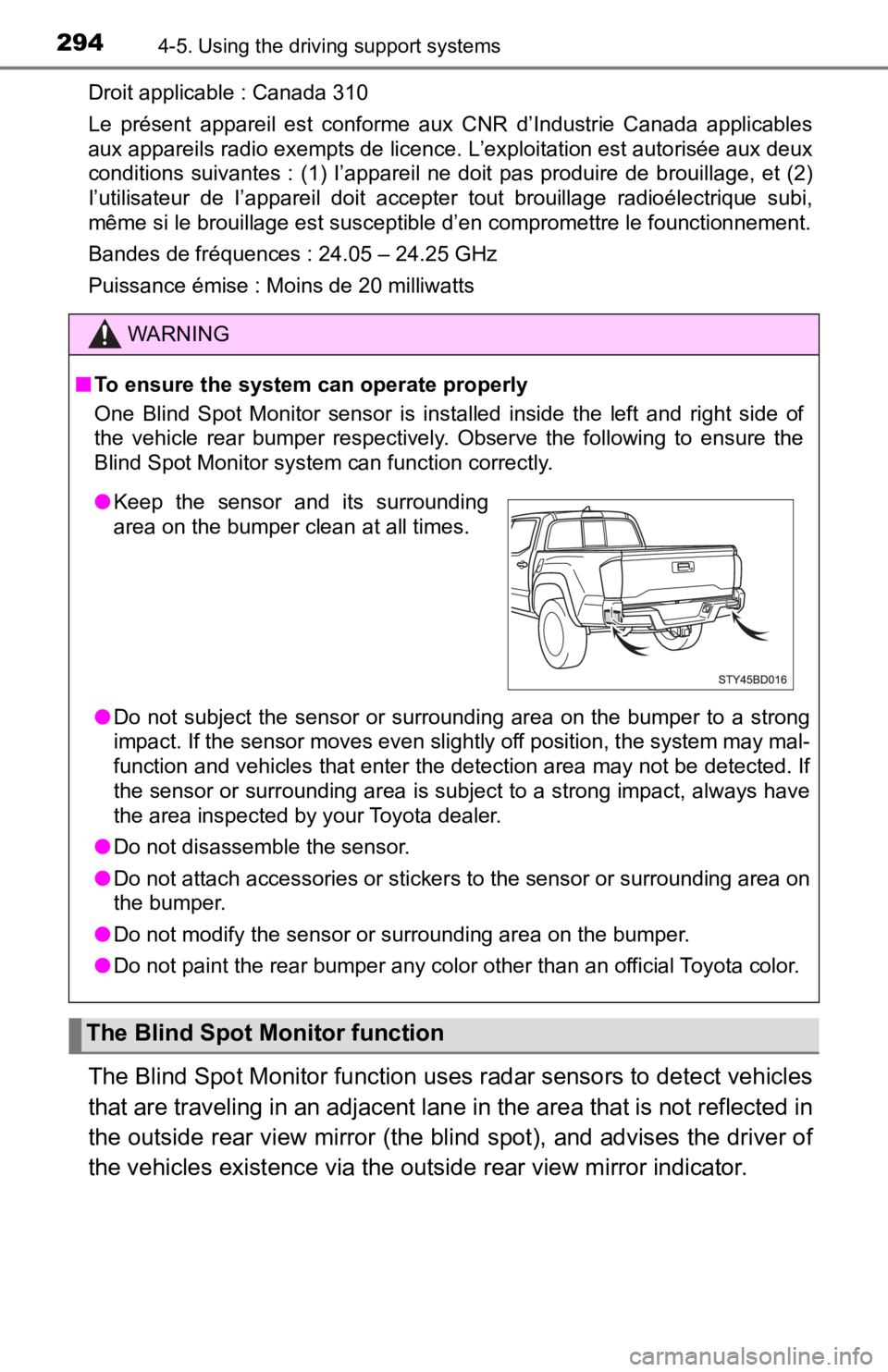
One Blind Spot Monitor sensor is installed inside the left and right side of
the vehicle rear bumper respectively. Observe the following to ensure the
Blind Spot Monitor system can function correctly.
● Do not subject the sensor or surrounding area on the bumper to a strong
impact. If the sensor moves even slightly off position, the system may mal-
function and vehicles that enter the detection area may not be detected. If
the sensor or surrounding area is subject to a strong impact, always have
the area inspected by your Toyota dealer.
● Do not disassemble the sensor.
● Do not attach accessories or stickers to the sensor or surrounding area on
the bumper.
● Do not modify the sensor or surrounding area on the bumper.
● Do not paint the rear bumper any color other than an official Toyota color.
The Blind Spot Monitor function
●Keep the sensor and its surrounding
area on the bumper clean at all times.
Page 295 of 616
2954-5. Using the driving support systems
4
Driving
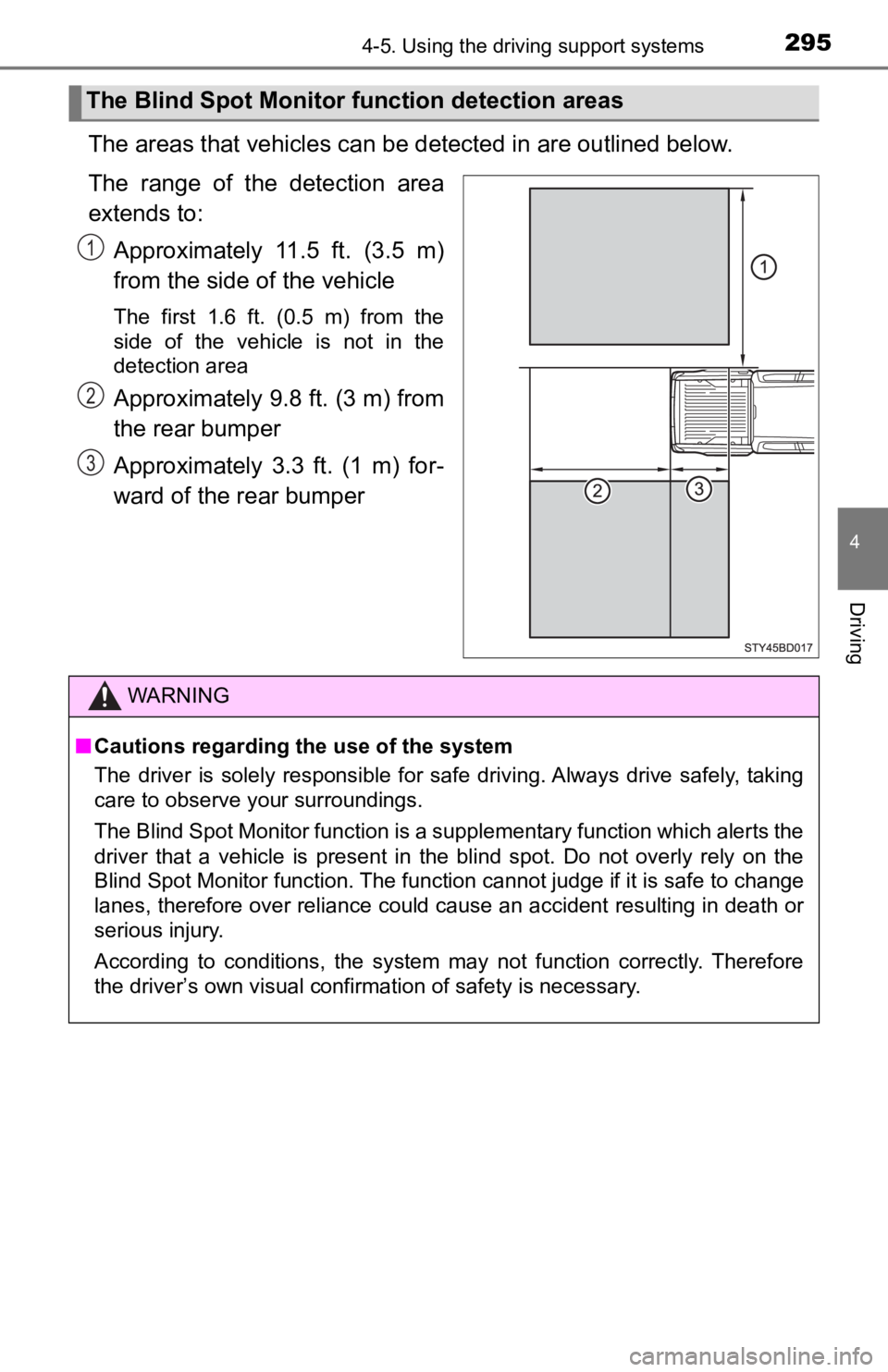
The areas that vehicles can be detected in are outlined below.
The range of the detection area
extends to:Approximately 11.5 ft. (3.5 m)
from the side of the vehicle
The first 1.6 ft. (0.5 m) from the
side of the vehicle is not in the
detection area
Approximately 9.8 ft. (3 m) from
the rear bumper
Approximately 3.3 ft. (1 m) for-
ward of the rear bumper
The Blind Spot Monitor f unction detection areas
1
2
3
WARNING
■Cautions regarding the use of the system
The driver is solely responsible for safe driving. Always drive safely, taking
care to observe your surroundings.
The Blind Spot Monitor function is a supplementary function which alerts the
driver that a vehicle is present in the blind spot. Do not over ly rely on the
Blind Spot Monitor function. The function cannot judge if it is safe to change
lanes, therefore over reliance could cause an accident resultin g in death or
serious injury.
According to conditions, the system may not function correctly. Therefore
the driver’s own visual confirmation of safety is necessary.