tire pressure reset TOYOTA TUNDRA 2023 Owners Manual
[x] Cancel search | Manufacturer: TOYOTA, Model Year: 2023, Model line: TUNDRA, Model: TOYOTA TUNDRA 2023Pages: 616, PDF Size: 11.14 MB
Page 20 of 616
20Pictorial index
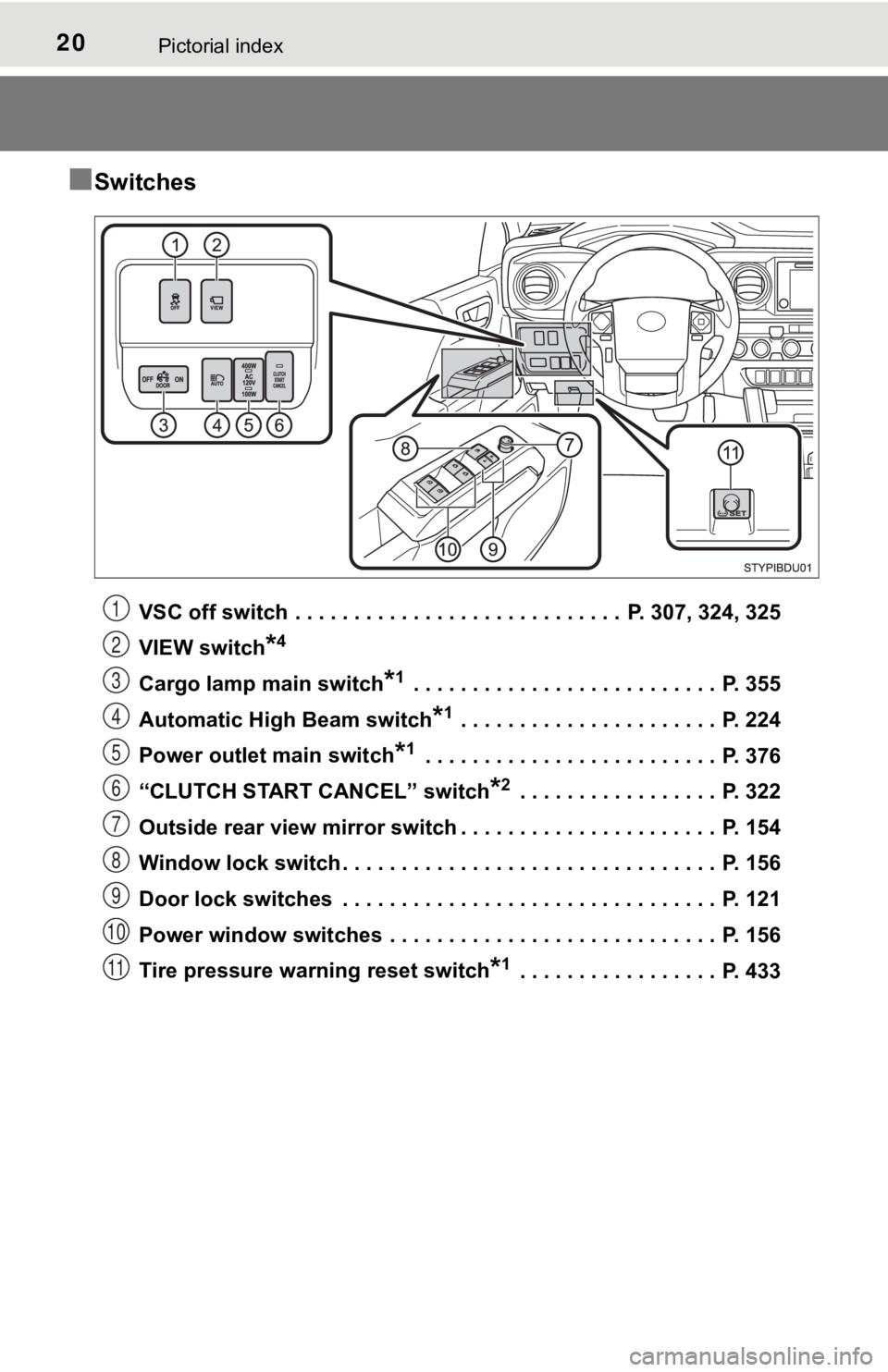
■Switches
VSC off switch . . . . . . . . . . . . . . . . . . . . . . . . . . . . P. 307, 324, 325
VIEW switch
*4
Cargo lamp main switch*1 . . . . . . . . . . . . . . . . . . . . . . . . . . P. 355
Automatic High Beam switch
*1 . . . . . . . . . . . . . . . . . . . . . . P. 224
Power outlet main switch
*1 . . . . . . . . . . . . . . . . . . . . . . . . . P. 376
“CLUTCH START CANCEL” switch
*2 . . . . . . . . . . . . . . . . . P. 322
Outside rear view mirror switch . . . . . . . . . . . . . . . . . . . . . . P. 154
Window lock switch . . . . . . . . . . . . . . . . . . . . . . . . . . . . . . . . P. 156
Door lock switches . . . . . . . . . . . . . . . . . . . . . . . . . . . . . . . . P. 121
Power window switches . . . . . . . . . . . . . . . . . . . . . . . . . . . . P. 156
Tire pressure warning reset switch
*1 . . . . . . . . . . . . . . . . . P. 433
1
2
3
4
5
6
7
8
9
10
11
Page 104 of 616
1042. Instrument cluster
●Trip average speed*1/Average speed*1, 2
Displays the engine was started and the average vehicle speed
since the function was reset, respectively
● Trip distance
*1/Distance*1, 2
Displays the engine was started and the distance since the func tion
was reset, respectively
● Digital speedometer
*1
●Display off*1
A blank screen is displayed
*1: Can be registered to Drive information 1 through 3.
*2: Resetting procedures:
• Select a function to be reset using the meter control switch a nd then
press and hold the center button to reset.
• If there is more than one function that can be reset, check bo xes will be
displayed next to the functions.
● Clinometer (if equipped)
Displays the longitudinal and lateral inclination of the vehicl e.
● LDA (Lane Departure Alert) (if equipped)
P. 2 5 8
● Dynamic radar cruise control (if equipped)
P. 2 6 6
● Intuitive parking a ssist (if equipped)
P. 2 8 4
● Multi-terrain select (if equipped)
P. 3 1 4
● Crawl control (if equipped)
P. 3 1 8
● Tire inflation pressure (if equipped)
P. 4 3 2
Vehicle information
Page 107 of 616

1072. Instrument cluster
2
Instrument cluster
■Setting items
●Setting items are not selectable during driving and cannot be o perated.
Also, the settings screen is temporarily canceled in the follow ing situations.
• A warning message is displayed.
• The vehicle starts off.
● Settings for functions not equipped to the vehicle are not displayed.
● When a function is turned off, the related settings for that fu nction are not
selectable.
■ Pop-up display
In some situations, such as when a switch operation is performe d, a pop-up
display will be temporarily displayed on the multi-information display.
■ When disconnecting and reco nnecting battery terminals
The drive information will be reset.
■ Ending display
When the engine switch is turned off, each of the following wil l be displayed
on the multi-information display, and will extinguish after app roximately
30 seconds.
● Distance traveled
● Average fuel economy
● Distance to empty
■ Tire inflation pressure (vehicles with tire pressure warning sy stem)
● It may take a few minutes to display the tire inflation pressur e after the
engine switch is turned to the “ON” position (vehicles without a smart key
system) or IGNITION ON mode (vehicles with a smart key system). It may
also take a few minutes to display the tire inflation pressure after inflation
pressure has been adjusted.
● “---” may be displayed if the tire position information cannot be determined
due to unfavorable radio wave conditions.
● Tire inflation pressure changes with temperature. The displayed values may
also be different from the values measured using a tire pressur e gauge.
■ Liquid crystal display
P. 100
Page 433 of 616
4336-3. Do-it-yourself maintenance
6
Maintenance and care
■How to initialize the tire pressure warning systemVehicles without a smart key system:
Park the vehicle in a safe plac e and turn the engine switch to the
“LOCK” position.
Vehicles with a smart key system:
Park the vehicle in a safe place and turn the engine switch off .
Initialization cannot be performed while the vehicle is moving.
Adjust the tire inflation pressure to the specified cold tire i nflation
pressure level. ( P. 551)
Make sure to adjust the tire pre ssure to the specified cold tire infla-
tion pressure level. The tire pressure warning system will oper ate
based on this pr essure level.
Vehicles without a smart key system:
Turn the engine switch t o the “ON” position.
Vehicles with a smart key system:
Turn the engine switch to IGNITION ON mode.
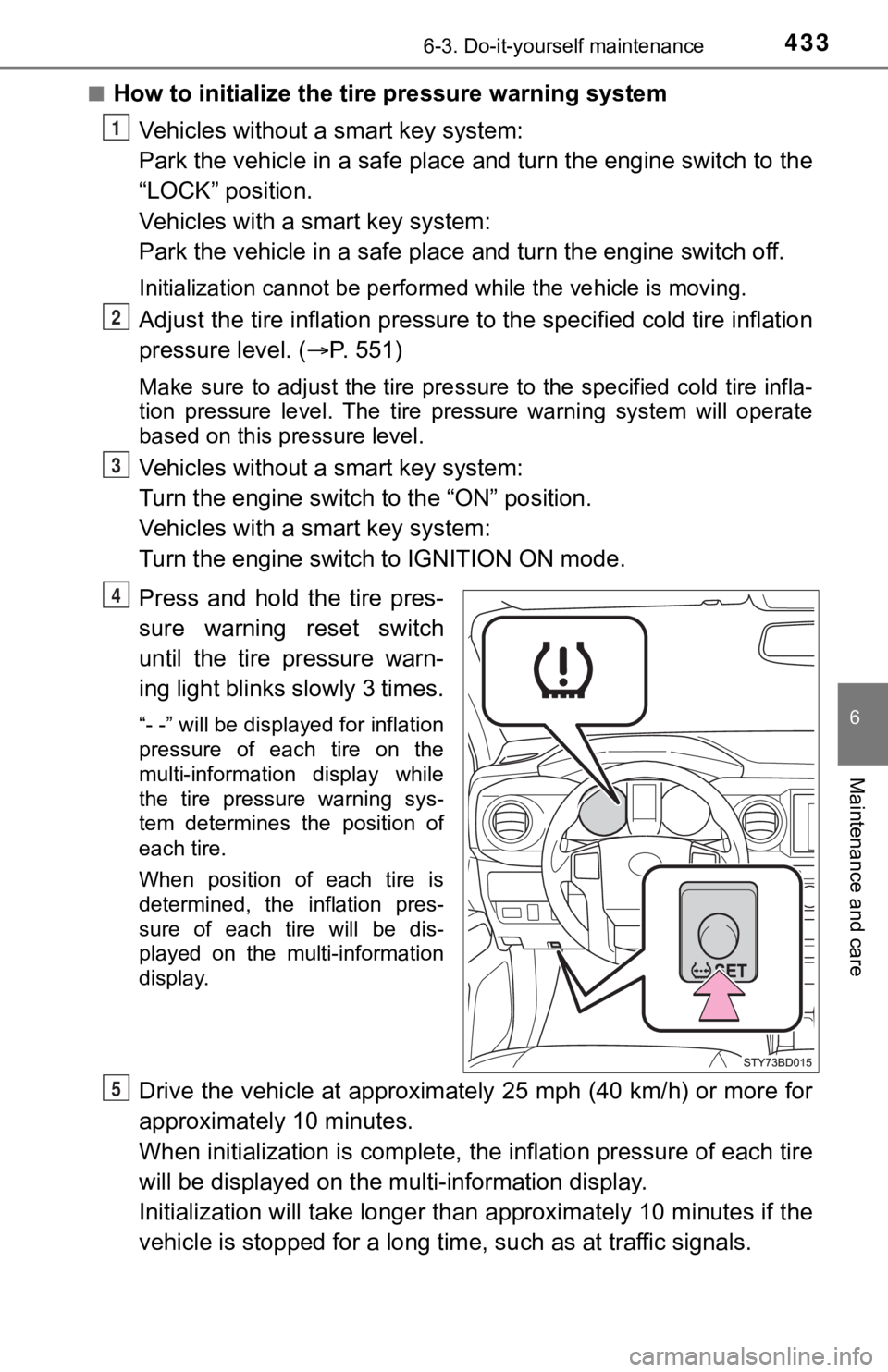
Press and hold the tire pres-
sure warning reset switch
until the tire pressure warn-
ing light blinks slowly 3 times.
“- -” will be displayed for inflation
pressure of each tire on the
multi-information display while
the tire pressure warning sys-
tem determines the position of
each tire.
When position of each tire is
determined, the inflation pres-
sure of each tire will be dis-
played on the multi-information
display.
Drive the vehicle at approximately 25 mph (40 km/h) or more for
approximately 10 minutes.
When initialization is complete, the inflation pressure of each tire
will be displayed on the mu lti-information display.
Initialization will ta ke longer than approxi mately 10 minutes if the
vehicle is stopped for a long time, such as at traffic signals.
1
2
3
4
5
Page 437 of 616

4376-3. Do-it-yourself maintenance
6
Maintenance and care
■The initialization operation (vehicles with the tire pressure warning
system)
●Make sure to carry out initializ ation after adjusting the tire inflation pres-
sure.
Also, make sure the tires are co ld before carrying out initialization or tire
inflation pressure adjustment.
●If you have accidentally turned the engine switch to the “LOCK” position
(vehicles without a smart key system) or off (vehicles with a s mart key
system) during initialization, it is not necessary to press the reset switch
again as initialization will rest art automatically when the engine switch
has been turned to the “ON” posi tion (vehicles without a smart key sys-
tem) or IGNITION ON mode (vehicl es with a smart key system) for the
next time.
●If you accidentally press the reset switch when initialization is not neces-
sary, adjust the tire inflation pressure to the specified level when the
tires are cold, and cond uct initialization again.
■Warning performance of the tire pressure warning system
The warning of the tire pressu re warning system will change in accor-
dance with the conditions under which it was initialized. For t his reason,
the system may give a warning even if the tire pressure does no t reach a
low enough level, or if the pressure is higher than the pressur e that was
adjusted to when the sys tem was initialized.
■When initialization of the tire pressure warning system has fai led (if
equipped)
Initialization may take longer to complete if the vehicle is driven on an
unpaved road. When performing ini tialization, drive on a paved road if
possible. Depending on the driving environment and condition of the tires,
initialization will be completed in approximately 10 minutes. If initialization
is not complete after driving app roximately 10 minutes, continue driving
for a while.
If the inflation pressure of each tire is not displayed after d riving for
approximately 1 hour, perf orm the following procedure.
●Park the vehicle in a safe place for approximately 20 minutes. Then
drive straight (with occasional left and right turns) at approx imately
25mph (40 km/h) or more for ap proximately 10 to 20 minutes.
However, in the following situatio ns, the tire inflation pressure will not be
recorded and the system will not operate properly. Perform initialization
again.
●When operating the tire pressure warning reset switch, the tire pressure
warning light does not blink 3 times.
●After performing initialization, t he tire pressure warning light blinks for
1 minute then stays on while driving.
If the inflation pressure of eac h tire is still not displayed, have the vehicle
inspected by you r Toyota dealer.
Page 440 of 616

4406-3. Do-it-yourself maintenance
WARNING
■When inspecting or replacing tires
Observe the following precautions to prevent accidents.
Failure to do so may cause damage to parts of the drive train as well as
dangerous handling characteristics, which may lead to an accide nt
resulting in death o r serious injury.
●Do not mix tires of different ma kes, models or tread patterns.
Also, do not mix tires of remarkably different treadwear.
●Do not use tire sizes other th an those recommended by Toyota.
●Do not mix differently constructed tires (radial, bias-belted o r bias-ply
tires).
●Do not mix summer, all season and snow tires.
●Do not use tires that have been used on another vehicle.
Do not use tires if you do not kn ow how they were used previously.
■When initializing the tire pressure warning system (if equipped )
Do not operate the tire pressure warning reset switch without first
adjusting the tire inflation pressure to the specified level. O therwise, the
tire pressure warning light may not come on even if the tire in flation
pressure is low, or it may come on when the tire inflation pres sure is
actually normal.
Page 486 of 616

4867-2. Steps to take in an emergency
■If the malfunction indicator lamp comes on while driving
First check the following:
●Is the fuel tank empty?
If it is, fill the fuel tank immediately.
● Is the fuel tank cap loose?
If it is, tighten it securely.
The light will go off after several driving trips.
If the light does not go off even after several trips, contact your Toyota dealer
as soon as possible.
■
When the tire pressure warning light comes on (if equipped)
Check the tire inflation pressure and adjust to the appropriate level. Push-
ing the tire pressur e warning reset switch will not turn off the tire pressure
warning light.
■The tire pressure warning light may come on due to natural caus es
(if equipped)
The tire pressure warning light may come on due to natural caus es such
as natural air leaks and tire inflation pressure changes caused by tem-
perature. In this case, adjusting the tire inflation pressure w ill turn off the
warning light (after several minutes).
■When a tire is replaced with a spare tire (vehicles with the ti re pres-
sure warning system)
The temporary spare tire is not equipped with a tire pressure w arning
valve and transmitter. If a tire goes flat, the tire pressure w arning light will
not turn off even though the flat tire has been replaced with t he temporary
spare tire. Replace the temporary spare tire with the repaired tire and
adjust the tire inflation pressu re. The tire pressure warning l ight will go off
after several minutes.
■Conditions that the tire pressure warning system may not functi on
properly (if equipped)
P. 4 3 6
■If the tire pressure warning light frequently comes on after bl inking
for 1 minute (if equipped)
If the tire pressure warning light frequently comes on after bl inking for 1
minute when the engine switch is turned to “ON” position (vehic les with-
out a smart key system) or IGNITION ON mode (vehicles with a sm art
key system), have it checked by your Toyota dealer.
■Warning buzzer
In some cases, the buzzer may not be heard because of noisy pla ce or an
audio sound.
Page 523 of 616

5237-2. Steps to take in an emergency
7
When trouble arises
■The temporary spare tire
●Your vehicle is equipped with a temporary spare tire that may be a differ-
ent size, tread type, and/or manufacturer from the ground tires installed
on your vehicle.
●The temporary spare tire is iden tified by the “TEMPORARY USE ON LY ”
marking on the disc wheel and/or the tire sidewall.
Use the temporary spare tire temp orarily, and only in an emergency.
●Make sure to check the tire inflation pressure of the temporary spare
tire. ( P. 5 5 1 )
■After completing the tire change (vehicles with the tire pressu re
warning system)
The tire pressure warni ng system must be reset. ( P. 433)
■When using the temporary spare tire (vehicles with the tire pre ssure
warning system)
As the temporary spare tire is no t equipped with the tire pressure warning
valve and transmitter, low inflation pressure of the spare tire will not be
indicated by the tire pressure warning system. Also, if you rep lace the
temporary spare tire after the tire pressure warning light come s on, the
light remains on.
■If you have a flat rear tire on a road covered with snow or ice
Install the temporary spare tire on one of the front wheels of the vehicle.
Perform the following steps and f it tire chains to the rear tires:
Replace a front tire with the temporary spare tire.
Replace the flat rear tire with the tire removed from the front of the
vehicle.
Fit tire chains to the rear tires.
1
2
3
Page 611 of 616
611Alphabetical index
Steering wheel audio switches*
Stop lightsReplacing light bulbs............. 466
Wattage ................................ 553
Storage box .............................. 361
Storage feature ........................ 356
Stuck If the vehicle becomes stuck ................................... 536
Sun visors ................................ 374
Switches
Active traction control switch ................................. 312
Audio remote control switches
*
Automatic High Beam ........... 224
BSM (Blind spot monitor) main switch......................... 292
Cargo lamp main switch ....... 355
“CLUTCH START
CANCEL” switch................. 322
Crawl Control switch ............. 318
Cruise control switch............. 280
Door lock switches ................ 121
Dynamic radar cruise
control switch...................... 266
Emergency flashers switch ... 472
Engine switch................ 202, 205
Fog light switch ..................... 229
Front-wheel drive control switch ................................. 303
Garage door opener switches.............................. 389 Headlight switch ................... 220
Ignition switch ............... 202, 205
Intuitive parking assist .......... 284
LDA (Lane Departure Alert)
switch ................................. 258
Light switches ....................... 220
Moon roof switches............... 162
Multi-terrain Select switches ............................. 314
Outside rear view mirror
defoggers switch ........ 340, 347
Outside rear view mirror switches ............................. 154
Power door lock switch ......... 121
Power mode switch .............. 212
Power outlet main switch ...... 376
Power window switches........ 156
Rear differential lock switch ................................. 309
Seat heater switches ............ 351
Talk switch
*
Telephone switches*
Tire pressure warning reset switch ........................ 433
Turn signal lights .................. 218
VSC off switch ...... 307, 324, 325
Window lock switch .............. 156
Windshield wipers and
washer switch..................... 230
Wireless charger switch........ 383
*: For vehicles with Audio Plus or Premium Audio, refer to the “ NAVIGA-
TION AND MULTIMEDIA SYSTEM OWNER’S MANUAL”
Page 612 of 616

612Alphabetical index
Tachometer ................................ 98
Tail lights .................................. 220Light switch ........................... 220
Replacing light bulbs............. 466
Wattage ................................ 553
Tailgate Removing the tailgate ........... 127
Tailgate ................................. 126
Talk switch
*
Telephone switches*
Theft deterrent system Alarm ...................................... 88
Engine immobilizer system ..... 78
Tire inflation pressure ............. 442 Maintenance data ................. 551
Warning light ......................... 484
Warning message ......... 491, 493
Tire information ....................... 557 Glossary................................ 563
Size ....................................... 559
Tire identification number ..... 558
Uniform Tire Quality
Grading............................... 561
Tire pressure warning system .................................... 432
Initializing .............................. 433
Installing tire pressure warning valves and
transmitters......................... 432
Registering ID codes ............ 434
Tire pressure warning reset
switch ................................. 433
Warning light ......................... 484
Warning message ......... 491, 493 Tires .......................................... 431
Chains .................................. 330
Checking............................... 431
If you have a flat tire ............. 511
Inflation pressure .................. 551
Information............................ 557
Replacing.............................. 511
Rotating tires ........................ 431
Size....................................... 551
Snow tires ............................. 331
Spare tire .............................. 512
Tire pressure warning system .......... ...................... 432
Warning light......................... 484
Warning message......... 491, 493
Tonneau cover ......................... 368
Tools ......................................... 512
Top tether strap ................... 66, 68
Total load capacity .......... 182, 541
Towing
Bumper towing...................... 190
Dinghy towing ....................... 201
Emergency towing ................ 479
Trailer towing ........................ 183
Toyota Safety Sense P ............ 237
Automatic High Beam ........... 224
Dynamic radar cruise control ................................ 266
LDA (Lane Departure Alert) ....... 258
PCS
(Pre-Collision System) ....... 245
TRAC (Traction Control) ......... 323
Transmission ........................... 211 Automatic transmission ........ 211
If the shift lever cannot be shifted from P ..................... 214
Manual transmission............. 216
Power mode switch .............. 212
S mode ................................. 213
T