lock TOYOTA TUNDRA HYBRID 2022 Owner's Manual
[x] Cancel search | Manufacturer: TOYOTA, Model Year: 2022, Model line: TUNDRA HYBRID, Model: TOYOTA TUNDRA HYBRID 2022Pages: 618, PDF Size: 19.91 MB
Page 82 of 618
821-5. Theft deterrent system
Owners Manual_USA_M0C031_en
■Items to check before lock-
ing the vehicle
To prevent unexpected trigger-
ing of the alarm and vehicle
theft, make sure of the following:
Nobody is in the vehicle.
The windows and the pan-
oramic moon roof (if
equipped) are closed before
the alarm is set.
No valuables or other per-
sonal items are left in the
vehicle.
■Setting
Close the doors and hood, and
lock all the doors using the entry
function or wireless remote con- trol. The system will be set auto-
matically after 30 seconds.
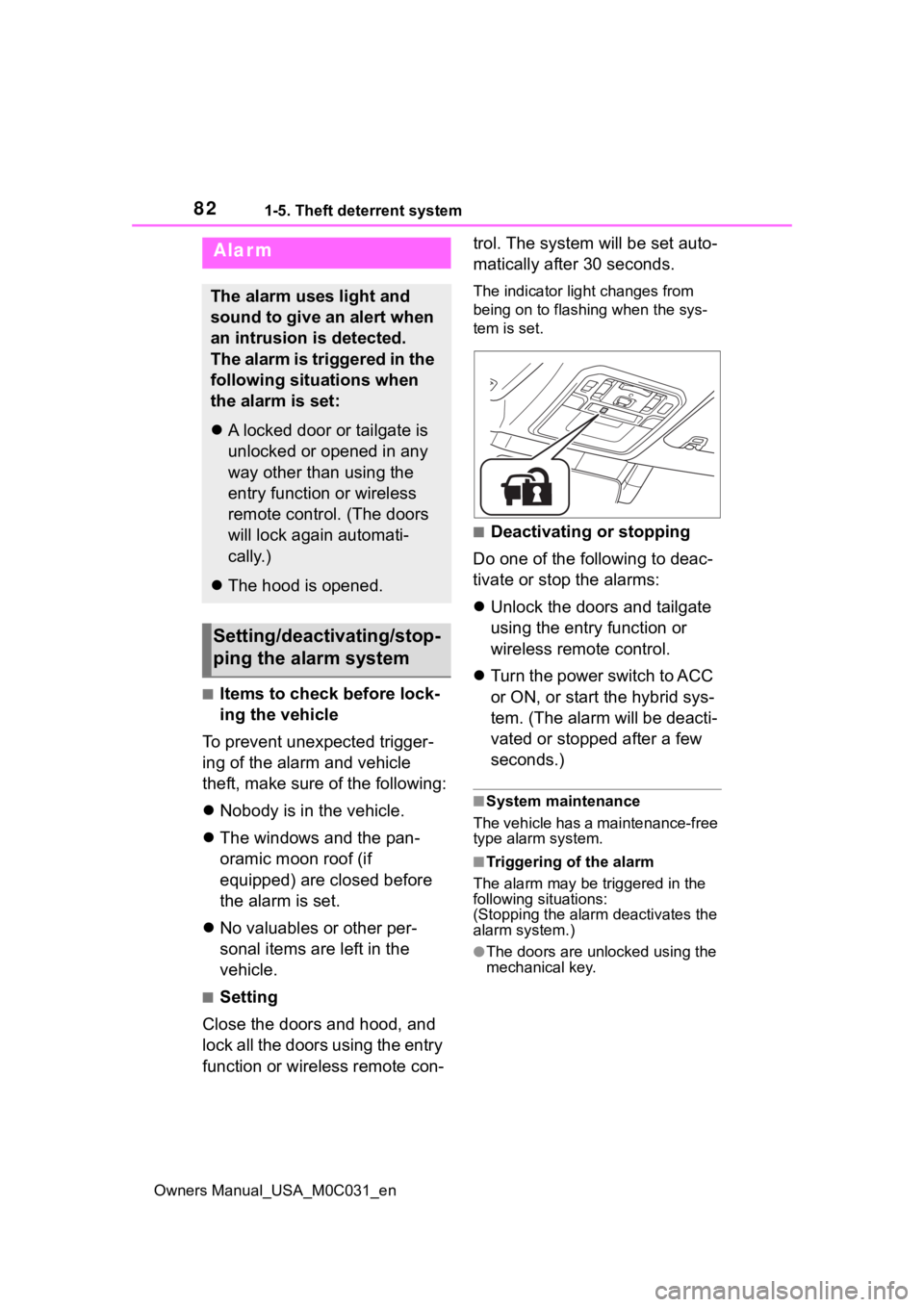
The indicator light changes from
being on to flashing when the sys-
tem is set.
■Deactivating or stopping
Do one of the following to deac-
tivate or stop the alarms:
Unlock the doors and tailgate
using the entry function or
wireless remote control.
Turn the power switch to ACC
or ON, or start the hybrid sys-
tem. (The alarm will be deacti-
vated or stopped after a few
seconds.)
■System maintenance
The vehicle has a maintenance-free
type alarm system.
■Triggering of the alarm
The alarm may be triggered in the
following situations:
(Stopping the alarm deactivates the
alarm system.)
●The doors are unlocked using the
mechanical key.
Alarm
The alarm uses light and
sound to give an alert when
an intrusion is detected.
The alarm is triggered in the
following situations when
the alarm is set:
A locked door or tailgate is
unlocked or opened in any
way other than using the
entry function or wireless
remote control. (The doors
will lock again automati-
cally.)
The hood is opened.
Setting/deactivating/stop-
ping the alarm system
Page 83 of 618
831-5. Theft deterrent system
Owners Manual_USA_M0C031_en
1
For safety and security
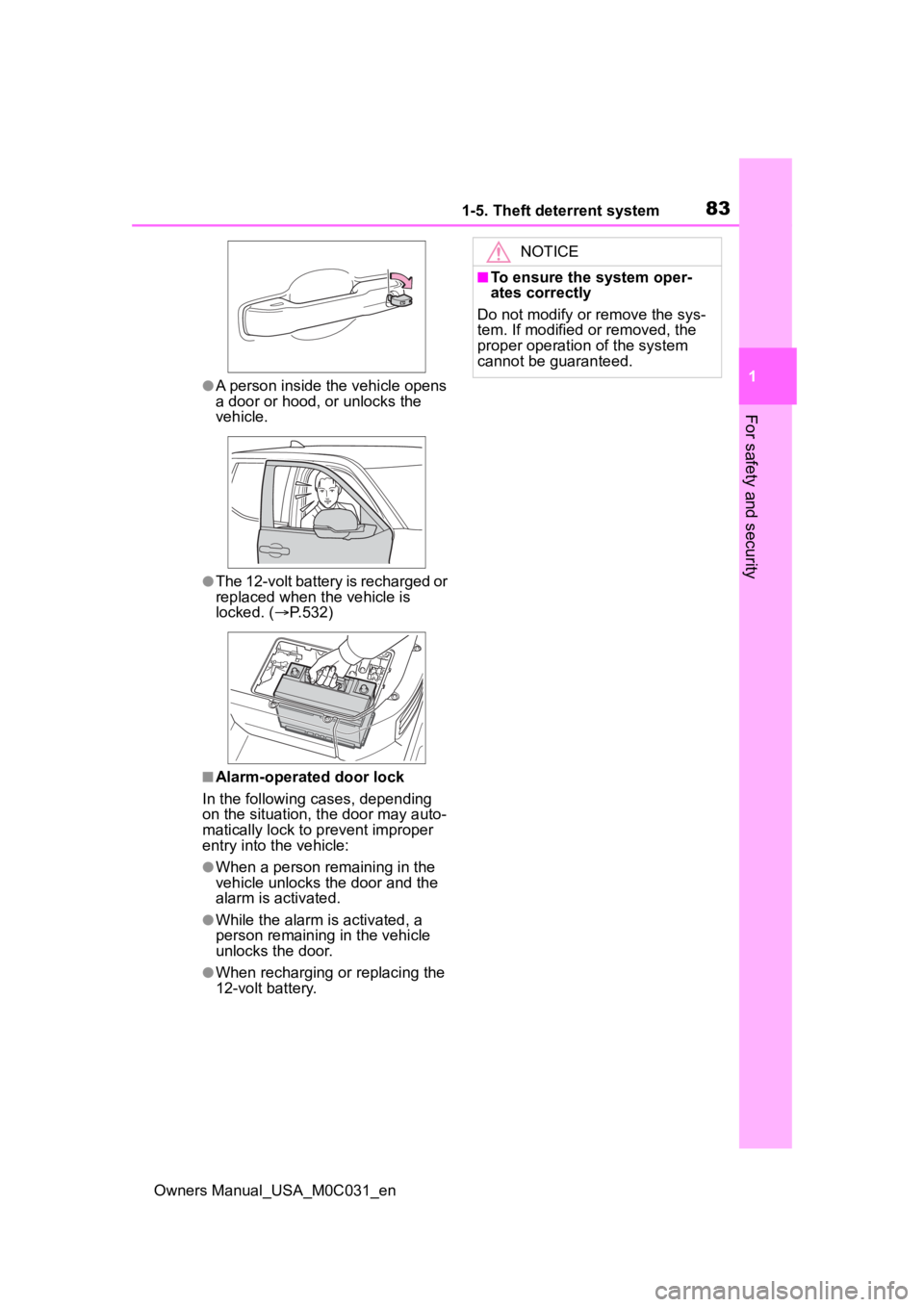
●A person inside the vehicle opens
a door or hood, or unlocks the
vehicle.
●The 12-volt battery is recharged or
replaced when the vehicle is
locked. ( P.532)
■Alarm-operated door lock
In the following cases, depending
on the situation, th e door may auto-
matically lock to p revent improper
entry into the vehicle:
●When a person remaining in the
vehicle unlocks the door and the
alarm is activated.
●While the alarm is activated, a
person remaining in the vehicle
unlocks the door.
●When recharging or replacing the
12-volt battery.
NOTICE
■To ensure the system oper-
ates correctly
Do not modify or remove the sys-
tem. If modified or removed, the
proper operation of the system
cannot be guaranteed.
Page 88 of 618
882-1. Instrument cluster
Owners Manual_USA_M0C031_en
*1: These lights turn on when the power switch is turned to ON to
indicate that a system check is
being performed. They will turn
off after the hybrid system is
started, or after a few seconds.
There may be a malfunction in a
system if the light does not come
on, or turn off. Have the vehicle
inspected by your Toyota dealer.
*2: This light illuminates on the multi-informatio n display with a
message.
*3: Intuitive parking assist OFF indi- cator turns on when the power
switch is turned to ON while the
Intuitive parking assist function is
on. It will turn off after a few sec-
onds.
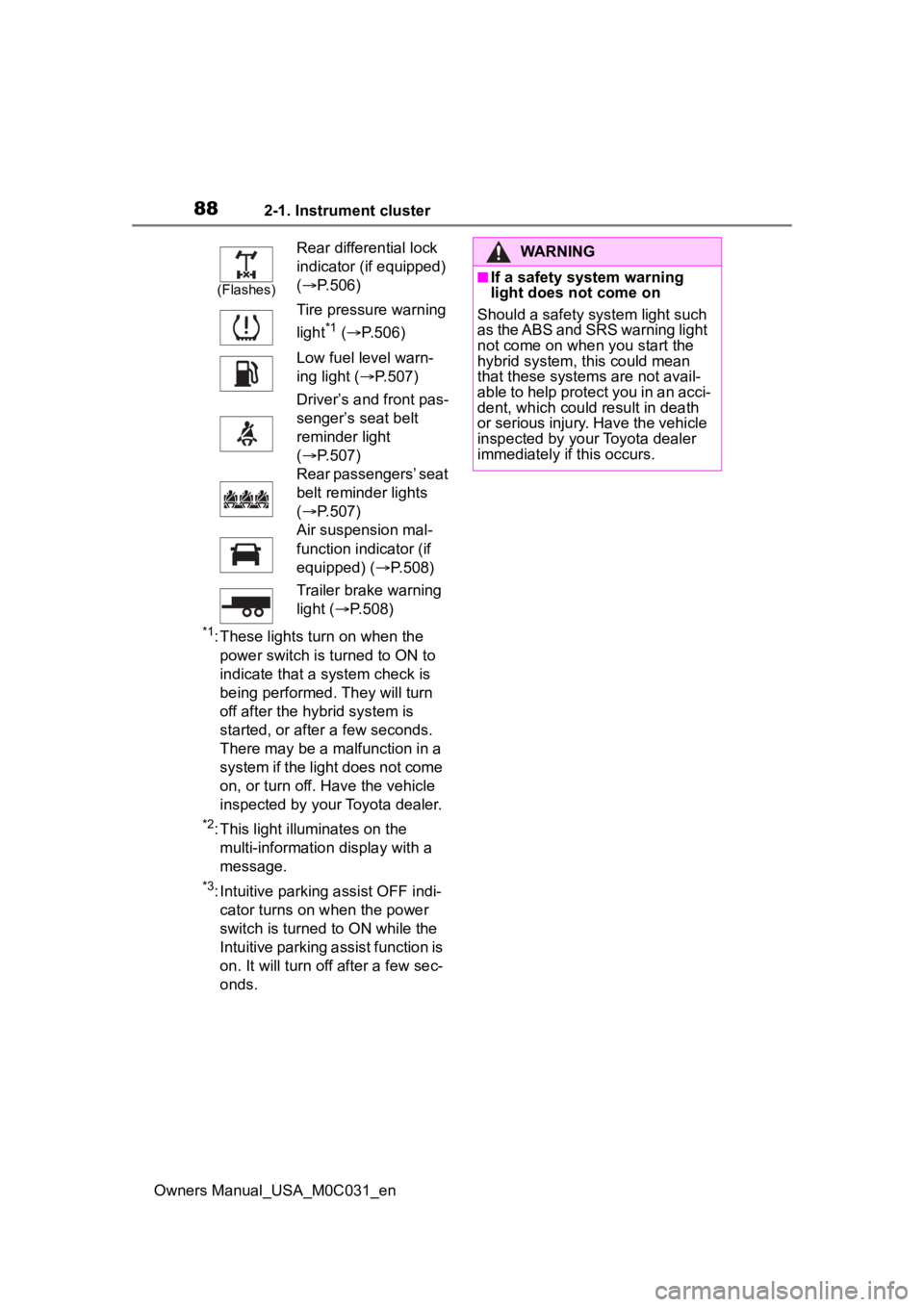
(Flashes)
Rear differential lock
indicator (if equipped)
( P.506)
Tire pressure warning
light
*1 ( P.506)
Low fuel level warn-
ing light ( P.507)
Driver’s and front pas-
senger’s seat belt
reminder light
( P.507)
Rear passengers’ seat
belt reminder lights
( P.507)
Air suspension mal-
function indicator (if
equipped) ( P.508)
Trailer brake warning
light ( P.508)
WARNING
■If a safety system warning
light does not come on
Should a safety system light such
as the ABS and SRS warning light
not come on when you start the
hybrid system, this could mean
that these system s are not avail-
able to help protect you in an acci-
dent, which could result in death
or serious injury. Have the vehicle
inspected by you r Toyota dealer
immediately if this occurs.
Page 90 of 618
902-1. Instrument cluster
Owners Manual_USA_M0C031_en
*1: This light illuminates on the multi-information display with a
message.
*2: Depending on the operating con-ditions of the system, the color
and state (illuminat ed/blinking) of
the indicator change.
*3: The light comes on when the system is turned off.
*4: Intuitive parking assist OFF indi-cator turns on wh en the power
switch is turned t o ON while the
Intuitive parking assist function is
on. It will turn off after a few sec-
onds.
*5: These lights tu rn on when the
power switch is turned to ON to
indicate that a system check is
being performed. They will turn
off after the hybrid system is
started, or after a few seconds.
There may be a malfunction in a
system if the lights do not turn
on, or turn off. Have the vehicle
inspected by your Toyota dealer.
*6: This light illuminates on the out- side rear view mirrors.
*7: This light illuminates on the over-head console.
*8: When the outside temperature is approximately 37°F (3°C) or
lower, the indicator will flash for
approximately 10 seconds, then
stay on.
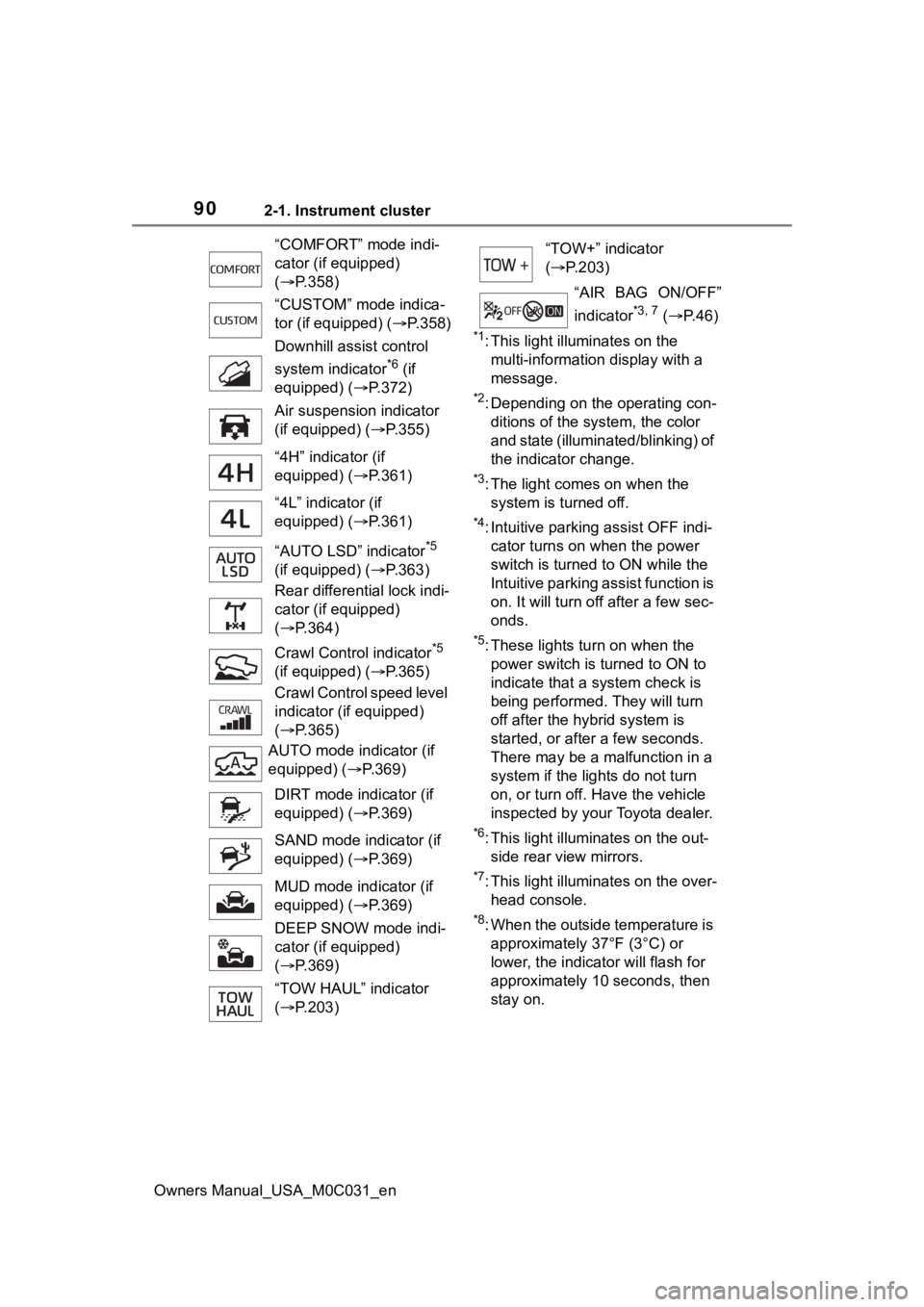
“COMFORT” mode indi-
cator (if equipped)
(
P.358)
“CUSTOM” mode indica-
tor (if equipped) ( P.358)
Downhill assist control
system indicator
*6 (if
equipped) ( P.372)
Air suspension indicator
(if equipped) ( P.355)
“4H” indicator (if
equipped) ( P.361)
“4L” indicator (if
equipped) ( P.361)
“AUTO LSD” indicator
*5
(if equipped) ( P.363)
Rear differential lock indi-
cator (if equipped)
( P.364)
Crawl Contro l indicator
*5
(if equipped) ( P.365)
Crawl Control speed level
indicator (if equipped)
( P.365)
AUTO mode indicator (if
equipped) ( P.369)
DIRT mode indicator (if
equipped) ( P.369)
SAND mode indicator (if
equipped) ( P.369)
MUD mode indicator (if
equipped) ( P.369)
DEEP SNOW mode indi-
cator (if equipped)
( P.369)
“TOW HAUL” indicator
( P.203)
“TOW+” indicator
( P.203)
“AIR BAG ON/OFF”
indicator
*3, 7 ( P. 4 6 )
Page 91 of 618
912-1. Instrument cluster
Owners Manual_USA_M0C031_en
2
Vehicle status information and indicators
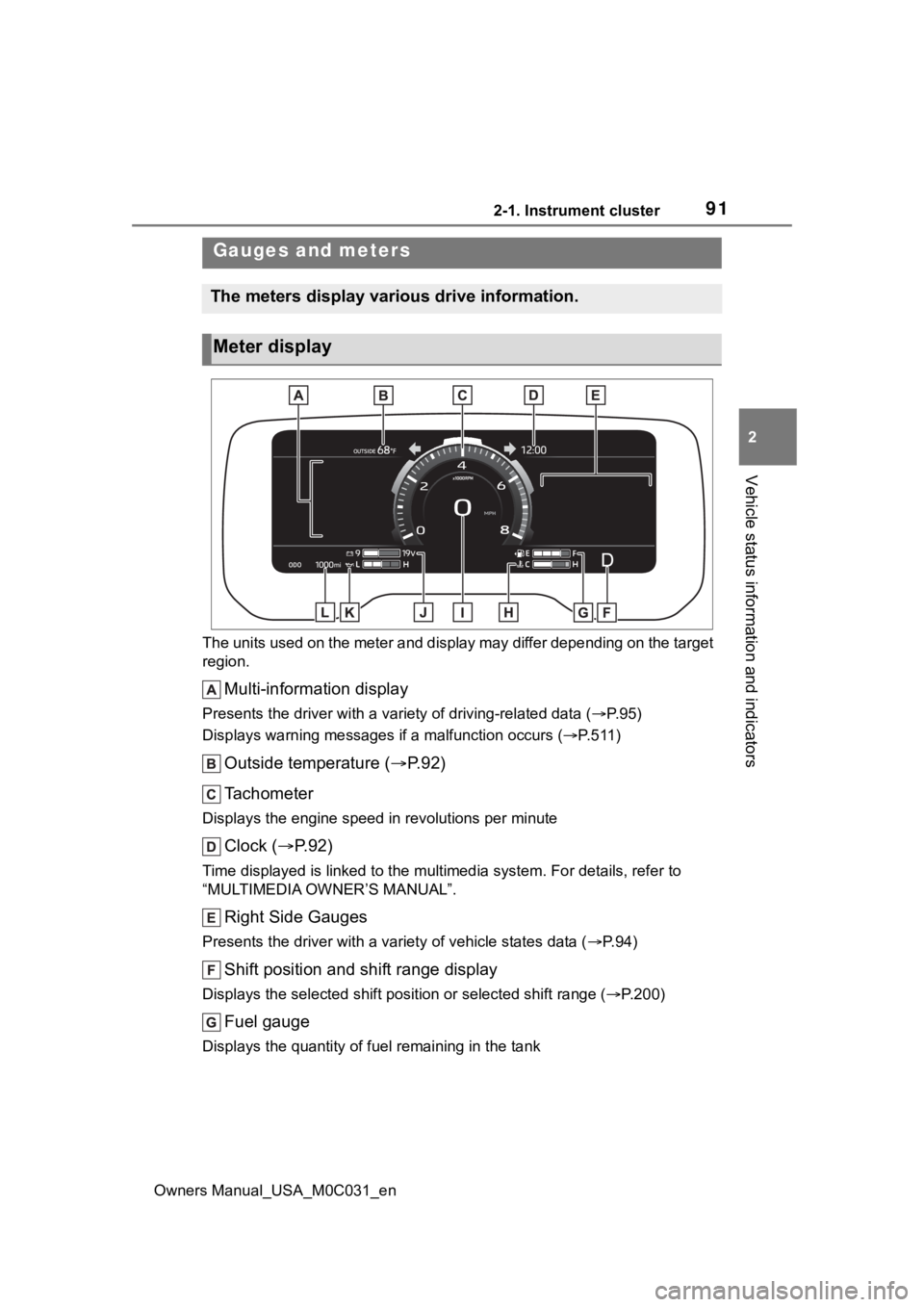
The units used on the meter and display may differ depending on the target
region.
Multi-information display
Presents the driver with a variety of driving-related data ( P. 9 5 )
Displays warning messages if a malfunction occurs (P.511)
Outside temperature ( P. 9 2 )
Tachometer
Displays the engine speed in revolutions per minute
Clock ( P. 9 2 )
Time displayed is linked to the multimedia system. For details, refer to
“MULTIMEDIA OWNER’S MANUAL”.
Right Side Gauges
Presents the driver with a variety of vehicle states data ( P. 9 4 )
Shift position and shift range display
Displays the selected shift posit ion or selected shift range (P.200)
Fuel gauge
Displays the quantity of fu el remaining in the tank
Gauges and meters
The meters display various drive information.
Meter display
Page 92 of 618
922-1. Instrument cluster
Owners Manual_USA_M0C031_en
Engine coolant temperature gauge
Displays the engine coolant temperature
Speedometer
Displays the vehicle speed
Voltmeter
Displays the charge state
Engine oil pressure gauge
Displays the engine oil pressure
Odometer and trip meter ( P.93)
■The meters and display illumi-
nate when
The power swit ch is in ON.
■Tachometer needle feature
The tachometer needle will fade in
or out during the engine starting or
stopping, respectively.
The needle is completely visible
after the engine is turned on or
turned off.
■Clock settings screen
If clock setting item is displayed
when is selected on the multi-
information display, the system may
be malfunctioning. Have the vehicle
inspected by your Toyota dealer.
■Outside temperature display
●In the following si tuations, the cor-
rect outside tempe rature may not
be displayed, or the display may
take longer than normal to
change.
• When stopped, or driving at low
speeds (less than 12 mph [20
km/h])
• When the outside temperature
has changed suddenly (at the
entrance/exit of a garage, tunnel,
etc.)
●When “--” or “E” is displayed, the
system may be malfunctioning.
Take your vehicle to your Toyota
dealer.
●Displays the outsi de temperature
within the range of -40°F (-40°C)
to 122°F (50°C).
●When the outside temperature is
approximately 37°F (3°C) or
lower, the indicator will flash
for approximately 10 seconds,
then stay on.
■Liquid crystal display
P. 9 6
■Customization
Settings (e. g. mete r display) can be
changed on screen of the multi-
information display. ( P. 9 9 )
WARNING
■The information display at
low temperatures
Allow the interior of the vehicle to
warm up before using the liquid
crystal information display. At
extremely low temperatures, the
information disp lay monitor may
respond slowly, and display
changes may be delayed.
Page 109 of 618
109
Owners Manual_USA_M0C031_en
3
3
Before driving
Before driving
3-1. Key informationKeys ............................ 110
3-2. Opening, closing and locking the doors and
tailgate
Side doors ................... 113
Power running boards . 117
Tailgate........................ 120
Power bed step ........... 126
Smart key system ....... 128
3-3. Adjusting the seats Front seats .................. 133
Rear seats................... 134
Driving position memory .................................. 137
Head restraints............ 140
3-4. Adjusting the steering wheel and mirrors
Steering wheel ............ 143
Inside rear view mirror 145
Digital Rear-view Mirror 146
Outside rear view mirrors .................................. 156
3-5. Opening, closing the win- dows and moon roof
Power windows ........... 160
Power back window .... 163
Panoramic moon roof.. 164
Page 110 of 618
1103-1. Key information
Owners Manual_USA_M0C031_en
3-1.Key information
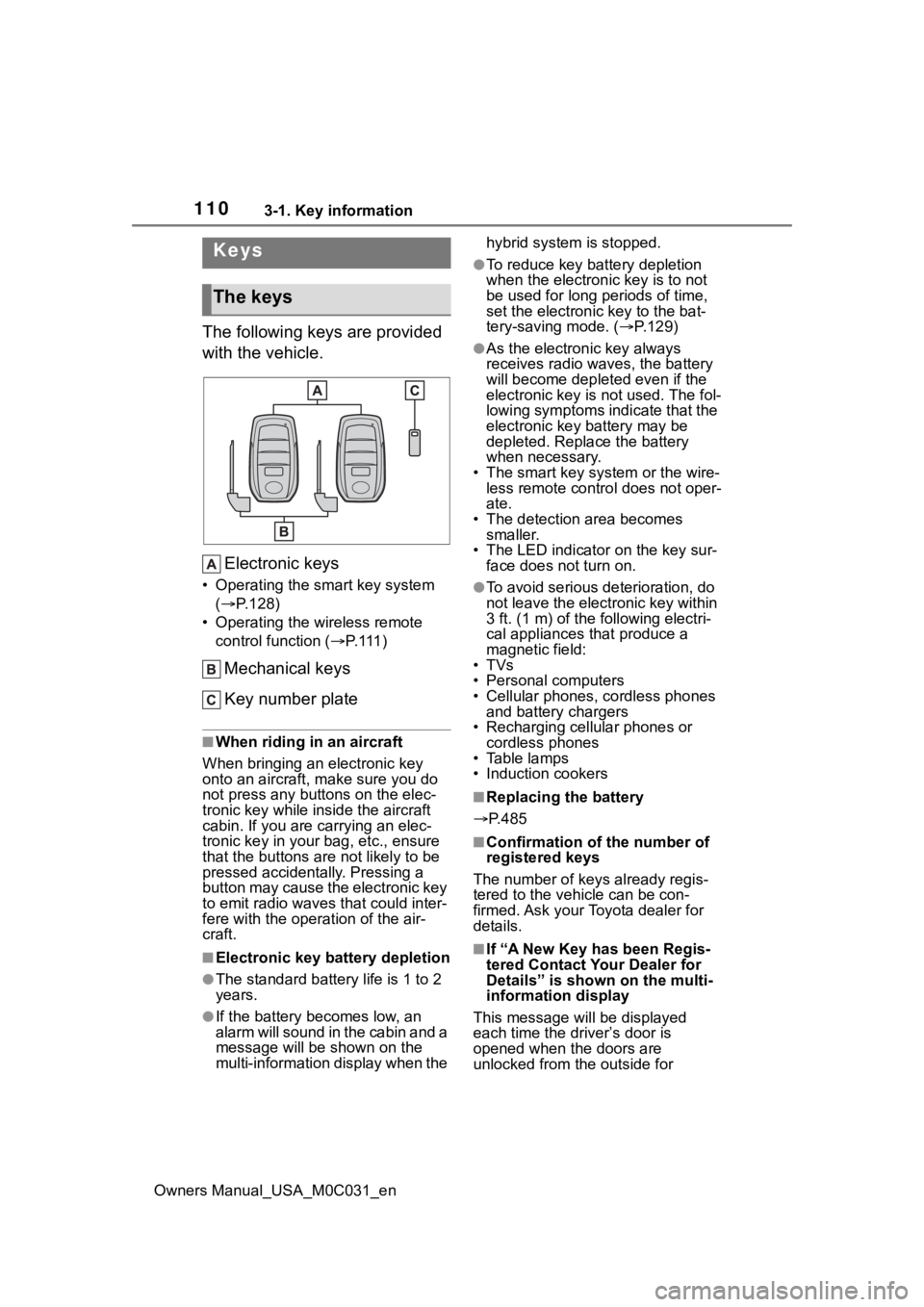
The following keys are provided
with the vehicle.Electronic keys
• Operating the smart key system ( P.128)
• Operating the wireless remote control function ( P. 111 )
Mechanical keys
Key number plate
■When riding in an aircraft
When bringing an electronic key
onto an aircraft, make sure you do
not press any buttons on the elec-
tronic key while inside the aircraft
cabin. If you are carrying an elec-
tronic key in your bag, etc., ensure
that the buttons are not likely to be
pressed accidentally. Pressing a
button may cause the electronic key
to emit radio waves that could inter-
fere with the oper ation of the air-
craft.
■Electronic key battery depletion
●The standard battery life is 1 to 2
years.
●If the battery becomes low, an
alarm will sound in the cabin and a
message will be s hown on the
multi-information display when the hybrid system is stopped.
●To reduce key battery depletion
when the electronic key is to not
be used for long periods of time,
set the electronic key to the bat-
tery-saving mode. (
P.129)
●As the electronic key always
receives radio waves, the battery
will become depleted even if the
electronic key is not used. The fol-
lowing symptoms indicate that the
electronic key battery may be
depleted. Replace the battery
when necessary.
• The smart key system or the wire- less remote contro l does not oper-
ate.
• The detection area becomes smaller.
• The LED indicator on the key sur- face does not turn on.
●To avoid serious deterioration, do
not leave the electronic key within
3 ft. (1 m) of the following electri-
cal appliances that produce a
magnetic field:
•TVs
• Personal computers
• Cellular phones, cordless phones and battery chargers
• Recharging cellular phones or cordless phones
• Table lamps
• Induction cookers
■Replacing the battery
P.485
■Confirmation of the number of
registered keys
The number of keys already regis-
tered to the vehi cle can be con-
firmed. Ask your Toyota dealer for
details.
■If “A New Key has been Regis-
tered Contact Your Dealer for
Details” is shown on the multi-
information display
This message will be displayed
each time the driver’s door is
opened when the doors are
unlocked from the outside for
Keys
The keys
Page 111 of 618
1113-1. Key information
Owners Manual_USA_M0C031_en
3
Before driving
approximately 10 days after a new
electronic key has been registered.
If this message is displayed but you
have not had a new electronic key
registered, ask your Toyota dealer to
check if an unknow n electronic key
(other than those in your posses-
sion) has been registered.
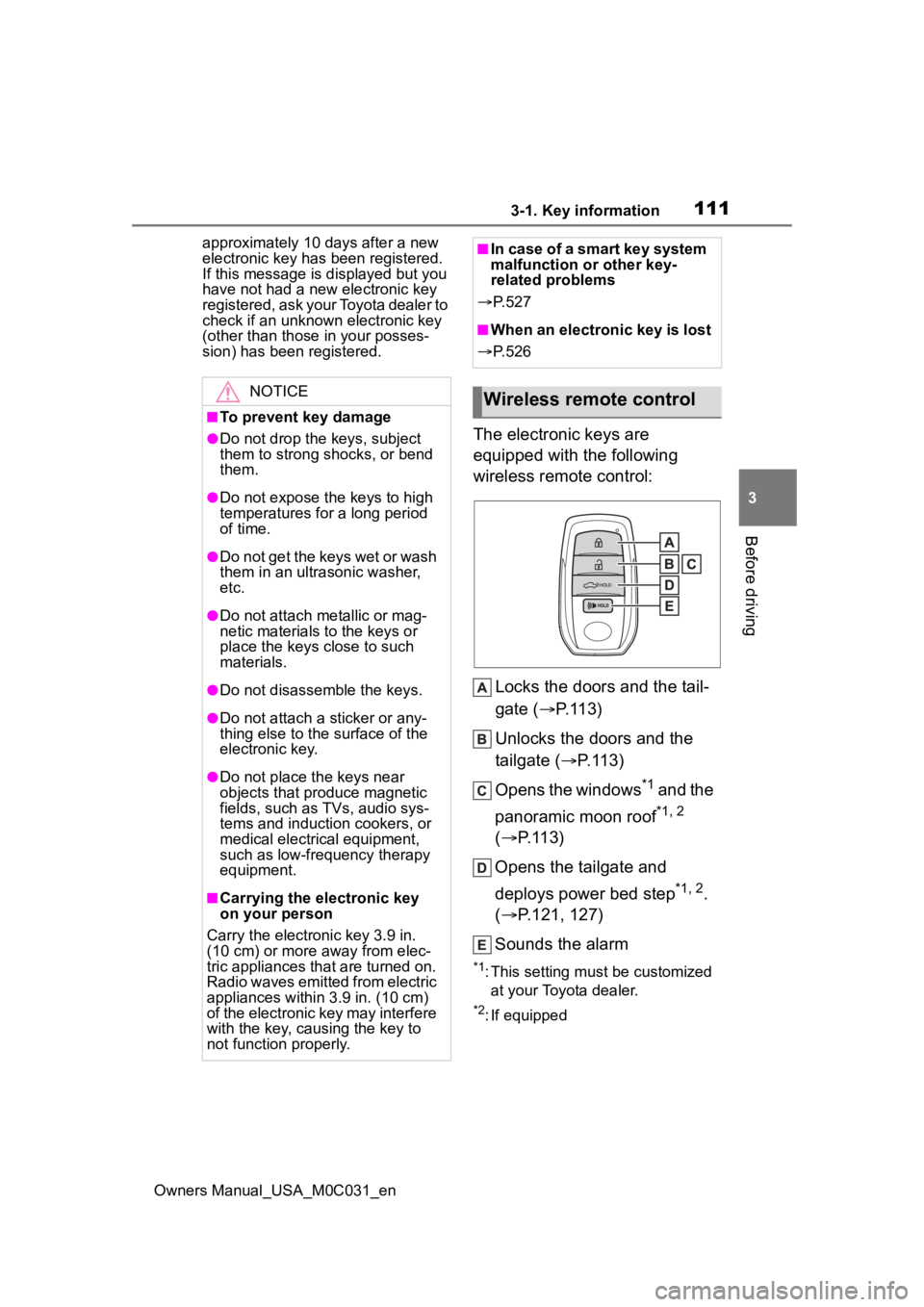
The electronic keys are
equipped with the following
wireless remote control:
Locks the doors and the tail-
gate ( P.113)
Unlocks the doors and the
tailgate ( P.113)
Opens the windows
*1 and the
panoramic moon roof
*1, 2
( P.113)
Opens the tailgate and
deploys power bed step
*1, 2.
( P.121, 127)
Sounds the alarm
*1: This setting must be customized at your Toyota dealer.
*2: If equipped
NOTICE
■To prevent key damage
●Do not drop the keys, subject
them to strong shocks, or bend
them.
●Do not expose the keys to high
temperatures for a long period
of time.
●Do not get the keys wet or wash
them in an ultrasonic washer,
etc.
●Do not attach metallic or mag-
netic materials to the keys or
place the keys close to such
materials.
●Do not disassemble the keys.
●Do not attach a sticker or any-
thing else to the surface of the
electronic key.
●Do not place th e keys near
objects that produce magnetic
fields, such as TVs, audio sys-
tems and induction cookers, or
medical electrical equipment,
such as low-frequency therapy
equipment.
■Carrying the electronic key
on your person
Carry the electronic key 3.9 in.
(10 cm) or more away from elec-
tric appliances that are turned on.
Radio waves emitted from electric
appliances within 3.9 in. (10 cm)
of the electronic key may interfere
with the key, causing the key to
not function properly.
■In case of a smart key system
malfunction or other key-
related problems
P. 5 2 7
■When an electronic key is lost
P. 5 2 6
Wireless remote control
Page 112 of 618
1123-1. Key information
Owners Manual_USA_M0C031_en
■Theft deterrent panic mode
When is pressed for longer
than about one second, an alarm
will sound intermittently and the
vehicle lights will f lash to deter any
person from trying to break into or
damage your vehicle.
To stop the alarm, press any button
on the electronic key.
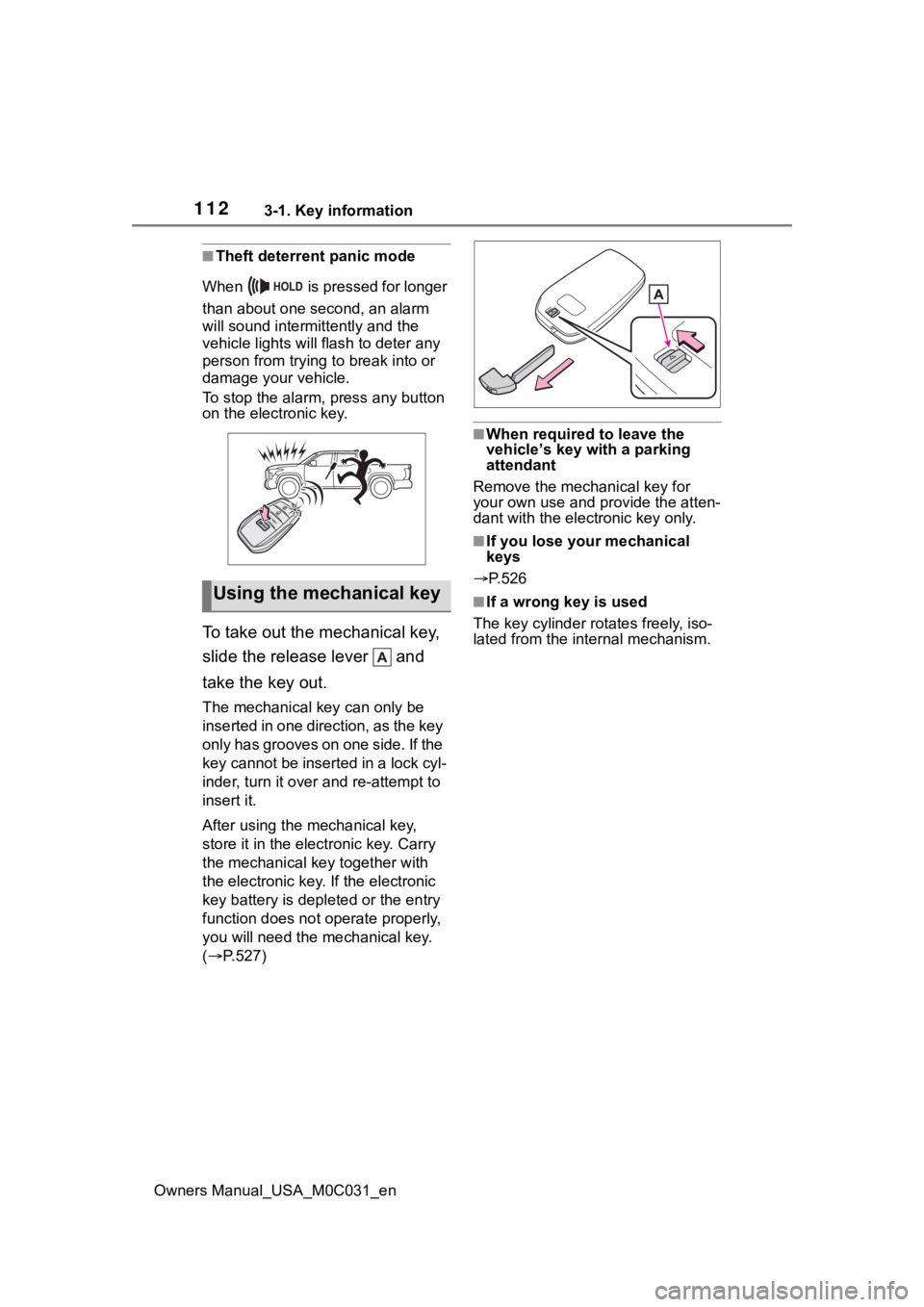
To take out the mechanical key,
slide the release lever and
take the key out.
The mechanical key can only be
inserted in one direction, as the key
only has grooves on one side. If the
key cannot be inserted in a lock cyl-
inder, turn it over and re-attempt to
insert it.
After using the mechanical key,
store it in the electronic key. Carry
the mechanical k ey together with
the electronic key. If the electronic
key battery is dep leted or the entry
function does not operate properly,
you will need the m echanical key.
( P.527)
■When required to leave the
vehicle’s key wi th a parking
attendant
Remove the mechanical key for
your own use and p rovide the atten-
dant with the elec tronic key only.
■If you lose your mechanical
keys
P.526
■If a wrong key is used
The key cylinder rotates freely, iso-
lated from the internal mechanism.Using the mechanical key