lights TOYOTA TUNDRA HYBRID 2022 Workshop Manual
[x] Cancel search | Manufacturer: TOYOTA, Model Year: 2022, Model line: TUNDRA HYBRID, Model: TOYOTA TUNDRA HYBRID 2022Pages: 618, PDF Size: 19.91 MB
Page 307 of 618
3074-5. Using the driving support systems
Owners Manual_USA_M0C031_en
4
Driving
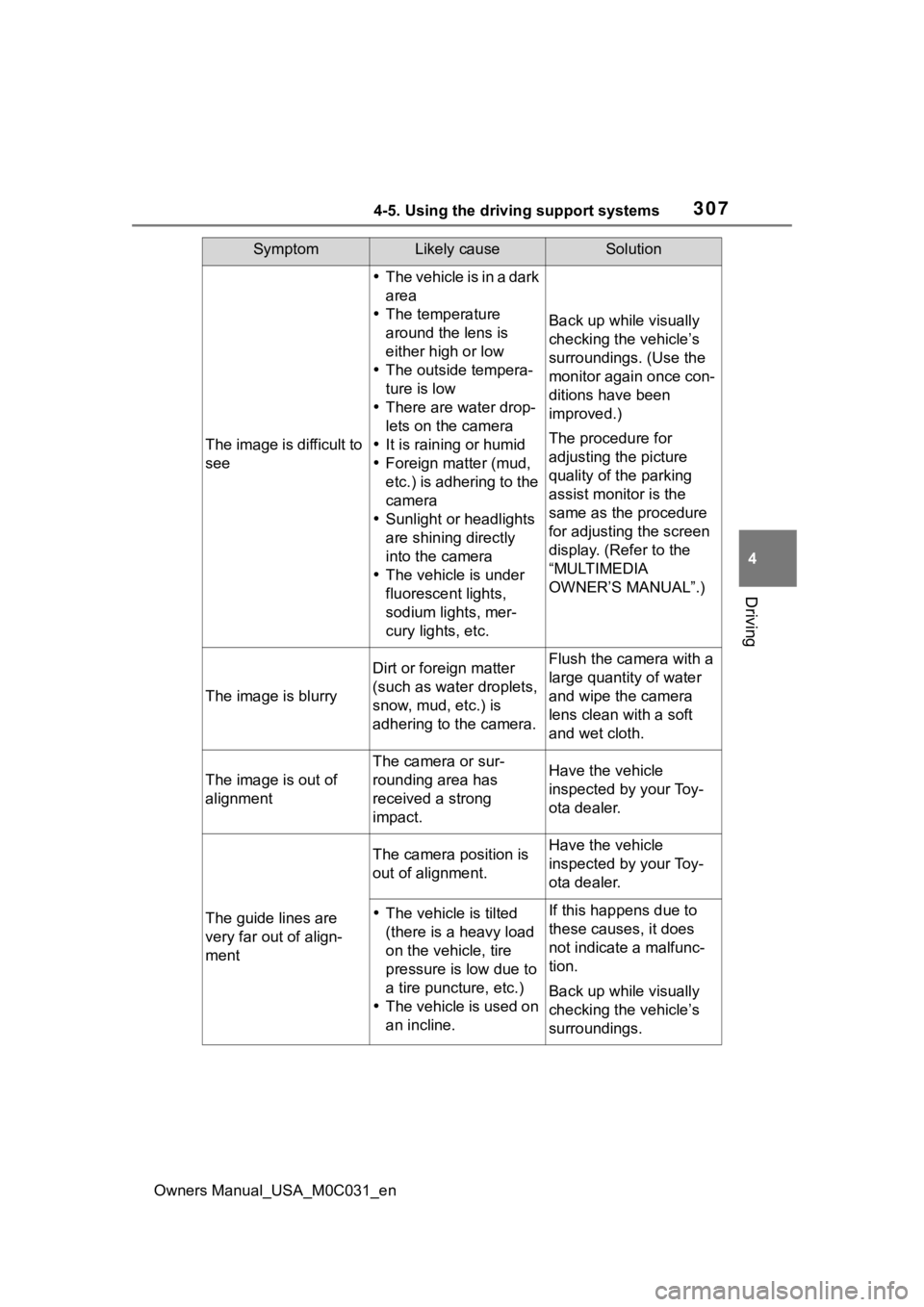
SymptomLikely causeSolution
The image is difficult to
see
The vehicle is in a dark
area
The temperature
around the lens is
either high or low
The outside tempera-
ture is low
There are water drop-
lets on the camera
It is raining or humid
Foreign matter (mud,
etc.) is adhering to the
camera
Sunlight or headlights
are shining directly
into the camera
The vehicle is under
fluorescent lights,
sodium lights, mer-
cury lights, etc.
Back up while visually
checking the vehicle’s
surroundings. (Use the
monitor again once con-
ditions have been
improved.)
The procedure for
adjusting the picture
quality of the parking
assist monitor is the
same as the procedure
for adjusting the screen
display. (Refer to the
“MULTIMEDIA
OWNER’S MANUAL”.)
The image is blurry
Dirt or foreign matter
(such as water droplets,
snow, mud, etc.) is
adhering to the camera.Flush the camera with a
large quantity of water
and wipe the camera
lens clean with a soft
and wet cloth.
The image is out of
alignment
The camera or sur-
rounding area has
received a strong
impact.Have the vehicle
inspected by your Toy-
ota dealer.
The guide lines are
very far out of align-
ment
The camera position is
out of alignment.Have the vehicle
inspected by your Toy-
ota dealer.
The vehicle is tilted
(there is a heavy load
on the vehicle, tire
pressure is low due to
a tire puncture, etc.)
The vehicle is used on
an incline.If this happens due to
these causes, it does
not indicate a malfunc-
tion.
Back up while visually
checking the vehicle’s
surroundings.
Page 341 of 618
3414-5. Using the driving support systems
Owners Manual_USA_M0C031_en
4
Driving
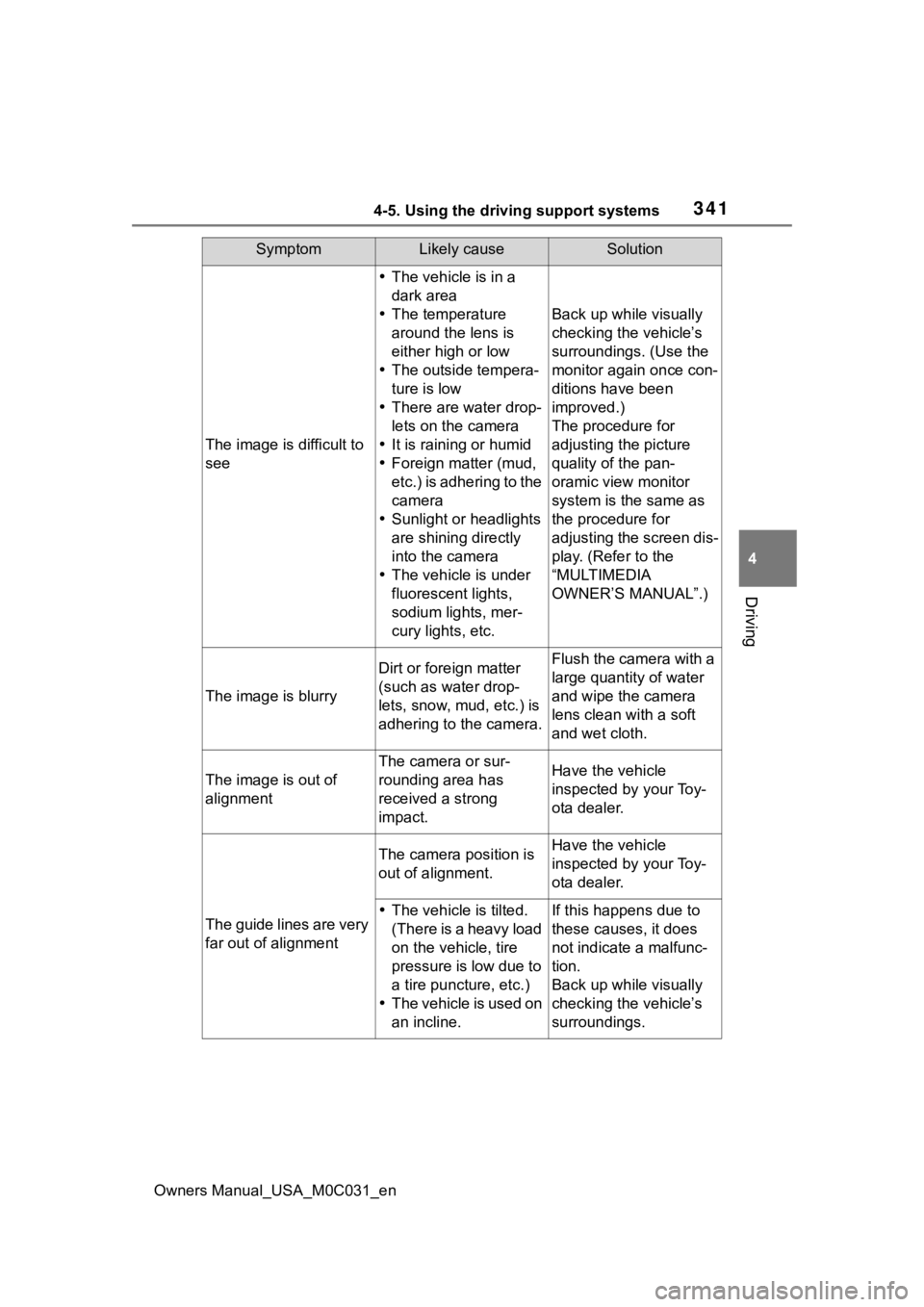
SymptomLikely causeSolution
The image is difficult to
see
The vehicle is in a
dark area
The temperature
around the lens is
either high or low
The outside tempera-
ture is low
There are water drop-
lets on the camera
It is raining or humid
Foreign matter (mud,
etc.) is adhering to the
camera
Sunlight or headlights
are shining directly
into the camera
The vehicle is under
fluorescent lights,
sodium lights, mer-
cury lights, etc.
Back up while visually
checking the vehicle’s
surroundings. (Use the
monitor again once con-
ditions have been
improved.)
The procedure for
adjusting the picture
quality of the pan-
oramic view monitor
system is the same as
the procedure for
adjusting the screen dis-
play. (Refer to the
“MULTIMEDIA
OWNER’S MANUAL”.)
The image is blurry
Dirt or fore ign matter
(such as water drop-
lets, snow, mud, etc.) is
adhering to the camera.Flush the camera with a
large quantity of water
and wipe the camera
lens clean with a soft
and wet cloth.
The image is out of
alignment
The camera or sur-
rounding area has
received a strong
impact.Have the vehicle
inspected by your Toy-
ota dealer.
The guide lines are very
far out of alignment
The camera position is
out of alignment.Have the vehicle
inspected by your Toy-
ota dealer.
The vehicle is tilted.
(There is a heavy load
on the vehicle, tire
pressure is low due to
a tire puncture, etc.)
The vehicle is used on
an incline.If this happens due to
these causes, it does
not indicate a malfunc-
tion.
Back up while visually
checking the vehicle’s
surroundings.
Page 367 of 618

3674-5. Using the driving support systems
Owners Manual_USA_M0C031_en
4
Driving
approximately 6 mph (10 km/h).
• With the rear d ifferential is
unlocked: when the vehicle speed
exceeds approximately 15 mph
(25 km/h).
■When the Crawl Control sys-
tem is operated continuously
●If Crawl Control is used continu-
ously for a long time, the brake
system overheats . In this case, a
buzzer will sou nd, a message
stating a malfunction will be dis-
played on the multi-information
display, and the Crawl Control
indicator will flash and then go off.
In this event, as Crawl Control will
be temporarily inoperable, stop
the vehicle immediately in a safe
place, and allow the brake system
to cool down suffi ciently until the
message goes off. (In the mean-
time, normal driving is possible.)
●If Crawl Control is used continu-
ously for a long time, the auto-
matic transmission overheats. In
this case, a buzzer will sound, the
system will be temporarily can-
celed, and a message stating a
malfunction may be displayed on
the multi-informat ion display. In
this event, stop th e vehicle in a
safe place until the message goes
off.
■Sounds and vibrations caused
by the Crawl Control system
●A sound may be heard from the
hybrid system compartment when
the hybrid system is started or just
after the vehicle begins to move.
This sound does not indicate that
a malfunction has occurred in
Crawl Control system.
●Either of the following conditions
may occur when the Crawl Control
system is operating. None of
these are indicators that a mal-
function has occurred.
• Vibrations may be felt through the vehicle body and steering.
• A motor sound may be heard after
the vehicle comes to a stop.
■When there is a malfunction in
the system
Warning lights and/or warning mes-
sages will tu rn on. (P.501, 511)
Page 371 of 618
3714-5. Using the driving support systems
Owners Manual_USA_M0C031_en
4
Driving
*: If equipped
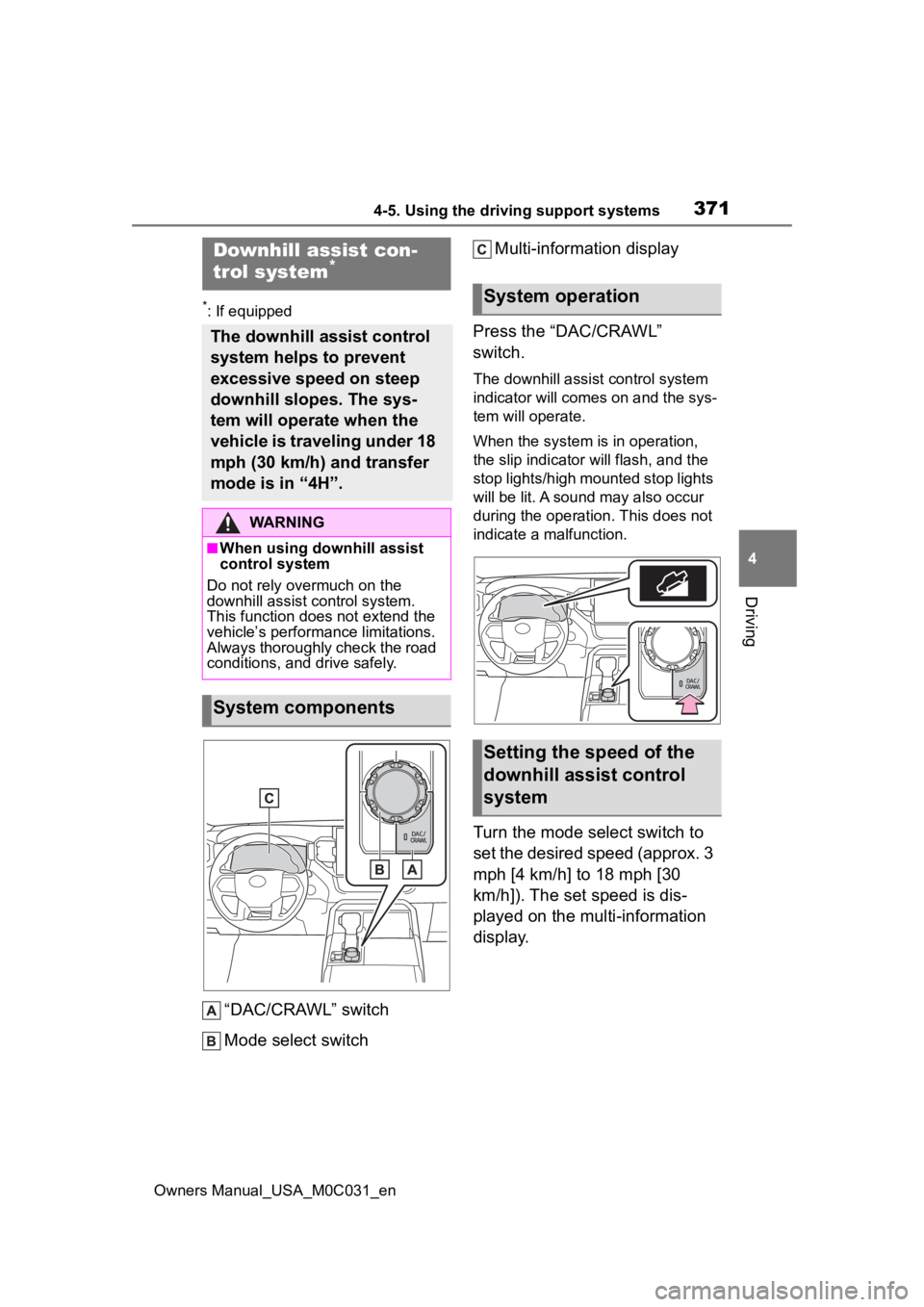
“DAC/CRAWL” switch
Mode select switch Multi-information display
Press the “DAC/CRAWL”
switch.
The downhill assist control system
indicator will comes on and the sys-
tem will operate.
When the system is in operation,
the slip indicator will flash, and the
stop lights/high mounted stop lights
will be lit. A sound may also occur
during the operation. This does not
indicate a malfunction.
Turn the mode select switch to
set the desired speed (approx. 3
mph [4 km/h] to 18 mph [30
km/h]). The set speed is dis-
played on the multi-information
display.
Downhill assist con-
trol system*
The downhill assist control
system helps to prevent
excessive speed on steep
downhill slopes. The sys-
tem will operate when the
vehicle is traveling under 18
mph (30 km/h) and transfer
mode is in “4H”.
WARNING
■When using downhill assist
control system
Do not rely overmuch on the
downhill assist control system.
This function does not extend the
vehicle’s performance limitations.
Always thoroughly check the road
conditions, and drive safely.
System components
System operation
Setting the speed of the
downhill assist control
system
Page 374 of 618

3744-5. Using the driving support systems
Owners Manual_USA_M0C031_en
system detects a panic stop sit-
uation
■Enhanced VSC (Enhanced
Vehicle Stability Control)
Provides cooperative control of
the ABS, TRAC, VSC and EPS.
Helps to maintai n directional
stability when swerving on slip-
pery road surfaces by con-
trolling steering performance.
■Trailer Sway Control
Helps the driver to control trailer
sway by selectively applying
brake pressure for individual
wheels and reducing driving
torque when trailer sway is
detected.
■TRAC (Traction Control)
Helps to maintain drive power
and prevent the drive wheels
from spinning when starting the
vehicle or accelerating on slip-
pery roads
■Hill-start assist control
Helps to reduce the backward
movement of the vehicle when
starting on an uphill
■AVS (Adaptive Variable
Suspension System) (if
equipped)
The damping force of the shock
absorbers are independently
controlled for the 4 wheels
according to factors including
the road surface conditions and
driving operation, contributing
toward enhancing smooth driv- ing comfort and superior stabil-
ity, and helping to maintain
vehicle posture.
In addition, the damping force
can be changed by selecting the
drive mode with the driving
mode select (
P.358), and driv-
ing comfort can be ensured
during off-road driving by setting
the front-wheel drive control
switch to “4L”.( P.361)
■EPS (Electric Power Steer-
ing)
Employs an electric motor to
reduce the amount of effort
needed to turn the steering
wheel
■The Secondary Collision
Brake
When the SRS airbag sensor
detects a collision and the sys-
tem operates, the brakes and
brake lights are automatically
controlled to reduce the vehicle
speed and help reduce the pos-
sibility of further damage due to
a secondary collision.
■When the
TRAC/VSC/ABS/Trailer Sway
Control systems are operating
The slip indicator light will flash
while the TRAC/VSC/ABS/Trailer
Sway Control systems are operat-
ing.
Page 389 of 618
3894-6. Driving tips
Owners Manual_USA_M0C031_en
4
Driving
4-6.Driving tips
When using Eco drive mode, the
torque corresponding to the
accelerator pedal depression
amount can be generated more
smoothly than it is in normal
conditions. In addition, the oper-
ation of the air conditioning sys-
tem (heating/cooling) will be
minimized, improving the fuel
economy. ( P.358)
The Eco-friendly driving is pos-
sible by keeping the indicate of
Hybrid System Indicator within
Eco area. ( P.97)
Shift the shift lever to D when
stopped at a traffic light, or driv-
ing in heavy traffic etc. Shift the
shift lever to P when parking.
When using the N, there is no
positive effect on fuel consump-
tion. When using the air condi-
tioning system, etc., the hybrid
battery (traction battery) power
is consumed.
Drive your vehicle smoothly.
Avoid abrupt acceleration and
deceleration. Gradual accel-
eration and deceleration will
make more effective use of
the electric motor (traction
motor) without having to use
gasoline engine power.
Avoid repeated acceleration.
Repeated acceleration con-
sumes hybrid battery (trac-
tion battery) power, resulting
in poor fuel consumption. Bat-
tery power can be restored by
driving with the accelerator
pedal slightly released.
Make sure to operate the brakes
gently and in a timely manner. A
greater amount of electrical
energy can be regenerated
when slowing down.
Repeated acceleration and
deceleration, as well as long
waits at traffic lights, will lead to
bad fuel economy. Check traffic
reports before leaving and avoid
delays as much as possible.
When driving in a traffic jam,
gently release the brake pedal
to allow the vehicle to move for-
ward slightly while avoiding
Hybrid Electric Vehi-
cle driving tips
For economical and ecolog-
ical driving, pay attention to
the following points:
Using Eco drive mode
Use of Hybrid System
Indicator
Shift lever operation
Accelerator pedal/brake
pedal operation
When braking
Delays
Page 395 of 618
3954-6. Driving tips
Owners Manual_USA_M0C031_en
4
Driving
Perform the following according
to the driving conditions:
Do not try to forcibly open a
window or move a wiper that
is frozen. Pour warm water
over the frozen area to melt
the ice. Wipe away the water
immediately to prevent it from
freezing.
To ensure proper operation of
the climate control system
fan, remove any snow that
has accumulated on the air
inlet vents in front of the wind-
shield.
Check for and remove any
excess ice or snow that may
have accumulated on the
exterior lights, vehicle’s roof,
chassis, around the tires or on
the brakes.
Remove any snow or mud
from the bottom of your shoes
before getting in the vehicle. Accelerate the vehicle slowly,
keep a safe distance between
you and the vehicle ahead, and
drive at a reduced speed suit-
able to road conditions.
Park the vehicle and move
the shift lever to P without set-
ting the parking brake. The
parking brake may freeze up,
preventing it from being
released. If the vehicle is
parked without setting the
parking brake, make sure to
block the wheels.
Failure to do so may be dan-
gerous because it may cause
the vehicle to move unexpect-
edly, possibly leading to an
accident.
When the parking brake is in auto-
matic mode, release the parking
brake after shifting the shift lever to
P. ( P.206)
If the vehicle is parked without
setting the parking brake,
confirm that the shift lever
cannot be moved out of P
*.
*: The shift lever will be locked if it is
attempted to be shifted from P to
any other position without
depressing the brake pedal. If the
shift lever can be shifted from P,
there may be a problem with the
shift lock system. Have the vehi-
cle inspected by your Toyota
NOTICE
■Repairing or replacing snow
tires
Request repairs or replacement of
snow tires from Toyota dealers or
legitimate tire retailers.
This is because the removal and
attachment of snow tires affects
the operation of the tire pressure
warning valves and transmitters.
Before driving the vehicle
When driving the vehicle
When parking the vehicle
Page 397 of 618
399
Owners Manual_USA_M0C031_en
5
5
Interior features
Interior features
5-1. Using the air conditioning system and defogger
Automatic air conditioning system ....................... 400
Heated steering wheel/seat heaters/seat ventilators
.................................. 407
5-2. Using the interior lights Interior lights list .......... 410
5-3. Using the storage features List of storage features 413
Luggage compartment fea- tures .......................... 417
5-4. Using the other interior features
Other interior features . 420
Garage door opener.... 433
Page 408 of 618
4105-2. Using the interior lights
Owners Manual_USA_M0C031_en
5-2.Using the interior lights
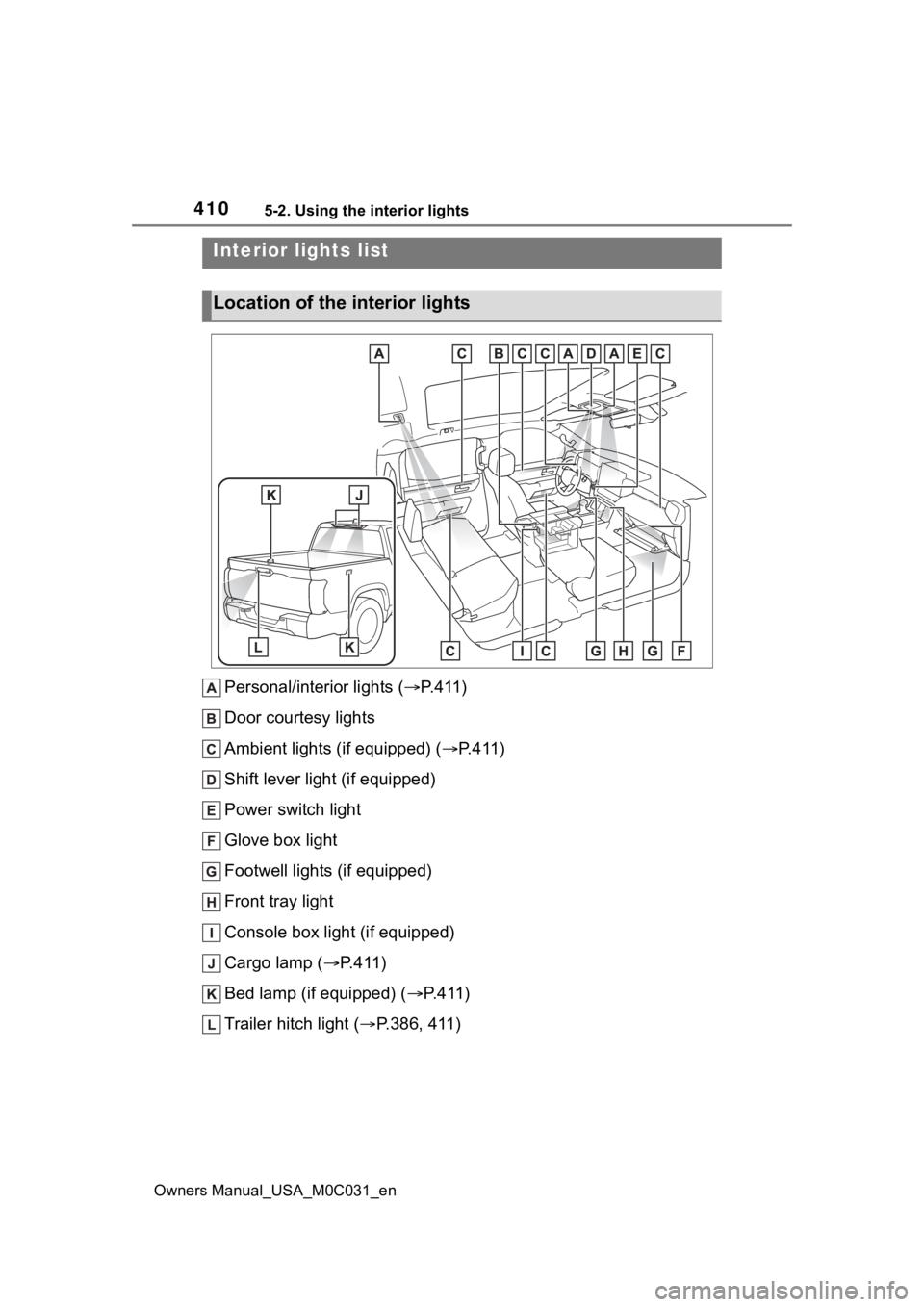
Personal/interior lights (P.411)
Door courtesy lights
Ambient lights (if equipped) ( P.411)
Shift lever light (if equipped)
Power switch light
Glove box light
Footwell lights (if equipped)
Front tray light
Console box light (if equipped)
Cargo lamp ( P.411)
Bed lamp (if equipped) ( P.411)
Trailer hitch light ( P.386, 411)
Interior lights list
Location of the i nterior lights
Page 409 of 618
4115-2. Using the interior lights
Owners Manual_USA_M0C031_en
5
Interior features
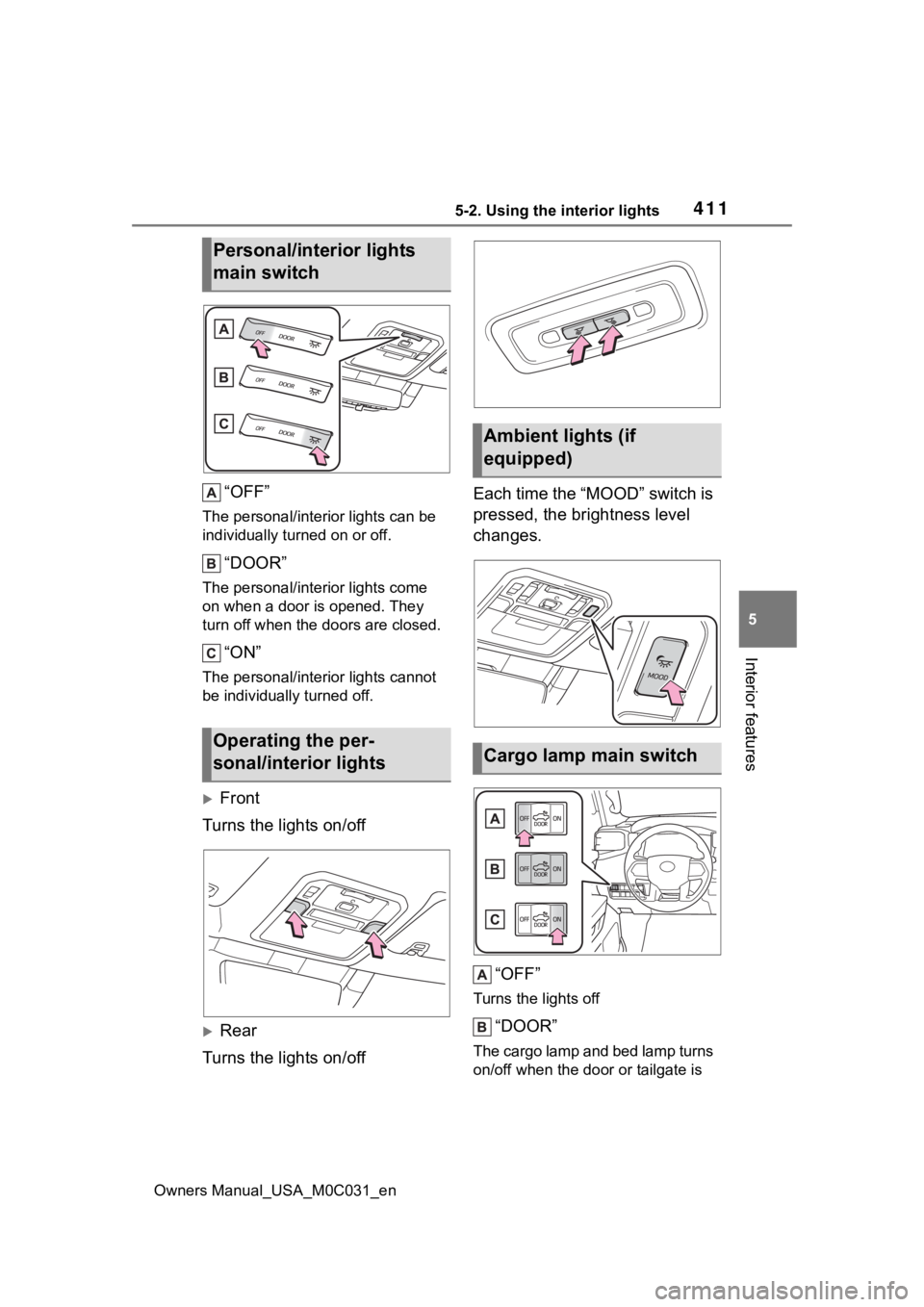
“OFF”
The personal/interior lights can be
individually turned on or off.
“DOOR”
The personal/interior lights come
on when a door is opened. They
turn off when the doors are closed.
“ON”
The personal/interior lights cannot
be individually turned off.
Front
Turns the lights on/off
Rear
Turns the lights on/off Each time the “MOOD” switch is
pressed, the brightness level
changes.
“OFF”
Turns the lights off
“DOOR”
The cargo lamp and bed lamp turns
on/off when the doo r or tailgate is
Personal/interior lights
main switch
Operating the per-
sonal/interior lights
Ambient lights (if
equipped)
Cargo lamp main switch