clock TOYOTA TUNDRA HYBRID 2022 Owners Manual
[x] Cancel search | Manufacturer: TOYOTA, Model Year: 2022, Model line: TUNDRA HYBRID, Model: TOYOTA TUNDRA HYBRID 2022Pages: 618, PDF Size: 19.91 MB
Page 91 of 618
912-1. Instrument cluster
Owners Manual_USA_M0C031_en
2
Vehicle status information and indicators
The units used on the meter and display may differ depending on the target
region.
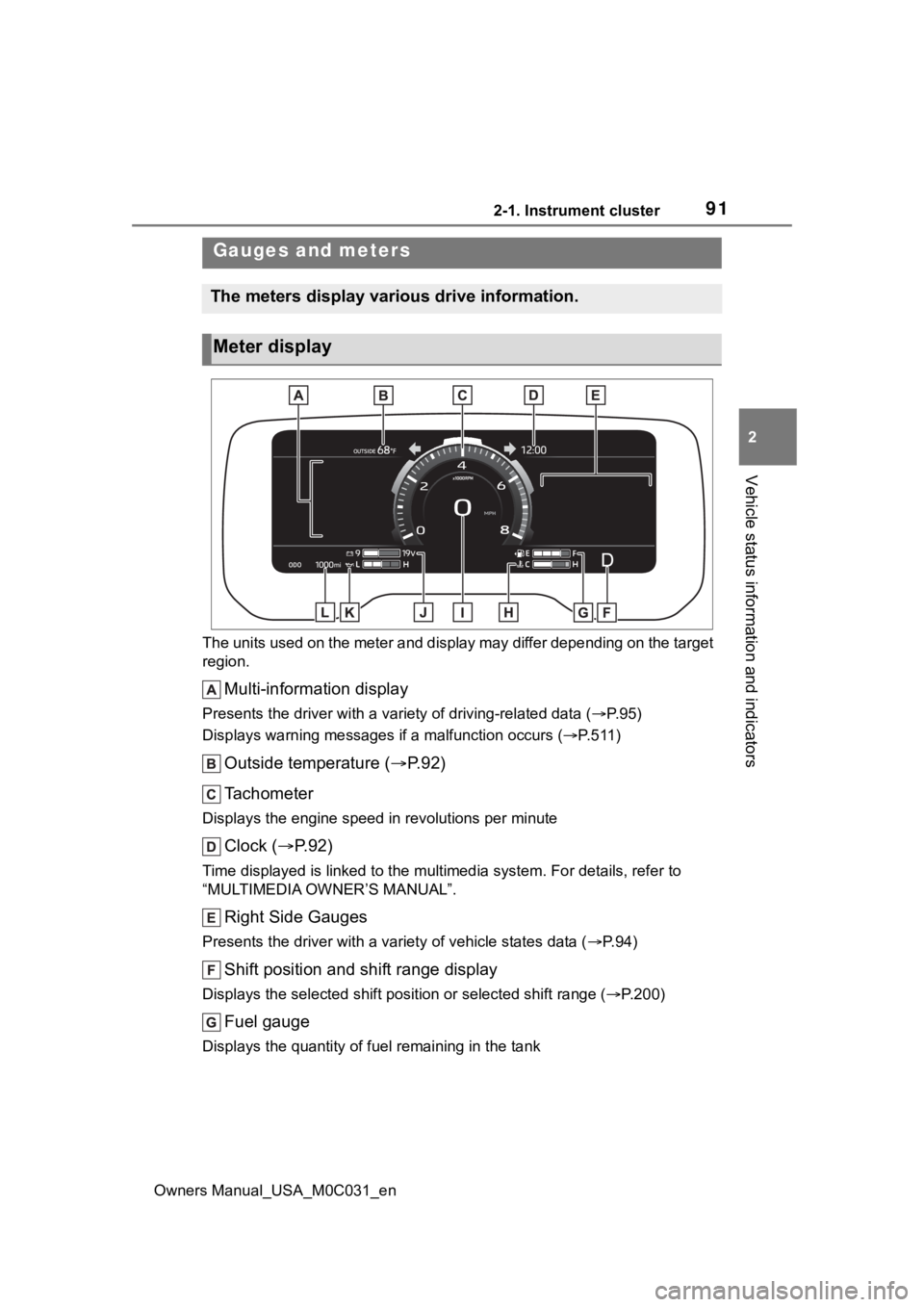
Multi-information display
Presents the driver with a variety of driving-related data ( P. 9 5 )
Displays warning messages if a malfunction occurs (P.511)
Outside temperature ( P. 9 2 )
Tachometer
Displays the engine speed in revolutions per minute
Clock ( P. 9 2 )
Time displayed is linked to the multimedia system. For details, refer to
“MULTIMEDIA OWNER’S MANUAL”.
Right Side Gauges
Presents the driver with a variety of vehicle states data ( P. 9 4 )
Shift position and shift range display
Displays the selected shift posit ion or selected shift range (P.200)
Fuel gauge
Displays the quantity of fu el remaining in the tank
Gauges and meters
The meters display various drive information.
Meter display
Page 92 of 618
922-1. Instrument cluster
Owners Manual_USA_M0C031_en
Engine coolant temperature gauge
Displays the engine coolant temperature
Speedometer
Displays the vehicle speed
Voltmeter
Displays the charge state
Engine oil pressure gauge
Displays the engine oil pressure
Odometer and trip meter ( P.93)
■The meters and display illumi-
nate when
The power swit ch is in ON.
■Tachometer needle feature
The tachometer needle will fade in
or out during the engine starting or
stopping, respectively.
The needle is completely visible
after the engine is turned on or
turned off.
■Clock settings screen
If clock setting item is displayed
when is selected on the multi-
information display, the system may
be malfunctioning. Have the vehicle
inspected by your Toyota dealer.
■Outside temperature display
●In the following si tuations, the cor-
rect outside tempe rature may not
be displayed, or the display may
take longer than normal to
change.
• When stopped, or driving at low
speeds (less than 12 mph [20
km/h])
• When the outside temperature
has changed suddenly (at the
entrance/exit of a garage, tunnel,
etc.)
●When “--” or “E” is displayed, the
system may be malfunctioning.
Take your vehicle to your Toyota
dealer.
●Displays the outsi de temperature
within the range of -40°F (-40°C)
to 122°F (50°C).
●When the outside temperature is
approximately 37°F (3°C) or
lower, the indicator will flash
for approximately 10 seconds,
then stay on.
■Liquid crystal display
P. 9 6
■Customization
Settings (e. g. mete r display) can be
changed on screen of the multi-
information display. ( P. 9 9 )
WARNING
■The information display at
low temperatures
Allow the interior of the vehicle to
warm up before using the liquid
crystal information display. At
extremely low temperatures, the
information disp lay monitor may
respond slowly, and display
changes may be delayed.
Page 457 of 618
4596-3. Do-it-yourself maintenance
Owners Manual_USA_M0C031_en
6
Maintenance and care
Items
Clean funnel
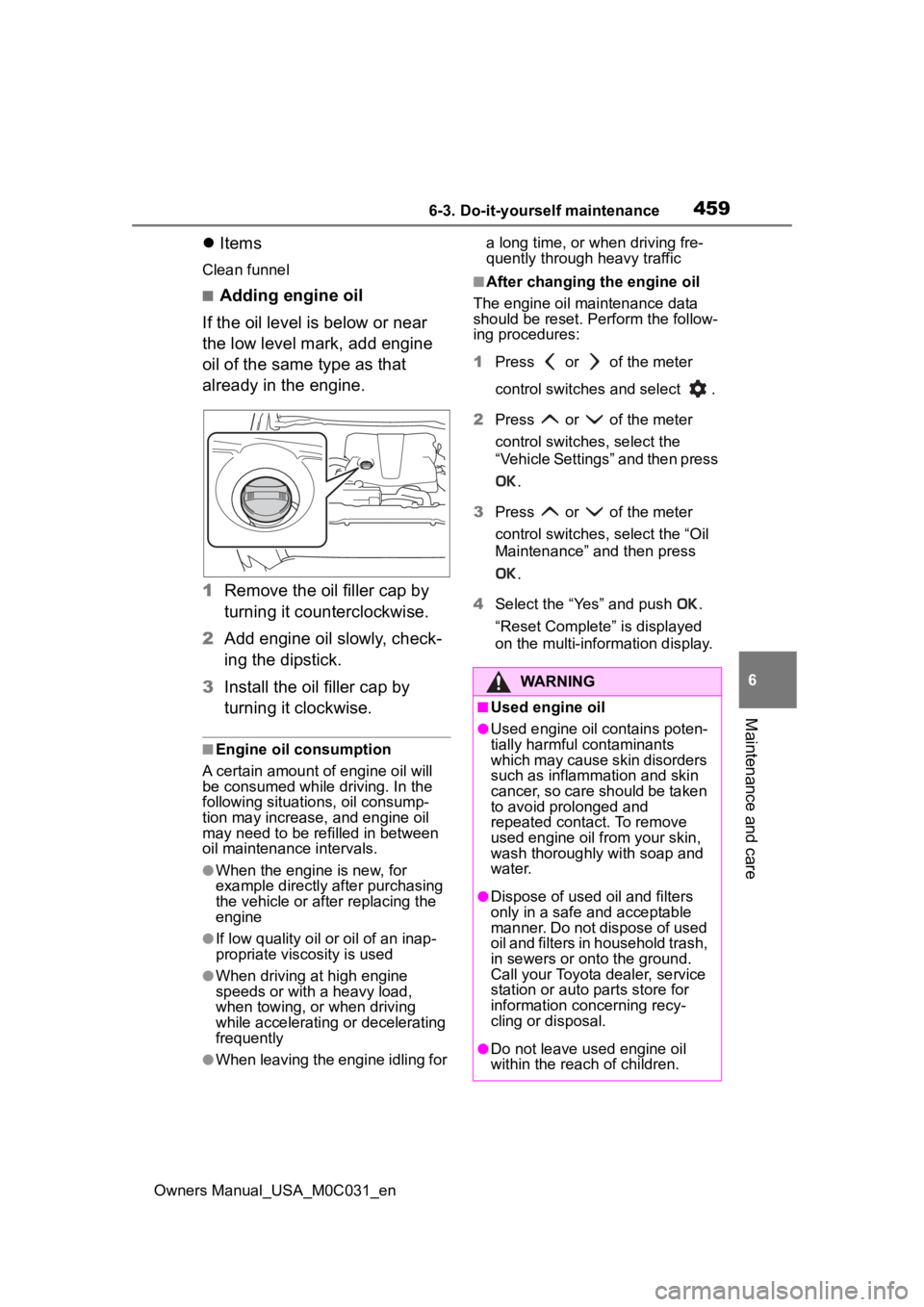
■Adding engine oil
If the oil level is below or near
the low level mark, add engine
oil of the same type as that
already in the engine.
1 Remove the oil filler cap by
turning it counterclockwise.
2 Add engine oil slowly, check-
ing the dipstick.
3 Install the oil filler cap by
turning it clockwise.
■Engine oil consumption
A certain amount of engine oil will
be consumed while driving. In the
following situatio ns, oil consump-
tion may increase, and engine oil
may need to be ref illed in between
oil maintenance intervals.
●When the engine is new, for
example directly after purchasing
the vehicle or after replacing the
engine
●If low quality oil or oil of an inap-
propriate viscosity is used
●When driving at high engine
speeds or with a heavy load,
when towing, or when driving
while accelerating o r decelerating
frequently
●When leaving the engine idling for a long time, or when driving fre-
quently through heavy traffic
■After changing the engine oil
The engine oil maintenance data
should be reset. Pe rform the follow-
ing procedures:
1 Press or of the meter
control switches and select .
2 Press or of the meter
control switches, select the
“Vehicle Settings” and then press
.
3 Press or of the meter
control switches, select the “Oil
Maintenance” and then press
.
4 Select the “Yes” and push .
“Reset Complete” is displayed
on the multi-info rmation display.
WARNING
■Used engine oil
●Used engine oil contains poten-
tially harmful contaminants
which may cause skin disorders
such as inflammation and skin
cancer, so care should be taken
to avoid prolonged and
repeated contact. To remove
used engine oil from your skin,
wash thoroughly with soap and
water.
●Dispose of used oil and filters
only in a safe and acceptable
manner. Do not dispose of used
oil and filters in h ousehold trash,
in sewers or onto the ground.
Call your Toyota dealer, service
station or auto parts store for
information concerning recy-
cling or disposal.
●Do not leave used engine oil
within the reach of children.
Page 489 of 618
4916-3. Do-it-yourself maintenance
Owners Manual_USA_M0C031_en
6
Maintenance and care
■Condensation build-up on the
inside of the lens
Temporary condensation build-up
on the inside of the headlight lens
does not indicate a malfunction.
Contact your Toyota dealer for more
information in the following situa-
tions:
●Large drops of water have built up
on the inside of the lens.
●Water has built up inside the
headlight.
■When replacing light bulbs
P. 4 8 9
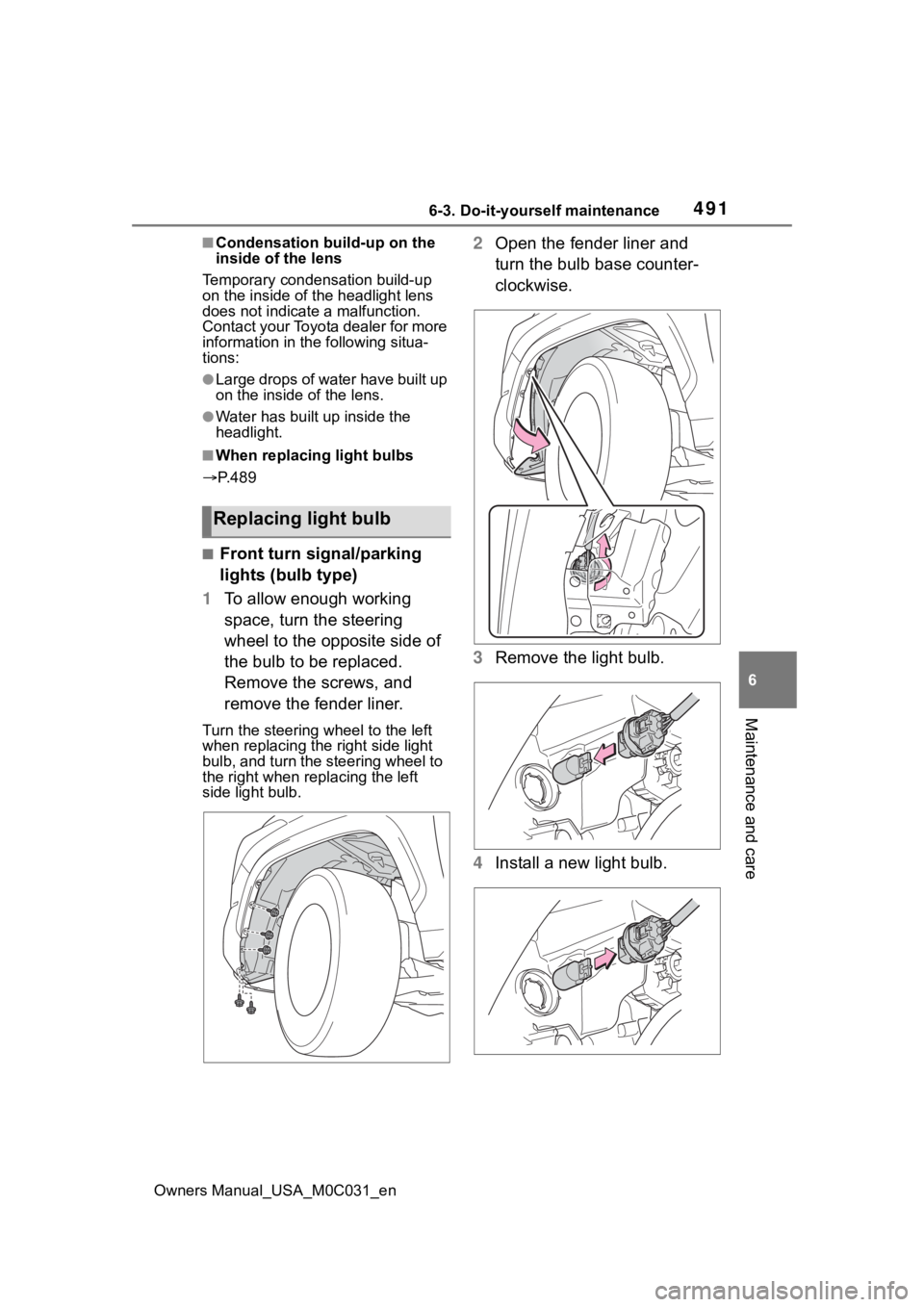
■Front turn signal/parking
lights (bulb type)
1 To allow enough working
space, turn the steering
wheel to the opposite side of
the bulb to be replaced.
Remove the screws, and
remove the fender liner.
Turn the steering wheel to the left
when replacing the right side light
bulb, and turn the steering wheel to
the right when rep lacing the left
side light bulb.
2 Open the fender liner and
turn the bulb base counter-
clockwise.
3 Remove the light bulb.
4 Install a new light bulb.
Replacing light bulb
Page 516 of 618
5187-2. Steps to take in an emergency
Owners Manual_USA_M0C031_en
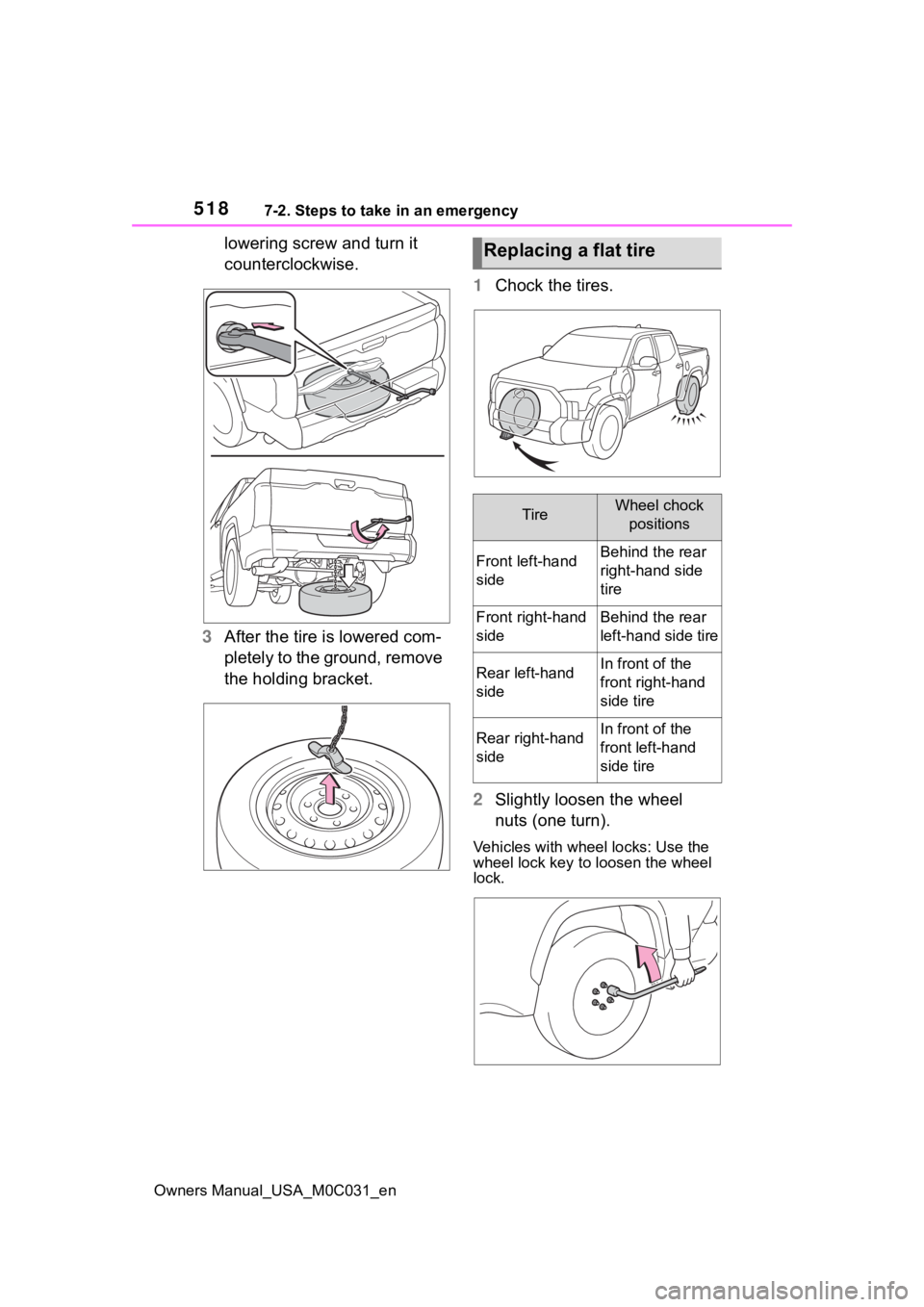
lowering screw and turn it
counterclockwise.
3 After the tire is lowered com-
pletely to the ground, remove
the holding bracket. 1
Chock the tires.
2 Slightly loosen the wheel
nuts (one turn).
Vehicles with wheel locks: Use the
wheel lock key to loosen the wheel
lock.
Replacing a flat tire
TireWheel chock
positions
Front left-hand
sideBehind the rear
right-hand side
tire
Front right-hand
sideBehind the rear
left-hand side tire
Rear left-hand
sideIn front of the
front right-hand
side tire
Rear right-hand
sideIn front of the
front left-hand
side tire
Page 519 of 618
5217-2. Steps to take in an emergency
Owners Manual_USA_M0C031_en
7
When trouble arises
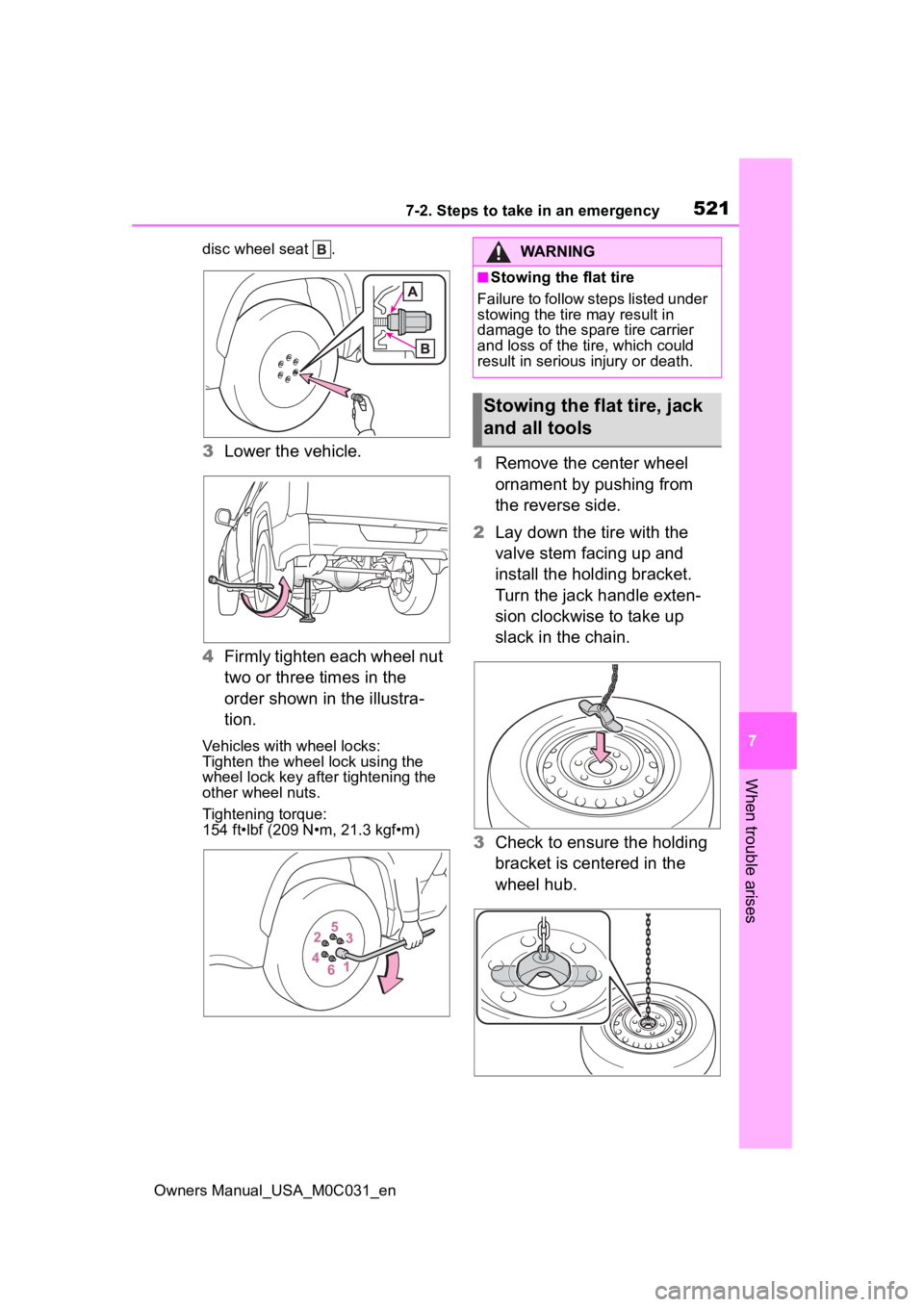
disc wheel seat .
3 Lower the vehicle.
4 Firmly tighten each wheel nut
two or three times in the
order shown in the illustra-
tion.
Vehicles with wheel locks:
Tighten the wheel lock using the
wheel lock key after tightening the
other wheel nuts.
Tightening torque:
154 ft•lbf (209 N•m, 21.3 kgf•m)
1Remove the center wheel
ornament by pushing from
the reverse side.
2 Lay down the tire with the
valve stem facing up and
install the holding bracket.
Turn the jack handle exten-
sion clockwise to take up
slack in the chain.
3 Check to ensure the holding
bracket is centered in the
wheel hub.
WARNING
■Stowing the flat tire
Failure to follow steps listed under
stowing the tire may result in
damage to the spare tire carrier
and loss of the tire, which could
result in serious injury or death.
Stowing the flat tire, jack
and all tools
Page 595 of 618
Owners Manual_USA_M0C031_en
Alphabetical Index597
Seat belt extender precautions............................................. 30
Seat belt precautions ............. 52
Child-protectors .. ................... 116
Cleaning .......................... 442, 445 Aluminum wheel ornaments . 442
Aluminum wheels ................. 442
Exterior ................................. 442
Interior .................................. 445
Radar sensor........................ 226
Seat belts ............................. 445
Clock ......................................... 91
Coat hooks .............................. 426
Condenser .............................. 461
Console box ............................ 415
Console box light ................... 410
Consumption screen.............. 106
Coolant .................................... 460 Checking .............................. 460
Cooling system ...................... 460 Engine overheating .............. 535
Coussins gonflables Modification et é limination en fin
de vie des coussins gonflables ........................................... 583
Crawl Control .......................... 365
Cruise control Dynamic radar cruise control with full-speed range .......... 255
Cup holders ............................ 414
Current fuel consumption ....... 97
Curtain shield airbags ............. 36
Customizable features ........... 561
D
DAC ......................................... 372
Daytime running light system211
Daytime running lights Replacing light bulbs ............ 490
Deck divider ............................ 417 Defogger
Outside rear view mirrors .....401
Rear window.........................401
Windshield ............................401
Differential ...............................546
Digital Rear-view Mirror .........146
Dimension ...............................540
Dinghy towing .........................194
Display Dynamic radar cruise control with full-speed range ..........255
Head-up display ...................102
Intuitive parking assist ..........274
LTA (Lane Tracing Assist) .....248
Multi-information display.........95
Warning messages ............... 511
Display change button .............93
Distance until next engine oil change .....................................93
Do-it-yourself maintenance ...449
Door courtesy lights...............410
Door lock Side doors ............................ 113
Smart key system .................128
Wireless remote control........ 111
Doors Automatic door locking and unlocking system ................ 116
Door glasses ........................160
Door lock .............................. 113
Open door warning buzzer . 114, 11 6
Outside rear view mirrors .....156
Rear door child-protectors .... 116
Side doors ............................ 113
Downhill assist control system ...............................................372
Drive distance ...........................98
Drive information ......................98
Drive-start control ..................177
Page 600 of 618
602Alphabetical Index
Owners Manual_USA_M0C031_en
M
Maintenance Do-it-yourself maintenance .. 454
General maintenance ........... 449
Maintenance data................. 540
Maintenance requirements... 448
Malfunction indicator lamp.... 502
Manual headlight leveling dial ............................................... 213
Menu icons ............................... 96
Meter Boost Meter ............................ 94
Clock ...................................... 91
Engine oil pressure gauge ..... 91
Hybrid Power Meter ............... 94
Indicators................................ 89
Instrument panel light control . 94
Meter control switches ........... 96
Meters .................................... 91
Multi-information display ........ 95
Pitch and roll gauges.............. 94
Settings .................................. 99
Tow gauges ............................ 94
Voltmeter ................................ 91
Warning lights................. 87, 501
Warning messages............... 511
Meter control switches ............ 96
Mirrors Digital Rear-view Mirror........ 146
Inside rear view mirror.......... 145
Outside rear view mirror defog-gers .................................... 401
Outside rear view mirrors ..... 156
Vanity mirrors ....................... 431
Mode select switch TOW HAUL switch ............... 203
Multi-information display......... 95 Audio system-linked display ... 98
Changing the display.............. 96
Driving informatio n display ..... 97 Dynamic radar cruise control
with full-speed range ..........255
Fuel economy .........................97
Hybrid System Indicator .........97
Intuitive parking assist ..........274
LTA (Lane Tracing Assist) .....248
Menu icons .............................96
Meter control switches............96
Navigation system-linked display .............................................98
Settings ..................................99
Tire pressure ...... ..................468
Trailer settings ......................100
Vehicle information display .....98
Warning messages ............... 511
Multi-terrain Monitor...............344 Automatic display mode .......347
Camera switch......................344
Function................................345
Menu button .........................345
Multi-terrain Monitor precautions...........................................354
Screen display and functions347
Things you should know .......354
Multi-terrain Select .................369
N
Navigation system-linked display .........................................98, 102
O
Odometer...................................93
Odometer and trip meter display Display change button ............93
Display items ..........................93
Off-road precautions ..............392
Oil Differential oil ........................546
Engine oil..............................543
Transfer oil............................545