light TOYOTA TUNDRA HYBRID 2023 Owner's Guide
[x] Cancel search | Manufacturer: TOYOTA, Model Year: 2023, Model line: TUNDRA HYBRID, Model: TOYOTA TUNDRA HYBRID 2023Pages: 618, PDF Size: 13.67 MB
Page 77 of 618
771-4. Hybrid system
Owners Manual_USA_M0C052_en
1
For safety and security
started, refuel th e vehicle with at
least enough gasoline to make the
low fuel level warning light ( P.507)
go off. If there is only a small
amount of fuel, th e hybrid system
may not be able to start. (The stan-
dard amount of fuel is about 21.9 L
[5.8 gal., 4.8 Imp. gal.] when the
vehicle is on a level surface. This
value may vary whe n the vehicle is
on a slope. Add extra fuel when the
vehicle is inclined.)
■Electromagnetic waves
●High voltage parts and cables on
Hybrid Electric Vehicles incorpo-
rate electromagnetic shielding,
and therefore emi t approximately
the same amount of electromag-
netic waves as conventional gaso-
line powered vehicles or home
electronic appliances.
●Your vehicle may cause sound
interference in so me third party-
produced radio parts.
■Hybrid battery (tr action battery)
The hybrid battery (traction battery)
has a limited service life. The lifes-
pan of the hybrid battery (traction
battery) can change in accordance
with driving style and driving condi-
tions.
■Starting the hybrid system in an
extremely cold environment
When the hybrid battery (traction
battery) is extremely cold (below
approximately -31°F [-35°C]) under
the influence of t he outside tem-
perature, it may no t be possible to
start the hybrid system. In this case,
try to start the hybrid system again
after the temperature of the hybrid
battery increases due to the outside
temperature increase etc.
WARNING
■High voltage precautions
This vehicle has high voltage DC
and AC systems as well as a 12-
volt system. DC and AC high volt-
age is very dangerous and can
cause severe burns and electric
shock that may result in death or
serious injury.
●Never touch, disassemble,
remove or replace the high volt-
age parts, cables or their con-
nectors.
●The hybrid system will become
hot after starting as the system
uses high voltage. Be careful of
both the high voltage and the
high temperature, and always
obey the warning labels
attached to the vehicle.
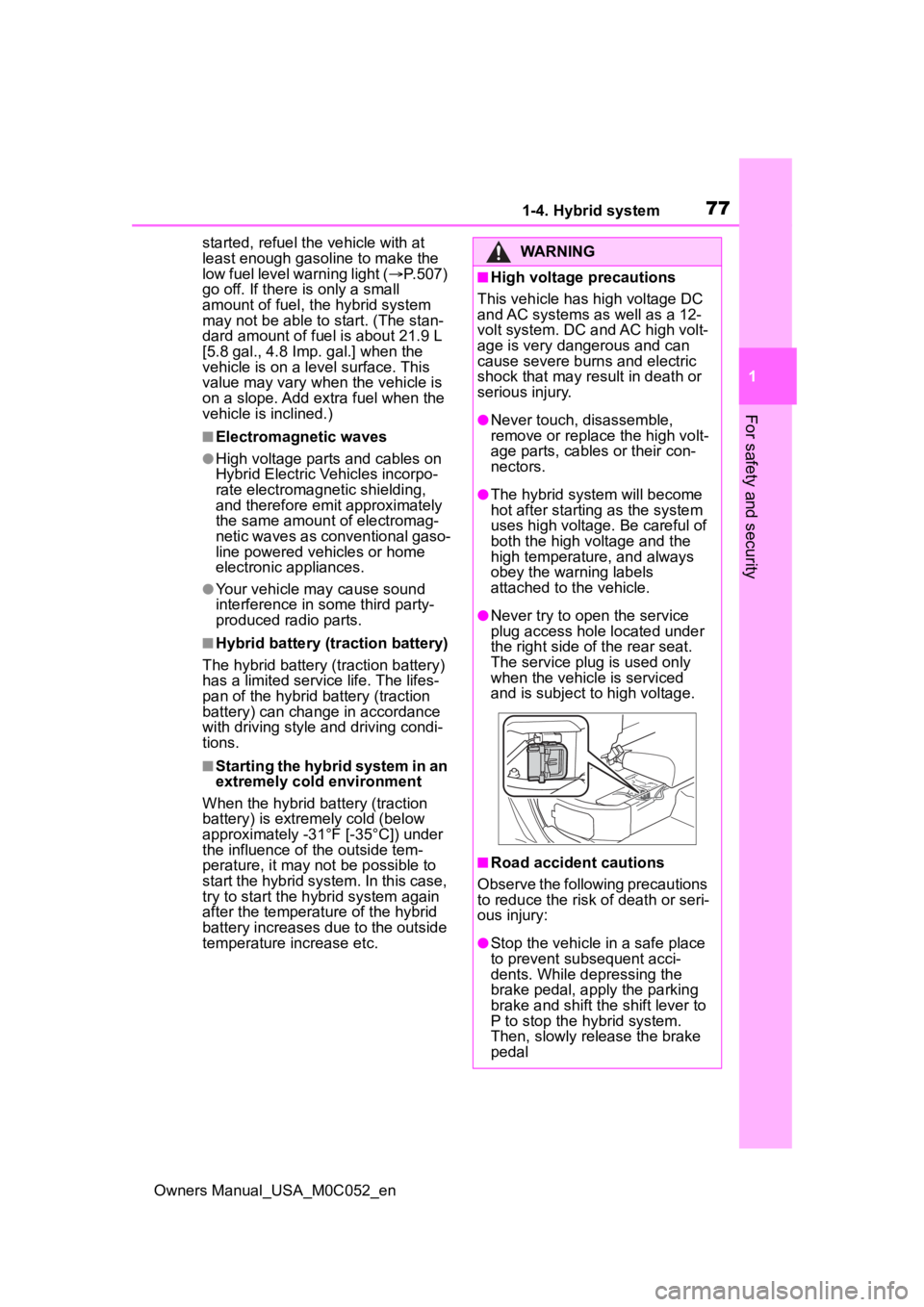
●Never try to open the service
plug access hole located under
the right side o f the rear seat.
The service plug is used only
when the vehicle is serviced
and is subject to high voltage.
■Road accident cautions
Observe the following precautions
to reduce the risk of death or seri-
ous injury:
●Stop the vehicle in a safe place
to prevent subsequent acci-
dents. While depressing the
brake pedal, apply the parking
brake and shift the shift lever to
P to stop the hybrid system.
Then, slowly release the brake
pedal
Page 80 of 618
801-4. Hybrid system
Owners Manual_USA_M0C052_en
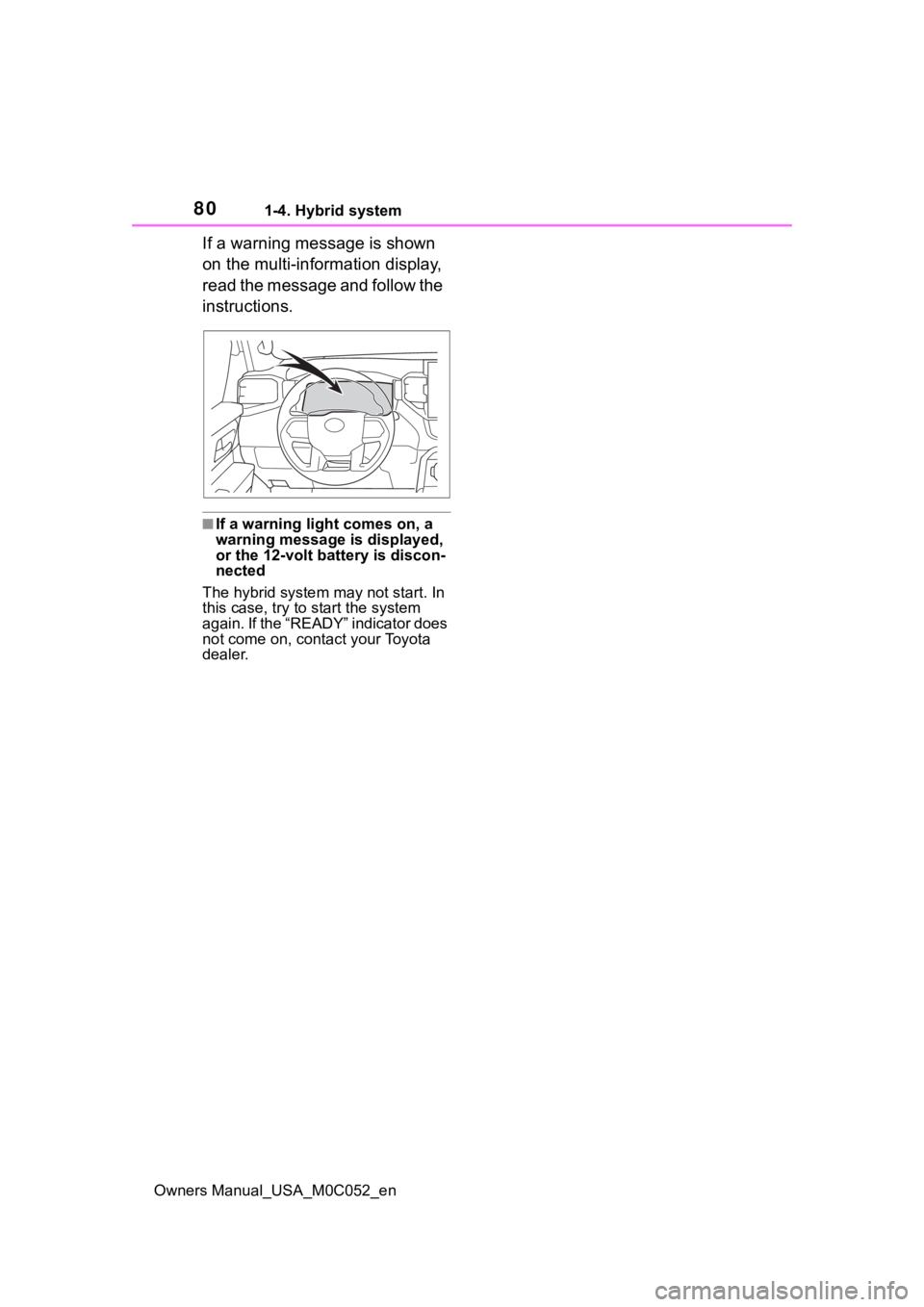
If a warning message is shown
on the multi-information display,
read the message and follow the
instructions.
■If a warning light comes on, a
warning message is displayed,
or the 12-volt battery is discon-
nected
The hybrid system may not start. In
this case, try to start the system
again. If the “READY” indicator does
not come on, contact your Toyota
dealer.
Page 81 of 618
811-5. Theft deterrent system
Owners Manual_USA_M0C052_en
1
For safety and security
1-5.Theft deterrent system
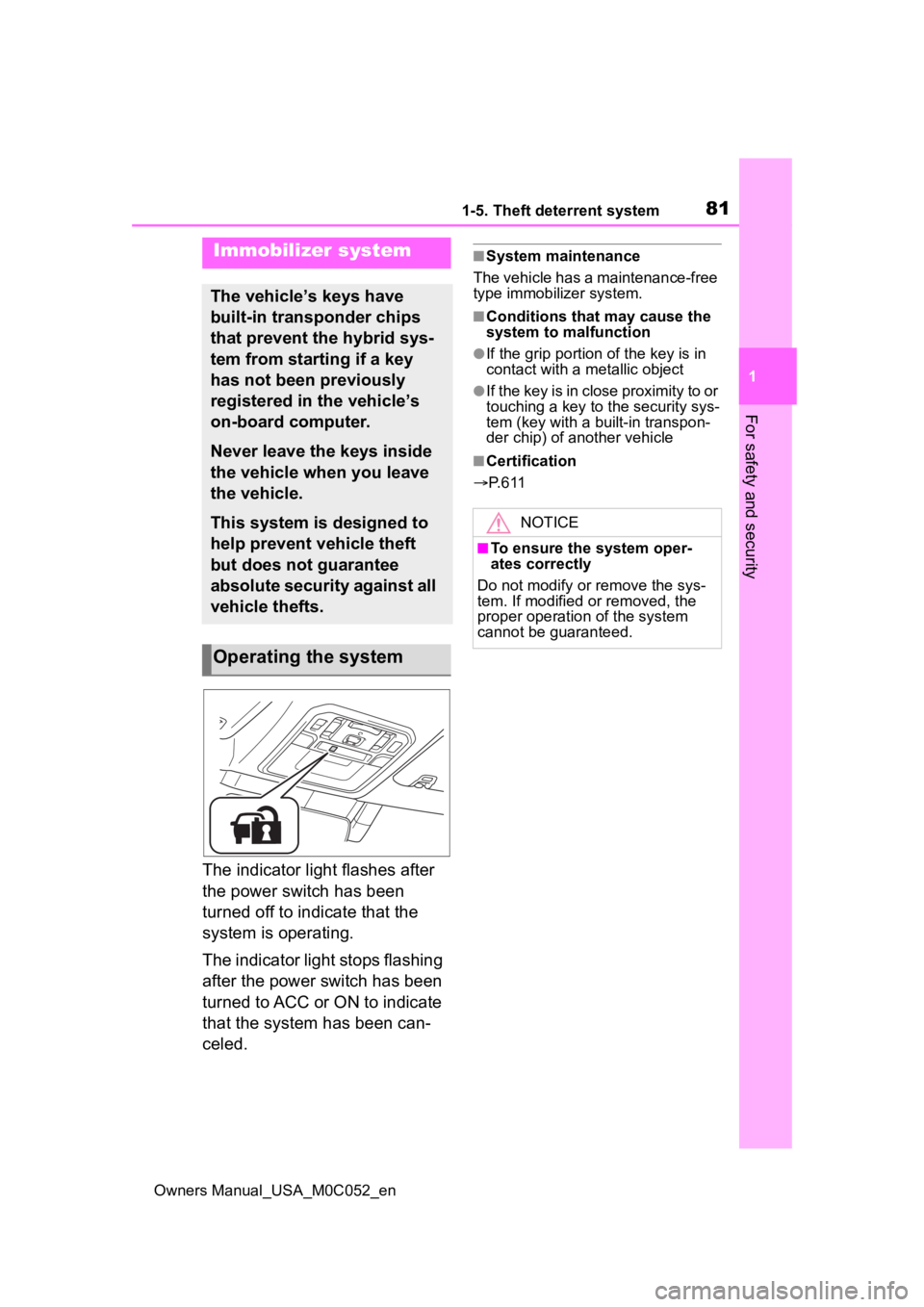
The indicator light flashes after
the power switch has been
turned off to indicate that the
system is operating.
The indicator light stops flashing
after the power switch has been
turned to ACC or ON to indicate
that the system has been can-
celed.
■System maintenance
The vehicle has a maintenance-free
type immobilizer system.
■Conditions that may cause the
system to malfunction
●If the grip portion of the key is in
contact with a metallic object
●If the key is in close proximity to or
touching a key to the security sys-
tem (key with a built-in transpon-
der chip) of another vehicle
■Certification
P. 6 1 1
Immobilizer system
The vehicle’s keys have
built-in transponder chips
that prevent the hybrid sys-
tem from starting if a key
has not been previously
registered in the vehicle’s
on-board computer.
Never leave the keys inside
the vehicle when you leave
the vehicle.
This system is designed to
help prevent vehicle theft
but does not guarantee
absolute security against all
vehicle thefts.
Operating the system
NOTICE
■To ensure the system oper-
ates correctly
Do not modify or remove the sys-
tem. If modified or removed, the
proper operation of the system
cannot be guaranteed.
Page 82 of 618
821-5. Theft deterrent system
Owners Manual_USA_M0C052_en
■Items to check before lock-
ing the vehicle
To prevent unexpected trigger-
ing of the alarm and vehicle
theft, make sure of the following:
Nobody is in the vehicle.
The windows and the pan-
oramic moon roof (if
equipped) are closed before
the alarm is set.
No valuables or other per-
sonal items are left in the
vehicle.
■Setting
Close the doors and hood, and
lock all the doors using the entry
function or wireless remote con- trol. The system will be set auto-
matically after 30 seconds.
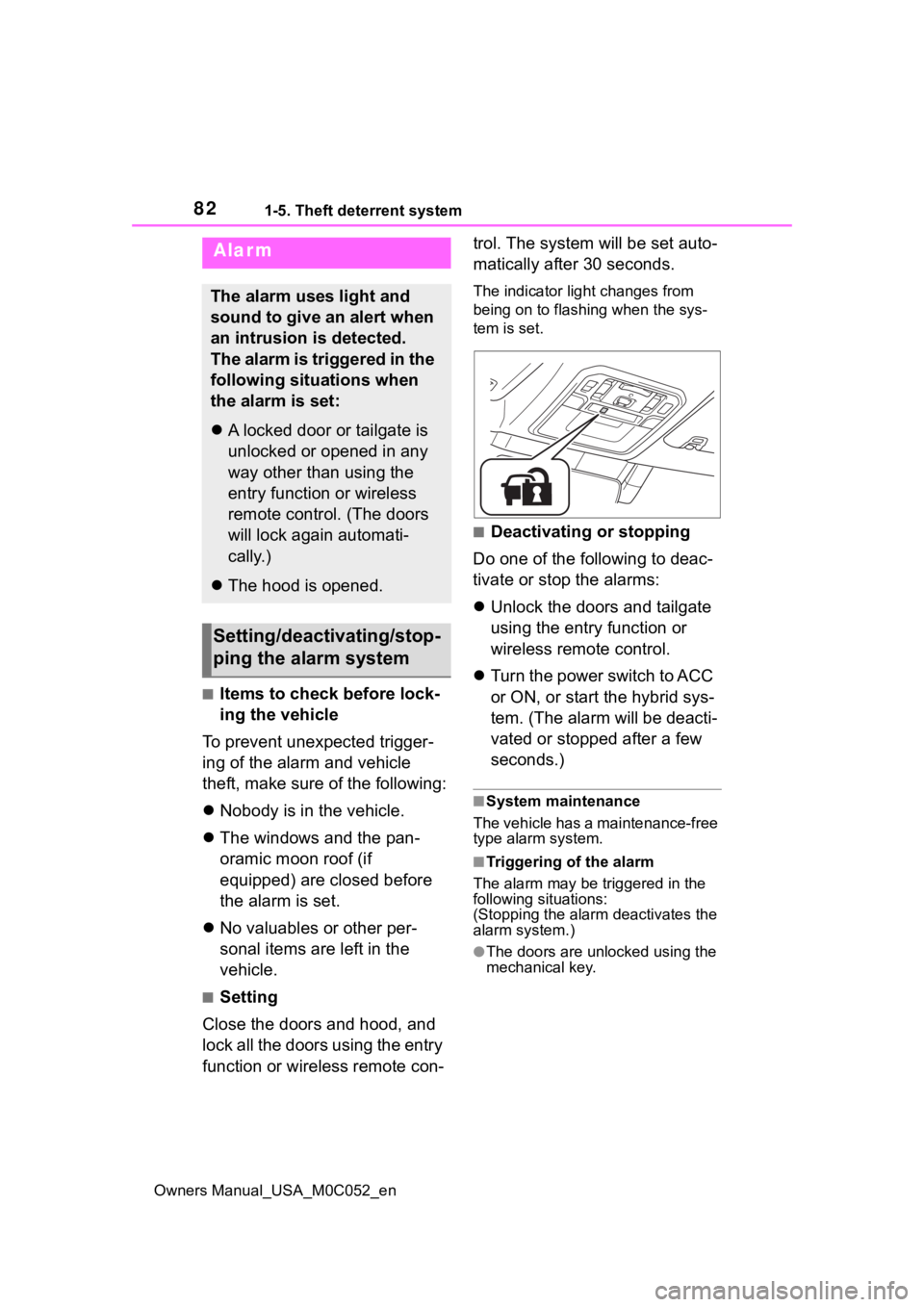
The indicator light changes from
being on to flashing when the sys-
tem is set.
■Deactivating or stopping
Do one of the following to deac-
tivate or stop the alarms:
Unlock the doors and tailgate
using the entry function or
wireless remote control.
Turn the power switch to ACC
or ON, or start the hybrid sys-
tem. (The alarm will be deacti-
vated or stopped after a few
seconds.)
■System maintenance
The vehicle has a maintenance-free
type alarm system.
■Triggering of the alarm
The alarm may be triggered in the
following situations:
(Stopping the alarm deactivates the
alarm system.)
●The doors are unlocked using the
mechanical key.
Alarm
The alarm uses light and
sound to give an alert when
an intrusion is detected.
The alarm is triggered in the
following situations when
the alarm is set:
A locked door or tailgate is
unlocked or opened in any
way other than using the
entry function or wireless
remote control. (The doors
will lock again automati-
cally.)
The hood is opened.
Setting/deactivating/stop-
ping the alarm system
Page 85 of 618
85
Owners Manual_USA_M0C052_en
2
2
Vehicle status information and indicators
Vehicle status informa-tion and indicators
2-1. Instrument cluster
Warning lights and indica-tors ............................... 86
Gauges and meters ....... 91
Multi-information display 95
Head-up display .......... 102
Fuel consumption informa- tion ............................ 106
Page 86 of 618
862-1. Instrument cluster
Owners Manual_USA_M0C052_en
2-1.Instrument cluster
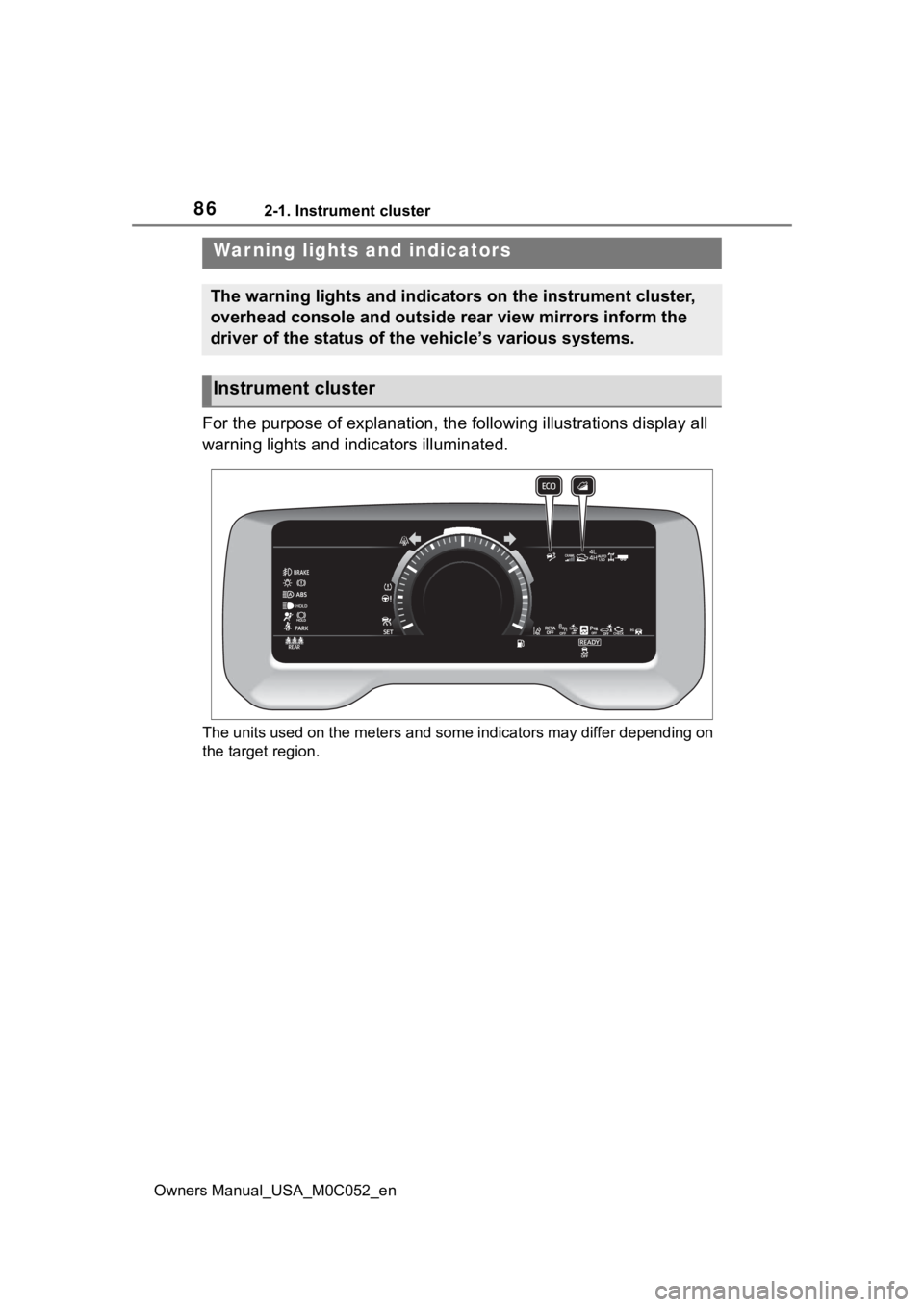
For the purpose of explanation, the following illustrations display all
warning lights and indicators illuminated.
The units used on the meters and some indicators may differ dep ending on
the target region.
War ning lights and indicators
The warning lights and indicators on the instrument cluster,
overhead console and outside rear view mirrors inform the
driver of the status of the vehicle’s various systems.
Instrument cluster
Page 87 of 618
872-1. Instrument cluster
Owners Manual_USA_M0C052_en
2
Vehicle status information and indicators
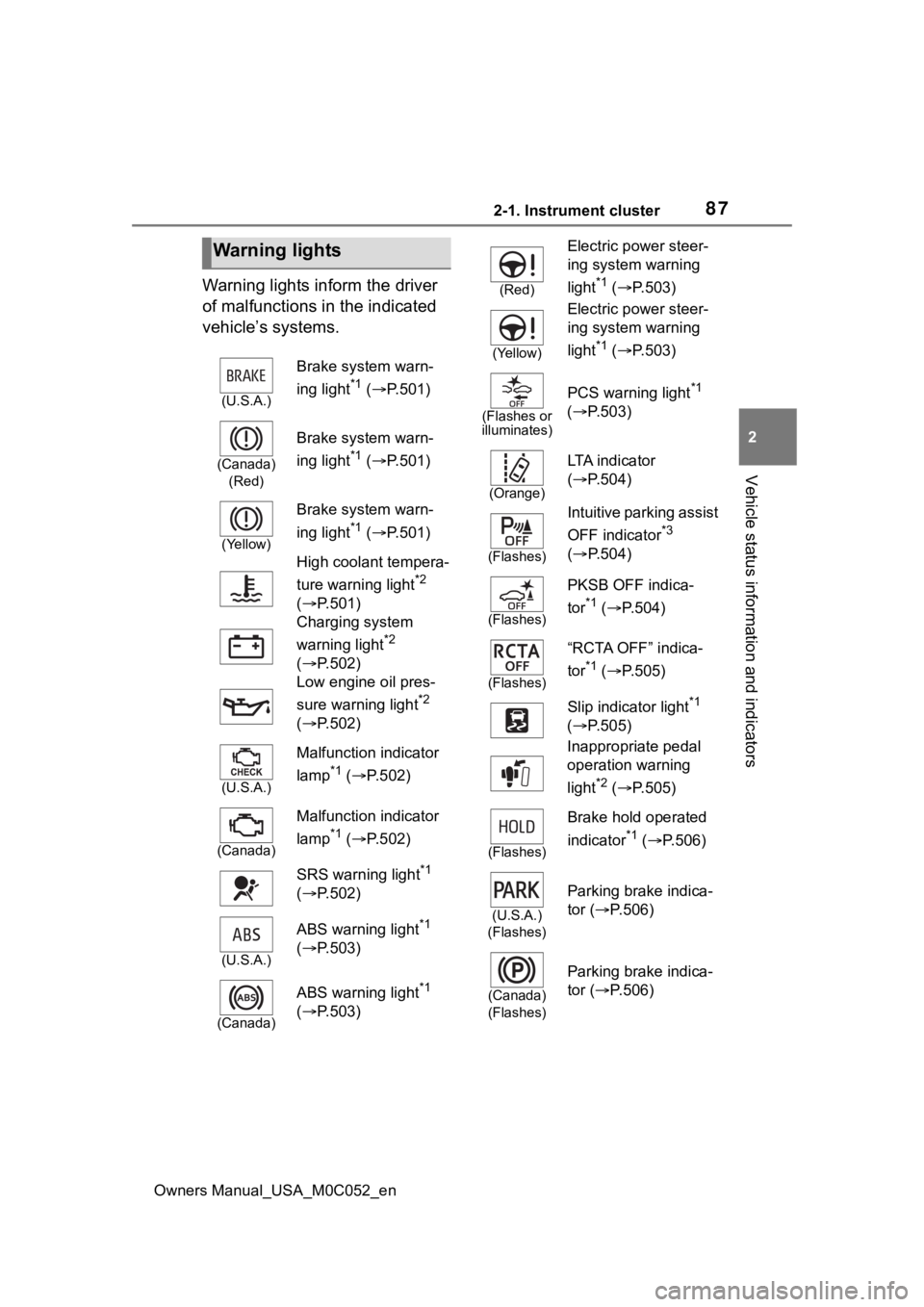
Warning lights inform the driver
of malfunctions in the indicated
vehicle’s systems.
Warning lights
(U.S.A.)
Brake system warn-
ing light
*1 ( P.501)
(Canada)
(Red)
Brake system warn-
ing light
*1 ( P.501)
(Yellow)
Brake system warn-
ing light
*1 ( P.501)
High coolant tempera-
ture warning light
*2
( P.501)
Charging system
warning light
*2
( P.502)
Low engine oil pres-
sure warning light
*2
( P.502)
(U.S.A.)
Malfunction indicator
lamp
*1 ( P.502)
(Canada)
Malfunction indicator
lamp
*1 ( P.502)
SRS warning light
*1
( P.502)
(U.S.A.)
ABS warning light*1
( P.503)
(Canada)
ABS warning light*1
( P.503)
(Red)
Electric power steer-
ing system warning
light
*1 ( P.503)
(Yellow)
Electric power steer-
ing system warning
light
*1 ( P.503)
(Flashes or
illuminates)
PCS warning light*1
( P.503)
(Orange)
LTA i n d i c a t o r
( P.504)
(Flashes)
Intuitive parking assist
OFF indicator
*3
( P.504)
(Flashes)
PKSB OFF indica-
tor
*1 ( P.504)
(Flashes)
“RCTA OFF” indica-
tor
*1 ( P.505)
Slip indicator light
*1
( P.505)
Inappropriate pedal
operation warning
light
*2 ( P.505)
(Flashes)
Brake hold operated
indicator
*1 ( P.506)
(U.S.A.)
(Flashes)
Parking brake indica-
tor ( P.506)
(Canada)
(Flashes)
Parking brake indica-
tor ( P.506)
Page 88 of 618
882-1. Instrument cluster
Owners Manual_USA_M0C052_en
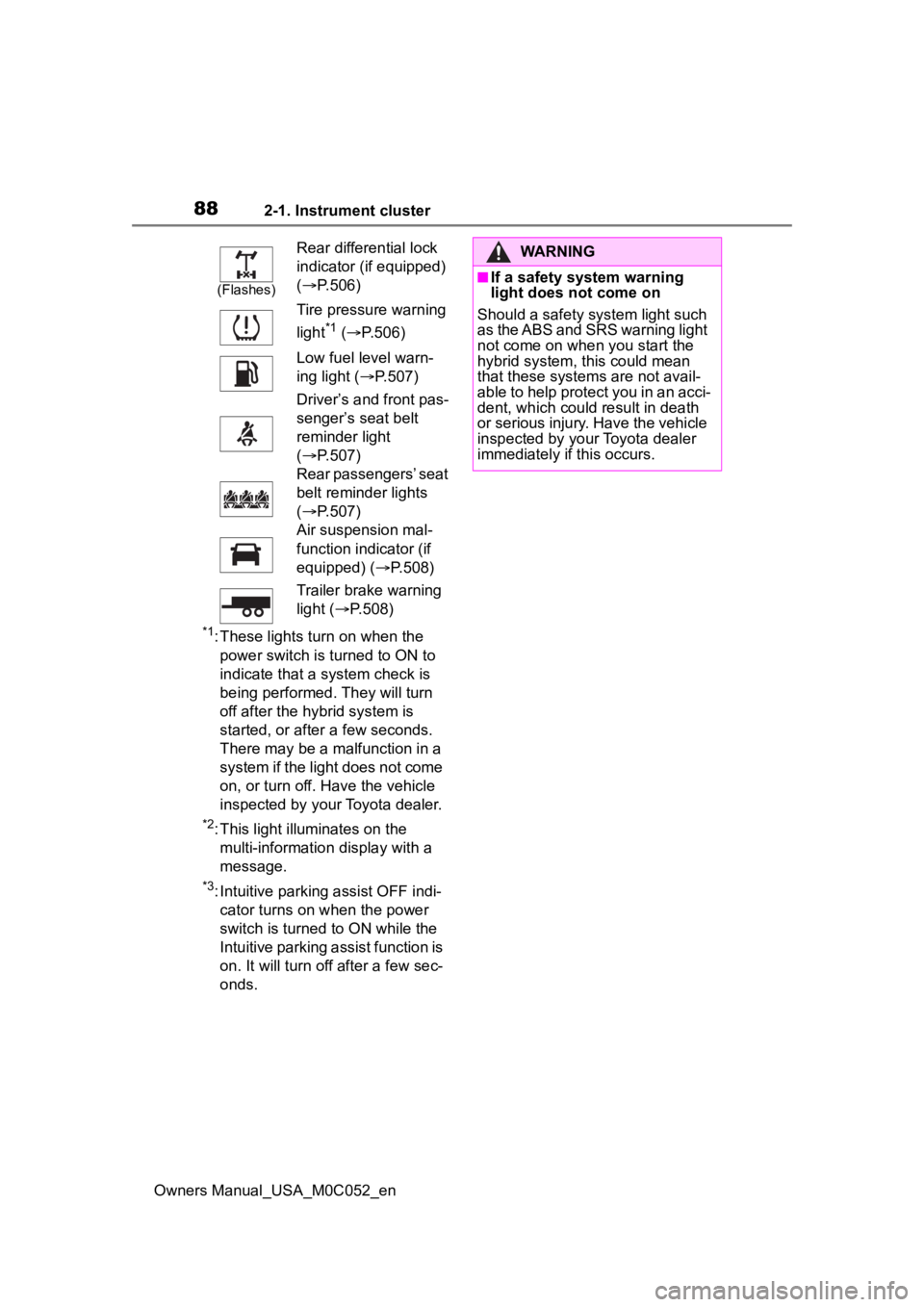
*1: These lights turn on when the power switch is turned to ON to
indicate that a system check is
being performed. They will turn
off after the hybrid system is
started, or after a few seconds.
There may be a malfunction in a
system if the light does not come
on, or turn off. Have the vehicle
inspected by your Toyota dealer.
*2: This light illuminates on the multi-informatio n display with a
message.
*3: Intuitive parking assist OFF indi- cator turns on when the power
switch is turned to ON while the
Intuitive parking assist function is
on. It will turn off after a few sec-
onds.
(Flashes)
Rear differential lock
indicator (if equipped)
( P.506)
Tire pressure warning
light
*1 ( P.506)
Low fuel level warn-
ing light ( P.507)
Driver’s and front pas-
senger’s seat belt
reminder light
( P.507)
Rear passengers’ seat
belt reminder lights
( P.507)
Air suspension mal-
function indicator (if
equipped) ( P.508)
Trailer brake warning
light ( P.508)
WARNING
■If a safety system warning
light does not come on
Should a safety system light such
as the ABS and SRS warning light
not come on when you start the
hybrid system, this could mean
that these system s are not avail-
able to help protect you in an acci-
dent, which could result in death
or serious injury. Have the vehicle
inspected by you r Toyota dealer
immediately if this occurs.
Page 89 of 618
892-1. Instrument cluster
Owners Manual_USA_M0C052_en
2
Vehicle status information and indicators
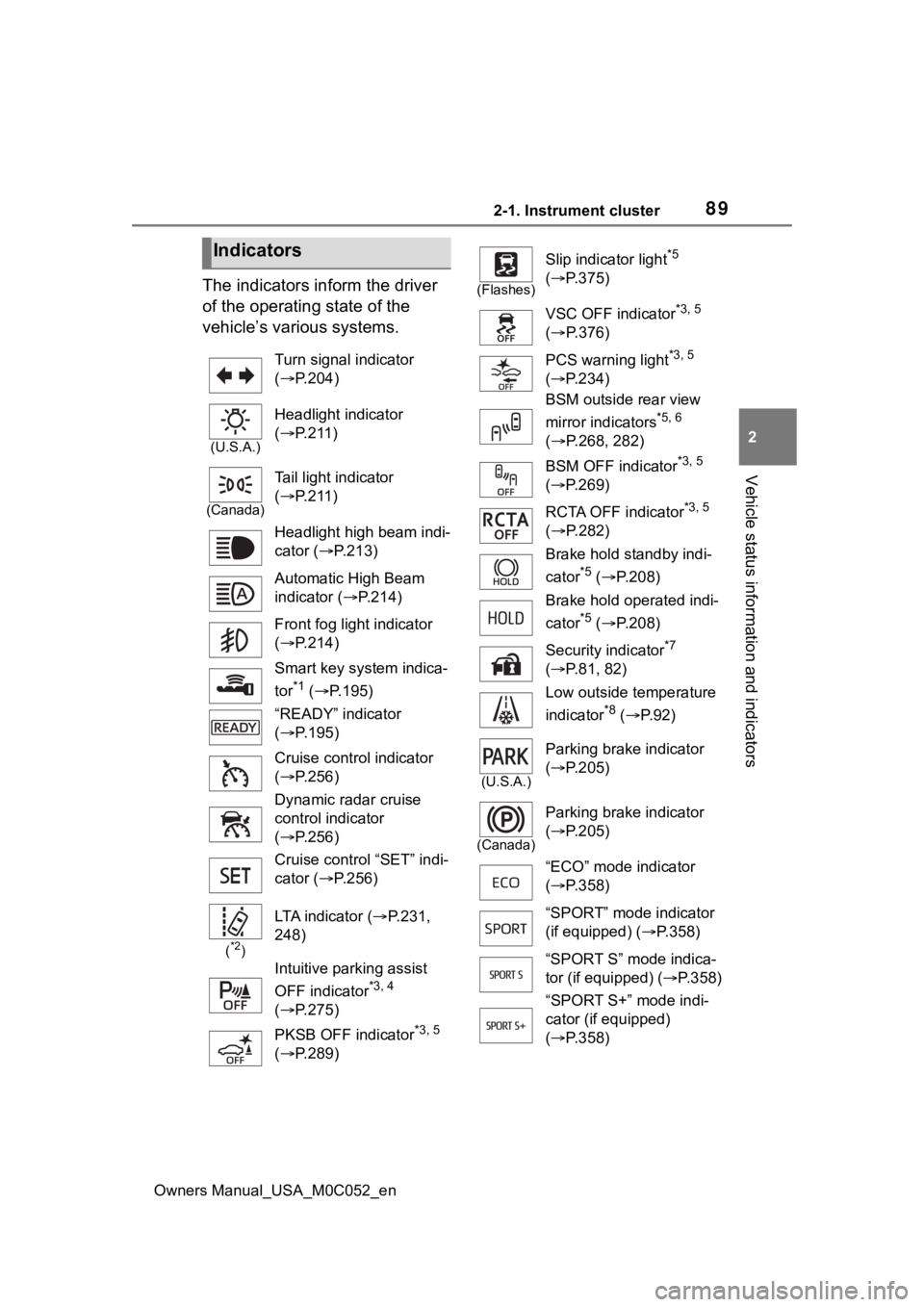
The indicators inform the driver
of the operating state of the
vehicle’s various systems.
Indicators
Turn signal indicator
( P.204)
(U.S.A.)
Headlight indicator
( P.211)
(Canada)
Tail light indicator
( P.211)
Headlight high beam indi-
cator ( P.213)
Automatic High Beam
indicator ( P.214)
Front fog light indicator
( P.214)
Smart key system indica-
tor
*1 ( P.195)
“READY” indicator
( P.195)
Cruise control indicator
( P.256)
Dynamic radar cruise
control indicator
( P.256)
Cruise control “SET” indi-
cator ( P.256)
(*2)
LTA indicator ( P.231,
248)
Intuitive parking assist
OFF indicator
*3, 4
( P.275)
PKSB OFF indicator
*3, 5
( P.289)
(Flashes)
Slip indicator light*5
( P.375)
VSC OFF indicator
*3, 5
( P.376)
PCS warning light
*3, 5
( P.234)
BSM outside rear view
mirror indicators
*5, 6
( P.268, 282)
BSM OFF indicator
*3, 5
( P.269)
RCTA OFF indicator
*3, 5
( P.282)
Brake hold standby indi-
cator
*5 ( P.208)
Brake hold operated indi-
cator
*5 ( P.208)
Security indicator
*7
( P.81, 82)
Low outside temperature
indicator
*8 ( P. 9 2 )
(U.S.A.)
Parking brake indicator
( P.205)
(Canada)
Parking brake indicator
( P.205)
“ECO” mode indicator
( P.358)
“SPORT” mode indicator
(if equipped) ( P.358)
“SPORT S” mode indica-
tor (if equipped) ( P.358)
“SPORT S+” mode indi-
cator (if equipped)
( P.358)
Page 90 of 618
902-1. Instrument cluster
Owners Manual_USA_M0C052_en
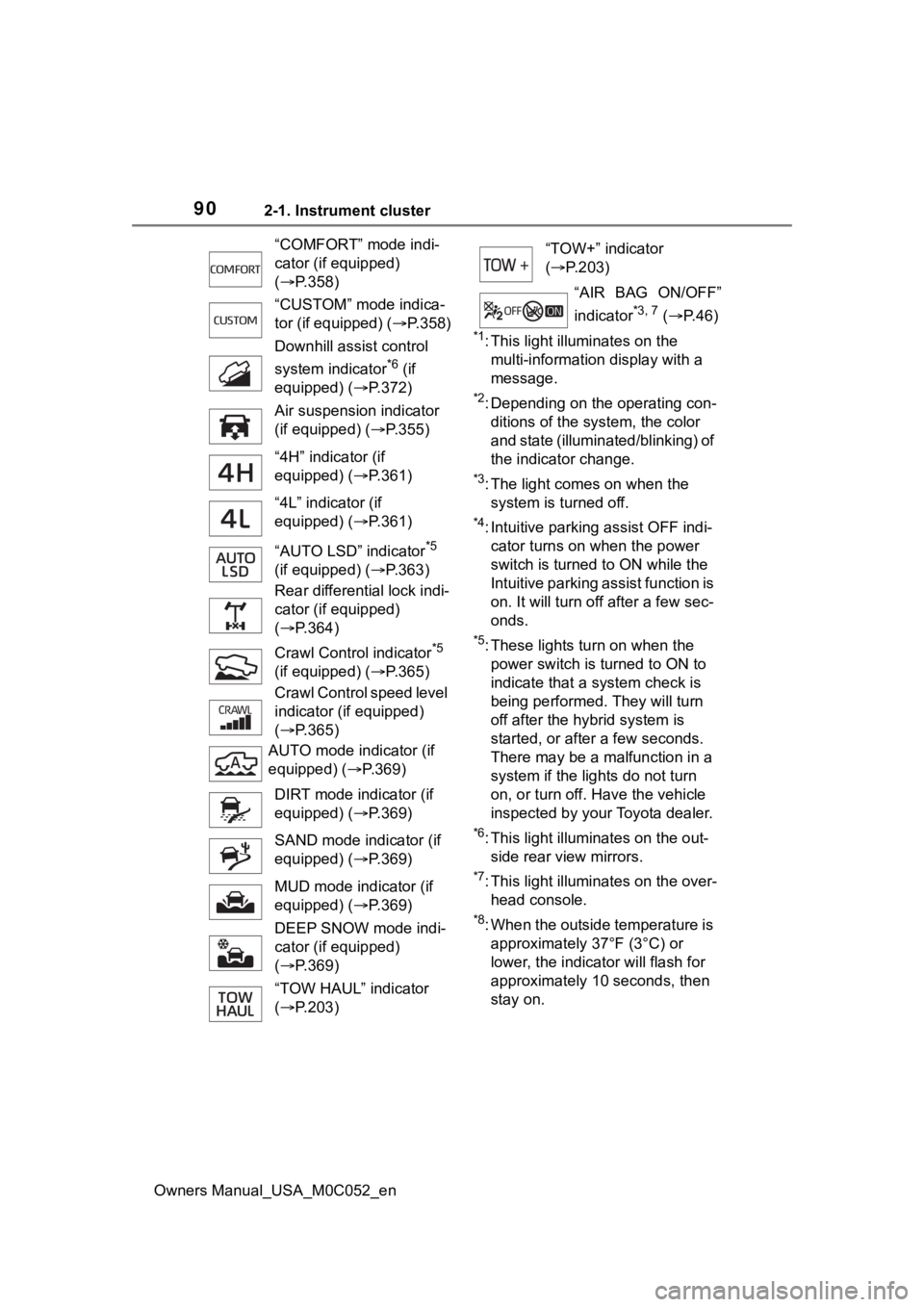
*1: This light illuminates on the multi-information display with a
message.
*2: Depending on the operating con-ditions of the system, the color
and state (illuminat ed/blinking) of
the indicator change.
*3: The light comes on when the system is turned off.
*4: Intuitive parking assist OFF indi-cator turns on wh en the power
switch is turned t o ON while the
Intuitive parking assist function is
on. It will turn off after a few sec-
onds.
*5: These lights tu rn on when the
power switch is turned to ON to
indicate that a system check is
being performed. They will turn
off after the hybrid system is
started, or after a few seconds.
There may be a malfunction in a
system if the lights do not turn
on, or turn off. Have the vehicle
inspected by your Toyota dealer.
*6: This light illuminates on the out- side rear view mirrors.
*7: This light illuminates on the over-head console.
*8: When the outside temperature is approximately 37°F (3°C) or
lower, the indicator will flash for
approximately 10 seconds, then
stay on.
“COMFORT” mode indi-
cator (if equipped)
(
P.358)
“CUSTOM” mode indica-
tor (if equipped) ( P.358)
Downhill assist control
system indicator
*6 (if
equipped) ( P.372)
Air suspension indicator
(if equipped) ( P.355)
“4H” indicator (if
equipped) ( P.361)
“4L” indicator (if
equipped) ( P.361)
“AUTO LSD” indicator
*5
(if equipped) ( P.363)
Rear differential lock indi-
cator (if equipped)
( P.364)
Crawl Contro l indicator
*5
(if equipped) ( P.365)
Crawl Control speed level
indicator (if equipped)
( P.365)
AUTO mode indicator (if
equipped) ( P.369)
DIRT mode indicator (if
equipped) ( P.369)
SAND mode indicator (if
equipped) ( P.369)
MUD mode indicator (if
equipped) ( P.369)
DEEP SNOW mode indi-
cator (if equipped)
( P.369)
“TOW HAUL” indicator
( P.203)
“TOW+” indicator
( P.203)
“AIR BAG ON/OFF”
indicator
*3, 7 ( P. 4 6 )