power steering TOYOTA URBAN CRUISER 2011 Owners Manual
[x] Cancel search | Manufacturer: TOYOTA, Model Year: 2011, Model line: URBAN CRUISER, Model: TOYOTA URBAN CRUISER 2011Pages: 532, PDF Size: 27.93 MB
Page 2 of 532
TABLE OF CONTENTSIndex
2
URBAN CRUISER_EE (OM52C21E)
1-1. Key information
Keys ...................................... 32
1-2. Opening, closing and locking
the doors
Smart entry & start system ... 35
Wireless remote control ........ 56
Side doors............................. 65
Back door.............................. 69
1-3. Adjustable components
(seats, mirrors, steering
wheel)
Front seats ............................ 74
Rear seats ............................ 76
Head restraints ..................... 82
Seat belts .............................. 85
Steering wheel ...................... 93
Inside rear view mirror .......... 94
Outside rear view mirrors...... 961-4. Opening and closing
the windows
Power windows .................... 99
1-5. Refueling
Opening the fuel tank
cap ................................... 103
1-6. Theft deterrent system
Engine immobilizer
system.............................. 108
Double locking system ....... 116
Alarm .................................. 118
1-7. Safety information
Correct driving posture ....... 122
SRS airbags ....................... 124
Child restraint systems ....... 137
Installing child restraints ..... 145
Airbag manual on-off
system.............................. 158
1Before driving
Page 4 of 532
TABLE OF CONTENTSIndex
4
URBAN CRUISER_EE (OM52C21E)
3-1. Using the air conditioning
system and defogger
Manual air conditioning
system .............................. 244
Automatic air conditioning
system .............................. 251
Power heater ...................... 259
Rear window and outside
rear view mirror
defoggers.......................... 262
3-2. Using the audio system
Audio system types............. 264
Using the radio.................... 266
Using the CD player............ 270
Playing back MP3 and
WMA discs........................ 277
Optimal use of the audio
system .............................. 285
Using the AUX port ............. 288
Using the steering
switches ............................ 2893-3. Using the hands-free system
(for cellular phone)
Hands-free system
(for cellular phone) ........... 291
Using the hands-free
system.............................. 298
Making a phone call ........... 302
Setting a cellular phone...... 306
Security and system
setup ................................ 310
Using the phone book ........ 314
3-4. Using the interior lights
Interior lights list ................. 320
• Interior light ....................... 320
• Personal lights ................. 321
3Interior features
Page 31 of 532
1Before driving
31
URBAN CRUISER_EE (OM52C21E)
1-1. Key information
Keys.................................... 32
1-2. Opening, closing and
locking the doors
Smart entry & start
system .............................. 35
Wireless remote control ...... 56
Side doors .......................... 65
Back door ........................... 69
1-3. Adjustable components
(seats, mirrors, steering
wheel)
Front seats.......................... 74
Rear seats .......................... 76
Head restraints ................... 82
Seat belts............................ 85
Steering wheel .................... 93
Inside rear view mirror ........ 94
Outside rear view
mirrors .............................. 961-4. Opening and closing
the windows
Power windows ................... 99
1-5. Refueling
Opening the fuel tank
cap .................................. 103
1-6. Theft deterrent system
Engine immobilizer
system ............................ 108
Double locking system ...... 116
Alarm ................................ 118
1-7. Safety information
Correct driving posture ..... 122
SRS airbags...................... 124
Child restraint systems ..... 137
Installing child
restraints ......................... 145
Airbag manual on-off
system ............................ 158
Page 97 of 532
97 1-3. Adjustable components (seats, mirrors, steering wheel)
1
Before driving
URBAN CRUISER_EE (OM52C21E)
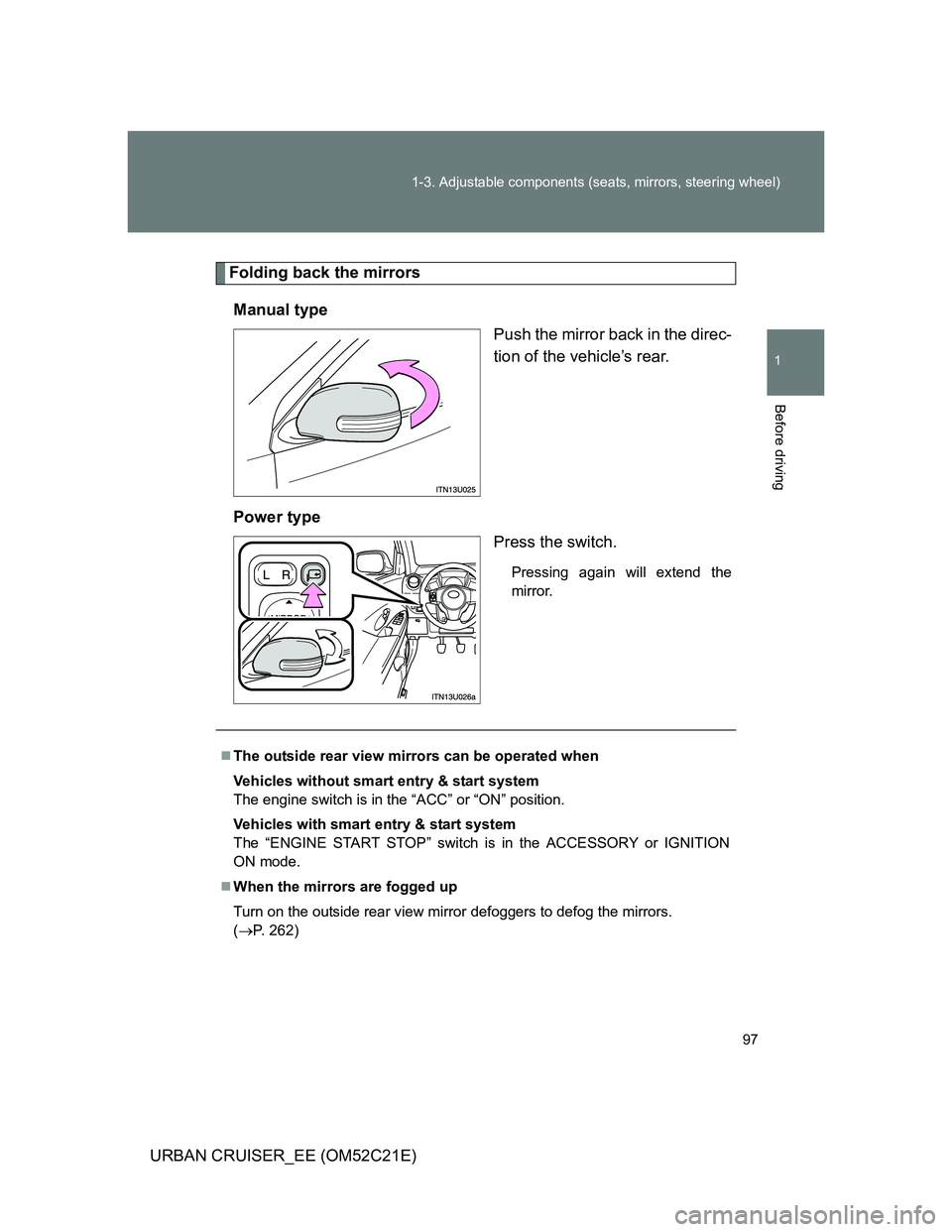
Folding back the mirrors
Manual type
Push the mirror back in the direc-
tion of the vehicle’s rear.
Power type
Press the switch.
Pressing again will extend the
mirror.
The outside rear view mirrors can be operated when
Vehicles without smart entry & start system
The engine switch is in the “ACC” or “ON” position.
Vehicles with smart entry & start system
The “ENGINE START STOP” switch is in the ACCESSORY or IGNITION
ON mode.
When the mirrors are fogged up
Turn on the outside rear view mirror defoggers to defog the mirrors.
(P. 262)
Page 167 of 532
167 2-1. Driving procedures
2
When driving
URBAN CRUISER_EE (OM52C21E)
CAUTION
When driving the vehicle
Do not shift the shift lever to “R” while the vehicle is moving forward.
Doing so can damage the transmission and may result in a loss of vehicle
control.
Do not shift the shift lever to “1” while the vehicle is moving backward.
Doing so can damage the transmission and may result in a loss of vehicle
control.
Moving the shift lever to “N” while the vehicle is moving will disengage the
engine from the transmission. Engine braking is not available when “N” is
selected.
During normal driving, do not turn off the engine. Turning the engine off
while driving will not cause loss of steering or braking control, but the
power assist to these systems will be lost. This will make it more difficult to
steer and brake, so you should pull over and stop the vehicle as soon as it
is safe to do so.
However, in the event of an emergency, such as if it becomes impossible
to stop the vehicle in the normal way: P. 490
When stopped on an inclined surface, use the brake pedal and parking
brake to prevent the vehicle from rolling backward or forward and causing
an accident.
Do not adjust the position of the steering wheel, the seat, or the inside or
outside rear view mirrors while driving.
Doing so may result in a loss of vehicle control that can cause accidents
that may result in death or serious injury.
Always check that all passengers’ arms, heads or other parts of their body
are not outside the vehicle, as this may result in death or serious injury.
Do not drive the vehicle off-road.
This is not a 4WD vehicle designed for real off-road driving. Proceed with
all due caution if it becomes unavoidable to drive off-road.
Page 173 of 532
173 2-1. Driving procedures
2
When driving
URBAN CRUISER_EE (OM52C21E)
NOTICE
When driving the vehicle
Do not depress the accelerator and brake pedals at the same time during
driving. If the brake pedal is depressed while driving with the accelerator
pedal depressed, driving torque may be restrained.
Do not shift gears unless the clutch pedal is fully depressed. After shifting,
do not release the clutch abruptly. Doing so may damage the clutch, trans-
mission and gears.
Observe the following to prevent the clutch from being damaged.
• Do not rest your foot on the clutch pedal while driving.
Doing so may cause clutch trouble.
• Do not use any gears other than the 1st gear when starting off and
moving forward.
Doing so may damage the clutch.
• Do not use the clutch to hold the vehicle when stopping on an uphill
grade.
Doing so may damage the clutch.
Do not shift the shift lever to R when the vehicle is still moving. Doing so
may damage the clutch, transmission and gears.
Avoiding damage to vehicle parts
Do not turn the steering wheel fully in either direction and hold it there for
an extended period of time.
Doing so may damage the power steering motor.
When driving over bumps in the road, drive as slowly as possible to avoid
damaging the wheels, underside of the vehicle, etc.
Diesel engine only: Make sure to idle the engine immediately after high-
speed driving or hill climbing. Stop the engine only after the turbocharger
has cooled down.
Failure to do so may cause damage to the turbocharger.
Page 181 of 532
181 2-1. Driving procedures
2
When driving
URBAN CRUISER_EE (OM52C21E)
If the engine does not start
The engine immobilizer system may not have been deactivated. (P. 108)
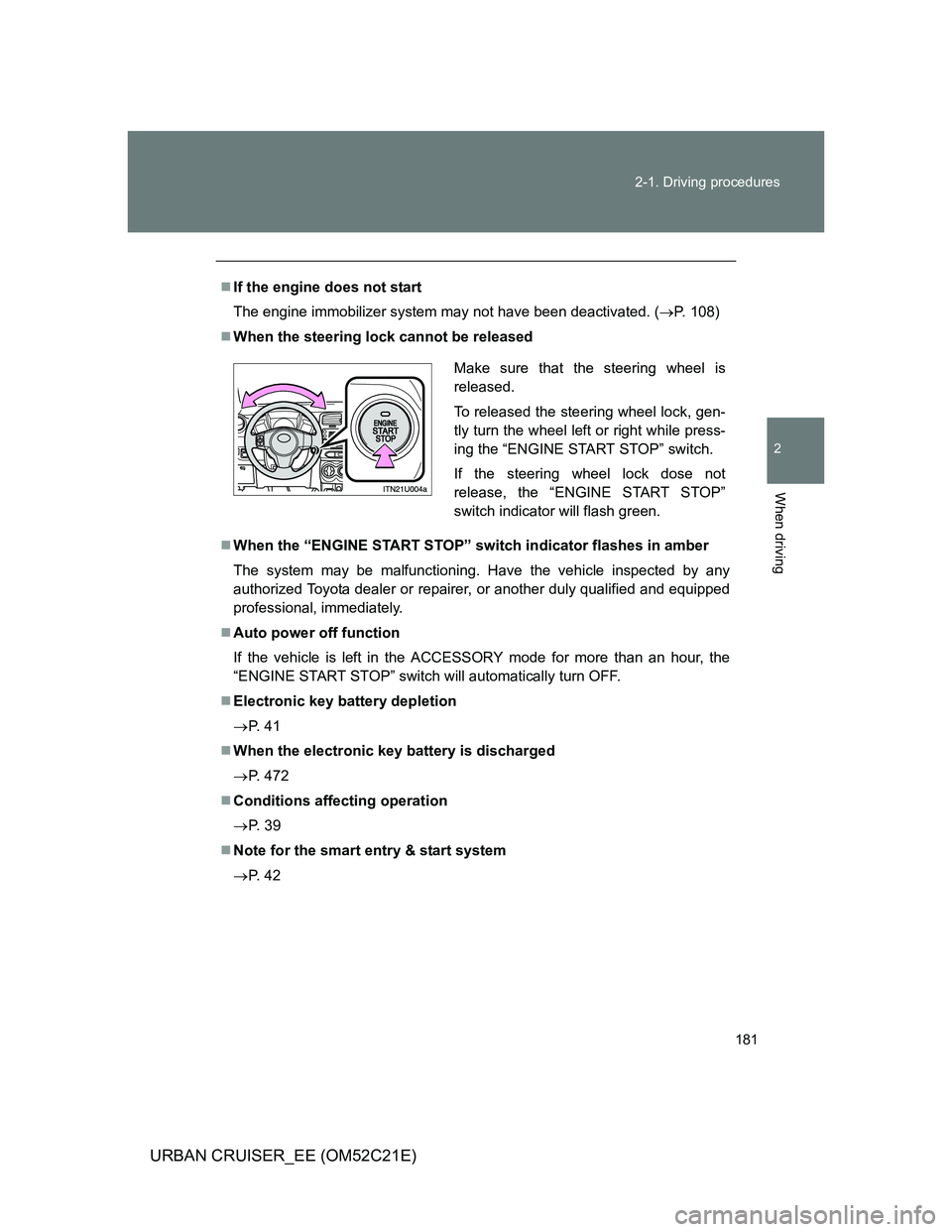
When the steering lock cannot be released
When the “ENGINE START STOP” switch indicator flashes in amber
The system may be malfunctioning. Have the vehicle inspected by any
authorized Toyota dealer or repairer, or another duly qualified and equipped
professional, immediately.
Auto power off function
If the vehicle is left in the ACCESSORY mode for more than an hour, the
“ENGINE START STOP” switch will automatically turn OFF.
Electronic key battery depletion
P. 4 1
When the electronic key battery is discharged
P. 472
Conditions affecting operation
P. 3 9
Note for the smart entry & start system
P. 4 2
Make sure that the steering wheel is
released.
To released the steering wheel lock, gen-
tly turn the wheel left or right while press-
ing the “ENGINE START STOP” switch.
If the steering wheel lock dose not
release, the “ENGINE START STOP”
switch indicator will flash green.
Page 182 of 532
182 2-1. Driving procedures
URBAN CRUISER_EE (OM52C21E)
CAUTION
When starting the engine
Always start the engine while sitting in the driver’s seat. Do not depress the
accelerator while starting the engine under any circumstances.
Doing so may cause an accident resulting in death or serious injury.
Stopping the engine in an emergency
If you want to stop the engine in an emergency while driving the vehicle,
push and hold the “ENGINE START STOP” switch for more than 3 seconds.
However, do not touch the “ENGINE START STOP” switch while driving
except in an emergency. Turning the engine off while driving will not cause
loss of steering or braking control, but the power assist to these systems will
be lost. This will make it more difficult to steer and brake, so you should pull
over and stop the vehicle as soon as it is safe to do so.
NOTICE
To prevent battery discharge
Do not leave the “ENGINE START STOP” switch in the ACCESSORY or
IGNITION ON mode for long periods without the engine running.
When starting the engine
Do not race a cold engine.
If the engine becomes difficult to start or stalls frequently, have the engine
checked immediately.
Page 214 of 532
214 2-4. Using other driving systems
URBAN CRUISER_EE (OM52C21E)
Automatic engine start function
In the following situations, the engine may start even without the clutch pedal
being depressed after the “ECO” indicator flashes for a few seconds.
The brake pedal is pumped or strongly depressed.
The air conditioning system is being used or turned on.
Vehicles with an automatic air conditioning system only: The windshield
defogger is turned on.
The battery is not sufficiently charged.
The vehicle starts to roll on an incline.
Automatic reactivation of the Stop & Start system
Even if the Stop & Start system is disabled by the “ECO OFF” switch, it will
be automatically re-enabled once the engine switch is turned to the “LOCK”
position then to the “START” position (vehicles without a smart entry & start
system) or the “ENGINE START STOP” switch is turned to OFF then the
engine is started (vehicles with a smart entry & start system).
The Stop & Start system protection feature
When an excessively loud sound is being projected by the audio system, the
audio system may be automatically cut off in order to maintain power for the
Stop & Start system function.
If this occurs, turning the engine switch to the “LOCK” position then to the
“ACC” or “ON” position (vehicles without a smart entry & start system) or the
“ENGINE START STOP” switch to the OFF then to ACCESSORY or IGNI-
TION ON mode (vehicles with a smart entry & start system) re-enables the
audio system.
Steering wheel operation
When the engine is stopped by the Stop & Start system, the steering wheel
may become heavier than when driving.
Page 217 of 532
217
2-4. Using other driving systems
2
When driving
URBAN CRUISER_EE (OM52C21E)
Driving assist systems
To help enhance driving safety and performance, the following sys-
tems operate automatically in response to various driving situations.
Be aware, however, that these systems are supplementary and
should not be relied upon too heavily when operating the vehicle.
ABS (Anti-lock Brake System)
Helps to prevent wheel lock when the brakes are applied suddenly, or if
the brakes are applied while driving on a slippery road surface.
Brake assist
Generates an increased level of braking force after the brake pedal is
depressed, when the system detects a panic stop situation.
VSC (Vehicle Stability Control) (if equipped)
Helps the driver to control skidding when swerving suddenly or turning
on slippery road surfaces.
TRC (Traction Control) (if equipped)
Helps to maintain drive power and prevent the front wheels from spin-
ning when starting the vehicle or accelerating on slippery roads.
Active Torque Control 4WD system (4WD models)
Automatically switches from front-wheel drive to four-wheel drive
(4WD) according to the driving conditions, helping to ensure reliable
handling and stability. Examples of conditions where the system will
switch to 4WD are when cornering going uphill, starting off or accelerat-
ing, and when the road surface is slippery due to snow, rain, etc.
EPS (Electric Power Steering)
Employs an electric motor to reduce the amount of effort needed to turn
the steering wheel.