eps TOYOTA URBAN CRUISER 2012 Owners Manual
[x] Cancel search | Manufacturer: TOYOTA, Model Year: 2012, Model line: URBAN CRUISER, Model: TOYOTA URBAN CRUISER 2012Pages: 532, PDF Size: 27.93 MB
Page 6 of 532
TABLE OF CONTENTSIndex
6
URBAN CRUISER_EE (OM52C21E)
5-1. Essential information
Emergency flashers ............ 416
If your vehicle needs to
be towed ........................... 417
If you think something is
wrong ................................ 425
Fuel pump shut off system
(gasoline engine) .............. 4265-2. Steps to take in an emergency
If a warning light turns on
or a warning buzzer
sounds... .......................... 427
If you have a flat tire
(vehicles with a spare
tire) ................................... 437
If you have a flat tire
(vehicles without a spare
tire) ................................... 452
If the engine will not start ... 468
If you lose your keys .......... 470
If you cannot operate
the back door opener ....... 471
If the electronic key does
not operate properly ......... 472
If the battery is
discharged ....................... 475
If your vehicle
overheats ......................... 481
If you run out of fuel and
the engine stalls
(diesel engine) ................. 485
If the vehicle becomes
stuck................................. 488
If your vehicle has to be
stopped in an
emergency ....................... 490
5When trouble arises
Page 103 of 532
103
1
Before driving
URBAN CRUISER_EE (OM52C21E)
1-5. Refueling
Opening the fuel tank cap
Perform the following steps to open the fuel tank cap.
Before refueling the vehicle
Vehicles without smart entry & start system
Turn the engine switch to the “LOCK” position and ensure that
all the doors and windows are closed.
Vehicles with smart entry & start system
Turn the “ENGINE START STOP” switch OFF and ensure that
all the doors and windows are closed.
Opening the fuel tank cap
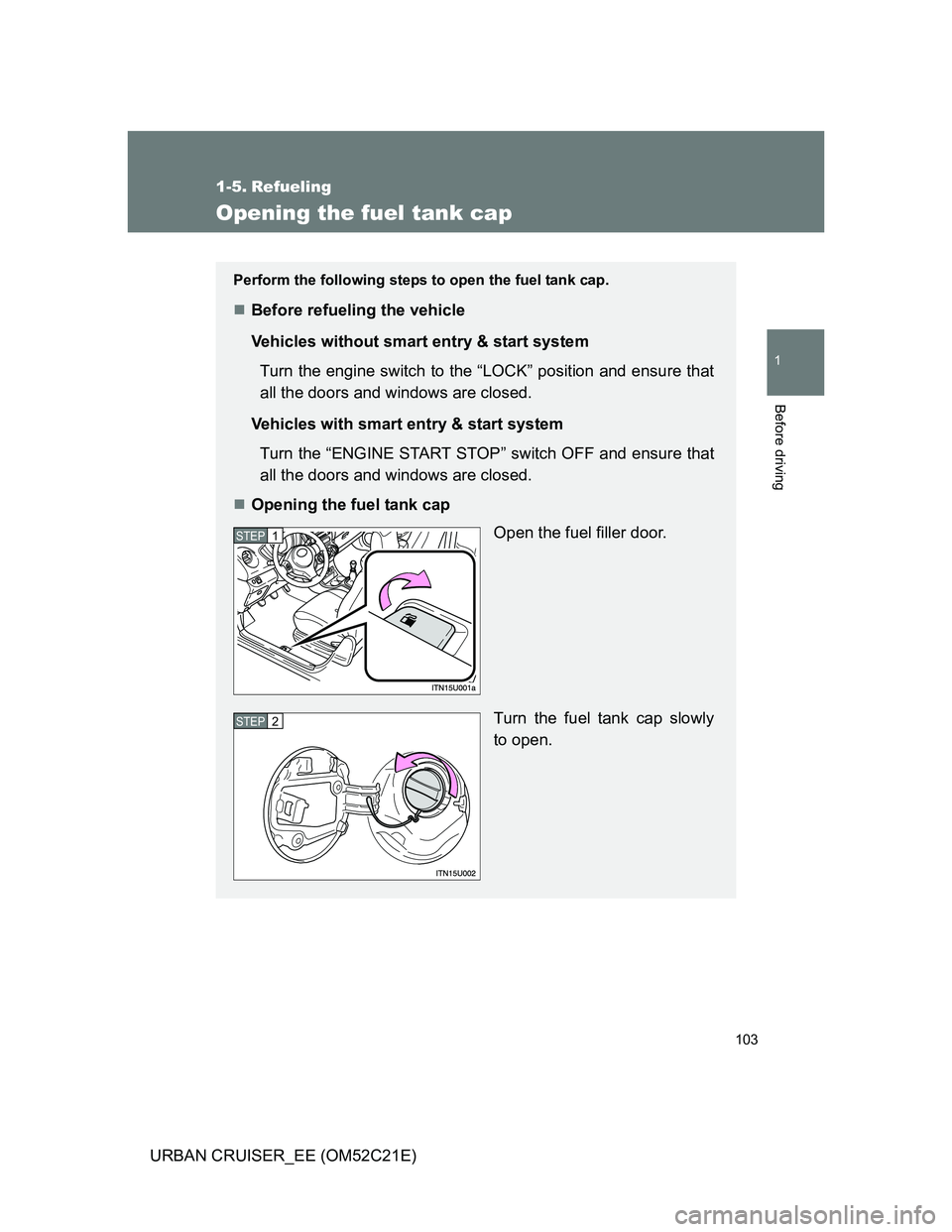
Open the fuel filler door.
Turn the fuel tank cap slowly
to open.
STEP1
STEP2
Page 217 of 532
217
2-4. Using other driving systems
2
When driving
URBAN CRUISER_EE (OM52C21E)
Driving assist systems
To help enhance driving safety and performance, the following sys-
tems operate automatically in response to various driving situations.
Be aware, however, that these systems are supplementary and
should not be relied upon too heavily when operating the vehicle.
ABS (Anti-lock Brake System)
Helps to prevent wheel lock when the brakes are applied suddenly, or if
the brakes are applied while driving on a slippery road surface.
Brake assist
Generates an increased level of braking force after the brake pedal is
depressed, when the system detects a panic stop situation.
VSC (Vehicle Stability Control) (if equipped)
Helps the driver to control skidding when swerving suddenly or turning
on slippery road surfaces.
TRC (Traction Control) (if equipped)
Helps to maintain drive power and prevent the front wheels from spin-
ning when starting the vehicle or accelerating on slippery roads.
Active Torque Control 4WD system (4WD models)
Automatically switches from front-wheel drive to four-wheel drive
(4WD) according to the driving conditions, helping to ensure reliable
handling and stability. Examples of conditions where the system will
switch to 4WD are when cornering going uphill, starting off or accelerat-
ing, and when the road surface is slippery due to snow, rain, etc.
EPS (Electric Power Steering)
Employs an electric motor to reduce the amount of effort needed to turn
the steering wheel.
Page 219 of 532
219 2-4. Using other driving systems
2
When driving
URBAN CRUISER_EE (OM52C21E)Turning off both TRC and VSC systems
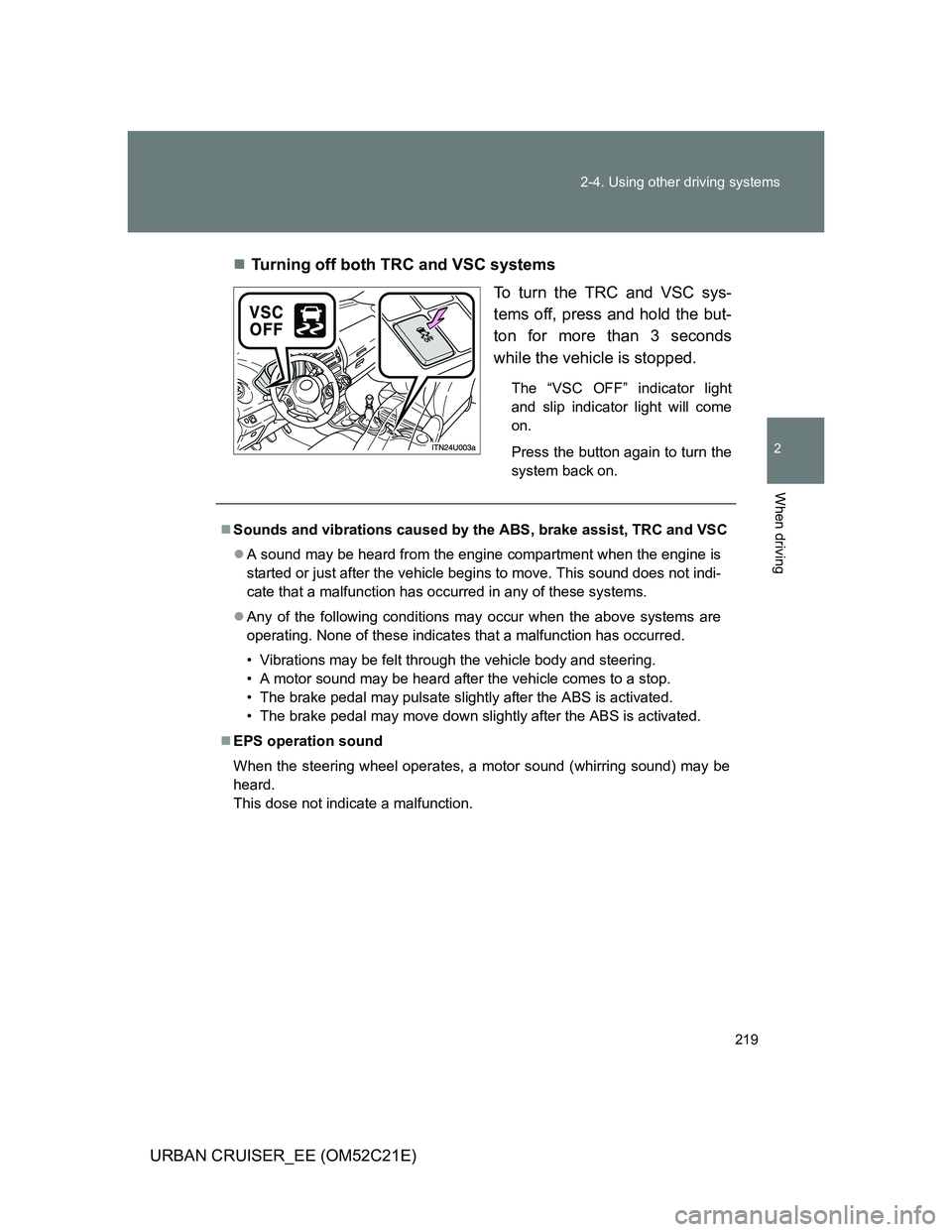
To turn the TRC and VSC sys-
tems off, press and hold the but-
ton for more than 3 seconds
while the vehicle is stopped.
The “VSC OFF” indicator light
and slip indicator light will come
on.
Press the button again to turn the
system back on.
Sounds and vibrations caused by the ABS, brake assist, TRC and VSC
A sound may be heard from the engine compartment when the engine is
started or just after the vehicle begins to move. This sound does not indi-
cate that a malfunction has occurred in any of these systems.
Any of the following conditions may occur when the above systems are
operating. None of these indicates that a malfunction has occurred.
• Vibrations may be felt through the vehicle body and steering.
• A motor sound may be heard after the vehicle comes to a stop.
• The brake pedal may pulsate slightly after the ABS is activated.
• The brake pedal may move down slightly after the ABS is activated.
EPS operation sound
When the steering wheel operates, a motor sound (whirring sound) may be
heard.
This dose not indicate a malfunction.
Page 220 of 532
220 2-4. Using other driving systems
URBAN CRUISER_EE (OM52C21E)
Reactivation of the TRC/VSC systems after turning off the engine
Turning off the engine after turning off the TRC/VSC systems will automati-
cally reactivate them.
Reactivation of the TRC system linked to vehicle speed
When only the TRC system is turned off, the TRC system will turn on when
vehicle speed increases. However, when both TRC and VSC systems are
turned off, the systems will not turn on even when vehicle speed increases.
Reduced effectiveness of the EPS system
The effectiveness of the EPS is reduced to prevent the system from over-
heating when there is frequent steering input over an extended period of
time. The steering wheel may feel heavy as a result. Should this occur,
refrain from excessive steering input or stop the vehicle and turn the engine
off. The system should return to normal after about 10 minutes.
Page 267 of 532
267 3-2. Using the audio system
3
Interior features
URBAN CRUISER_EE (OM52C21E)Automatically
Press and hold until you hear a beep.
Up to 6 stations are set in order of reception quality. When the settings
are finished, 2 beeps will be heard.
In the FM1 or FM2 mode, the stations automatically set by the audio sys-
tem will be set in the FM3 presets.
RDS (Radio Data System)
This feature allows your radio to receive station and program informa-
tion (classical, news, etc.) from radio stations that broadcast this
information.
Listening to stations of the same network
Press .
AF-ON, REG-OFF modes: A station among those of the same net-
work with strong reception is selected.
Switching between different regional
programs of the same station might
occur.
AF-ON, REG-ON modes: A station among those of the same net-
work with strong reception and broad-
casting the same program is selected.
Each time is pressed, the mode changes in the order of AF-ON,
REG-OFFAF-ON, REG-ONAF-OFF, REG-OFF.
Page 306 of 532
306
3-3. Using the hands-free system (for cellular phone)
URBAN CRUISER_EE (OM52C21E)
Setting a cellular phone
Registering a cellular phone in the hands-free system allows the
system to function. The following function can be used for regis-
tered cellular phones:
Functions and operation procedures
To enter menu for each function, follow the steps below by using
.
Registering a cellular phone
1. “Setup” 2. “Phone Setup” 3. “Pair Phone”
Selecting a cellular phone to be used
1. “Setup” 2. “Phone Setup” 3. “Select Phone”
Changing a registered name
1. “Setup” 2. “Phone Setup” 3. “Change Name”
Listing the registered cellular phones
1. “Setup” 2. “Phone Setup” 3. “List Phones”
Deleting a cellular phone
1. “Setup” 2. “Phone Setup” 3. “Delete”
Changing the passkey
1. “Setup” 2. “Phone Setup” 3. “Set Passkey”
Page 310 of 532
310
3-3. Using the hands-free system (for cellular phone)
URBAN CRUISER_EE (OM52C21E)
Security and system setup
Setting or changing the PIN
Setting a PIN
Select “Set PIN” by using .
Enter a PIN by using .
Input the code one digit at a time.
To enter the menu of each setting, follow the steps below:
Security setting items and operation procedure
Setting or changing the PIN (Personal Identification Number)
1. “Setup” 2. “Security” 3. “Set PIN”
Locking the phone book
1. “Setup” 2. “Security” 3. “Phonebook Lock” (Phbk
Lock)
Unlocking the phone book
1. “Setup” 2. “Security” 3. “Phonebook Unlock” (Phbk
Unlock)
System setup items and operation procedure
Setting voice guidance volume
1. “Setup” 2. “System Setup” 3. “Guidance Vol”
Initialization
1. “Setup” 2. “System Setup” 3. “Initialize”
can only be used for system setup operation.
STEP1
STEP2
Page 314 of 532
314
3-3. Using the hands-free system (for cellular phone)
URBAN CRUISER_EE (OM52C21E)
Using the phone book
Adding a new phone number
The following methods can be used to add a new phone number:
Transferring data from the cellular phone
Inputting a phone number by using
Selecting a phone number from outgoing or incoming history
To enter the menu of each setting, follow the steps below:
Adding a new phone number
1. “Phonebook” 2. “Add Entry”
Setting speed dial
1. “Phonebook” 2. “Set Speed Dial (Set Spd Dial)”
Changing a registered name
1. “Phonebook” 2. “Change Name”
Deleting registered data
1. “Phonebook” 2. “Delete Entry”
Deleting speed dial
1. “Phonebook” 2. “Delete Speed Dial (Delete Spd Dial)”
Listing the registered data
1. “Phonebook” 2. “List Names”
Page 396 of 532
396 4-3. Do-it-yourself maintenance
URBAN CRUISER_EE (OM52C21E)
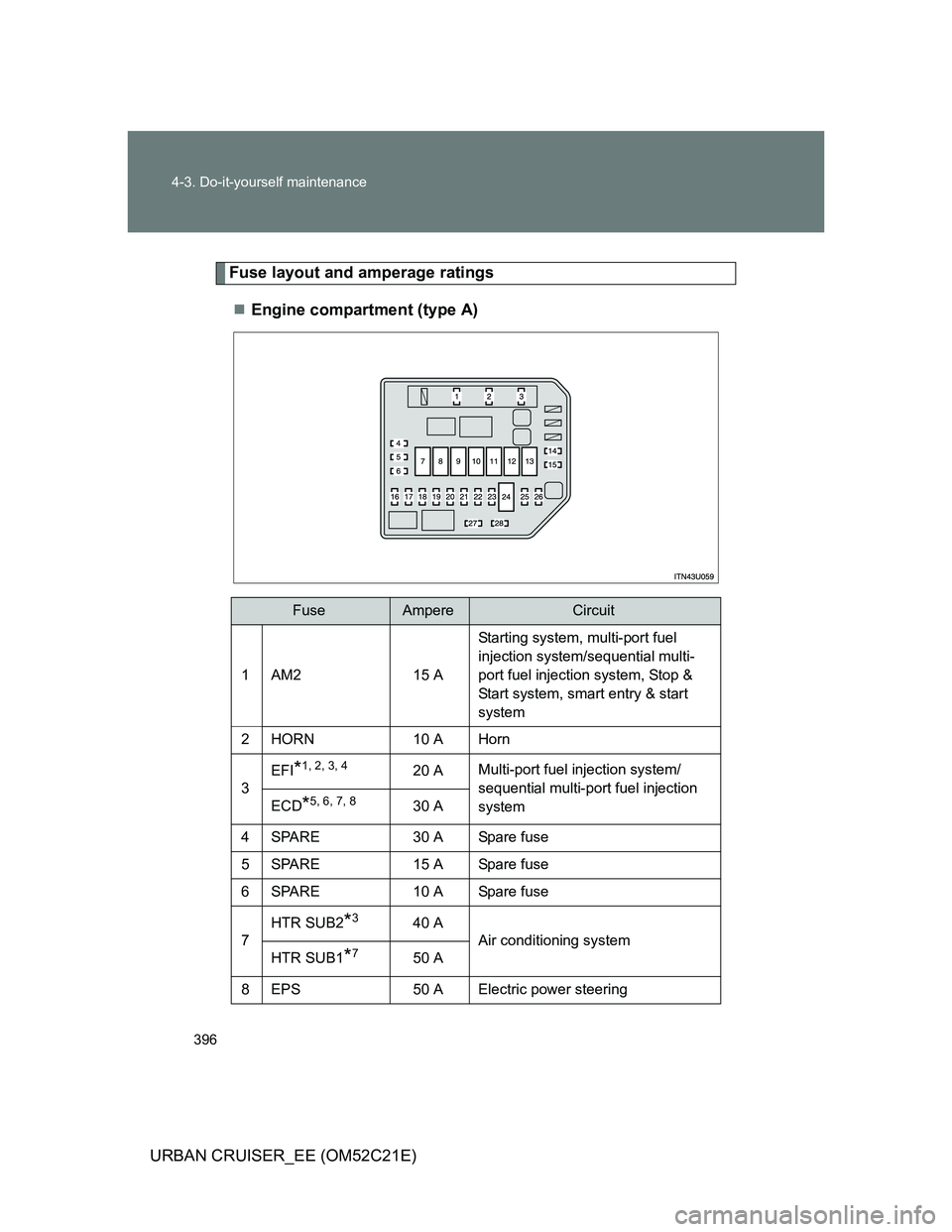
Fuse layout and amperage ratings
Engine compartment (type A)
FuseAmpereCircuit
1AM215 AStarting system, multi-port fuel
injection system/sequential multi-
port fuel injection system, Stop &
Start system, smart entry & start
system
2HORN10 A Horn
3
EFI*1, 2, 3, 420 AMulti-port fuel injection system/
sequential multi-port fuel injection
system
ECD*5, 6, 7, 830 A
4 SPARE 30 A Spare fuse
5 SPARE 15 A Spare fuse
6 SPARE 10 A Spare fuse
7HTR SUB2
*340 A
Air conditioning system
HTR SUB1
*750 A
8 EPS 50 A Electric power steering