audio TOYOTA URBAN CRUISER 2014 Owners Manual
[x] Cancel search | Manufacturer: TOYOTA, Model Year: 2014, Model line: URBAN CRUISER, Model: TOYOTA URBAN CRUISER 2014Pages: 544, PDF Size: 16.77 MB
Page 1 of 544
TABLE OF CONTENTS
1
URBAN CRUISER_OM_OM52F47E_(EE)
1Before drivingAdjusting and operating features such as door locks,
mirrors, and steering column
2When drivingDriving, stopping and safe-driving information
3Interior featuresAir conditioning and audio systems, as well as other in-
terior features for a comfortable driving experience
4Maintenance and
careCleaning and protecting your vehicle, performing do-it-
yourself maintenance, and maintenance information
5When trouble
arisesWhat to do if the vehicle needs to be towed, gets a flat
tire, or is involved in an accident
6Vehicle
specificationsDetailed vehicle information
IndexAlphabetical listing of information contained in this man-
ual
Page 4 of 544
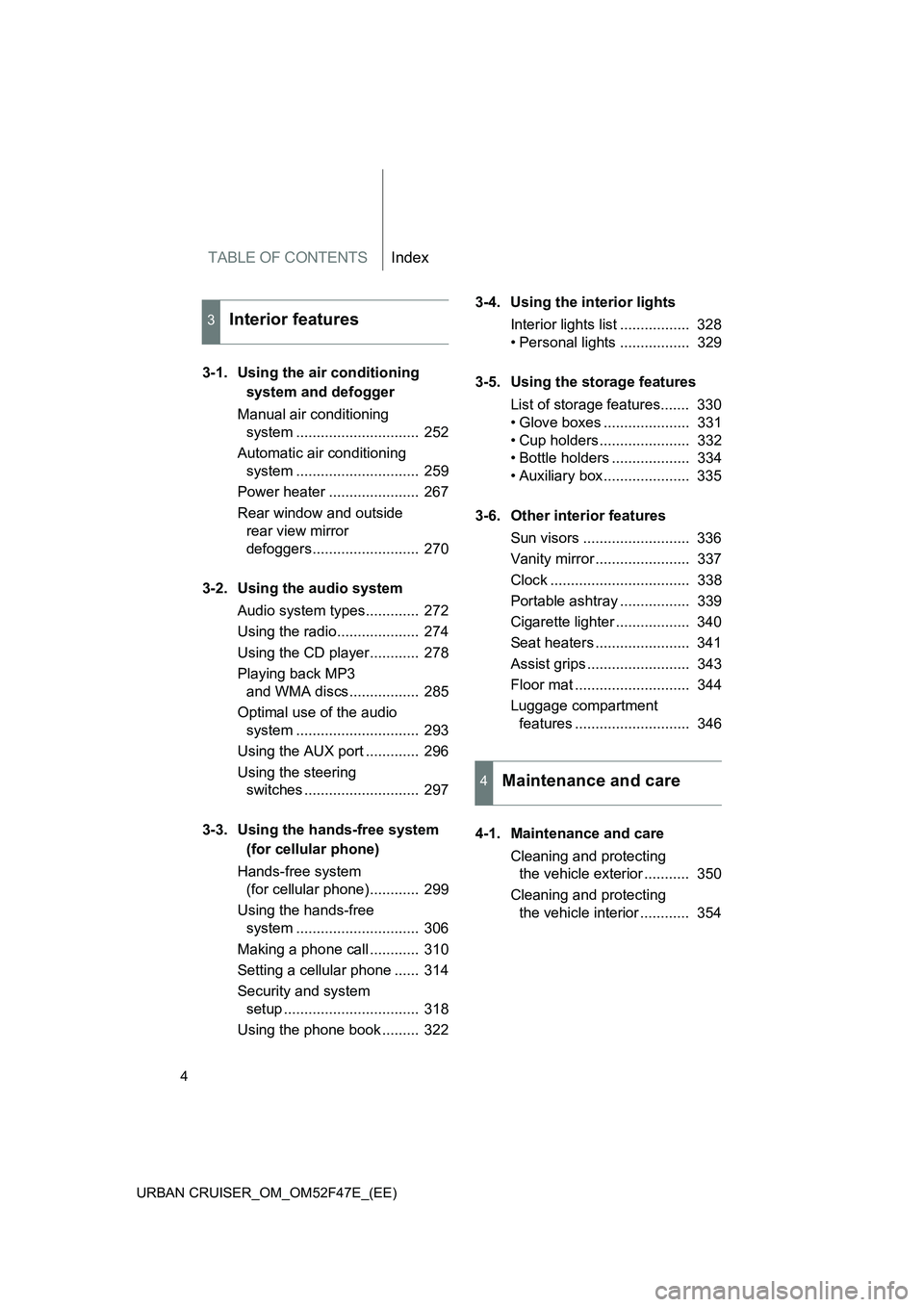
TABLE OF CONTENTSIndex
4
URBAN CRUISER_OM_OM52F47E_(EE)
3-1. Using the air conditioning system and defogger
Manual air conditioning system .............................. 252
Automatic air conditioning system .............................. 259
Power heater ...................... 267
Rear window and outside rear view mirror
defoggers.......................... 270
3-2. Using the audio system Audio system types............. 272
Using the radio.................... 274
Using the CD player............ 278
Playing back MP3 and WMA discs................. 285
Optimal use of the audio system .............................. 293
Using the AUX port ............. 296
Using the steering switches ............................ 297
3-3. Using the hands-free system (for cellular phone)
Hands-free system (for cellular phone)............ 299
Using the hands-free system .............................. 306
Making a phone call ............ 310
Setting a cellular phone ...... 314
Security and system setup ................................. 318
Using the phone book ......... 322 3-4. Using the interior lights
Interior lights list ................. 328
• Personal lights ................. 329
3-5. Using the storage features List of storage features....... 330
• Glove boxes ..................... 331
• Cup holders...................... 332
• Bottle holders ................... 334
• Auxiliary box..................... 335
3-6. Other interior features Sun visors .......................... 336
Vanity mirror ....................... 337
Clock .................................. 338
Portable ashtray ................. 339
Cigarette lighter .................. 340
Seat heaters ....................... 341
Assist grips ......................... 343
Floor mat ............................ 344
Luggage compartment features ............................ 346
4-1. Maintenance and care Cleaning and protecting the vehicle exterior ........... 350
Cleaning and protecting the vehicle interior ............ 354
3Interior features
4Maintenance and care
Page 14 of 544
14
URBAN CRUISER_OM_OM52F47E_(EE)
Pictorial indexInstrument panel
(left-hand drive vehicles)
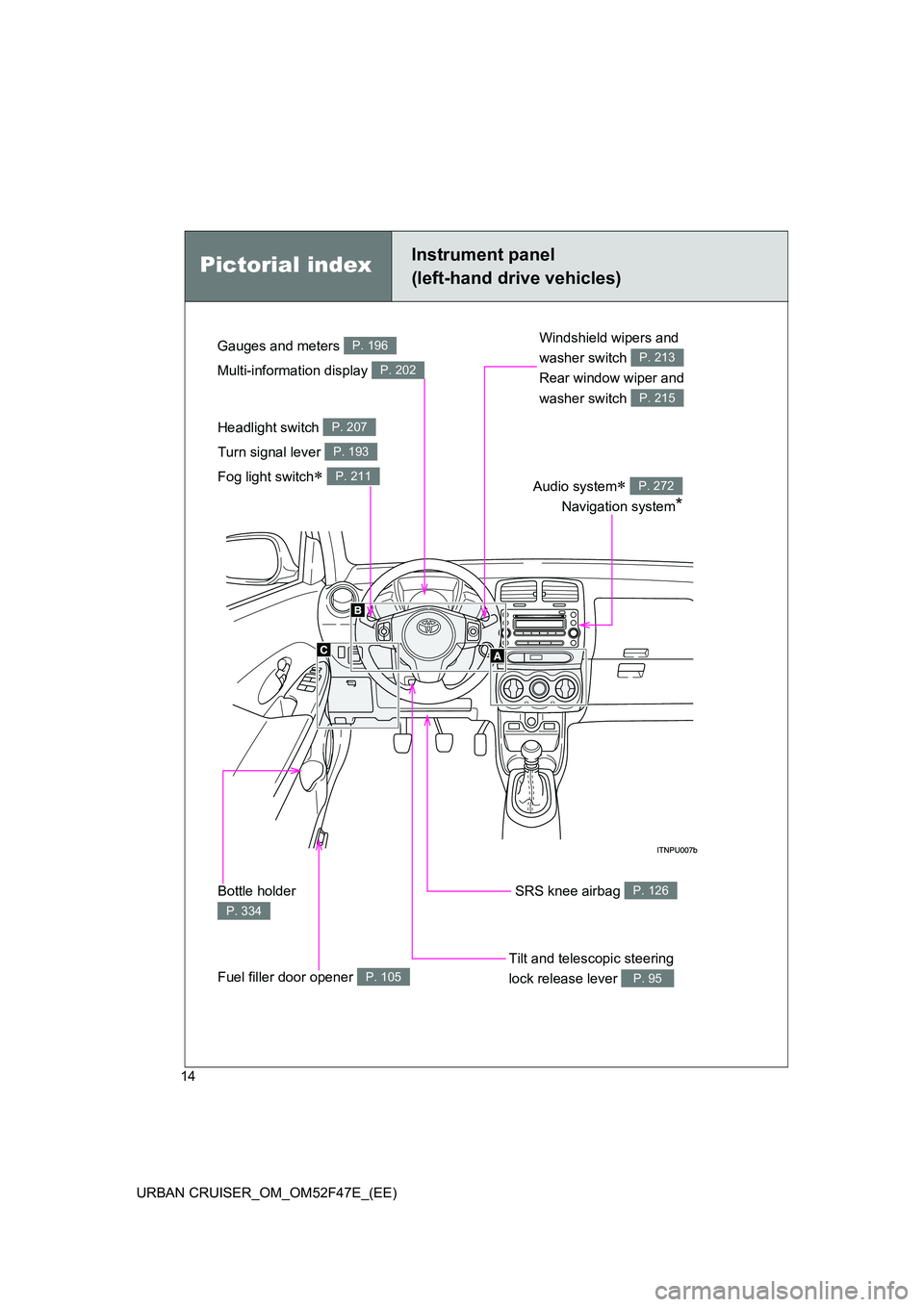
Headlight switch
Turn signal lever
Fog light switch
∗
P. 207
P. 193
P. 211
Tilt and telescopic steering
lock release lever
P. 95
Windshield wipers and
washer switch
Rear window wiper and
washer switch
P. 213
P. 215
Fuel filler door opener P. 105
Gauges and meters
Multi-information display P. 196
P. 202
Bottle holder
P. 334
Audio system∗
Navigation system
*
P. 272
SRS knee airbag P. 126
Page 16 of 544
16
URBAN CRUISER_OM_OM52F47E_(EE)
B
Pictorial indexInstrument panel
(left-hand drive vehicles)
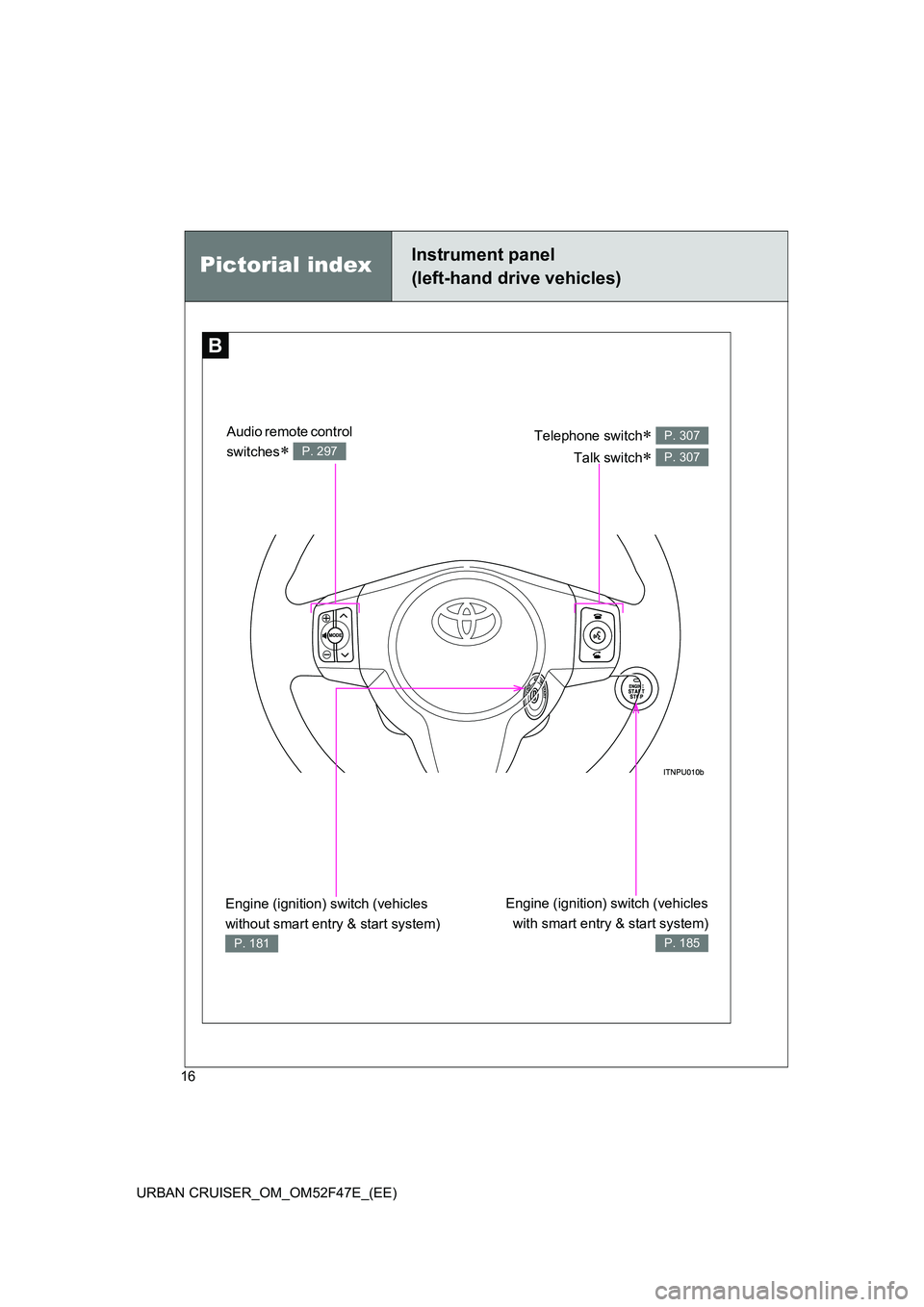
Telephone switch∗
Talk switch
∗
P. 307
P. 307
Engine (ignition) switch (vehicles with smart entry & start system)
P. 185
Engine (ignition) switch (vehicles
without smart entry & start system)
P. 181
Audio remote control
switches
∗ P. 297
Page 22 of 544
22
URBAN CRUISER_OM_OM52F47E_(EE)
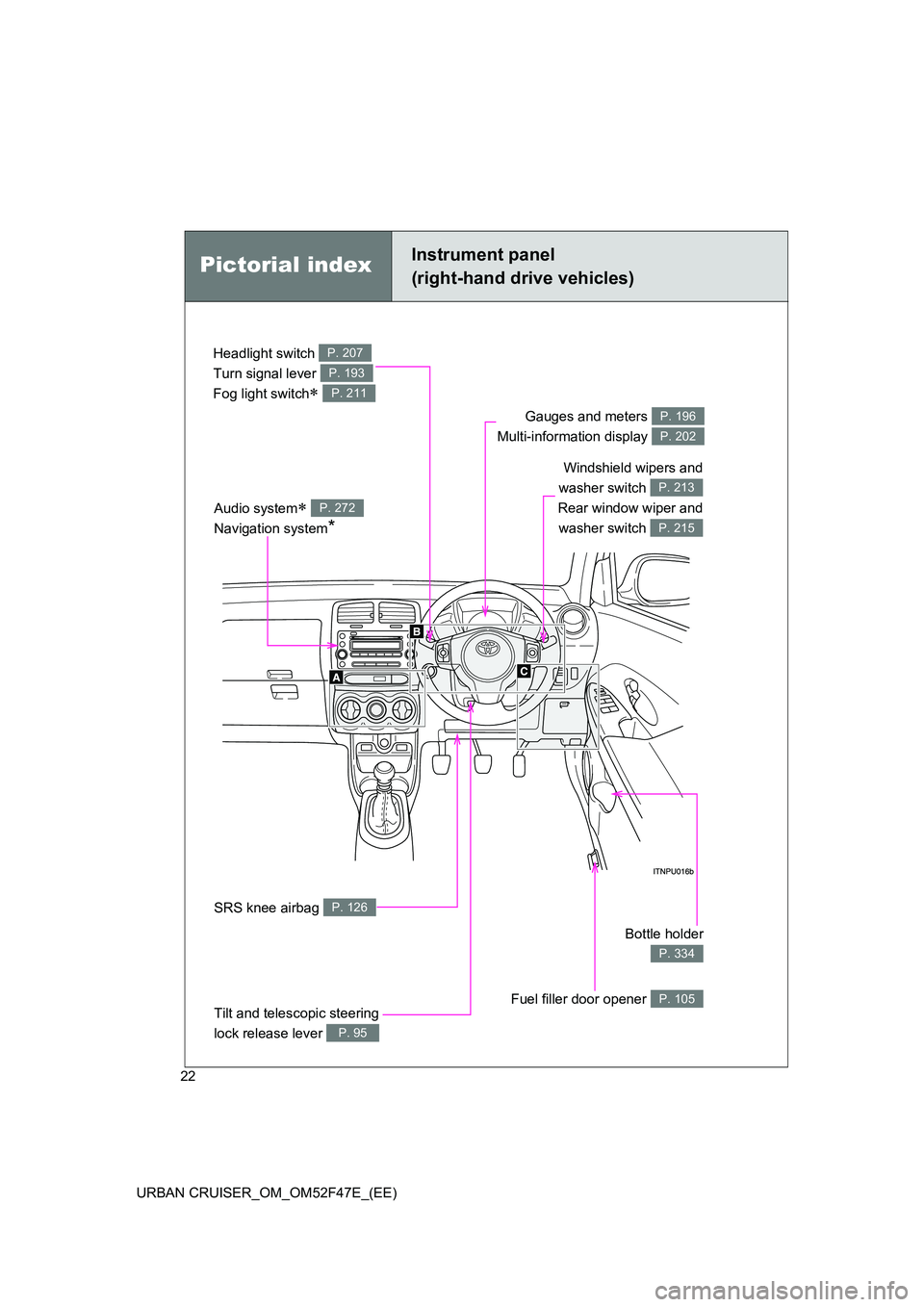
Headlight switch
Turn signal lever
Fog light switch
∗
P. 207
P. 193
P. 211
Gauges and meters
Multi-information display P. 196
P. 202
Audio system∗
Navigation system
*
P. 272
Pictorial indexInstrument panel
(right-hand drive vehicles)
Windshield wipers and
washer switch
Rear window wiper and washer switch
P. 213
P. 215
Bottle holder
P. 334
Fuel filler door opener P. 105
SRS knee airbag P. 126
Tilt and telescopic steering
lock release lever
P. 95
Page 24 of 544
24
URBAN CRUISER_OM_OM52F47E_(EE)
B
Pictorial indexInstrument panel
(right-hand drive vehicles)
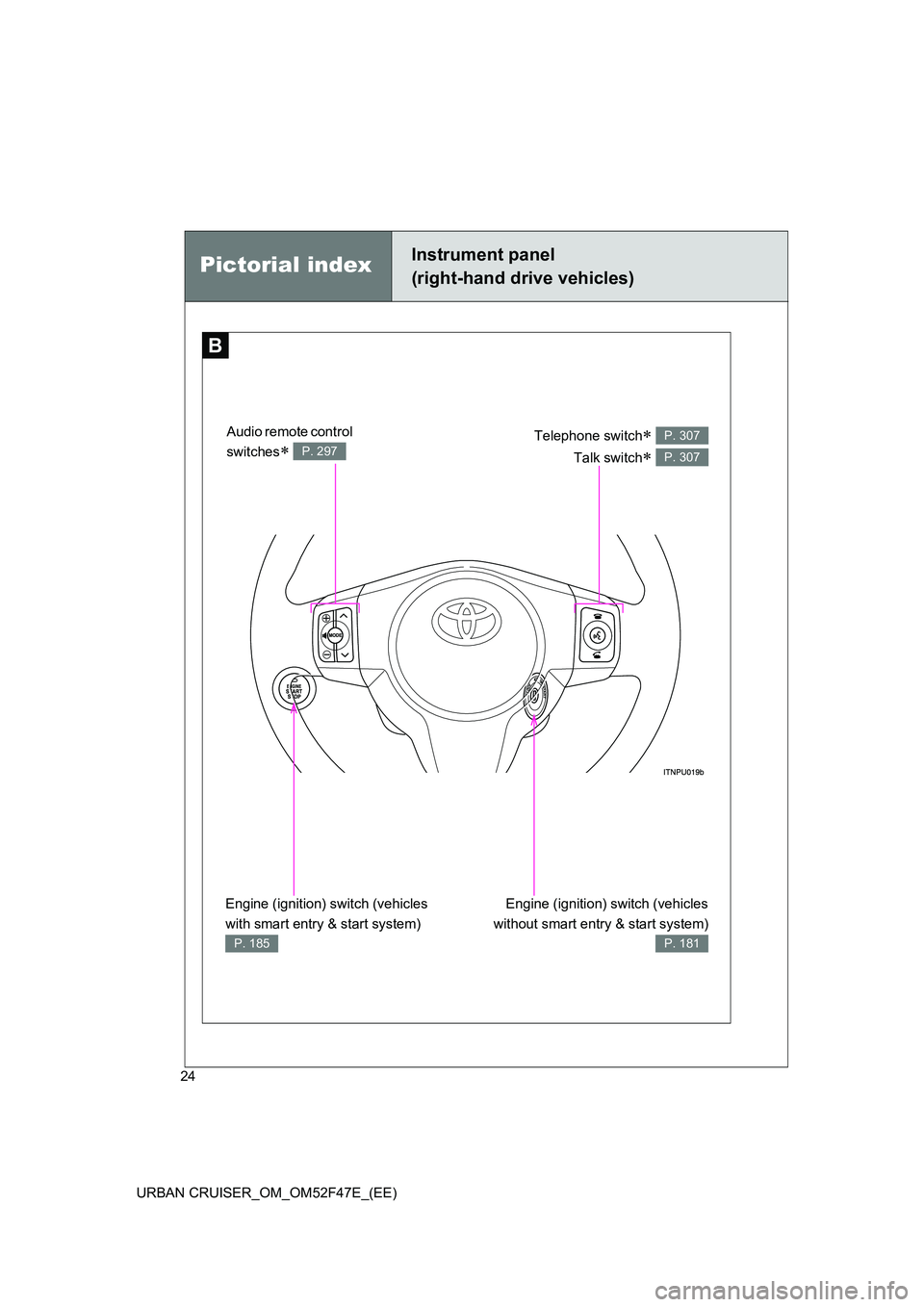
Telephone switch∗
Talk switch
∗
P. 307
P. 307
Engine (ignition) switch (vehicles
without smart entry & start system)
P. 181
Engine (ignition) switch (vehicles
with smart entry & start system)
P. 185
Audio remote control
switches
∗ P. 297
Page 41 of 544
41
1-2. Opening, closing and locking the doors
1
Before driving
URBAN CRUISER_OM_OM52F47E_(EE)
●
When multiple electronic keys are in the vicinity
● When another wireless key (that emits radio waves) is being used nearby
● When carrying or using the electronic key together with the following
devices that emit radio waves
• Another vehicle’s electronic key or a wireless key that emits radio
waves
• Personal computer or personal digital assistants (PDAs)
• Digital audio players
• Portable game systems
● If window tint with a metallic content or metallic objects are attached to
the rear window
■ Battery-saving function
In the following circumstances, the smart entry & start system is disabled in
order to prevent the vehicle and elec tronic key batteries from discharging.
● When the smart entry & start system has not been used for 2 weeks or
more
● When the electronic key has been left within approximately 1 m (3 ft.) of
the vehicle for 10 minutes or more
The system will resume operation when...
● The vehicle is locked using the door handle lock switch.
● The vehicle is locked/unlocked using the wireless remote control function
(→ P. 57) or the mechanical key. ( →P. 484)
Page 182 of 544
182
2-1. Driving procedures
URBAN CRUISER_OM_OM52F47E_(EE)
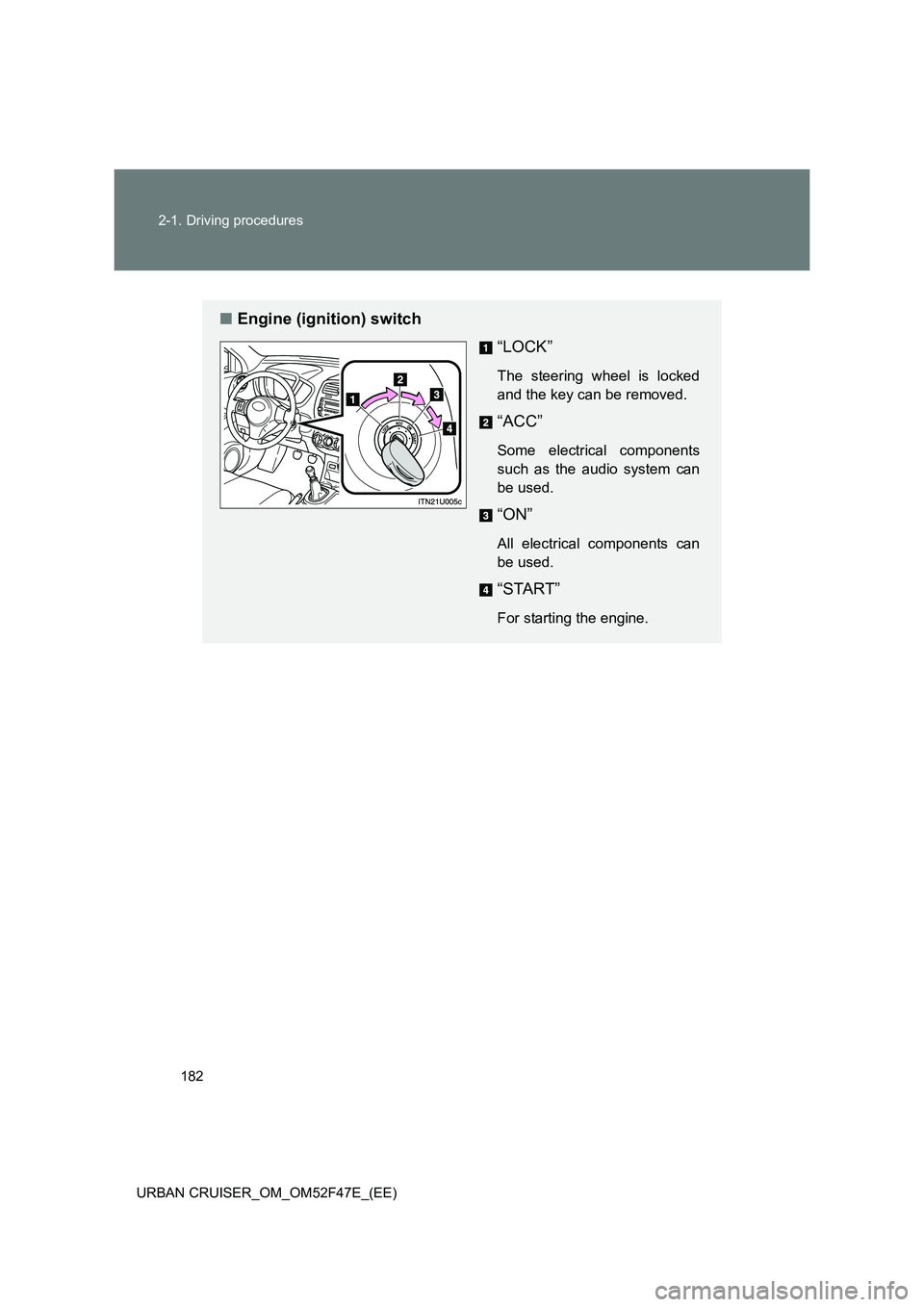
■ Engine (ignition) switch
“LOCK”
The steering wheel is locked
and the key can be removed.
“ACC”
Some electrical components
such as the audio system can
be used.
“ON”
All electrical components can
be used.
“START”
For starting the engine.
Page 186 of 544
186
2-1. Driving procedures
URBAN CRUISER_OM_OM52F47E_(EE)
■ Stopping the engine
Stop the vehicle.
Shift the shift lever to “N”.
Set the parking brake. ( →P. 194)
Press the “ENGINE START STOP” switch.
Release the brake pedal and check that the indicator on the
“ENGINE START STOP” switch is off.
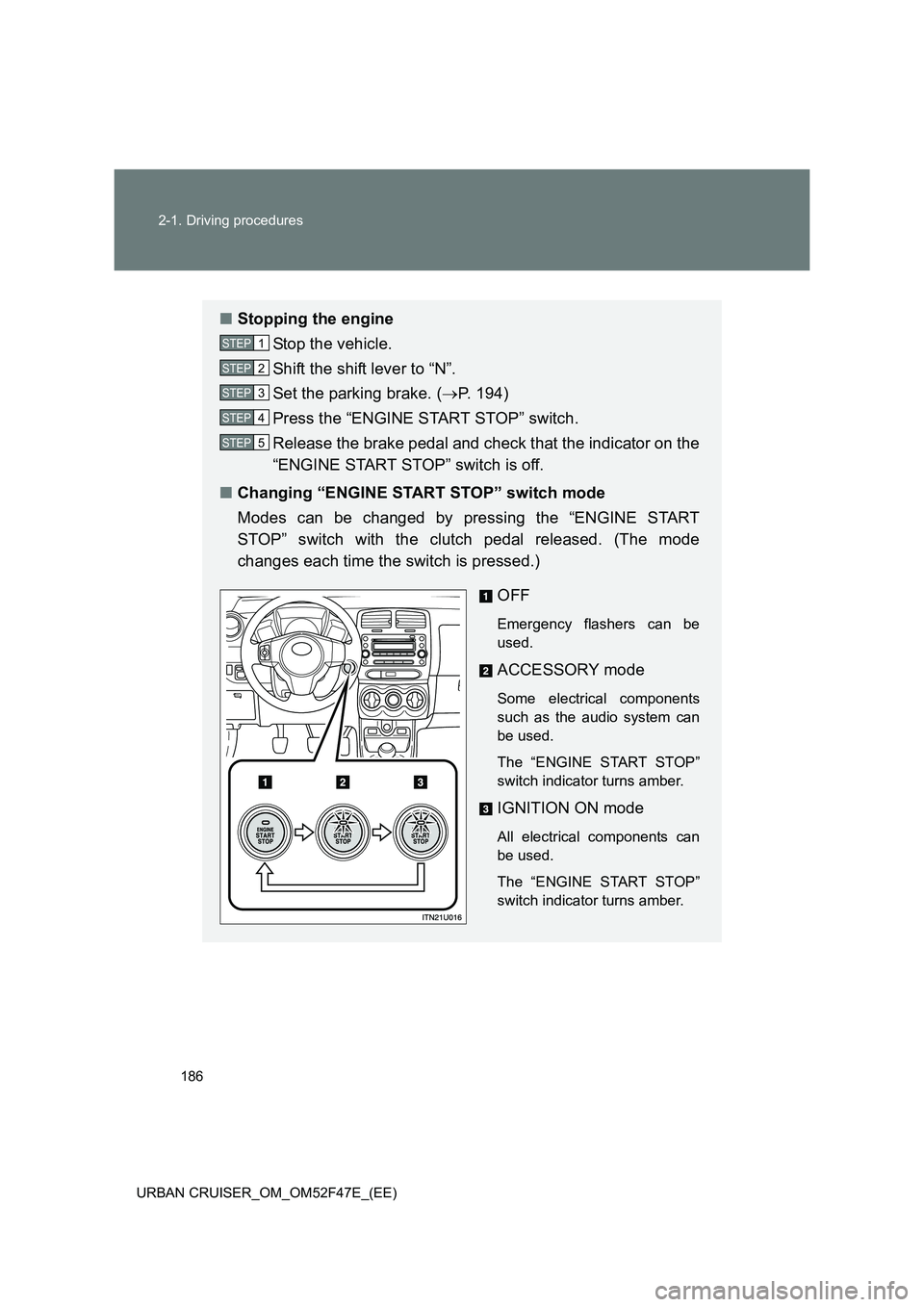
■ Changing “ENGINE START STOP” switch mode
Modes can be changed by pressing the “ENGINE START
STOP” switch with the clutch pedal released. (The mode
changes each time the switch is pressed.)
OFF
Emergency flashers can be
used.
ACCESSORY mode
Some electrical components
such as the audio system can
be used.
The “ENGINE START STOP”
switch indicator turns amber.
IGNITION ON mode
All electrical components can
be used.
The “ENGINE START STOP”
switch indicator turns amber.
STEP1
STEP2
STEP3
STEP4
STEP5
Page 220 of 544
220
2-4. Using other driving systems
URBAN CRUISER_OM_OM52F47E_(EE)
■ Automatic engine start function
In the following situations, the engine may start even without the clutch pedal
being depressed after the “ECO” indicator flashes for a few seconds.
●The brake pedal is pumped or strongly depressed.
● The air conditioning system is being used or turned on.
● Vehicles with an automatic air c onditioning system only: The windshield
defogger is turned on.
● The battery is not sufficiently charged.
● The vehicle starts to roll on an incline.
■ Automatic reactivation of the Stop & Start system
Even if the Stop & Start system is disabled by the “ECO OFF” switch, it will
be automatically re-enabled once the engine switch is turned to the “LOCK”
position then to the “START” position (vehicles without a smart entry & start
system) or the “ENGINE START STOP” switch is turned to OFF then the
engine is started (vehicles with a smart entry & start system).
■ The Stop & Start system protection feature
When an excessively loud sound is being projected by the audio system, the
audio system may be automatically cut off in order to maintain power for the
Stop & Start system function.
If this occurs, turning the engine switch to the “LOCK” position then to the
“ACC” or “ON” position (vehi cles without a smart entry & start system) or the
“ENGINE START STOP” switch to the OFF then to ACCESSORY or IGNI-
TION ON mode (vehicles with a smart entry & start system) re-enables the
audio system.
■ Steering wheel operation
When the engine is stopped by the Stop & Start system, the steering wheel
may become heavier than when driving.