buttons TOYOTA VENZA 2010 Owners Manual (in English)
[x] Cancel search | Manufacturer: TOYOTA, Model Year: 2010, Model line: VENZA, Model: TOYOTA VENZA 2010Pages: 664, PDF Size: 11.44 MB
Page 27 of 664
27
1-1. Key information
1
Before driving
VENZA_U (OM73007U)
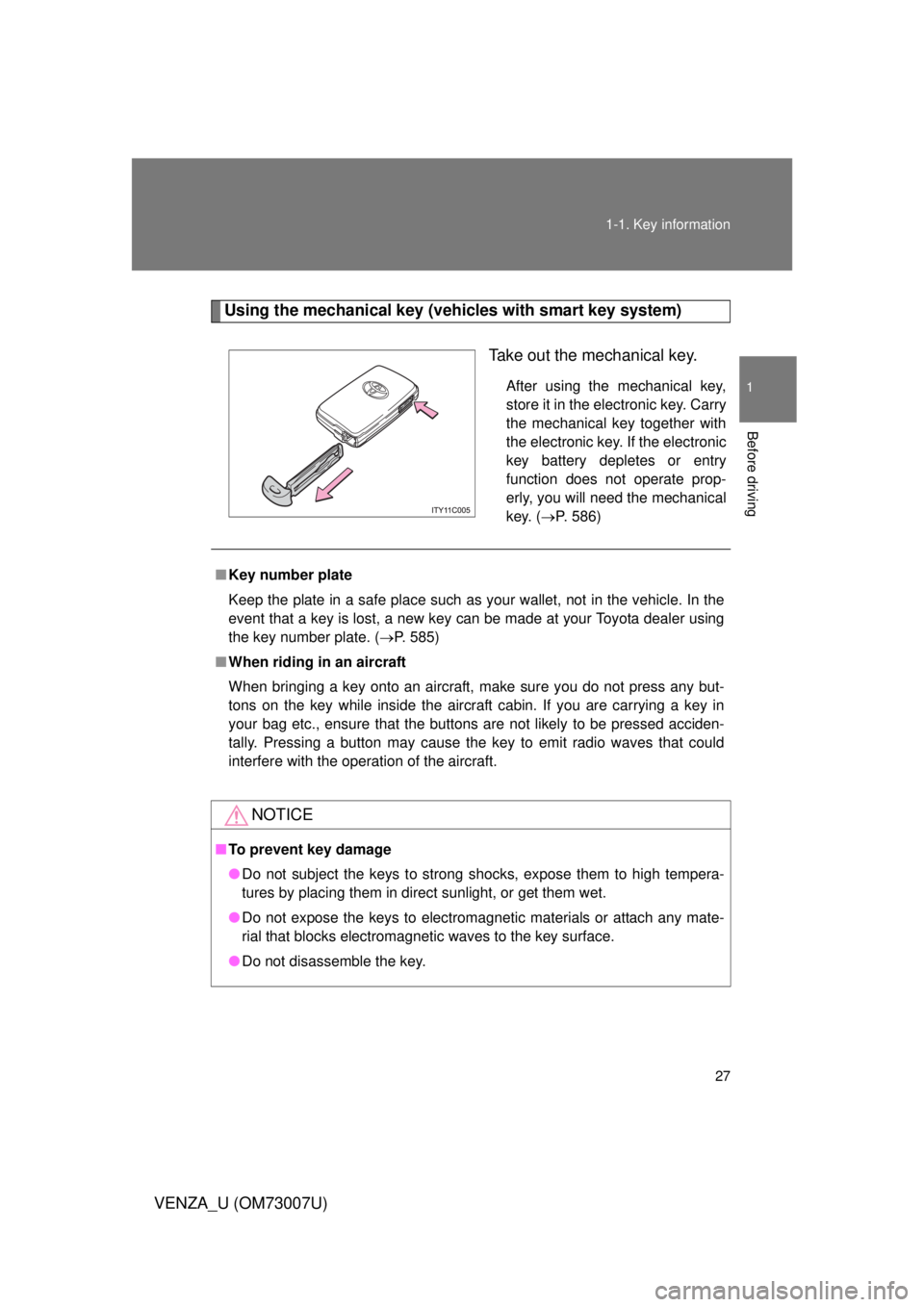
Using the mechanical key (vehicles with smart key system)
Take out the mechanical key.
After using the mechanical key,
store it in the electronic key. Carry
the mechanical key together with
the electronic key. If the electronic
key battery depletes or entry
function does not operate prop-
erly, you will need the mechanical
key. (P. 586)
■Key number plate
Keep the plate in a safe place such as your wallet, not in the vehicle. In the
event that a key is lost, a new key can be made at your Toyota dealer using
the key number plate. ( P. 585)
■ When riding in an aircraft
When bringing a key onto an aircraft, make sure you do not press any but-
tons on the key while inside the aircraft cabin. If you are carrying a key in
your bag etc., ensure that the buttons are not likely to be pressed acciden-
tally. Pressing a button may cause the key to emit radio waves that could
interfere with the operation of the aircraft.
NOTICE
■To prevent key damage
● Do not subject the keys to strong shocks, expose them to high tempera-
tures by placing them in direct sunlight, or get them wet.
● Do not expose the keys to electromagnetic materials or attach any mate-
rial that blocks electromagnetic waves to the key surface.
● Do not disassemble the key.
Page 34 of 664
34 1-2. Opening, closing and locking the doors
VENZA_U (OM73007U)
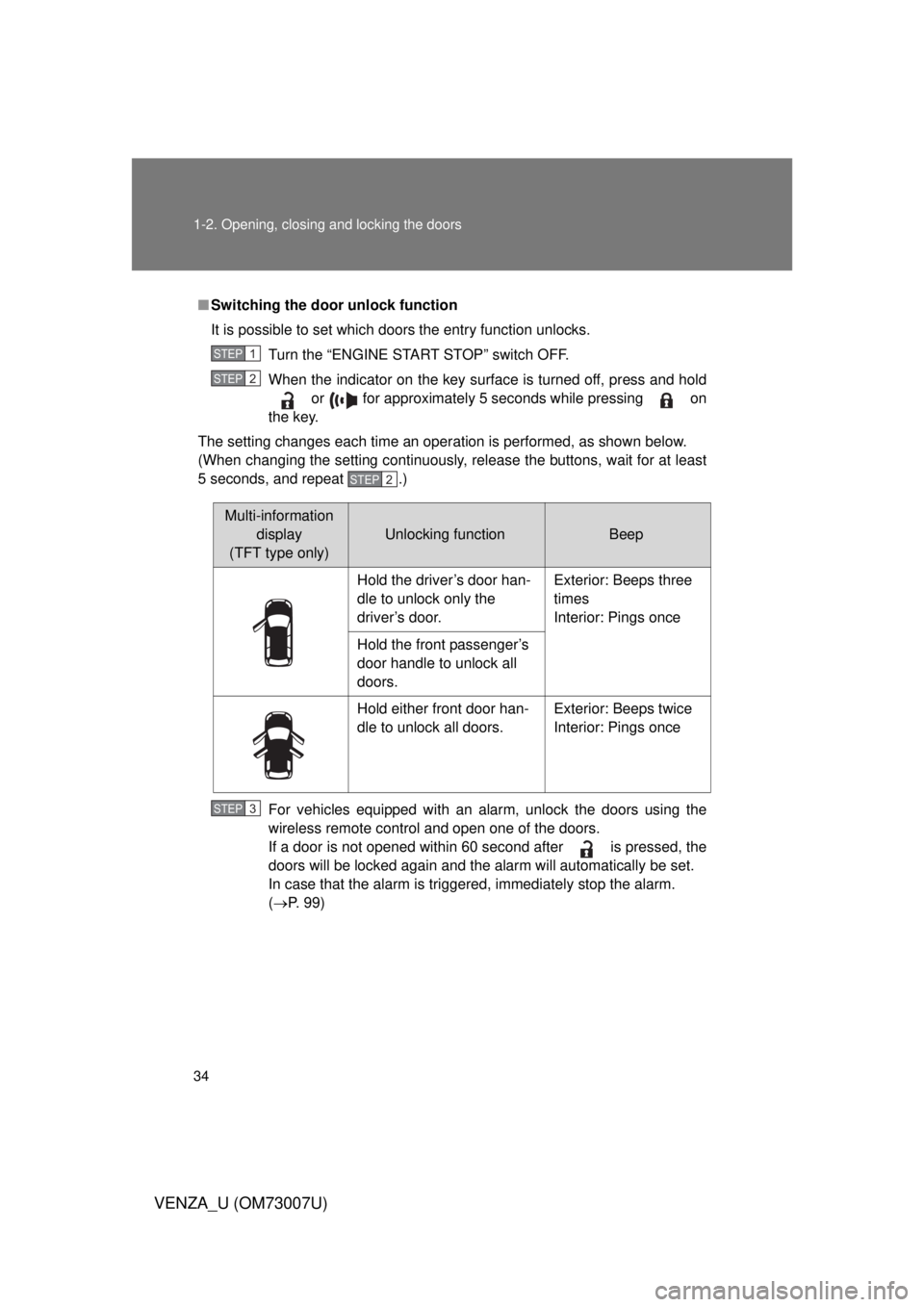
■Switching the door unlock function
It is possible to set which doors the entry function unlocks.
Turn the “ENGINE START STOP” switch OFF.
When the indicator on the key surface is turned off, press and hold or for approximately 5 seconds while pressing on
the key.
The setting changes each time an operation is performed, as shown below.
(When changing the setting continuously, release the buttons, wait for at least
5 seconds, and repeat .)
For vehicles equipped with an alarm, unlock the doors using the
wireless remote control and open one of the doors.
If a door is not opened within 60 second after is pressed, the
doors will be locked again and the alarm will automatically be set.
In case that the alarm is triggered, immediately stop the alarm.
(P. 99)
STEP1
STEP2
STEP2
Multi-information
display
(TFT type only)
Unlocking functionBeep
Hold the driver’s door han-
dle to unlock only the
driver’s door. Exterior: Beeps three
times
Interior: Pings once
Hold the front passenger’s
door handle to unlock all
doors.
Hold either front door han-
dle to unlock all doors. Exterior: Beeps twice
Interior: Pings once
STEP3
Page 49 of 664
49
1-2. Opening, closing and locking the doors
1
Before driving
VENZA_U (OM73007U)
■
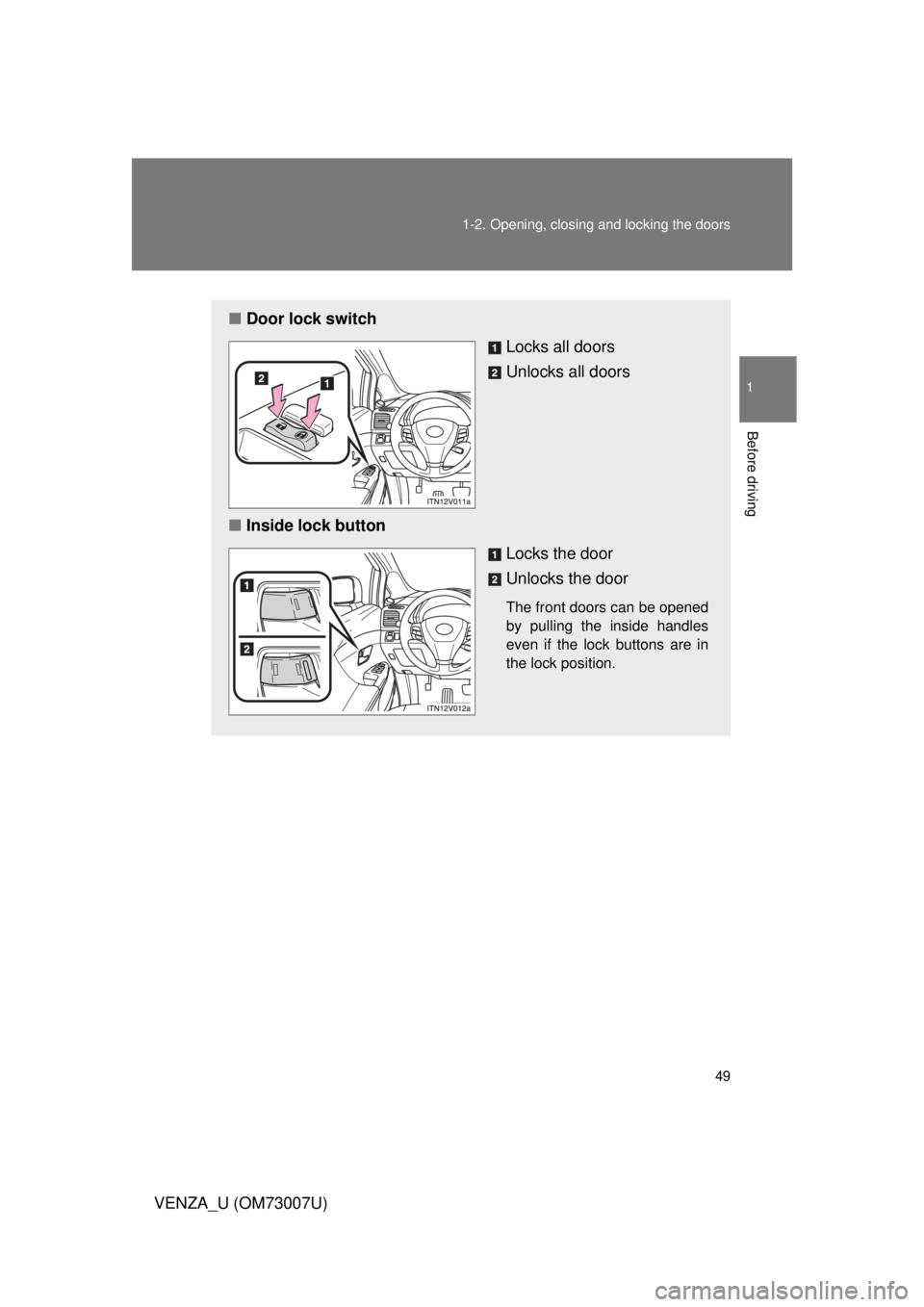
Door lock switch
Locks all doors
Unlocks all doors
■ Inside lock button
Locks the door
Unlocks the door
The front doors can be opened
by pulling the inside handles
even if the lock buttons are in
the lock position.
Page 53 of 664
53
1-2. Opening, closing and locking the doors
1
Before driving
VENZA_U (OM73007U)
■
Impact detection door lock release system
In the event that the vehicle is subject to a strong impact, all the doors are
unlocked.
Depending on the force of the impact or the type of accident, however, the
system may not operate.
■ Customization that can be configured at Toyota dealer or by the TFT
type multi-information display
Settings (e.g. unlocking function using a key) can be changed.
(Customizable features P. 634)
CAUTION
■To prevent an accident
Observe the following precautions while driving the vehicle.
Failing to do so may result in a door opening and an occupant falling out,
resulting in death or serious injury.
● Always use a seat belt.
● Always lock all doors.
● Ensure that all doors are properly closed.
● Do not pull the inside handle of the doors while driving.
The doors may be opened and the passengers are thrown out of the vehi-
cle and it may result in death or serious injury.
Be especially careful for the front doors, as the doors may be opened even
if the inside lock buttons are in locked position.
● Set the rear door child-protector locks when children are seated in the rear
seat.
Page 131 of 664
131
1
1-7. Safety information
Before driving
VENZA_U (OM73007U)
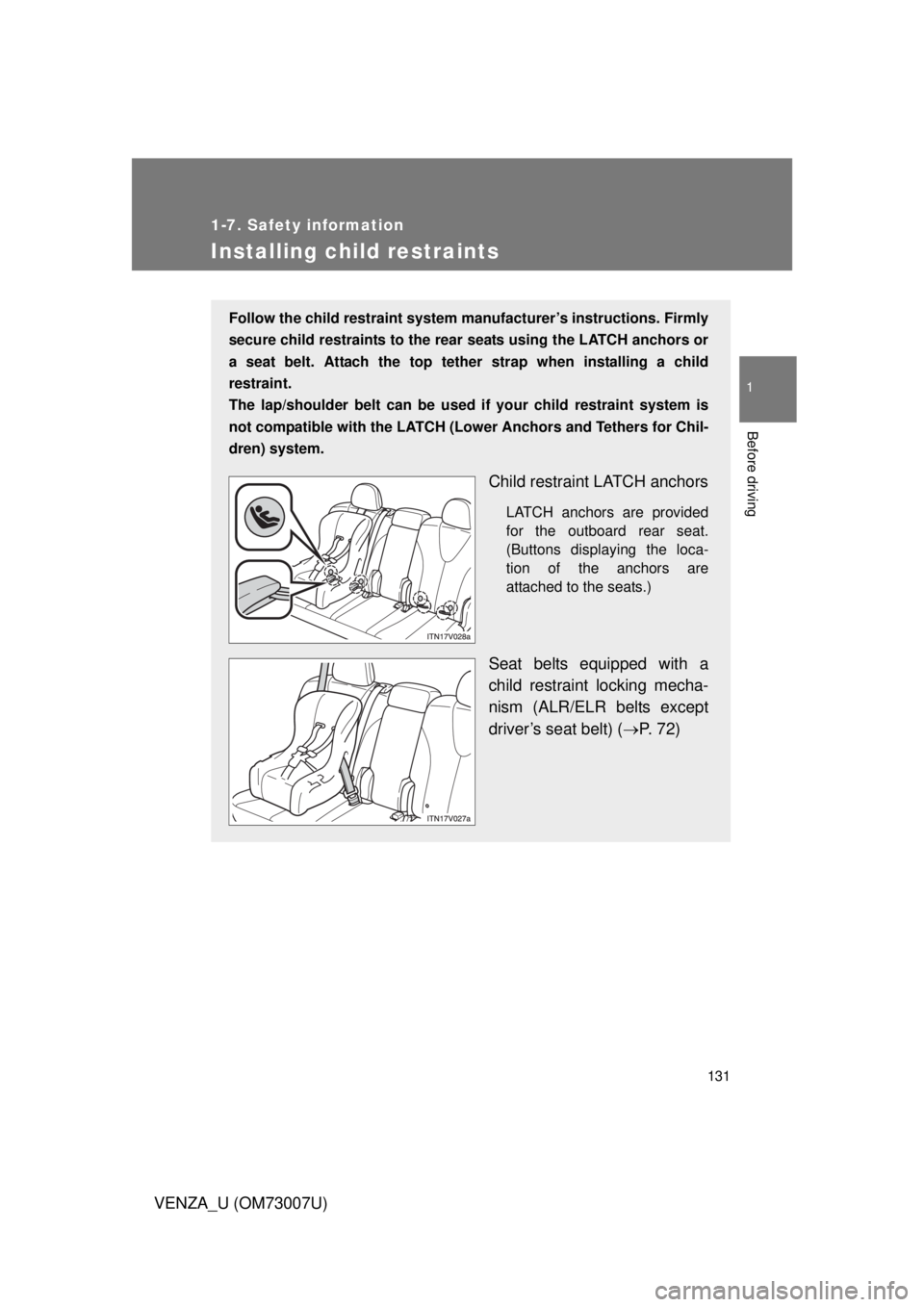
Installing child restraints
Follow the child restraint system manufacturer’s instructions. Firmly
secure child restraints to the r ear seats using the LATCH anchors or
a seat belt. Attach the top tether strap when installing a child
restraint.
The lap/shoulder belt can be used if your child restraint system is
not compatible with the LATCH (Low er Anchors and Tethers for Chil-
dren) system.
Child restraint LATCH anchors
LATCH anchors are provided
for the outboard rear seat.
(Buttons displaying the loca-
tion of the anchors are
attached to the seats.)
Seat belts equipped with a
child restraint locking mecha-
nism (ALR/ELR belts except
driver’s seat belt) ( P. 72)
Page 182 of 664
182 2-2. Instrument cluster
VENZA_U (OM73007U)■
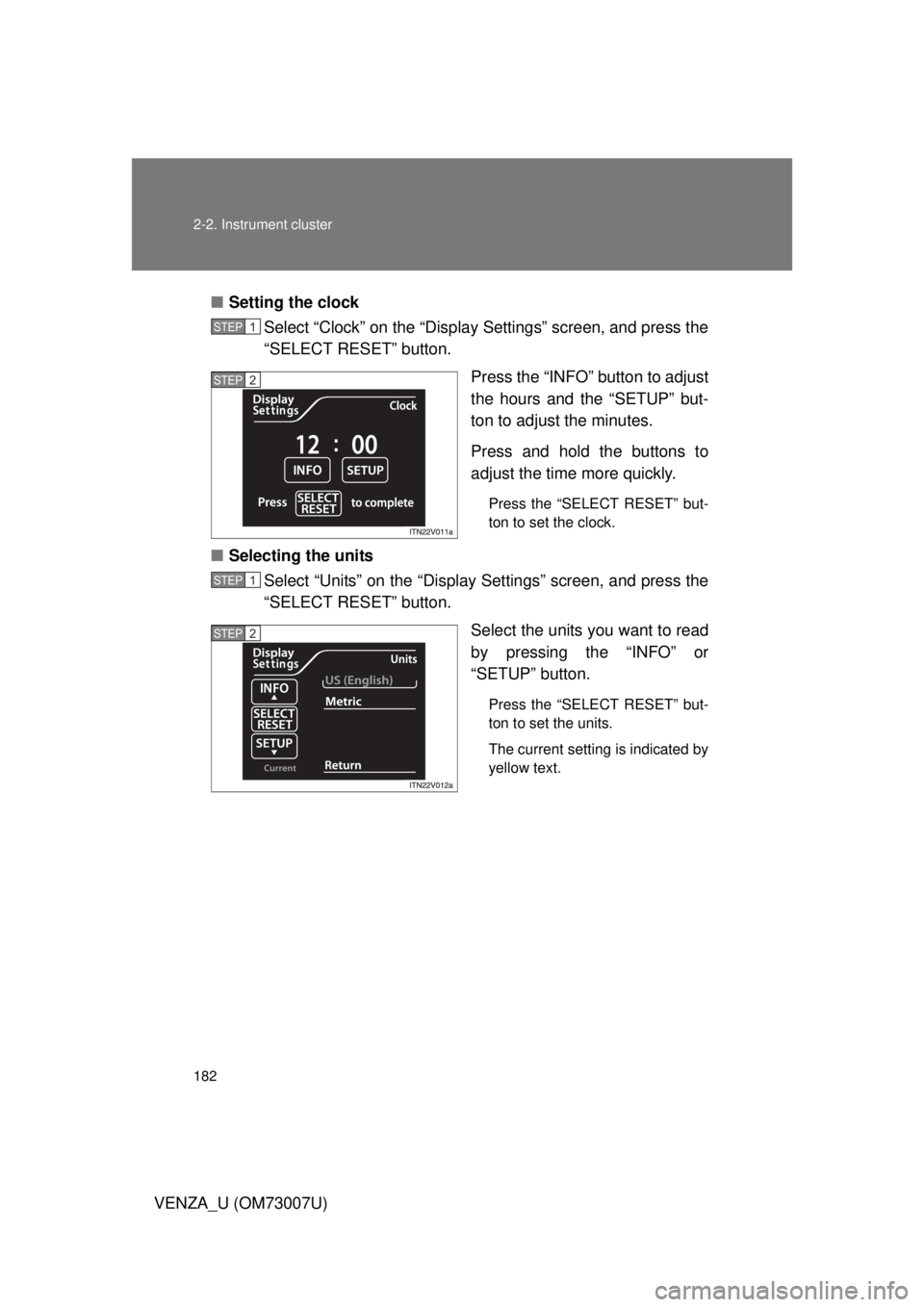
Setting the clock
Select “Clock” on the “Display Settings” screen, and press the
“SELECT RESET” button.
Press the “INFO” button to adjust
the hours and the “SETUP” but-
ton to adjust the minutes.
Press and hold the buttons to
adjust the time more quickly.
Press the “SELECT RESET” but-
ton to set the clock.
■Selecting the units
Select “Units” on the “Display Settings” screen, and press the
“SELECT RESET” button.
Select the units you want to read
by pressing the “INFO” or
“SETUP” button.
Press the “SELECT RESET” but-
ton to set the units.
The current setting is indicated by
yellow text.
STEP1
STEP2
STEP1
STEP2
Page 184 of 664
184 2-2. Instrument cluster
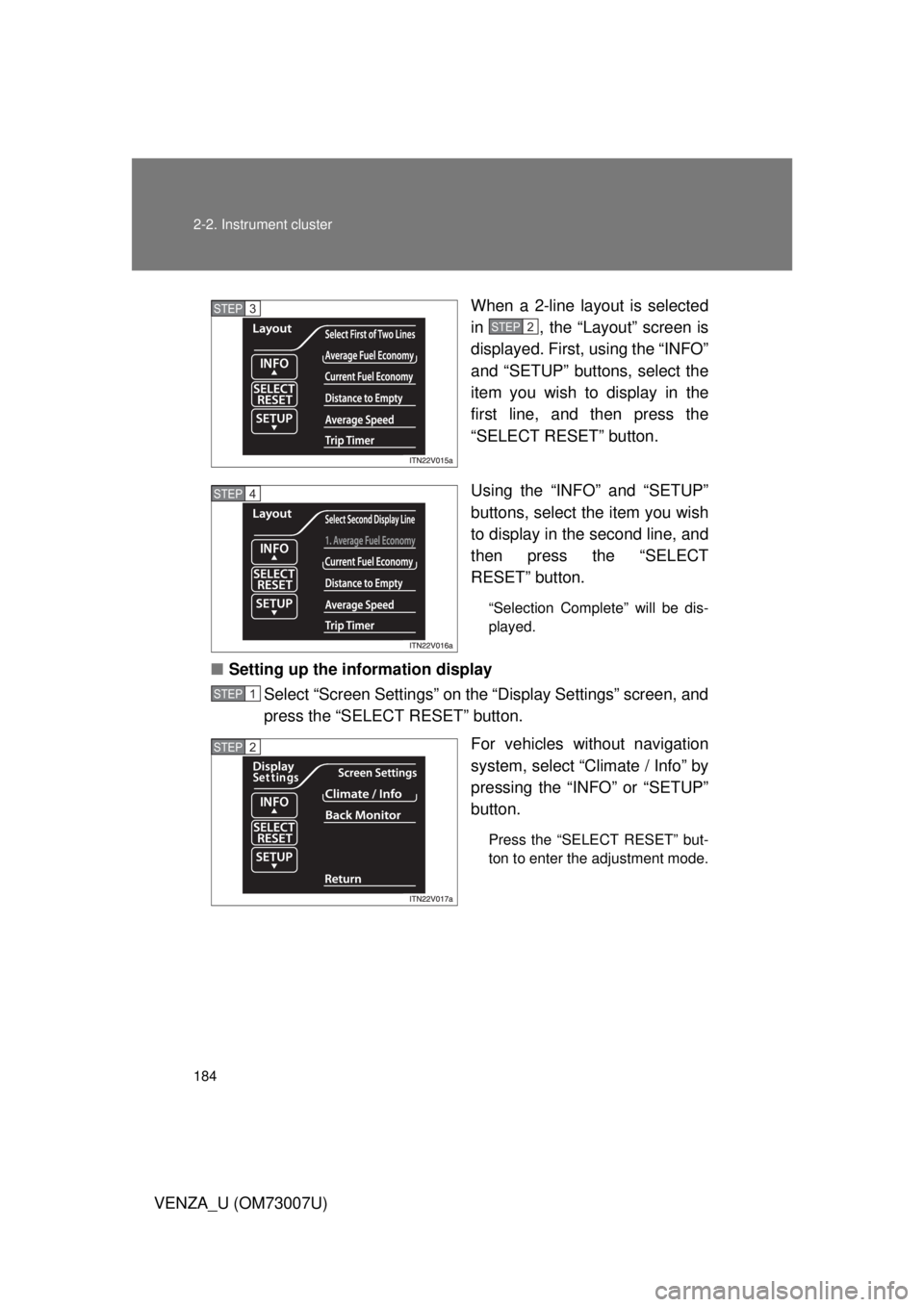
VENZA_U (OM73007U)When a 2-line layout is selected
in , the “Layout” screen is
displayed. First, using the “INFO”
and “SETUP” buttons, select the
item you wish to display in the
first line, and then press the
“SELECT RESET” button.
Using the “INFO” and “SETUP”
buttons, select the item you wish
to display in the second line, and
then press the “SELECT
RESET” button.
“Selection Complete” will be dis-
played.
■
Setting up the information display
Select “Screen Settings” on the “Display Settings” screen, and
press the “SELECT RESET” button.
For vehicles without navigation
system, select “Climate / Info” by
pressing the “INFO” or “SETUP”
button.
Press the “SELECT RESET” but-
ton to enter the adjustment mode.
STEP3
STEP2
STEP4
STEP1
STEP2
Page 290 of 664
290 3-2. Using the audio system
VENZA_U (OM73007U)
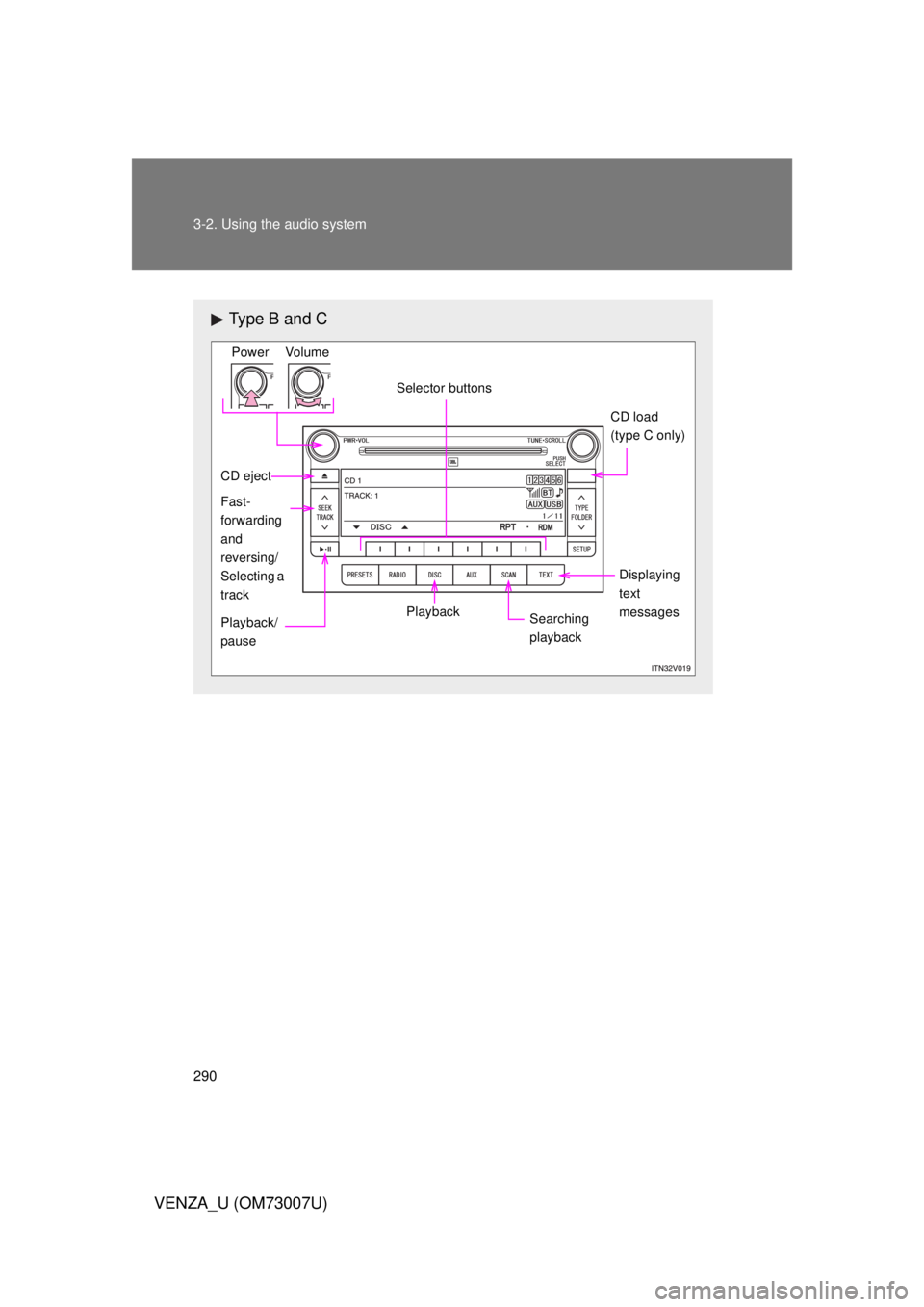
Type B and C
Power VolumeSelector buttons CD load
(type C only)
Displaying
text
messages
Searching
playback
PlaybackPlayback/
pause Fast-
forwarding
and
reversing/
Selecting a
track
CD eject
Page 300 of 664
300 3-2. Using the audio system
VENZA_U (OM73007U)
Loading and ejecting MP3 and WMA discs P. 2 8 9
Selecting a CD (with a CD changer)
P. 2 8 9
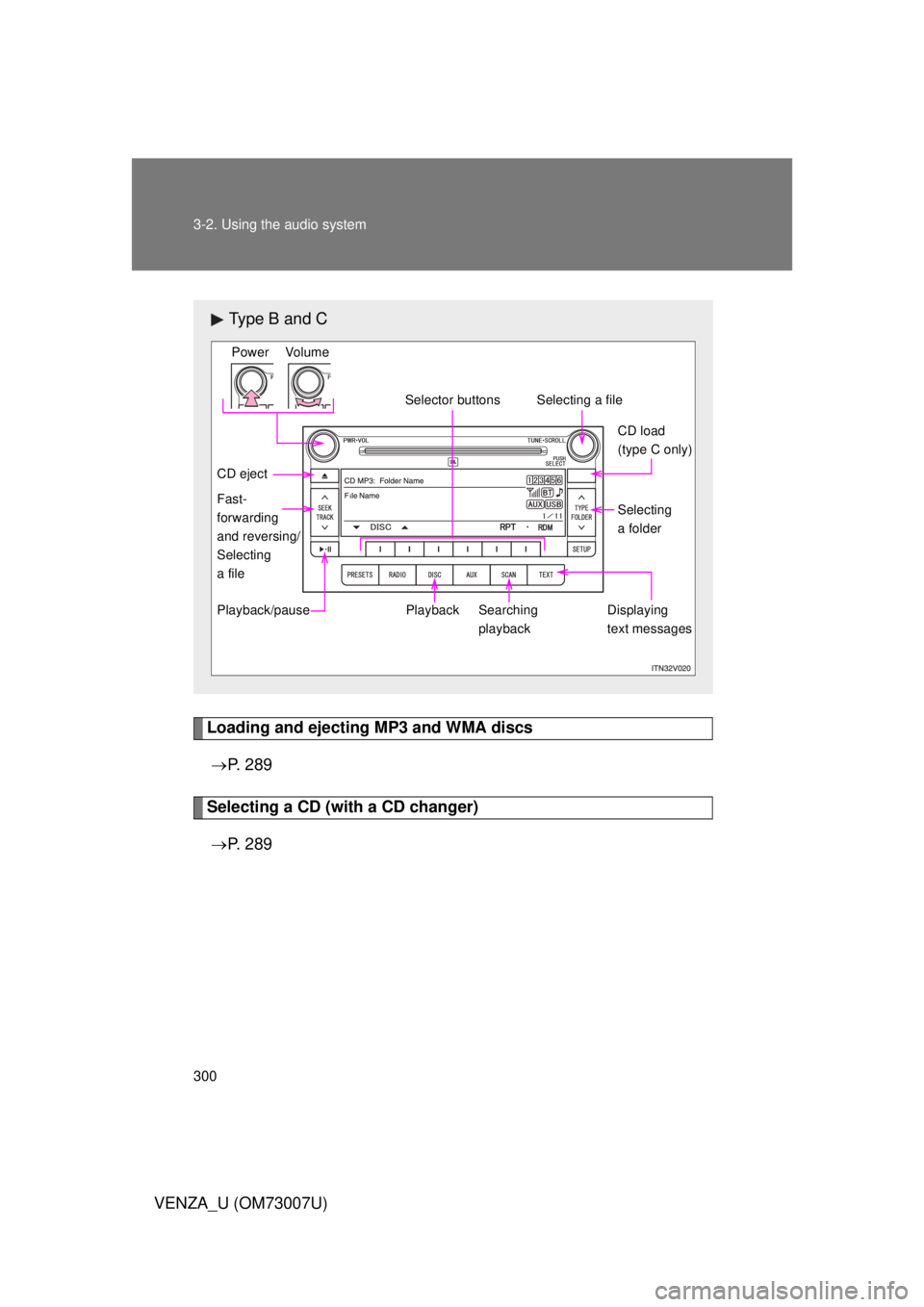
Type B and C
Power Volume
Playback
CD eject
Playback/pause Searching
playbackDisplaying
text messagesSelecting
a folder CD load
(type C only)
Selecting a file
Selector buttons
Fast-
forwarding
and reversing/
Selecting
a file
Page 309 of 664
309
3-2. Using the audio system
3
Interior features
VENZA_U (OM73007U)
Operating an iPod
: If equipped
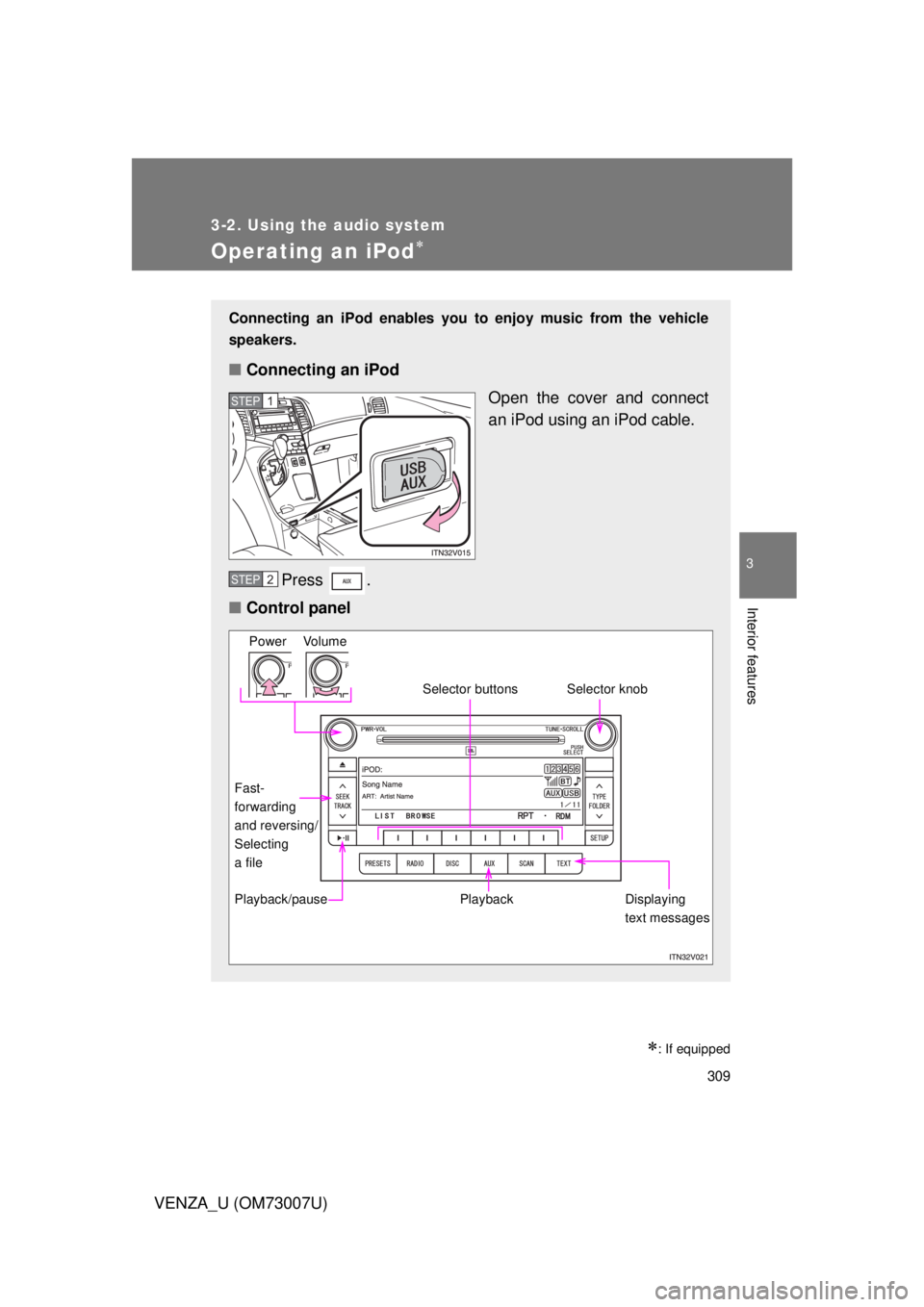
Connecting an iPod enables you to enjoy music from the vehicle
speakers.
■ Connecting an iPod
Open the cover and connect
an iPod using an iPod cable.
Press .
■ Control panel
STEP1
STEP2
Power Volume
Playback
Playback/pause Displaying
text messages
Selector knob
Selector buttons
Fast-
forwarding
and reversing/
Selecting
a file