steering TOYOTA VENZA 2013 Accessories, Audio & Navigation (in English)
[x] Cancel search | Manufacturer: TOYOTA, Model Year: 2013, Model line: VENZA, Model: TOYOTA VENZA 2013Pages: 363, PDF Size: 5.62 MB
Page 7 of 363
7
1
2
3
4
5
6
7
8
9
VENZA (US) NAVI 73011U
12.02.24 10:18
1. PHONE OPERATION .................... 130
QUICK REFERENCE .......................... 130
PHONE (HANDS-FREE SYSTEM
FOR CELLULAR PHONE) ................ 132
REGISTER A Bluetooth
® PHONE ....... 137
CALL ON THE Bluetooth® PHONE ..... 142
RECEIVE ON THE Bluetooth®
PHONE ............................................. 149
TALK ON THE Bluetooth
® PHONE ..... 150
Bluetooth® PHONE MESSAGE
FUNCTION........................................ 153
2. SETUP ........................................... 156
PHONE SETTINGS ............................. 156
Bluetooth® SETTINGS ........................ 178
1. AUDIO/VIDEO SYSTEM OPERATION ................................ 192
QUICK REFERENCE .......................... 192
SOME BASICS .................................... 194
RADIO OPERATION ........................... 200
HD Radio™ TECHNOLOGY
INFORMATION ................................. 203
RADIO OPERATION (XM Satellite Radio BROADCAST) ........................ 208
RADIO OPERATION (INTERNET RADIO BROADCAST)................................... 214
DVD PLAYER OPERATION................ 215
USB MEMORY OPERATION .............. 237
iPod OPERATION ............................... 242
Bluetooth
® AUDIO OPERATION ......... 246
AUDIO/VIDEO REMOTE CONTROLS
(STEERING SWITCHES) ................. 256
AUDIO/VIDEO SYSTEM OPERATING HINTS ......................... 257
2. SETUP ........................................... 267
AUDIO SETTINGS .............................. 267
1. VOICE COMMAND SYSTEM OPERATION................................ 270
VOICE COMMAND SYSTEM .............. 270
NATURAL SPEECH INFORMATION
(ENGLISH ONLY) ............................. 276
EXPANDED VOICE COMMANDS ....... 278
COMMAND LIST ................................. 279
1. INFORMATION DISPLAY ............. 284
FUEL CONSUMPTION ........................ 284
MAP DATABASE VERSION AND COVERAGE AREA ........................... 286
2. XM FUNCTION-O VERVIEW ......... 288
XM SERVICES .................................... 288
3. XM FUNCTION OPERATION ....... 289
XM Sports ............................................ 289
XM Stocks ............................................ 292
XM Fuel Prices..................................... 295
XM NavWeather™ ............................... 298
XM NavTraffic
®.................................... 301
4. SETUP ........................................... 304
XM SETTINGS..................................... 304
4PHONE
5AUDIO/VIDEO SYSTEM
6VOICE COMMAND SYSTEM
7INFORMATION
Page 129 of 363
4
129
1
2
3
4
5
6
7
8
9
VENZA (US) NAVI 73011U
12.02.16 15:45
1. QUICK REFERENCE ................... 130
2. PHONE (HANDS-FREE
SYSTEM FOR CELLULAR
PHONE) ......................................132
USING THE PHONE SWITCH ............ 133
USING THE STEERING
SWITCHES ....................................... 134
ABOUT THE PHONEBOOK IN THIS SYSTEM.............................. 135
WHEN SELLING OR DISPOSING OF THE VEHICLE............................. 135
3. REGISTER A Bluetooth®
PHONE........................................137
CONNECTING A Bluetooth®
PHONE ............................................. 139
RECONNECTING THE Bluetooth
®
PHONE ............................................. 141
4. CALL ON THE Bluetooth®
PHONE........................................142
BY DIAL ............................................... 142
BY PHONEBOOK................................ 142
BY SPEED DIAL.................................. 144
BY CALL HISTORY ............................. 144
BY VOICE RECOGNITION ................. 146
CALLING USING AN
SMS/MMS MESSAGE ...................... 148
BY POI* CALL ..................................... 148
5. RECEIVE ON THE Bluetooth®
PHONE ....................................... 149
6. TALK ON THE Bluetooth
®
PHONE ....................................... 150
WHEN YOU SELECT “0-9”.................. 150
INCOMING CALL WAITING ................ 152
7. Bluetooth® PHONE MESSAGE
FUNCTION ...... ........................... 153
CHECKING MESSAGES ..................... 153
REPLYING (QUICK REPLY) ............... 154
NEW MESSAGE NOTIFICATION ....... 155
1. PHONE SETTINGS ..................... 156
PHONE SOUND SETTINGS ............... 156
PHONEBOOK ...................................... 158
MESSAGE SETTINGS ........................ 171
PHONE DISPLAY SETTINGS ............. 175
2. Bluetooth® SETTINGS ............... 178
REGISTERED DEVICES ..................... 178
SELECTING A Bluetooth® PHONE ..... 182
SELECTING PORTABLE PLAYER ..... 184
DETAILED Bluetooth
® SETTINGS ...... 185
1PHONE OPERATION
2SETUP
PHONE
*: Point of Interest
Page 132 of 363
132
1. PHONE OPERATION
VENZA (US) NAVI 73011U
12.02.17 09:43
2. PHONE (HANDS-FREE SYSTEM FOR CELLULAR PHONE)
*: This profile is necessary when using
Entune. (See “ENTUNE SERVICE” on
page 306.)
The hands-free system enables calls
to be made and received without hav-
ing to take your hands off the steering
wheel.
This system supports Bluetooth
®.
Bluetooth
® is a wireless data system
that enables cellular phones to be used
without being connected by a cable or
placed in a cradle.
The operating procedure of the phone
is explained here.
For registering and setting of the phone,
see “PHONE SETTINGS” on page 156
and “Bluetooth
® SETTINGS” on page
178.
CAUTION
● While driving, do not use a cellular
phone or connect the Bluetooth® phone.
NOTICE
●Do not leave your cellular phone in the
vehicle. The temperature inside may rise
to a level that could damage the phone.
INFORMATION
●If your cellular phone does not support
Bluetooth®, this system cannot function.
● In the following conditions, the system
may not function:
• The cellular phone is turned off.
• The current position is outside the
communication area.
• The cellular phone is not connected.
• The cellular phone has a low battery.
● When using Bluetooth
® audio and
hands-free at the same time, the follow-
ing problems may occur:
• The Bluetooth
® connection may be
cut.
• Noise may be heard on the Bluetooth
®
audio playback.
● This system supports the following ser-
vices:
•Bluetooth
® Specification
Ver.1.1 or higher
(Recommended: Ver.2.1 + EDR or
higher)
•Profiles HFP (Hands Free Profile)
Ver.1.0 or higher
(Recommended: Ver.1.5 or higher)
OPP (Object Push Profile)
Ver.1.1 or higher
PBAP (Phone Book Access Profile)
Ver.1.0 or higher
MAP (Message Access Profile)
Ver.1.0 or higher
SPP (Serial Port Profile)
Ver.1.1 or higher*
Page 133 of 363
133
1. PHONE OPERATION
4
PHONE
VENZA (US) NAVI 73011U
12.02.17 09:43
Bluetooth is a registered trademark of
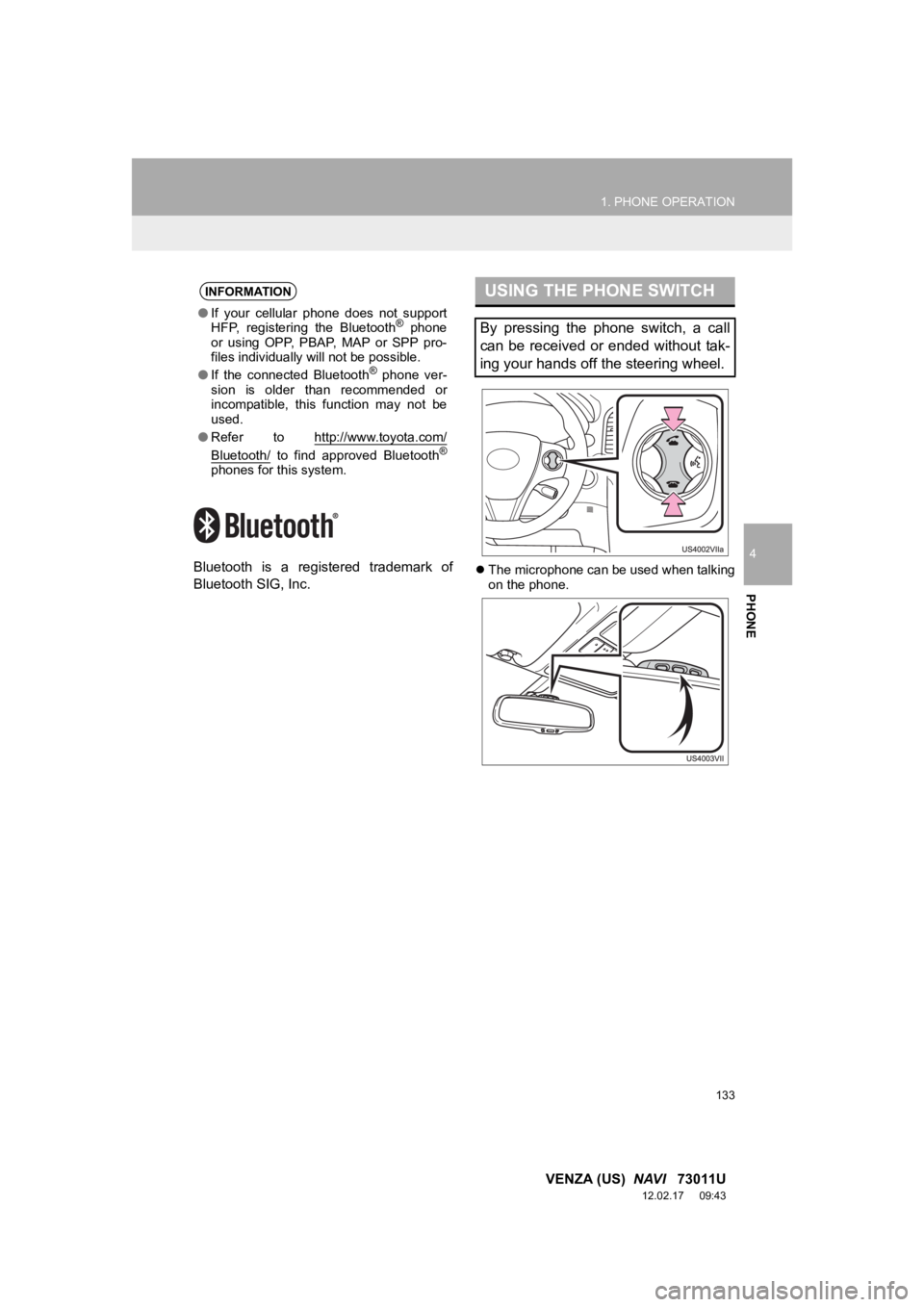
Bluetooth SIG, Inc.The microphone can be used when talking
on the phone.
INFORMATION
●If your cellular phone does not support
HFP, registering the Bluetooth® phone
or using OPP, PBAP , MAP or SPP pro-
files individually will not be possible.
● If the connected Bluetooth
® phone ver-
sion is older than recommended or
incompatible, this function may not be
used.
● Refer to http://www.toyota.
com/
Bluetooth/ to find approved Bluetooth®
phones for this system.
USING THE PHONE SWITCH
By pressing the phone switch, a call
can be received or ended without tak-
ing your hands off the steering wheel.
Page 134 of 363
134
1. PHONE OPERATION
VENZA (US) NAVI 73011U
12.02.17 09:43
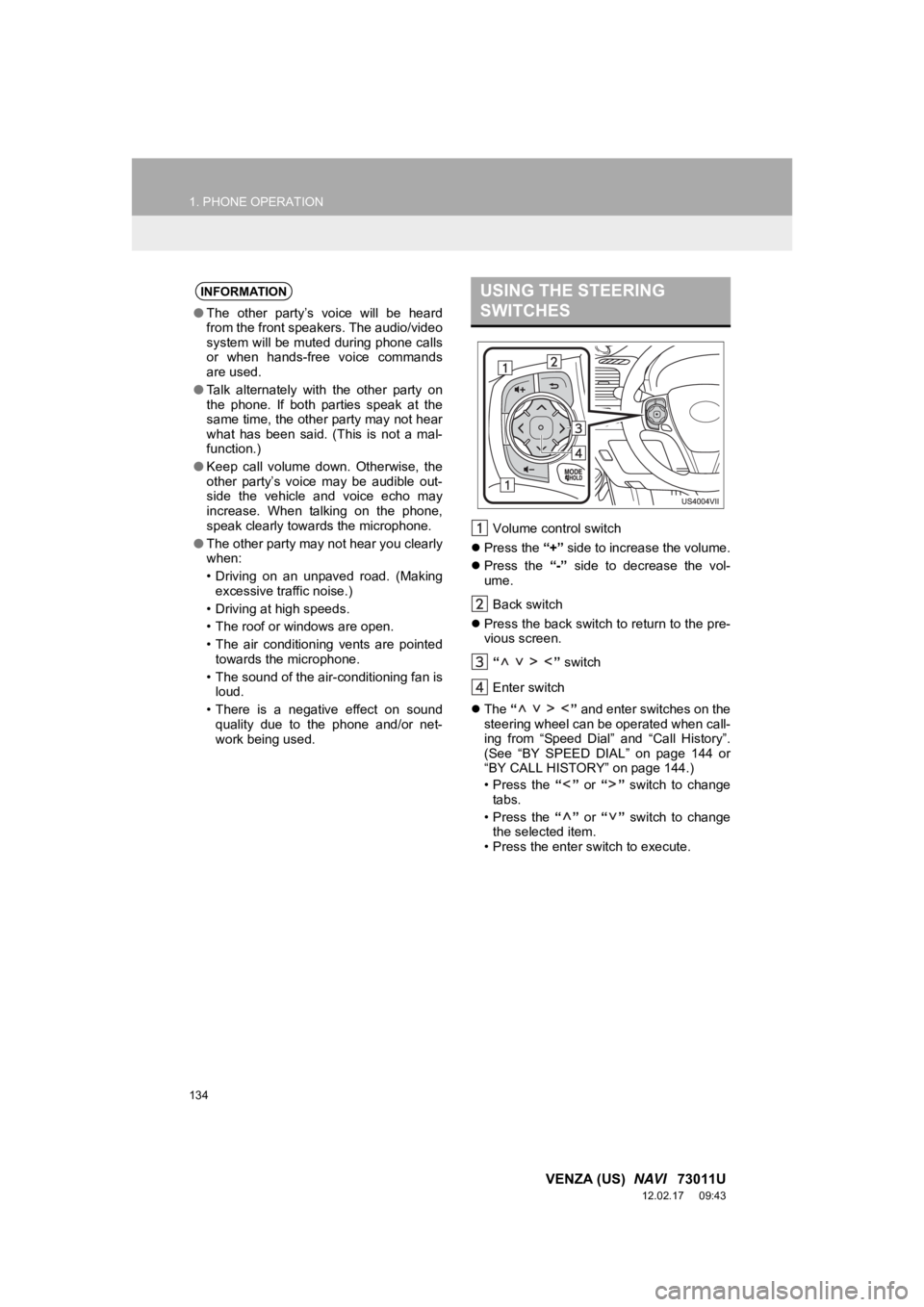
Volume control switch
Press the “+” side to increase the volume.
Press the “-” side to decrease the vol-
ume.
Back switch
Press the back switch to return to the pre-
vious screen.
“ ” switch
Enter switch
The “ ” and enter switches on the
steering wheel can be operated when call-
ing from “Speed Dial” and “Call History”.
(See “BY SPEED DIAL” on page 144 or
“BY CALL HISTORY” on page 144.)
• Press the “” or “” switch to change
tabs.
• Press the “” or “” switch to change
the selected item.
• Press the enter switch to execute.
INFORMATION
● The other party’s voice will be heard
from the front speakers. The audio/video
system will be muted during phone calls
or when hands-free voice commands
are used.
● Talk alternately with the other party on
the phone. If both parties speak at the
same time, the other party may not hear
what has been said. (This is not a mal-
function.)
● Keep call volume down. Otherwise, the
other party’s voice may be audible out-
side the vehicle and voice echo may
increase. When talking on the phone,
speak clearly towards the microphone.
● The other party may not hear you clearly
when:
• Driving on an unpaved road. (Making
excessive traffic noise.)
• Driving at high speeds.
• The roof or windows are open.
• The air conditioning vents are pointed towards the microphone.
• The sound of the air-conditioning fan is loud.
• There is a negative effect on sound quality due to the phone and/or net-
work being used.
USING THE STEERING
SWITCHES
Page 137 of 363
137
1. PHONE OPERATION
4
PHONE
VENZA (US) NAVI 73011U
12.02.17 09:43
3. REGISTER A Bluetooth® PHONE
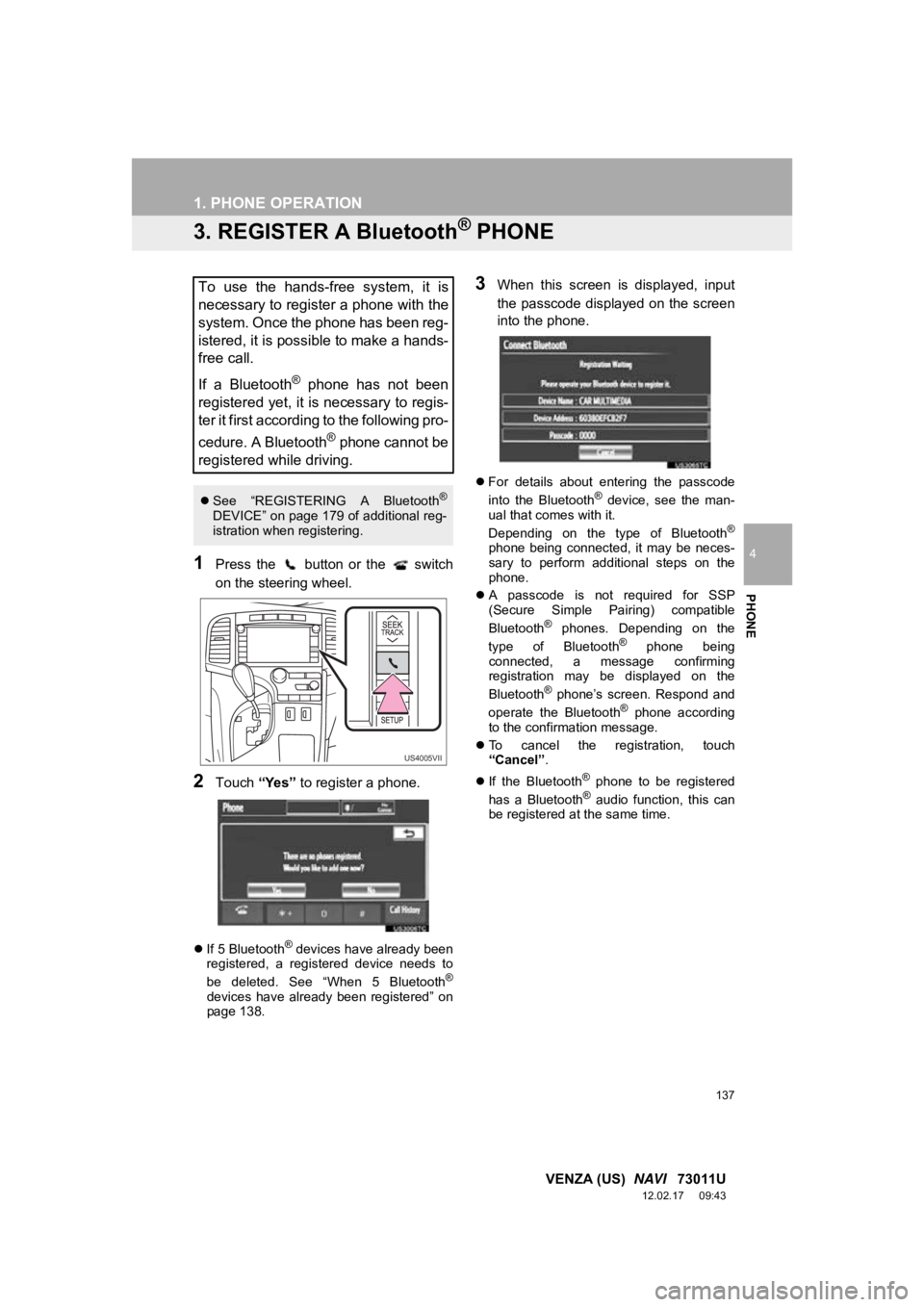
1Press the button or the switch
on the steering wheel.
2Touch “Yes” to register a phone.
If 5 Bluetooth® devices have already been
registered, a registered device needs to
be deleted. See “When 5 Bluetooth
®
devices have already been registered” on
page 138.
3When this screen is displayed, input
the passcode displayed on the screen
into the phone.
For details about entering the passcode
into the Bluetooth® device, see the man-
ual that comes with it.
Depending on the type of Bluetooth
®
phone being connected, it may be neces-
sary to perform additional steps on the
phone.
A passcode is not required for SSP
(Secure Simple Pairing) compatible
Bluetooth
® phones. Depending on the
type of Bluetooth® phone being
connected, a message confirming
registration may be displayed on the
Bluetooth
® phone’s screen. Respond and
operate the Bluetooth® phone according
to the confirmation message.
To cancel the registration, touch
“Cancel” .
If the Bluetooth
® phone to be registered
has a Bluetooth® audio function, this can
be registered at the same time.
To use the hands-free system, it is
necessary to register a phone with the
system. Once the phone has been reg-
istered, it is possible to make a hands-
free call.
If a Bluetooth
® phone has not been
registered yet, it is necessary to regis-
ter it first according to the following pro-
cedure. A Bluetooth
® phone cannot be
registered while driving.
See “REGISTERING A Bluetooth®
DEVICE” on page 179 of additional reg-
istration when registering.
US4005VII
Page 140 of 363
140
1. PHONE OPERATION
VENZA (US) NAVI 73011U
12.02.17 09:43
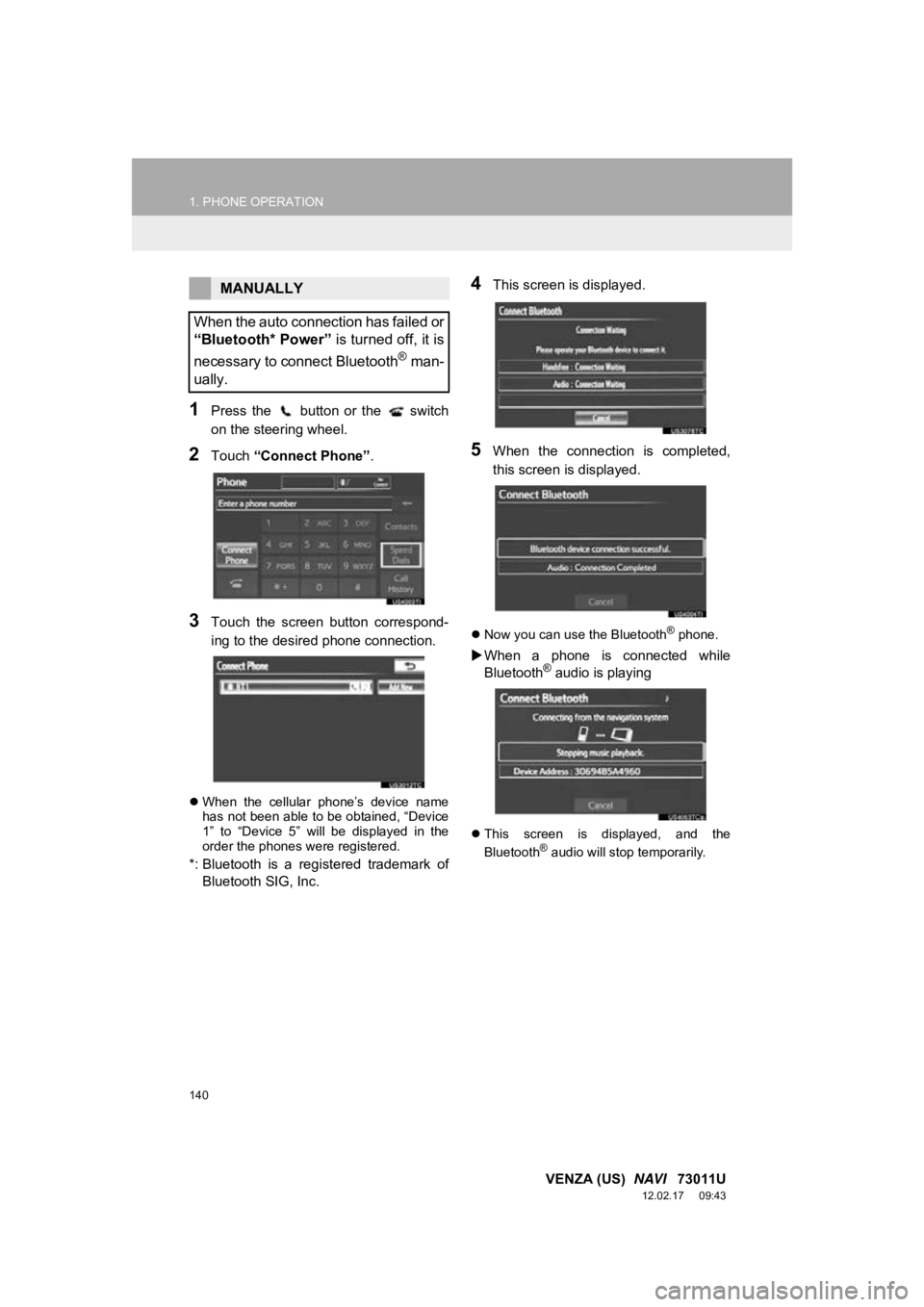
1Press the button or the switch
on the steering wheel.
2Touch “Connect Phone” .
3Touch the screen button correspond-
ing to the desired phone connection.
When the cellular phone’s device name
has not been able to be obtained, “Device
1” to “Device 5” will be displayed in the
order the phones were registered.
*: Bluetooth is a regi stered trademark of
Bluetooth SIG, Inc.
4This screen is displayed.
5When the connection is completed,
this screen is displayed.
Now you can use the Bluetooth® phone.
When a phone is connected while
Bluetooth® audio is playing
This screen is displayed, and the
Bluetooth® audio will stop temporarily.
MANUALLY
When the auto connection has failed or
“Bluetooth* Power” is turned off, it is
necessary to connect Bluetooth
® man-
ually.
Page 142 of 363
142
1. PHONE OPERATION
VENZA (US) NAVI 73011U
12.02.17 09:43
4. CALL ON THE Bluetooth® PHONE
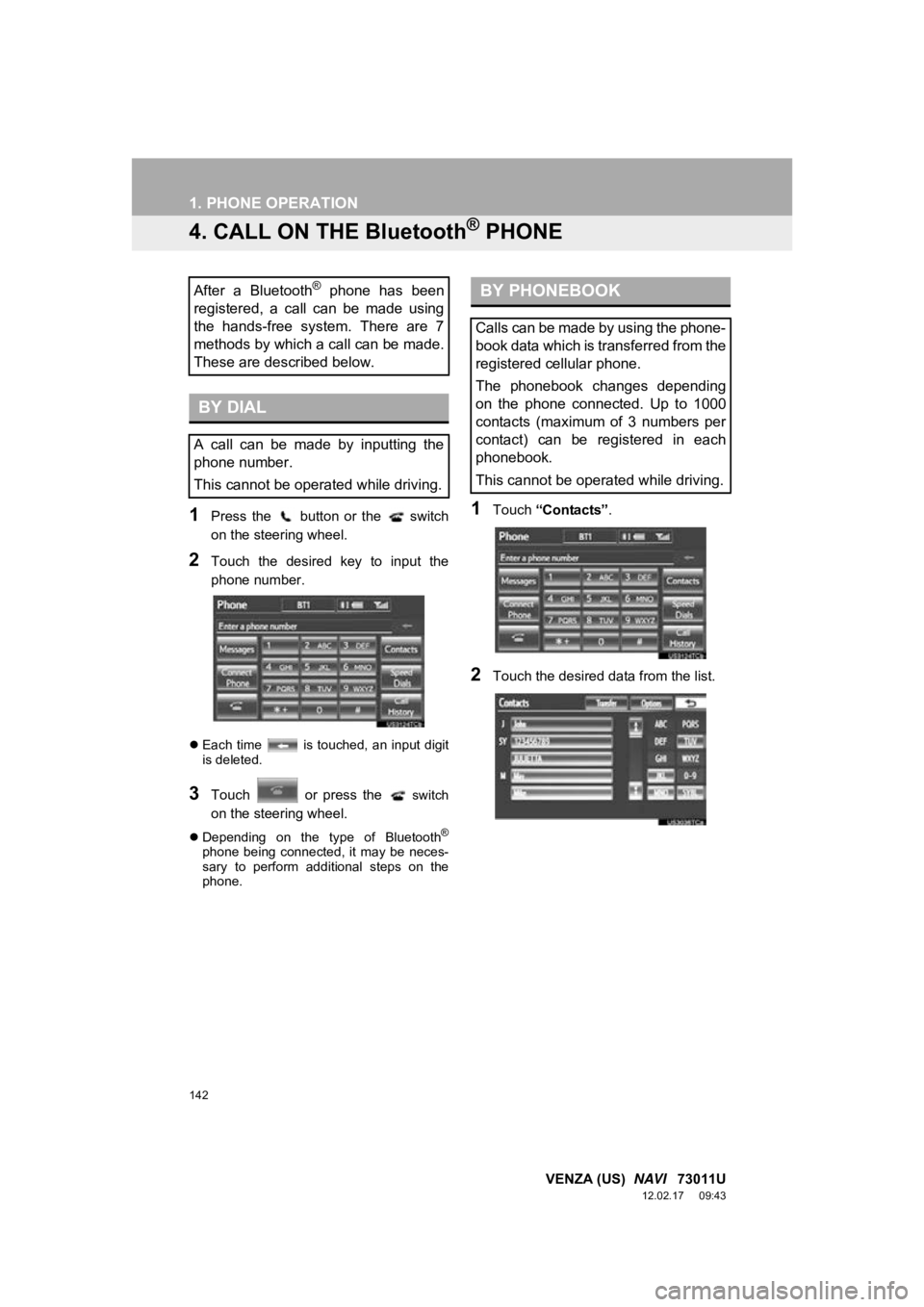
1Press the button or the switch
on the steering wheel.
2Touch the desired key to input the
phone number.
Each time is touched, an input digit
is deleted.
3Touch or press the switch
on the steering wheel.
Depending on the type of Bluetooth®
phone being connected, it may be neces-
sary to perform additional steps on the
phone.
1Touch “Contacts” .
2Touch the desired data from the list.
After a Bluetooth® phone has been
registered, a call can be made using
the hands-free system. There are 7
methods by which a call can be made.
These are described below.
BY DIAL
A call can be made by inputting the
phone number.
This cannot be operated while driving.
BY PHONEBOOK
Calls can be made by using the phone-
book data which is transferred from the
registered cellular phone.
The phonebook changes depending
on the phone connected. Up to 1000
contacts (maximum of 3 numbers per
contact) can be registered in each
phonebook.
This cannot be operated while driving.
Page 143 of 363
143
1. PHONE OPERATION
4
PHONE
VENZA (US) NAVI 73011U
12.02.17 09:43
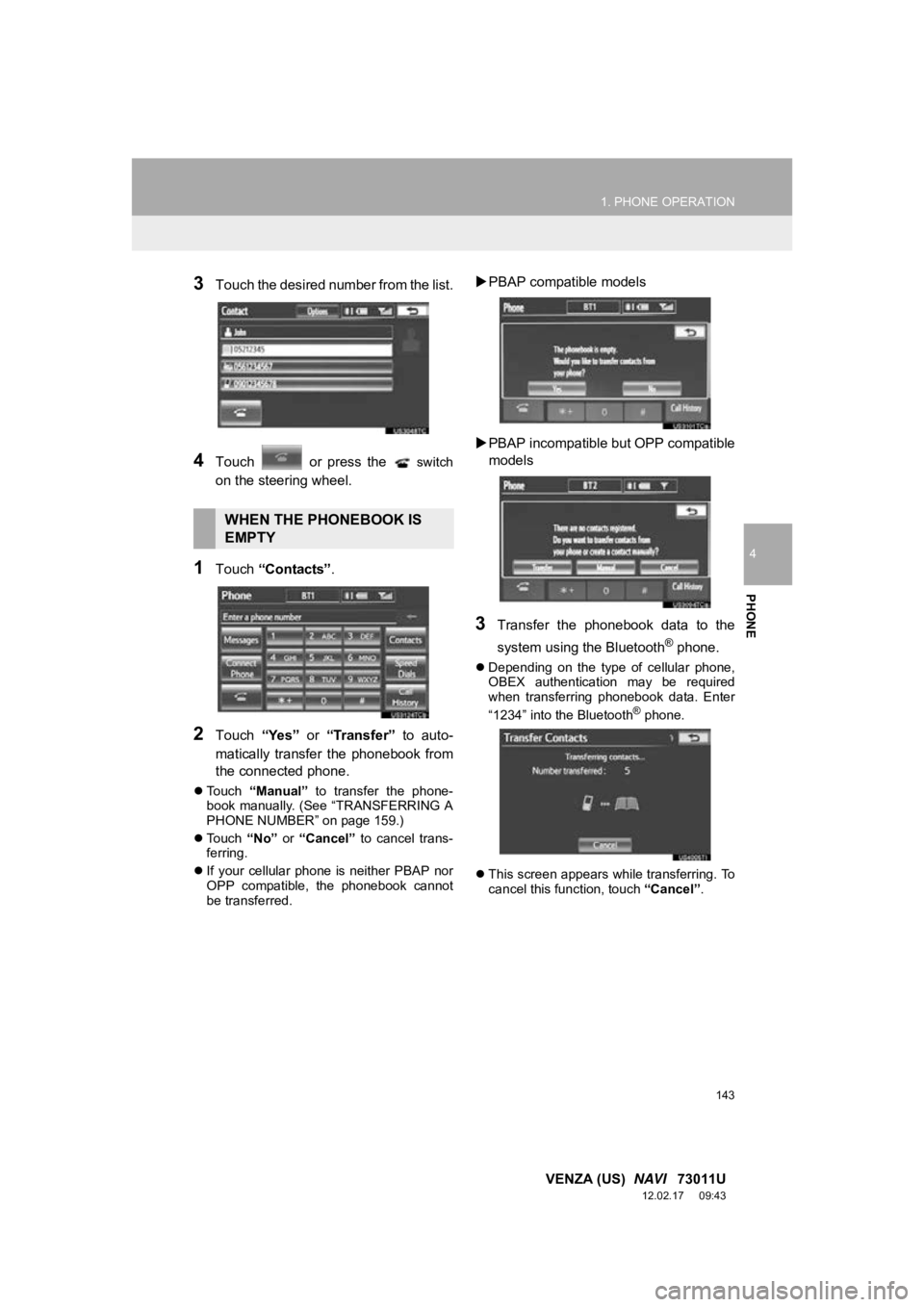
3Touch the desired number from the list.
4Touch or press the switch
on the steering wheel.
1Touch “Contacts” .
2Touch “Yes” or “Transfer” to auto-
matically transfer the phonebook from
the connected phone.
Touch “Manual” to transfer the phone-
book manually. (See “TRANSFERRING A
PHONE NUMBER” on page 159.)
Touch “No” or “Cancel” to cancel trans-
ferring.
If your cellular phone is neither PBAP nor
OPP compatible, the phonebook cannot
be transferred.
PBAP compatible models
PBAP incompatible bu t OPP compatible
models
3Transfer the phonebook data to the
system using the Bluetooth
® phone.
Depending on the type of cellular phone,
OBEX authentication may be required
when transferring phonebook data. Enter
“1234” into the Bluetooth
® phone.
This screen appears while transferring. To
cancel this function, touch “Cancel”.
WHEN THE PHONEBOOK IS
EMPTY
Page 144 of 363
144
1. PHONE OPERATION
VENZA (US) NAVI 73011U
12.02.17 09:43
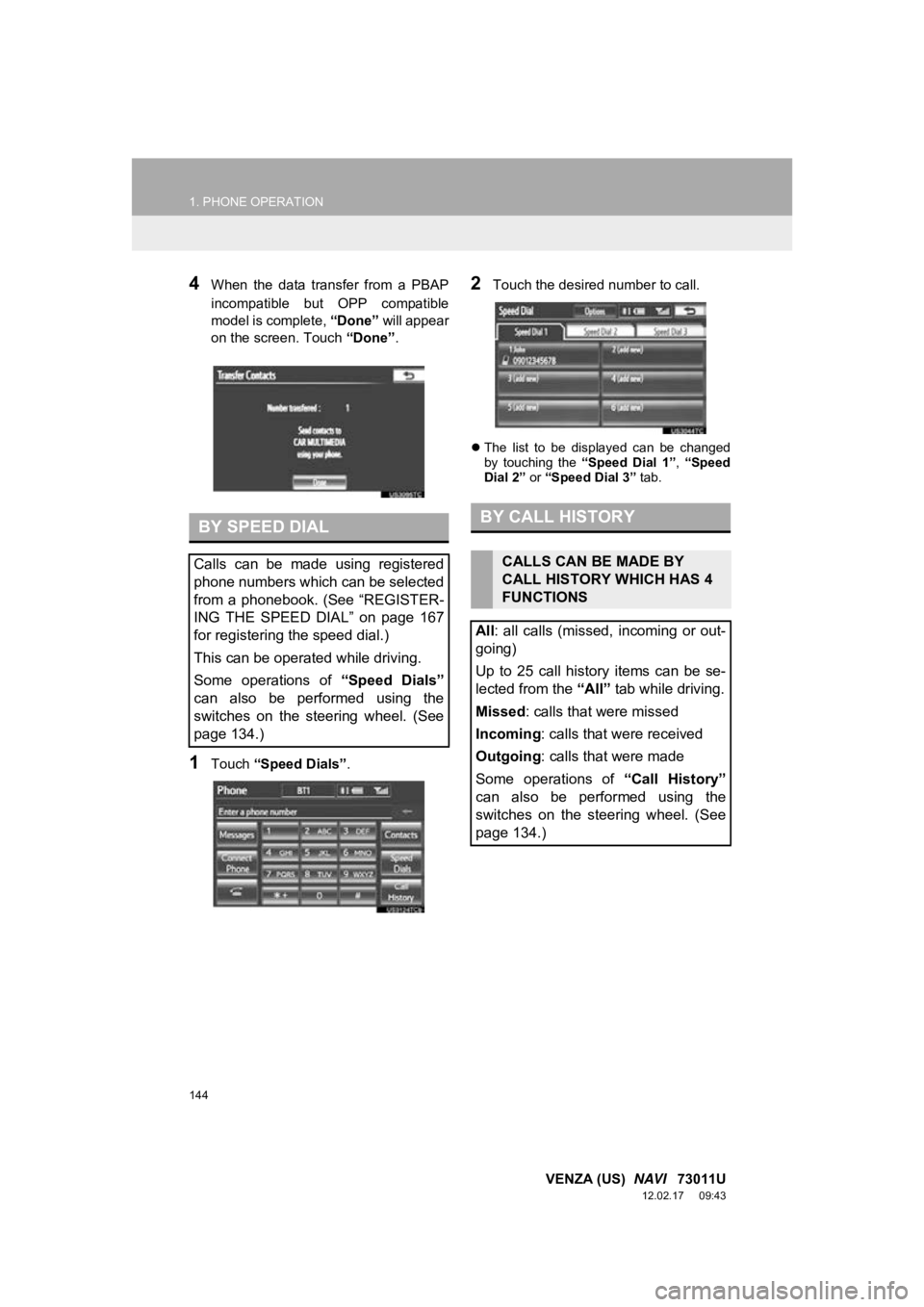
4When the data transfer from a PBAP
incompatible but OPP compatible
model is complete, “Done” will appear
on the screen. Touch “Done”.
1Touch “Speed Dials” .
2Touch the desired number to call.
The list to be displayed can be changed
by touching the “Speed Dial 1”, “Speed
Dial 2” or “Speed Dial 3” tab.
BY SPEED DIAL
Calls can be made using registered
phone numbers which can be selected
from a phonebook. (See “REGISTER-
ING THE SPEED DIAL” on page 167
for registering the speed dial.)
This can be operated while driving.
Some operations of “Speed Dials”
can also be performed using the
switches on the steering wheel. (See
page 134.)
BY CALL HISTORY
CALLS CAN BE MADE BY
CALL HISTORY WHICH HAS 4
FUNCTIONS
All : all calls (missed, incoming or out-
going)
Up to 25 call history items can be se-
lected from the “All” tab while driving.
Missed : calls that were missed
Incoming : calls that were received
Outgoing : calls that were made
Some operations of “Call History”
can also be performed using the
switches on the steering wheel. (See
page 134.)