air conditioning TOYOTA VENZA 2014 Accessories, Audio & Navigation (in English)
[x] Cancel search | Manufacturer: TOYOTA, Model Year: 2014, Model line: VENZA, Model: TOYOTA VENZA 2014Pages: 363, PDF Size: 21.59 MB
Page 134 of 363
134
1. PHONE OPERATION
VENZA_Navi_OM73020U_(U)
13.05.13 14:12
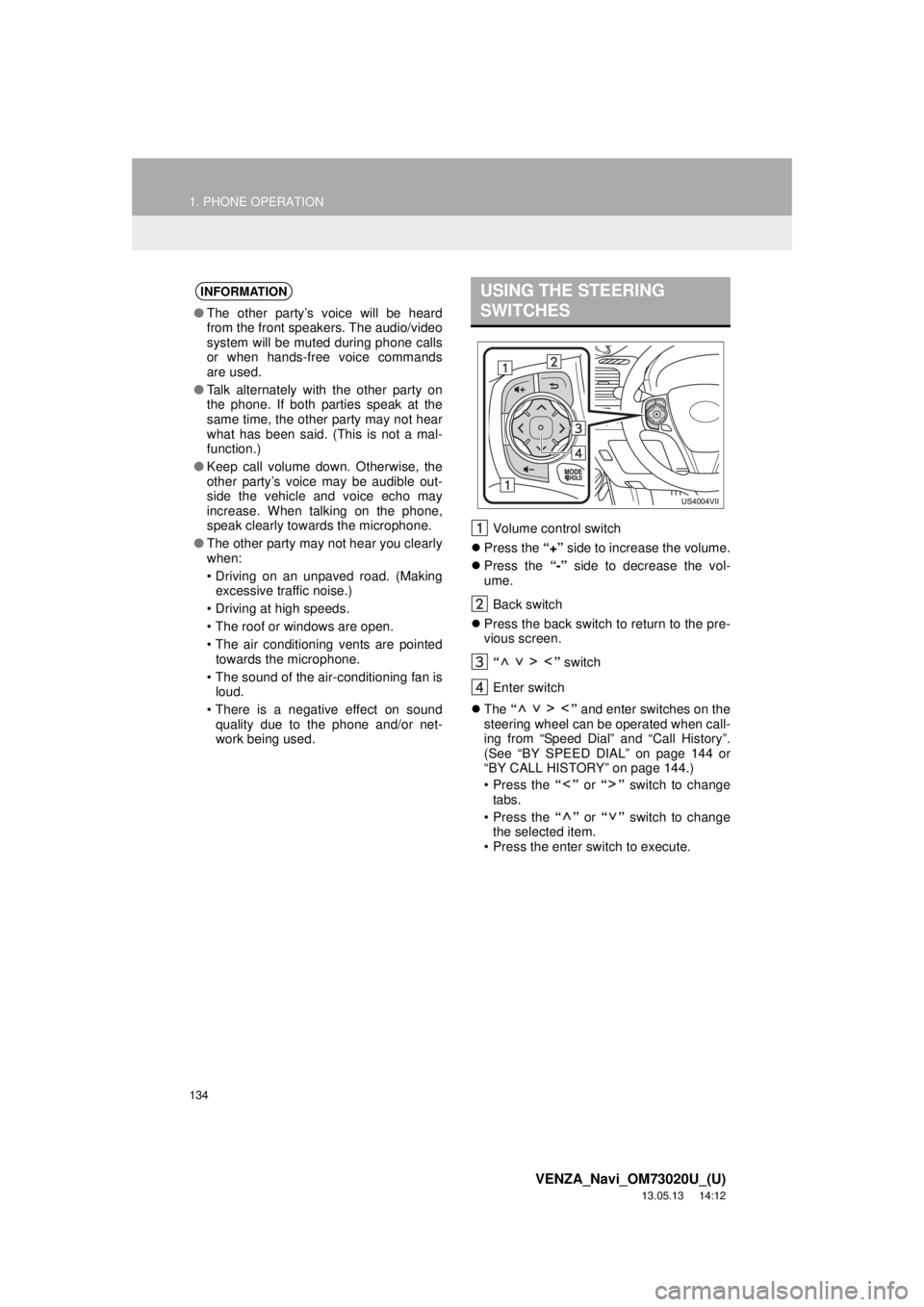
Volume control switch
Press the “+” side to increase the volume.
Press the “-” side to decrease the vol-
ume.
Back switch
Press the back switch to return to the pre-
vious screen.
“ ” switch
Enter switch
The “ ” and enter switches on the
steering wheel can be operated when call-
ing from “Speed Dial” and “Call History”.
(See “BY SPEED DIAL” on page 144 or
“BY CALL HISTORY” on page 144.)
• Press the “” or “” switch to change
tabs.
• Press the “” or “” switch to change
the selected item.
• Press the enter switch to execute.
INFORMATION
●The other party’s voice will be heard
from the front speakers. The audio/video
system will be muted during phone calls
or when hands-free voice commands
are used.
●Talk alternately with the other party on
the phone. If both parties speak at the
same time, the other party may not hear
what has been said. (This is not a mal-
function.)
●Keep call volume down. Otherwise, the
other party’s voice may be audible out-
side the vehicle and voice echo may
increase. When talking on the phone,
speak clearly towards the microphone.
●The other party may not hear you clearly
when:
• Driving on an unpaved road. (Making
excessive traffic noise.)
• Driving at high speeds.
• The roof or windows are open.
• The air conditioning vents are pointed
towards the microphone.
• The sound of the air-conditioning fan is
loud.
• There is a negative effect on sound
quality due to the phone and/or net-
work being used.
USING THE STEERING
SWITCHES
Page 259 of 363
259
1. AUDIO/VIDEO SYSTEM OPERATION
5
AUDIO/VIDEO SYSTEM
VENZA_Navi_OM73020U_(U)
13.05.13 14:12
The following iPod®, iPod nano®, iPod
classic®, iPod touch® and iPhone® devic-
es can be used with this system.
Made for
• iPod touch (4th generation)
• iPod touch (3rd generation)
• iPod touch (2nd generation)
• iPod touch (1st generation)
• iPod classic
• iPod with video
• iPod nano (6th generation)
• iPod nano (5th generation)
• iPod nano (4th generation)
• iPod nano (3rd generation)
• iPod nano (2nd generation)
• iPod nano (1st generation)
• iPhone 4
• iPhone 3GS
• iPhone 3G
• iPhone
Depending on differences between mod-
els or software versions etc., some models
might be incompatible with this system.
USB memory that can be used for MP3
and WMA playback:
• USB communication formats: USB 2.0
HS (480 Mbps) and FS (12 Mbps)
• File formats: FAT 16/32
• Correspondence class: Mass storage
classThis DVD player is intended for use with
4.7 in. (12 cm) discs only.
Extremely high temperatures can keep the
DVD player from working. On hot days,
use the air conditioning system to cool the
inside of the vehicle before using the
player.
Bumpy roads or other vibrations may
make the DVD player skip.
If moisture gets into the DVD player, the
discs may not be able to be played.
Remove the discs from the player and
wait until it dries.
COMPATIBLE MODELS
USB MEMORY
CARING FOR YOUR DVD
PLAYER AND DISC
CAUTION
●DVD players use an invisible laser beam
which could cause hazardous radiation
exposure if directed outside the unit. Be
sure to operate the player correctly.
Page 272 of 363
272
1. VOICE COMMAND SYSTEM OPERATION
VENZA_Navi_OM73020U_(U)
13.05.13 14:12
1Press the talk switch.
2Say “Go home”.
A confirmation screen will be displayed
showing the recognition results.
3Say “Yes” or touch “Yes”.
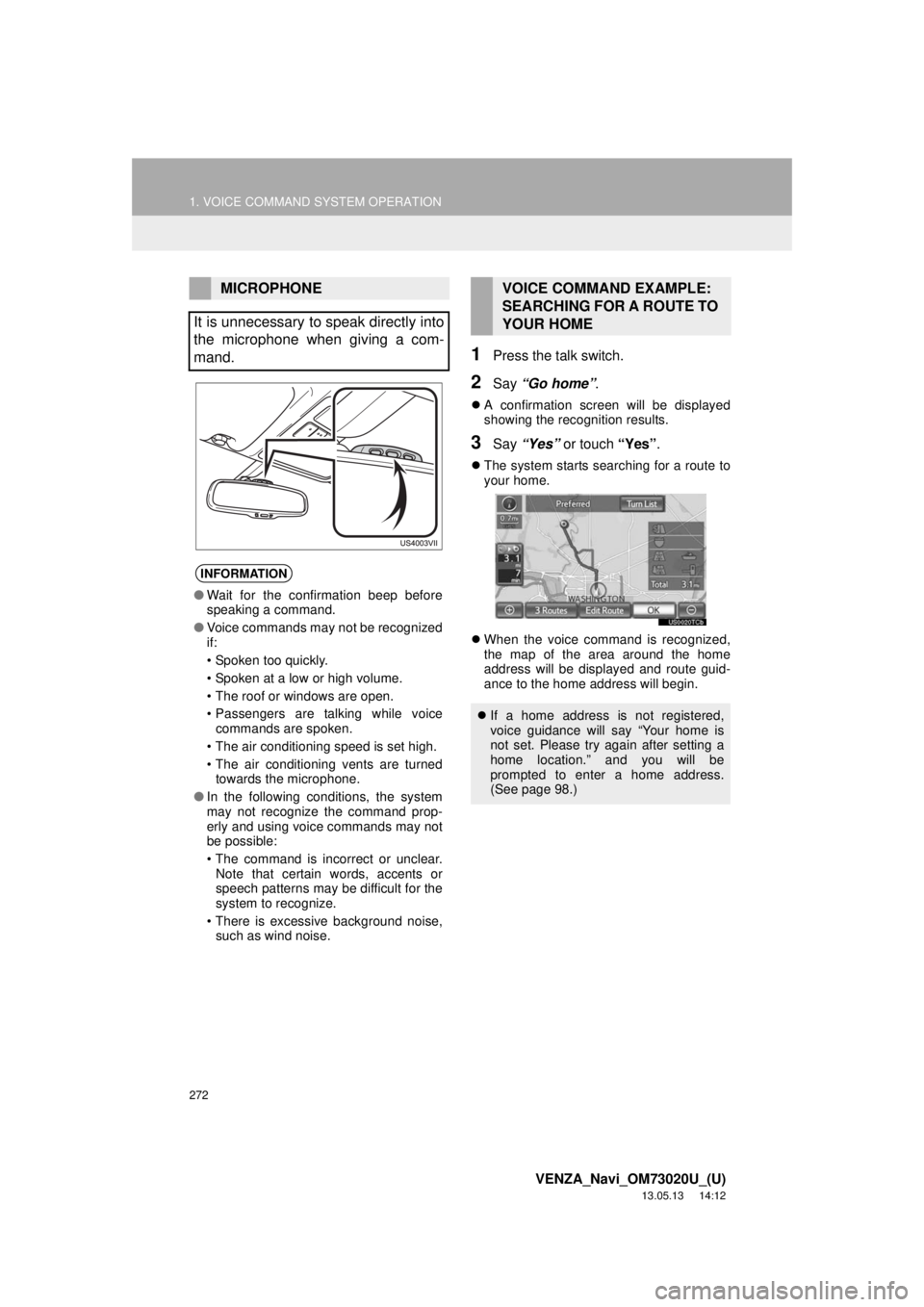
The system starts searching for a route to
your home.
When the voice command is recognized,
the map of the area around the home
address will be displayed and route guid-
ance to the home address will begin.
MICROPHONE
It is unnecessary to speak directly into
the microphone when giving a com-
mand.
INFORMATION
●Wait for the confirmation beep before
speaking a command.
●Voice commands may not be recognized
if:
• Spoken too quickly.
• Spoken at a low or high volume.
• The roof or windows are open.
• Passengers are talking while voice
commands are spoken.
• The air conditioning speed is set high.
• The air conditioning vents are turned
towards the microphone.
●In the following conditions, the system
may not recognize the command prop-
erly and using voice commands may not
be possible:
• The command is incorrect or unclear.
Note that certain words, accents or
speech patterns may be difficult for the
system to recognize.
• There is excessive background noise,
such as wind noise.
VOICE COMMAND EXAMPLE:
SEARCHING FOR A ROUTE TO
YOUR HOME
If a home address is not registered,
voice guidance will say “Your home is
not set. Please try again after setting a
home location.” and you will be
prompted to enter a home address.
(See page 98.)