engine TOYOTA VENZA 2016 Owners Manual
[x] Cancel search | Manufacturer: TOYOTA, Model Year: 2016, Model line: VENZA, Model: TOYOTA VENZA 2016Pages: 688, PDF Size: 18.51 MB
Page 328 of 688

3283-2. Using the audio system (Entune Audio)
VENZA_OM_OM73030U_(U) NOTICE■ To prevent battery discharge
Do not leave the audio system on longer than necessary when the engine is
off.
■ To avoid damaging the audio system
Take care not to spill drinks or other fluids on the audio system.
Page 371 of 688
3713-2. Using the audio system (Entune Audio)
VENZA_OM_OM73030U_(U) 3
Interior features Auto connection
To turn auto connection mode on, set “Bluetooth
* Power” to on.
( P. 375)
When you register a phone, auto connection will be activated. Always
set it to this mode and leave the Bluetooth ®
phone in a place where a
connection can be established. When the engine switch is turned to the “ACC” or “ON” position (vehicles
without a smart key system) or ACCESSORY or IGNITION ON mode
(vehicles with a smart key system), the system will search for a nearby
cellular phone you have registered.
Next, the system automatically connects with the most recent of the
phones connected to in the past. Then, the connection result is displayed.
Manual connection
When auto connection has failed or “Bluetooth
* Power” is turned off,
you must connect the Bluetooth ®
device manually.
* : Bluetooth is a registered trademark of Bluetooth SIG, Inc.
Follow the steps in “Connecting a Bluetooth ®
device” from
. ( P. 370)
Connecting a Bluetooth ®
audio player
Registering an additional device
Select “Select Devi ce” on the Bluetooth ®
audio control
screen.
For more information: P. 3 6 8
Selecting a registered device
Select “Select Devi ce” on the Bluetooth ®
audio control
screen.
For more information: P. 3 7 0STEP 1
STEP 1
STEP 1
STEP 2
STEP 1
STEP 2
Page 372 of 688

3723-2. Using the audio system (Entune Audio)
VENZA_OM_OM73030U_(U) ■ Reconnecting a Bluetooth ®
phone
If the system cannot connect due to poor signal strength with the engine
switch in the “ACC” or “ON” position (vehicles without a smart key system) or
ACCESSORY or IGNITION ON mode (vehicles with a smart key system),
the system will automatically attempt to reconnect.
If the phone is turned off, the system will not attempt to reconnect. In this
case, the connection must be made manually, or the phone must be rese-
lected.
Page 413 of 688
4133-2. Using the audio system (Entune Audio)
VENZA_OM_OM73030U_(U) 3
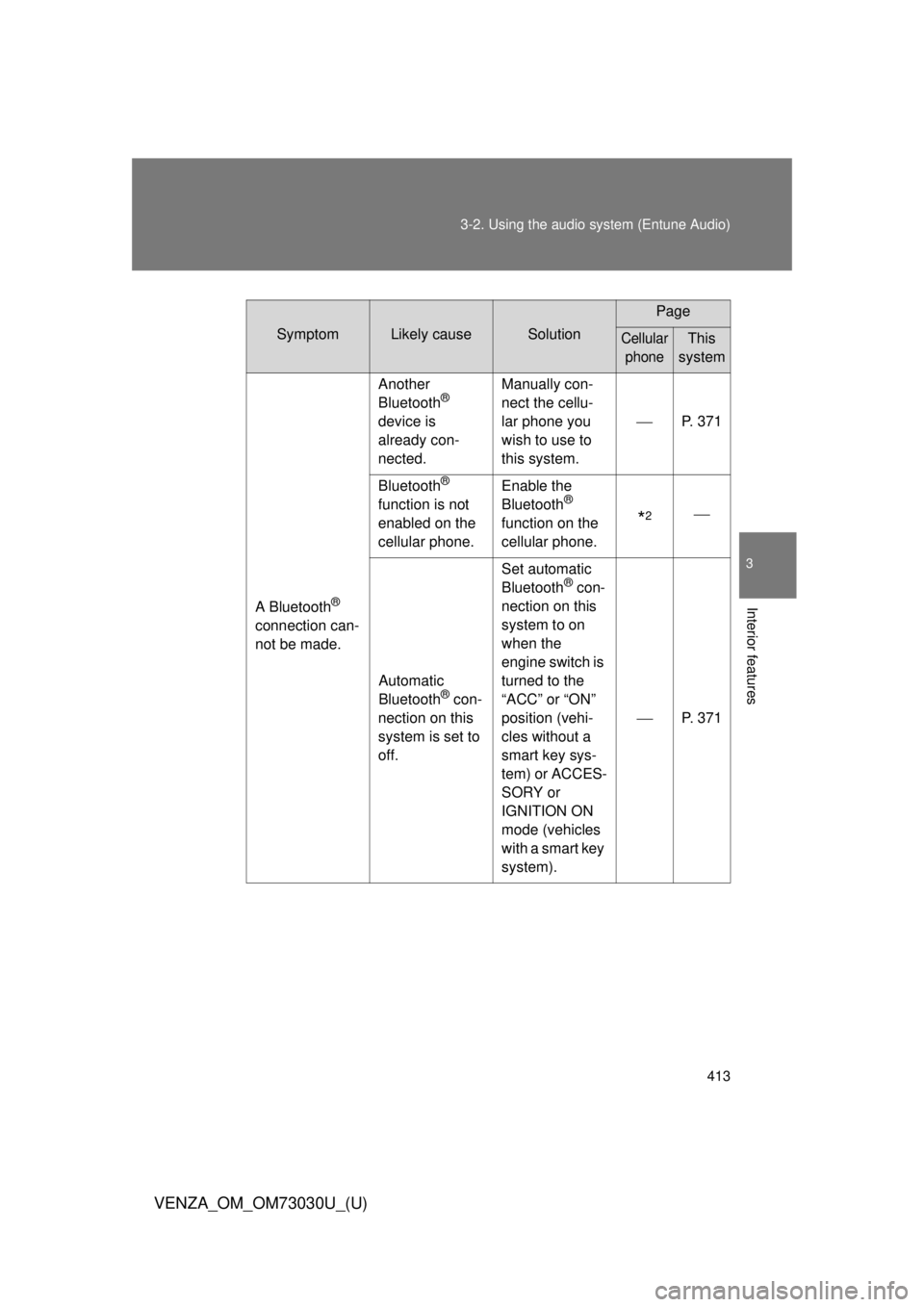
Interior features Symptom Likely cause Solution Page
Cellular
phone This
system
A Bluetooth ®
connection can-
not be made. Another
Bluetooth ®
device is
already con-
nected. Manually con-
nect the cellu-
lar phone you
wish to use to
this system. P. 371
Bluetooth ®
function is not
enabled on the
cellular phone. Enable the
Bluetooth ®
function on the
cellular phone.
* 2
Automatic
Bluetooth ®
con-
nection on this
system is set to
off. Set automatic
Bluetooth ®
con-
nection on this
system to on
when the
engine switch is
turned to the
“ACC” or “ON”
position (vehi-
cles without a
smart key sys-
tem) or ACCES-
SORY or
IGNITION ON
mode (vehicles
with a smart key
system). P. 371
Page 417 of 688
4173-2. Using the audio system (Entune Audio)
VENZA_OM_OM73030U_(U) 3
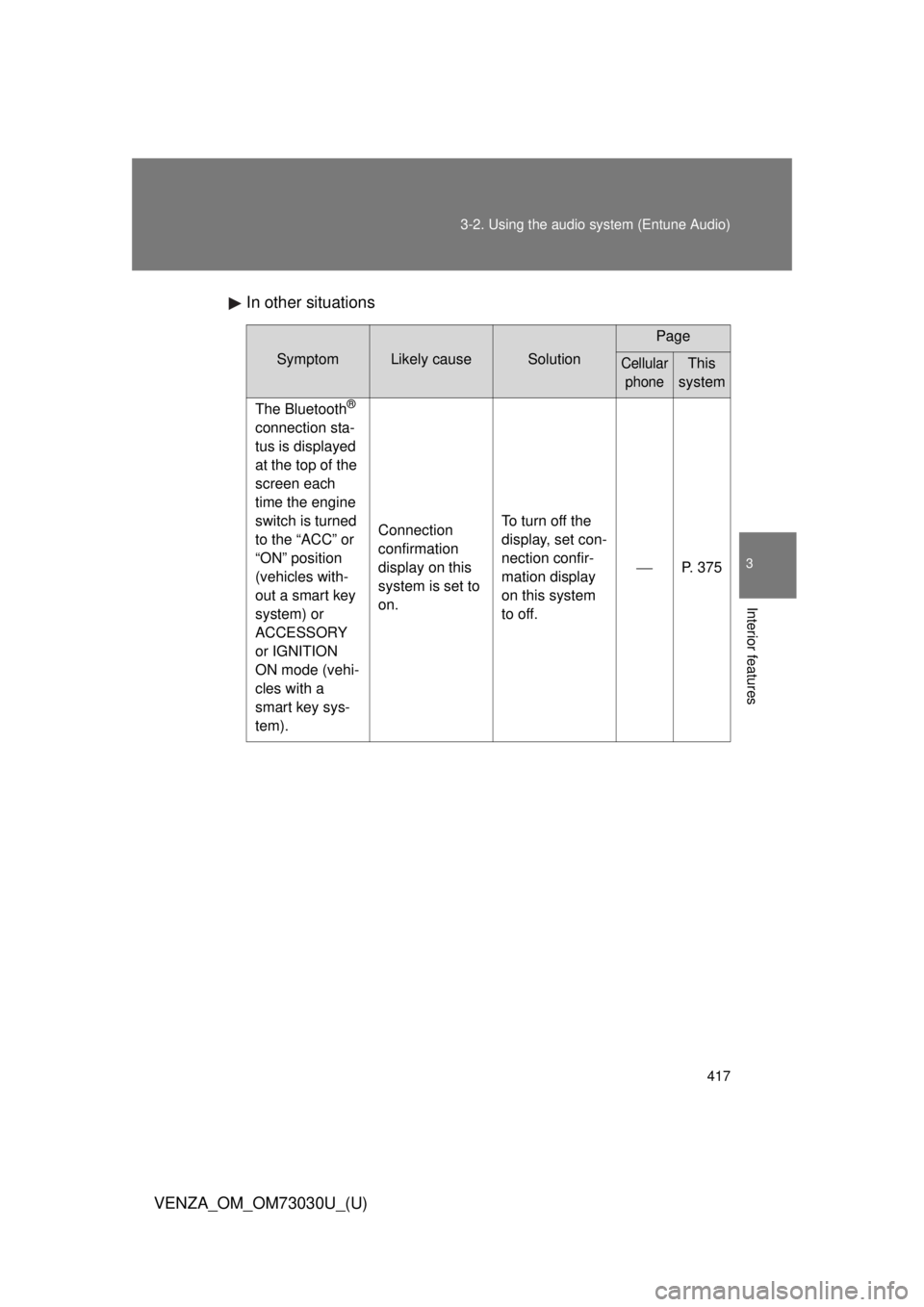
Interior features In other situations Symptom Likely cause Solution Page
Cellular
phone This
system
The Bluetooth ®
connection sta-
tus is displayed
at the top of the
screen each
time the engine
switch is turned
to the “ACC” or
“ON” position
(vehicles with-
out a smart key
system) or
ACCESSORY
or IGNITION
ON mode (vehi-
cles with a
smart key sys-
tem). Connection
confirmation
display on this
system is set to
on. To turn off the
display, set con-
nection confir-
mation display
on this system
to off. P. 375
Page 424 of 688
4243-2. Using the audio system (Entune Audio)
VENZA_OM_OM73030U_(U) ■ Reconnecting the portable audio player
If the portable audio player is disconnected due to poor reception when the
engine switch is in the “ACC” or “ON” position (vehicles without a smart key
system) or ACCESSORY or IGNITION ON mode (vehicles with a smart key
system), the system automatically reconnects the portable audio player.
If you have switched off the portable audio player yourself, follow the instruc-
tions below to reconnect:
● Select the portable audio player again
● Enter the portable audio player
■ When you sell your car
Be sure to delete your personal data. ( P. 331)
CAUTION■ While driving
Do not operate the portable audio player, cellular phone or connect a device
to the Bluetooth ®
system.
■ Caution regarding interfer ence with electronic devices
● Your audio unit is fitted with Bluetooth ®
antennas. People with implantable
cardiac pacemakers, cardiac resynchronization therapy-pacemakers or
implantable cardioverter defibrillators should maintain a reasonable dis-
tance between themselves and the Bluetooth ®
antennas. The radio waves
may affect the operation of such devices.
● Before using Bluetooth ®
devices, users of any electrical medical device
other than implantable cardiac pacemakers, cardiac resynchronization
therapy-pacemakers or implantable cardioverter defibrillators should con-
sult the manufacturer of the device for information about its operation
under the influence of radio waves. Radio waves could have unexpected
effects on the operation of such medical devices.
Page 430 of 688
430
VENZA_OM_OM73030U_(U) 3-3. Using the interior lights
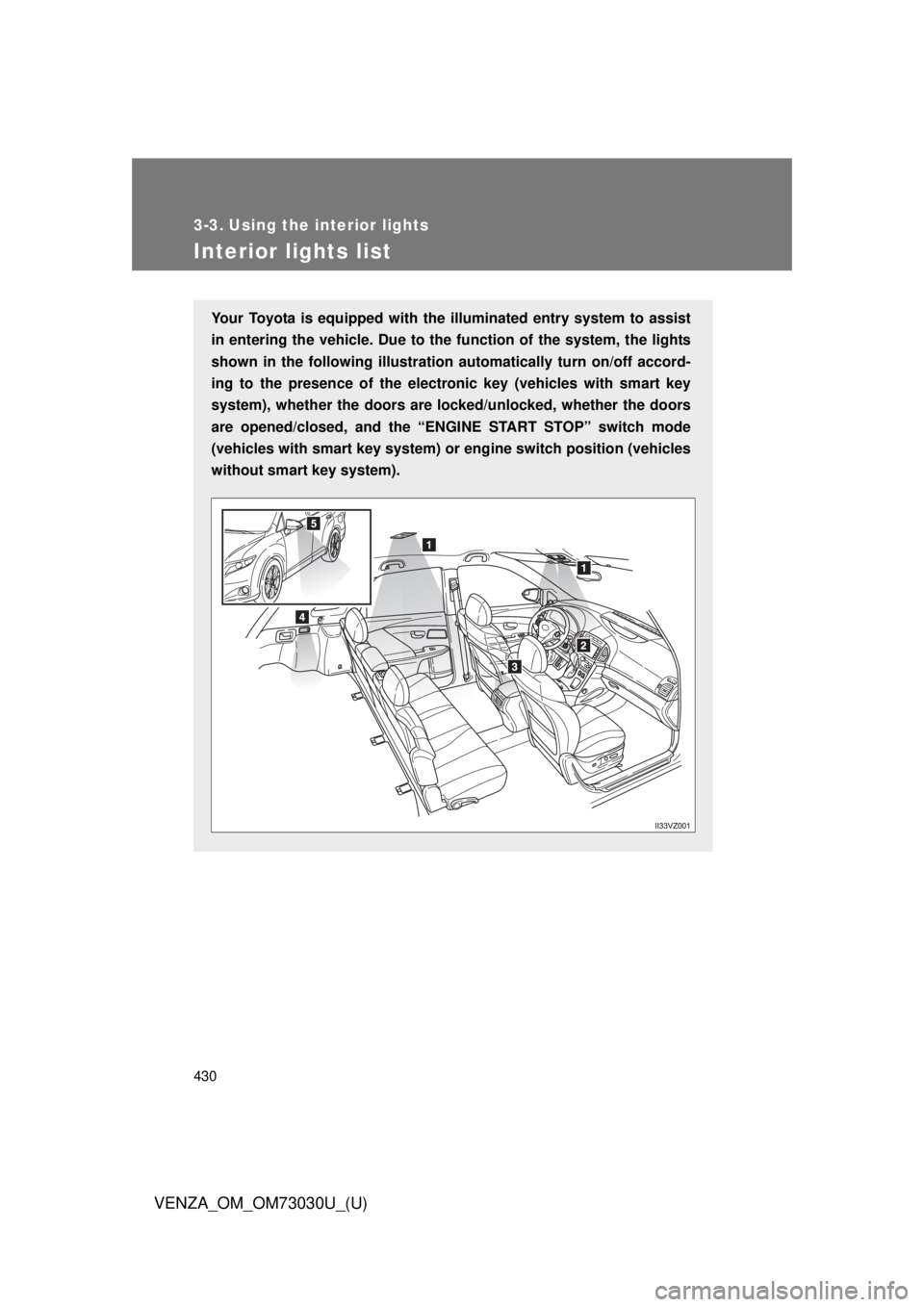
Interior lights list Your Toyota is equipped with th e illuminated entry system to assist
in entering the vehicle. Due to th e function of the system, the lights
shown in the following illustration automatically turn on/off accord-
ing to the presence of the electro nic key (vehicles with smart key
system), whether the doors are lo cked/unlocked, whether the doors
are opened/closed, and the “ENG INE START STOP” switch mode
(vehicles with smart key system) or engine switch position (vehicles
without smart key system).
Page 431 of 688
4313-3. Using the interior lights
3
Interior features
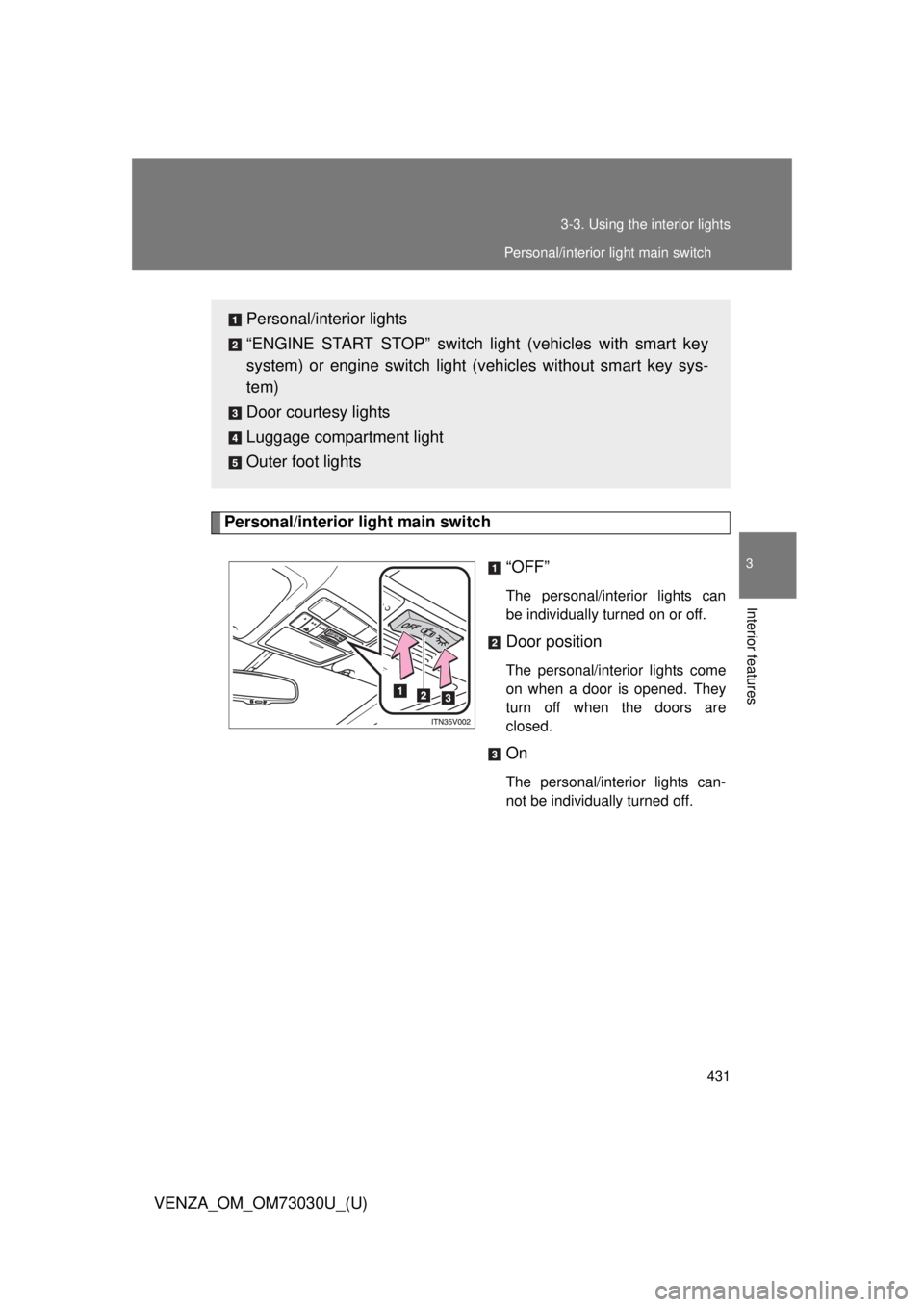
VENZA_OM_OM73030U_(U) Personal/interior light main switch
“OFF” The personal/interior lights can
be individually turned on or off.
Door position The personal/interior lights come
on when a door is opened. They
turn off when the doors are
closed.
On The personal/interior lights can-
not be individually turned off.Personal/interior lights
“ENGINE START STOP” switch light (vehicles with smart key
system) or engine switch light (vehicles without smart key sys-
tem)
Door courtesy lights
Luggage compartment light
Outer foot lights Personal/interior light main switch
Page 433 of 688
4333-3. Using the interior lights
3
Interior features
VENZA_OM_OM73030U_(U) ■ To prevent the battery from being discharged
Vehicles with smart key system
If the personal/interior lights and “ENGINE START STOP” switch light
remain on when the door is not fully closed and the personal/interior light
main switch is in door position, the lights will go off automatically after 20
minutes.
Vehicles without smart key system
If the personal/interior lights and engine switch light remain on when the
door is not fully closed and the personal/interior light main switch is in
door position, the lights will go off automatically after 20 minutes.
■ Customization
Settings (e.g. The time elapsed before lights turn off) can be changed.
(Customizable features
P. 645)
Page 448 of 688
4483-5. Other interior features
VENZA_OM_OM73030U_(U) ■ The power outlets can be used when
Vehicles with smart key system
The “ENGINE START STOP” switch is in ACCESSORY or IGNITION ON
mode.
Vehicles without smart key system
The engine switch is in the “ACC” or “ON” position.
NOTICE■ To avoid damaging the power outlets
Close the power outlet lid when not in use.
Foreign objects or liquids that enter the power outlet may cause a short cir-
cuit.
■ To prevent the fuse from being blown
Do not use an accessory that uses more than 12 V/10 A.
■ To prevent the battery from being discharged
Do not use the power outlet longer than necessary when the engine is not
running.