headlights TOYOTA VENZA 2016 User Guide
[x] Cancel search | Manufacturer: TOYOTA, Model Year: 2016, Model line: VENZA, Model: TOYOTA VENZA 2016Pages: 688, PDF Size: 18.51 MB
Page 222 of 688
2222-3. Operating the lights and wipers
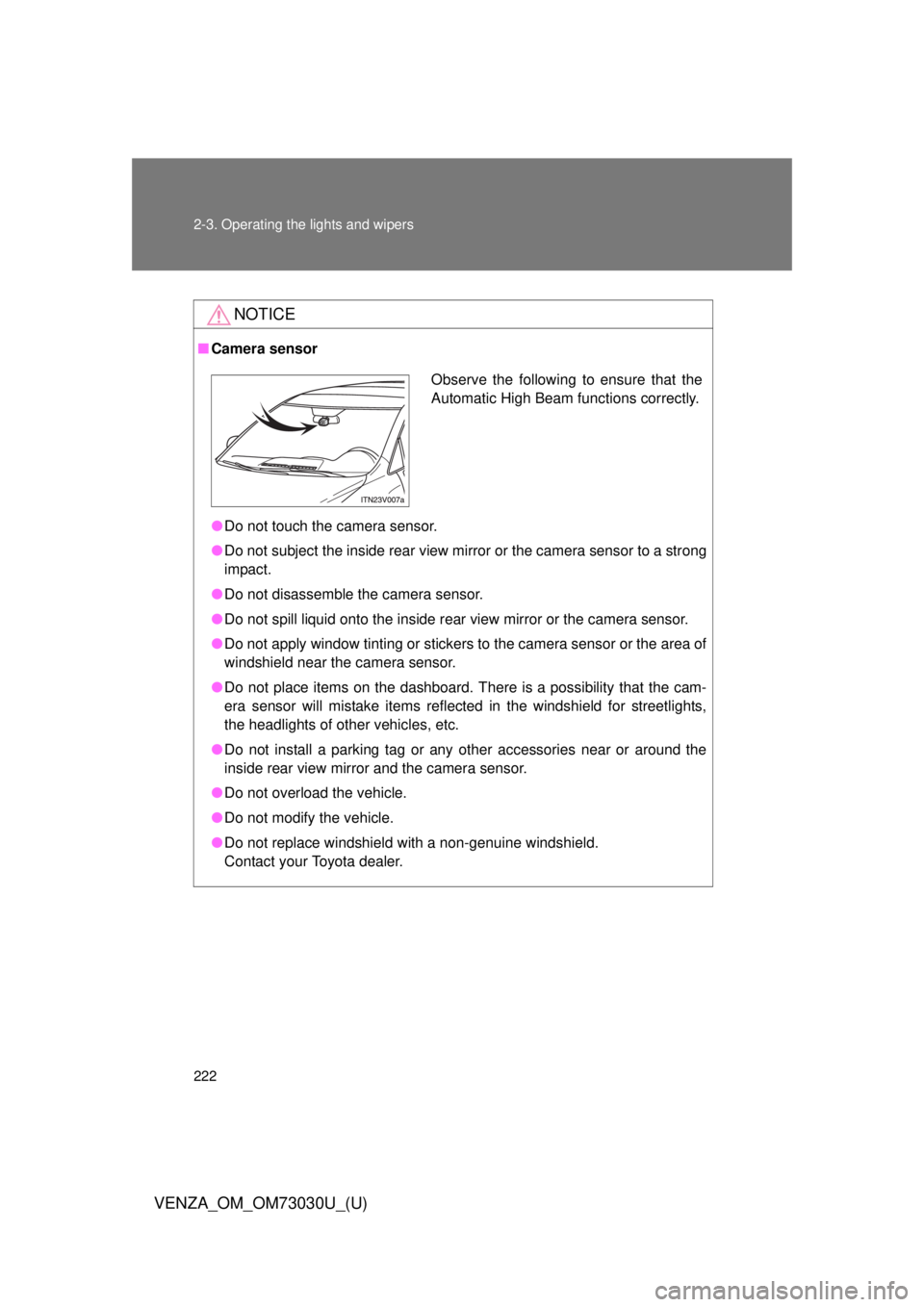
VENZA_OM_OM73030U_(U) NOTICE■ Camera sensor
● Do not touch the camera sensor.
● Do not subject the inside rear view mirr or or the camera sensor to a strong
impact.
● Do not disassemble the camera sensor.
● Do not spill liquid onto the inside rear view mirror or the camera sensor.
● Do not apply window tinting or stickers to the camera sensor or the area of
windshield near the camera sensor.
● Do not place items on the dashboard. There is a possibility that the cam-
era sensor will mistake items reflected in the windshield for streetlights,
the headlights of other vehicles, etc.
● Do not install a parking tag or any other accessories near or around the
inside rear view mirror and the camera sensor.
● Do not overload the vehicle.
● Do not modify the vehicle.
● Do not replace windshield with a non-genuine windshield.
Contact your Toyota dealer. Observe the following to ensure that the
Automatic High Beam functions correctly.
Page 223 of 688
2232-3. Operating the lights and wipers
2
When driving
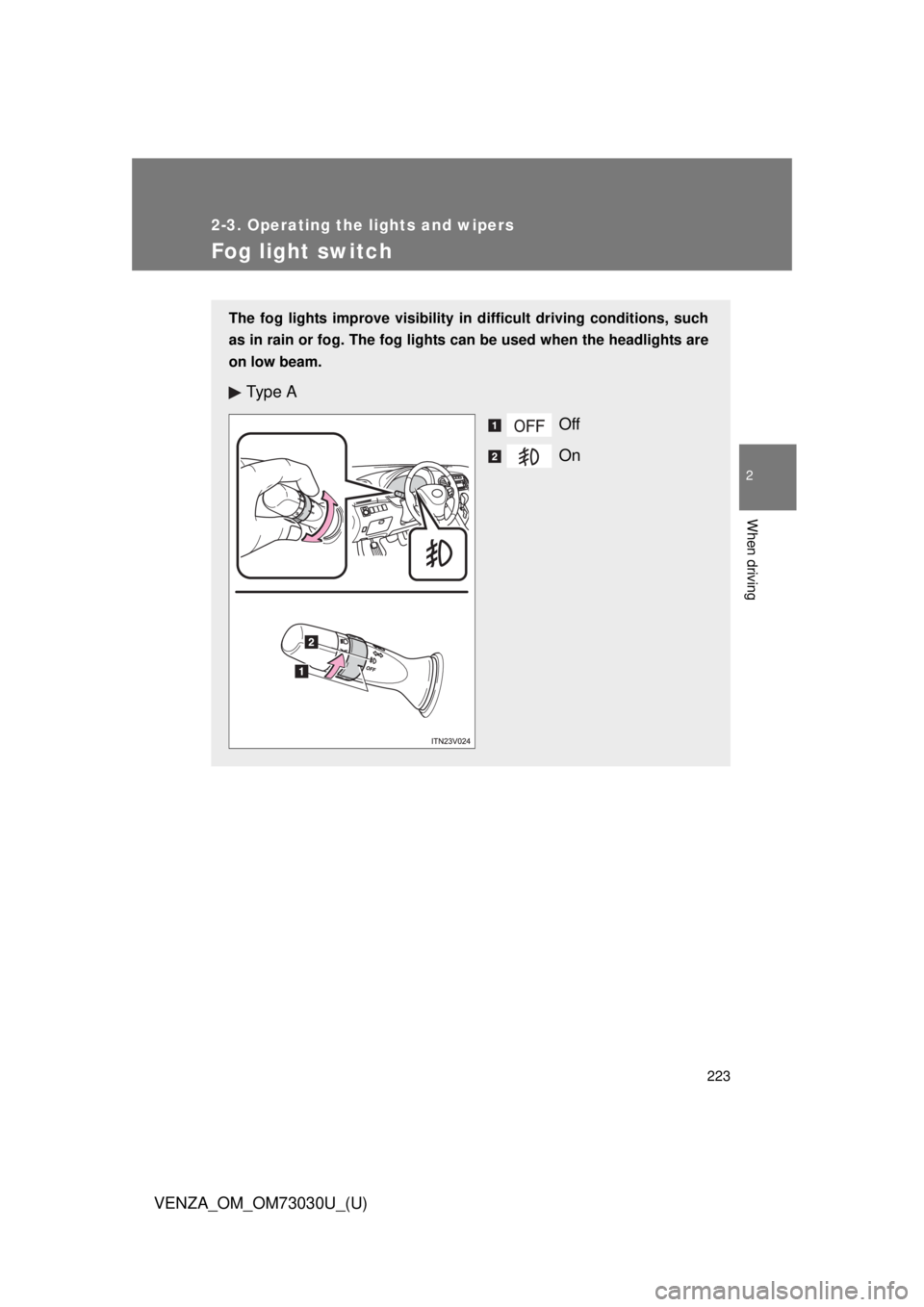
VENZA_OM_OM73030U_(U) Fog light switch The fog lights improve visibility in difficult driving conditions, such
as in rain or fog. The fog lights can be used when the headlights are
on low beam.
Ty p e A
Off
On
Page 251 of 688
2512-4. Using other driving systems
2
When driving
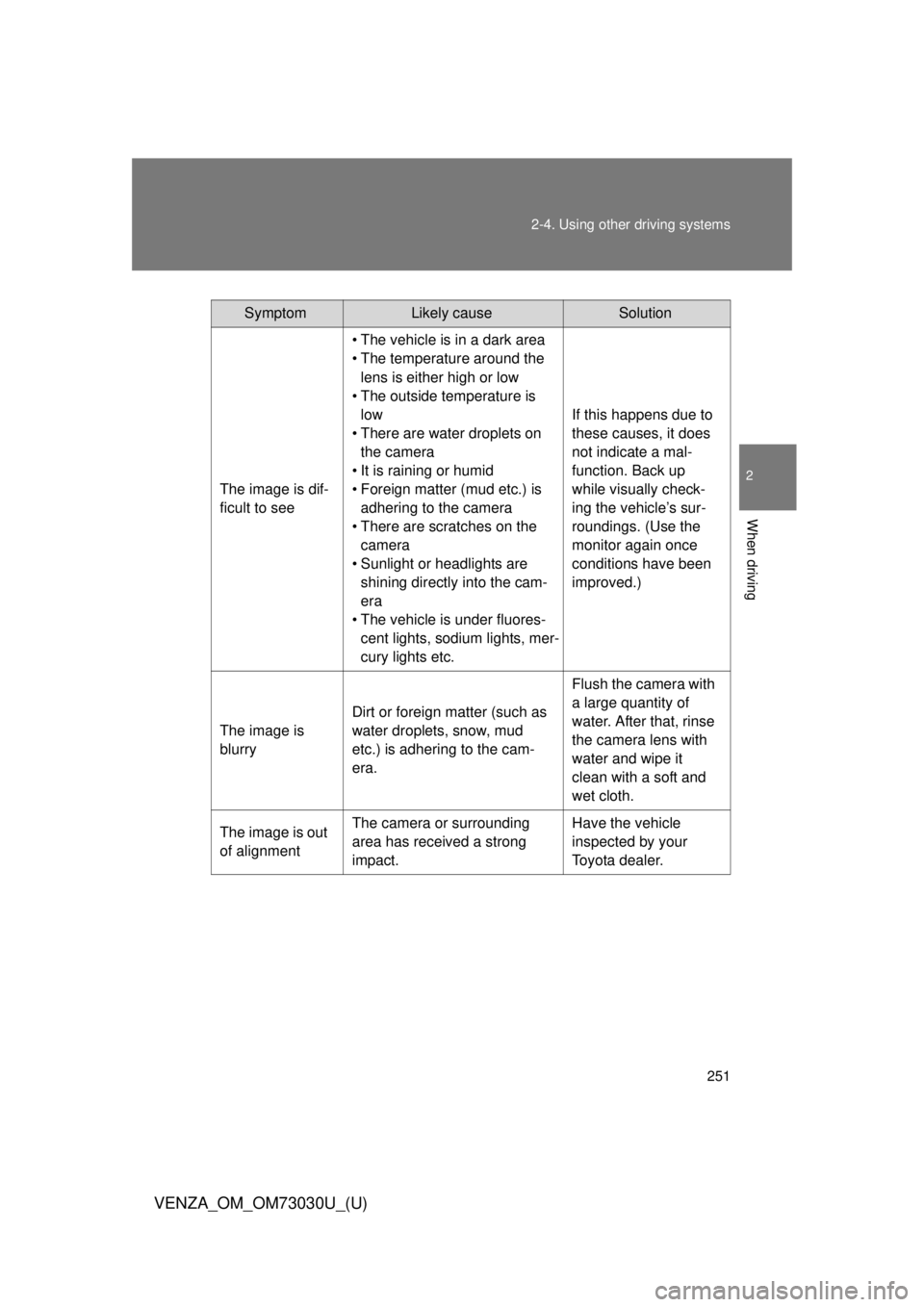
VENZA_OM_OM73030U_(U) Symptom Likely cause Solution
The image is dif-
ficult to see • The vehicle is in a dark area
• The temperature around the
lens is either high or low
• The outside temperature is
low
• There are water droplets on
the camera
• It is raining or humid
• Foreign matter (mud etc.) is
adhering to the camera
• There are scratches on the
camera
• Sunlight or headlights are
shining directly into the cam-
era
• The vehicle is under fluores-
cent lights, sodium lights, mer-
cury lights etc. If this happens due to
these causes, it does
not indicate a mal-
function. Back up
while visually check-
ing the vehicle’s sur-
roundings. (Use the
monitor again once
conditions have been
improved.)
The image is
blurry Dirt or foreign matter (such as
water droplets, snow, mud
etc.) is adhering to the cam-
era. Flush the camera with
a large quantity of
water. After that, rinse
the camera lens with
water and wipe it
clean with a soft and
wet cloth.
The image is out
of alignment The camera or surrounding
area has received a strong
impact. Have the vehicle
inspected by your
Toyota dealer.
Page 333 of 688
3333-2. Using the audio system (Entune Audio)
VENZA_OM_OM73030U_(U) 3
Interior features
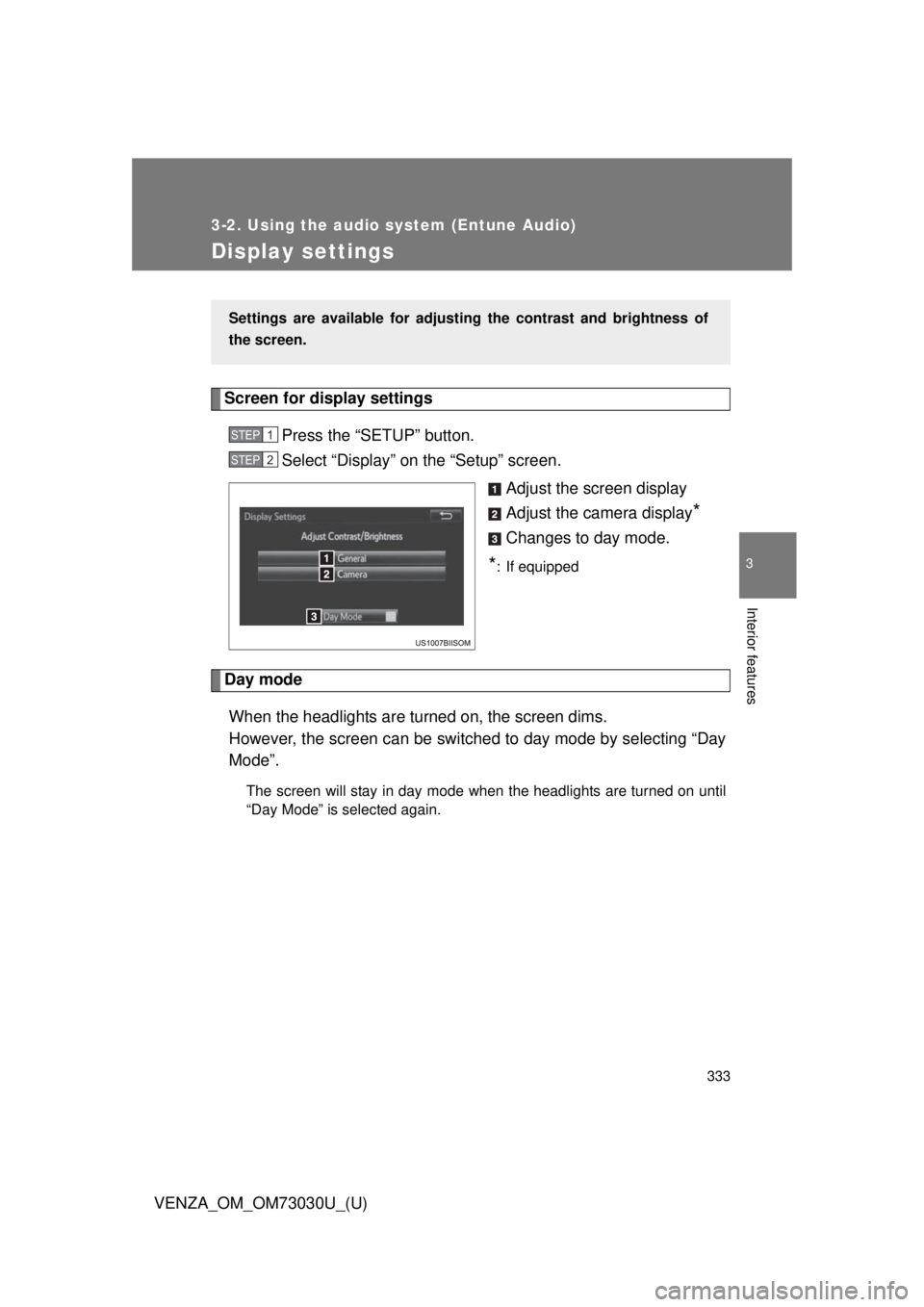
Display settings Screen for display settings
Press the “SETUP” button.
Select “Display” on the “Setup” screen.
Adjust the screen display
Adjust the camera display
*Changes to day mode.
* : If equipped
Day mode
When the headlights are turned on, the screen dims.
However, the screen can be switc hed to day mode by selecting “Day
Mode”. The screen will stay in day mode when the headlights are turned on until
“Day Mode” is selected again.Settings are available for adjusti ng the contrast and brightness of
the screen. STEP 1
STEP 2
Page 480 of 688
4804-2. Maintenance
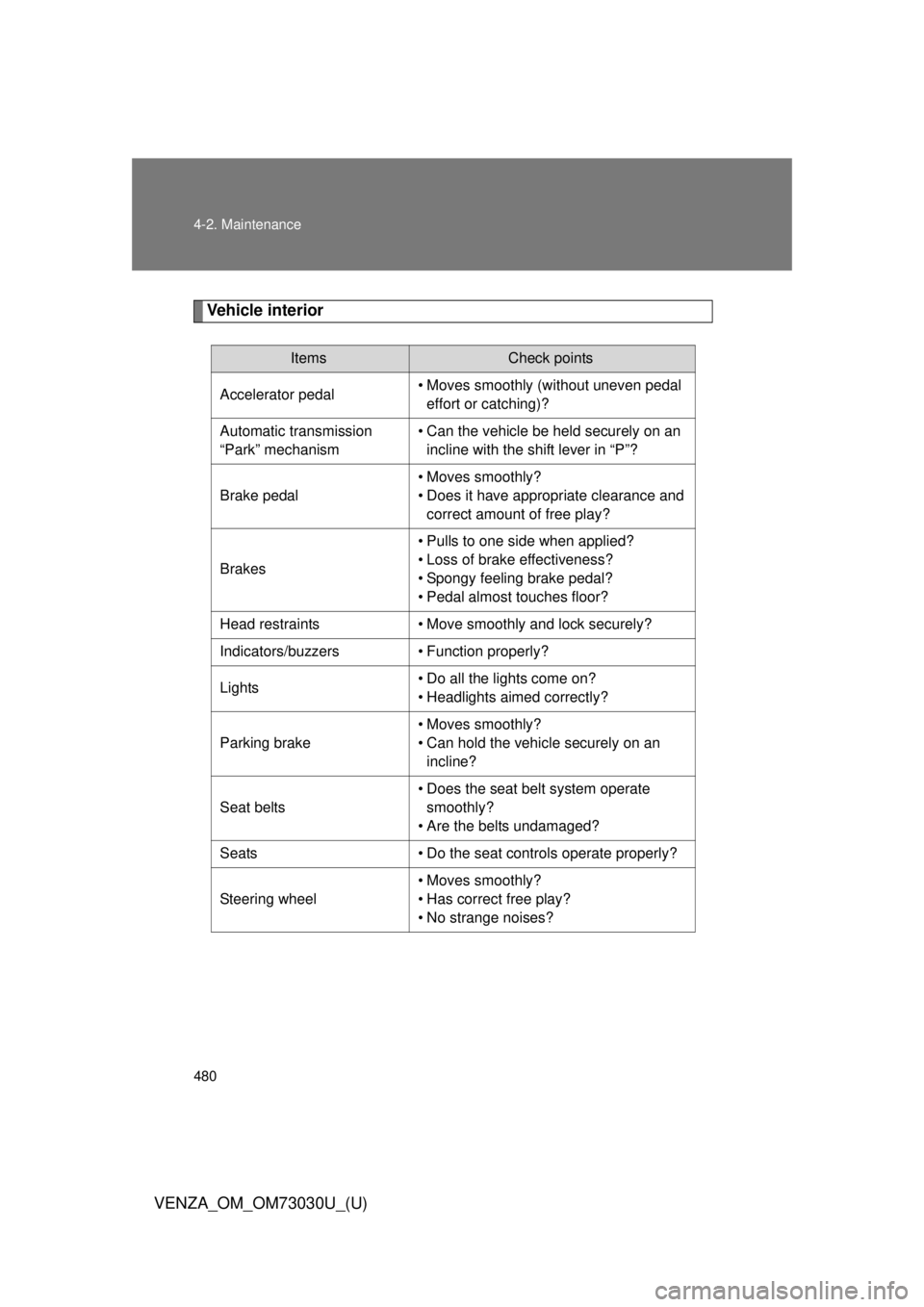
VENZA_OM_OM73030U_(U) Vehicle interior Items Check points
Accelerator pedal • Moves smoothly (without uneven pedal
effort or catching)?
Automatic transmission
“Park” mechanism • Can the vehicle be held securely on an
incline with the shift lever in “P”?
Brake pedal • Moves smoothly?
• Does it have appropriate clearance and
correct amount of free play?
Brakes • Pulls to one side when applied?
• Loss of brake effectiveness?
• Spongy feeling brake pedal?
• Pedal almost touches floor?
Head restraints • Move smoothly and lock securely?
Indicators/buzzers • Function properly?
Lights • Do all the lights come on?
• Headlights aimed correctly?
Parking brake • Moves smoothly?
• Can hold the vehicle securely on an
incline?
Seat belts • Does the seat belt system operate
smoothly?
• Are the belts undamaged?
Seats • Do the seat controls operate properly?
Steering wheel • Moves smoothly?
• Has correct free play?
• No strange noises?
Page 530 of 688
5304-3. Do-it-yourself maintenance
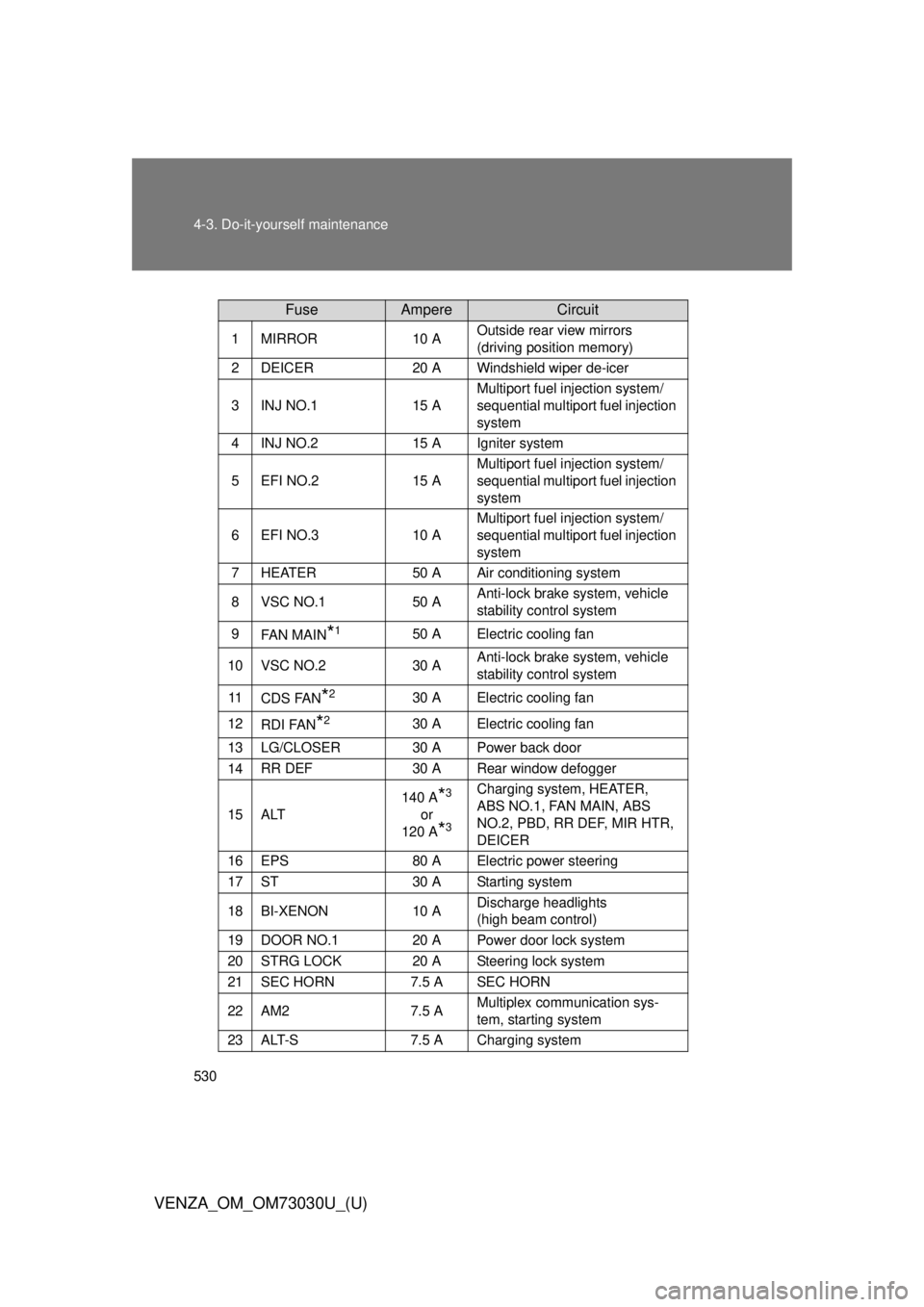
VENZA_OM_OM73030U_(U) Fuse Ampere Circuit1 MIRROR 10 A Outside rear view mirrors
(driving position memory)
2 DEICER 20 A Windshield wiper de-icer
3 INJ NO.1 15 A Multiport fuel injection system/
sequential multiport fuel injection
system
4 INJ NO.2 15 A Igniter system
5 EFI NO.2 15 A Multiport fuel injection system/
sequential multiport fuel injection
system
6 EFI NO.3 10 A Multiport fuel injection system/
sequential multiport fuel injection
system
7 HEATER 50 A Air conditioning system
8 VSC NO.1 50 A Anti-lock brake system, vehicle
stability control system
9
FA N M A I N
* 1
50 A Electric cooling fan
10 VSC NO.2 30 A Anti-lock brake system, vehicle
stability control system
11
CDS FAN
* 2
30 A Electric cooling fan
12
RDI FAN
* 2
30 A Electric cooling fan
13 LG/CLOSER 30 A Power back door
14 RR DEF 30 A Rear window defogger
15 ALT 140 A
* 3
or
120 A
* 3
Charging system, HEATER,
ABS NO.1, FAN MAIN, ABS
NO.2, PBD, RR DEF, MIR HTR,
DEICER
16 EPS 80 A Electric power steering
17 ST 30 A Starting system
18 BI-XENON 10 A Discharge headlights
(high beam control)
19 DOOR NO.1 20 A Power door lock system
20 STRG LOCK 20 A Steering lock system
21 SEC HORN 7.5 A SEC HORN
22 AM2 7.5 A Multiplex communication sys-
tem, starting system
23 ALT-S 7.5 A Charging system
Page 537 of 688
5374-3. Do-it-yourself maintenance
4
Maintenance and care
VENZA_OM_OM73030U_(U) Light bulbs You may replace the following bulbs yourself. The difficulty level of
replacement varies depending on the bulb. If necessary bulb
replacement seems difficult to perfor m, contact your Toyota dealer.
For more information about replacing other light bulbs, contact your
Toyota dealer.
■ Prepare a replacement light bulb.
Check the wattage of the light bulb being replaced. ( P. 624)
■ Turn the power back door main switch off. (vehicles with
power back door)
P. 5 9
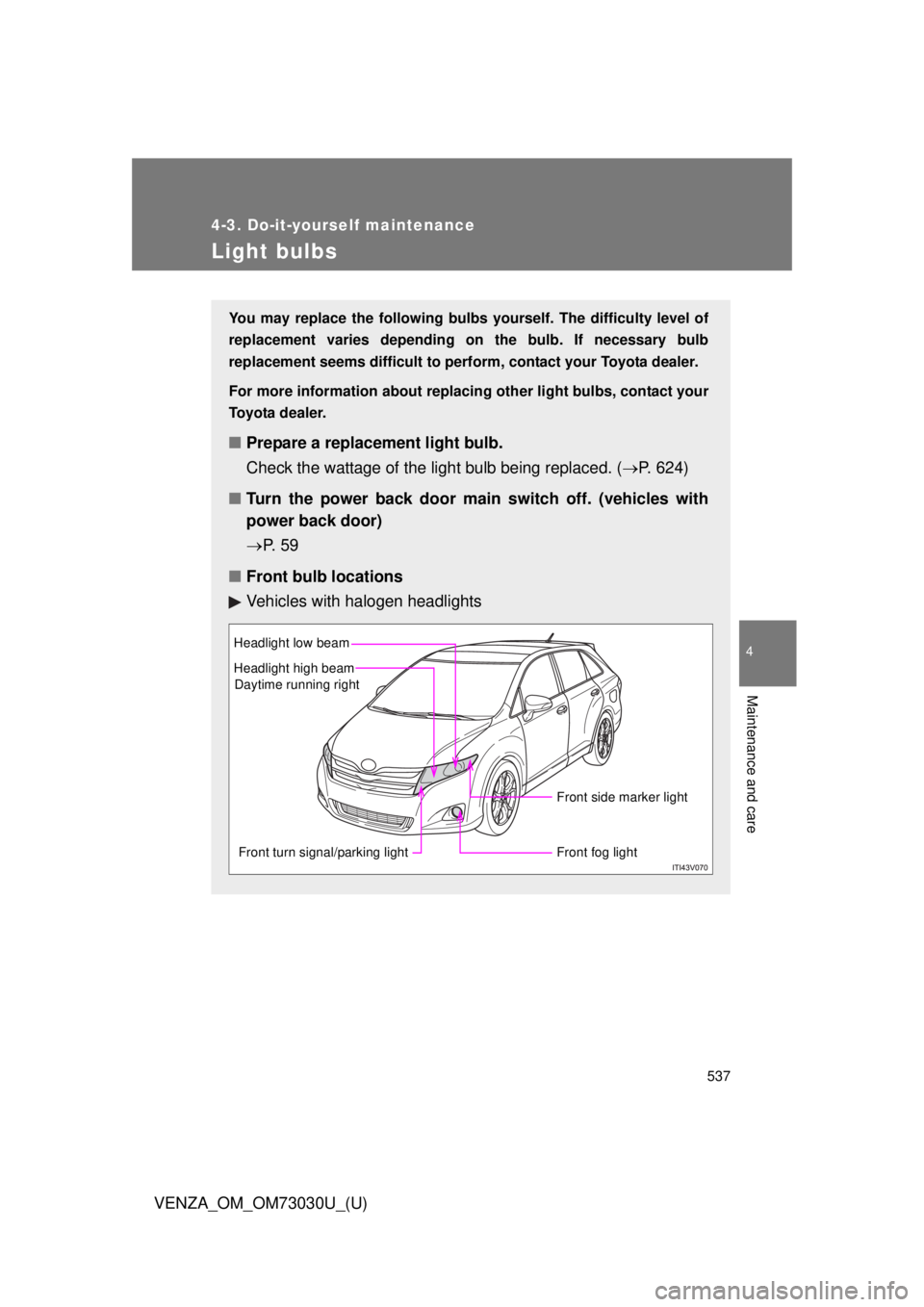
■ Front bulb locations
Vehicles with halogen headlights Headlight low beam
Headlight high beam
Front turn signal/parking light Front fog light Front side marker lightDaytime running right
Page 538 of 688
5384-3. Do-it-yourself maintenance
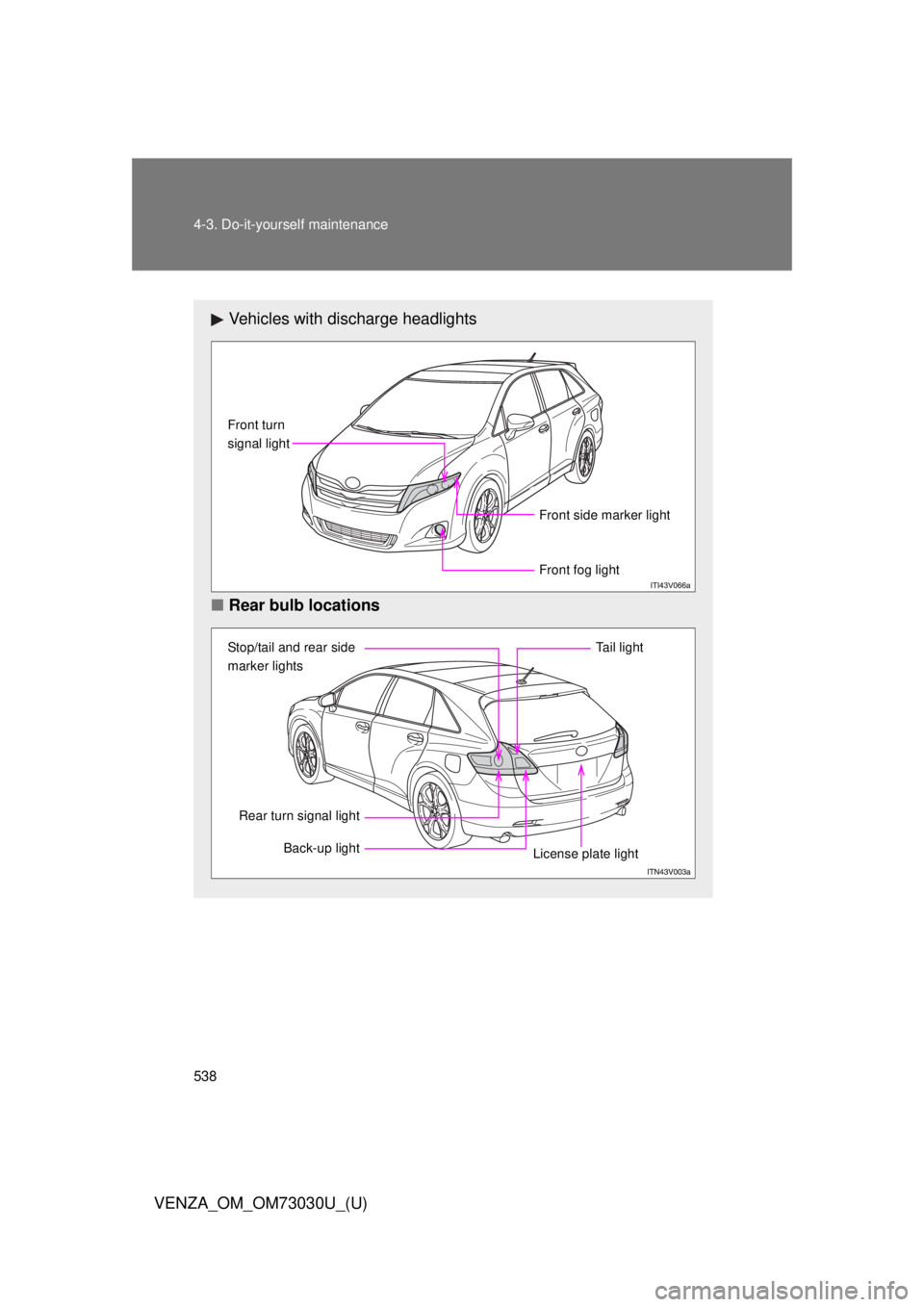
VENZA_OM_OM73030U_(U) Vehicles with discharge headlights
■ Rear bulb locations Front fog lightFront turn
signal light
Front side marker light
Stop/tail and rear side
marker lights
Back-up light Tail light
License plate lightRear turn signal light
Page 539 of 688
5394-3. Do-it-yourself maintenance
4
Maintenance and care
VENZA_OM_OM73030U_(U) Replacing light bulbs
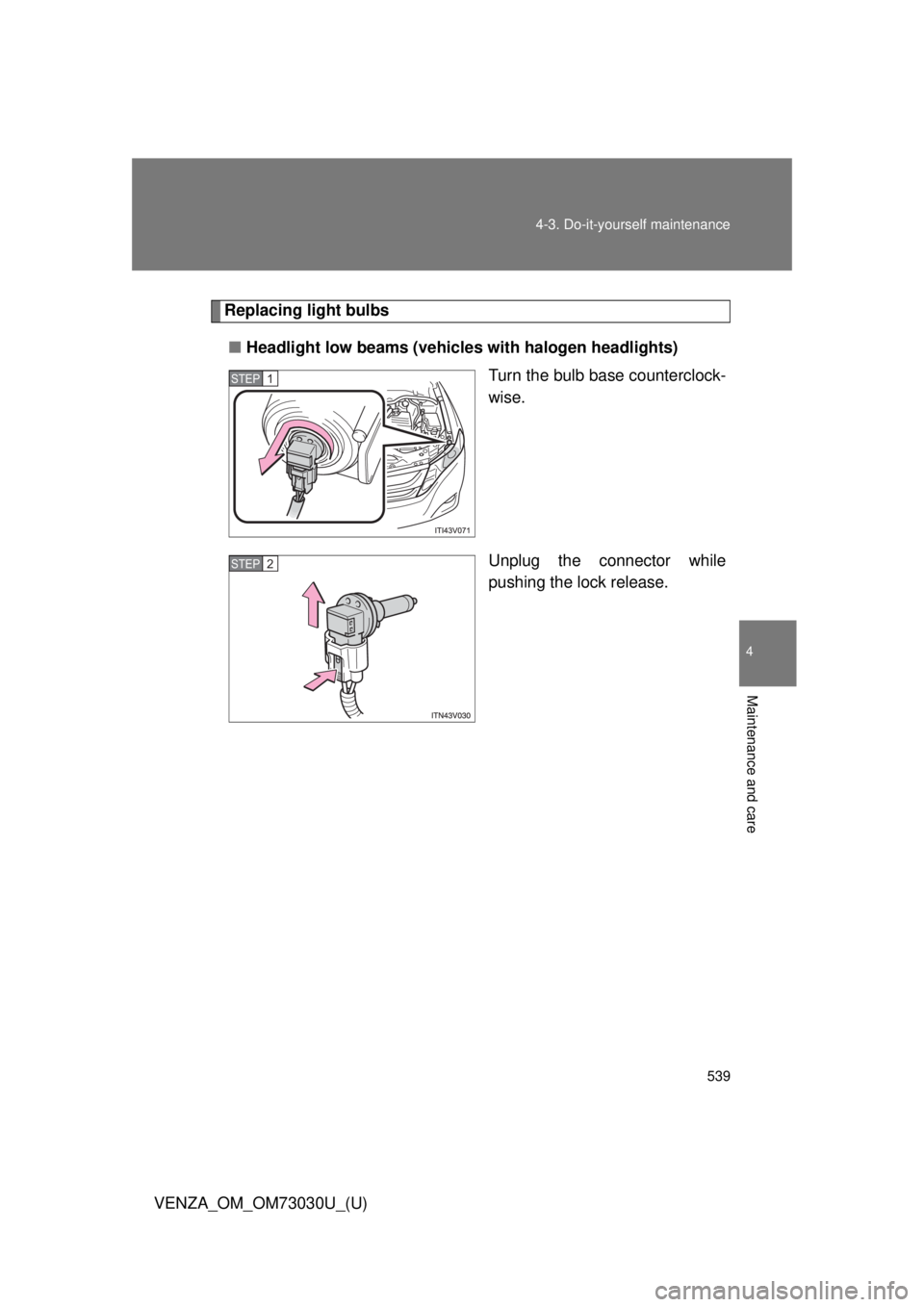
■ Headlight low beams (vehicle s with halogen headlights)
Turn the bulb base counterclock-
wise.
Unplug the connector while
pushing the lock release.STEP 1
STEP 2
Page 540 of 688
5404-3. Do-it-yourself maintenance
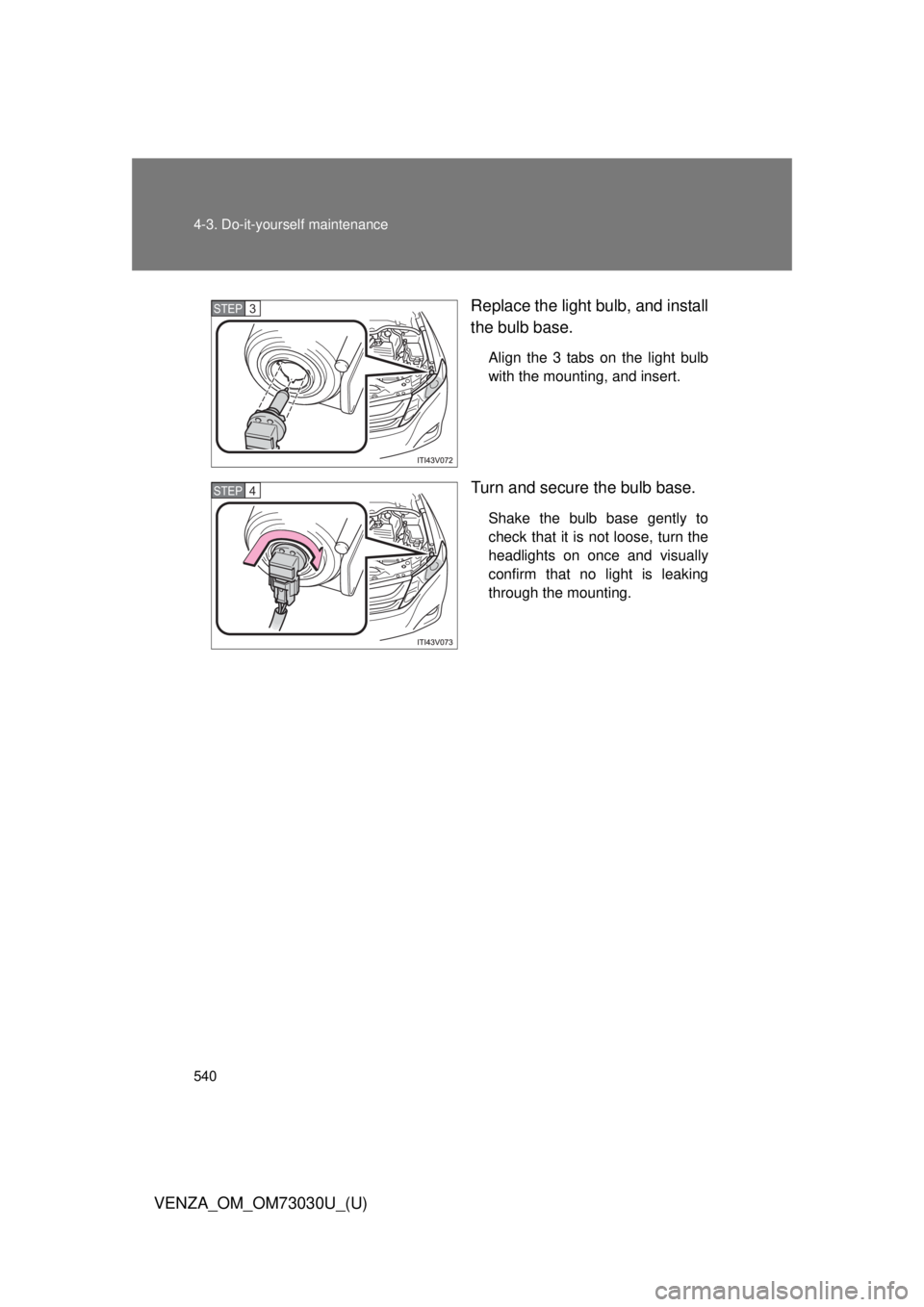
VENZA_OM_OM73030U_(U) Replace the light bulb, and install
the bulb base. Align the 3 tabs on the light bulb
with the mounting, and insert.
Turn and secure the bulb base. Shake the bulb base gently to
check that it is not loose, turn the
headlights on once and visually
confirm that no light is leaking
through the mounting.STEP 3
STEP 4