radio TOYOTA VENZA 2016 User Guide
[x] Cancel search | Manufacturer: TOYOTA, Model Year: 2016, Model line: VENZA, Model: TOYOTA VENZA 2016Pages: 688, PDF Size: 18.51 MB
Page 323 of 688
3233-2. Using the audio system (Entune Audio)
VENZA_OM_OM73030U_(U) 3
Interior features
Steering wheel audio switches
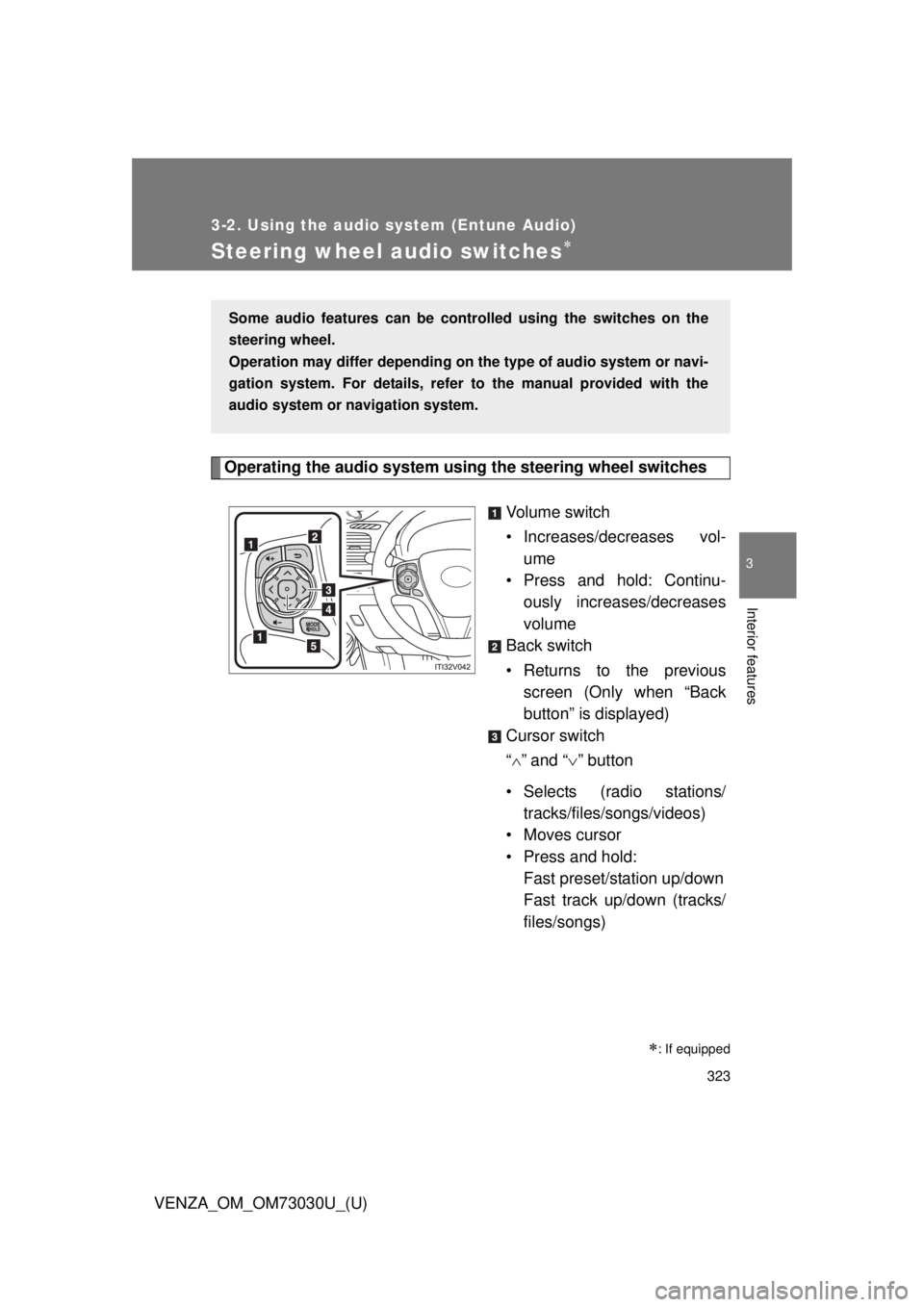
Operating the audio system using the steering wheel switches
Volume switch
• Increases/dec reases vol-
ume
• Press and hold: Continu-
ously increases/decreases
volume
Back switch
• Returns to the previous
screen (Only when “Back
button” is displayed)
Cursor switch
“ ” and “ ” button
• Selects (radio stations/
tracks/files/songs/videos)
• Moves cursor
• Press and hold:
Fast preset/station up/down
Fast track up/down (tracks/
files/songs)
: If equippedSome audio features can be contro lled using the switches on the
steering wheel.
Operation may differ depending on th e type of audio system or navi-
gation system. For details, refer to the manual provided with the
audio system or navigation system.
Page 324 of 688
3243-2. Using the audio system (Entune Audio)
VENZA_OM_OM73030U_(U) “ ” and “ ” button
• Tab change
• Press and hold:
Seek up/down (radio sta-
tions)
Fast up/down (tracks/files/
videos)
Enter switch
• Displays the audio screen
(Except when audio screen
is displayed)
• Displays the preset/list
screen (When audio screen
is displayed)
• Selects items (When audio
list screen is displayed)
“MODE/HOLD” switch
• Changes audio source
• Press and hold this switch
to mute or pause the current
operation
To cancel the mute or
pause, press and hold.
CAUTION■ To reduce the risk of an accident
Exercise care when operating the audio switches on the steering wheel.
Page 326 of 688
3263-2. Using the audio system (Entune Audio)
VENZA_OM_OM73030U_(U)Basic Audio Operations Basic audio operations and functions common to each mode are
explained in this section.
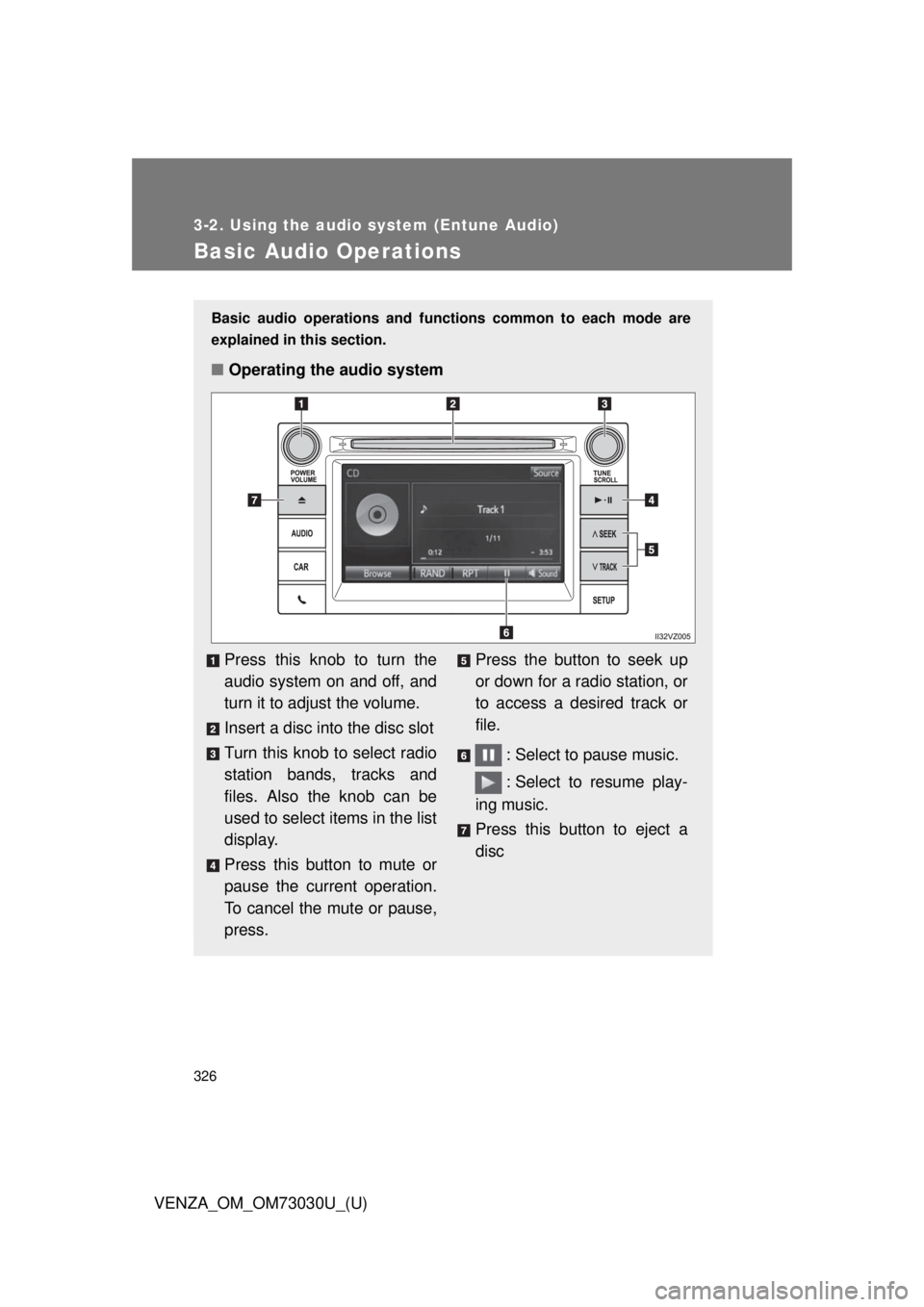
■ Operating the audio system
Press this knob to turn the
audio system on and off, and
turn it to adjust the volume.
Insert a disc into the disc slot
Turn this knob to select radio
station bands, tracks and
files. Also the knob can be
used to select items in the list
display.
Press this button to mute or
pause the current operation.
To cancel the mute or pause,
press. Press the button to seek up
or down for a radio station, or
to access a desired track or
file.
: Select to pause music.
: Select to resume play-
ing music.
Press this button to eject a
disc
Page 332 of 688
3323-2. Using the audio system (Entune Audio)
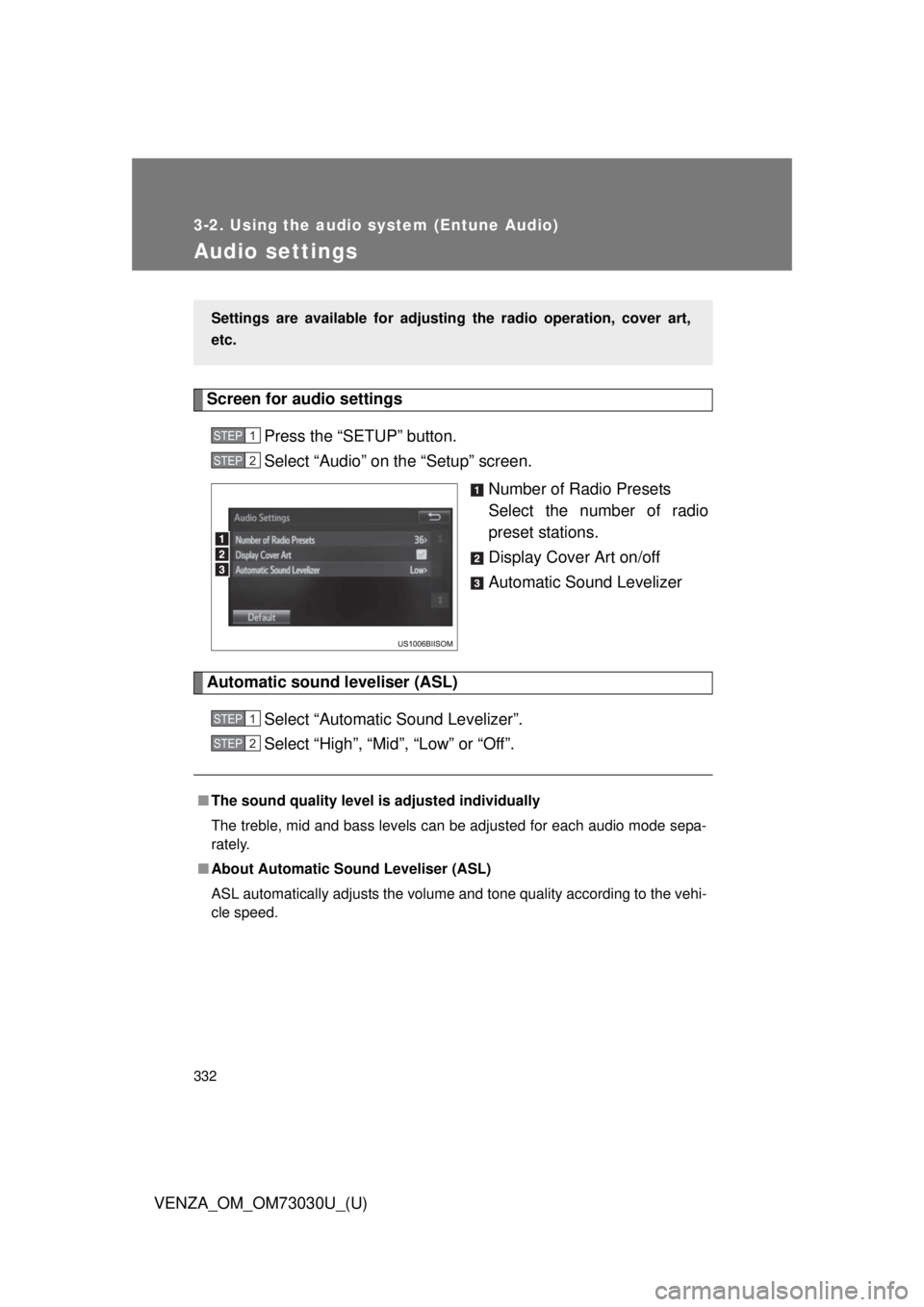
VENZA_OM_OM73030U_(U)Audio settings Screen for audio settings
Press the “SETUP” button.
Select “Audio” on the “Setup” screen.
Number of Radio Presets
Select the number of radio
preset stations.
Display Cover Art on/off
Automatic Sound Levelizer
Automatic sound leveliser (ASL)
Select “Automatic Sound Levelizer”.
Select “High”, “Mid”, “Low” or “Off”.Settings are available for adjusting the radio operation, cover art,
etc. STEP 1
STEP 2
■ The sound quality level is adjusted individually
The treble, mid and bass levels can be adjusted for each audio mode sepa-
rately.
■ About Automatic Sound Leveliser (ASL)
ASL automatically adjusts the volume and tone quality according to the vehi-
cle speed. STEP 1
STEP 2
Page 336 of 688
3363-2. Using the audio system (Entune Audio)
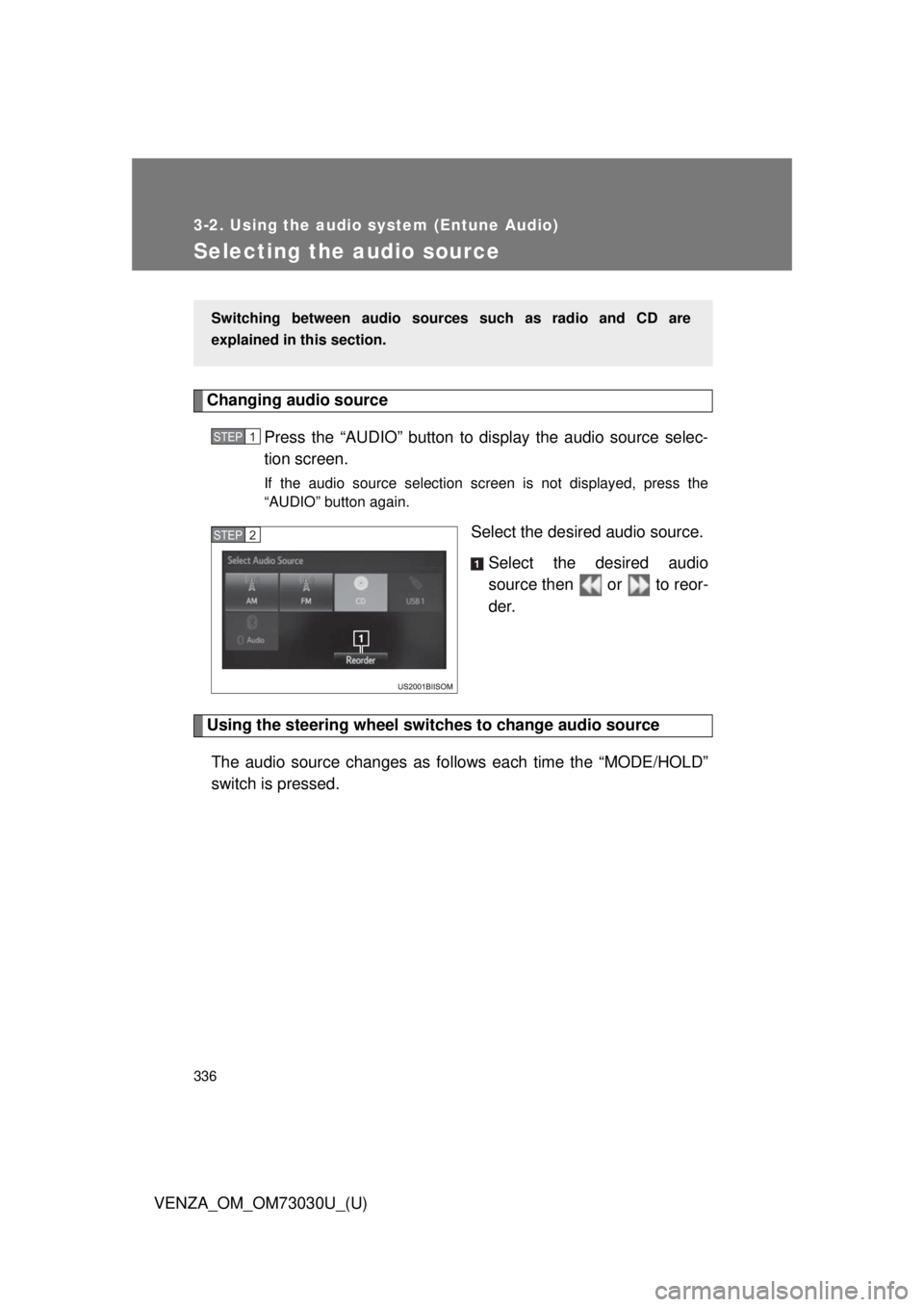
VENZA_OM_OM73030U_(U)Selecting the audio source Changing audio source
Press the “AUDIO” button to display the audio source selec-
tion screen. If the audio source selection screen is not displayed, press the
“AUDIO” button again.
Select the desired audio source.
Select the desired audio
source then or to reor-
der.
Using the steering wheel switch es to change audio source
The audio source changes as follows each time the “MODE/HOLD”
switch is pressed. Switching between audio sourc es such as radio and CD are
explained in this section. STEP 1
STEP 2
Page 340 of 688

3403-2. Using the audio system (Entune Audio)
VENZA_OM_OM73030U_(U)Radio operation Audio control screen
Pressing the “AUDIO” button disp lays the audio control screen from
any screens of the selected source.
Audio source selection screen
appears
Preset stations
FM only: Select to display
RBDS text messages.
Scanning for receivable sta-
tion
Select to display a list of
receivable stations
Setting the sound ( P. 339)
Selecting a station
Tune in to the desired station using one of the following methods.
■ Seek tuning
Press the “SEEK >” button or “< TRACK” button.
The radio will begin seeking up or down for a station of the nearest
frequency and will stop when a station is found.
■ Manual tuning
Turn the “TUNE•SCROLL” knob.
■ Preset stations
Select the desired preset station. Select “AM” or “FM” on the au dio source selection screen to begin
listening to the radio.
Page 341 of 688
3413-2. Using the audio system (Entune Audio)
VENZA_OM_OM73030U_(U) 3
Interior features Setting station presets
Search for desired stations by turning the “TUNE•SCROLL”
knob or pressing the “SEEK >” button or “< TRACK” button.
Select “(add new)”. To change the preset station to a different one, select and hold the
preset station.
Select “Yes”.
Select “OK” after setting the new preset station.
■ Refreshing the station list
Select “Refresh” on the “Station List” screen. To cancel the refresh, select “Cancel Refresh”.
Radio Broadcast Data System
This audio system is equipped with Radio Broadcast Data Systems
(RBDS). RBDS mode allows text me ssages to be received from radio
stations that utiliz e RBDS transmitters.
When RBDS is on, the radio can
only select stations of a particular program type,
display messages from radio stations.
RBDS features are available only wh en listening to an FM station that
broadcasts RBDS info rmation and the “FM Info” indicator is on.STEP 1
STEP 2
STEP 3
STEP 4
STEP 1
Page 342 of 688
3423-2. Using the audio system (Entune Audio)
VENZA_OM_OM73030U_(U) ■ Selecting a desired genre
Select “Station List”.
FM radio only: Select a desired genre of station and select a
desired station.
● The genre list is in the following order:
• Classical
• Country
• EasyLis (Easy Listening)
• Inform (Information)
•Jazz
•News
• Oldies
• Other
• Pop Music
• Religion
•Rock
• R&B (Rhythm and Blues)
•Sports
•Talk
• Alert (Emergency Alert)■ Reception sensitivity
● Maintaining perfect radio reception at all times is difficult due to the con-
tinually changing position of the antenna, differences in signal strength
and surrounding objects, such as trains, transmitters, etc.
● The radio antenna is mounted on the roof. The antenna can be removed
from the base by turning it. STEP 1
STEP 2
Page 424 of 688
4243-2. Using the audio system (Entune Audio)
VENZA_OM_OM73030U_(U) ■ Reconnecting the portable audio player
If the portable audio player is disconnected due to poor reception when the
engine switch is in the “ACC” or “ON” position (vehicles without a smart key
system) or ACCESSORY or IGNITION ON mode (vehicles with a smart key
system), the system automatically reconnects the portable audio player.
If you have switched off the portable audio player yourself, follow the instruc-
tions below to reconnect:
● Select the portable audio player again
● Enter the portable audio player
■ When you sell your car
Be sure to delete your personal data. ( P. 331)
CAUTION■ While driving
Do not operate the portable audio player, cellular phone or connect a device
to the Bluetooth ®
system.
■ Caution regarding interfer ence with electronic devices
● Your audio unit is fitted with Bluetooth ®
antennas. People with implantable
cardiac pacemakers, cardiac resynchronization therapy-pacemakers or
implantable cardioverter defibrillators should maintain a reasonable dis-
tance between themselves and the Bluetooth ®
antennas. The radio waves
may affect the operation of such devices.
● Before using Bluetooth ®
devices, users of any electrical medical device
other than implantable cardiac pacemakers, cardiac resynchronization
therapy-pacemakers or implantable cardioverter defibrillators should con-
sult the manufacturer of the device for information about its operation
under the influence of radio waves. Radio waves could have unexpected
effects on the operation of such medical devices.
Page 532 of 688
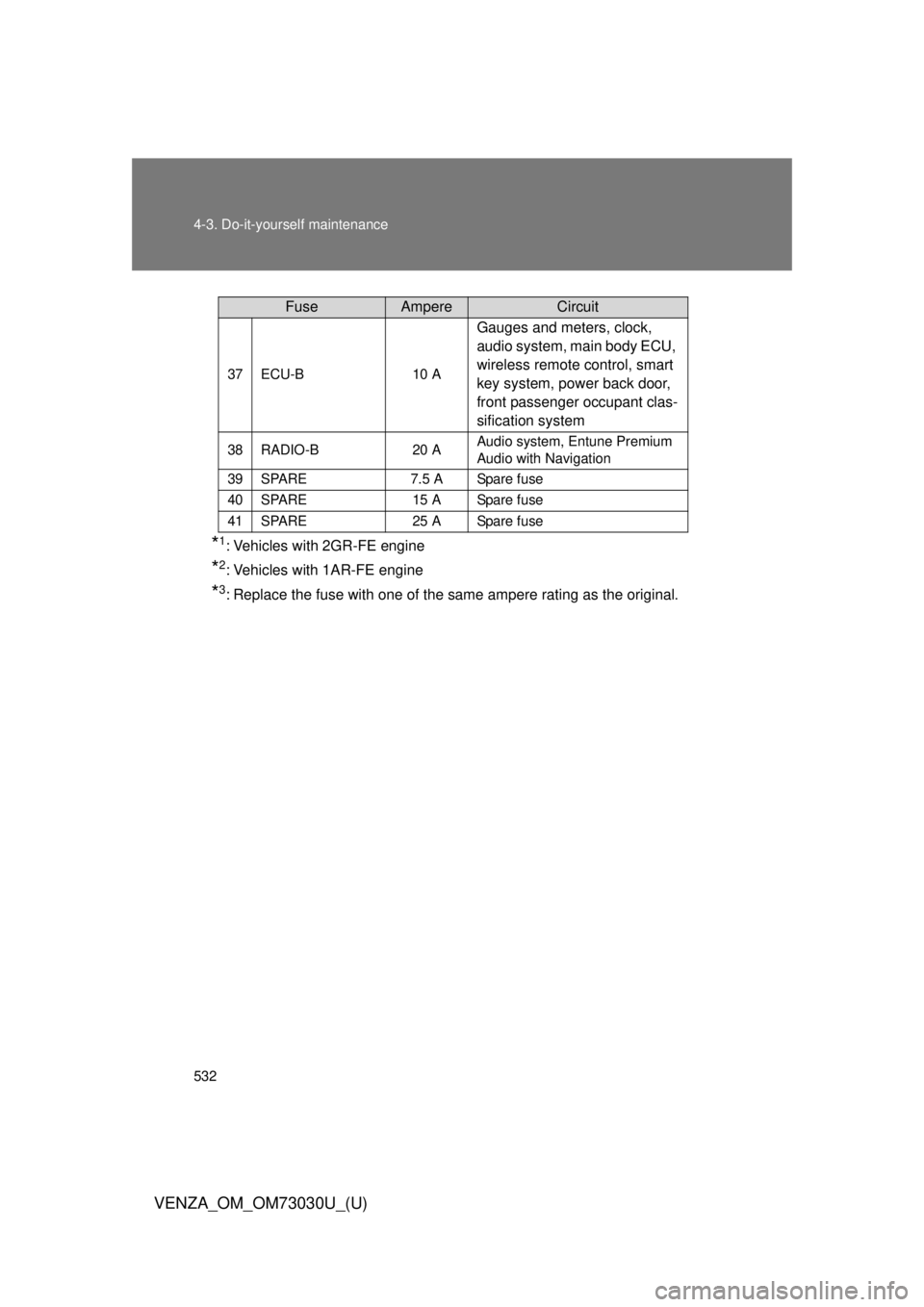
5324-3. Do-it-yourself maintenance
VENZA_OM_OM73030U_(U) * 1
: Vehicles with 2GR-FE engine
* 2
: Vehicles with 1AR-FE engine
* 3
: Replace the fuse with one of the same ampere rating as the original. 37 ECU-B 10 A
Gauges and meters, clock,
audio system, main body ECU,
wireless remote control, smart
key system, power back door,
front passenger occupant clas-
sification system38 RADIO-B 20 A Audio system, Entune Premium
Audio with Navigation
39 SPARE 7.5 A Spare fuse
40 SPARE 15 A Spare fuse
41 SPARE 25 A Spare fuseFuse Ampere Circuit