window TOYOTA VENZA 2016 User Guide
[x] Cancel search | Manufacturer: TOYOTA, Model Year: 2016, Model line: VENZA, Model: TOYOTA VENZA 2016Pages: 688, PDF Size: 18.51 MB
Page 35 of 688
351-2. Opening, closing and locking the doors
1
Before driving
VENZA_OM_OM73030U_(U) ■ Operation signals
A buzzer sounds and the emergency flashers flash to indicate that the doors
have been locked/unlocked. (Locked: Once; Unlocked: Twice)
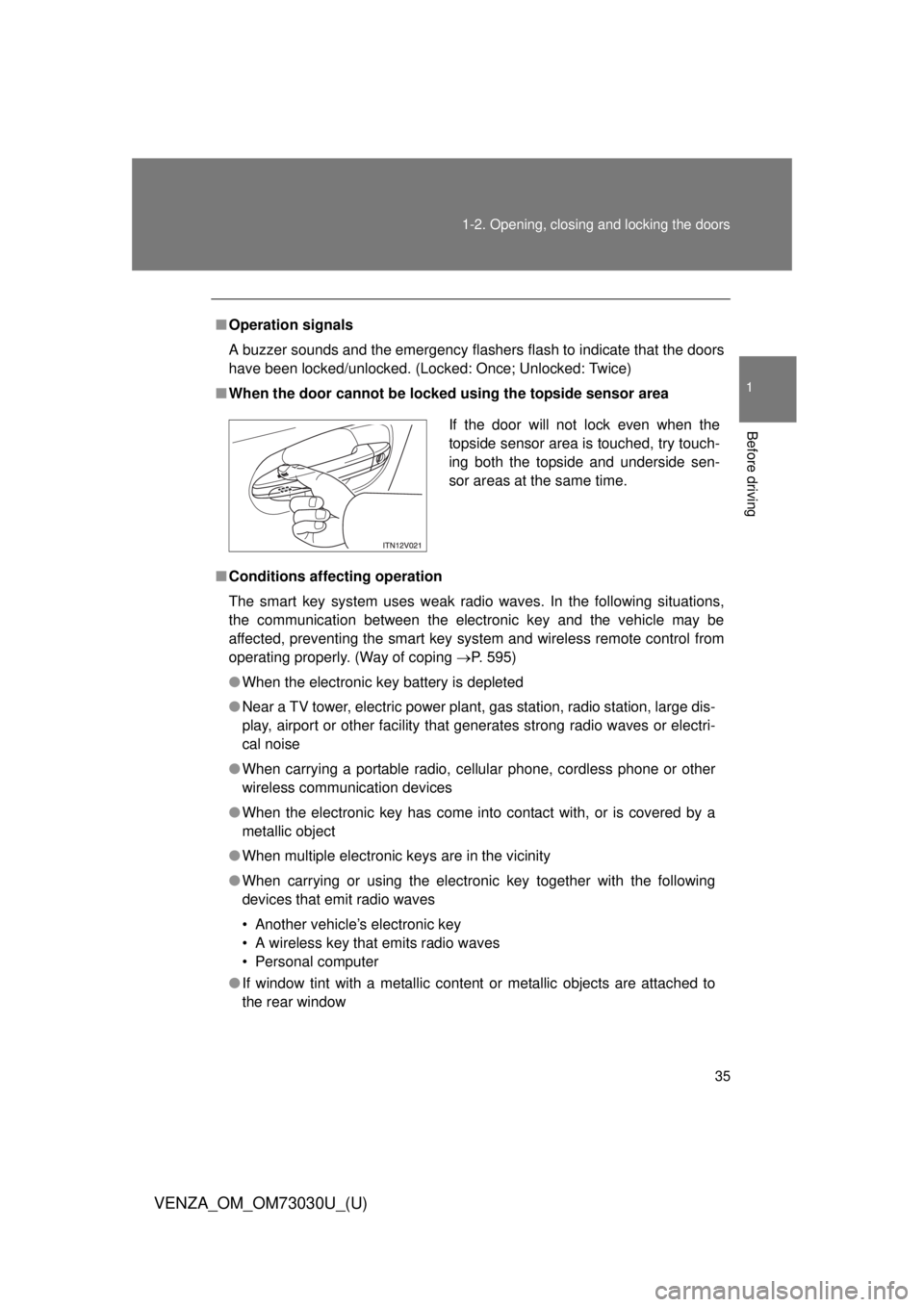
■ When the door cannot be locked using the topside sensor area
■ Conditions aff ecting operation
The smart key system uses weak radio waves. In the following situations,
the communication between the electronic key and the vehicle may be
affected, preventing the smart key system and wireless remote control from
operating properly. (Way of coping P. 595)
● When the electronic key battery is depleted
● Near a TV tower, electric power plant, gas station, radio station, large dis-
play, airport or other facility that generates strong radio waves or electri-
cal noise
● When carrying a portable radio, ce llular phone, cordless phone or other
wireless communication devices
● When the electronic key has come into contact with, or is covered by a
metallic object
● When multiple electronic keys are in the vicinity
● When carrying or using the electronic key together with the following
devices that emit radio waves
• Another vehicle’s electronic key
• A wireless key that emits radio waves
• Personal computer
● If window tint with a metallic content or metallic objects are attached to
the rear window If the door will not lock even when the
topside sensor area is touched, try touch-
ing both the topside and underside sen-
sor areas at the same time.
Page 38 of 688
381-2. Opening, closing and locking the doors
VENZA_OM_OM73030U_(U) ■ To operate the system properly
Make sure to carry the electronic key when operating the system. Do not get
the electronic key too close to the vehicle when operating the system from
outside of the vehicle.
Depending on the position and holding condition of the electronic key, the
key may not be detected correctly and the system may not operate properly.
(The alarm may go off accidentally, or the door lock prevention may not func-
tion.)
■ Note for the entry function
● Even when the electronic key is within the effective range (detection
areas), the system may not operate properly in the following cases.
• The electronic key is too close to the window or outside door handle,
near the ground, or in a high place when the doors are locked or
unlocked.
• The electronic key is near the ground or in a high place, or too close to
the rear bumper center when the back door is locked or unlocked.
• The electronic key is on the instrument panel, floor or in the glove box
when the engine is started or “ENGINE START STOP” switch modes
are changed.
● Do not leave the electronic key on top of the instrument panel or near the
door pockets when exiting the vehicle. Depending on the radio wave
reception conditions, it may be detected by the antenna outside the cabin
and the door will become lockable from the outside, possibly trapping the
electronic key inside the vehicle.
● As long as the electronic key is within the effective range, the doors may
be locked or unlocked by anyone.
Page 39 of 688
391-2. Opening, closing and locking the doors
1
Before driving
VENZA_OM_OM73030U_(U) ● Even if the electronic key is not inside the vehicle, it may be possible to
start the engine if the electronic key is near the window.
● The doors may unlock or lock if a large amount of water splashes on the
door handle, such as in the rain or in a car wash when the electronic key
is within the effective range. (The doors will automatically be locked after
approximately 60 seconds if the doors are not opened and closed.)
● If the key is kept near the vehicle while it is being washed, water applied
to a door handle may cause the door to lock and unlock repeatedly. In
this event, place the key in a location 6 ft. (2 m) or more from the vehicle,
taking care not to lose the key.
● If the key is inside the vehicle while it is being washed, water applied to a
door handle may cause a buzzer to sound. In this event, locking all doors
will cause the buzzer to stop sounding.
● It may not be possible to lock the doors if the sensor area is covered by
mud, ice, snow etc. In this event, try locking again after cleaning the
area, or lock by touching the sensor area on the underside of the door
handle.
● Gripping the door handle when wearing a glove may not unlock or lock
the door.
● If the wireless remote control is used to lock the doors when the elec-
tronic key is near the vehicle, there is a possibility that the door may not
be unlocked by the smart key system. (Use the wireless remote control to
unlock the doors.)
● A sudden approach to the effective range or door handle operation may
prevent the doors from being unlocked. In this case, return the door han-
dle to the original position and check that the doors unlock before pulling
the door handle.
Page 94 of 688

941-3. Adjustable components (s eats, mirrors, steering wheel)
VENZA_OM_OM73030U_(U) Linked mirror function when reversing (if equipped)
When the mirror select switch is in the L or R position, the outside
rear view mirrors will automatically angle downwards when the vehi-
cle is reversing in order to give a better view of the ground.
To disable this function, move the mirror select switch to the neutral
position (between L and R).
■ Adjusting the mirror angle when the vehicle is reversing
With the shift lever in R, adjust the mirror angle at a desired posi-
tion.
The adjusted angle will be memorized and the mirror will automati-
cally tilt to the memorized angle whenever the shift lever is shifted
to R from next time. The memorized downward tilt position of the mirror is linked to the nor-
mal position (angle adjusted when the shift lever in other than R). There-
fore, if the normal position is changed after adjustment, the tilt position
will also change.
When the normal position is changed, readjust the angle in reversing.
■ Mirror angle can be adjusted when
Vehicles with smart key system
The “ENGINE START STOP” switch is in ACCESSORY or IGNITION ON
mode.
Vehicles without smart key system
The engine switch is in the “ACC” or “ON” position.
■ When the mirrors are fogged up
The outside rear view mirrors can be cleared using the mirror defoggers.
Turn on the rear window defogger to turn on the outside rear view mirror
defoggers. ( P. 316)
■ Automatic adjustment of the mirror angle (if equipped)
The mirror adjustment can be entered into memory and recalled automati-
cally by the driving position memory. ( P. 73)
Page 96 of 688
96
VENZA_OM_OM73030U_(U) 1-4. Opening and closing the windows and moon roof
Power windows
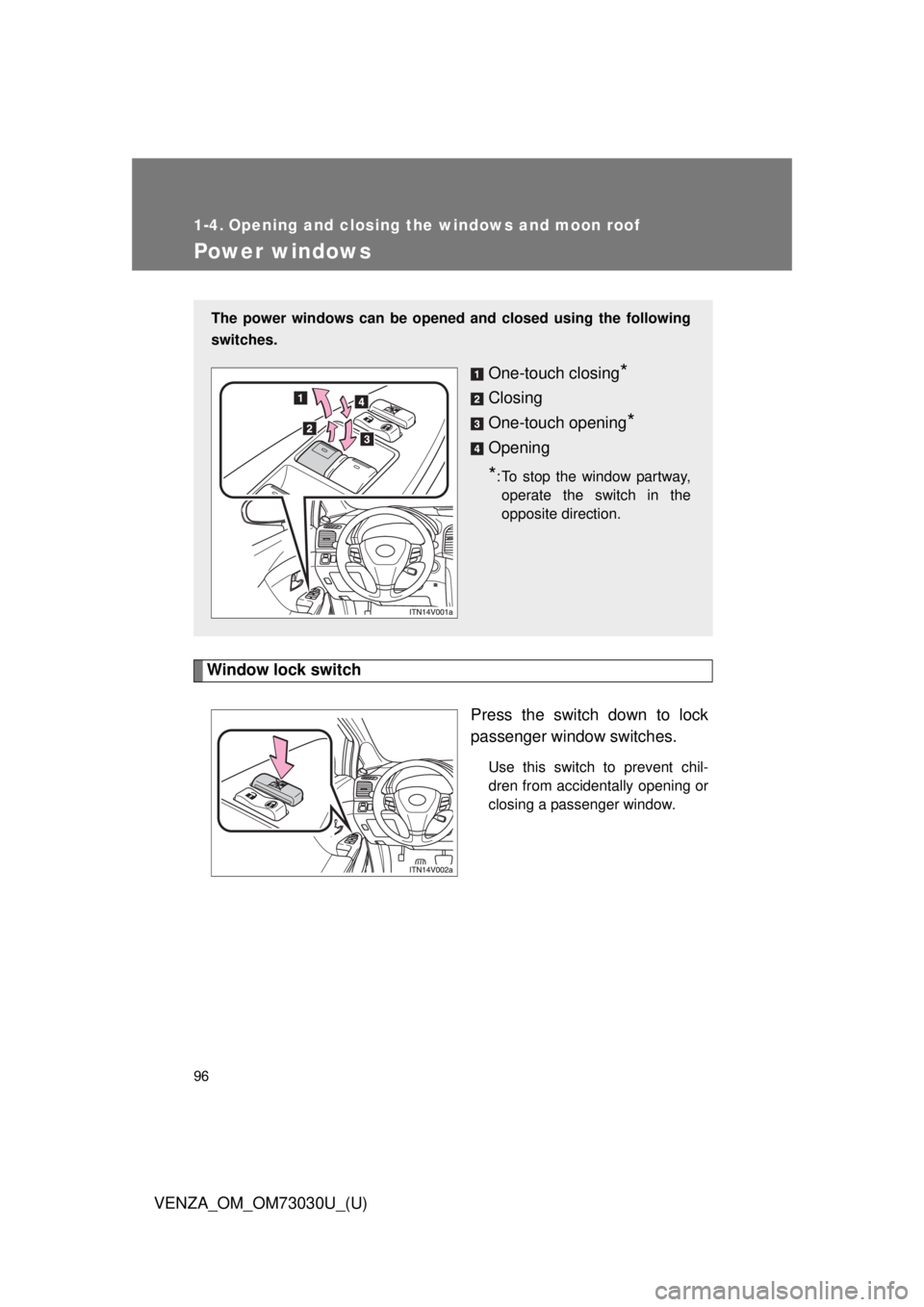
Window lock switch
Press the switch down to lock
passenger window switches. Use this switch to prevent chil-
dren from accidentally opening or
closing a passenger window.The power windows can be opened and closed using the following
switches.
One-touch closing
*Closing
One-touch opening
*Opening
* : To stop the window partway,
operate the switch in the
opposite direction.
Page 97 of 688

971-4. Opening and closing the windows and moon roof
1
Before driving
VENZA_OM_OM73030U_(U) ■ The power windows can be operated when
Vehicles with smart key system
The “ENGINE START STOP” switch is in IGNITION ON mode.
Vehicles without smart key system
The engine switch is in the “ON” position.
■ Operating the power windows after turning the engine off
Vehicles with smart key system
The power windows can be operated for approximately 45 seconds even
after the “ENGINE START STOP” switch is turned to ACCESSORY mode
or turned off. They cannot, however, be operated once either front door is
opened.
Vehicles without smart key system
The power windows can be operated for approximately 45 seconds even
after the engine switch is turned to the “ACC” or “LOCK” position. They
cannot, however, be operated once either front door is opened.
■ Jam protection function
If an object becomes caught between the window and the window frame,
window travel is stopped and the window is opened slightly.
Page 98 of 688

981-4. Opening and closing the windows and moon roof
VENZA_OM_OM73030U_(U) ■ When the power window does not close normally
If the jam protection function is operating abnormally and a window cannot
be closed, perform the following operations using the power window switch
on the relevant door.
● After stopping the vehicle, the window can be closed by holding the
power window switch in the one-touch closing position while the
“ENGINE START STOP” switch is turned to IGNITION ON mode (vehi-
cles with smart key system) or the engine switch is turned to the “ON”
position (vehicles without smart key system).
● If the window still cannot be closed even by carrying out the operation
explained above, initialize the function by performing the following proce-
dure.
Hold the power window switch in the one-touch closing position.
Continue holding the switch for a further 6 seconds after the win-
dow has closed.
Hold the power window switch in the one-touch opening position.
Continue holding the switch for a further 2 seconds after the win-
dow has opened completely.
Hold the power window switch in the one-touch closing position
once again. Continue holding the switch for a further 2 seconds
after the window has closed.
If you release the switch while the window is moving, start again from the
beginning. If the window continues to close but then re-open slightly even
after performing the above procedure correctly, have the vehicle inspected
by your Toyota dealer.
■ Customization
Settings (e.g. Rear window Auto Up/Down) can be changed.
(Customizable features P. 645)STEP 1
STEP 2
STEP 3
Page 99 of 688
991-4. Opening and closing the windows and moon roof
1
Before driving
VENZA_OM_OM73030U_(U) CAUTION■ Closing the windows
Observe the following precautions.
Failing to do so may result in death or serious injury.
● The driver is responsible for all t he power window operations, including the
operation for the passengers. In order to prevent accidental operation,
especially by a child, do not let a child operate the power windows. It is
possible for children and other passengers to have body parts caught in
the power window. Also, when riding with a child, it is recommended to use
the window lock switch. ( P. 96)
● Check to make sure that all passengers do not have any part of their body
in a position where it could be caught when a window is being operated.
● Vehicles with smart key system:
When exiting the vehicle, turn the “ENGINE START STOP” switch off,
carry the key and exit the vehicle along with the child. There may be acci-
dental operation, due to mischief, etc., that may possibly lead to an acci-
dent.
Vehicles without smart key system:
When exiting the vehicle, turn the engine switch to the “LOCK” position,
carry the key and exit the vehicle along with the child. There may be acci-
dental operation, due to mischief, etc., that may possibly lead to an acci-
dent.
■ Jam protection function
● Never try jamming any part of your body to activate the jam protection
function intentionally.
● The jam protection function may not work if something gets caught just
before the window fully closes.
Page 100 of 688
1001-4. Opening and closing the windows and moon roof
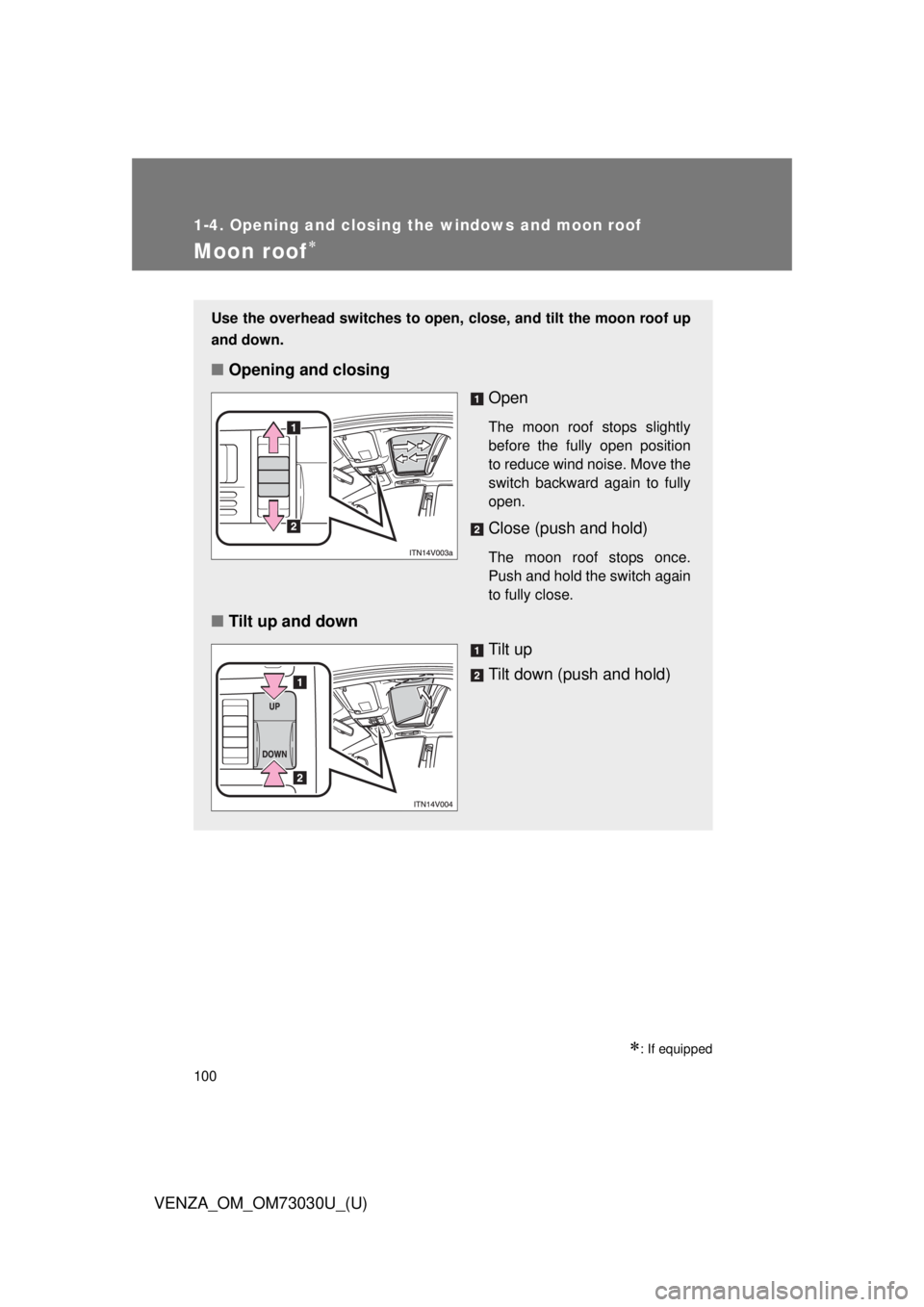
VENZA_OM_OM73030U_(U)Moon roof
: If equippedUse the overhead switches to open, close, and tilt the moon roof up
and down.
■ Opening and closing
Open The moon roof stops slightly
before the fully open position
to reduce wind noise. Move the
switch backward again to fully
open.
Close (push and hold) The moon roof stops once.
Push and hold the switch again
to fully close.
■ Tilt up and down
Tilt up
Tilt down (push and hold)
Page 101 of 688
1011-4. Opening and closing the windows and moon roof
1
Before driving
VENZA_OM_OM73030U_(U) ■ The moon roof can be operated when
Vehicles with smart key system
The “ENGINE START STOP” switch is in IGNITION ON mode.
Vehicles without smart key system
The engine switch is in the “ON” position.
■ Operating the moon roof af ter turning the engine off
Vehicles with smart key system
The moon roof can be operated for approximately 45 seconds even after
the “ENGINE START STOP” switch is turned to ACCESSORY mode or
turned off. It cannot, however, be operated once either front door is
opened.
Vehicles without smart key system
The moon roof can be operated for approximately 45 seconds even after
the engine switch is turned to the “ACC” or “LOCK” position. It cannot,
however, be operated once either front door is opened.
■ To reduce moon roof wind noise
When the moon roof is opened automatically, it will stop slightly before the
fully open position. Driving with the moon roof in this position can help
reduce wind noise.
■ Sunshade
P. 104
■ Open moon roof warning buzzer
Vehicles with smart key system
The buzzer sounds and message is shown on the multi-information dis-
play (TFT type only) when the “ENGIN E START STOP” switch is turned
off and the driver’s door is opened with the moon roof open.
Vehicles without smart key system
The buzzer sounds and message is shown on the multi-information dis-
play (TFT type only) when the engine switch is turned to the “LOCK” posi-
tion and the driver’s door is opened with the moon roof open.