ignition TOYOTA VENZA 2016 Owner's Manual
[x] Cancel search | Manufacturer: TOYOTA, Model Year: 2016, Model line: VENZA, Model: TOYOTA VENZA 2016Pages: 688, PDF Size: 18.51 MB
Page 175 of 688
1752-1. Driving procedures
2
When driving
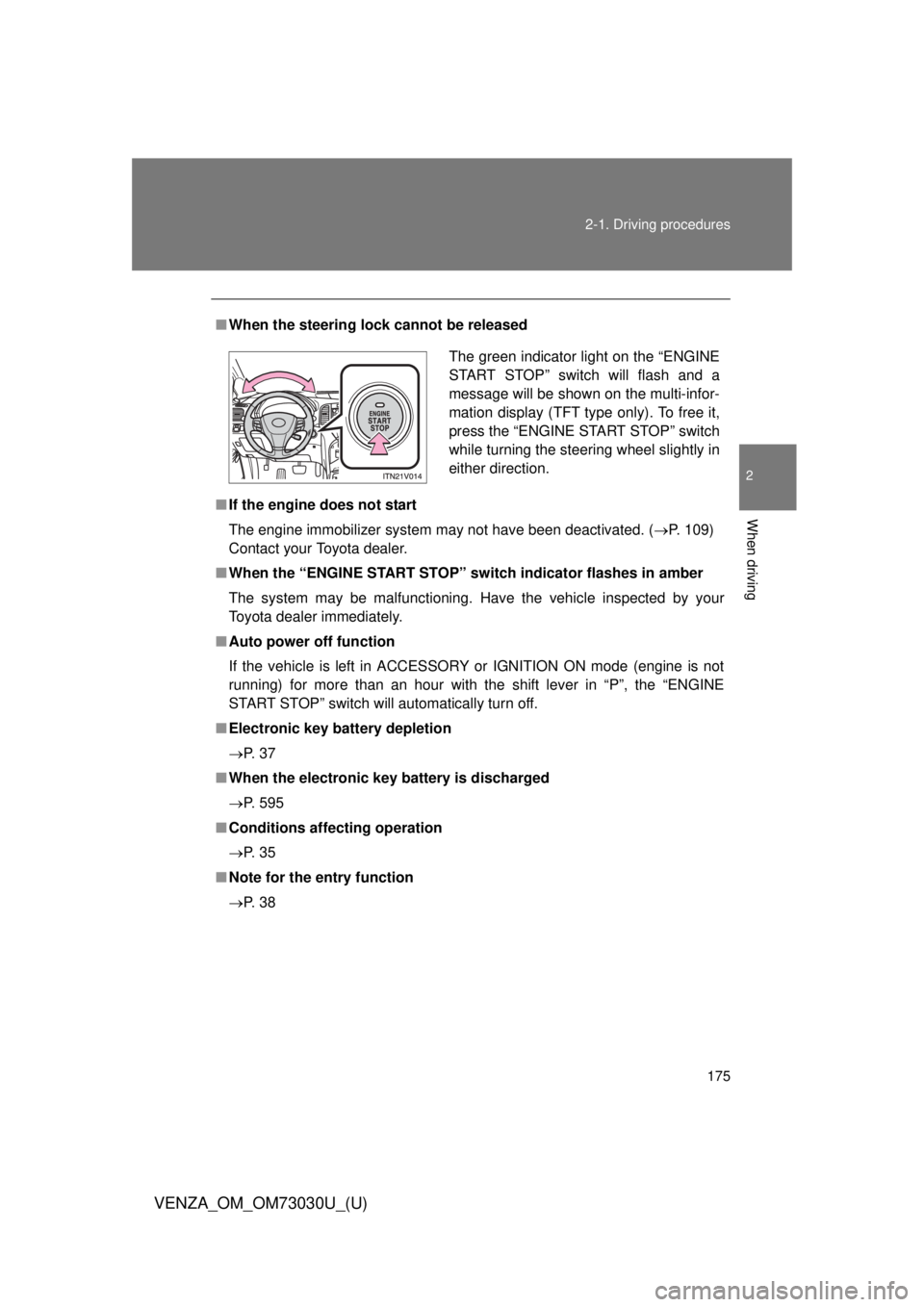
VENZA_OM_OM73030U_(U) ■ When the steering lock cannot be released
■ If the engine does not start
The engine immobilizer system may not have been deactivated. ( P. 109)
Contact your Toyota dealer.
■ When the “ENGINE START STOP” sw itch indicator flashes in amber
The system may be malfunctioning. Have the vehicle inspected by your
Toyota dealer immediately.
■ Auto power off function
If the vehicle is left in ACCESSORY or IGNITION ON mode (engine is not
running) for more than an hour with the shift lever in “P”, the “ENGINE
START STOP” switch will automatically turn off.
■ Electronic key battery depletion
P. 3 7
■ When the electronic key battery is discharged
P. 595
■ Conditions aff ecting operation
P. 3 5
■ Note for the entry function
P. 3 8 The green indicator light on the “ENGINE
START STOP” switch will flash and a
message will be shown on the multi-infor-
mation display (TFT type only). To free it,
press the “ENGINE START STOP” switch
while turning the steering wheel slightly in
either direction.
Page 177 of 688
1772-1. Driving procedures
2
When driving
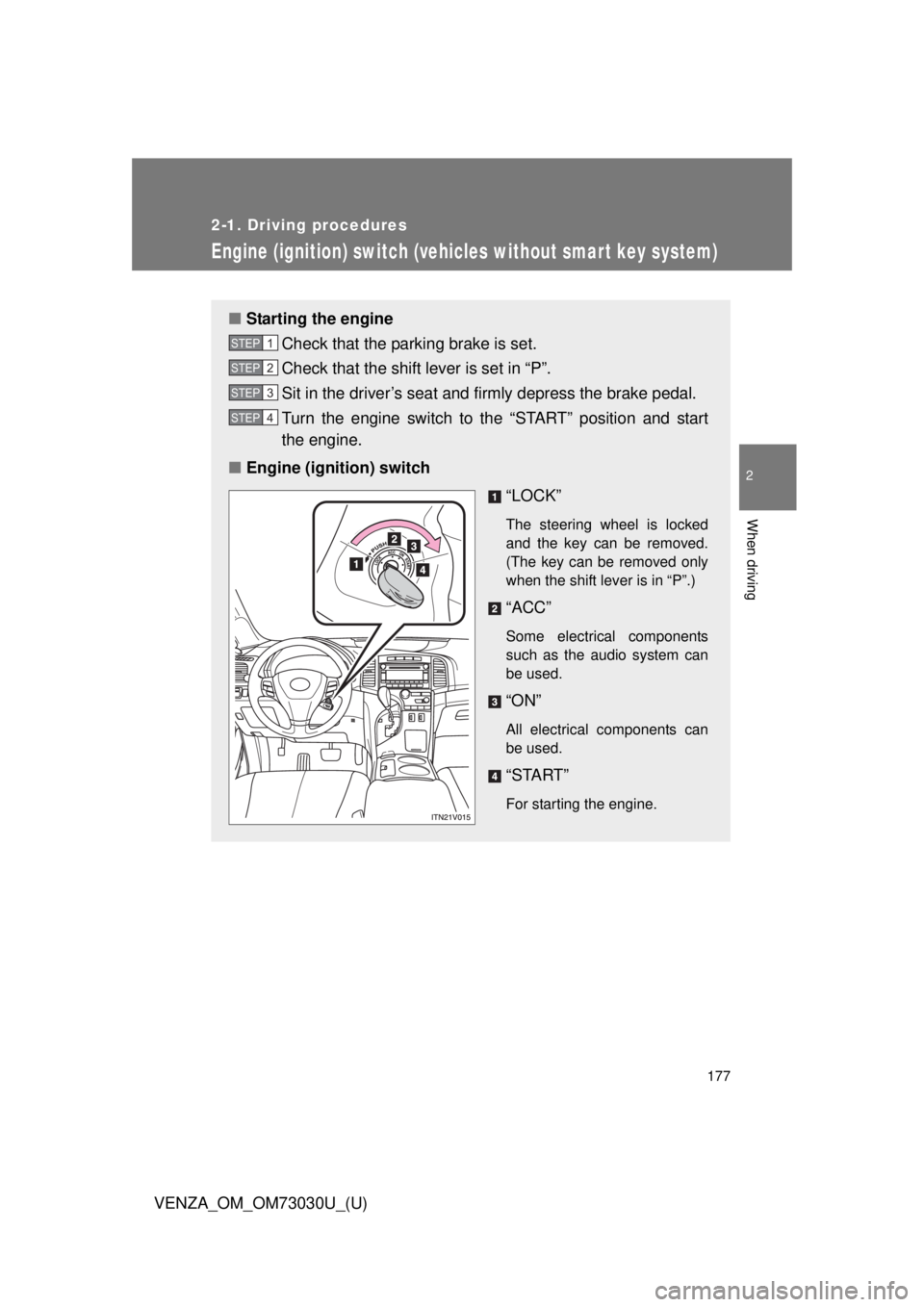
VENZA_OM_OM73030U_(U) Engine (ignition) switch (vehicles without smar t key system) ■ Starting the engine
Check that the parking brake is set.
Check that the shift lever is set in “P”.
Sit in the driver’s seat and firmly depress the brake pedal.
Turn the engine switch to the “START” position and start
the engine.
■ Engine (ignition) switch
“LOCK” The steering wheel is locked
and the key can be removed.
(The key can be removed only
when the shift lever is in “P”.)
“ACC” Some electrical components
such as the audio system can
be used.
“ON” All electrical components can
be used.
“START” For starting the engine.STEP 1
STEP 2
STEP 3
STEP 4
Page 180 of 688
1802-1. Driving procedures
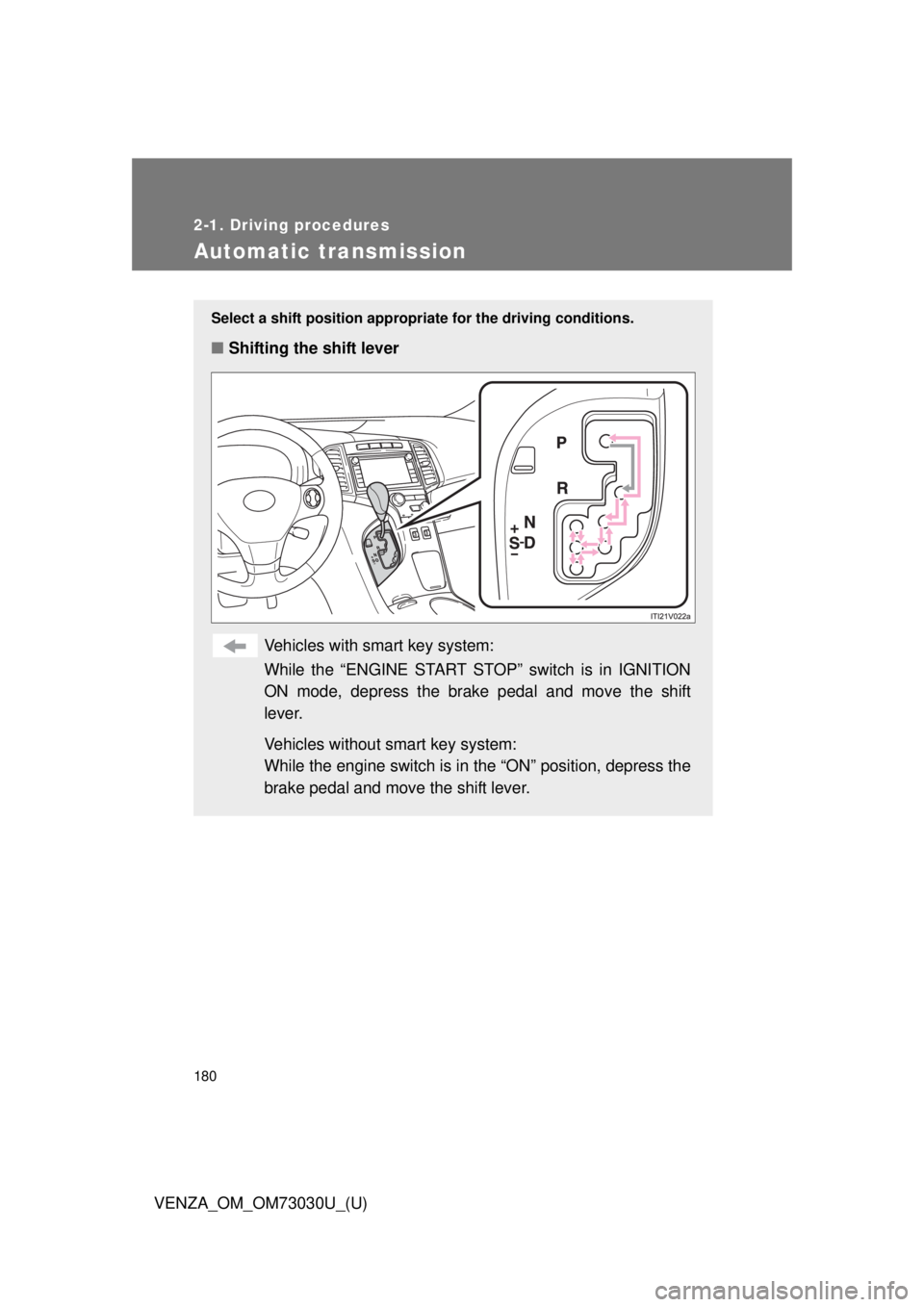
VENZA_OM_OM73030U_(U)Automatic transmission Select a shift positi on appropriate for the driving conditions.
■ Shifting the shift lever
Vehicles with smart key system:
While the “ENGINE START STOP” switch is in IGNITION
ON mode, depress the brake pedal and move the shift
lever.
Vehicles without smart key system:
While the engine switch is in the “ON” position, depress the
brake pedal and move the shift lever.
Page 185 of 688
1852-1. Driving procedures
2
When driving
VENZA_OM_OM73030U_(U) Tur n signal lever
■ Turn signals can be operated when
Vehicles with smart key system
The “ENGINE START STOP” switch is in IGNITION ON mode.
Vehicles without smart key system
The engine switch is in the “ON” position.
■ If the indicators flash faster than usual
Check that a light bulb in the front or rear turn signal lights has not burned
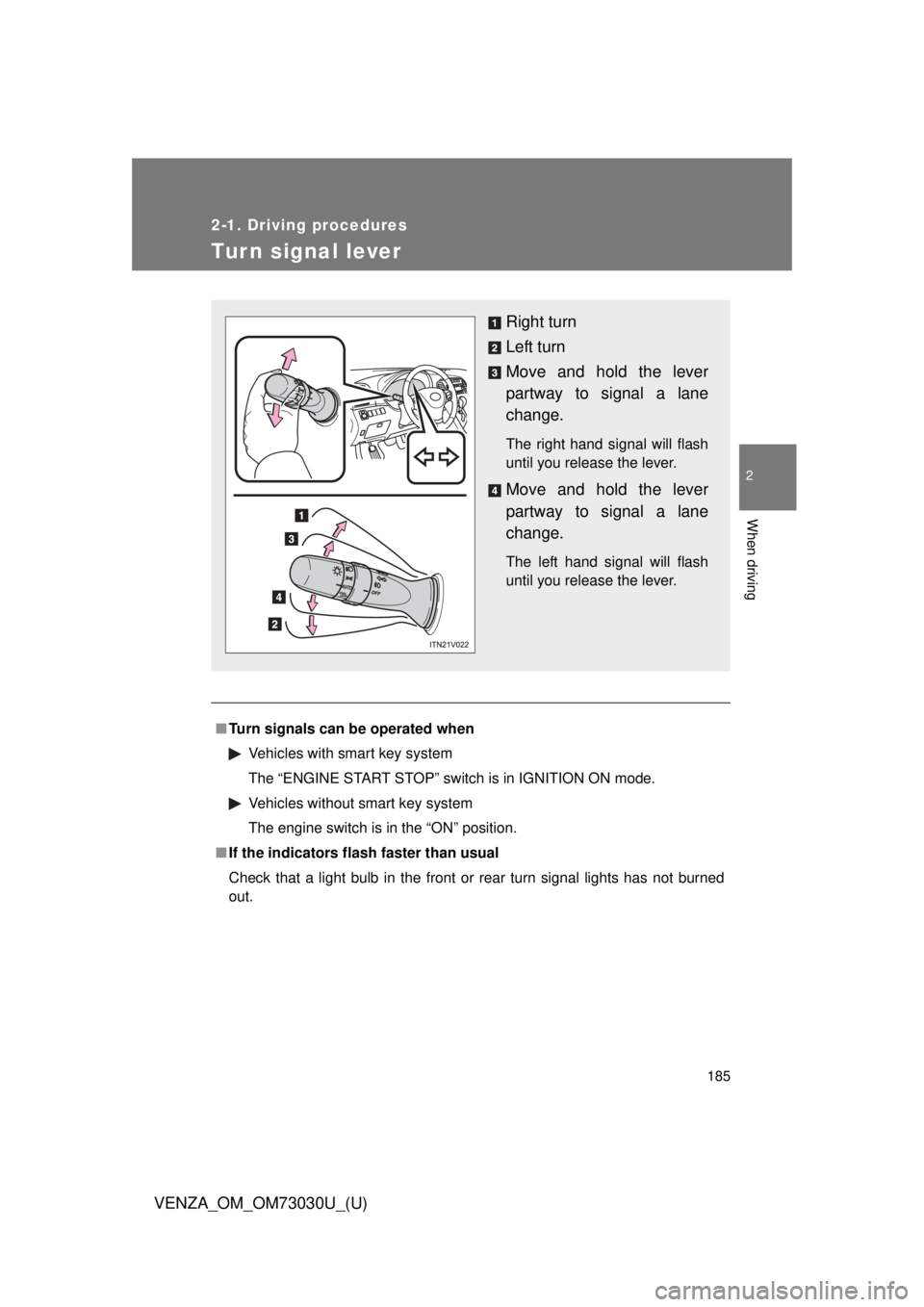
out. Right turn
Left turn
Move and hold the lever
partway to signal a lane
change. The right hand signal will flash
until you release the lever.
Move and hold the lever
partway to signal a lane
change. The left hand signal will flash
until you release the lever.
Page 188 of 688
188
VENZA_OM_OM73030U_(U) 2-2. Instrument cluster
Gauges and meters
Vehicles with smart key system
The following gauges, meters a nd display illuminate when the
“ENGINE START STOP” switch is in IGNITION ON mode.
Vehicles without smart key system
The following gauges, meters and displays illuminate when the
engine switch is in the “ON” position.
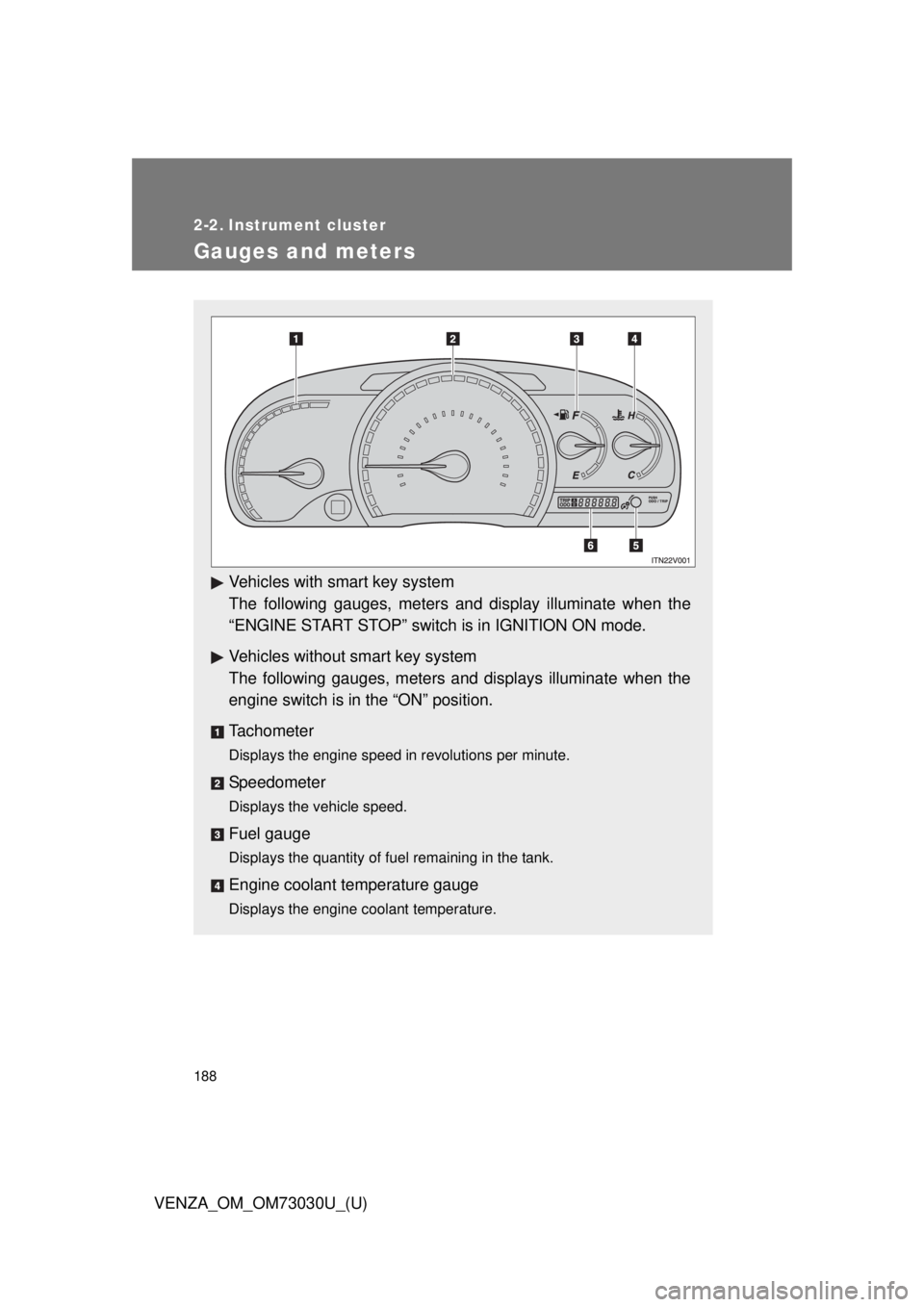
Tachometer Displays the engine speed in revolutions per minute.
Speedometer Displays the vehicle speed.
Fuel gauge Displays the quantity of fuel remaining in the tank.
Engine coolant temperature gauge Displays the engine coolant temperature.
Page 193 of 688
1932-2. Instrument cluster
2
When driving
VENZA_OM_OM73030U_(U) CAUTION■ If a safety system warning light does not come on
Should a safety system light such as the ABS and the SRS airbag warning
lights not come on when you start the engine, this could mean that these
systems are not available to help protect you in an accident, which could
result in death or serious injury. Have the vehicle inspected by your Toyota
dealer immediately if this occurs.■ Warning lights
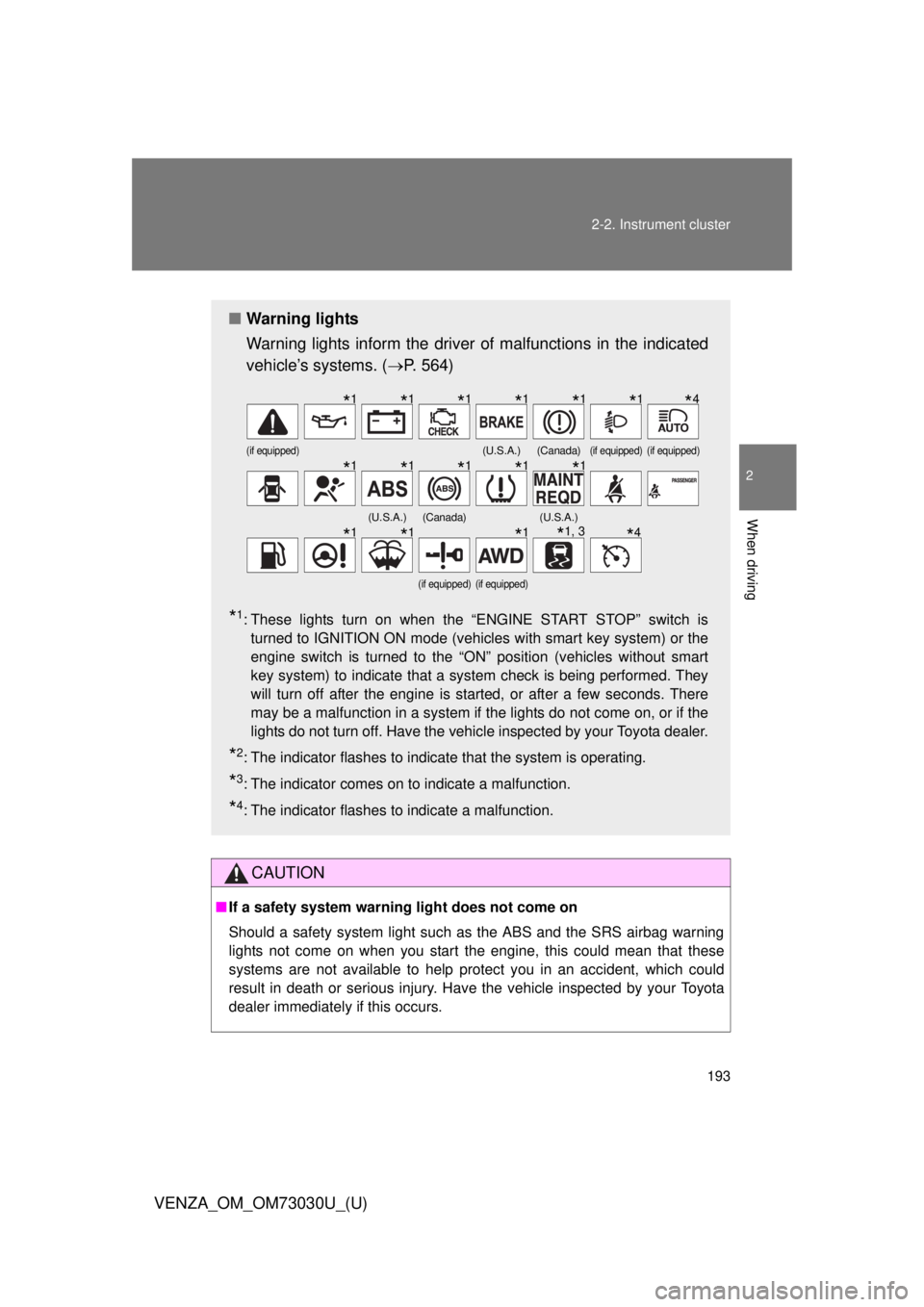
Warning lights inform the driver of malfunctions in the indicated
vehicle’s systems. ( P. 564)
* 1
: These lights turn on when the “ENGINE START STOP” switch is
turned to IGNITION ON mode (vehicles with smart key system) or the
engine switch is turned to the “ON” position (vehicles without smart
key system) to indicate that a system check is being performed. They
will turn off after the engine is started, or after a few seconds. There
may be a malfunction in a system if the lights do not come on, or if the
lights do not turn off. Have the vehicle inspected by your Toyota dealer.
* 2
: The indicator flashes to indicate that the system is operating.
* 3
: The indicator comes on to indicate a malfunction.
* 4
: The indicator flashes to indicate a malfunction. (if equipped) (U.S.A.) (Canada) (if equipped) (if equipped)
(U.S.A.) (Canada) (U.S.A.)
(if equipped) (if equipped)
* 1
* 1
* 1
* 1
* 1
* 1
* 4
* 1
* 1
* 1
* 1
* 1
* 1
* 1
* 1
* 1, 3
* 4
Page 204 of 688
2042-2. Instrument cluster
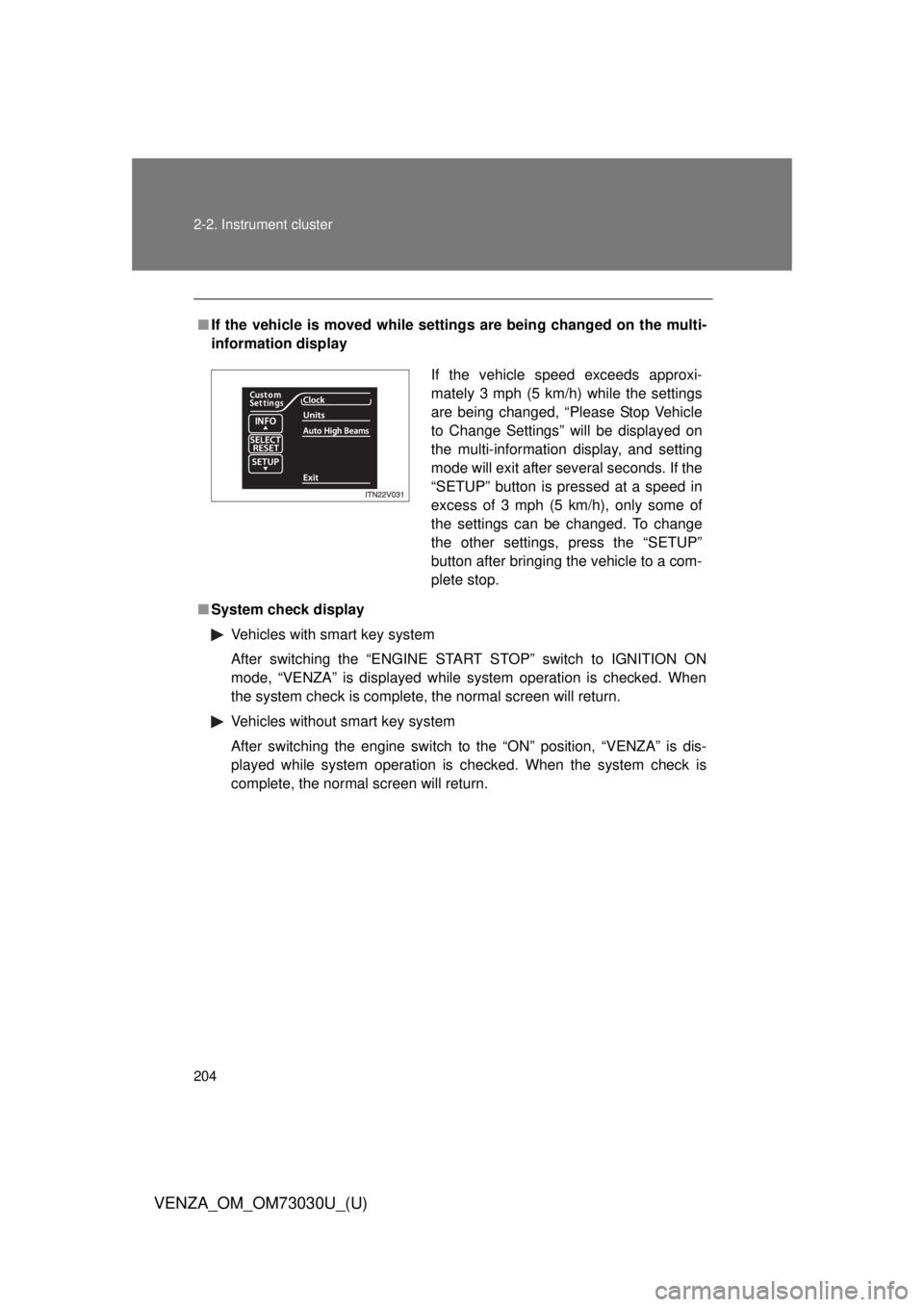
VENZA_OM_OM73030U_(U) ■ If the vehicle is moved while setti ngs are being changed on the multi-
information display
■ System check display
Vehicles with smart key system
After switching the “ENGINE START STOP” switch to IGNITION ON
mode, “VENZA” is displayed while system operation is checked. When
the system check is complete, the normal screen will return.
Vehicles without smart key system
After switching the engine switch to the “ON” position, “VENZA” is dis-
played while system operation is checked. When the system check is
complete, the normal screen will return. If the vehicle speed exceeds approxi-
mately 3 mph (5 km/h) while the settings
are being changed, “Please Stop Vehicle
to Change Settings” will be displayed on
the multi-information display, and setting
mode will exit after several seconds. If the
“SETUP” button is pressed at a speed in
excess of 3 mph (5 km/h), only some of
the settings can be changed. To change
the other settings, press the “SETUP”
button after bringing the vehicle to a com-
plete stop.
Page 210 of 688
2102-2. Instrument cluster
VENZA_OM_OM73030U_(U)Fuel consumption information Vehicles with Entune Premium Audio with Navigation and Entune
Audio Plus
Press the “APPS” button, and t hen select “Eco” on the screen.
Vehicles with Entune Audio
Press the “CAR” button.
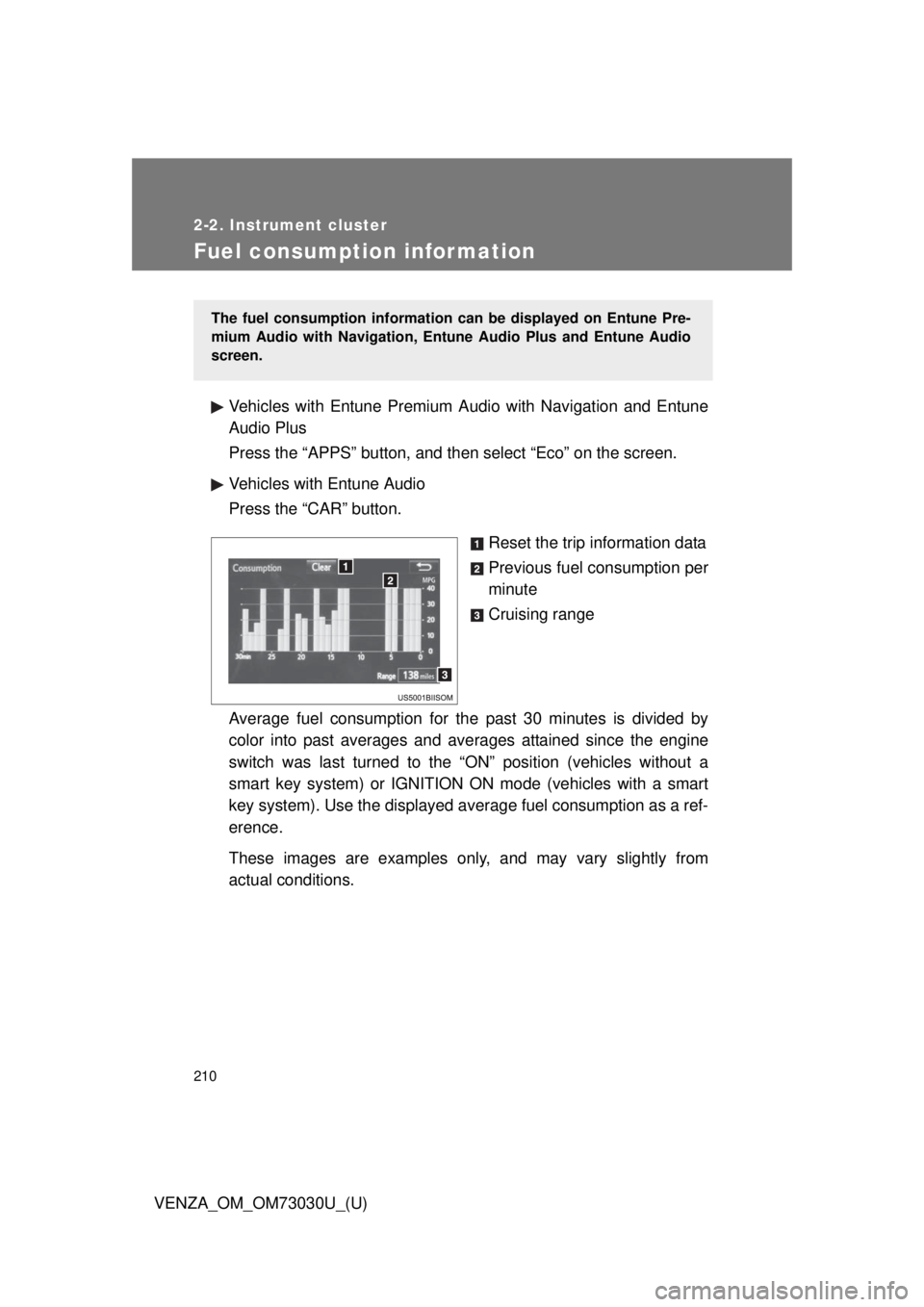
Reset the trip information data
Previous fuel consumption per
minute
Cruising range
Average fuel consumption for the past 30 minutes is divided by
color into past averages and av erages attained since the engine
switch was last turned to the “ON” position (vehicles without a
smart key system) or IGNITION ON mode (vehicles with a smart
key system). Use the displayed av erage fuel consumption as a ref-
erence.
These images are examples only , and may vary slightly from
actual conditions. The fuel consumption information can be displayed on Entune Pre-
mium Audio with Navigation, Entune Audio Plus and Entune Audio
screen.
Page 212 of 688
212
VENZA_OM_OM73030U_(U) 2-3. Operating the lights and wipers
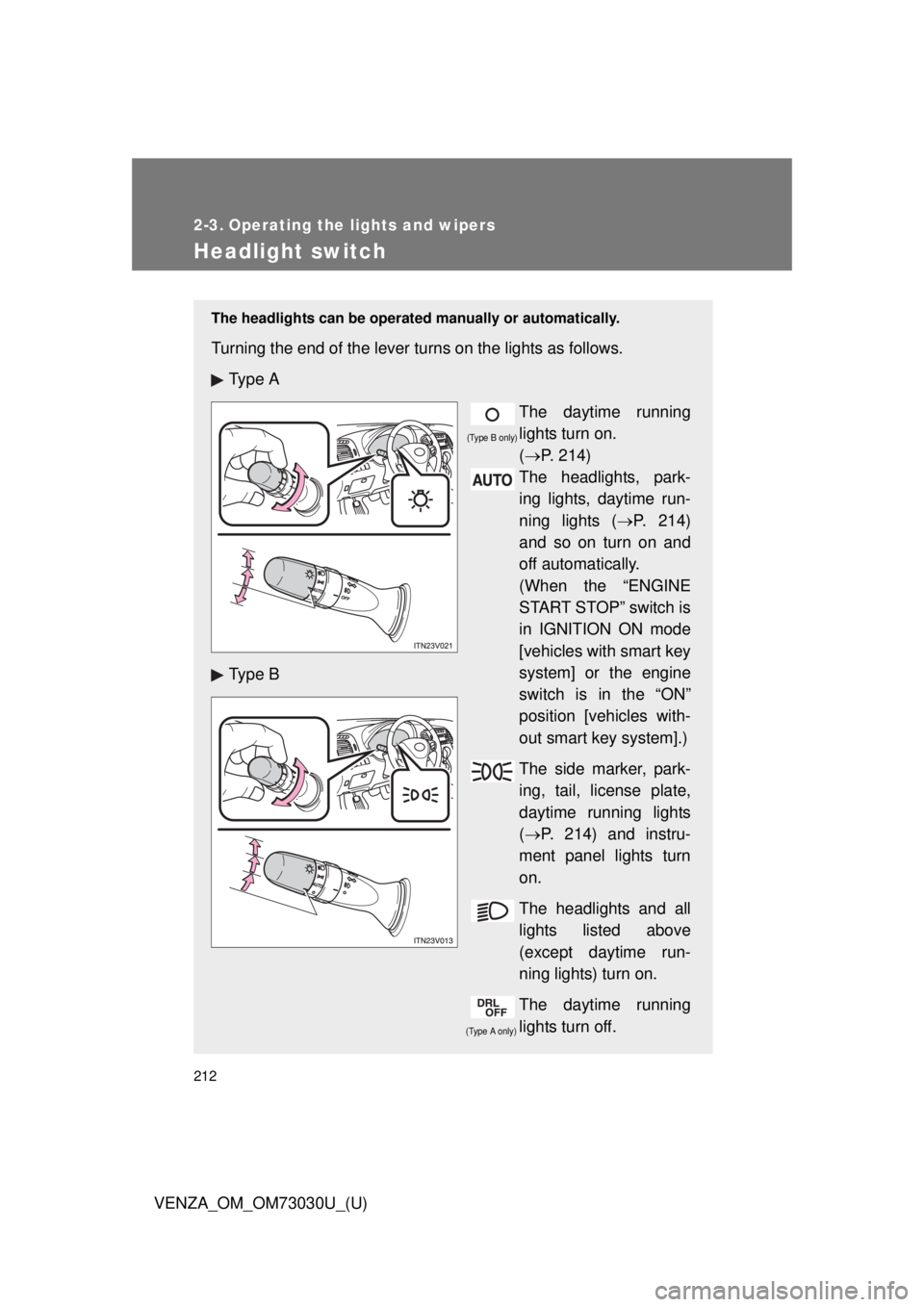
Headlight switch The headlights can be operated manually or automatically.
Turning the end of the lever turns on the lights as follows.
Ty p e A
The daytime running
lights turn on.
( P. 214)
The headlights, park-
ing lights, daytime run-
ning lights ( P. 214)
and so on turn on and
off automatically.
(When the “ENGINE
START STOP” switch is
in IGNITION ON mode
[vehicles with smart key
system] or the engine
switch is in the “ON”
position [vehicles with-
out smart key system].)
The side marker, park-
ing, tail, license plate,
daytime running lights
( P. 214) and instru-
ment panel lights turn
on.
The headlights and all
lights listed above
(except daytime run-
ning lights) turn on.
The daytime running
lights turn off.Ty p e B
(Type A only) (Type B only)
Page 214 of 688
2142-3. Operating the lights and wipers
VENZA_OM_OM73030U_(U) ■ Daytime running light system
● To make your vehicle more visible to others, the high beam headlights
turn on automatically at a reduced intensity (vehicles with halogen head-
lights) or the LED daytime running lights turn on automatically (vehicles
with discharge headlights) whenever the engine is started and the park-
ing brake is released. Daytime running lights are not designed for use at
night.
Type A: Daytime running lights can be turned off by operating the switch.
● Compared to turning on the headlights, the daytime running light system
offers greater durability and consumes less electricity, so it can help
improve fuel economy.
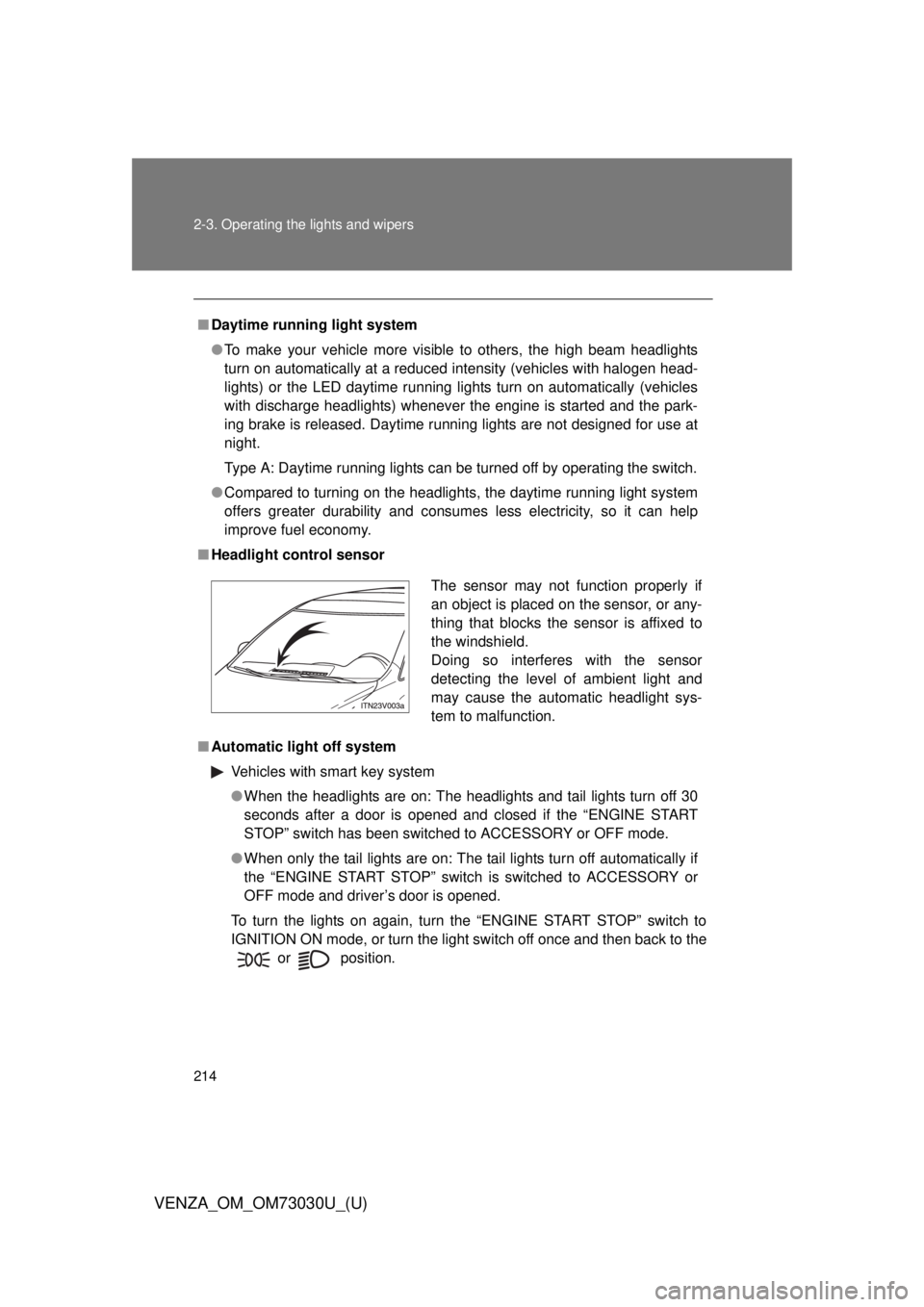
■ Headlight control sensor
■ Automatic light off system
Vehicles with smart key system
● When the headlights are on: The headlights and tail lights turn off 30
seconds after a door is opened and closed if the “ENGINE START
STOP” switch has been switched to ACCESSORY or OFF mode.
● When only the tail lights are on: The tail lights turn off automatically if
the “ENGINE START STOP” switch is switched to ACCESSORY or
OFF mode and driver’s door is opened.
To turn the lights on again, turn the “ENGINE START STOP” switch to
IGNITION ON mode, or turn the light switch off once and then back to the
or
position. The sensor may not function properly if
an object is placed on the sensor, or any-
thing that blocks the sensor is affixed to
the windshield.
Doing so interferes with the sensor
detecting the level of ambient light and
may cause the automatic headlight sys-
tem to malfunction.