reset TOYOTA VENZA 2016 Owner's Manual
[x] Cancel search | Manufacturer: TOYOTA, Model Year: 2016, Model line: VENZA, Model: TOYOTA VENZA 2016Pages: 688, PDF Size: 18.51 MB
Page 341 of 688
3413-2. Using the audio system (Entune Audio)
VENZA_OM_OM73030U_(U) 3
Interior features Setting station presets
Search for desired stations by turning the “TUNE•SCROLL”
knob or pressing the “SEEK >” button or “< TRACK” button.
Select “(add new)”. To change the preset station to a different one, select and hold the
preset station.
Select “Yes”.
Select “OK” after setting the new preset station.
■ Refreshing the station list
Select “Refresh” on the “Station List” screen. To cancel the refresh, select “Cancel Refresh”.
Radio Broadcast Data System
This audio system is equipped with Radio Broadcast Data Systems
(RBDS). RBDS mode allows text me ssages to be received from radio
stations that utiliz e RBDS transmitters.
When RBDS is on, the radio can
only select stations of a particular program type,
display messages from radio stations.
RBDS features are available only wh en listening to an FM station that
broadcasts RBDS info rmation and the “FM Info” indicator is on.STEP 1
STEP 2
STEP 3
STEP 4
STEP 1
Page 352 of 688
3523-2. Using the audio system (Entune Audio)
VENZA_OM_OM73030U_(U) ■ iPod cover art
● Depending on the iPod and songs in the iPod, iPod cover art may be dis-
played.
● This function can be changed to on/off. ( P. 332)
● It may take time to display iPod cover art, and the iPod may not be oper-
ated while the cover art display is in process.
● Only iPod cover art that is saved in JPEG format can be displayed.
■ iPod functions
● When an iPod is connected and the audio source is changed to iPod
mode, the iPod will resume play from the same point in which it was last
used.
● Depending on the iPod that is connected to the system, certain functions
may not be available. If a function is unavailable due to a malfunction (as
opposed to a system specification), disconnecting the device and recon-
necting it may resolve the problem.
● While connected to the system, the iPod cannot be operated with its own
controls. It is necessary to use the controls of the vehicle’s audio system
instead.
● When the battery level of an iPod is very low, the iPod may not operate. If
so, charge the iPod before use.
● Compatible models ( P. 354)
■ iPod problems
To resolve most problems encountered when using your iPod, disconnect
your iPod from the vehicle iPod connection and reset it. For instructions on
how to reset your iPod, refer to your iPod Owner’s Manual.
Page 400 of 688
4003-2. Using the audio system (Entune Audio)
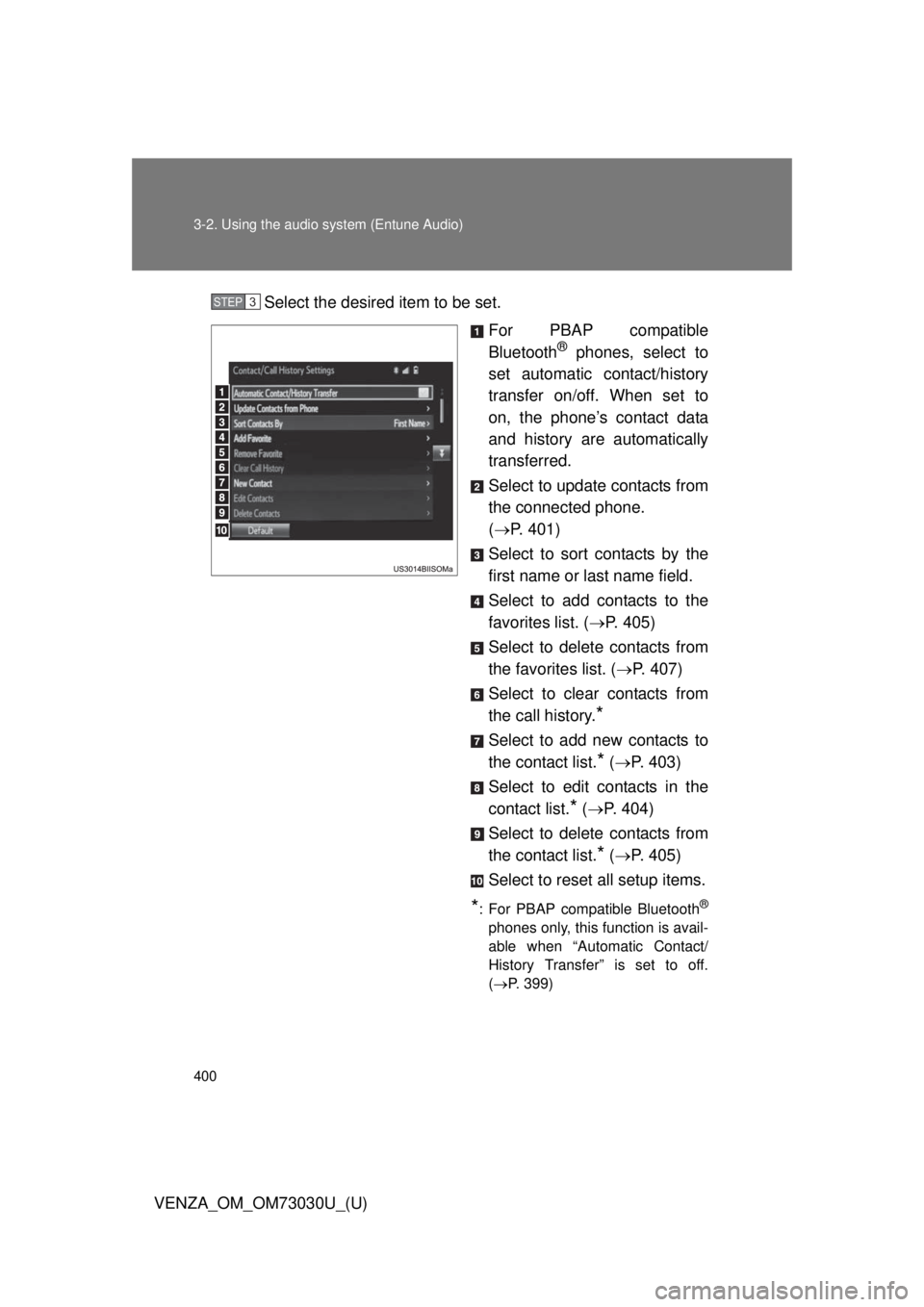
VENZA_OM_OM73030U_(U) Select the desired item to be set.
For PBAP compatible
Bluetooth ®
phones, select to
set automatic contact/history
transfer on/off. When set to
on, the phone’s contact data
and history are automatically
transferred.
Select to update contacts from
the connected phone.
( P. 401)
Select to sort contacts by the
first name or last name field.
Select to add contacts to the
favorites list. ( P. 405)
Select to delete contacts from
the favorites list. ( P. 407)
Select to clear contacts from
the call history.
* Select to add new contacts to
the contact list.
* ( P. 403)
Select to edit contacts in the
contact list.
* ( P. 404)
Select to delete contacts from
the contact list.
* ( P. 405)
Select to reset all setup items.
* : For PBAP compatible Bluetooth ®
phones only, this function is avail-
able when “Automatic Contact/
History Transfer” is set to off.
( P. 399)STEP 3
Page 477 of 688
4774-2. Maintenance
4
Maintenance and care
VENZA_OM_OM73030U_(U) ■ Resetting the maintenance required reminder light (U.S.A. only)
After the required maintenance is preformed according to the maintenance
schedule, please reset the reminder light.
To reset the reminder light, follow the procedures described below:
Switch the display to the trip meter A when the engine is running.
( P. 189)
Vehicles with smart key system:
Turn the “ENGINE START STOP” switch off.
Vehicles without smart key system:
Turn the engine switch to the “LOCK” position.
Vehicles with smart key system:
While pressing the trip meter reset button, set the “ENGINE START
STOP” switch to IGNITION ON mode (but do not start the engine
because otherwise the reset mode will be canceled). Continue to
press and hold the trip meter reset button until the trip meter dis-
plays “000000”.
Vehicles without smart key system:
While pressing the trip meter reset button, set the engine switch to
“ON” position (but do not start the engine because otherwise the
reset mode will be canceled). Continue to press and hold the trip
meter reset button until the trip meter displays “000000”.
■ Allow inspection and repairs to be performed by a Toyota dealer
● Toyota technicians are well-trained specialists and are kept up to date
with the latest service information. They are well informed about the
operations of all systems on your vehicle.
● Keep a copy of the repair order. It proves that the maintenance that has
been performed is under warranty coverage. If any problem should arise
while your vehicle is under warranty, your Toyota dealer will promptly
take care of it. STEP 1
STEP 2
STEP 3
Page 569 of 688
5
When trouble arises
5695-2. Steps to take in an emergency
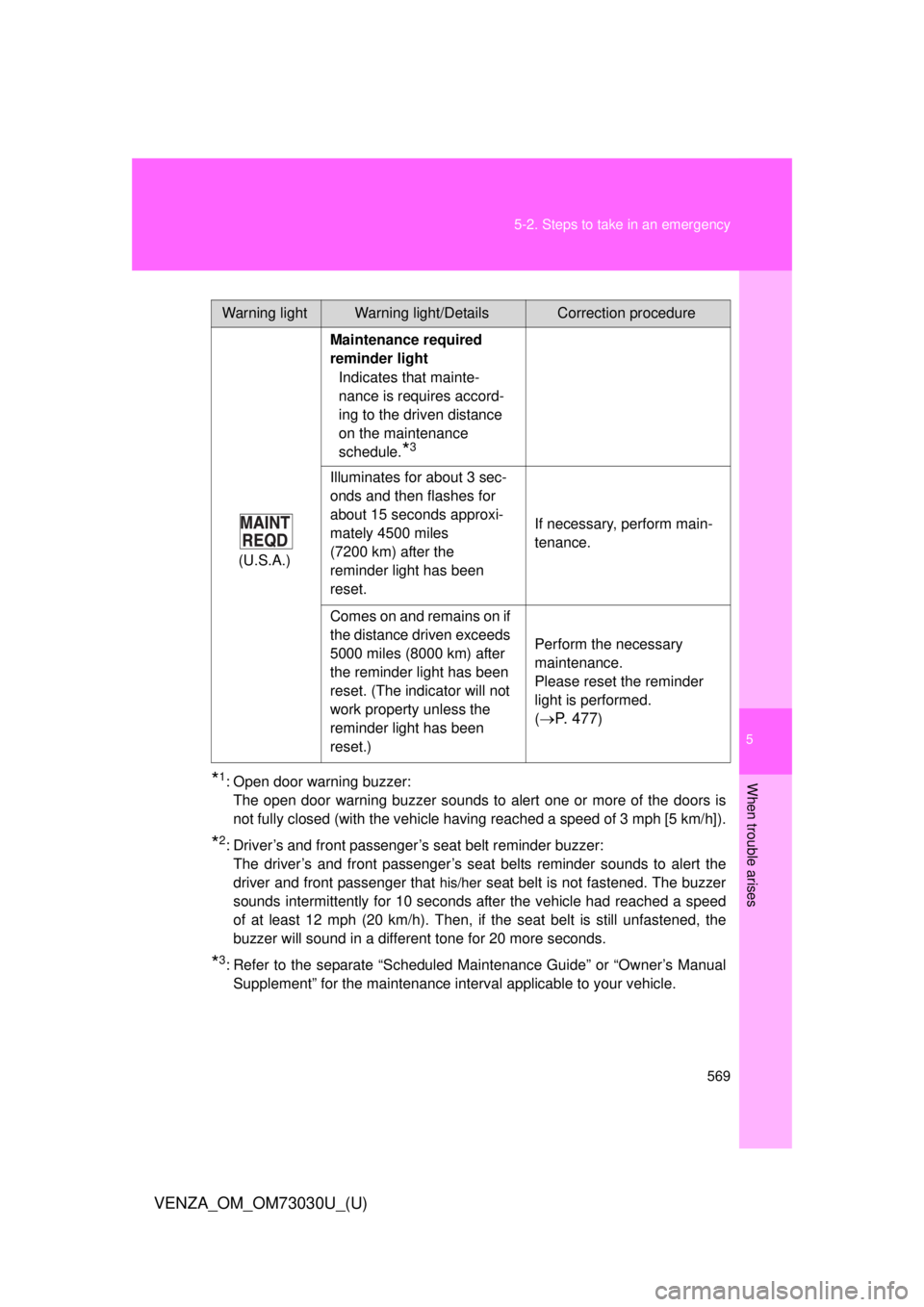
VENZA_OM_OM73030U_(U) * 1
: Open door warning buzzer:
The open door warning buzzer sounds to alert one or more of the doors is
not fully closed (with the vehicle hav ing reached a speed of 3 mph [5 km/h]).
* 2
: Driver’s and front passenger’s seat belt reminder buzzer:
The driver’s and front passenger’s seat belts reminder sounds to alert the
driver and front passenger that his/her
seat belt is not fastened. The buzzer
sounds intermittently for 10 seconds after the vehicle had reached a speed
of at least 12 mph (20 km/h). Then, if the seat belt is still unfastened, the
buzzer will sound in a different tone for 20 more seconds.
* 3
: Refer to the separate “Scheduled Maintenance Guide” or “Owner’s Manual
Supplement” for the maintenance interval applicable to your vehicle.Warning light Warning light/Details Correction procedure
(U.S.A.) Maintenance required
reminder light
Indicates that mainte-
nance is requires accord-
ing to the driven distance
on the maintenance
schedule.
* 3
Illuminates for about 3 sec-
onds and then flashes for
about 15 seconds approxi-
mately 4500 miles
(7200 km) after the
reminder light has been
reset. If necessary, perform main-
tenance.
Comes on and remains on if
the distance driven exceeds
5000 miles (8000 km) after
the reminder light has been
reset. (The indicator will not
work property unless the
reminder light has been
reset.) Perform the necessary
maintenance.
Please reset the reminder
light is performed.
(
P. 4 7 7 )
Page 652 of 688
6526-2. Customization
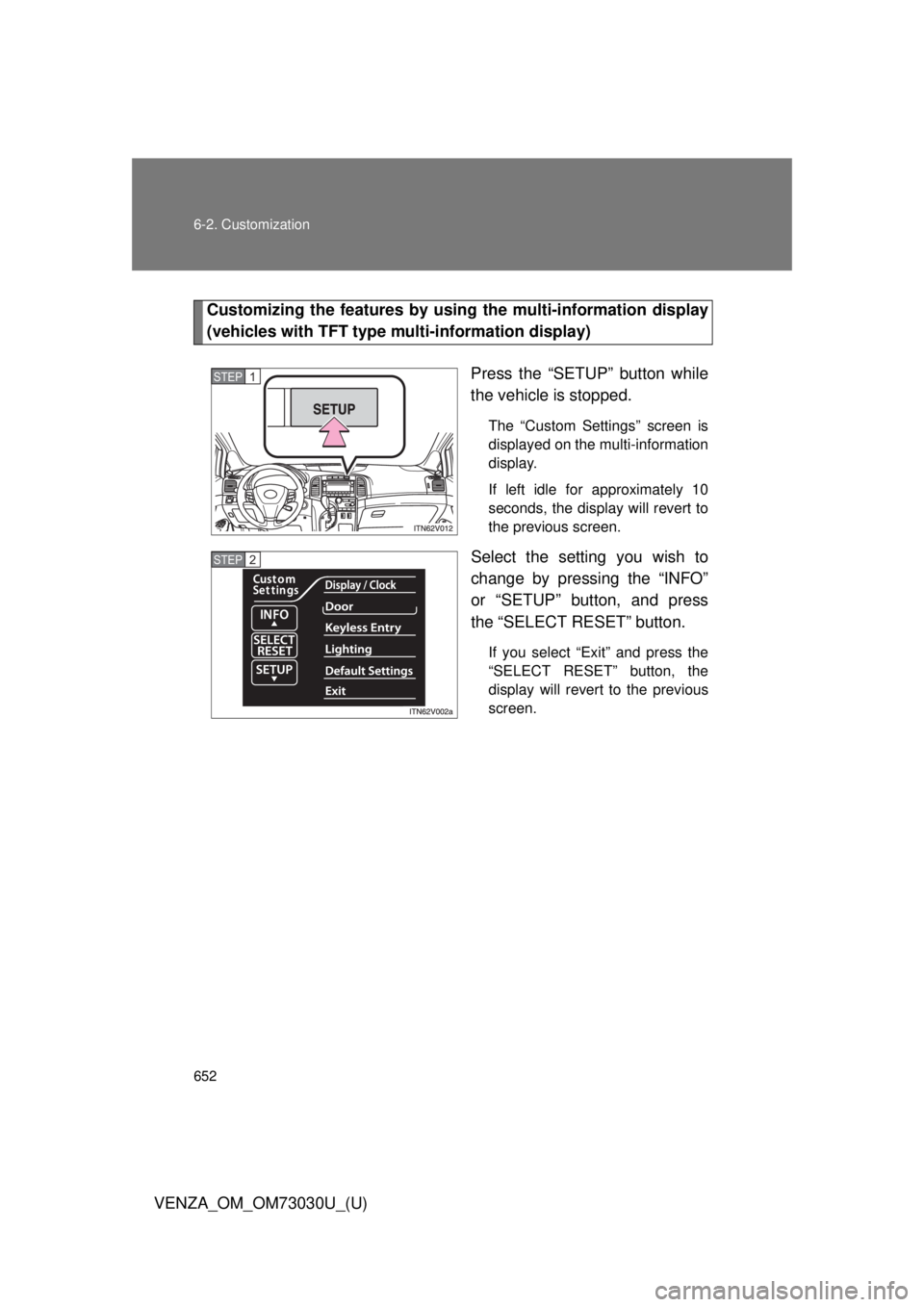
VENZA_OM_OM73030U_(U) Customizing the features by usin g the multi-information display
(vehicles with TFT type mu lti-information display)
Press the “SETUP” button while
the vehicle is stopped. The “Custom Settings” screen is
displayed on the multi-information
display.
If left idle for approximately 10
seconds, the display will revert to
the previous screen.
Select the setting you wish to
change by pressing the “INFO”
or “SETUP” button, and press
the “SELECT RESET” button. If you select “Exit” and press the
“SELECT RESET” button, the
display will revert to the previous
screen.STEP 1
STEP 2
Page 653 of 688
6536-2. Customization
6
Vehicle specifications
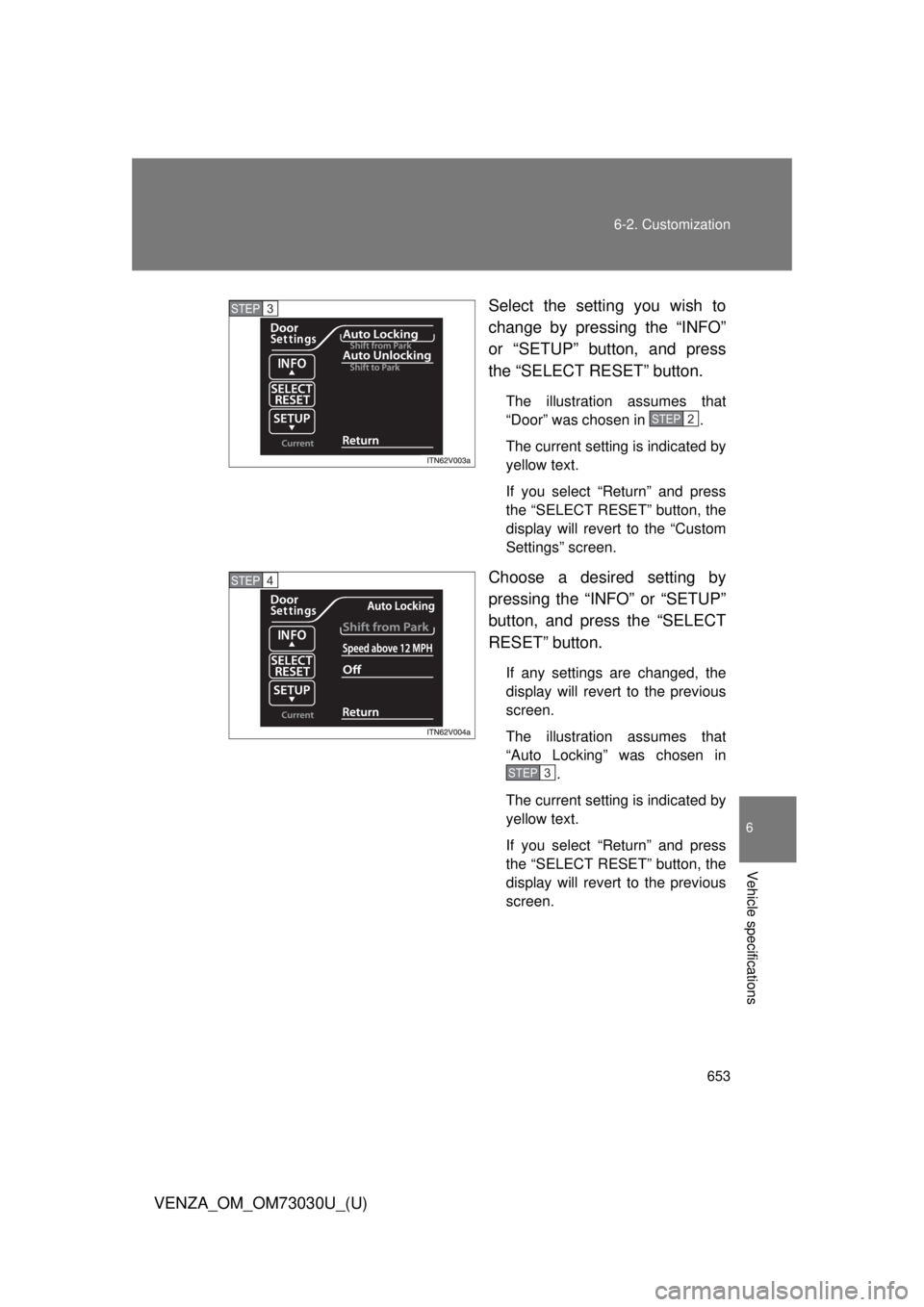
VENZA_OM_OM73030U_(U) Select the setting you wish to
change by pressing the “INFO”
or “SETUP” button, and press
the “SELECT RESET” button. The illustration assumes that
“Door” was chosen in .
The current setting is indicated by
yellow text.
If you select “Return” and press
the “SELECT RESET” button, the
display will revert to the “Custom
Settings” screen.
Choose a desired setting by
pressing the “INFO” or “SETUP”
button, and press the “SELECT
RESET” button. If any settings are changed, the
display will revert to the previous
screen.
The illustration assumes that
“Auto Locking” was chosen in
.
The current setting is indicated by
yellow text.
If you select “Return” and press
the “SELECT RESET” button, the
display will revert to the previous
screen.STEP 3
STEP2
STEP 4
STEP3
Page 654 of 688
6546-2. Customization
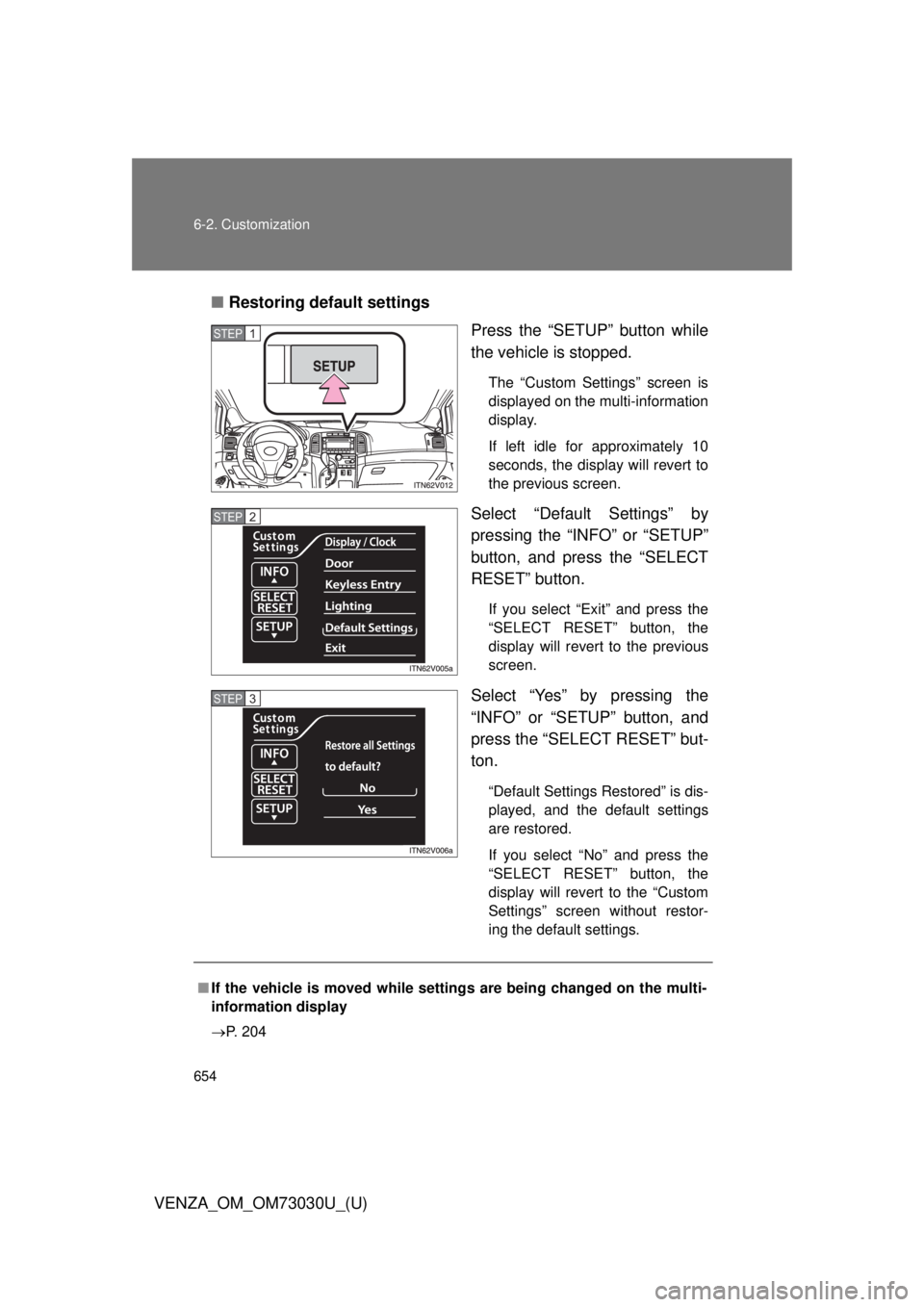
VENZA_OM_OM73030U_(U) ■ Restoring default settings
Press the “SETUP” button while
the vehicle is stopped. The “Custom Settings” screen is
displayed on the multi-information
display.
If left idle for approximately 10
seconds, the display will revert to
the previous screen.
Select “Default Settings” by
pressing the “INFO” or “SETUP”
button, and press the “SELECT
RESET” button. If you select “Exit” and press the
“SELECT RESET” button, the
display will revert to the previous
screen.
Select “Yes” by pressing the
“INFO” or “SETUP” button, and
press the “SELECT RESET” but-
ton. “Default Settings Restored” is dis-
played, and the default settings
are restored.
If you select “No” and press the
“SELECT RESET” button, the
display will revert to the “Custom
Settings” screen without restor-
ing the default settings.STEP 1
STEP 2
STEP 3
■ If the vehicle is moved while setti ngs are being changed on the multi-
information display
P. 204
Page 681 of 688
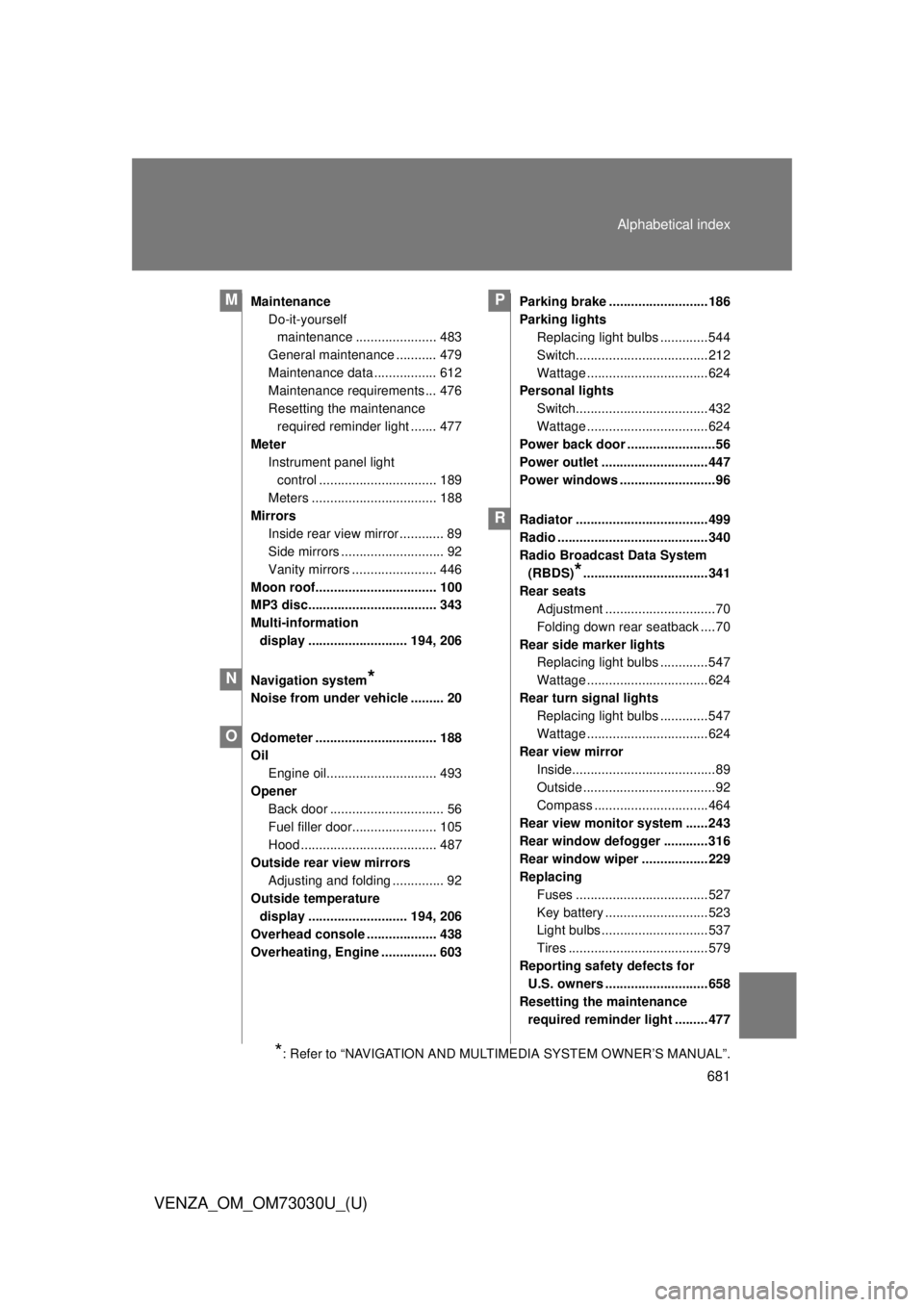
681Alphabetical index
VENZA_OM_OM73030U_(U) Maintenance
Do-it-yourself
maintenance ...................... 483
General maintenance ........... 479
Maintenance data ................. 612
Maintenance requirements ... 476
Resetting the maintenance
required reminder light ....... 477
Meter
Instrument panel light
control ................................ 189
Meters .................................. 188
Mirrors
Inside rear view mirror ............ 89
Side mirrors ............................ 92
Vanity mirrors ....................... 446
Moon roof................................. 100
MP3 disc................................... 343
Multi-information
display ........................... 194, 206
Navigation system
* Noise from under vehicle ......... 20
Odometer ................................. 188
Oil
Engine oil.............................. 493
Opener
Back door ............................... 56
Fuel filler door....................... 105
Hood ..................................... 487
Outside rear view mirrors
Adjusting and folding .............. 92
Outside temperature
display ........................... 194, 206
Overhead console ................... 438
Overheating, Engine ............... 603 Parking brake ...........................186
Parking lights
Replacing light bulbs .............544
Switch....................................212
Wattage .................................624
Personal lights
Switch....................................432
Wattage .................................624
Power back door ........................56
Power outlet .............................447
Power windows ..........................96
Radiator ....................................499
Radio .........................................340
Radio Broadcast Data System
(RBDS)
* ..................................341
Rear seats
Adjustment ..............................70
Folding down rear seatback ....70
Rear side marker lights
Replacing light bulbs .............547
Wattage .................................624
Rear turn signal lights
Replacing light bulbs .............547
Wattage .................................624
Rear view mirror
Inside.......................................89
Outside ....................................92
Compass ...............................464
Rear view monitor system ......243
Rear window defogger ............316
Rear window wiper ..................229
Replacing
Fuses ....................................527
Key battery ............................523
Light bulbs .............................537
Tires ......................................579
Reporting safety defects for
U.S. owners ............................658
Resetting the maintenance
required reminder light .........477M
N
O P
R
* : Refer to “NAVIGATION AND MULTIMEDIA SYSTEM OWNER’S MANUAL”.