fuel consumption TOYOTA VENZA HYBRID 2021 Owners Manual (in English)
[x] Cancel search | Manufacturer: TOYOTA, Model Year: 2021, Model line: VENZA HYBRID, Model: TOYOTA VENZA HYBRID 2021Pages: 548, PDF Size: 18.43 MB
Page 108 of 548
1072-1. Instrument cluster
2
Vehicle status information and indicators
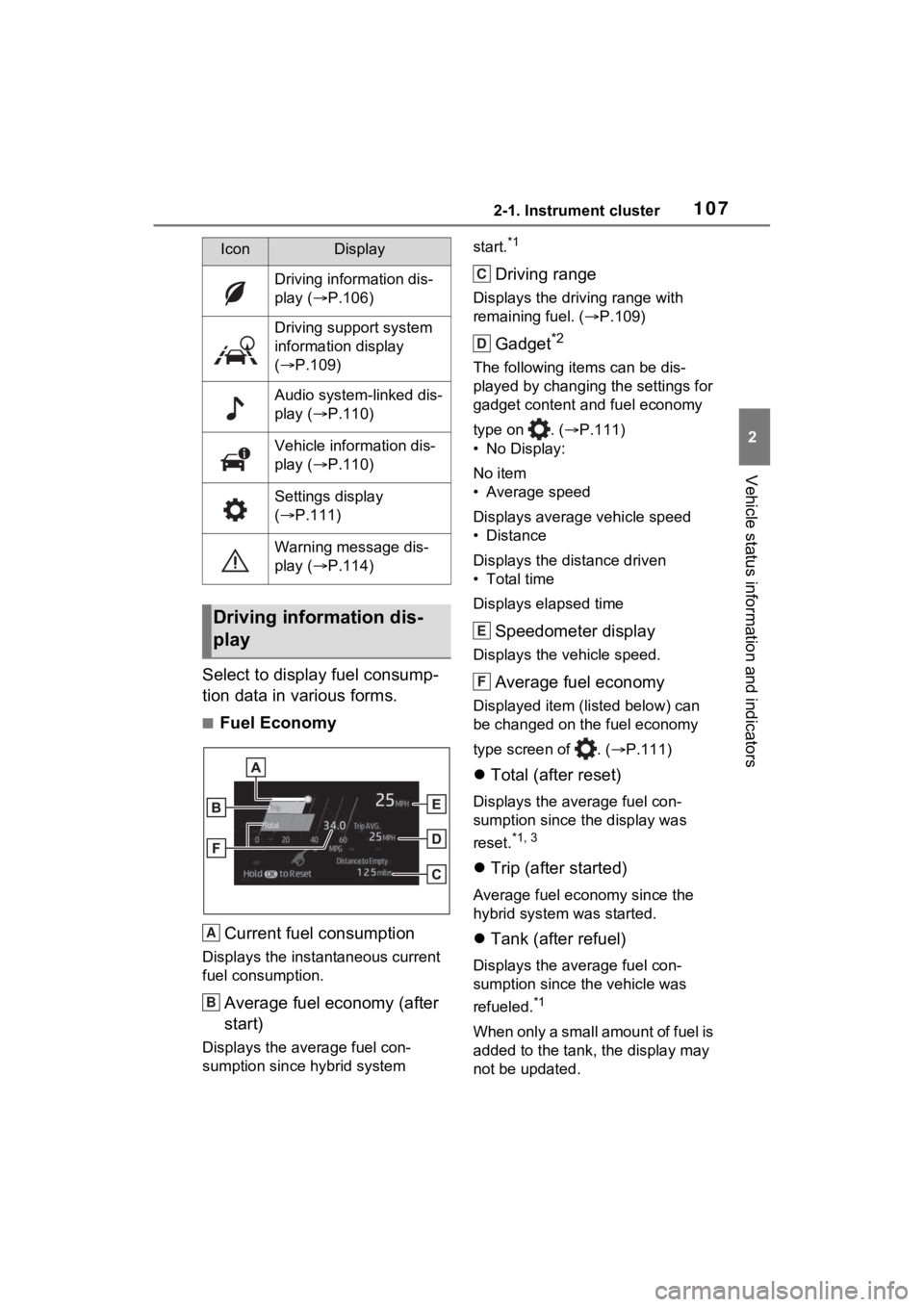
Select to display fuel consump-
tion data in various forms.
■Fuel EconomyCurrent fuel consumption
Displays the instantaneous current
fuel consumption.
Average fuel economy (after
start)
Displays the average fuel con-
sumption since hybrid system start.
*1
Driving range
Displays the driving range with
remaining fuel. (
P.109)
Gadget*2
The following items can be dis-
played by changing the settings for
gadget content and fuel economy
type on . ( P.111)
• No Display:
No item
• Average speed
Displays average vehicle speed
• Distance
Displays the distance driven
• Total time
Displays elapsed time
Speedometer display
Displays the vehicle speed.
Average fuel economy
Displayed item (listed below) can
be changed on the fuel economy
type screen of . ( P.111)
Total (after reset)
Displays the average fuel con-
sumption since t he display was
reset.
*1, 3
Trip (after started)
Average fuel economy since the
hybrid system was started.
Tank (after refuel)
Displays the average fuel con-
sumption since the vehicle was
refueled.
*1
When only a small amount of fuel is
added to the tank, the display may
not be updated.
IconDisplay
Driving information dis-
play ( P.106)
Driving support system
information display
( P.109)
Audio system-linked dis-
play ( P.110)
Vehicle information dis-
play ( P.110)
Settings display
( P.111)
Warning message dis-
play ( P.114)
Driving information dis-
play
A
B
C
D
E
F
Page 122 of 548
1212-1. Instrument cluster
2
Vehicle status information and indicators
Hybrid Eco area
Eco area
Power area
Displayed content is the same as
that displayed on the meter (Hybrid
System Indicator).
For details, refer to P.88or P.92.
■Tachometer
Displays the engine speed in
revolutions per minute.
■Outside temperature dis-
play
This is displayed when the
power switch is turned on or the
low temperature indicator
flashes.
■Outside temperature display
●When the ambient temperature is
approximately 37°F (3°C) or
lower, the low outside temperature
indicator will flash for approxi-
mately 10 seconds and the out-
side temperature display will turn
off. In this case, the display will be
displayed again when the outside
temperature becomes approxi-
mately 41°F (5°C) or higher.
●In the following si tuations, the cor-
rect outside tempe rature may not
be displayed, or the display may
take longer than normal to
change:
• When stopped, or driving at low speeds (less than 12 mph [20
km/h])
• When the outside temperature has changed su ddenly (at the
entrance/exit of a garage, tunnel,
etc.)
●When “--” or “E” is displayed, the
system may be malfunctioning.
Take your vehicle to your Toyota
dealer.
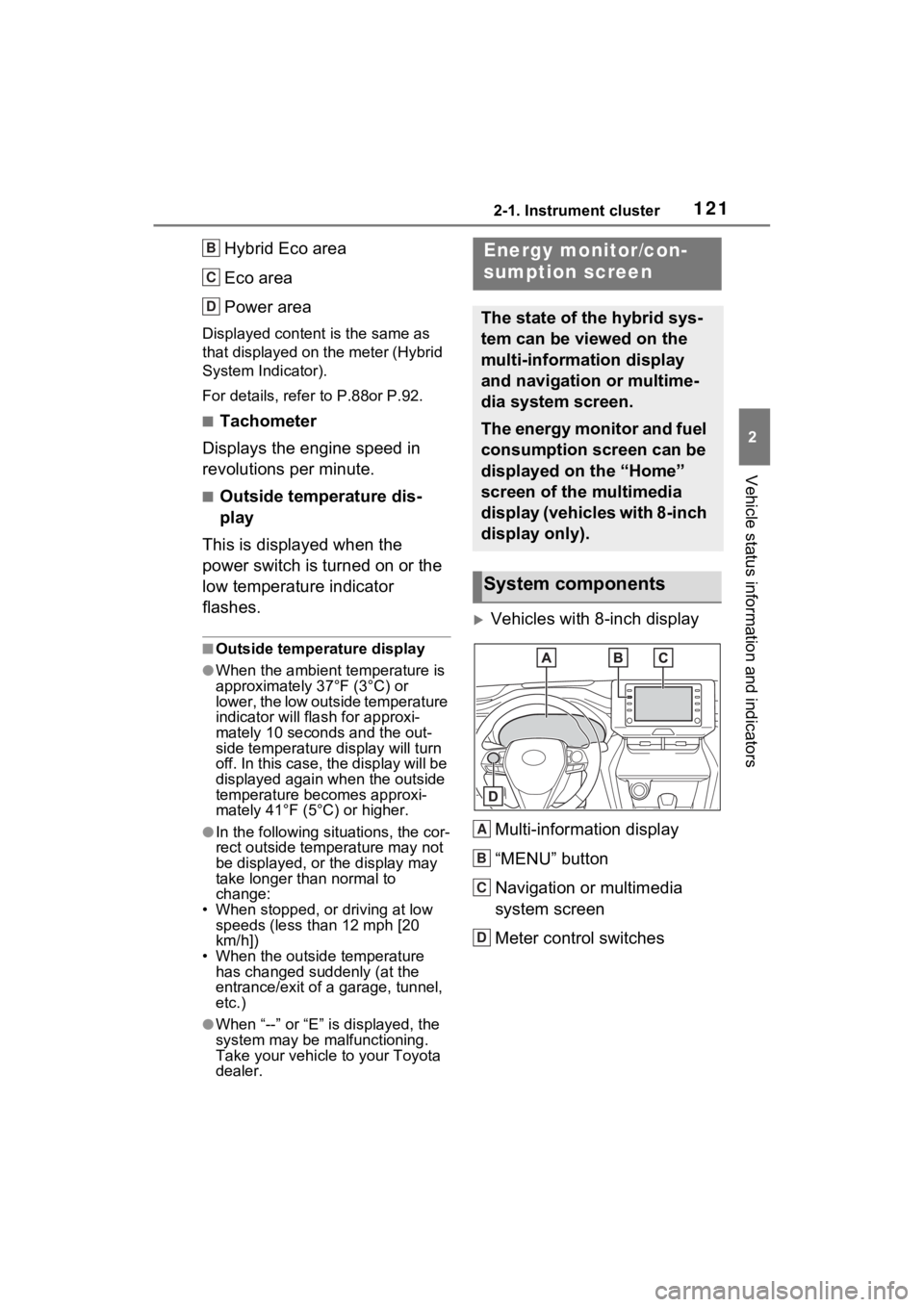
Vehicles with 8-inch display
Multi-information display
“MENU” button
Navigation or multimedia
system screen
Meter control switches
B
C
D
Energy monitor/con-
sumption screen
The state of the hybrid sys-
tem can be viewed on the
multi-information display
and navigation or multime-
dia system screen.
The energy monitor and fuel
consumption screen can be
displayed on the “Home”
screen of the multimedia
display (vehicles with 8-inch
display only).
System components
A
B
C
D
Page 126 of 548
1252-1. Instrument cluster
2
Vehicle status information and indicators
■Remaining charge amount
warning of hybrid battery (trac-
tion battery)
●The buzzer sounds intermittently
when the hybrid battery (traction
battery) remains without charging
while the shift lever is in N, or the
remaining charge amount drops
below a certain level. If the
remaining charge amount drops
further, the buzzer sounds contin-
uously.
●When a warning message is
shown on the multi-information
display and the buzzer sounds,
follow the instructions displayed
on the screen to p erform trouble-
shooting.
■Display procedure
Navigation or multimedia sys-
tem screen (with 8-inch dis-
play)
1 Press the “MENU” button.
2 Select “Info” on the “Menu”
screen.
3 Select “ECO” on the “Info”
screen.
If a screen other than “Trip Informa-
tion” is displayed, select “Trip Infor-
mation”.
Navigation or multimedia sys-
tem screen (with 12.3-inch
display)
1 Select on the Toyota
multi-operation touch
( P.345). 2
Select “Trip Info” from split-
screen.
Displaying a screen in full
screen( P.346)
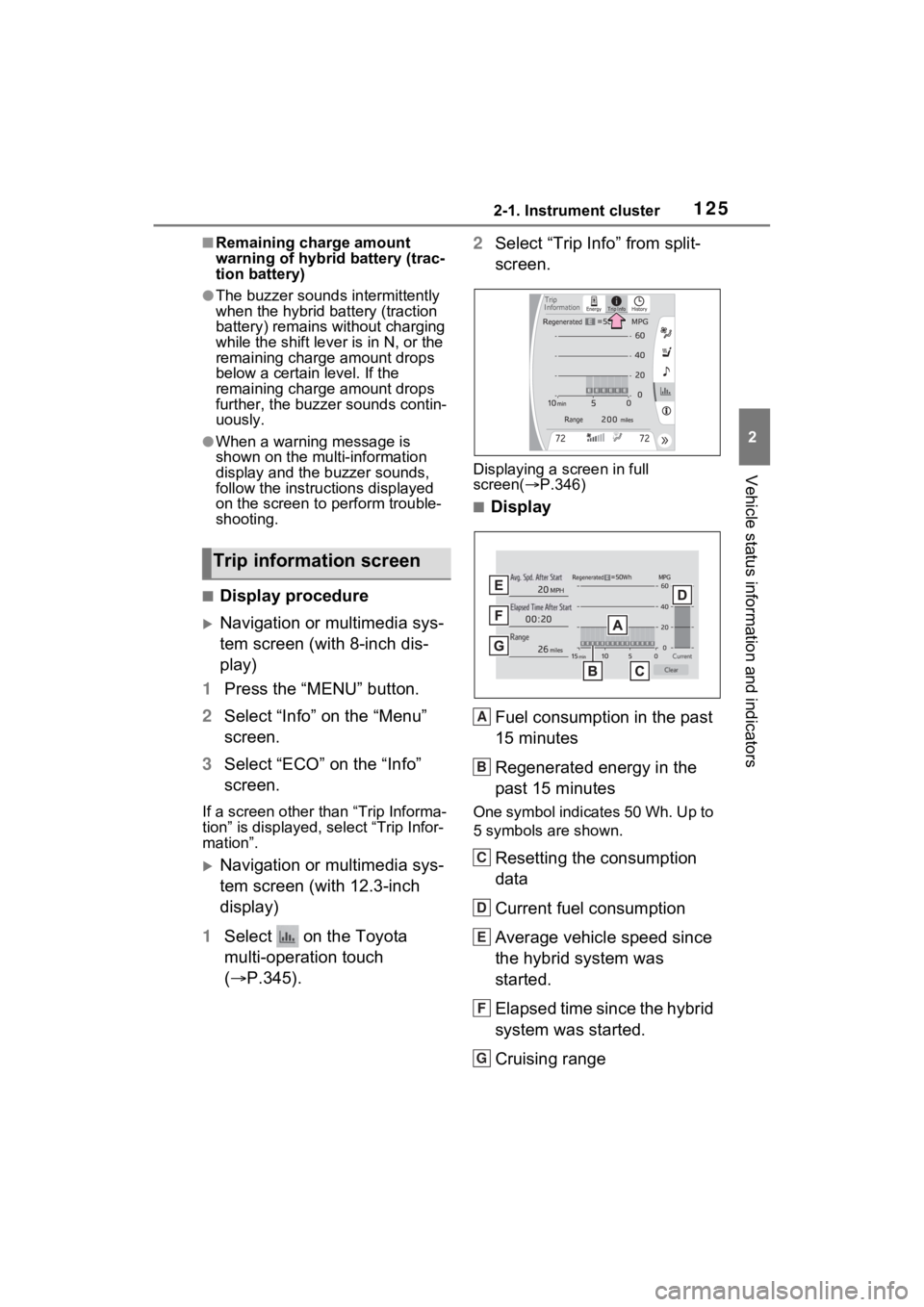
■Display
Fuel consumption in the past
15 minutes
Regenerated energy in the
past 15 minutes
One symbol indicates 50 Wh. Up to
5 symbols are shown.
Resetting the consumption
data
Current fuel consumption
Average vehicle speed since
the hybrid system was
started.
Elapsed time since the hybrid
system was started.
Cruising range
Trip information screen
+
A
B
C
D
E
F
G
Page 127 of 548
1262-1. Instrument cluster
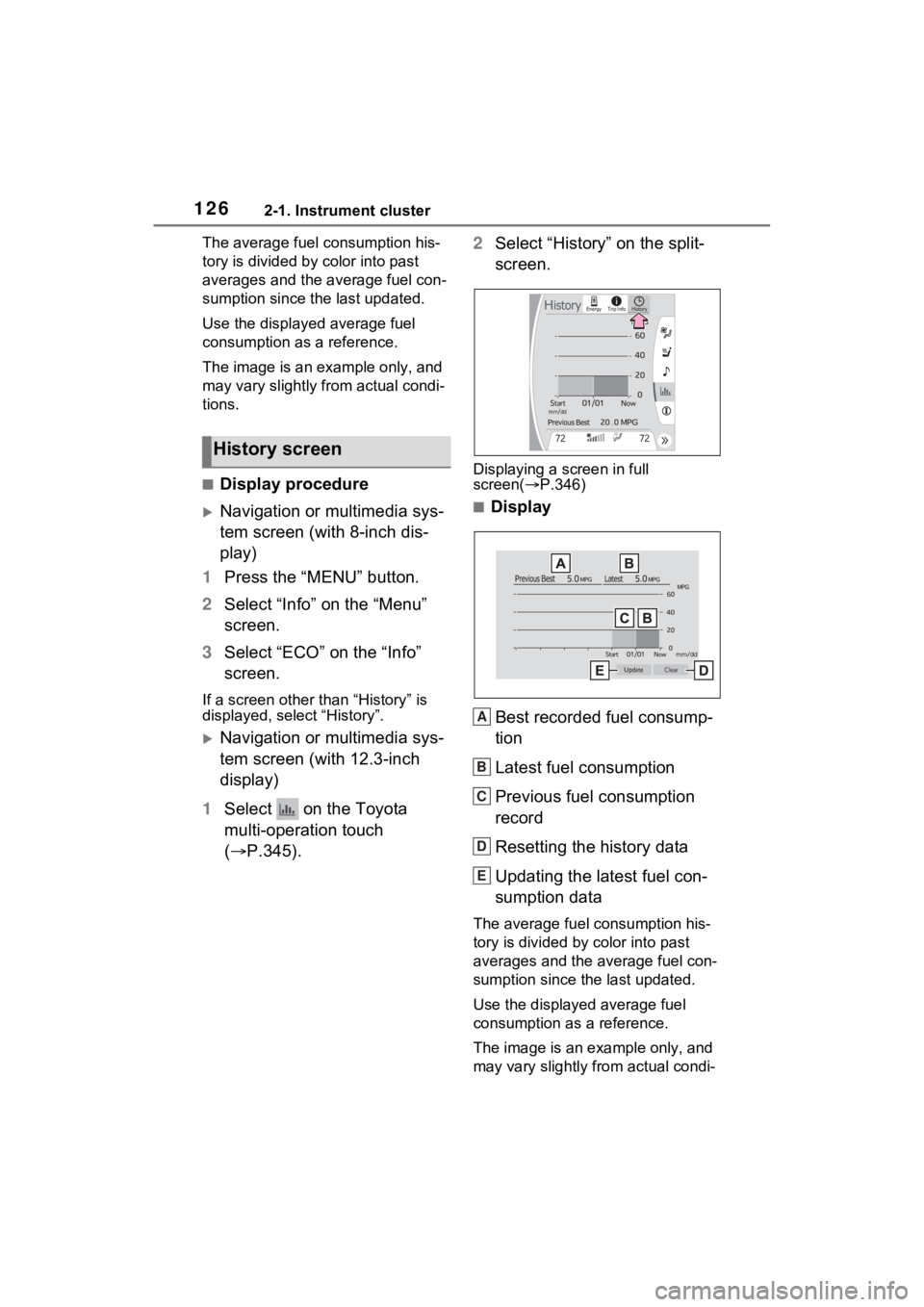
The average fuel consumption his-
tory is divided by color into past
averages and the average fuel con-
sumption since the last updated.
Use the displayed average fuel
consumption as a reference.
The image is an example only, and
may vary slightly f rom actual condi-
tions.
■Display procedure
Navigation or multimedia sys-
tem screen (with 8-inch dis-
play)
1 Press the “MENU” button.
2 Select “Info” on the “Menu”
screen.
3 Select “ECO” on the “Info”
screen.
If a screen other than “History” is
displayed, select “History”.
Navigation or multimedia sys-
tem screen (with 12.3-inch
display)
1 Select on the Toyota
multi-operation touch
( P.345). 2
Select “History” on the split-
screen.
Displaying a screen in full
screen( P.346)
■Display
Best recorded fuel consump-
tion
Latest fuel consumption
Previous fuel consumption
record
Resetting the history data
Updating the latest fuel con-
sumption data
The average fuel consumption his-
tory is divided by color into past
averages and the average fuel con-
sumption since the last updated.
Use the displayed average fuel
consumption as a reference.
The image is an example only, and
may vary slightly from actual condi-
History screen
A
B
C
D
E
Page 128 of 548

1272-1. Instrument cluster
2
Vehicle status information and indicators
tions.
■Updating the history data
Update the latest fuel consumption
by selecting “Upda te” to measure
the current fuel consumption again.
■Resetting the data
The fuel consumption data can be
deleted by selecting “Clear”.
■Cruising range
Displays the estimated maximum
distance that can be driven with the
quantity of fuel remaining.
This distance is computed based on
your average fuel consumption.
As a result, the actual distance that
can be driven may differ from that
displayed.
■“Home” screen (vehicles with 8-
inch display only)
The average fuel consumption and
distance to empty can be displayed
on the “Home” screen of the multi-
media display.
For details of the “Home” screen,
refer to the separate “NAVIGATION
AND MULTIMEDIA SYSTEM
OWNER’S MANUAL”.
Page 305 of 548
3044-6. Driving tips
4-6.Driving tips
When using Eco drive mode, the
torque corresponding to the
accelerator pedal depression
amount can be generated more
smoothly than it is in normal
conditions. In addition, the oper-
ation of the air conditioning sys-
tem (heating/cooling) will be
minimized, improving the fuel
economy. (P.297)
The Eco-friendly driving is pos-
sible by keeping the indicate of
Hybrid System Indicator within
Eco area. ( P.88, 92)
Shift the shift lever to D when
stopped at a traffic light, or driv-
ing in heavy traffic etc. Shift the
shift lever to P when parking.
When using the N, there is no
positive effect on fuel consump-
tion. In the N, the gasoline
engine operates but electricity
cannot be generated. Also,
when using the air conditioning system, etc., the hybrid battery
(traction battery) power is con-
sumed.
Drive your vehicle smoothly.
Avoid abrupt acceleration and
deceleration. Gradual accel-
eration and deceleration will
make more effective use of
the electric motor (traction
motor) without having to use
gasoline engine power.
Avoid repeated acceleration.
Repeated acceleration con-
sumes hybrid battery (trac-
tion battery) power, resulting
in poor fuel consumption. Bat-
tery power can be restored by
driving with the accelerator
pedal slightly released.
Make sure to operate the brakes
gently and in a timely manner. A
greater amount of electrical
energy can be regenerated
when slowing down.
Repeated acceleration and
deceleration, as well as long
waits at traffic lights, will lead to
bad fuel economy. Check traffic
reports before leaving and avoid
delays as much as possible.
Hybrid vehicle driving
tips
For economical and ecolog-
ical driving, pay attention to
the following points:
Using Eco drive mode
Use of Hybrid System
Indicator
Shift lever operation
Accelerator pedal/brake
pedal operation
When braking
Delays
Page 306 of 548
3054-6. Driving tips
4
Driving
When driving in a traffic jam,
gently release the brake pedal
to allow the vehicle to move for-
ward slightly while avoiding
overuse of the accelerator
pedal. Doing so can help control
excessive gasoline consump-
tion.
Control and maintain the vehicle
at a constant speed. Before
stopping at a toll booth or simi-
lar, allow plenty of time to
release the accelerator and gen-
tly apply the brakes. A greater
amount of electrical energy can
be regenerated when slowing
down.
Use the air conditioning only
when necessary. Doing so can
help reduce excessive gasoline
consumption.
In summer: When the ambient
temperature is high, use the
recirculated air mode. Doing so
will help to reduce the burden on
the air conditioning system and
reduce fuel consumption as
well.
In winter: Because the gasoline
engine will not automatically cut
out until it and the interior of the
vehicle are warm, it will con-
sume fuel. Also, fuel consump-
tion can be improved by avoiding overuse of the heater.
Make sure to check the tire infla-
tion pressure frequently.
Improper tire inflation pressure
can cause poor fuel economy.
Also, as snow tires can cause
large amounts of friction, their
use on dry roads can lead to
poor fuel economy. Use tires
that are appropriate for the sea-
son.
Carrying heavy luggage will lead
to poor fuel economy. Avoid car-
rying unnecessary luggage.
Installing a large roof rack will
also cause poor fuel economy.
Since the gasoline engine starts
up and cuts out automatically
when cold, warming up the
engine is unnecessary. More-
over, frequently driving short
distances will cause the engine
to repeatedly warm up, which
can lead to excess fuel con-
sumption.
Highway driving
Air conditioning
Checking tire inflation
pressure
Luggage
Warming up before driv-
ing
Page 315 of 548
3155-1. Using the air conditioning system and defogger
5
Interior features
ture.
If the “A/C” switch is not pressed,
the system will blow ambient tem-
perature air or heated air.
■Setting the fan speed
Press the fan speed increase
switch to increase the fan speed
and the fan speed decrease
switch to decrease the fan
speed.
Press the “OFF” switch to turn the
fan off.
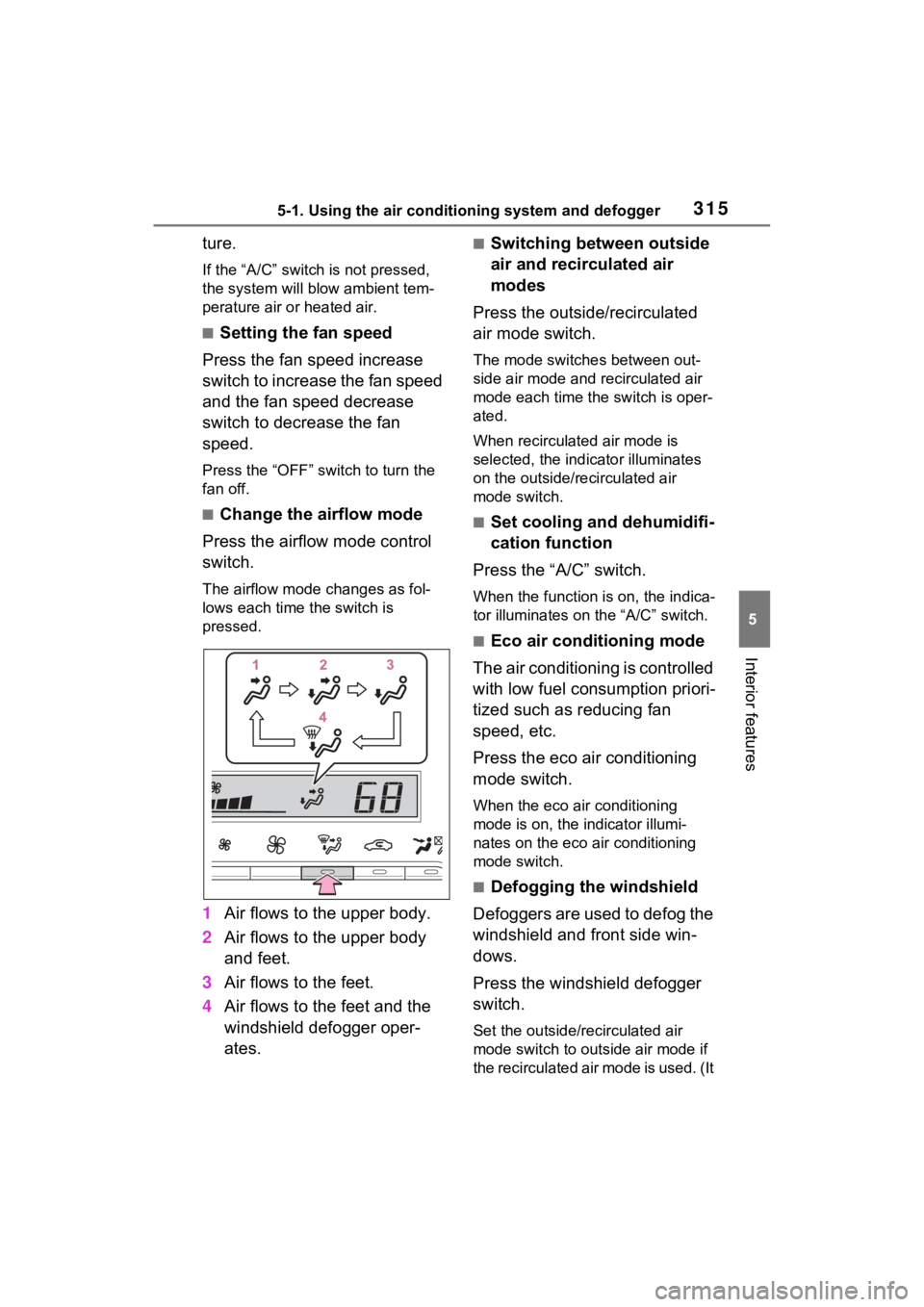
■Change the airflow mode
Press the airflow mode control
switch.
The airflow mode changes as fol-
lows each time the switch is
pressed.
1 Air flows to the upper body.
2 Air flows to the upper body
and feet.
3 Air flows to the feet.
4 Air flows to the feet and the
windshield defogger oper-
ates.
■Switching between outside
air and recirculated air
modes
Press the outside/recirculated
air mode switch.
The mode switches between out-
side air mode and recirculated air
mode each time the switch is oper-
ated.
When recirculated air mode is
selected, the indicator illuminates
on the outside/recirculated air
mode switch.
■Set cooling and dehumidifi-
cation function
Press the “A/C” switch.
When the function is on, the indica-
tor illuminates on the “A/C” switch.
■Eco air conditioning mode
The air conditioning is controlled
with low fuel consumption priori-
tized such as reducing fan
speed, etc.
Press the eco air conditioning
mode switch.
When the eco air conditioning
mode is on, the indicator illumi-
nates on the eco air conditioning
mode switch.
■Defogging the windshield
Defoggers are used to defog the
windshield and front side win-
dows.
Press the windshield defogger
switch.
Set the outside/recirculated air
mode switch to outside air mode if
the recirculated air mode is used. (It
Page 316 of 548

3165-1. Using the air conditioning system and defogger
may switch automatically.)
To defog the windshield and the
side windows quickly, turn the air
flow and temperature up.
To return to the previous mode,
press the windshield defogger
switch again when the windshield is
defogged.
When the windshield defogger
switch is on, the indicator illumi-
nates on the windshield defogger
switch.
■Defogging the rear window
and outside rear view mir-
rors
Defoggers are used to defog the
rear window and to remove rain-
drops, dew and frost from the
outside rear view mirrors.
Press the rear window and out-
side rear view mirror defoggers
switch.
The defoggers will automatically
turn off after 15 minutes.
When the rear window and outside
rear view mirror defoggers switch is
on, the indicator illuminates on the
rear window and ou tside rear view
mirror defoggers switch.
■When the outside temperature
exceeds 75°F (24°C) and the air
conditioning system is on
●In order to reduce the air condi-
tioning power consumption, the air
conditioning system may switch to
recirculated air mode automati-
cally.
This may also reduce fuel con-
sumption.
●Recirculated air mode is selected
as a default mode when the power switch is turned to ON.
●It is possible to switch to outside
air mode at any time by pressing
the outside/recirculated air mode
switch.
■Fogging up of the windows
●The windows will
easily fog up
when the humidity in the vehicle is
high. Turning the cooling and
dehumidification function on will
dehumidify the air from the outlets
and defog the windshield effec-
tively.
●If you turn the cooling and dehu-
midification function off, the win-
dows may fog up more easily.
●The windows may fog up if the
recirculated air mode is used.
■When driving on dusty roads
Close all windows. If dust thrown up
by the vehicle is still drawn into the
vehicle after closing the windows, it
is recommended that the air intake
mode be set to outside air mode
and the fan speed to any setting
except off.
■Outside/recirculated air mode
●Setting to the recirculated air
mode temporarily is recom-
mended in preventing dirty air
from entering the vehicle interior
and helping to c ool the vehicle
when the outside air temperature
is high.
●Outside/recirculated air mode may
automatically switch depending on
the temperature setting or the
inside temperature.
■When the outside temperature
falls to nearly 32°F (0°C)
The dehumidification function may
not operate even when “A/C” switch
is pressed.
■Operation of the air condition-
ing system in Eco drive mode
●In Eco drive mode, the air condi-
tioning system is controlled as fol-
lows to prioritize fuel efficiency:
Page 323 of 548

3235-1. Using the air conditioning system and defogger
5
Interior features
■Switching between outside
air and recirculated air
modes
Select the outside/recirculated
air mode switch on the air condi-
tioning control screen.
The mode switches between out-
side air mode and recirculated air
mode each time the switch is
selected.
When recirculated air mode is
selected, the indicator illuminates
on the outside/recirculated air
mode switch.
■Set cooling and dehumidifi-
cation function
Select the “A/C” switch on the
air conditioning control screen.
When the function i s on, the indica-
tor illuminates on th e “A/C” switch.
■Eco air conditioning mode
The air conditioning is controlled
with low fuel consumption priori-
tized such as reducing fan
speed, etc.
Select the eco air conditioning
mode switch on the air condi-
tioning control screen.
When the eco air conditioning
mode is on, the indicator illumi-
nates on the eco air conditioning
mode switch.
■Defogging the windshield
Defoggers are used to defog the
windshield and front side win-
dows.
Press the windshield defogger
switch on the air conditioning control panel.
Set the outside/recirculated air
mode switch to outside air mode if
the recirculated air mode is used. (It
may switch automatically.)
To defog the windshield and the
side windows quickly, turn the air
flow and temperature up.
To return to the previous mode,
press the windshield defogger
switch again when the windshield is
defogged.
When the windshield defogger
switch is on, the
indicator illumi-
nates on the windshield defogger
switch.
■Defogging the rear window
and outside rear view mir-
rors
Defoggers are used to defog the
rear window and to remove rain-
drops, dew and frost from the
outside rear view mirrors.
Press the rear window and out-
side rear view mirror defoggers
switch on the air conditioning
control panel.
The defoggers will automatically
turn off after 15 minutes.
When the rear window and outside
rear view mirror defoggers switch is
on, the indicator illuminates on the
rear window and outside rear view
mirror defoggers switch.
■Option control screen
Select the “Option” switch to dis-
play the option control screen.
The functions can be switched on
and off.