maintenance schedule TOYOTA VENZA HYBRID 2021 Owners Manual (in English)
[x] Cancel search | Manufacturer: TOYOTA, Model Year: 2021, Model line: VENZA HYBRID, Model: TOYOTA VENZA HYBRID 2021Pages: 548, PDF Size: 18.43 MB
Page 103 of 548
1022-1. Instrument cluster
Select to change the RCTA buzzer
volume.
■ PKSB (Parking Sup-
port Brake System) (if
equipped) ( P.283)
Select to enable/disable the
Parking Support Brake function.
■ RSA (Road Sign
Assist) (if equipped)
( P.253)
Select to set up the following
items.
Road Sign Assist on/off
Select to enable/disable the RSA
(Road Sign Assist).
“Notification method”
Select to change e ach notification
method used to notify the driver
when the system recognizes
excess speed and no-entry sign.
“Notification Level”
Select to change e ach notification
level used to notify the driver when
the system recognizes a speed limit
sign.
■Vehicle Settings
PBD (Power Back Door)
( P.137)
Select to set up the following items.
• System settings
Select to enable/disable the power
back door system.
• “Hands Free” (if equipped)
Select to enable/disable the Hands
Free Power Back Door operation.
• “Opening Adjustment” Select the open position when
power back door is fully open.
•“Volume”
Select to set the volume of the
buzzer which sounds when the
power back door system operates.
“TPWS setting” (Tire Pres-
sure Warning System)
( P.400)
• “Setting Pressure”
Select to initialize the tire pressure
warning system.
• “Identify Wheel”
Select to register the ID codes of
the tire pressure se nsors to the tire
pressure warning system.
• “Setting Unit”
Select to change the units of mea-
sure displayed.
Rear Seat Reminder
( P.133)
Select to enable/disable the rear
seat reminder function.
“Scheduled Maintenance”
( P.378)
Select to reset the scheduled main-
tenance information (message indi-
cating maintenance is required and
distance until the next mainte-
nance) after all ma intenance is per-
formed.
Oil Maintenance
Select to reset the Oil maintenance.
( P.390)
■ Settings
“Language”
Select to change the language on
Page 114 of 548
1132-1. Instrument cluster
2
Vehicle status information and indicators
■RCTA (Rear Cross Traffic
Alert) (P.267)
RCTA (Rear Cross Traffic
Alert) on/off
Select to enable/disable the RCTA
system.
“Volume”
Select to change t he RCTA buzzer
volume.
■ PKSB (Parking Sup-
port Brake System) (if
equipped) ( P.283)
Select to enable/disable the
Parking Support Brake function.
■HUD (Head-up display) (if
equipped) ( P.117)
Select to change the head-up
display setting.
■ RSA (Road Sign
Assist) (if equipped)
( P.253)
Select to set up the following
items.
Road Sign Assist on/off
Select to enable/disable the RSA
(Road Sign Assist).
“Notification method”
Select to change e ach notification
method used to notify the driver
when the system recognizes
excess speed and no-entry sign.
“Notification Level”
Select to change e ach notification
level used to notify the driver when
the system recognizes a speed limit
sign.
■ Vehicle Settings
PBD (Power Back Door)
( P.137)
Select to set up t he following items.
• System settings
Select to enable/disable the power
back door system.
• “Hands Free” (if equipped)
Select to enable/d isable the Hands
Free Power Back Door operation.
• “Opening Adjustment”
Select the open position when
power back door is fully open.
•“Volume”
Select to set the volume of the
buzzer which sounds when the
power back door system operates.
“TPWS setting” (Tire Pres-
sure Warning System)
( P.400)
• “Setting Pressure”
Select to initialize the tire pressure
warning system.
• “Identify Wheel”
Select to register the ID codes of
the tire pressure se nsors to the tire
pressure warning system.
• “Setting Unit”
Select to change the units of mea-
sure displayed.
Rear Seat Reminder
( P.133)
Select to enable/disable the rear
seat reminder function.
“Scheduled Maintenance”
( P.378)
Page 115 of 548
1142-1. Instrument cluster
Select to reset the scheduled main-
tenance information (message indi-
cating maintenance is required and
distance until the next mainte-
nance) after all maintenance is per-
formed.
Oil Maintenance
Select to reset the Oil maintenance.
( P.390)
■ Settings
“Language”
Select to change the language on
the multi-inform ation display.
“Units”
Select to change t he units of mea-
sure displayed.
(EV indicator) ( P.69)
Select to enable/disable the EV
indicator.
Digital Speed ( P.109)
Select to enable/dis able the Digital
Speed.
Gadget Content
Select to change the Gadget set-
ting.
Fuel Economy Type
( P.106)
Select to change the drive informa-
tion type display between trip, total
and tank.
“Pop-Up Display”
Select to enable/d isable the follow-
ing pop-up displays, which may
appear in some situations.
• Intersection guidance display of the navigation system-linked sys-
tem (if equipped) • Incoming call display of the
hands-free phone system
• Audio operation
• Volume operation
• Voice control (if equipped)
• Brightness
“MID OFF”
A blank screen is displayed.
“Default Settings”
Select to reset the meter display
settings.
■Tire pressure
• It may take a few minutes to dis-
play the tire inflation pressure
after the power switch is turned to
ON. It may also take a few min-
utes to display the tire inflation
pressure after infl ation pressure
has been adjusted.
• “---” may be displayed if the tire position information cannot be
determined due to unfavorable
radio wave conditions.
• Tire inflation pressure changes with temperature. The displayed
values may also be different from
the values measured using a tire
pressure gauge.
■Suspension of the settings dis-
play
●In the following situations, opera-
tion of the settings display will be
temporarily suspended.
• When a warning message
appears on the multi-information
display
• When the vehicle begins to move
●Settings for functions not
equipped to the vehicle are not
displayed.
●When a function is turned off, the
related settings for that function
are not selectable.
Page 312 of 548
3114-6. Driving tips
4
Driving
WARNING
●When driving off-road or in rug-
ged terrain, do not drive at
excessive speeds, jump, make
sharp turns, strike objects, etc.
This may cause loss of control
or vehicle rollover causing
death or serious injury. You are
also risking expensive damage
to your vehicle’s suspension
and chassis.
NOTICE
■To prevent water damage
Take all necessary safety mea-
sures to ensure that water dam-
age to the hybrid battery (traction
battery), hybrid s ystem or other
components does not occur.
●Water entering the engine com-
partment may cause severe
damage to the hybrid system.
Water entering the interior may
cause the hybrid battery (trac-
tion battery) stowed under the
rear seats to short circuit.
●Water entering t he hybrid trans-
mission and rear electric motor
(traction motor) will cause dete-
rioration in transmission quality.
The malfunction indicator may
come on, and the vehicle may
not be drivable.
●Water can wash the grease
from wheel bearings, causing
rusting and premature failure,
and may also enter the hybrid
transmission case, reducing the
gear oil’s lubricating qualities.
■When you drive through
water
If driving through water, such as
when crossing shallow streams,
first check the depth of the water
and the bottom of the riverbed for
firmness. Drive slowly and avoid
deep water.
■Inspection after off-road driv-
ing
●Sand and mud that has accu-
mulated around brake discs
may affect braking efficiency
and may damage brake system
components.
●Always perform a maintenance
inspection after each day of off-
road driving that has taken you
through rough terrain, sand,
mud, or water. For scheduled
maintenance information, refer
to the “Scheduled Maintenance
Guide” or “Owner’s Manual
Supplement”.
Page 377 of 548
3776-2. Maintenance
6
Maintenance and care
6-2.Maintenance
■Repair and replacement
It is recommended that genuine
Toyota parts be used for repairs to
ensure performanc e of each sys-
tem. If non-Toyota p arts are used in
replacement or if a repair shop other
than a Toyota dealer performs
repairs, confirm the warranty cover-
age.
■Allow inspection and repairs to
be performed by a Toyota
dealer
●Toyota technicians are well-
trained specialists and are kept up
to date with the latest service
information. They are well
informed about the operations of
all systems on your vehicle.
●Keep a copy of the repair order. It
proves that the maintenance that
has been performed is under war-
ranty coverage. If any problem
should arise while your vehicle is
under warranty, your Toyota
dealer will promptly take care of it.
General maintenance should be
performed on a daily basis. This
can be done by yourself or by a
Toyota dealer.
Scheduled maintenance should
be performed at specified inter-
vals according to the mainte-
nance schedule.
For details about maintenance
items and schedules, refer to the
“Scheduled Maintenance Guide” or
“Owner’s Manual Supplement”.
Maintenance require-
ments
To ensure safe and econom-
ical driving, day-to-day care
and regular maintenance
are essential. It is the
owner’s responsibility to
perform regular checks.
Toyota recommends the fol-
lowing maintenance:
WARNING
■If your vehicle is not properly
maintained
Improper maintenance could
result in serious damage to the
vehicle and possible death or seri-
ous injury.
■Handling of the 12-volt bat-
tery
●Engine exhaust, some of its
constituents, and a wide variety
of automobile components con-
tain or emit chemicals known to
the State of California to cause
cancer and birth defects and
other reproductive harm. Work
in a well ventilated area.
●Oils, fuels and fluids contained
in vehicles as well as waste pro-
duced by component wear con-
tain or emit chemicals known to
the State of California to cause
cancer and birth defects or
other reproductive harm. Avoid
exposure and wash any
affected area immediately.
●12-volt battery posts, terminals
and related accessories con-
tain lead and lead compounds
which are known to cause brain
damage. Wash your hands after
handling. ( P.394)
General maintenance
Scheduled maintenance
Page 378 of 548
3786-2. Maintenance
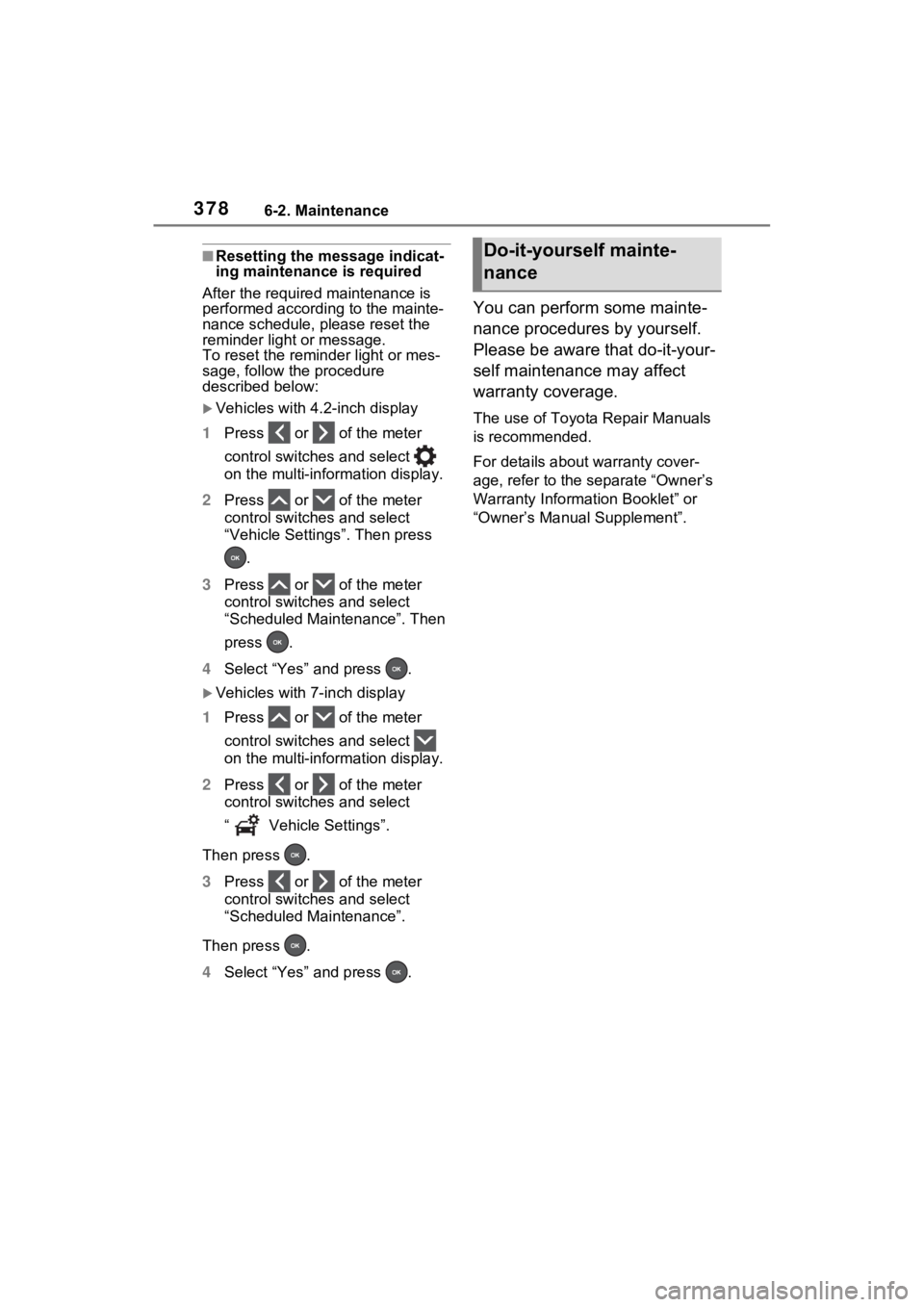
■Resetting the message indicat-
ing maintenance is required
After the required maintenance is
performed according to the mainte-
nance schedule, please reset the
reminder light or message.
To reset the reminder light or mes-
sage, follow the procedure
described below:
Vehicles with 4.2-inch display
1 Press or of the meter
control switches and select
on the multi-information display.
2 Press or of the meter
control switches and select
“Vehicle Settings”. Then press
.
3 Press or of the meter
control switches and select
“Scheduled Maintenance”. Then
press .
4 Select “Yes” and press .
Vehicles with 7-inch display
1 Press or of the meter
control switches and select
on the multi-information display.
2 Press or of the meter
control switches and select
“ Vehicle Settings”.
Then press .
3 Press or of the meter
control switches and select
“Scheduled Maintenance”.
Then press .
4 Select “Yes” and press .
You can perform some mainte-
nance procedures by yourself.
Please be aware that do-it-your-
self maintenance may affect
warranty coverage.
The use of Toyota Repair Manuals
is recommended.
For details about warranty cover-
age, refer to the separate “Owner’s
Warranty Informat ion Booklet” or
“Owner’s Manual Supplement”.
Do-it-yourself mainte-
nance
Page 381 of 548
3816-2. Maintenance
6
Maintenance and care
The OBD system determines
that a problem exists some-
where in the emission control
system. Your vehicle may not
pass the I/M test and may need
to be repaired. Contact your
Toyota dealer to service the
vehicle.
When the 12-volt battery is
disconnected or discharged
Readiness codes that are set
during ordinary driving are
erased.
Also, depending on your driv-
ing habits, the readiness
codes may not be completely
set.
When the fuel tank cap is
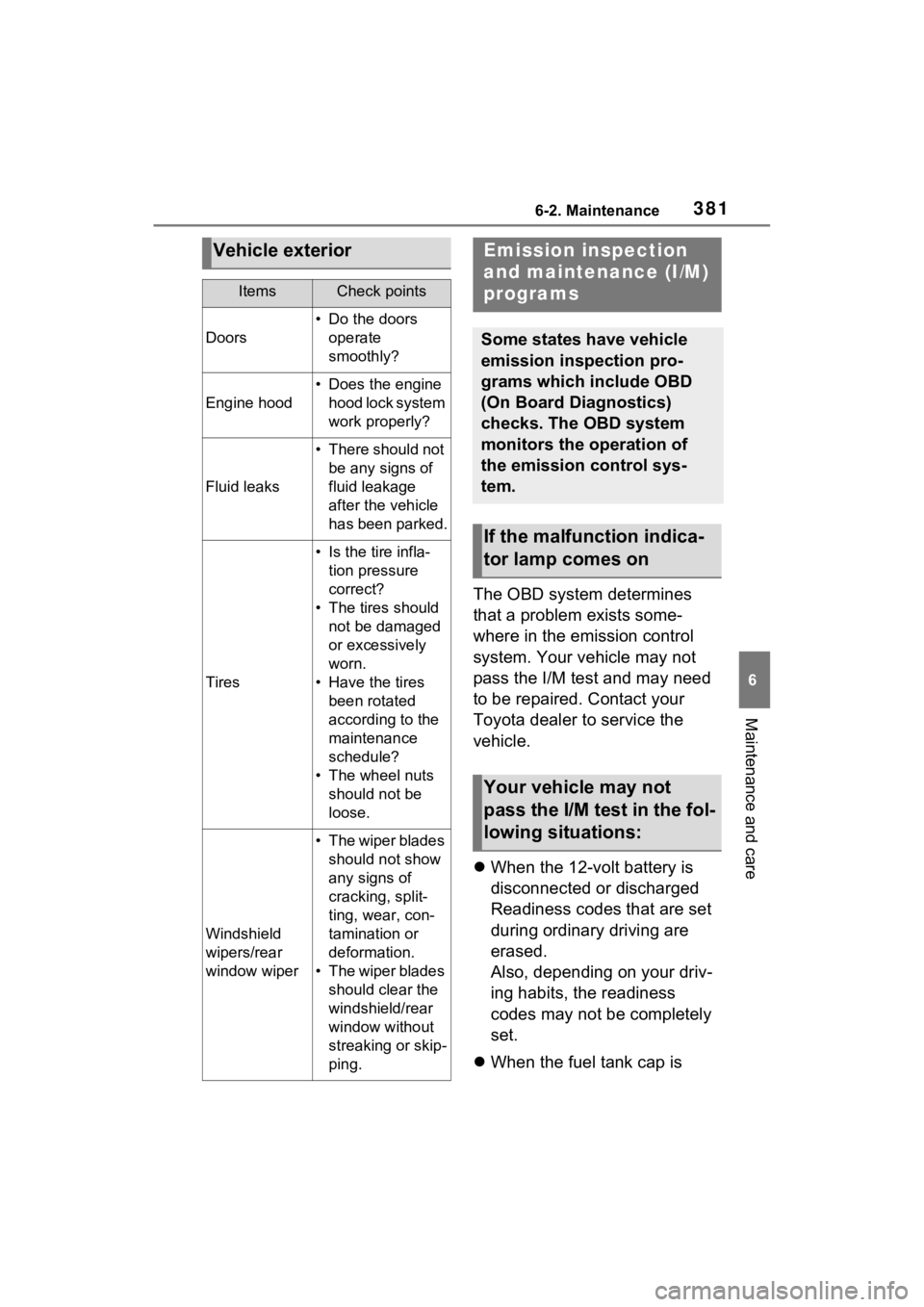
Vehicle exterior
ItemsCheck points
Doors
• Do the doors
operate
smoothly?
Engine hood
• Does the engine hood lock system
work properly?
Fluid leaks
• There should not be any signs of
fluid leakage
after the vehicle
has been parked.
Tires
• Is the tire infla-tion pressure
correct?
• The tires should not be damaged
or excessively
worn.
• Have the tires been rotated
according to the
maintenance
schedule?
• The wheel nuts should not be
loose.
Windshield
wipers/rear
window wiper
• The wiper blades should not show
any signs of
cracking, split-
ting, wear, con-
tamination or
deformation.
• The wiper blades should clear the
windshield/rear
window without
streaking or skip-
ping.
Emission inspection
and maintenance (I/M)
programs
Some states have vehicle
emission inspection pro-
grams which include OBD
(On Board Diagnostics)
checks. The OBD system
monitors the operation of
the emission control sys-
tem.
If the malfunction indica-
tor lamp comes on
Your vehicle may not
pass the I/M test in the fol-
lowing situations:
Page 397 of 548
3976-3. Do-it-yourself maintenance
6
Maintenance and care
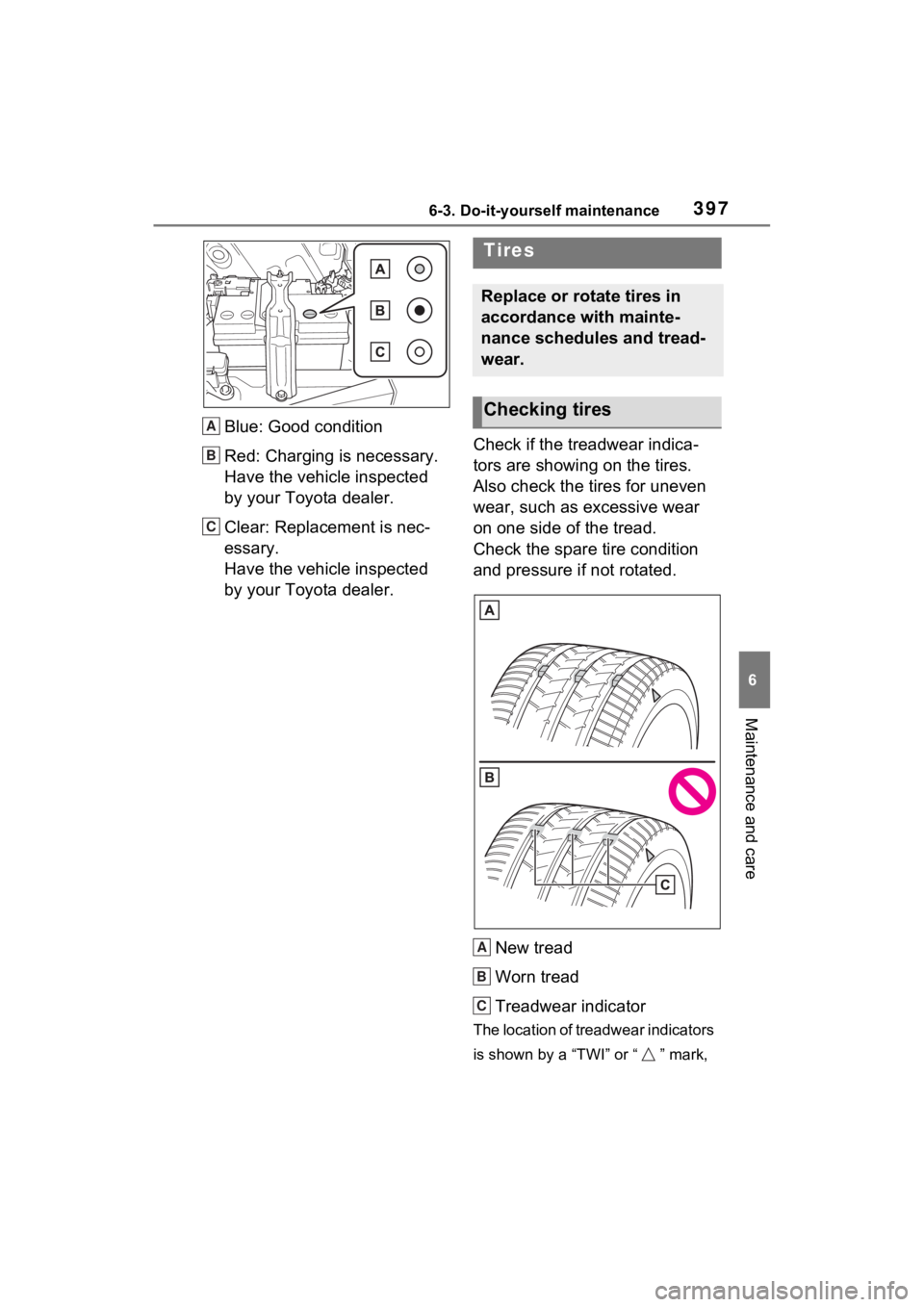
Blue: Good condition
Red: Charging is necessary.
Have the vehicle inspected
by your Toyota dealer.
Clear: Replacement is nec-
essary.
Have the vehicle inspected
by your Toyota dealer.Check if the treadwear indica-
tors are showing on the tires.
Also check the tires for uneven
wear, such as excessive wear
on one side of the tread.
Check the spare tire condition
and pressure if not rotated.
New tread
Worn tread
Treadwear indicator
The location of treadwear indicators
is shown by a “TWI” or “ ” mark,
A
B
C
Tires
Replace or rotate tires in
accordance with mainte-
nance schedules and tread-
wear.
Checking tires
A
B
C
Page 416 of 548
4166-3. Do-it-yourself maintenance
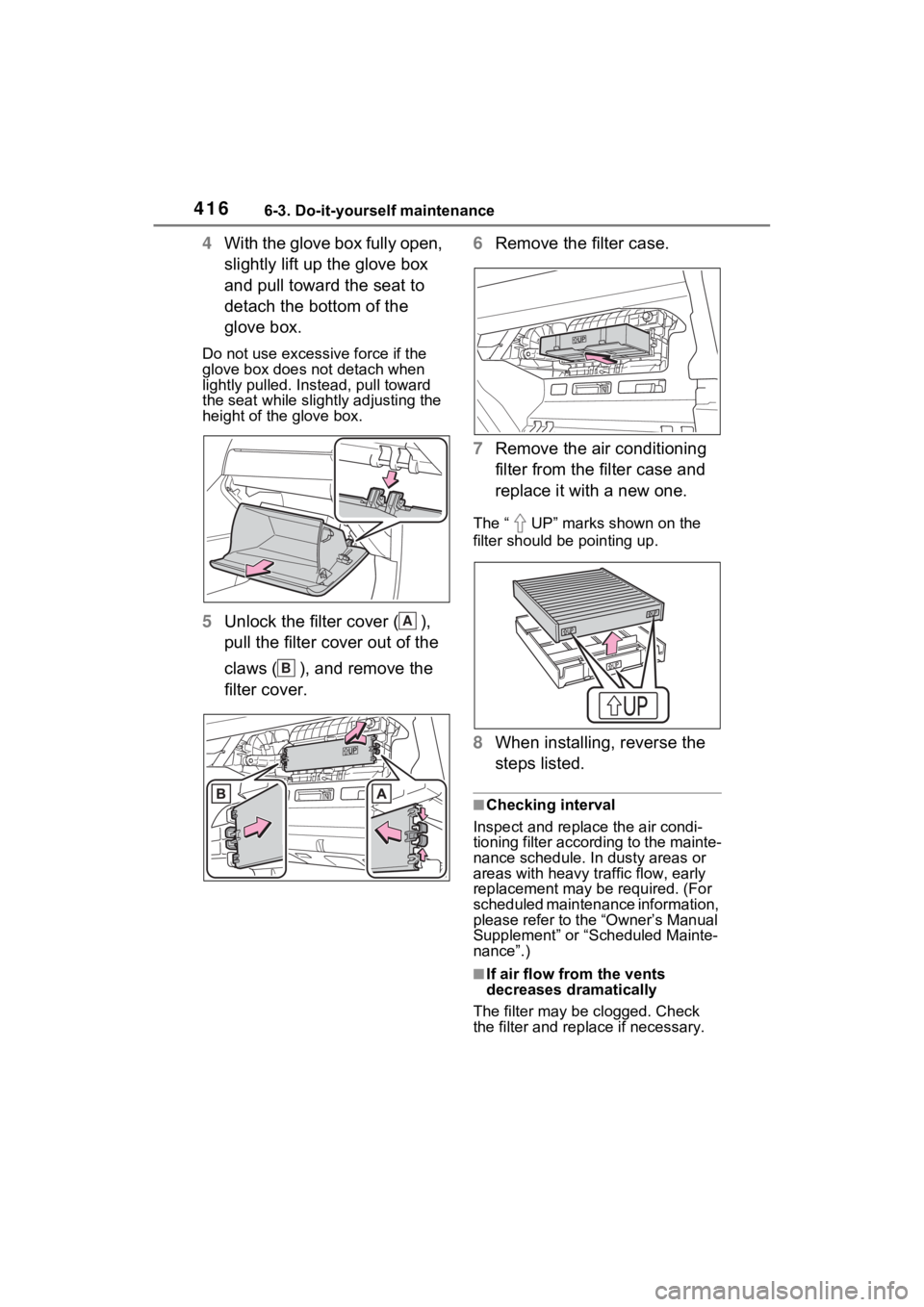
4With the glove box fully open,
slightly lift up the glove box
and pull toward the seat to
detach the bottom of the
glove box.
Do not use excessive force if the
glove box does not detach when
lightly pulled. Ins tead, pull toward
the seat while slightly adjusting the
height of the glove box.
5 Unlock the filter cover ( ),
pull the filter cover out of the
claws ( ), and remove the
filter cover. 6
Remove the filter case.
7 Remove the air conditioning
filter from the filter case and
replace it with a new one.
The “ UP” marks shown on the
filter should be pointing up.
8When installing, reverse the
steps listed.
■Checking interval
Inspect and replace the air condi-
tioning filter according to the mainte-
nance schedule. In dusty areas or
areas with heavy traffic flow, early
replacement may be required. (For
scheduled maintenance information,
please refer to the “Owner’s Manual
Supplement” or “Scheduled Mainte-
nance”.)
■If air flow from the vents
decreases dramatically
The filter may be clogged. Check
the filter and rep lace if necessary.
A
B
Page 419 of 548
4196-3. Do-it-yourself maintenance
6
Maintenance and care
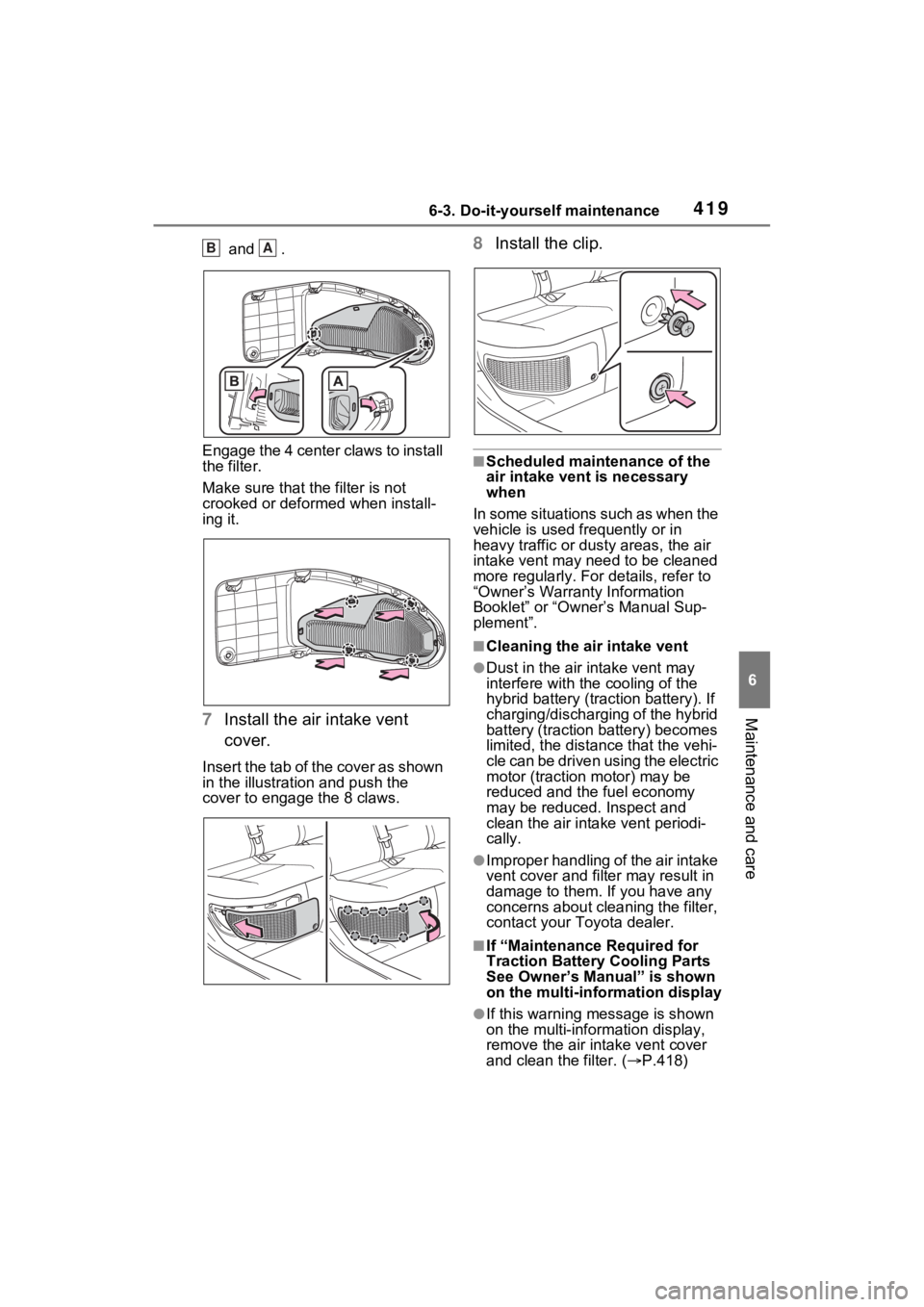
and .
Engage the 4 center claws to install
the filter.
Make sure that t he filter is not
crooked or deformed when install-
ing it.
7 Install the air intake vent
cover.
I ns er t t he t ab o f th e co ve r a s sh ow n
in the illustrati on and push the
cover to engag e the 8 claws.
8Install the clip.
■Scheduled maintenance of the
air intake vent is necessary
when
In some situations such as when the
vehicle is used frequently or in
heavy traffic or dusty areas, the air
intake vent may need to be cleaned
more regularly. For details, refer to
“Owner’s Warranty Information
Booklet” or “Owner’s Manual Sup-
plement”.
■Cleaning the air intake vent
●Dust in the air intake vent may
interfere with the cooling of the
hybrid battery (trac tion battery). If
charging/discharging of the hybrid
battery (traction battery) becomes
limited, the distance that the vehi-
cle can be driven using the electric
motor (traction motor) may be
reduced and the fuel economy
may be reduced. Inspect and
clean the air intake vent periodi-
cally.
●Improper handling of the air intake
vent cover and filt er may result in
damage to them. If you have any
concerns about cleaning the filter,
contact your Toyota dealer.
■If “Maintenance Required for
Traction Battery Cooling Parts
See Owner’s Manual” is shown
on the multi-information display
●If this warning message is shown
on the multi-information display,
remove the air intake vent cover
and clean the filter. ( P.418)
BA