navigation update TOYOTA VENZA HYBRID 2021 Owners Manual (in English)
[x] Cancel search | Manufacturer: TOYOTA, Model Year: 2021, Model line: VENZA HYBRID, Model: TOYOTA VENZA HYBRID 2021Pages: 548, PDF Size: 18.43 MB
Page 111 of 548
1102-1. Instrument cluster
tion. As a result, the actual dis-
tance that can be driven may
differ from that displayed.
●When only a small amount of fuel
is added to the tank, the display
may not be updated. When refuel-
ing, turn the power switch off. If
the vehicle is refueled without
turning the power switch off, the
display may not be updated.
●When “Refuel” is displayed, the
remaining fuel amount is low and
the distance that can be driven
with the remaining fuel cannot be
calculated.
Refuel immediately.
■ECO Accelerator Guid-
ance/“Eco Score” will not oper-
ate when
The ECO Accelerator Guid-
ance/“Eco Score” will not operate in
the following situations:
●The Hybrid System Indicator is not
operating.
●The vehicle is being driven using
the dynamic radar cruise control
with full-speed range.
■Driving support system
information display
Select to display the operational
status of the following systems:
LTA (Lane Tracing Assist)
( P.243)
RSA (Road Sign Assist) (if
equipped) ( P.253)
Dynamic radar cruise control
with full-speed range
( P.256) Select to display the following
navigation system-linked infor-
mation.
Route guidance to destination
Compass display (heading-up
display)
■Route guidance to destination
display
When the route guidance to destina-
tion display is enabled on the head-
up display (if equipped), it will not be
displayed on the multi-information
display. ( P.117)
Select to enable selection of an
audio source or track on the dis-
play.
■Energy monitor
P.120
■Tire pressure
P.400
Driving support system
information display
Navigation system-linked
display (if equipped)
Audio system-linked dis-
play
Vehicle information dis-
play
Page 127 of 548
1262-1. Instrument cluster
The average fuel consumption his-
tory is divided by color into past
averages and the average fuel con-
sumption since the last updated.
Use the displayed average fuel
consumption as a reference.
The image is an example only, and
may vary slightly f rom actual condi-
tions.
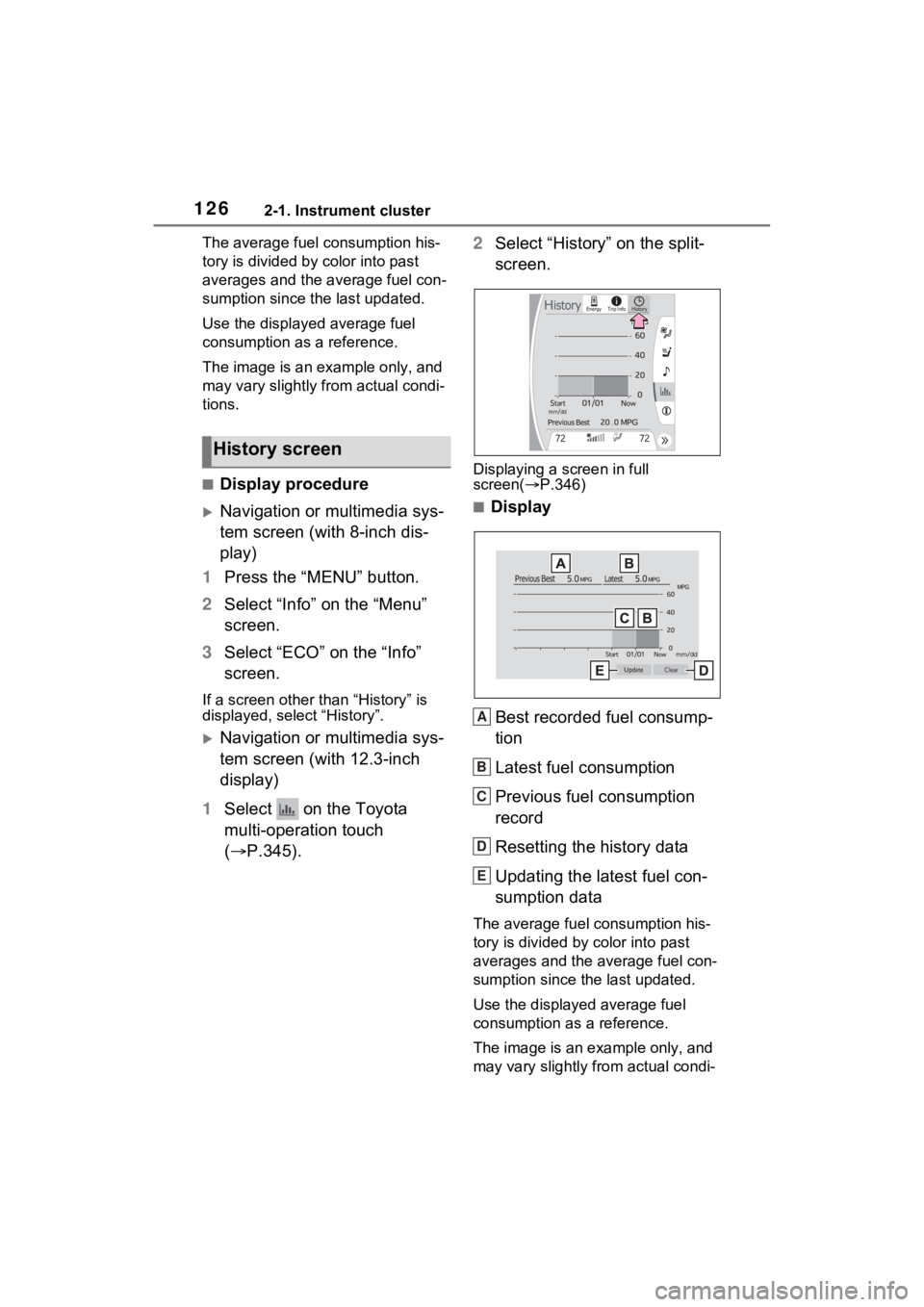
■Display procedure
Navigation or multimedia sys-
tem screen (with 8-inch dis-
play)
1 Press the “MENU” button.
2 Select “Info” on the “Menu”
screen.
3 Select “ECO” on the “Info”
screen.
If a screen other than “History” is
displayed, select “History”.
Navigation or multimedia sys-
tem screen (with 12.3-inch
display)
1 Select on the Toyota
multi-operation touch
( P.345). 2
Select “History” on the split-
screen.
Displaying a screen in full
screen( P.346)
■Display
Best recorded fuel consump-
tion
Latest fuel consumption
Previous fuel consumption
record
Resetting the history data
Updating the latest fuel con-
sumption data
The average fuel consumption his-
tory is divided by color into past
averages and the average fuel con-
sumption since the last updated.
Use the displayed average fuel
consumption as a reference.
The image is an example only, and
may vary slightly from actual condi-
History screen
A
B
C
D
E
Page 128 of 548
1272-1. Instrument cluster
2
Vehicle status information and indicators
tions.
■Updating the history data
Update the latest fuel consumption
by selecting “Upda te” to measure
the current fuel consumption again.
■Resetting the data
The fuel consumption data can be
deleted by selecting “Clear”.
■Cruising range
Displays the estimated maximum
distance that can be driven with the
quantity of fuel remaining.
This distance is computed based on
your average fuel consumption.
As a result, the actual distance that
can be driven may differ from that
displayed.
■“Home” screen (vehicles with 8-
inch display only)
The average fuel consumption and
distance to empty can be displayed
on the “Home” screen of the multi-
media display.
For details of the “Home” screen,
refer to the separate “NAVIGATION
AND MULTIMEDIA SYSTEM
OWNER’S MANUAL”.