tow TOYOTA VENZA HYBRID 2021 Owners Manual (in English)
[x] Cancel search | Manufacturer: TOYOTA, Model Year: 2021, Model line: VENZA HYBRID, Model: TOYOTA VENZA HYBRID 2021Pages: 548, PDF Size: 18.43 MB
Page 3 of 548
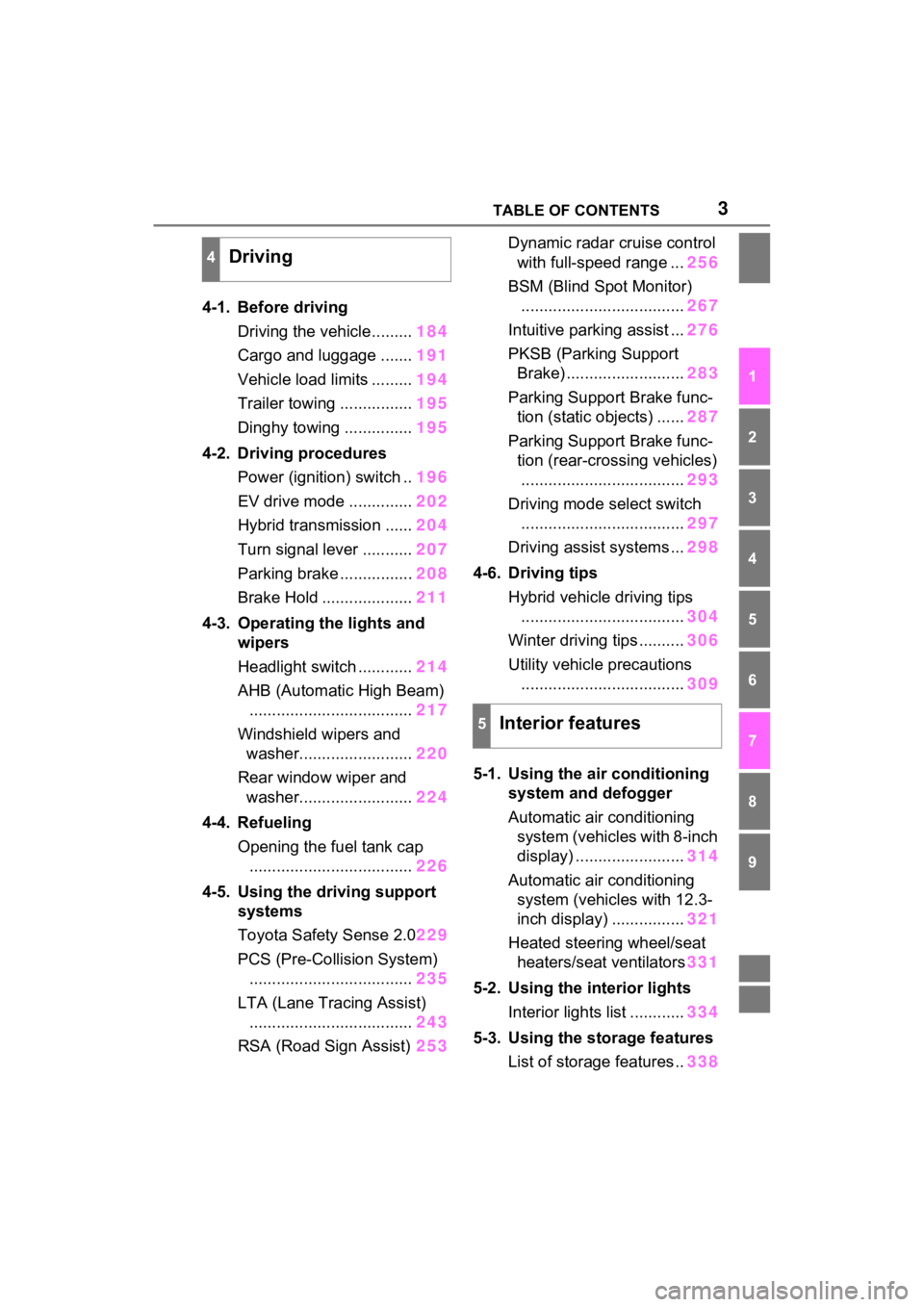
3TABLE OF CONTENTS
1
2
3
4
5
6
7
8
9
4-1. Before drivingDriving the vehicle......... 184
Cargo and luggage ....... 191
Vehicle load limits ......... 194
Trailer towing ................ 195
Dinghy towing ............... 195
4-2. Driving procedures Power (ignition) switch .. 196
EV drive mode .............. 202
Hybrid transmission ...... 204
Turn signal lever ........... 207
Parking brake ................ 208
Brake Hold .................... 211
4-3. Operating the lights and wipers
Headlight switch ............ 214
AHB (Automatic High Beam) .................................... 217
Windshield wipers and washer......................... 220
Rear window wiper and washer......................... 224
4-4. Refueling Opening the fuel tank cap.................................... 226
4-5. Using the driving support
systems
Toyota Safety Sense 2.0 229
PCS (Pre-Collision System) .................................... 235
LTA (Lane Tracing Assist) .................................... 243
RSA (Road Sign Assist) 253Dynamic radar cruise control
with full-speed range ... 256
BSM (Blind Spot Monitor) .................................... 267
Intuitive parking assist ... 276
PKSB (Parking Support Brake) .......................... 283
Parking Support Brake func- tion (static objects) ...... 287
Parking Support Brake func- tion (rear-crossing vehicles).................................... 293
Driving mode s elect switch
.................................... 297
Driving assist systems ... 298
4-6. Driving tips Hybrid vehicle driving tips.................................... 304
Winter driving tips .......... 306
Utility vehicle precautions .................................... 309
5-1. Using the ai r conditioning
system and defogger
Automatic air conditioning system (vehicles with 8-inch
display) ........................ 314
Automatic air conditioning system (vehicl es with 12.3-
inch display) ................ 321
Heated steering wheel/seat heater s/sea
t ventilators331
5-2. Using the interior lights Interior lights list ............ 334
5-3. Using the storage features List of storage features .. 338
4Driving
5Interior features
Page 4 of 548
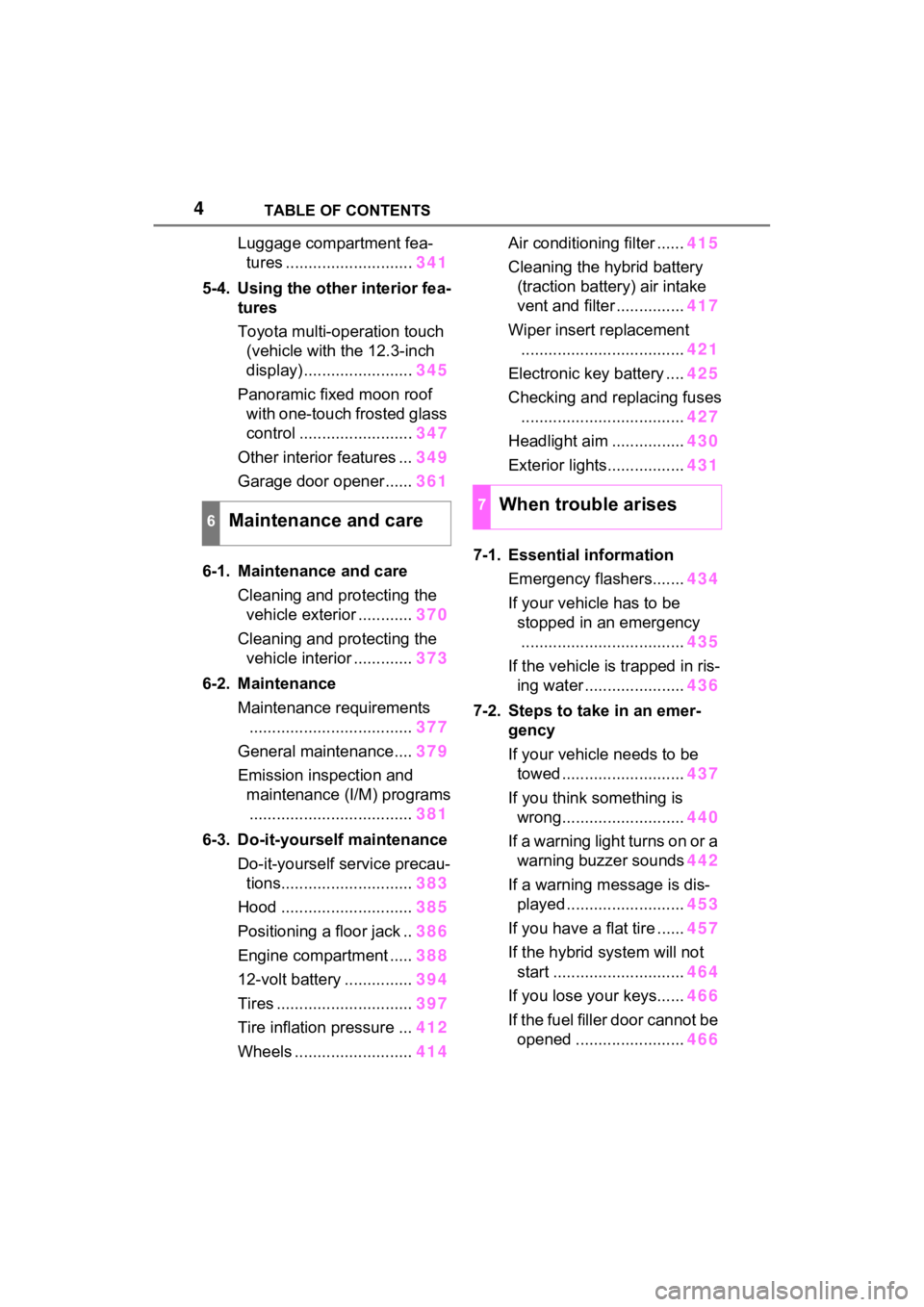
4TABLE OF CONTENTS
Luggage compartment fea-tures ............................ 341
5-4. Using the other interior fea- tures
Toyota multi-operation touch
(vehicle with the 12.3-inch
display) ........................ 345
Panoramic fixed moon roof with one-touch frosted glass
control ......................... 347
Other interior features ... 349
Garage door opener...... 361
6-1. Maintenance and care Cleaning and protecting the vehicle exterior ............ 370
Cleaning and protecting the vehicle interior ............. 373
6-2. Maintenance Maintenance requirements.................................... 377
General maintenance.... 379
Emission inspection and maintenance (I/M) programs.................................... 381
6-3. Do-it-yourself maintenance Do-it-yourself service precau-tions............................. 383
Hood ............................. 385
Positioning a floor jack .. 386
Engine compartment ..... 388
12-volt battery ............... 394
Tires .............................. 397
Tire inflation pressure ... 412
Wheels ......... .................414 Air conditioning filter ......
415
Cleaning the hybrid battery (traction battery) air intake
vent and filter ............... 417
Wiper insert replacement .................................... 421
Electronic key battery .... 425
Checking and replacing fuses .................................... 427
Headlight aim ................ 430
Exterior lights................. 431
7-1. Essential information Emergency flashers....... 434
If your vehicle has to be stopped in an emergency.................................... 435
If the vehicle is trapped in ris- ing water ...................... 436
7-2. Steps to take in an emer- gency
If your vehicle needs to be towed ........................... 437
If you think something is wrong........................... 440
If a warning light turns on or a warning buzzer sounds 442
If a warning message is dis- played .......................... 453
If you have a flat tire ...... 457
If the hybrid system will not start ............................. 464
If you lose your keys...... 466
If the fuel filler door cannot be open ed
........................ 466
6Maintenance and care
7When trouble arises
Page 17 of 548
17Pictorial index
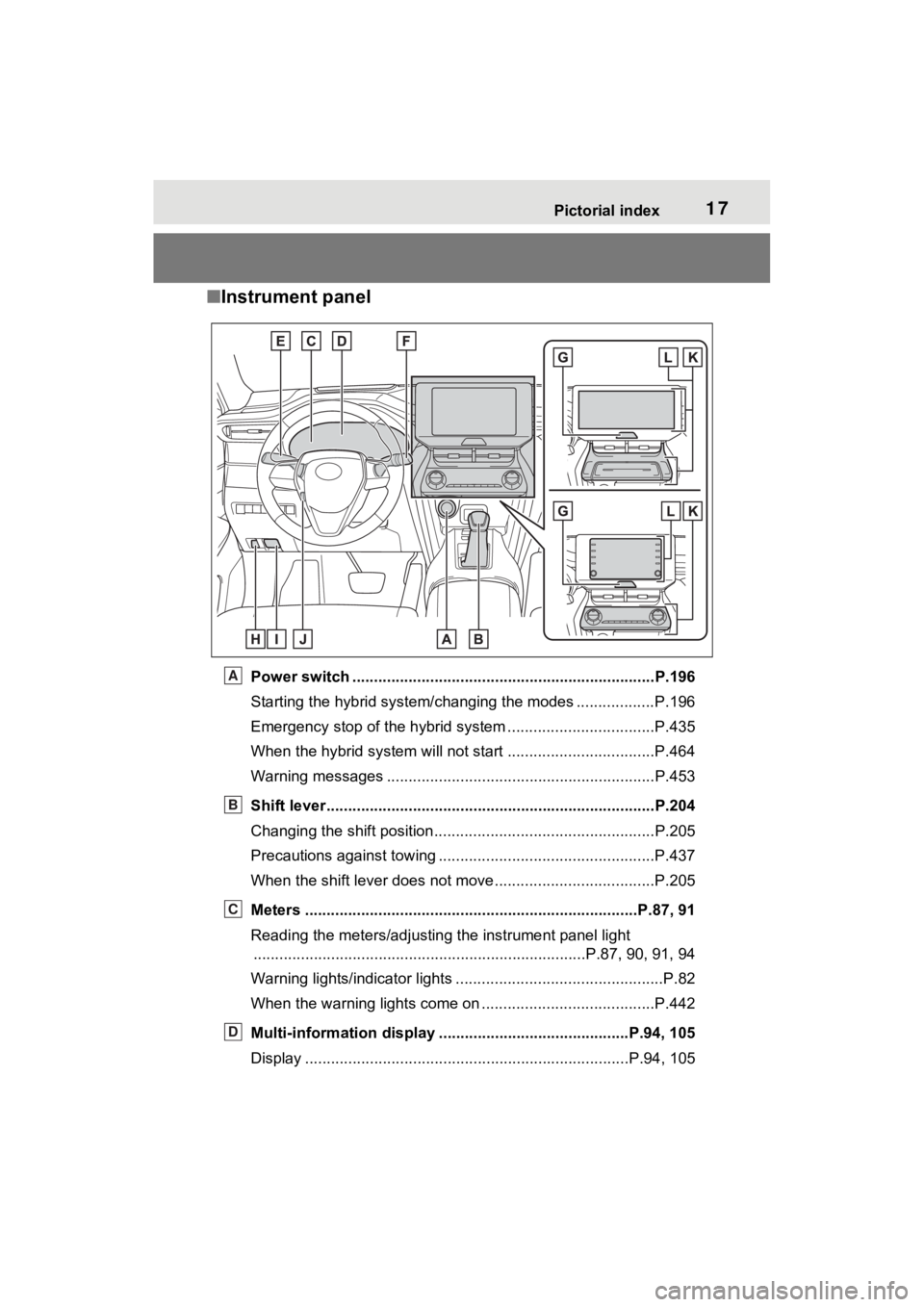
■Instrument panel
Power switch ................................................... ...................P.196
Starting the hybrid system/changing the modes .................. P.196
Emergency stop of the hybrid system ............................ ......P.435
When the hybrid system will not start .......................... ........P.464
Warning messages ..............................................................P.453
Shift lever.................................................... ........................P.204
Changing the shift position.................................... ...............P.205
Precautions against towing ..................................................P.437
When the shift lever does not move............................. ........P.205
Meters ......................................................... ....................P.87, 91
Reading the meters/adjusting the instrument panel light ............................................................... ..............P.87, 90, 91, 94
Warning lights/indicator lights ................................ ................P.82
When the warning lights come on ................................ ........P.442
Multi-information display . ...........................................P.94, 105
Display ........................................................ ...................P.94, 105A
B
C
D
Page 39 of 548
381-1. For safe use
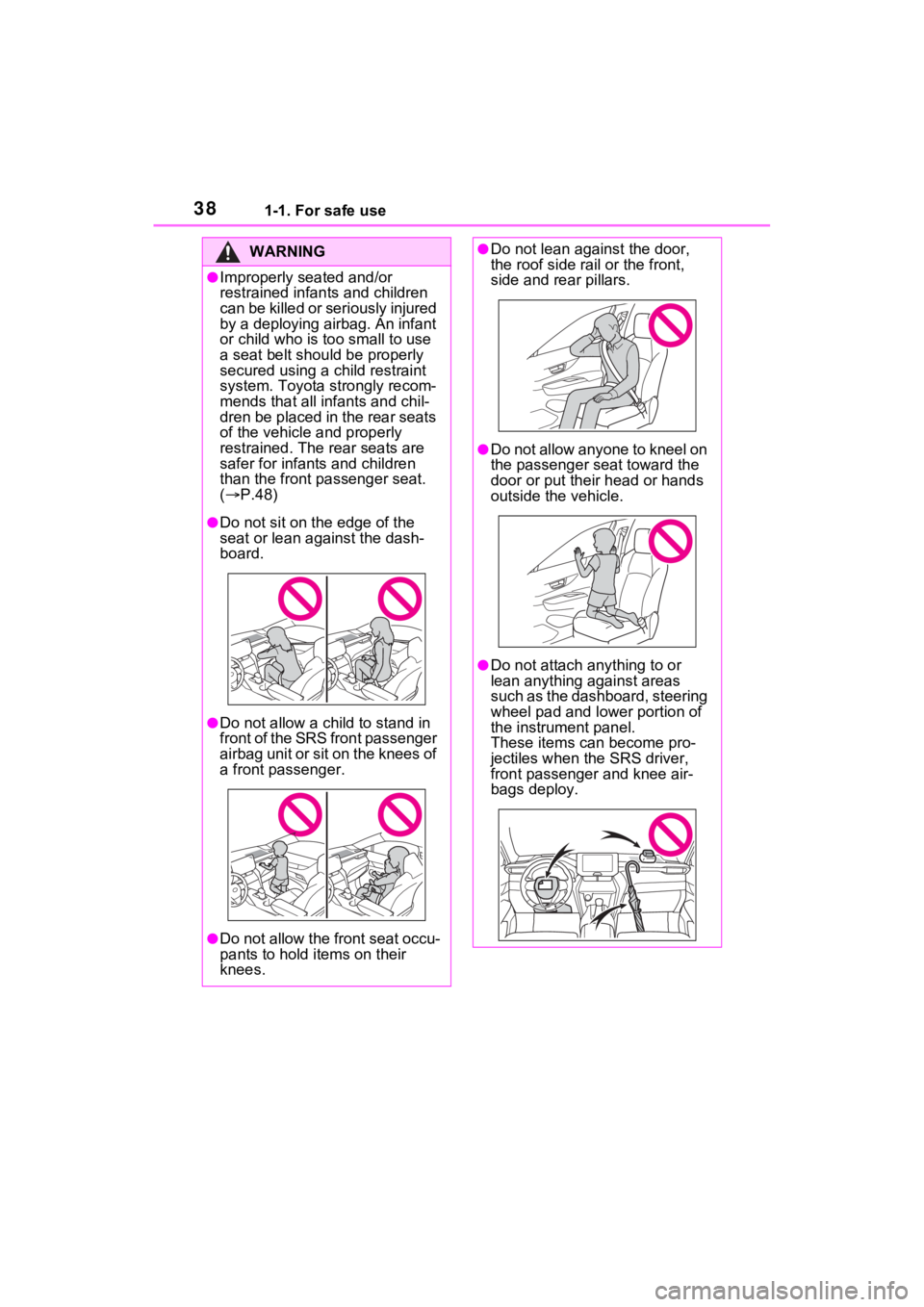
WARNING
●Improperly seated and/or
restrained infants and children
can be killed or seriously injured
by a deploying airbag. An infant
or child who is too small to use
a seat belt should be properly
secured using a child restraint
system. Toyota strongly recom-
mends that all in fants and chil-
dren be placed in the rear seats
of the vehicle and properly
restrained. The rear seats are
safer for infants and children
than the front pa ssenger seat.
( P.48)
●Do not sit on the edge of the
seat or lean against the dash-
board.
●Do not allow a child to stand in
f r o n t o f t h e S R S f r o n t p a s s e n g e r
airbag unit or sit on the knees of
a front passenger.
●Do not allow the front seat occu-
pants to hold items on their
knees.
●Do not lean against the door,
the roof side rail or the front,
side and rear pillars.
●Do not allow anyone to kneel on
the passenger seat toward the
door or put thei r head or hands
outside the vehicle.
●Do not attach a nything to or
lean anything against areas
such as the dashboard, steering
wheel pad and lower portion of
the instrument panel.
These items can become pro-
jectiles when th e SRS driver,
front passenger and knee air-
bags deploy.
Page 57 of 548
561-2. Child safety
buckle. Make sure that the
belt is not twisted.
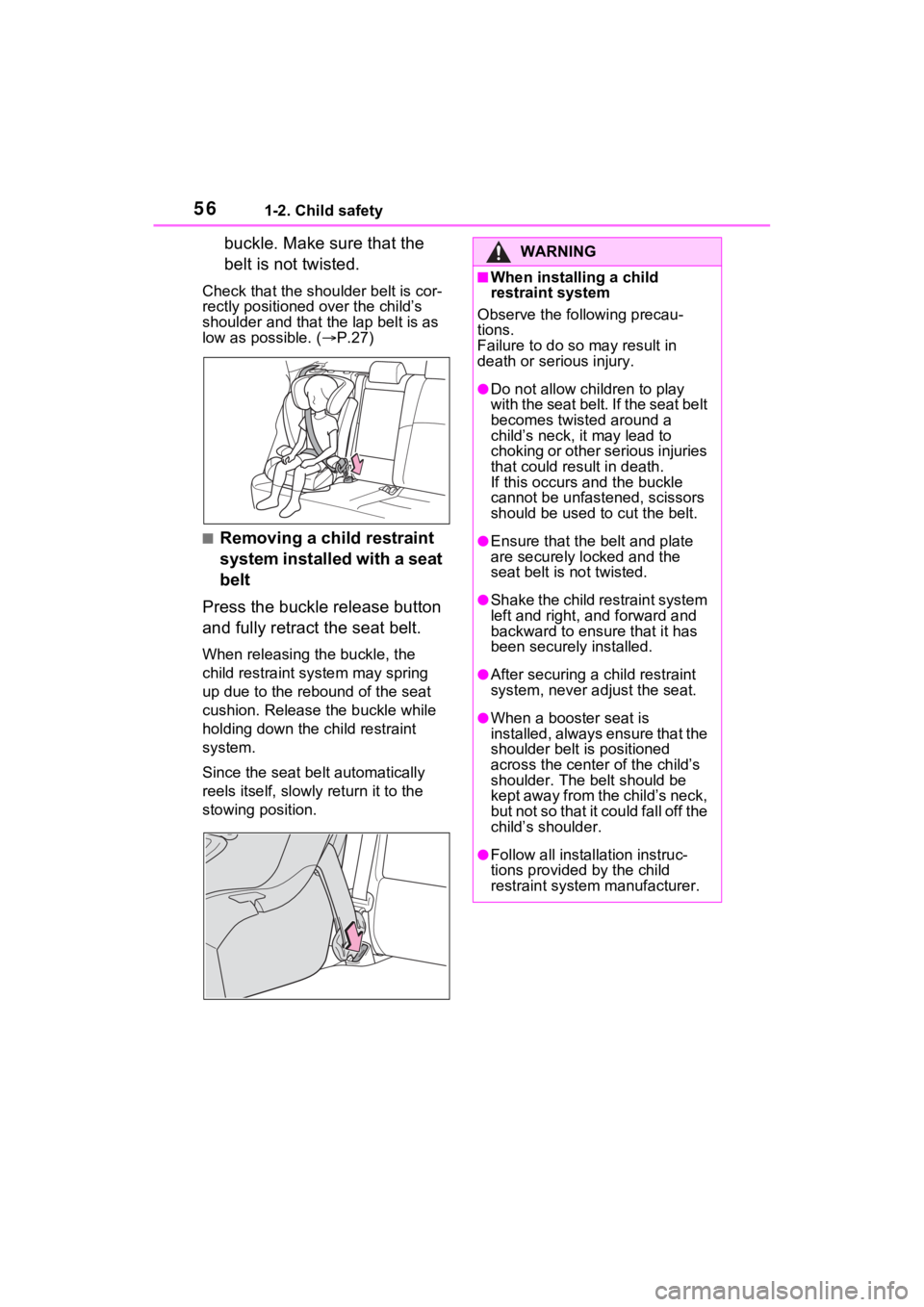
Check that the shoulder belt is cor-
rectly positioned over the child’s
shoulder and that the lap belt is as
low as possible. (P.27)
■Removing a child restraint
system installed with a seat
belt
Press the buckle release button
and fully retract the seat belt.
When releasing the buckle, the
child restraint system may spring
up due to the rebound of the seat
cushion. Release the buckle while
holding down the child restraint
system.
Since the seat belt automatically
reels itself, slowly return it to the
stowing position.
WARNING
■When installing a child
restraint system
Observe the following precau-
tions.
Failure to do so may result in
death or serious injury.
●Do not allow children to play
with the seat belt. If the seat belt
becomes twisted around a
child’s neck, it may lead to
choking or other serious injuries
that could result in death.
If this occurs and the buckle
cannot be unfastened, scissors
should be used to cut the belt.
●Ensure that the belt and plate
are securely locked and the
seat belt is not twisted.
●Shake the child restraint system
left and right, and forward and
backward to ensure that it has
been securely installed.
●After securing a child restraint
system, never adjust the seat.
●When a booster seat is
installed, always ensure that the
shoulder belt is positioned
across the center of the child’s
shoulder. The belt should be
kept away from the child’s neck,
but not so that it could fall off the
child’s shoulder.
●Follow all installation instruc-
tions provided by the child
restraint system manufacturer.
Page 68 of 548
671-3. Emergency assistance
1
For safety and security
cle’s location, assess the emer-
gency, and dispatch the
necessary assistance required.
If you accidentally press the “SOS”
button, tell the response-center
agent that you are not experiencing
an emergency.
■Enhanced Roadside Assis-
tance
Enhanced Roadside Assistance
adds GPS data to the already
included warranty-based Toyota
roadside service.
Subscribers can press the
“SOS” button to reach a Safety
Connect response-center agent,
who can help with a wide range
of needs, such as: towing, flat
tire, fuel delivery, etc. For a
description of the Enhanced
Roadside Assistance services
and their limitations, please see
the Safety Connect Terms and
Conditions, which are available
at Toyota.com in the United
States, Toyotapr.com in Puerto
Rico and Toyota.ca in Canada.
Important! Read this informa-
tion before using Safety Con-
nect.
■Exposure to radio fre-
quency signals
The Safety Connect system
installed in your vehicle is a low-
power radio transmitter and receiver. It receives and also
sends out radio frequency (RF)
signals.
In August 1996, the Federal
Communications Commission
(FCC) adopted RF exposure
guidelines with safety levels for
mobile wireless phones. Those
guidelines are consistent with
the safety standards previously
set by the following U.S. and
international standards bodies.
ANSI (American National
Standards Institute) C95.1
[1992]
NCRP (National Council on
Radiation Protection and
Measurement) Report 86
[1986]
ICNIRP (International Com-
mission on Non-Ionizing Radi-
ation Protection) [1996]
Those standards were based on
comprehensive and periodic
evaluations of the relevant sci-
entific literature. Over 120 scien-
tists, engineers, and physicians
from universities, and govern-
ment health agencies and
industries reviewed the avail-
able body of research to
develop the ANSI Standard
(C95.1).
The design of Safety Connect
complies with the FCC guide-
lines in addition to those stan-
dards.
Safety information for
Safety Connect
Page 75 of 548
741-4. Hybrid system
WARNING
●If electric wires are exposed
inside or outside your vehicle,
an electric shock may occur.
Never touch exposed electric
wires.
●Do not touch the battery if liquid
is leaking from or adhering to it.
If electrolyte (carbonic-based
organic electrolyte) from the
hybrid battery (traction battery)
comes into contact with the
eyes or skin, it could cause
blindness or skin wounds. In the
unlikely event that it comes into
contact with the eyes or skin,
wash it off immediately with a
large amount of water, and seek
immediate medical attention.
●If electrolyte is leaking from the
hybrid battery (traction battery),
do not approach the vehicle.
Even in the unlikely event that
the hybrid battery (traction bat-
tery) is damaged, the internal
construction of the battery will
prevent a large amount of elec-
trolyte from leaking out. How-
ever, any electr olyte that does
leak out will give off a vapor.
This vapor is an irritant to skin
and eyes and could cause acute
poisoning if inhaled.
●Do not bring burning or high-
temperature items close to the
electrolyte.
The electrolyte may ignite and
cause a fire.
●If a fire occurs in the hybrid
vehicle, leave the vehicle as
soon as possible. Never use a
fire extinguisher that is not
meant for electric fires. Using
even a small amount of water
may be dangerous.
●If your vehicle needs to be
towed, do so with four wheels
raised. If the wheels connected
to the electric motor (traction
motor) are on the ground when
towing, the motor may continue
to generate electricity. This may
cause a fire. ( P.437)
●Carefully inspect the ground
under the vehicle. If you find
that liquid has l eaked onto the
ground, the fuel system may
have been damaged. Leave the
vehicle as soon as possible.
■Hybrid battery (traction bat-
tery)
●Never resell, hand over or mod-
ify the hybrid battery. To prevent
accidents, hybrid batteries that
have been removed from a dis-
posed vehicle are collected
through Toyota dealer. Do not
dispose of the battery yourself.
●Your vehicle contains a sealed
lithium-ion battery.
Unless the battery is properly col-
lected, the following may occur,
resulting in dea th or serious
injury:
• The hybrid batte ry may be ille-
gally disposed of or dumped,
and it is hazardous to the envi-
ronment or someone may touch
a high voltage part, resulting in
an electric shock.
• The hybrid battery is intended to be used exclusively with your
hybrid vehicle. If the hybrid bat-
tery is used out side of your
vehicle or modified in any way,
accidents such as electric
shock, heat generation, smoke
generation, an explosion and
electrolyte leakage may occur.
Page 144 of 548

1423-2. Opening, closing and locking the doors
not near the vehicle
■Kick sensor operating condi-
tions (vehicles with Hands Free
Power Back Door)
The Hands Free Power Back Door
will open/close automatically when
the following cond itions are met:
●The kick sensor operation is
enabled ( P.100, 111)
●The power switch is in OFF.
●The electronic key is within the
operational range. ( P.149)
●A foot is put near the lower center
part of the rear bumper and
moved away from the rear
bumper.
The power back door may also be
operated by putting a hand, an
elbow, a knee, etc. near the lower
center part of the rear bumper and
moving it away from the rear
bumper. Make sure to put it close
enough to the center part of the
rear bumper.
■Situations in which the Hands
Free Power Back Door may not
operate properly (vehicles with
Hands Free Powe r Back Door)
In the following situations, the
Hands Free Power Back Door may
not operate properly:
●When a foot remains under the
rear bumper
●If the rear bumper is strongly hit
with a foot or is touched for a while
If the rear bumper has been touched
for a while, wait for a short time
before attempting to operate the
Hands Free Power Back Door
again.
●When operated while a person is
too close to the rear bumper
●When an external radio wave
source interferes with the commu-
nication between the electronic
key and the vehicle ( P.150)
●When the vehicle is parked near an electrical noise source which
affects the sensitivity of the Hands
Free Power Back Door, such as a
pay parking spot, gas station,
electrically heated road, or fluo-
rescent light
●When the vehicle is near a TV
tower, electric po
wer plant, radio
station, large display, airport or
other facility that generates strong
radio waves or electrical noise
●When a large amount of water is
applied to the rea r bumper, such
as when the vehicle is being
washed or in heavy rain
●When mud, snow, ice, etc. is
attached to the rear bumper
●When the vehicle has been
parked for a while near objects
that may move and contact the
rear bumper, such as plants
●When an accessory i s installed to
the rear bumper
If an accessory has been installed,
turn the Hands F ree Power Back
Door (kick sensor) operation setting
off.
■Preventing unintentional opera-
tion of the Hands Free Power
Back Door (vehicles with Hands
Free Power Back Door)
When an electronic key is in the
operation range, the Hands Free
Power Back Door may operate unin-
tentionally, so be careful in the fol-
lowing situations.
To prevent unintentional operation,
turn the Hands F ree Power Back
Door (kick sensor) operation setting
off. ( P.100, 111)
●When a large amount of water is
applied to the rea r bumper, such
as when the vehicle is being
washed or in heavy rain
●When dirt is wip ed off the rear
bumper
●When a small animal or small
Page 145 of 548
1433-2. Opening, closing and locking the doors
3
Before driving
object, such as a ball, moves
under the rear bumper
●When an object is moved from
under the rear bumper
●If someone is swinging their legs
while sitting on the rear bumper
●If the legs or another part of some-
one’s body contacts the rear
bumper while passing by the vehi-
cle
●When the vehicle is parked near
an electrical noise source which
affects the sensitivity of the Hands
Free Power Back Door, such as a
pay parking spot , gas station,
electrically heated road, or fluo-
rescent light
●When the vehicle is near a TV
tower, electric power plant, radio
station, large display, airport or
other facility that generates strong
radio waves or electrical noise
●When the vehicle is parked in a
place where objects such as
plants are near the rear bumper
●If luggage, etc. is s et near the rear
bumper
●If accessories or a vehicle cover is
installed/removed near the rear
bumper
●When the vehicle is being towed
■When reconnecting the 12-volt
battery
To enable the power back door to
operate properly, close the back
door manually.
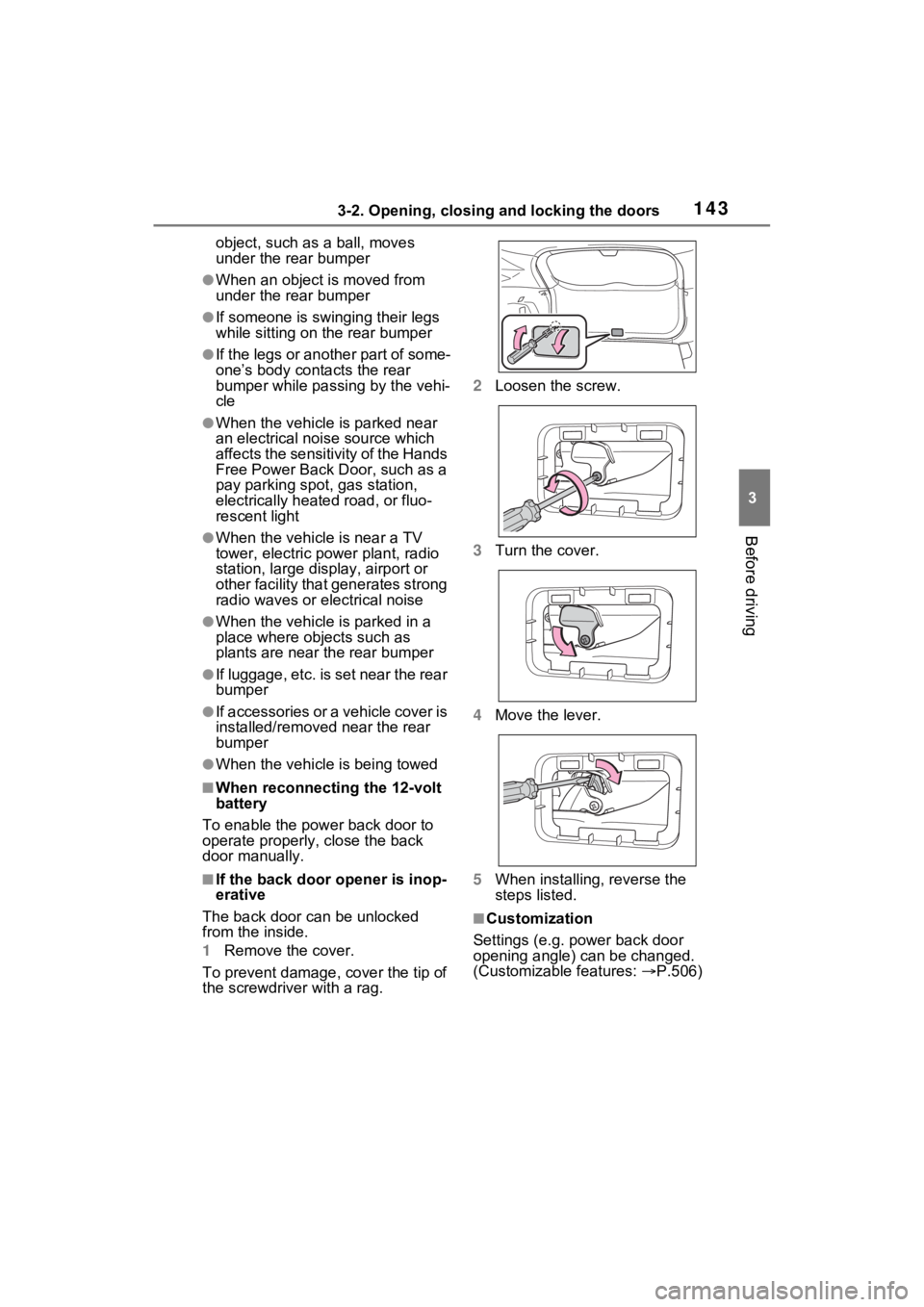
■If the back door opener is inop-
erative
The back door can be unlocked
from the inside.
1 Remove the cover.
To prevent damage, cover the tip of
the screwdriver with a rag. 2
Loosen the screw.
3 Turn the cover.
4 Move the lever.
5 When installing, reverse the
steps listed.
■Customization
Settings (e.g. power back door
opening angle) can be changed.
(Customizable features: P.506)
Page 152 of 548
1503-2. Opening, closing and locking the doors
mechanical key, to unlock the
doors.
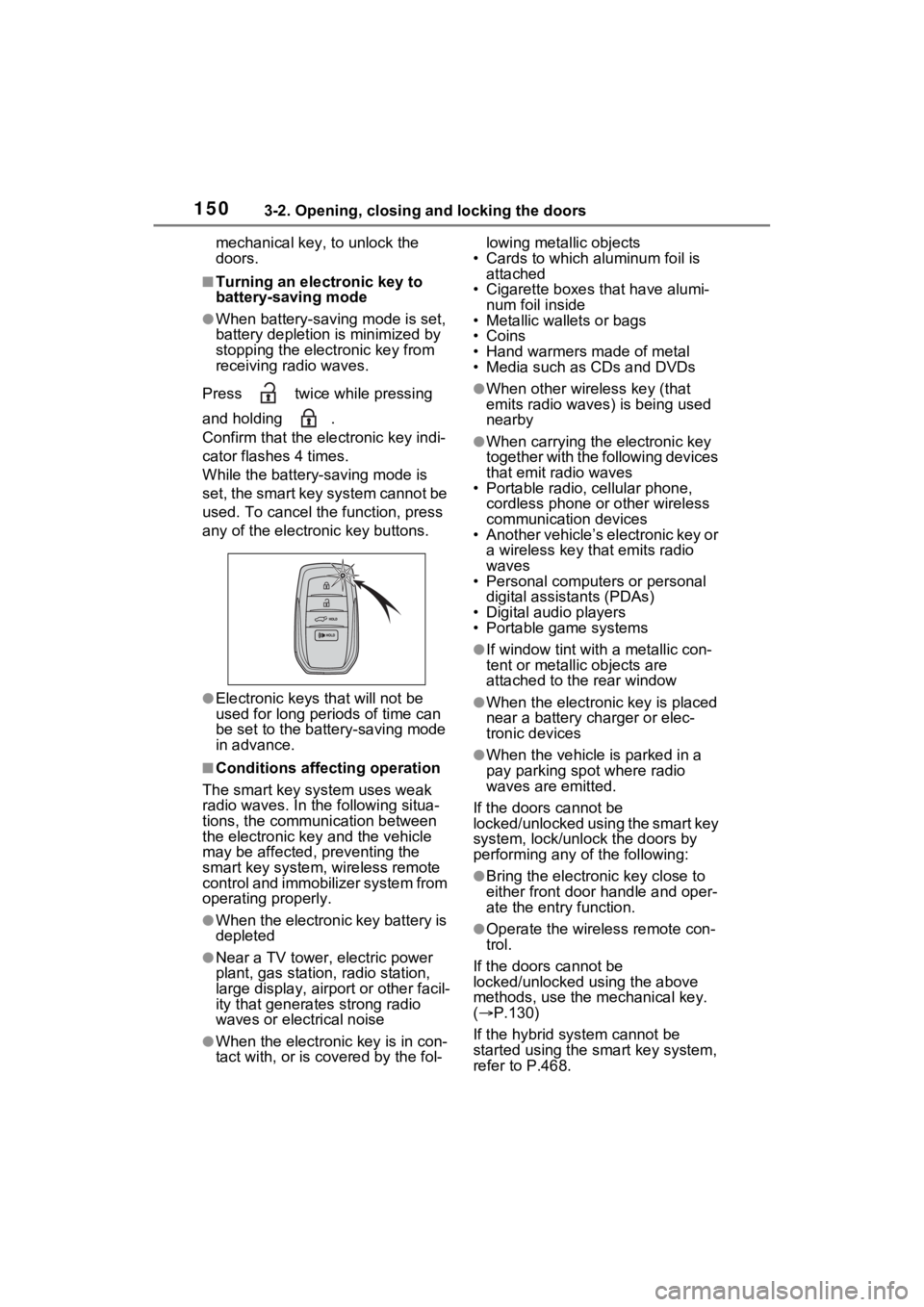
■Turning an electronic key to
battery-saving mode
●When battery-saving mode is set,
battery depletion is minimized by
stopping the electronic key from
receiving radio waves.
Press twice while pressing
and holding .
Confirm that the electronic key indi-
cator flashes 4 times.
While the battery-saving mode is
set, the smart key system cannot be
used. To cancel the function, press
any of the electronic key buttons.
●Electronic keys that will not be
used for long periods of time can
be set to the battery-saving mode
in advance.
■Conditions affecting operation
The smart key system uses weak
radio waves. In the following situa-
tions, the communication between
the electronic key and the vehicle
may be affected, preventing the
smart key system, wireless remote
control and immobilizer system from
operating properly.
●When the electronic key battery is
depleted
●Near a TV tower, electric power
plant, gas station , radio station,
large display, airpo rt or other facil-
ity that generates strong radio
waves or electrical noise
●When the electronic key is in con-
tact with, or is covered by the fol- lowing metallic objects
• Cards to which aluminum foil is
attached
• Cigarette boxes that have alumi- num foil inside
• Metallic wallets or bags
•Coins
• Hand warmers made of metal
• Media such as CDs and DVDs
●When other wireless key (that
emits radio waves) is being used
nearby
●When carrying the electronic key
together with the following devices
that emit radio waves
• Portable radio, cellular phone,
cordless phone or other wireless
communication devices
• Another vehicle’s electronic key or
a wireless key that emits radio
waves
• Personal computers or personal
digital assistants (PDAs)
• Digital audio players
• Portable game systems
●If window tint wit h a metallic con-
tent or metallic objects are
attached to the rear window
●When the electronic key is placed
near a battery charger or elec-
tronic devices
●When the vehicle is parked in a
pay parking spot where radio
waves are emitted.
If the doors cannot be
locked/unlocked using the smart key
system, lock/unlock the doors by
performing any of the following:
●Bring the electronic key close to
either front door handle and oper-
ate the entry function.
●Operate the wireless remote con-
trol.
If the doors cannot be
locked/unlocked using the above
methods, use the mechanical key.
( P.130)
If the hybrid system cannot be
started using the smart key system,
refer to P.468.