sensor TOYOTA VENZA HYBRID 2022 Owners Manual
[x] Cancel search | Manufacturer: TOYOTA, Model Year: 2022, Model line: VENZA HYBRID, Model: TOYOTA VENZA HYBRID 2022Pages: 548, PDF Size: 17.93 MB
Page 34 of 548
341-1. For safe use
SRS curtain shield airbags
• Can help protect primarily the head of occupants in the outboard seats
• Can help prevent the occupants from being thrown from the vehi cle in the
event of vehicle rollover
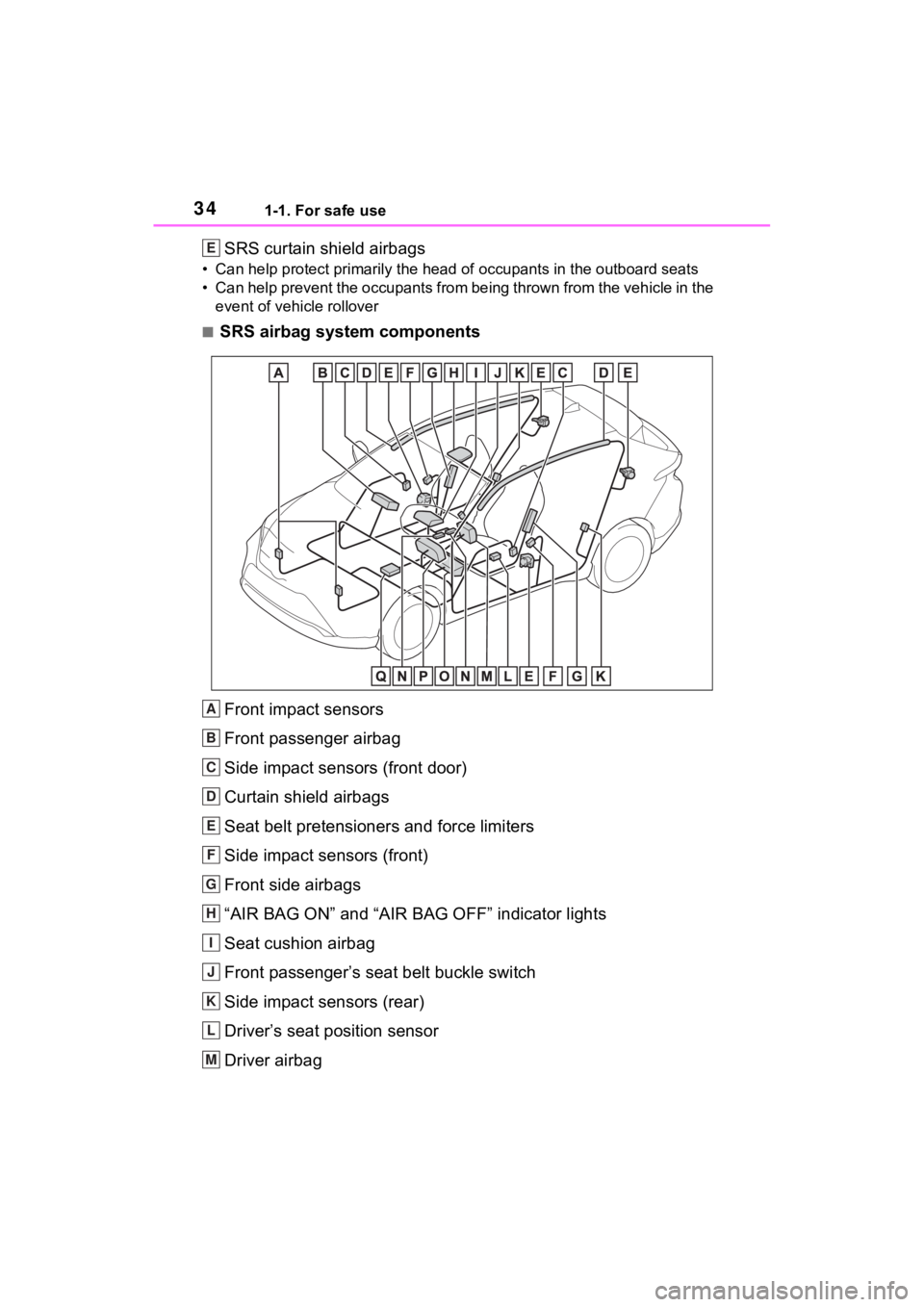
■SRS airbag system components
Front impact sensors
Front passenger airbag
Side impact sensors (front door)
Curtain shield airbags
Seat belt pretensioners and force limiters
Side impact sensors (front)
Front side airbags
“AIR BAG ON” and “AIR BAG OFF” indicator lights
Seat cushion airbag
Front passenger’s seat belt buckle switch
Side impact sensors (rear)
Driver’s seat position sensor
Driver airbag
E
A
B
C
D
E
F
G
H
I
J
K
L
M
Page 35 of 548

351-1. For safe use
1
For safety and security
Front passenger occupant classification sensors
Knee airbag
SRS warning light
Airbag sensor assembly
Your vehicle is equipped with ADVANCED AIRBAGS designed
based on the US motor vehicle safety standards (FMVSS208). The
airbag sensor assembly (ECU) cont rols airbag deployment based on
information obtained from the sensors etc. shown in the system
components diagram above. This in formation includes crash sever-
ity and occupant information. As the airbags deploy, a chemical
reaction in the inflators quickly fills the airbags with non-toxic gas to
help restrain the motion of the occupants.
■If the SRS airbags deploy
(inflate)
●Slight abrasions, burns, bruising
etc., may be sustained from SRS
airbags, due to the extremely high
speed deployment (inflation) by
hot gases.
●A loud noise and white powder will
be emitted.
●Parts of the airbag module (steer-
ing wheel hub, airbag cover and
inflator) as well as the front seats,
parts of the front and rear pillars,
and roof side rails, may be hot for
several minutes. T he airbag itself
may also be hot.
●The windshield may crack.
●The hybrid system will be stopped
and fuel supply to the engine will
be stopped. ( P.78)
●All of the doors will be unlocked.
( P.134)
●The brakes and st op lights will be
controlled automatically.
( P.297)
●The interior lights will turn on auto-
matically. ( P.334)
●The emergency flashers will turn
on automatically. ( P.430)
●For Safety Connect subscribers, if any of the following situations
occur, the system is designed to
send an emergency call to the
response center, notifying them of
the vehicle’s location (without
needing to push the “SOS” button)
and an agent will attempt to speak
with the occupants to ascertain
the level of emergency and assis-
tance required. If the occupants
are unable to communicate, the
agent automatically treats the call
as an emergency and helps to dis-
patch the necessary emergency
services. (
P.65)
• An SRS airbag is deployed.
• A seat belt pretensioner is acti- vated.
• The vehicle is involved in a severe rear-end collision.
■SRS airbag deployment condi-
tions (SRS front airbags)
●The SRS front airbags will deploy
in the event of an impact that
exceeds the set threshold level
(the level of forc e corresponding
to an approximately 12 - 18 mph
[20 - 30 km/h] frontal collision with
a fixed wall that does not move or
deform).
However, this threshold velocity will
be considerably higher in the follow-
ing situations:
N
O
P
Q
Page 78 of 548
781-4. Hybrid system
When a certain level of impact is
detected by the impact sensor,
the emergency shut off system
blocks the high voltage current
and stops the fuel pump to mini-
mize the risk of electrocution
and fuel leakage. If the emer-
gency shut off system activates,
your vehicle will not restart. To
restart the hybrid system, con-
tact your Toyota dealer.
A message is automatically dis-
played when a malfunction
occurs in the hybrid system or
an improper operation is
attempted.
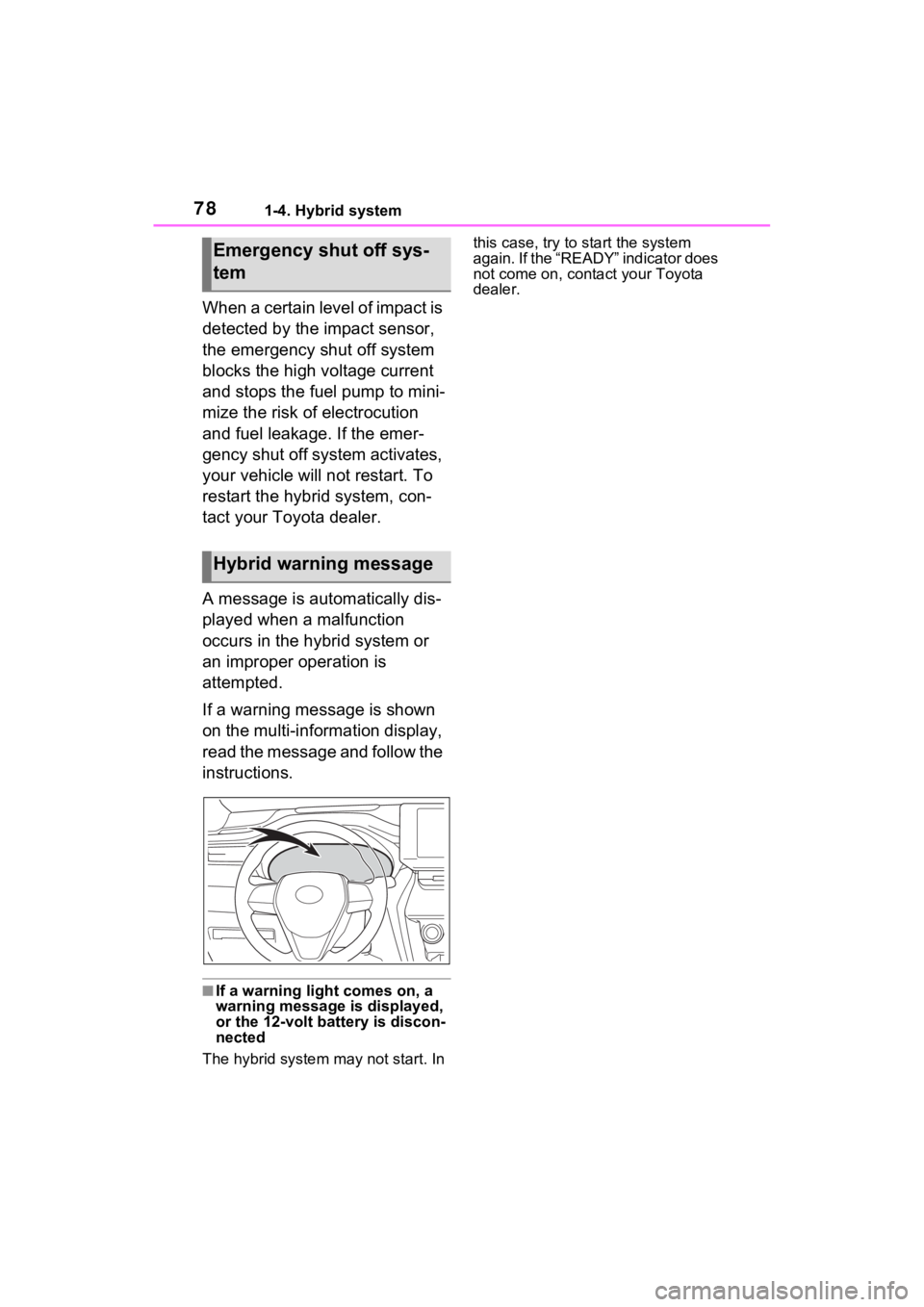
If a warning message is shown
on the multi-information display,
read the message and follow the
instructions.
■If a warning light comes on, a
warning message is displayed,
or the 12-volt battery is discon-
nected
The hybrid system may not start. In this case, try to start the system
again. If the “READY” indicator does
not come on, contact your Toyota
dealer.
Emergency shut off sys-
tem
Hybrid warning message
Page 104 of 548

1042-1. Instrument cluster
Select to change the RCTA buzzer
volume.
■ RSA (Road Sign
Assist) (if equipped)
( P.254)
Select to set up the following
items.
Road Sign Assist on/off
Select to enable/disable the RSA
(Road Sign Assist).
“Notification method”
Select to change e ach notification
method used to notify the driver
when the system recognizes
excess speed and Do Not Enter
sign.
“Notification Level”
Select to change e ach notification
level used to notify the driver when
the system recognizes a speed limit
sign.
■Vehicle Settings
PBD (Power Back Door)
( P.139)
Select to set up the following items.
• System settings
Select to enable/disable the power
back door system.
• “Hands Free” (if equipped)
Select to enable/disable the Hands
Free Power Back Door operation.
• “Opening Adjustment”
Select the open position when
power back door is fully open.
•“Volume”
Select to set the volume of the
buzzer which sounds when the power back door system operates.
“TPWS setting” (Tire Pres-
sure Warning System)
( P.399)
• “Setting Pressure”
Select to initialize the tire pressure
warning system.
• “Identify Wheel”
Select to change the tire pressure
warning system sen sor ID code set.
To enable this function, a second
set of tire pressure warning system
sensor ID codes must be registered
by a Toyota dealer. For information
regarding changing the registered
ID code set, contact your Toyota
dealer.
• “Setting Unit”
Select to change the units of mea-
sure displayed.
Rear Seat Reminder
( P.135)
Select to enable/disable the rear
seat reminder function.
“Scheduled Maintenance”
( P.378)
Select to reset the scheduled main-
tenance information (message indi-
cating maintenance is required and
distance until the next mainte-
nance) after all ma intenance is per-
formed.
Oil Maintenance
Select to reset the Oil maintenance.
( P.390)
■ Settings
“Language”
Select to change the language on
Page 115 of 548

1152-1. Instrument cluster
2
Vehicle status information and indicators
Parking Support Brake function.
■HUD (Head-up display) (if
equipped) (P.119)
Select to change the head-up
display setting.
■ RSA (Road Sign
Assist) (if equipped)
( P.254)
Select to set up the following
items.
Road Sign Assist on/off
Select to enable/disable the RSA
(Road Sign Assist).
“Notification method”
Select to change e ach notification
method used to notify the driver
when the system recognizes
excess speed and Do Not Enter
sign.
“Notification Level”
Select to change e ach notification
level used to notify the driver when
the system recognizes a speed limit
sign.
■ Vehicle Settings
PBD (Power Back Door)
( P.139)
Select to set up the following items.
• System settings
Select to enable/disable the power
back door system.
• “Hands Free” (if equipped)
Select to enable/disable the Hands
Free Power Back Door operation.
• “Opening Adjustment”
Select the open position when power back door is fully open.
•“Volume”
Select to set the volume of the
buzzer which sounds when the
power back door system operates.
“TPWS setting” (Tire Pres-
sure Warning System)
( P.399)
• “Setting Pressure”
Select to initialize the tire pressure
warning system.
• “Identify Wheel”
Select to change the tire pressure
warning system sen sor ID code set.
To enable this function, a second
set of tire pressure warning system
sensor ID codes must be registered
by a Toyota dealer. For information
regarding changing the registered
ID code set, contact your Toyota
dealer.
• “Setting Unit”
Select to change the units of mea-
sure displayed.
Rear Seat Reminder
( P.135)
Select to enable/disable the rear
seat reminder function.
“Scheduled Maintenance”
( P.378)
Select to reset the scheduled main-
tenance information (message indi-
cating maintenance is required and
distance until the next mainte-
nance) after all ma intenance is per-
formed.
Oil Maintenance
Select to reset the Oil maintenance.
( P.390)
Page 134 of 548
1333-2. Opening, closing and locking the doors
3
Before driving
3-2.Opening, closing and locking the doors
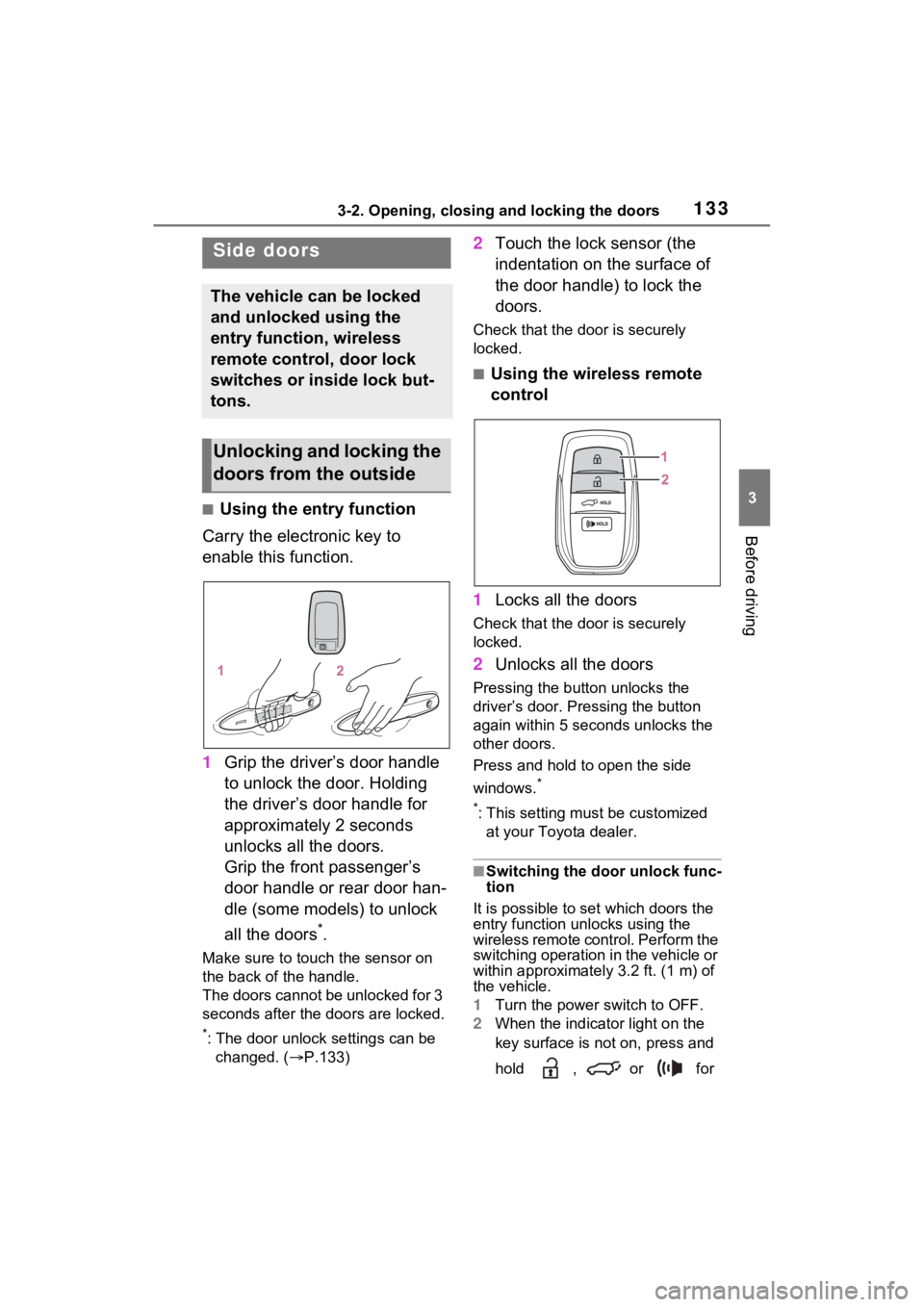
■Using the entry function
Carry the electronic key to
enable this function.
1 Grip the driver’s door handle
to unlock the door. Holding
the driver’s door handle for
approximately 2 seconds
unlocks all the doors.
Grip the front passenger’s
door handle or rear door han-
dle (some models) to unlock
all the doors
*.
Make sure to touch the sensor on
the back of the handle.
The doors cannot be unlocked for 3
seconds after the doors are locked.
*: The door unlock settings can be
changed. ( P.133)
2 Touch the lock sensor (the
indentation on the surface of
the door handle) to lock the
doors.
Check that the d oor is securely
locked.
■Using the wireless remote
control
1 Locks all the doors
Check that the d oor is securely
locked.
2 Unlocks all the doors
Pressing the button unlocks the
driver’s door. Pressing the button
again within 5 seconds unlocks the
other doors.
Press and hold to open the side
windows.
*
*
: This setting must be customized at your Toyota dealer.
■Switching the door unlock func-
tion
It is possible to set which doors the
entry function unlocks using the
wireless remote control. Perform the
switching operation in the vehicle or
within approximately 3.2 ft. (1 m) of
the vehicle.
1 Turn the power switch to OFF.
2 When the indicator light on the
key surface is not on, press and
hold , or for
Side doors
The vehicle can be locked
and unlocked using the
entry function, wireless
remote control, door lock
switches or inside lock but-
tons.
Unlocking and locking the
doors from the outside
Page 135 of 548
1343-2. Opening, closing and locking the doors
approximately 5 seconds while
pressing and holding .
The setting changes each time an
operation is performed, as shown
below. (When changing the setting
continuously, release the buttons,
wait for at least 5 seconds, and
repeat step 2.)
Vehicles with alarm: To prevent
unintended triggering of the alarm,
unlock the doors us ing the wireless
remote control and open and close
a door once after t he settings have
been changed. (If a door is not
opened within 60 seconds after
is pressed, the doors will be
locked again a nd the alarm will
automatically be set.)
In a case that the alarm is triggered,
immediately stop the alarm. (
P.80)
■Impact detection door lock
release system
In the event that t he vehicle is sub-
ject to a strong impact, all the doors
are unlocked. Depending on the
force of the impact or the type of
accident, however, the system may
not operate.
■Operation signals
Doors: A buzzer sounds and the
emergency flashers flash to indicate
that the doors have been
locked/unlocked. (Locked: Once;
Unlocked: Twice)
Side windows: A buzzer sounds to
indicate that the side windows are
operating.
■Security feature
If a door is not opened within
approximately 60 s econds after the
vehicle is unlocked, the security fea-
ture automatically locks the vehicle
again. (However, depending on the
location of the el ectronic key, the
key may be detected as being in the
vehicle. In this case, vehicle may be
unlocked.)
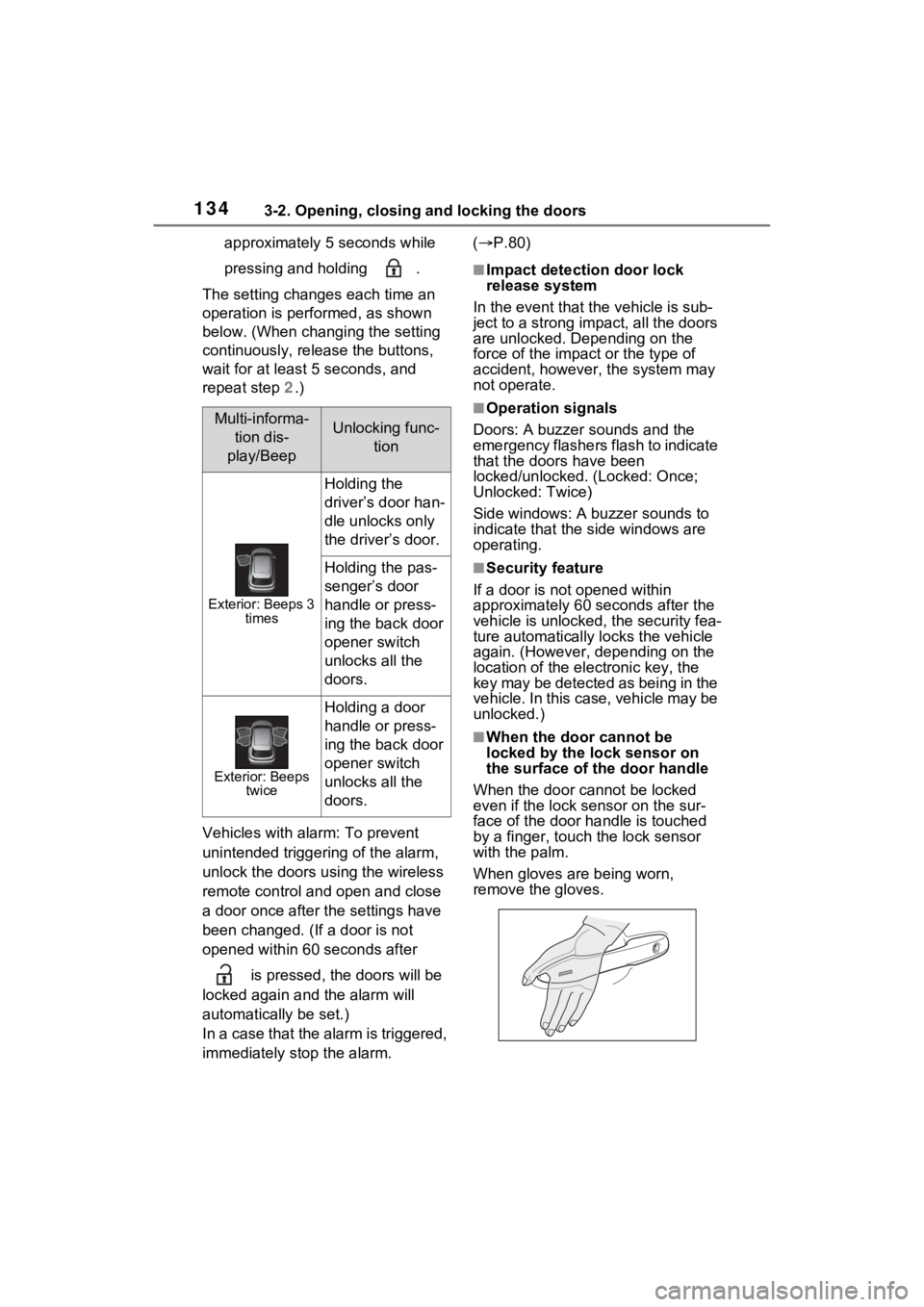
■When the door cannot be
locked by the lock sensor on
the surface of the door handle
When the door cannot be locked
even if the lock se nsor on the sur-
face of the door handle is touched
by a finger, touch the lock sensor
with the palm.
When gloves are being worn,
remove the gloves.
Multi-informa-
tion dis-
play/BeepUnlocking func- tion
Exterior: Beeps 3 times
Holding the
driver’s door han-
dle unlocks only
the driver’s door.
Holding the pas-
senger’s door
handle or press-
ing the back door
opener switch
unlocks all the
doors.
Exterior: Beeps twice
Holding a door
handle or press-
ing the back door
opener switch
unlocks all the
doors.
Page 142 of 548
1413-2. Opening, closing and locking the doors
3
Before driving
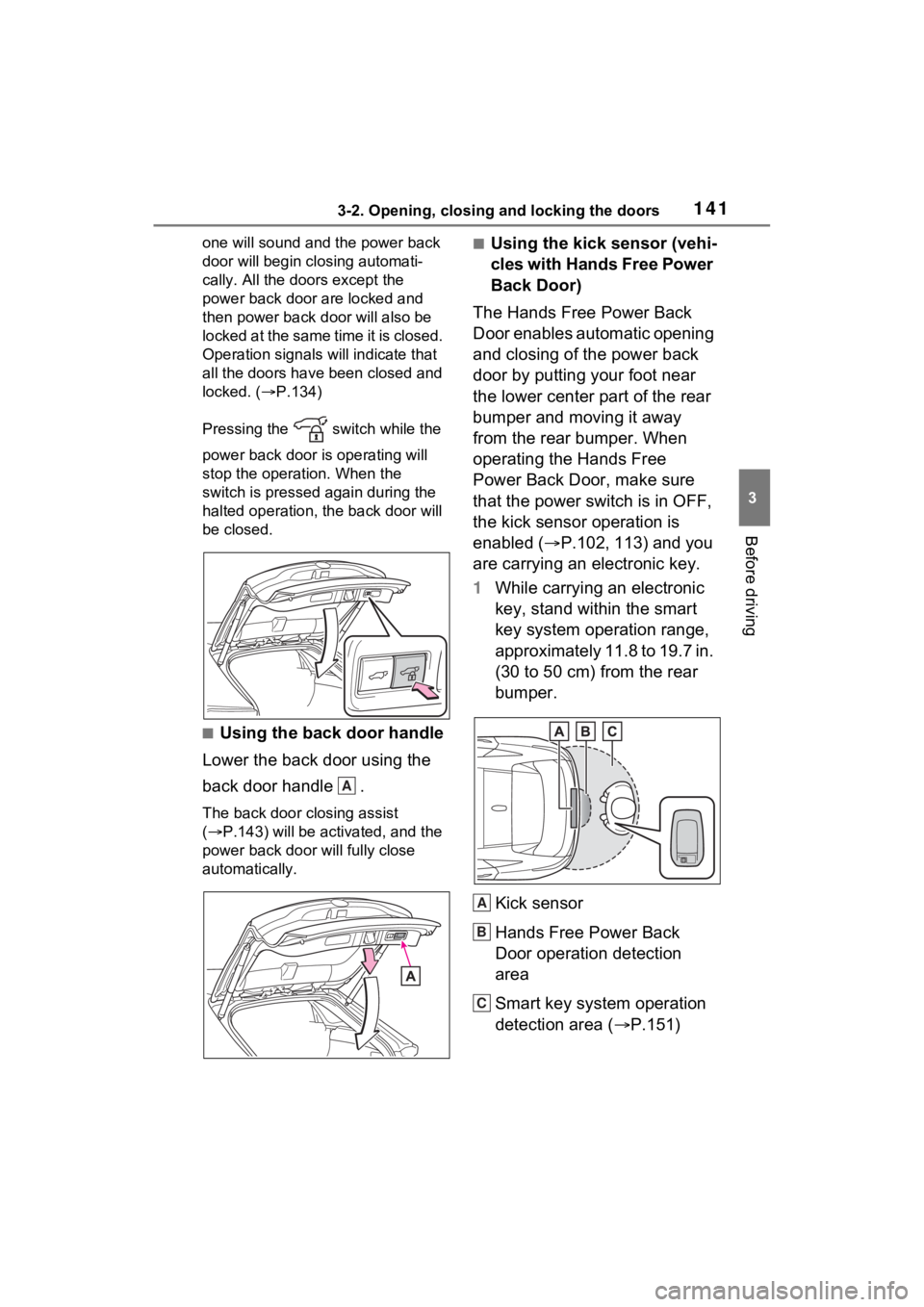
one will sound and the power back
door will begin closing automati-
cally. All the doors except the
power back door are locked and
then power back d oor will also be
locked at the same time it is closed.
Operation signals will indicate that
all the doors have been closed and
locked. ( P.134)
Pressing the switch while the
power back door is operating will
stop the operation. When the
switch is pressed again during the
halted operation, the back door will
be closed.
■Using the back door handle
Lower the back door using the
back door handle .
The back door closing assist
( P.143) will be activated, and the
power back door will fully close
automatically.
■Using the kick sensor (vehi-
cles with Hands Free Power
Back Door)
The Hands Free Power Back
Door enables automatic opening
and closing of the power back
door by putting your foot near
the lower center part of the rear
bumper and moving it away
from the rear bumper. When
operating the Hands Free
Power Back Door, make sure
that the power switch is in OFF,
the kick sensor operation is
enabled ( P.102, 113) and you
are carrying an electronic key.
1 While carrying an electronic
key, stand within the smart
key system operation range,
approximately 11.8 to 19.7 in.
(30 to 50 cm) from the rear
bumper.
Kick sensor
Hands Free Power Back
Door operation detection
area
Smart key system operation
detection area ( P.151)
A
A
B
C
Page 143 of 548
1423-2. Opening, closing and locking the doors
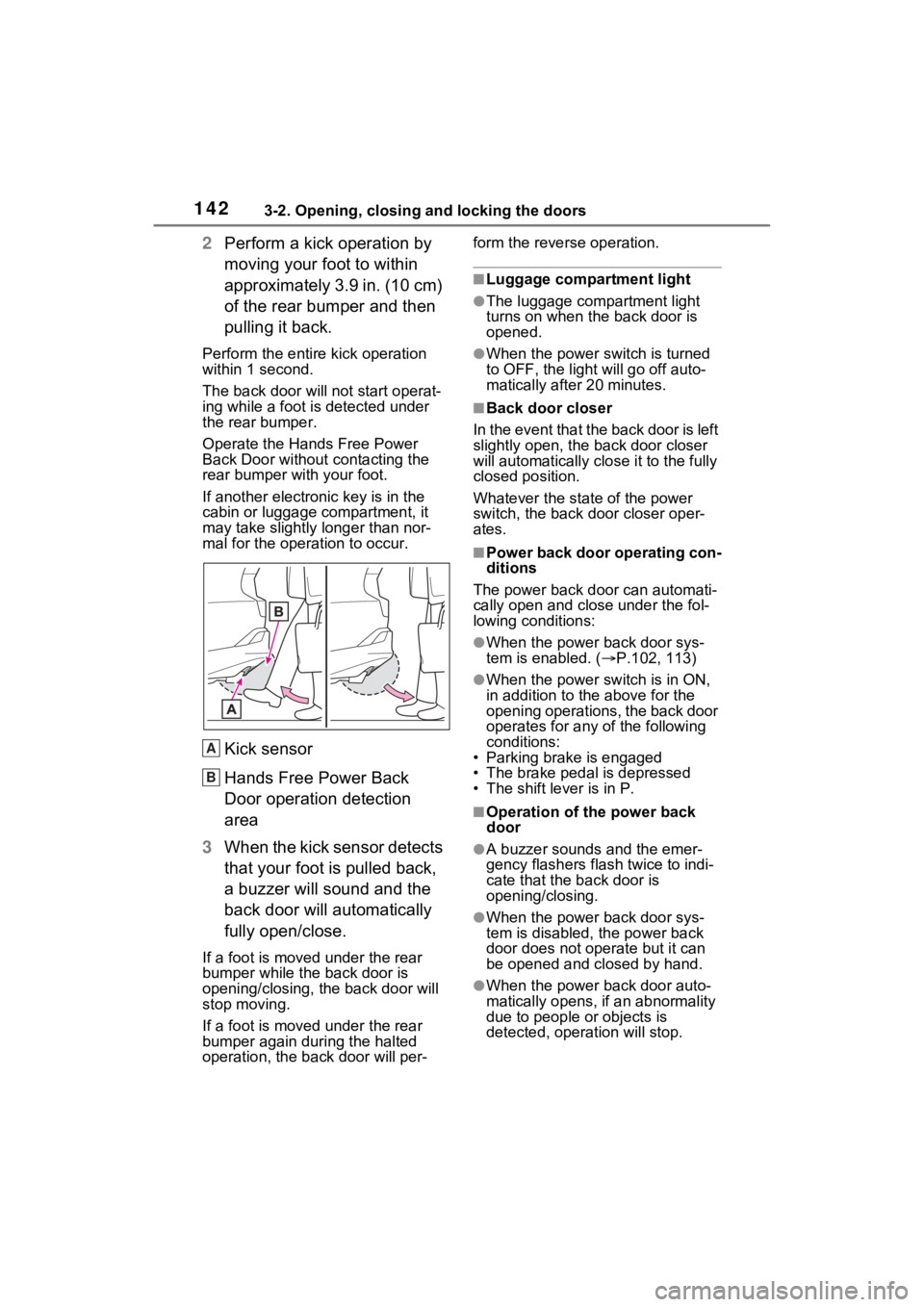
2Perform a kick operation by
moving your foot to within
approximately 3.9 in. (10 cm)
of the rear bumper and then
pulling it back.
Perform the entire kick operation
within 1 second.
The back door will not start operat-
ing while a foot is detected under
the rear bumper.
Operate the Hands Free Power
Back Door without contacting the
rear bumper with your foot.
If another electronic key is in the
cabin or luggage compartment, it
may take slightly longer than nor-
mal for the operation to occur.
Kick sensor
Hands Free Power Back
Door operation detection
area
3 When the kick sensor detects
that your foot is pulled back,
a buzzer will sound and the
back door will automatically
fully open/close.
If a foot is moved under the rear
bumper while the back door is
opening/closing, the back door will
stop moving.
If a foot is moved under the rear
bumper again during the halted
operation, the back door will per- form the rever
se operation.
■Luggage compartment light
●The luggage compartment light
turns on when the back door is
opened.
●When the power switch is turned
to OFF, the light will go off auto-
matically after 20 minutes.
■Back door closer
In the event that the back door is left
slightly open, the back door closer
will automatically clo se it to the fully
closed position.
Whatever the state of the power
switch, the back door closer oper-
ates.
■Power back door operating con-
ditions
The power back doo r can automati-
cally open and close under the fol-
lowing conditions:
●When the power back door sys-
tem is enabled. ( P.102, 113)
●When the power switch is in ON,
in addition to the above for the
opening operations, the back door
operates for any of the following
conditions:
• Parking brake is engaged
• The brake pedal is depressed
• The shift lever is in P.
■Operation of the power back
door
●A buzzer sounds and the emer-
gency flashers flash twice to indi-
cate that the back door is
opening/closing.
●When the power back door sys-
tem is disabled, t he power back
door does not operate but it can
be opened and closed by hand.
●When the power back door auto-
matically opens, if an abnormality
due to people or objects is
detected, operation will stop.
A
B
Page 144 of 548
1433-2. Opening, closing and locking the doors
3
Before driving
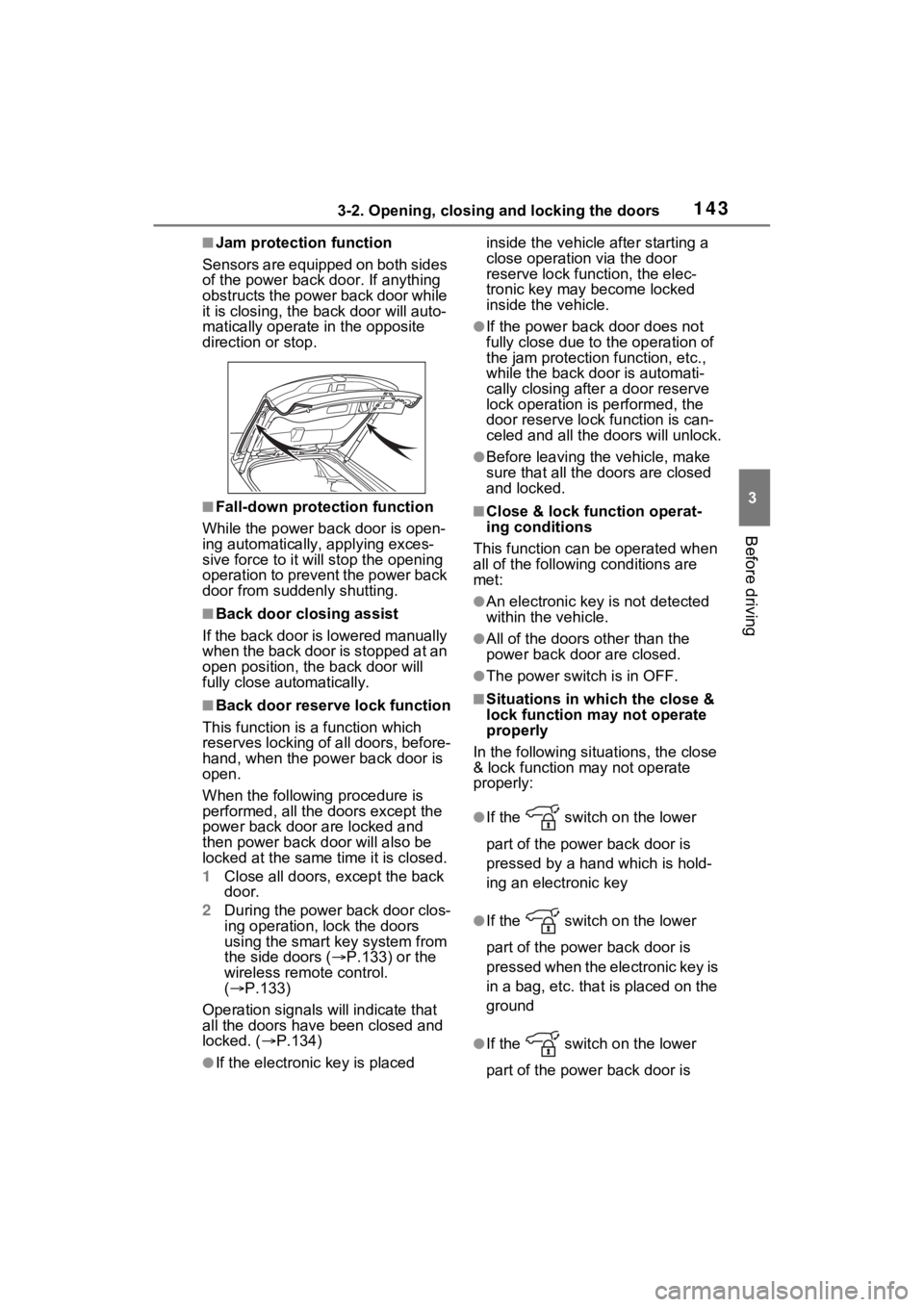
■Jam protection function
Sensors are equipped on both sides
of the power back door. If anything
obstructs the power back door while
it is closing, the b ack door will auto-
matically operate in the opposite
direction or stop.
■Fall-down protection function
While the power back door is open-
ing automatically, applying exces-
sive force to it will stop the opening
operation to prevent the power back
door from suddenly shutting.
■Back door closing assist
If the back door is lowered manually
when the back door is stopped at an
open position, th e back door will
fully close automatically.
■Back door reserve lock function
This function is a function which
reserves locking of all doors, before-
hand, when the power back door is
open.
When the following procedure is
performed, all the doors except the
power back door are locked and
then power back d oor will also be
locked at the same time it is closed.
1 Close all doors, except the back
door.
2 During the power back door clos-
ing operation, lock the doors
using the smart key system from
the side doors ( P.133) or the
wireless remo te control.
( P.133)
Operation signals will indicate that
all the doors have been closed and
locked. ( P.134)
●If the electronic key is placed inside the vehicle after starting a
close operation via the door
reserve lock function, the elec-
tronic key may become locked
inside the vehicle.
●If the power back door does not
fully close due to the operation of
the jam protection function, etc.,
while the back door is automati-
cally closing after a door reserve
lock operation is performed, the
door reserve lock function is can-
celed and all the
doors will unlock.
●Before leaving the vehicle, make
sure that all the doors are closed
and locked.
■Close & lock function operat-
ing conditions
This function can be operated when
all of the followin g conditions are
met:
●An electronic key is not detected
within the vehicle.
●All of the doors other than the
power back door are closed.
●The power switch is in OFF.
■Situations in which the close &
lock function ma y not operate
properly
In the following situ ations, the close
& lock function may not operate
properly:
●If the switch on the lower
part of the power back door is
pressed by a hand which is hold-
ing an electronic key
●If the switch on the lower
part of the power back door is
pressed when the e lectronic key is
in a bag, etc. that is placed on the
ground
●If the switch on the lower
part of the power back door is