service indicator TOYOTA VENZA HYBRID 2022 Owners Manual
[x] Cancel search | Manufacturer: TOYOTA, Model Year: 2022, Model line: VENZA HYBRID, Model: TOYOTA VENZA HYBRID 2022Pages: 548, PDF Size: 17.93 MB
Page 65 of 548
651-3. Emergency assistance
1
For safety and security
1-3.Emergency assistance
*: If equipped
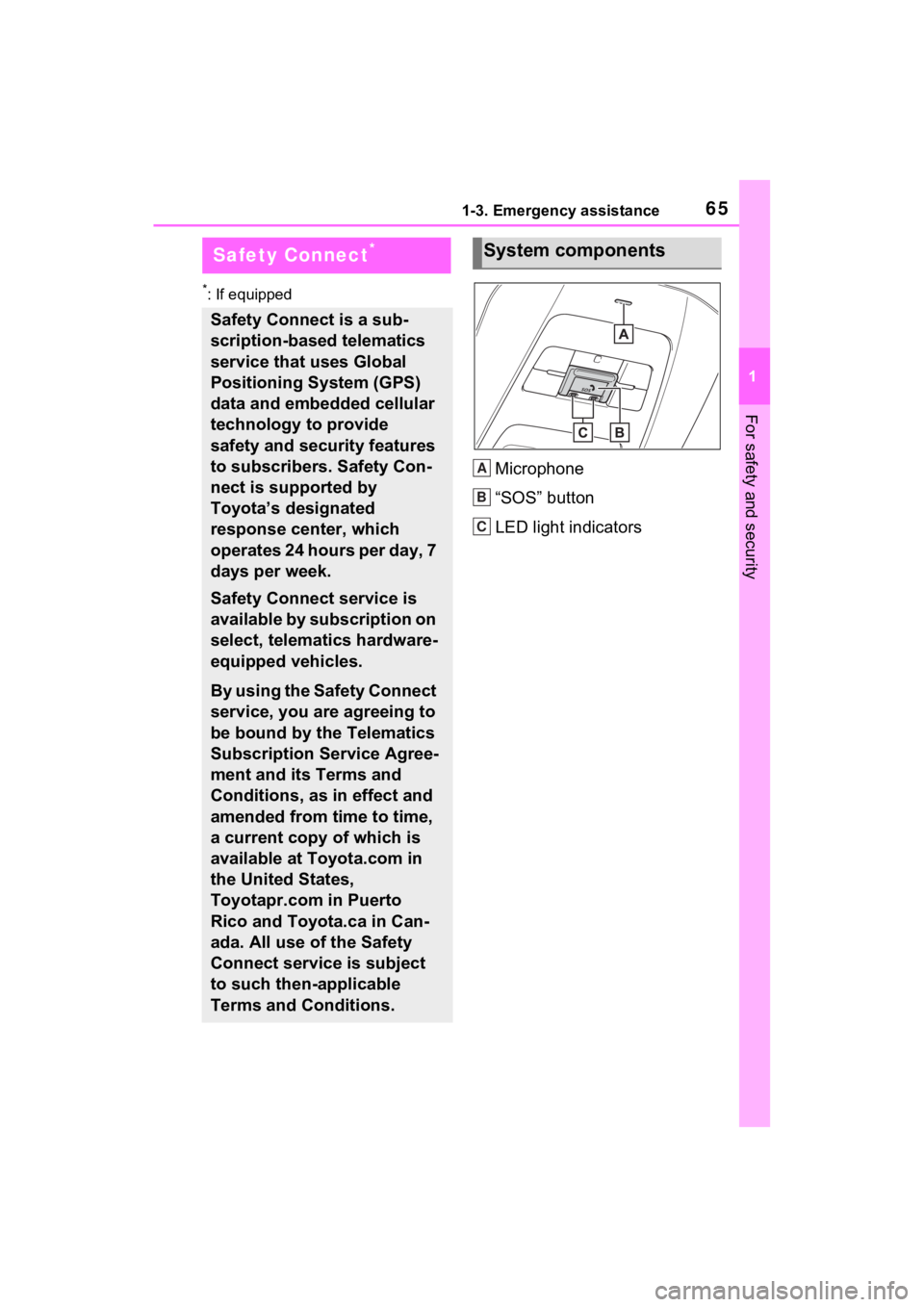
Microphone
“SOS” button
LED light indicators
Safety Connect*
Safety Connect is a sub-
scription-based telematics
service that uses Global
Positioning System (GPS)
data and embedded cellular
technology to provide
safety and security features
to subscribers. Safety Con-
nect is supported by
Toyota’s designated
response center, which
operates 24 hours per day, 7
days per week.
Safety Connect service is
available by subscription on
select, telematics hardware-
equipped vehicles.
By using the Safety Connect
service, you are agreeing to
be bound by the Telematics
Subscription Service Agree-
ment and its Terms and
Conditions, as in effect and
amended from time to time,
a current copy of which is
available at Toyota.com in
the United States,
Toyotapr.com in Puerto
Rico and Toyota.ca in Can-
ada. All use of the Safety
Connect service is subject
to such then-applicable
Terms and Conditions.
System components
A
B
C
Page 68 of 548
681-3. Emergency assistance
When the power switch is turned
to ON, the red indicator light
comes on for 2 seconds then
turns off. Afterward, the green
indicator light comes on, indicat-
ing that the service is active.
The following indicator light pat-
terns indicate specific system
usage conditions:
Green indicator light on =
Active service
Green indicator light flashing
= Safety Connect call in pro-
cess
Red indicator light (except at
vehicle start-up) = System
malfunction (contact your
Toyota dealer)
No indicator light (off) =
Safety Connect service not
active
■Automatic Collision Notifi-
cation
In case of either airbag deploy-
ment or severe rear-end colli-
sion, the system is designed to
automatically call the response
center. The responding agent
receives the vehicle’s location
and attempts to speak with the
vehicle occupants to assess the
level of emergency. If the occu- pants are unable to communi-
cate, the agent automatically
treats the call as an emergency,
contacts the nearest emer-
gency services provider to
describe the situation, and
requests that assistance be sent
to the location.
■Stolen Vehicle Location
If your vehicle is stolen, Safety
Connect can work with local
authorities to assist them in
locating and recovering the
vehicle. After filing a police
report, call the Customer Experi-
ence Center at 1-800-331-4331
in the United States, 1-877-855-
8377 in Puerto Rico or 1-888-
869-6828 in Canada, and follow
the prompts for Safety Connect
to initiate this service.
In addition to assisting law
enforcement with recovery of a
stolen vehicle, Safety-Connect-
equipped vehicle location data
may, under certain circum-
stances, be shared with third
parties to locate your vehicle.
Further information is available
at Toyota.com in the United
States, Toyotapr.com in Puerto
Rico and Toyota.ca in Canada.
■Emergency Assistance But-
ton (“SOS”)
In the event of an emergency on
the road, push the “SOS” button
to reach the Safety Connect
response center. The answering
agent will determine your vehi-
Safety Connect LED light
Indicators
Safety Connect services
Page 324 of 548
3245-1. Using the air conditioning system and defogger
●When parking, the system auto-
matically switches to outside air
mode to encourage better air cir-
culation throughout the vehicle,
helping to reduce odors that occur
when starting the vehicle.
■Air conditioning filter
P.413
■Air conditioning system refrig-
erant
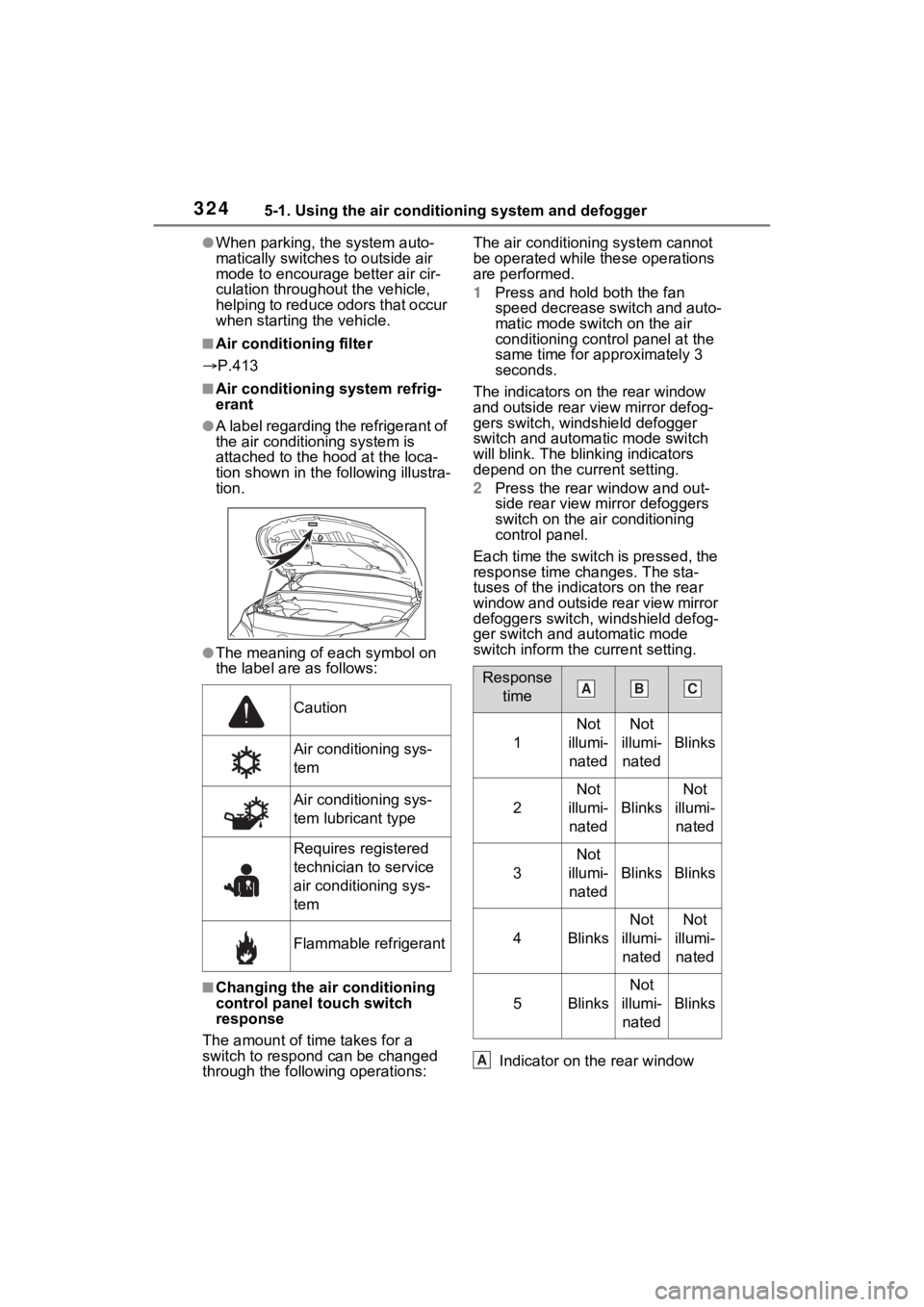
●A label regarding the refrigerant of
the air conditioning system is
attached to the ho od at the loca-
tion shown in the f ollowing illustra-
tion.
●The meaning of each symbol on
the label are as follows:
■Changing the air conditioning
control panel touch switch
response
The amount of time takes for a
switch to respond can be changed
through the following operations: The air conditioning system cannot
be operated while these operations
are performed.
1
Press and hold both the fan
speed decrease switch and auto-
matic mode switch on the air
conditioning control panel at the
same time for approximately 3
seconds.
The indicators on the rear window
and outside rear view mirror defog-
gers switch, windshield defogger
switch and automatic mode switch
will blink. The blinking indicators
depend on the current setting.
2 Press the rear window and out-
side rear view mirror defoggers
switch on the air conditioning
control panel.
Each time the switch is pressed, the
response time changes. The sta-
tuses of the indicators on the rear
window and outside rear view mirror
defoggers switch, windshield defog-
ger switch and automatic mode
switch inform the current setting.
Indicator on the rear window
Caution
Air conditioning sys-
tem
Air conditioning sys-
tem lubricant type
Requires registered
technician to service
air conditioning sys-
tem
Flammable refrigerant
Response time
1
Not
illumi- natedNot
illumi- nated
Blinks
2
Not
illumi- nated
Blinks
Not
illumi- nated
3
Not
illumi- nated
BlinksBlinks
4Blinks
Not
illumi- natedNot
illumi- nated
5Blinks
Not
illumi- nated
Blinks
ABC
A
Page 487 of 548
4878-1. Specifications
8
Vehicle specifications
If fuel containing MMT is used, your
emission control system may be
adversely affected.
The malfunction indicator lamp on
the instrument cluster may come on.
If this happens, contact your Toyota
dealer for service.
■If your engine knocks
●Consult your Toyota dealer.
●You may occasionally notice light
knocking for a short time while
accelerating or driving uphill. This
is normal and there is no need for
concern.
NOTICE
■Notice on fuel quality
●Do not use impro per fuels. If
improper fuels are used, the
engine will be damaged.
●Do not use leaded gasoline.
Leaded gasoline can cause
damage to your vehicle’s three-
way catalytic converters caus-
ing the emission control system
to malfunction.
●Do not use gasohol other than
the type previously stated.
Other gasohol may cause fuel
system damage or vehicle per-
formance problems.
●Using unleaded gasoline with
an octane number or rating
lower than the l evel previously
stated will cause persistent
heavy knocking.
At worst, this will lead to engine
damage.
■Fuel-related poor driveability
If poor driveability (poor hot start-
ing, vaporization, engine knock-
ing, etc.) is encountered after
using a different type of fuel, dis-
continue the use of that type of
fuel.
■When refueling with gasohol
Take care not to spill gasohol. It
can damage your vehicle’s paint.