air condition TOYOTA VERSO 2011 Owner's Manual
[x] Cancel search | Manufacturer: TOYOTA, Model Year: 2011, Model line: VERSO, Model: TOYOTA VERSO 2011Pages: 588, PDF Size: 31.32 MB
Page 241 of 588
241 2-3. Operating the lights and wipers
2
When driving
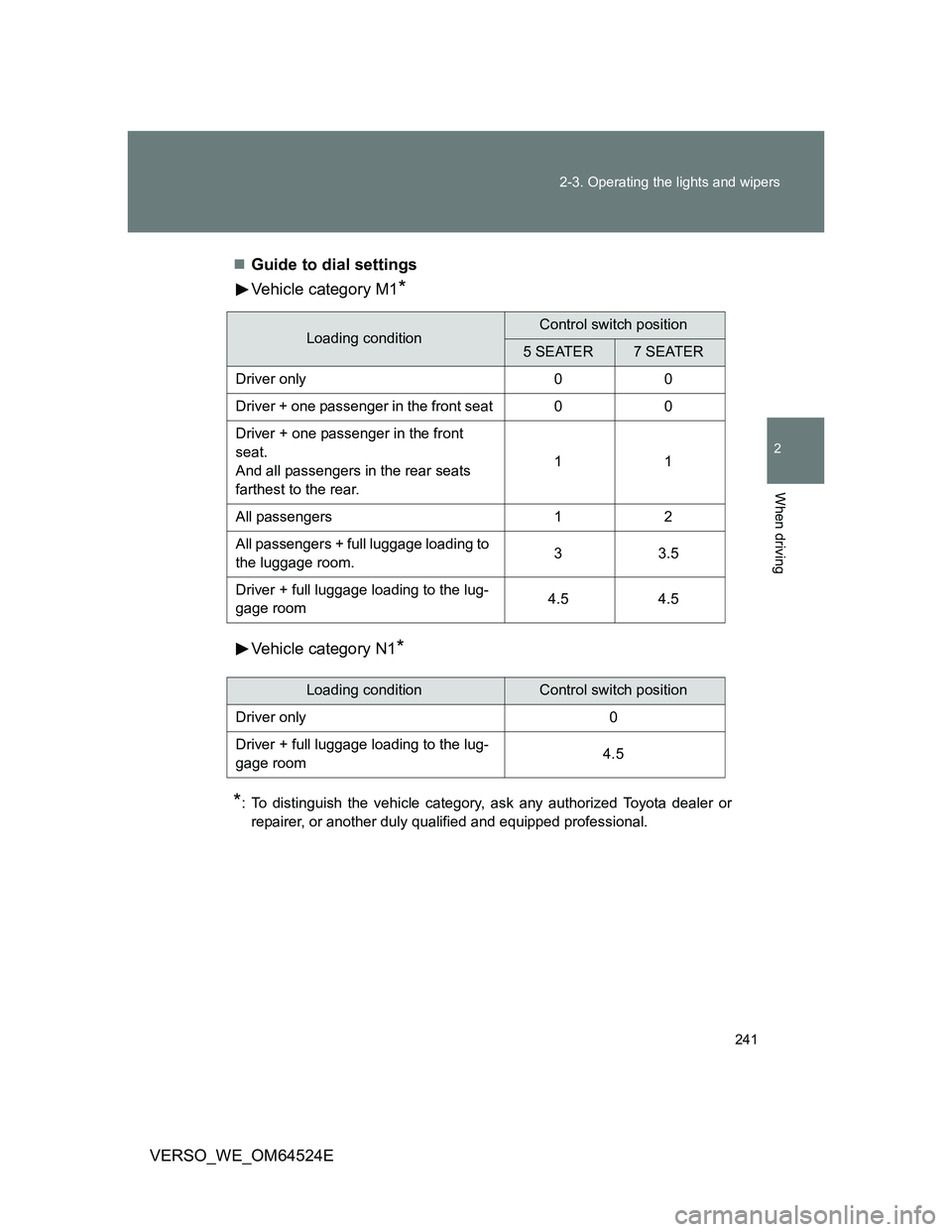
VERSO_WE_OM64524EGuide to dial settings
Vehicle category M1
*
Vehicle category N1*
*
: To distinguish the vehicle category, ask any authorized Toyota dealer or
repairer, or another duly qualified and equipped professional.
Loading conditionControl switch position
5 SEATER7 SEATER
Driver only 0 0
Driver + one passenger in the front seat 0 0
Driver + one passenger in the front
seat.
And all passengers in the rear seats
farthest to the rear.11
All passengers 1 2
All passengers + full luggage loading to
the luggage room.33.5
Driver + full luggage loading to the lug-
gage room4.5 4.5
Loading conditionControl switch position
Driver only 0
Driver + full luggage loading to the lug-
gage room4.5
Page 243 of 588
243 2-3. Operating the lights and wipers
2
When driving
VERSO_WE_OM64524E
Light reminder buzzer
Vehicles without smart entry & start system
A buzzer sounds when the engine switch is turned to the “LOCK” or
“ACC” position and the driver’s door is opened while the lights are turned
on.
Vehicles with smart entry & start system
A buzzer sounds when the ENGINE START STOP switch is turned OFF
or to the ACCESSORY mode and the driver’s door is opened while the
lights are turned on.
Automatic headlight leveling system (vehicles with discharge head-
lights)
The level of the headlights is automatically adjusted according to the number
of passengers and the loading condition of the vehicle to ensure that the
headlights do not interfere with other road users.
Customization that can be configured at any authorized Toyota dealer
or repairer, or another duly qualified and equipped professional
Settings of the light sensor sensitivity can be changed.
(Customizable features P. 569)
NOTICE
To prevent battery discharge
Do not leave the lights on longer than necessary when the engine is not run-
ning.
Page 260 of 588
260 2-4. Using other driving systems
VERSO_WE_OM64524E
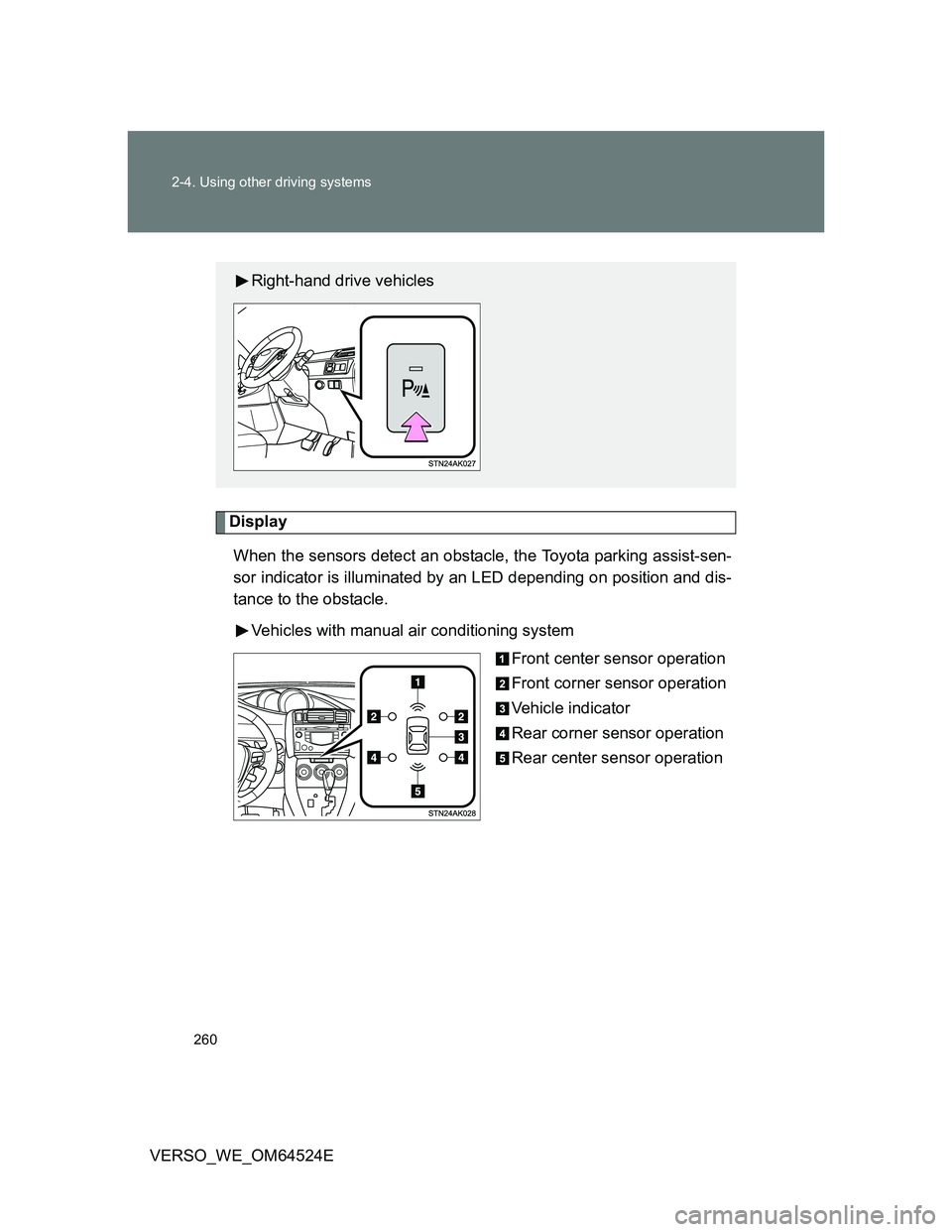
Display
When the sensors detect an obstacle, the Toyota parking assist-sen-
sor indicator is illuminated by an LED depending on position and dis-
tance to the obstacle.
Vehicles with manual air conditioning system
Front center sensor operation
Front corner sensor operation
Vehicle indicator
Rear corner sensor operation
Rear center sensor operation
Right-hand drive vehicles
Page 261 of 588
261 2-4. Using other driving systems
2
When driving
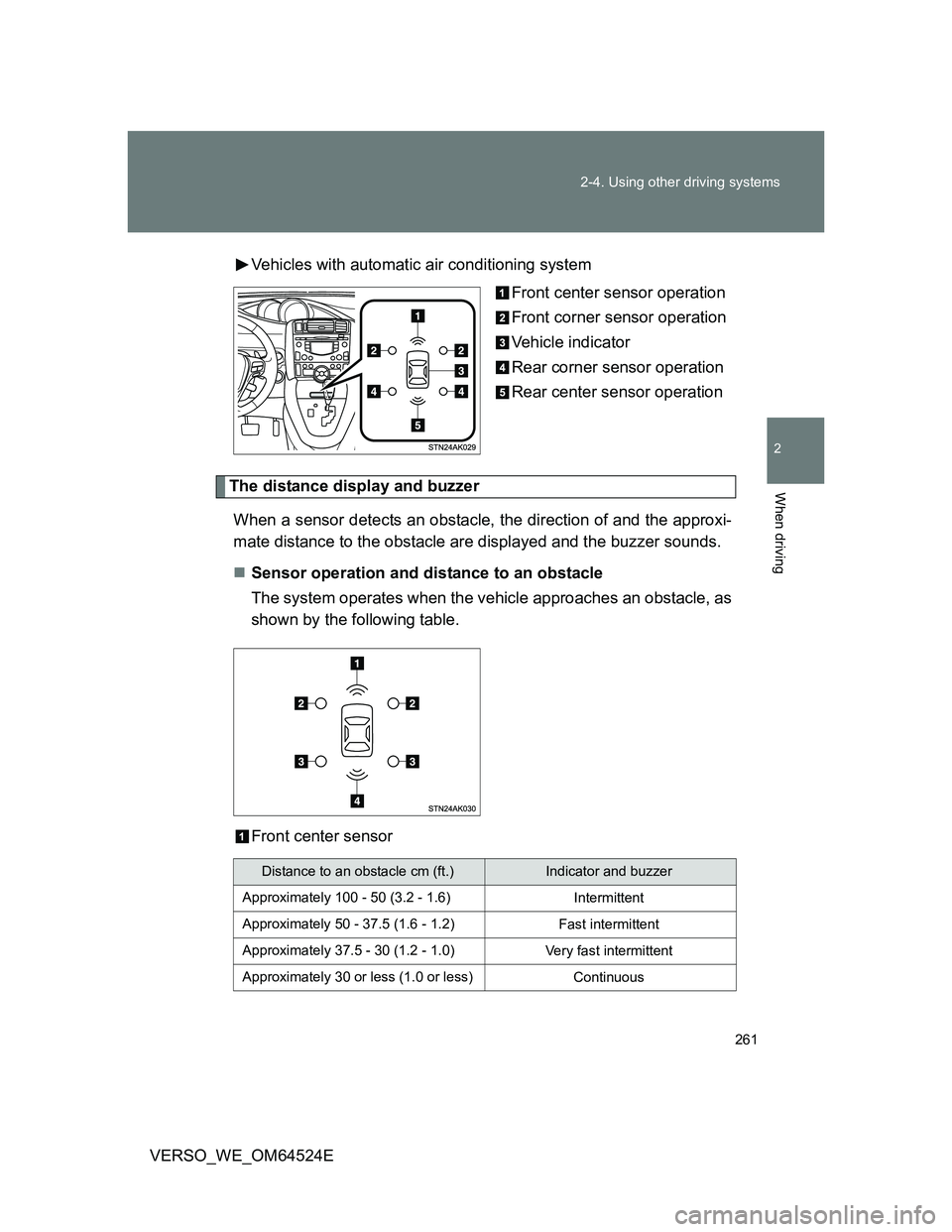
VERSO_WE_OM64524EVehicles with automatic air conditioning system
Front center sensor operation
Front corner sensor operation
Vehicle indicator
Rear corner sensor operation
Rear center sensor operation
The distance display and buzzer
When a sensor detects an obstacle, the direction of and the approxi-
mate distance to the obstacle are displayed and the buzzer sounds.
Sensor operation and distance to an obstacle
The system operates when the vehicle approaches an obstacle, as
shown by the following table.
Front center sensor
Distance to an obstacle cm (ft.)Indicator and buzzer
Approximately 100 - 50 (3.2 - 1.6)
Intermittent
Approximately 50 - 37.5 (1.6 - 1.2)
Fast intermittent
Approximately 37.5 - 30 (1.2 - 1.0)
Very fast intermittent
Approximately 30 or less (1.0 or less)
Continuous
Page 265 of 588
265 2-4. Using other driving systems
2
When driving
VERSO_WE_OM64524E
Sensor detection information
Certain vehicle conditions and the surrounding environment may affect
the ability of a sensor to correctly detect an obstacle. Particular instances
where this may occur are listed below.
• There is dirt, snow or ice on a sensor.
• A sensor is frozen.
• A sensor is covered in any way.
• The vehicle is leaning considerably to one side.
• On an extremely bumpy road, on an incline, on gravel, or on grass.
• The vicinity of the vehicle is noisy due to vehicle horns, motorcycle
engines, air brakes of large vehicles, or other loud noises producing
ultrasonic waves.
• There is another vehicle equipped with parking assist sensors in the
vicinity.
• A sensor is coated with a sheet of spray or heavy rain.
• The vehicle is equipped with a fender pole or radio antenna.
• Towing eyelet is installed.
• A bumper or sensor receives a strong impact.
• The vehicle is approaching a tall or right-angled curb.
• In harsh sunlight or intense cold weather.
• A non-genuine Toyota suspension (lowered suspension etc.) is
installed.
In addition to the examples above, there are instances in which, because of
their shape, signs and other objects may be judged by a sensor to be closer
than they are.
The shape of the obstacle may prevent a sensor from detecting it. Pay
particular attention to the following obstacles:
• Wires, fences, ropes, etc.
• Cotton, snow and other materials that absorb sound waves
• Sharply-angles objects
• Low obstacles
• Tall obstacles with upper sections projecting outwards in the direction
of your vehicle
Page 279 of 588
279 2-5. Driving information
2
When driving
VERSO_WE_OM64524E
Before driving the vehicle
Perform the following according to the driving conditions:
Do not try to forcibly open a window or move a wiper that is
frozen. Pour warm water over the frozen area to melt the ice.
Wipe away the water immediately to prevent it from freezing.
To ensure proper operation of the climate control system fan,
remove any snow that has accumulated on the air inlet vents
in front of the windshield.
Remove any ice that has accumulated on the vehicle chassis.
Periodically check for and remove any excess ice or snow
that may have accumulated in the wheel well or on the
brakes.
When driving the vehicle
Accelerate the vehicle slowly and drive at a reduced speed suit-
able to road conditions.
When parking the vehicle
Park the vehicle and move the shift lever to “P” (Multidrive or
automatic transmission) or to “1” or “R” (manual transmission)
without setting the parking brake. The parking brake may freeze
up, preventing it from being released. If necessary, block the
wheels to prevent inadvertent sliding or creeping.
Page 289 of 588
289 2-5. Driving information
2
When driving
VERSO_WE_OM64524EImportant points regarding turning
The wheels of the trailer will travel closer to the inside of the curve
than the wheels of the vehicle. To make allowance for this, take the
turns wider than you would normally.
Important points regarding stability
Vehicle movement resulting from uneven road surfaces and strong
crosswinds will affect handling. The vehicle may also be rocked by
passing buses or large trucks. Frequently check behind when mov-
ing alongside such vehicles. As soon as such vehicle movement
occurs, immediately start to decelerate smoothly by slowly apply-
ing the brakes. Always steer the vehicle straight ahead while brak-
ing.
Passing other vehicles
Consider the total combined length of your vehicle and trailer, and
ensure that the vehicle-to-vehicle distance is sufficient before exe-
cuting lane changes.
Transmission information
Multidrive or automatic transmission
To maintain engine braking efficiency, when using engine brak-
ing, do not use the transmission in “D”. Transmission shift gear
position must be in “4” in the 7-speed sport sequential shiftmatic
mode (Multidrive) (P. 196) or the “M” mode (automatic trans-
mission) (P. 202).
Manual transmission
To maintain engine braking efficiency, when using engine brak-
ing, do not use the transmission in “5” and “6” gear. (P. 209)
When towing a trailer, check the engine coolant temperature
warning light (Red)
Towing a loaded trailer up a long steep incline in temperatures
exceeding 30C (85F) may result in the engine overheating.
If the engine coolant temperature warning light (Red) flashes or
comes on, turn the air conditioning off immediately and stop the
vehicle in a safe place. (P. 532)
Page 291 of 588
3Interior features
291
VERSO_WE_OM64524E
3-1. Using the air conditioning
system and defogger
Manual air conditioning
system ............................ 292
Automatic air conditioning
system ............................ 297
Power heater .................... 304
Rear window and outside
rear view mirror
defoggers ....................... 306
3-2. Using the audio system
Audio system types .......... 308
Using the radio ................. 314
Using the CD player ......... 319
Playing back MP3 and
WMA discs...................... 324
Operating an iPod............. 330
Operating a USB
memory........................... 336
Optimal use of the audio
system ............................ 343
Using the AUX port ........... 345
Using the steering wheel
audio switches ................ 346
3-3. Using the interior lights
Interior lights list................ 349
• Personal/interior lights
main switch ..................... 350
• Personal/interior lights .... 3513-4. Using the storage features
List of storage features ..... 352
• Glove box ....................... 353
• Console box.................... 354
• Overhead console .......... 355
• Cup holders .................... 356
• Bottle holders.................. 357
• Auxiliary boxes ............... 358
3-5. Other interior features
Sun visors ......................... 361
Vanity mirror ..................... 362
Conversation mirror .......... 363
Portable ashtray................ 364
Cigarette lighter ................ 365
Power outlet ...................... 366
Seat heaters ..................... 368
Armrest ............................. 370
Front seatback table ......... 371
Panoramic roof shade....... 373
Rear side sunshades ........ 376
Floor mat........................... 377
Luggage compartment
features........................... 379
Page 292 of 588
292
VERSO_WE_OM64524E
3-1. Using the air conditioning system and defogger
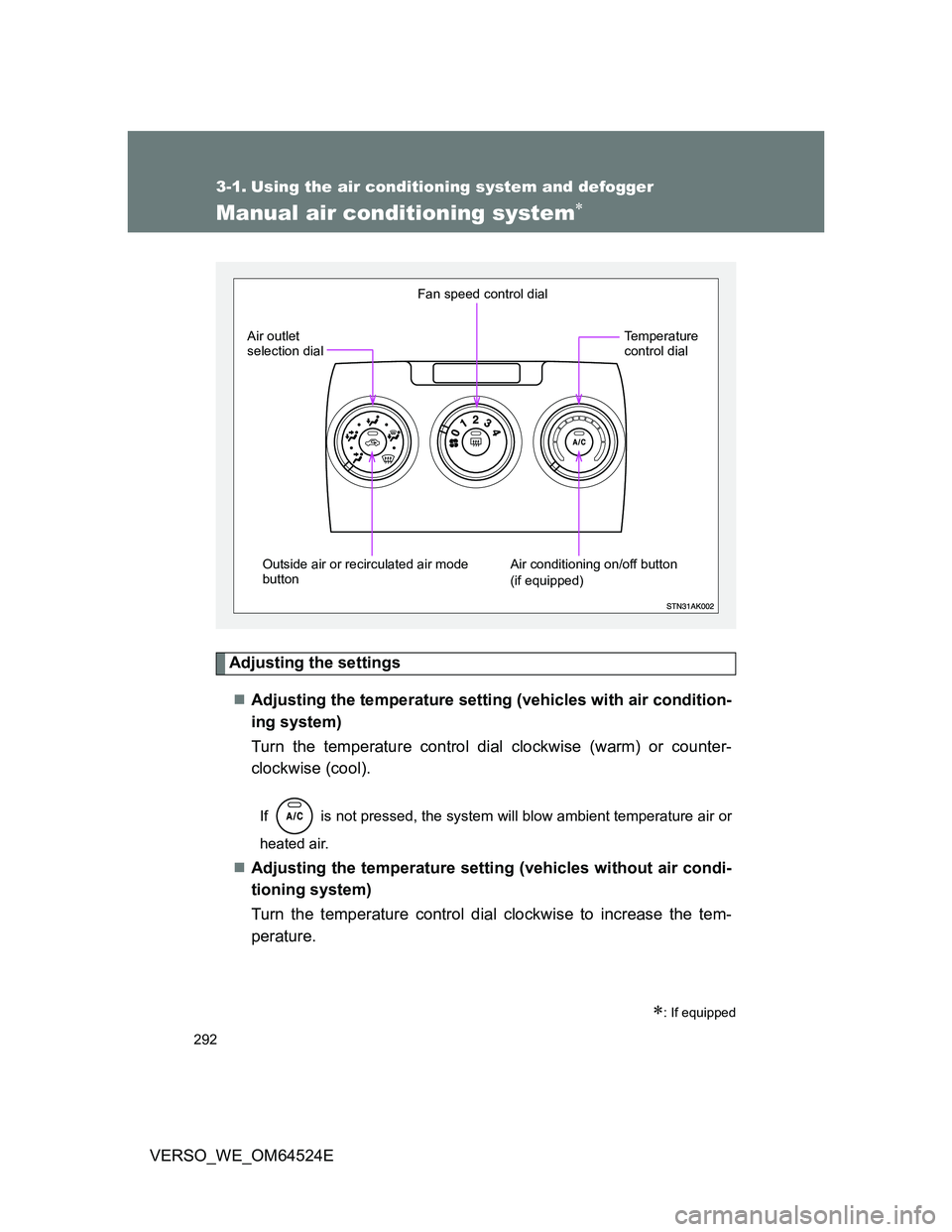
Manual air conditioning system
Adjusting the settings
Adjusting the temperature setting (vehicles with air condition-
ing system)
Turn the temperature control dial clockwise (warm) or counter-
clockwise (cool).
If is not pressed, the system will blow ambient temperature air or
heated air.
Adjusting the temperature setting (vehicles without air condi-
tioning system)
Turn the temperature control dial clockwise to increase the tem-
perature.
: If equipped
Fan speed control dial
Outside air or recirculated air mode
button Air outlet
selection dial
Air conditioning on/off button
(if equipped)Temperature
control dial
Page 293 of 588
293 3-1. Using the air conditioning system and defogger
3
Interior features
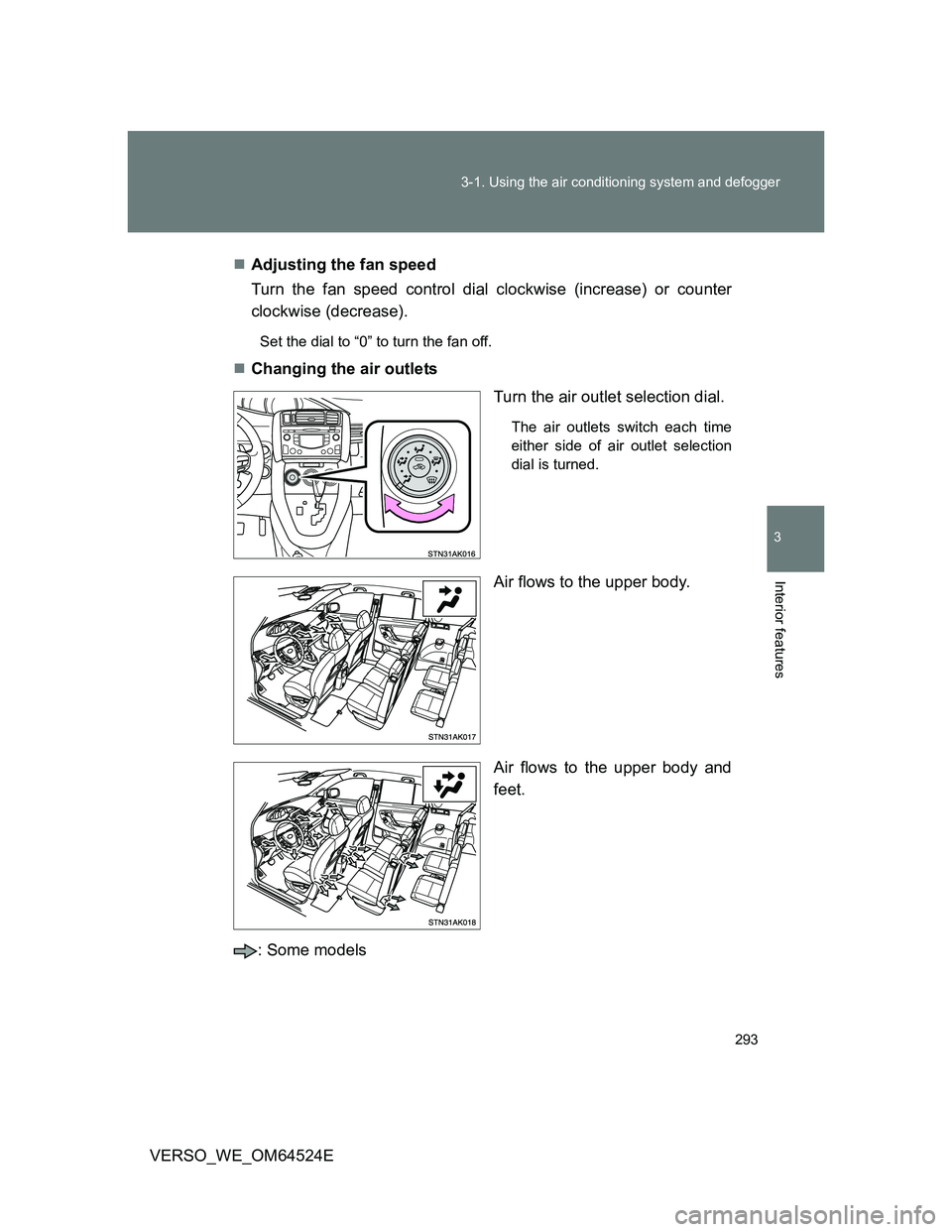
VERSO_WE_OM64524EAdjusting the fan speed
Turn the fan speed control dial clockwise (increase) or counter
clockwise (decrease).
Set the dial to “0” to turn the fan off.
Changing the air outlets
Turn the air outlet selection dial.
The air outlets switch each time
either side of air outlet selection
dial is turned.
Air flows to the upper body.
Air flows to the upper body and
feet.
: Some models