change time TOYOTA VERSO 2012 User Guide
[x] Cancel search | Manufacturer: TOYOTA, Model Year: 2012, Model line: VERSO, Model: TOYOTA VERSO 2012Pages: 588, PDF Size: 31.32 MB
Page 325 of 588
325 3-2. Using the audio system
3
Interior features
VERSO_WE_OM64524E
Fast-forwarding and reversing files
To fast-forward or reverse, press and hold “
” or “” on .
Repeat play
To r e p e a t a f i l e
Press (RPT).
To repeat all of the files on a folder
Press and hold (RPT) until you hear a beep.
Random playback
To play files from a particular folder in random order
Press (RAND).
To play all of the files on a disc in random order
Press and hold (RAND) until you hear a beep.
Switching the display
Press .
Each time is pressed, the display changes in the order of Folder no./
File no./Elapsed timeFolder nameFile nameAlbum title (MP3
only)Track titleArtist name.
Silencing a sound
P. 317
Page 333 of 588
333 3-2. Using the audio system
3
Interior features
VERSO_WE_OM64524E
Repeat play
Press
(RPT).
To cancel, press (RPT) again.
Switching the display
Press .
Each time is pressed, the display changes in the following order:
Elapsed time Album title Track title Artist name
Adjusting sound quality and volume balance
Press to enter iPod menu mode.
Pressing changes sound modes. (P. 343)
About iPod
Apple is not responsible for the operation of this device or its compliance
with safety and regulatory standards.
iPod is a trademark of Apple Inc., registered in the U.S. and other coun-
tries.
iPod functions
When an iPod is connected and the audio source is changed to iPod
mode, the iPod will resume play from the same point in which it was last
used.
Depending on the iPod that is connected to the system, certain functions
may not be available. If a function is unavailable due to a malfunction (as
opposed to a system specification), disconnecting the device and recon-
necting it once again may resolve the problem.
While connected to the system, the iPod cannot be operated with its own
controls. It is necessary to use the controls of the vehicle’s audio system
instead.
Page 338 of 588
338 3-2. Using the audio system
VERSO_WE_OM64524E
Repeat play
Repeating a file
Press
(RPT).
To cancel, press (RPT) again.
Repeating all the files in a folder
Press and hold
(RPT) until you hear a beep.
To cancel, press (RPT) again.
Switching the display
Press .
Each time is pressed, the display changes in the following order:
Elapsed time Folder name File name Album title (MP3 only)
Track title Artist name
USB memory functions
Depending on the USB memory that is connected to the system, the
device itself may not be operable and certain functions may not be avail-
able. If the device is inoperable or a function is unavailable due to a mal-
function (as opposed to a system specification), disconnecting the device
and reconnecting it once again may resolve the problem.
If the USB memory still does not begin operation after being discon-
nected and reconnected, format the memory.
Display
P. 320
Error messages
“ERROR”: This indicates a problem in the USB memory or its con-
nection.
“NO SUPPORT”: This indicates that no MP3/WMA files are included in the
USB memory.
Page 346 of 588
346
3-2. Using the audio system
VERSO_WE_OM64524E
Using the steering wheel audio switches
Turning on the power
Press when the audio system is turned off.
The audio system can be turned off by holding down until you hear
a beep.
Changing the audio source
Press when the audio system is turned on. The audio source
changes as follows each time is pressed. If a mode cannot be
used, it will be skipped.
AMFM (1, 2, 3)CD playerAUXiPod or USB memoryDAB*
*
: If equipped
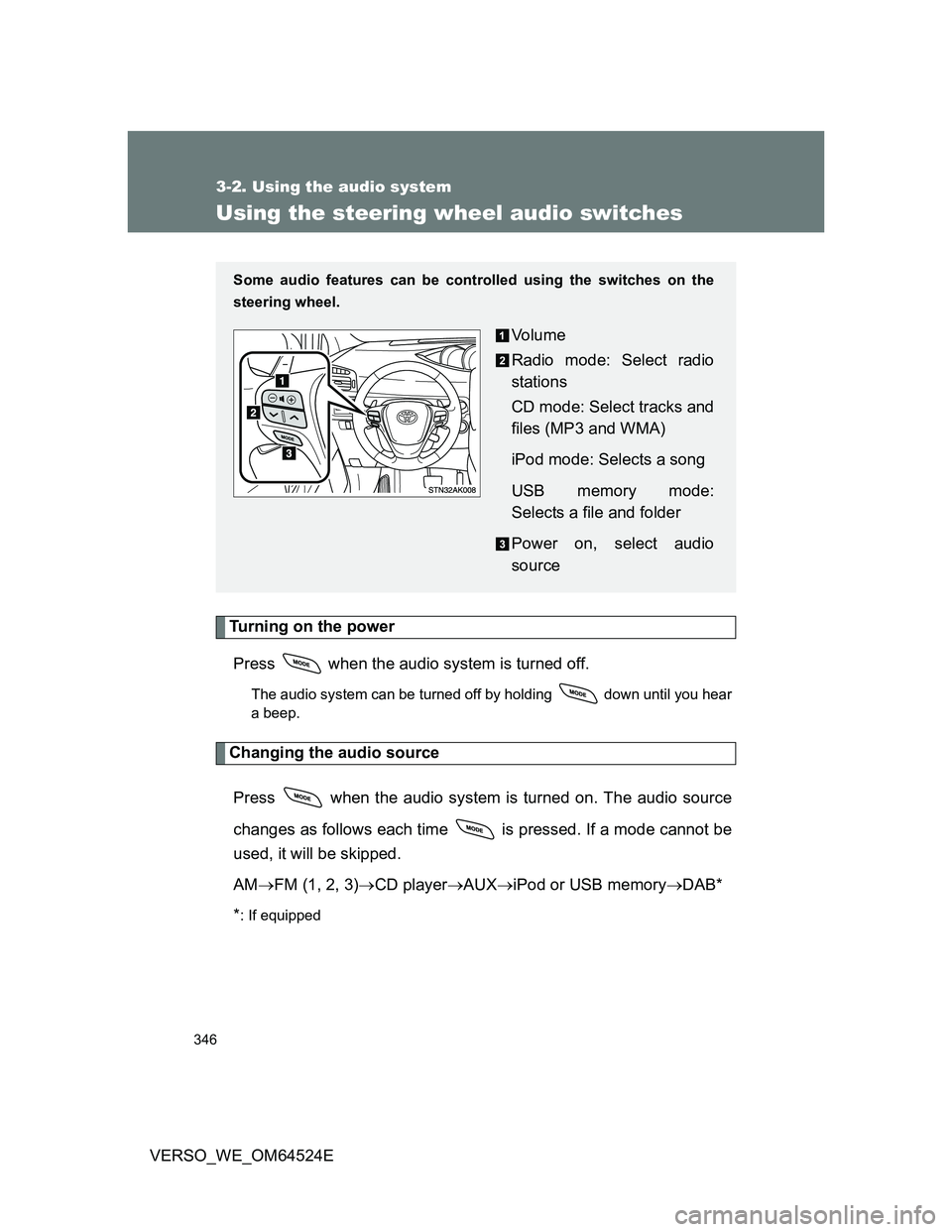
Some audio features can be controlled using the switches on the
steering wheel.
Vo l u m e
Radio mode: Select radio
stations
CD mode: Select tracks and
files (MP3 and WMA)
iPod mode: Selects a song
USB memory mode:
Selects a file and folder
Power on, select audio
source
Page 350 of 588
350 3-3. Using the interior lights
VERSO_WE_OM64524E
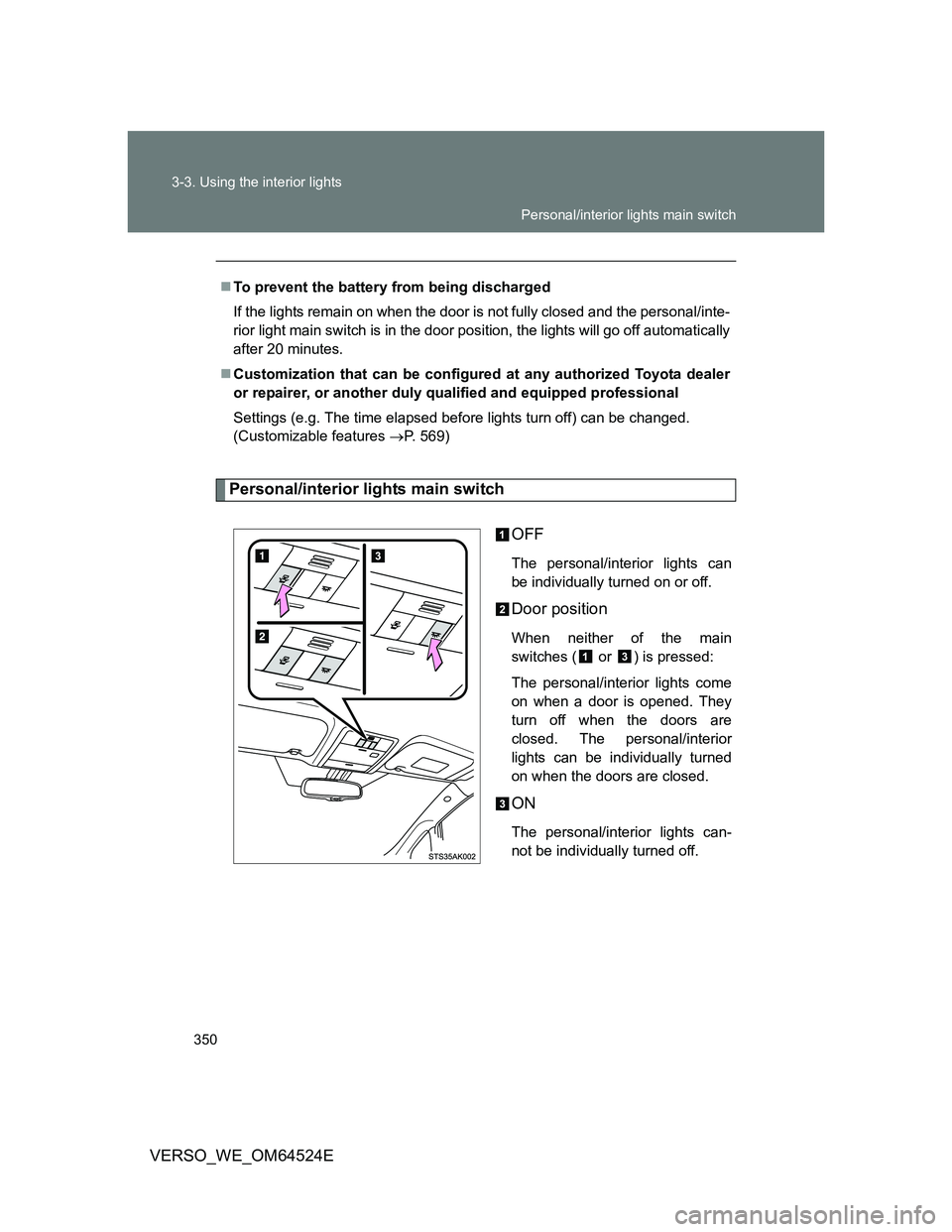
Personal/interior lights main switch
OFF
The personal/interior lights can
be individually turned on or off.
Door position
When neither of the main
switches ( or ) is pressed:
The personal/interior lights come
on when a door is opened. They
turn off when the doors are
closed. The personal/interior
lights can be individually turned
on when the doors are closed.
ON
The personal/interior lights can-
not be individually turned off. To prevent the battery from being discharged
If the lights remain on when the door is not fully closed and the personal/inte-
rior light main switch is in the door position, the lights will go off automatically
after 20 minutes.
Customization that can be configured at any authorized Toyota dealer
or repairer, or another duly qualified and equipped professional
Settings (e.g. The time elapsed before lights turn off) can be changed.
(Customizable features P. 569)
Personal/interior lights main switch
Page 526 of 588

526 5-2. Steps to take in an emergency
VERSO_WE_OM64524E
Changing “ENGINE START STOP” switch modes and starting the
engine
Vehicles with a Multidrive or an automatic transmission: Shift
the shift lever to “P” and apply the brakes.
Vehicles with a manual transmission: Shift the shift lever to
“N” and depress the clutch pedal.
Touch the Toyota emblem side of
the electronic key to the
“ENGINE START STOP” switch.
An alarm will sound to indicate
that the start function cannot
detect the electronic key that is
touched to the “ENGINE START
STOP” switch if any of the doors
is opened and closed while the
key is touched to the switch.
To change “ENGINE START STOP” switch modes: Within 10
seconds of the buzzer sounding, release the brake pedal
(Multidrive or automatic transmission) or clutch pedal (manual
transmission) and press the “ENGINE START STOP” switch.
Modes can be changed each time the switch is pressed.
(P. 192)
To start the engine: Press the “ENGINE START STOP” switch
within 10 seconds after the buzzer sounds, keeping the brake
pedal (Multidrive or automatic transmission) or clutch pedal
(manual transmission) depressed.
In the event that the “ENGINE START STOP” switch still cannot be
operated, contact any authorized Toyota dealer or repairer, or another
duly qualified and equipped professional.
Page 569 of 588
569
6
Vehicle specifications
VERSO_WE_OM64524E
6-2. Customization
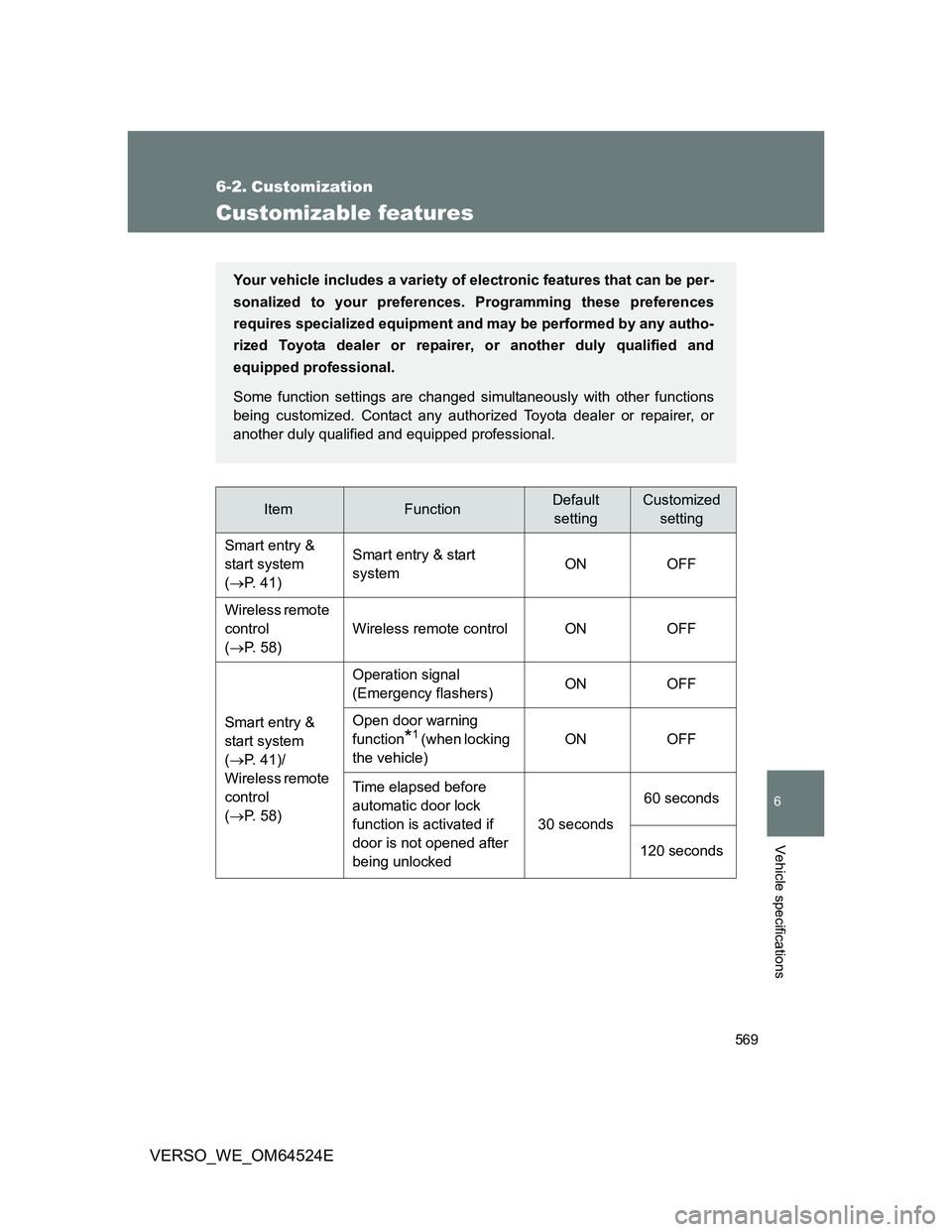
Customizable features
ItemFunctionDefault
settingCustomized
setting
Smart entry &
start system
(P. 41)Smart entry & start
systemON OFF
Wireless remote
control
(P. 58)Wireless remote control ON OFF
Smart entry &
start system
(P. 41)/
Wireless remote
control
(P. 58)Operation signal
(Emergency flashers)ON OFF
Open door warning
function
*1 (when locking
the vehicle)ON OFF
Time elapsed before
automatic door lock
function is activated if
door is not opened after
being unlocked30 seconds60 seconds
120 seconds
Your vehicle includes a variety of electronic features that can be per-
sonalized to your preferences. Programming these preferences
requires specialized equipment and may be performed by any autho-
rized Toyota dealer or repairer, or another duly qualified and
equipped professional.
Some function settings are changed simultaneously with other functions
being customized. Contact any authorized Toyota dealer or repairer, or
another duly qualified and equipped professional.