ECO mode TOYOTA VERSO 2013 User Guide
[x] Cancel search | Manufacturer: TOYOTA, Model Year: 2013, Model line: VERSO, Model: TOYOTA VERSO 2013Pages: 616, PDF Size: 39.6 MB
Page 217 of 616
217 2-1. Driving procedures
2
When driving
VERSO_WE_OM64550E_EURO5
If the shift lever cannot be shifted from “P”
P. 547
If the “M” indicator is not displayed after shifting the shift lever to the
“M” position
Vehicles without smart entry & start system: Within a few seconds of
turning the engine switch to the “ON” position, the transmission will not
go into “M” mode if the shift lever is moved to the “M” position.
Vehicles with smart entry & start system: Within a few seconds of turning
the “ENGINE START STOP” switch to IGNITION ON mode, the transmis-
sion will not go into “M” mode if the shift lever is moved to the “M” posi-
tion.
This is because a system check is being performed. In this case, wait a
moment and then try moving the shift lever to the “M” position again.
If the display does not change to “M” on an occasion other than that
described above, it may indicate a malfunction in the transmission sys-
tem. Have your vehicle inspected by any authorized Toyota dealer or
repairer, or another duly qualified and equipped professional immedi-
ately.
Page 235 of 616
235 2-2. Instrument cluster
2
When driving
VERSO_WE_OM64550E_EURO5
CAUTION
If a safety system warning light does not come on
Should a safety system light such as ABS and the SRS airbag warning light
not come on when you start the engine, this could mean that these systems
are not available to help protect you in an accident, which could result in
death or serious injury. Have the vehicle inspected by any authorized Toyota
dealer or repairer, or another duly qualified and equipped professional imme-
diately if this occurs.
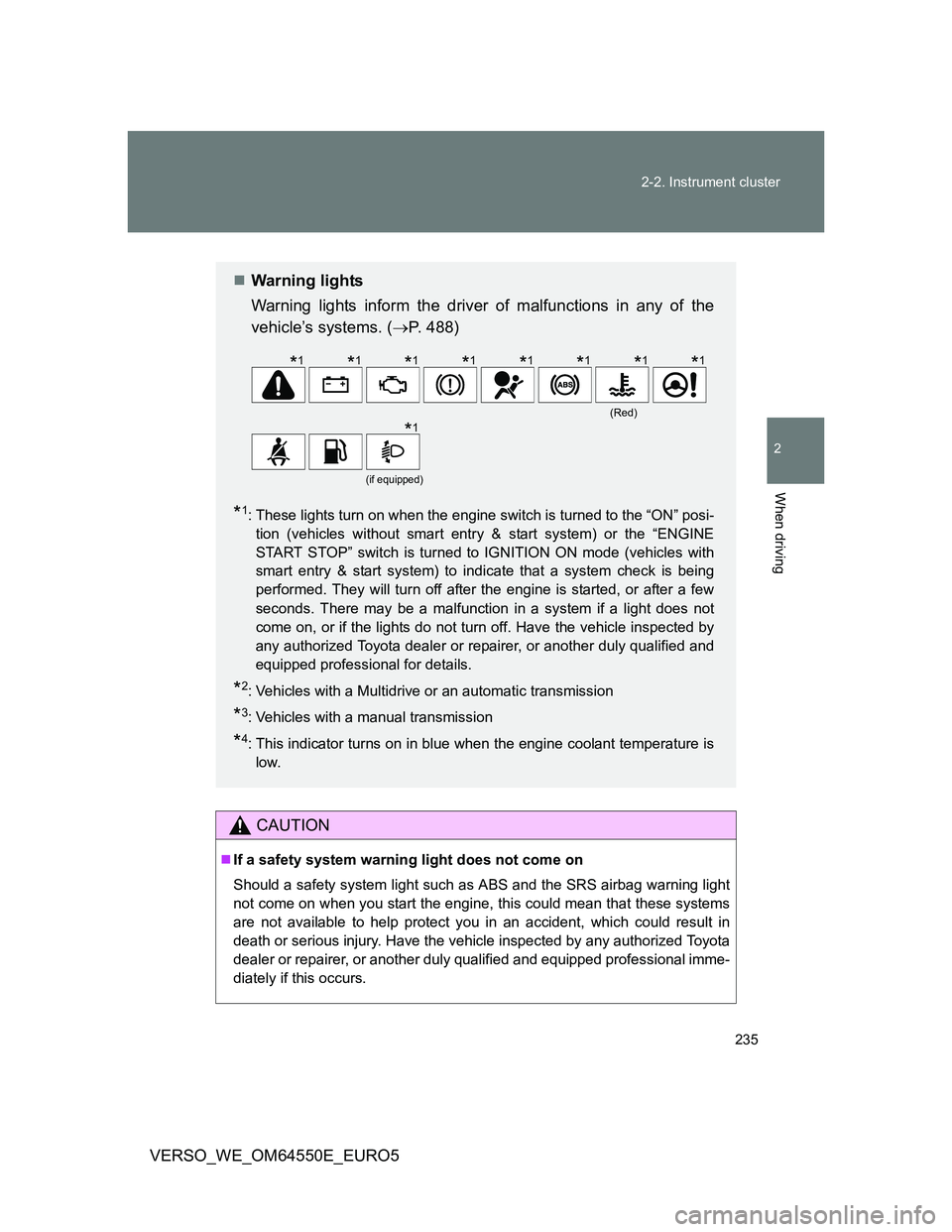
Warning lights
Warning lights inform the driver of malfunctions in any of the
vehicle’s systems. (P. 488)
*1: These lights turn on when the engine switch is turned to the “ON” posi-
tion (vehicles without smart entry & start system) or the “ENGINE
START STOP” switch is turned to IGNITION ON mode (vehicles with
smart entry & start system) to indicate that a system check is being
performed. They will turn off after the engine is started, or after a few
seconds. There may be a malfunction in a system if a light does not
come on, or if the lights do not turn off. Have the vehicle inspected by
any authorized Toyota dealer or repairer, or another duly qualified and
equipped professional for details.
*2: Vehicles with a Multidrive or an automatic transmission
*3: Vehicles with a manual transmission
*4: This indicator turns on in blue when the engine coolant temperature is
low.
(Red)
(if equipped)
*1*1*1*1*1*1*1*1
*1
Page 247 of 616
247 2-2. Instrument cluster
2
When driving
VERSO_WE_OM64550E_EURO5
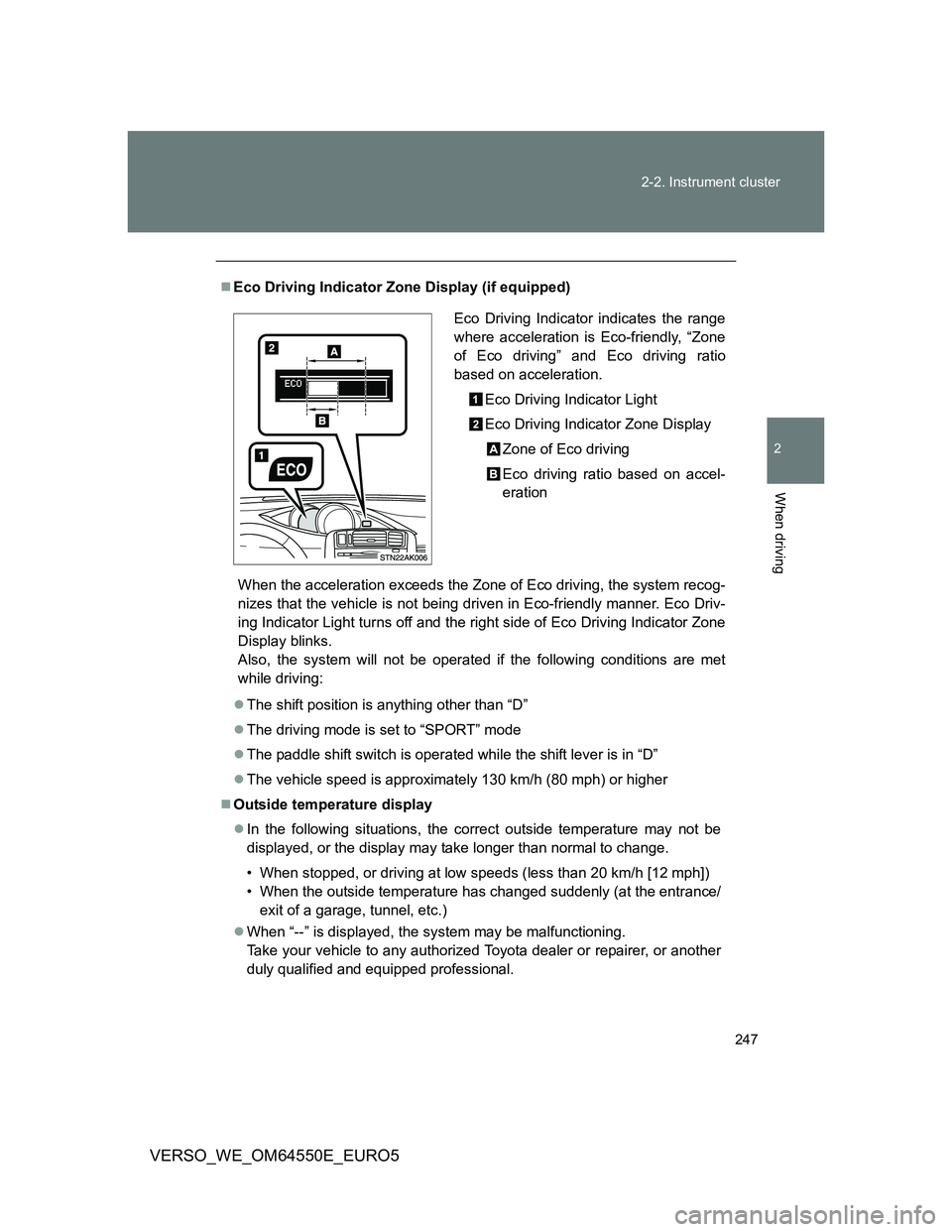
Eco Driving Indicator Zone Display (if equipped)
When the acceleration exceeds the Zone of Eco driving, the system recog-
nizes that the vehicle is not being driven in Eco-friendly manner. Eco Driv-
ing Indicator Light turns off and the right side of Eco Driving Indicator Zone
Display blinks.
Also, the system will not be operated if the following conditions are met
while driving:
The shift position is anything other than “D”
The driving mode is set to “SPORT” mode
The paddle shift switch is operated while the shift lever is in “D”
The vehicle speed is approximately 130 km/h (80 mph) or higher
Outside temperature display
In the following situations, the correct outside temperature may not be
displayed, or the display may take longer than normal to change.
• When stopped, or driving at low speeds (less than 20 km/h [12 mph])
• When the outside temperature has changed suddenly (at the entrance/
exit of a garage, tunnel, etc.)
When “--” is displayed, the system may be malfunctioning.
Take your vehicle to any authorized Toyota dealer or repairer, or another
duly qualified and equipped professional.
Eco Driving Indicator indicates the range
where acceleration is Eco-friendly, “Zone
of Eco driving” and Eco driving ratio
based on acceleration.
Eco Driving Indicator Light
Eco Driving Indicator Zone Display
Zone of Eco driving
Eco driving ratio based on accel-
eration
Page 252 of 616
252 2-3. Operating the lights and wipers
VERSO_WE_OM64550E_EURO5
Daytime running light system (if equipped)
To make your vehicle more visible to other drivers, the daytime run-
ning lights turn on automatically whenever the engine is started and
then the parking brake is released. (However, the daytime running
light system will be canceled when the headlight switch is operated
manually or the automatic headlight system turns on the tail lights.)
Daytime running lights are not designed for use at night.
Deactivating/reactivating the daytime running light system
Follow the procedure below.
Vehicles without smart entry & start system: Turn the engine
switch to the “ON” position. Turn off the headlights, tail lights
and automatic headlights system, and set the parking brake.
Vehicles with smart entry & start system: Turn the “ENGINE
START STOP” switch to IGNITION ON mode. Turn off the
headlights, tail lights and automatic headlights system, and
set the parking brake.
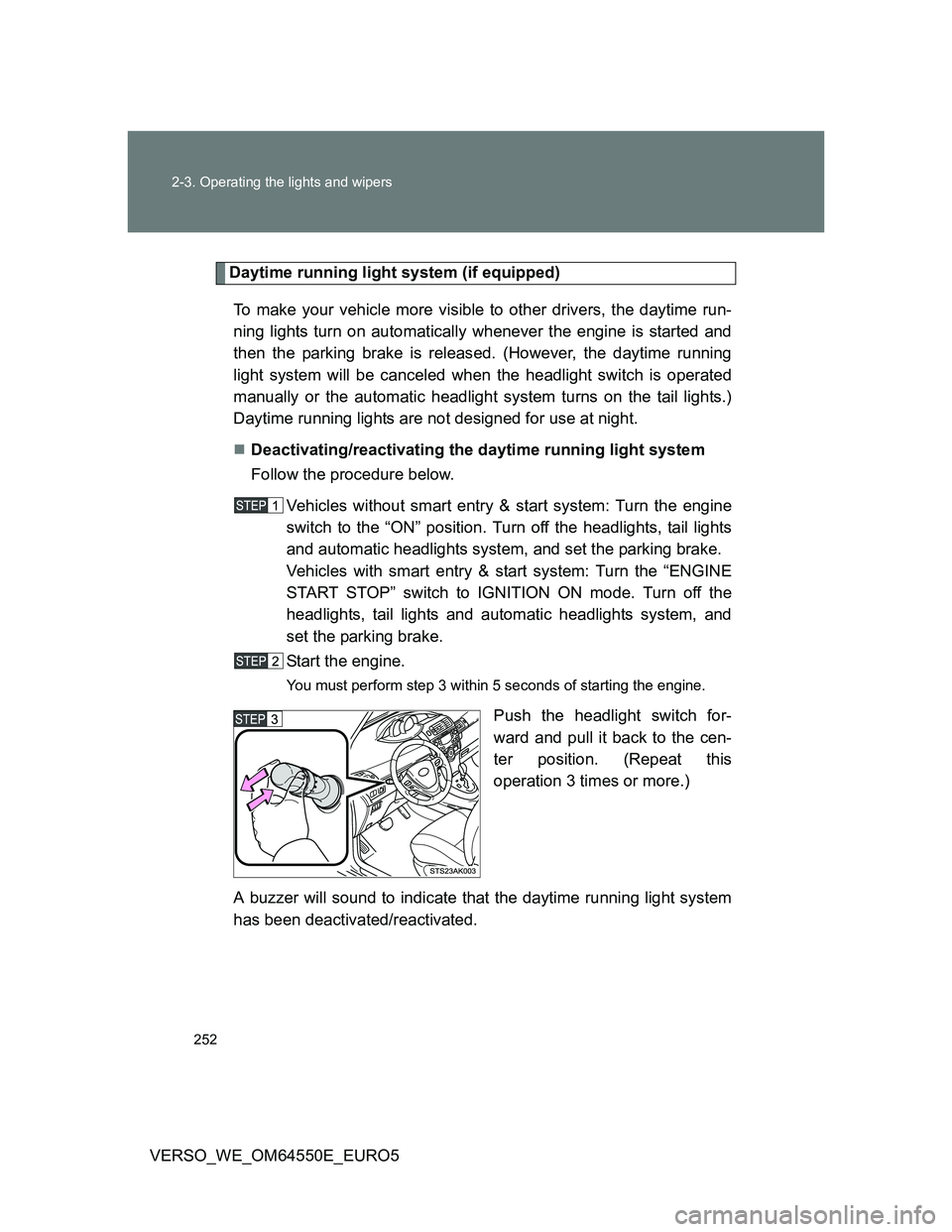
Start the engine.
You must perform step 3 within 5 seconds of starting the engine.
Push the headlight switch for-
ward and pull it back to the cen-
ter position. (Repeat this
operation 3 times or more.)
A buzzer will sound to indicate that the daytime running light system
has been deactivated/reactivated.
Page 261 of 616
261 2-3. Operating the lights and wipers
2
When driving
VERSO_WE_OM64550E_EURO5
Vehicles with smart entry & start system:
If the wiper switch is turned to the position while the “ENGINE
START STOP” switch is in IGNITION ON mode, the wiper will operate
once to show that AUTO mode is activated.
If the wiper sensitivity is adjusted to higher, the wiper may operate once to
indicate the change of sensitivity.
If the temperature of the raindrop sensor is 85°C (185°F) or higher, or
-40°C (-40°F) or lower, automatic operation may not occur. In this case,
operate the wipers in any mode other than AUTO.
If no windshield washer fluid sprays
Check that the washer nozzles are not blocked and if there is washer fluid in
the windshield washer fluid reservoir.
CAUTION
Caution regarding the use of windshield wipers in AUTO mode
The windshield wipers may operate unexpectedly if the sensor is touched or
the windshield is subject to vibration in AUTO mode. Take care that your fin-
gers or anything else do not become caught in the windshield wipers.
Caution regarding the use of washer fluid
When it is cold, do not use the washer fluid until the windshield becomes
warm. The fluid may freeze on the windshield and cause low visibility. This
may lead to an accident, resulting in death or serious injury.
NOTICE
When the windshield is dry
Do not use the wipers, as they may damage the windshield.
When the washer fluid tank is empty
Do not use the washer when the washer fluid tank is empty. This may cause
the washer fluid pump to overheat.
When there is no windshield washer fluid spray from the nozzle
Damage to the washer fluid pump may be caused if the lever is pulled
toward you and held continually.
Page 296 of 616
296 2-5. Driving information
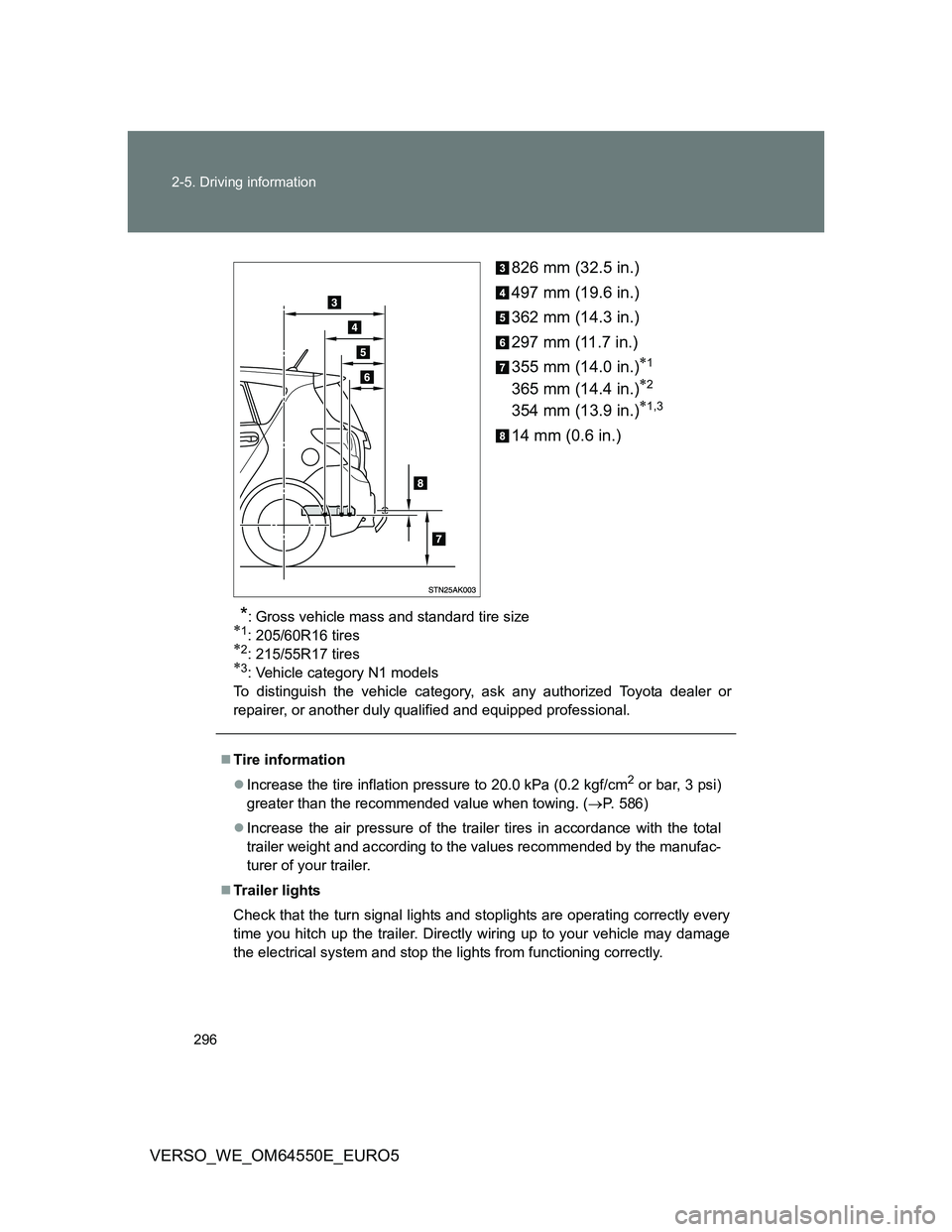
VERSO_WE_OM64550E_EURO5826 mm (32.5 in.)
497 mm (19.6 in.)
362 mm (14.3 in.)
297 mm (11.7 in.)
355 mm (14.0 in.)
1
365 mm (14.4 in.)2
354 mm (13.9 in.)1,3
14 mm (0.6 in.)
*: Gross vehicle mass and standard tire size1: 205/60R16 tires2: 215/55R17 tires3: Vehicle category N1 models
To distinguish the vehicle category, ask any authorized Toyota dealer or
repairer, or another duly qualified and equipped professional.
Tire information
Increase the tire inflation pressure to 20.0 kPa (0.2 kgf/cm
2 or bar, 3 psi)
greater than the recommended value when towing. (P. 586)
Increase the air pressure of the trailer tires in accordance with the total
trailer weight and according to the values recommended by the manufac-
turer of your trailer.
Trailer lights
Check that the turn signal lights and stoplights are operating correctly every
time you hitch up the trailer. Directly wiring up to your vehicle may damage
the electrical system and stop the lights from functioning correctly.
Page 306 of 616
306 3-1. Using the air conditioning system and defogger
VERSO_WE_OM64550E_EURO5
Using the system in recirculated air mode
The windows will fog up more easily if the recirculated air mode is used for
an extended period.
When outside air temperature approaches 0°C (32°F) (vehicles with air
conditioning system)
The air conditioning system may not operate even when is pressed.
When is selected for the air outlets used
For your driving comfort, air flowing to the feet may be warmer than air flow-
ing to the upper body depending on the position of the temperature adjust-
ment dial.
Air conditioning odors
During use, various odors from inside and outside the vehicle may enter
into and accumulate in the air conditioning system. This may then cause
odor to be emitted from the vents.
To reduce potential odors from occurring:
It is recommended that the air conditioning system be set to outside air
mode prior to turning the vehicle off.
CAUTION
To prevent the windshield from fogging up
Do not set the air outlet selection dial to during cool air operation in
extremely humid weather. The difference between the temperature of the
outside air and that of the windshield can cause the outer surface of the
windshield to fog up, blocking your vision.
NOTICE
To prevent battery discharge
Do not leave the air conditioning system on longer than necessary when the
engine is stopped.
Page 313 of 616
313 3-1. Using the air conditioning system and defogger
3
Interior features
VERSO_WE_OM64550E_EURO5
Air conditioning odors
During use, various odors from inside and outside the vehicle may enter
into and accumulate in the air conditioning system. This may then cause
odor to be emitted from the vents.
To reduce potential odors from occurring:
• It is recommended that the air conditioning system be set to outside air
mode prior to turning the vehicle off.
• The start timing of the blower may be delayed for a short period of time
immediately after the air conditioning system is started in AUTO mode.
CAUTION
To prevent the windshield from fogging up
Do not use during cool air operation in extremely humid weather. The
difference between the temperature of the outside air and that of the wind-
shield can cause the outer surface of the windshield to fog up, blocking your
vision.
NOTICE
To prevent battery discharge
Do not leave the air conditioning system on longer than necessary when the
engine is stopped.
Page 317 of 616
317 3-1. Using the air conditioning system and defogger
3
Interior features
VERSO_WE_OM64550E_EURO5
The defoggers can be operated when
Vehicles without smart entry & start system
The engine switch is in the “ON” position.
Vehicles with smart entry & start system
The “ENGINE START STOP” switch is in IGNITION ON mode.
The outside rear view mirror defoggers
Turning the rear window defogger on will turn the outside rear view mirror
defoggers on.
CAUTION
When the outside rear view mirror defoggers are on
Do not touch the outside surface of the rear view mirrors, as they can
become very hot and burn you.
Page 336 of 616
336 3-2. Using the audio system
VERSO_WE_OM64550E_EURO5
MP3 and WMA files
MP3 (MPEG Audio LAYER3) is a standard audio compression format.
Files can be compressed to approximately 1/10 of their original size by using
MP3 compression.
WMA (Windows Media Audio) is a Microsoft audio compression format.
This format compresses audio data to a size smaller than that of the MP3
format.
There is a limit to the MP3 and WMA file standards and to the media/formats
recorded by them that can be used.
MP3 file compatibility
• Compatible standards
MP3 (MPEG1 LAYER3, MPEG2 LSF LAYER3)
• Compatible sampling frequencies
MPEG1 LAYER3: 32, 44.1, 48 (kHz)
MPEG2 LSF LAYER3: 16, 22.05, 24 (kHz)
• Compatible bit rates (compatible with VBR)
MPEG1 LAYER3: 64, 80, 96, 112, 128, 160, 192, 224, 256, 320 (kbps)
MPEG2 LSF LAYER3: 64, 80, 96, 112, 128, 144, 160 (kbps)
• Compatible channel modes: stereo, joint stereo, dual channel and
monaural
WMA file compatibility
• Compatible standards
WMA Ver. 7, 8, 9
• Compatible sampling frequencies
32, 44.1, 48 (kHz)
• Compatible bit rates (only compatible with 2-channel playback)
Ver. 7, 8: CBR 48, 64, 80, 96, 128, 160, 192 (kbps)
Ver. 9: CBR 48, 64, 80, 96, 128, 160, 192, 256, 320 (kbps)
Compatible media
Media that can be used for MP3 and WMA playback are CD-Rs and CD-
RWs.
Playback in some instances may not be possible, depending on the status
of the CD-R or CD-RW. Playback may not be possible or the audio may
jump if the disc is scratched or marked with fingerprints.