driver TOYOTA VERSO 2013 Owners Manual
[x] Cancel search | Manufacturer: TOYOTA, Model Year: 2013, Model line: VERSO, Model: TOYOTA VERSO 2013Pages: 616, PDF Size: 39.6 MB
Page 8 of 616
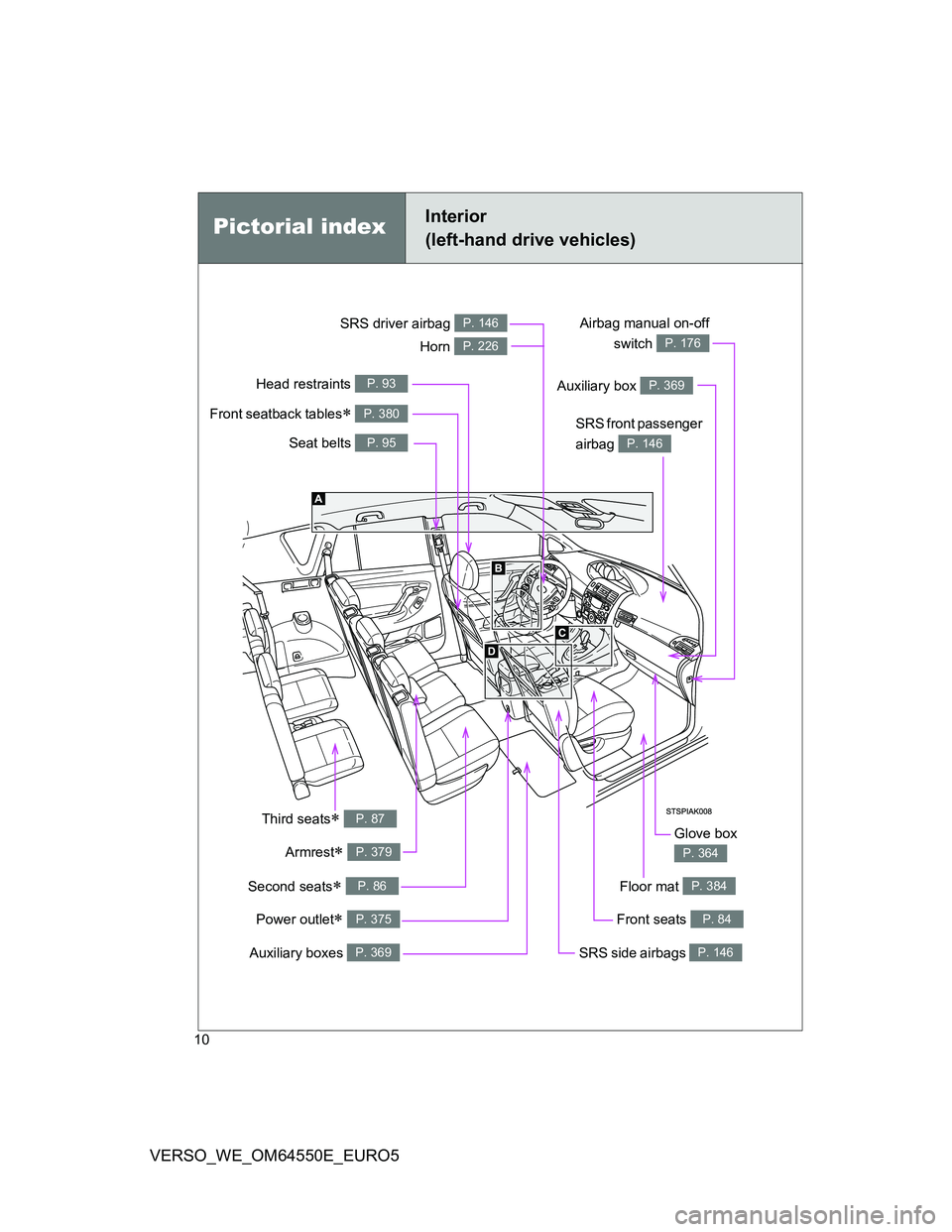
10
VERSO_WE_OM64550E_EURO5
Power outlet P. 375
Pictorial indexInterior
(left-hand drive vehicles)
Seat belts P. 95
SRS front passenger
airbag
P. 146
SRS driver airbag P. 146
Head restraints P. 93
Auxiliary boxes P. 369
Third seats P. 87
Front seats P. 84
SRS side airbags P. 146
Glove box
P. 364Armrest P. 379
Front seatback tables P. 380
Floor mat P. 384
Airbag manual on-off
switch
P. 176Horn P. 226
Auxiliary box P. 369
Second seats P. 86
Page 19 of 616
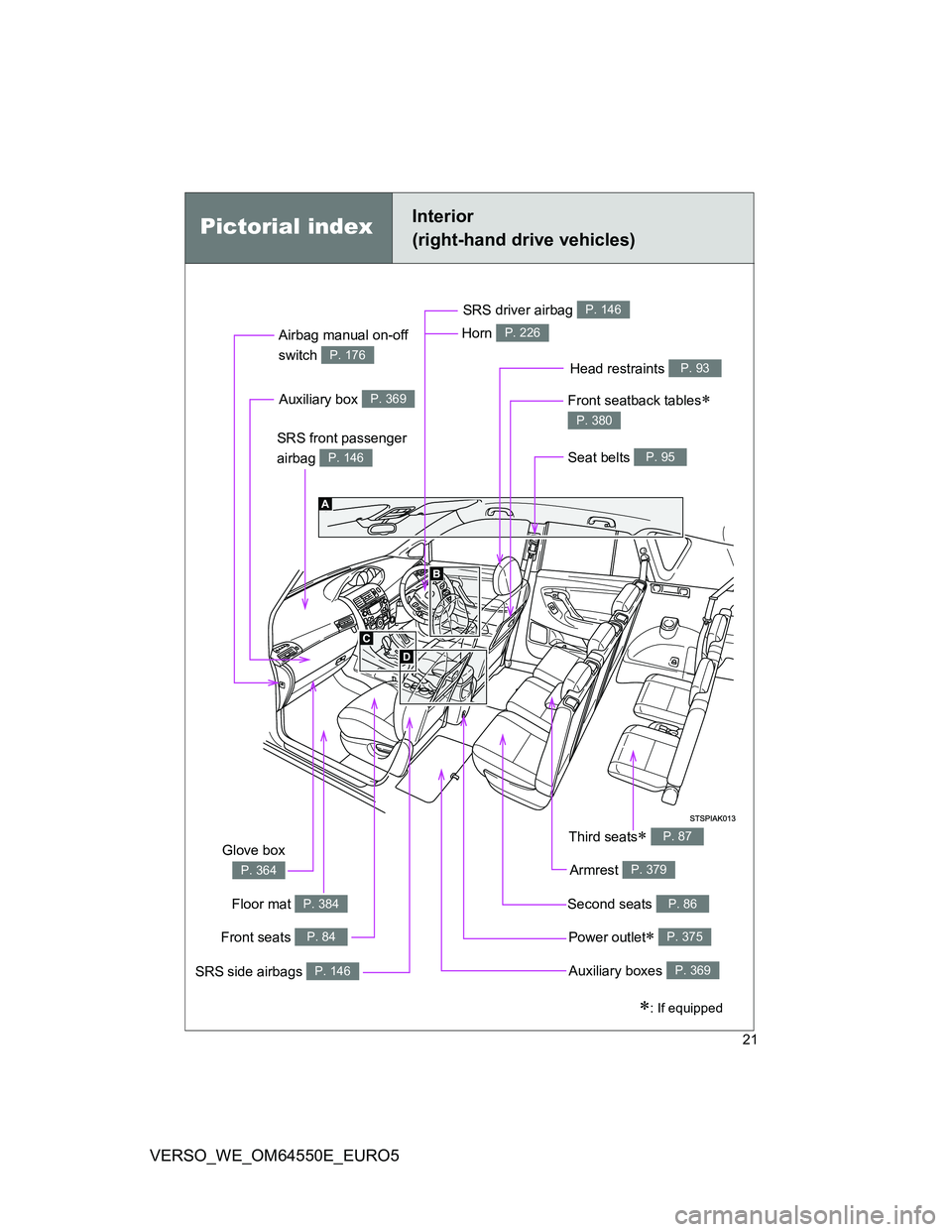
21
VERSO_WE_OM64550E_EURO5
Pictorial indexInterior
(right-hand drive vehicles)
Power outlet P. 375
Seat belts P. 95
SRS front passenger
airbag
P. 146
SRS driver airbag P. 146
Head restraints P. 93
Auxiliary boxes P. 369
Third seats P. 87
Front seats P. 84
SRS side airbags P. 146
Glove box
P. 364Armrest P. 379
Front seatback tables
P. 380
Floor mat P. 384
Airbag manual on-off
switch
P. 176
Horn P. 226
Auxiliary box P. 369
Second seats P. 86
: If equipped
Page 34 of 616
36
VERSO_WE_OM64550E_EURO5
CAUTION
General precautions while driving
Driving under the influence: Never drive your vehicle when under the influ-
ence of alcohol or drugs that have impaired your ability to operate your vehi-
cle. Alcohol and certain drugs delay reaction time, impair judgment and
reduce coordination, which could lead to an accident that could result in
death or serious injury.
Defensive driving: Always drive defensively. Anticipate mistakes that other
drivers or pedestrians might make and be ready to avoid accidents.
Driver distraction: Always give your full attention to driving. Anything that dis-
tracts the driver, such as adjusting controls, talking on a cellular phone or
reading can result in a collision with resulting death or serious injury to you,
your occupants or others.
General precautions regarding children’s safety
Never leave children unattended in the vehicle, and never allow children to
have or use the key.
Children may be able to start the vehicle or shift the vehicle into neutral.
There is also a danger that children may injure themselves by playing with
the cigarette lighter, the windows, or other features of the vehicle. In addi-
tion, heat build-up or extremely cold temperatures inside the vehicle can be
fatal to children.
Your vehicle contains batteries and/or accumulators. Do not discard
them into the environment but cooperate with separate collection
(Directive 2006/66/EC).
Page 42 of 616
42
VERSO_WE_OM64550E_EURO5
1-2. Opening, closing and locking the doors
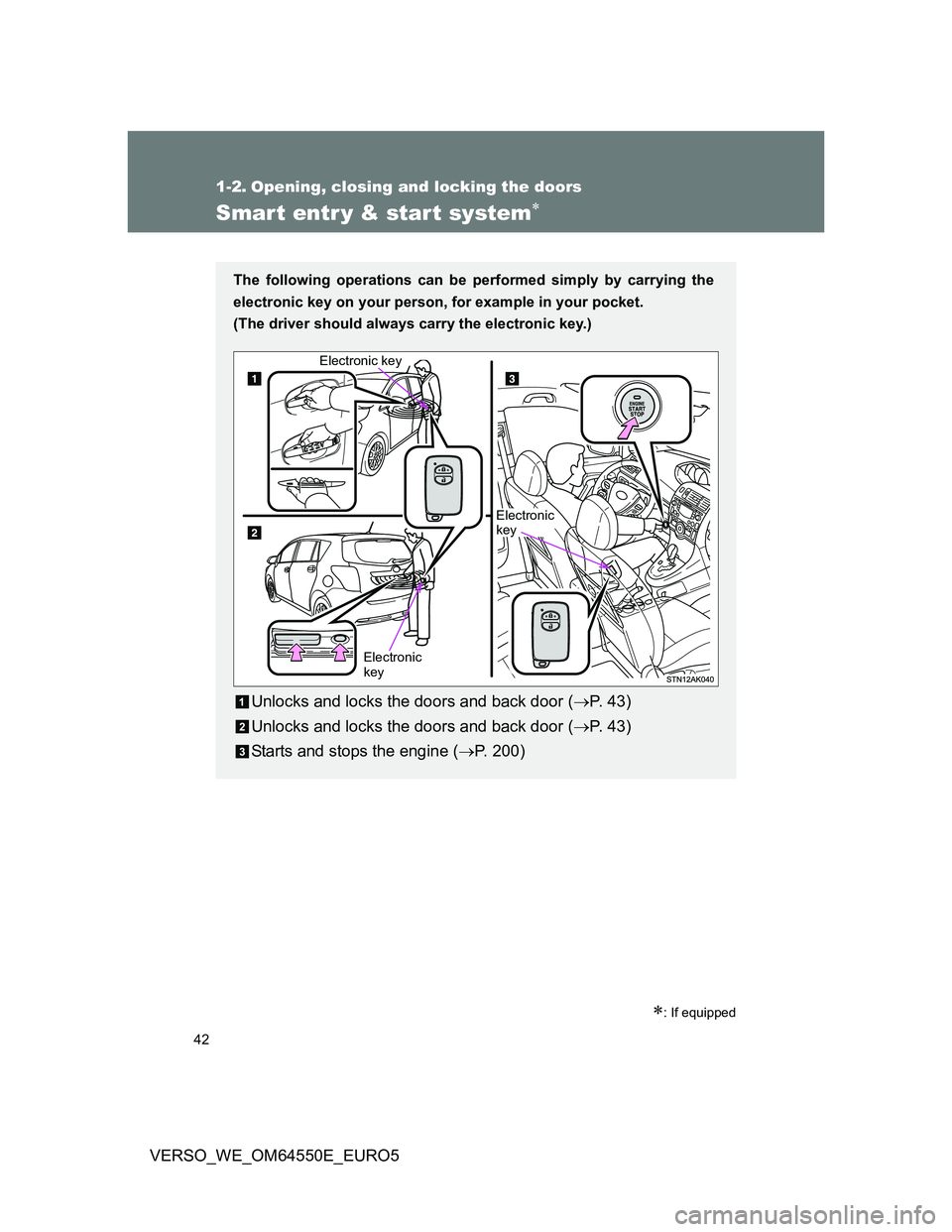
Smart entr y & start system
: If equipped
The following operations can be performed simply by carrying the
electronic key on your person, for example in your pocket.
(The driver should always carry the electronic key.)
Unlocks and locks the doors and back door (P. 4 3 )
Unlocks and locks the doors and back door (P. 4 3 )
Starts and stops the engine (P. 200)
Electronic
key Electronic key
Electronic
key
Page 46 of 616
46 1-2. Opening, closing and locking the doors
VERSO_WE_OM64550E_EURO5
Operation signals
The emergency flashers flash to indicate that the doors have been locked/
unlocked. (Locked: Once; Unlocked: Twice)
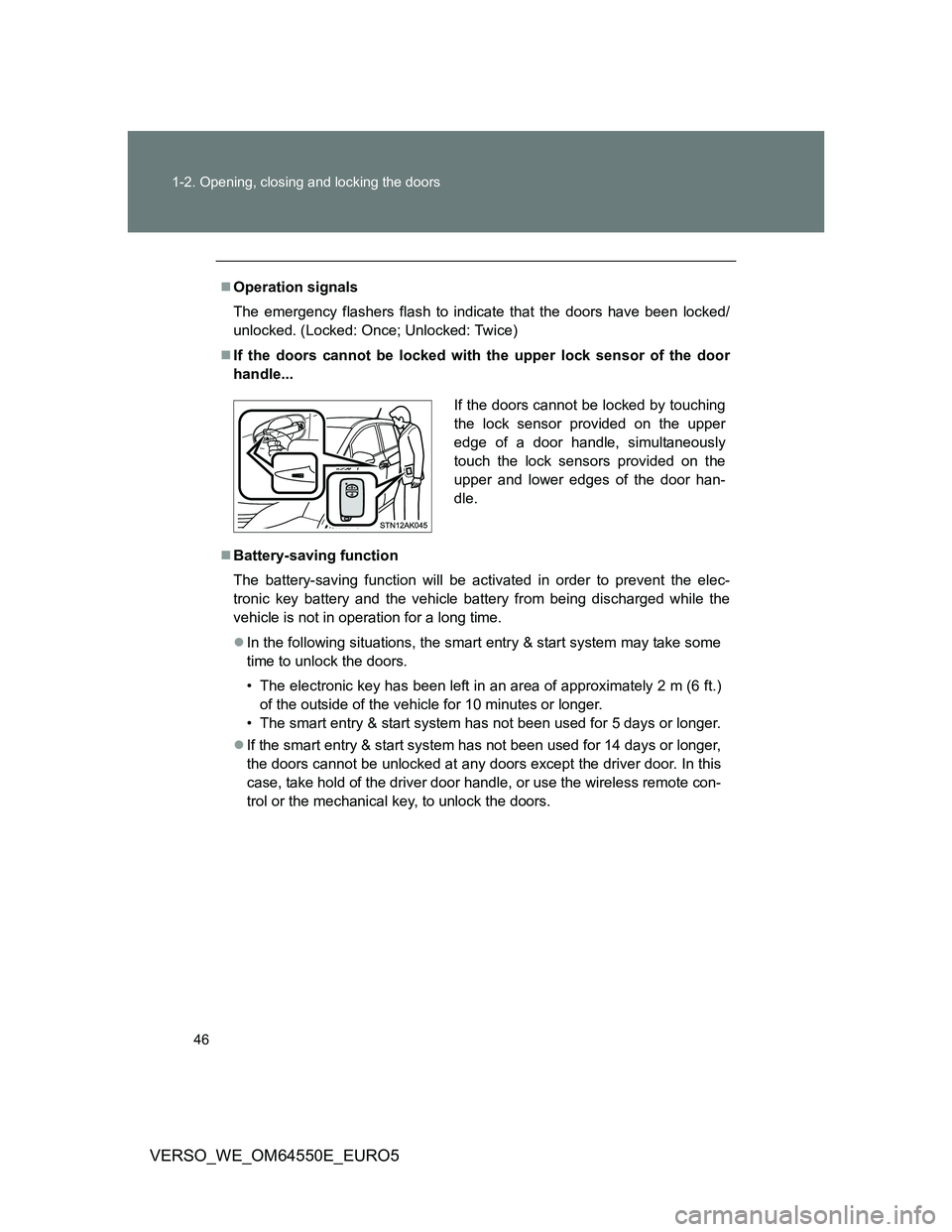
If the doors cannot be locked with the upper lock sensor of the door
handle...
Battery-saving function
The battery-saving function will be activated in order to prevent the elec-
tronic key battery and the vehicle battery from being discharged while the
vehicle is not in operation for a long time.
In the following situations, the smart entry & start system may take some
time to unlock the doors.
• The electronic key has been left in an area of approximately 2 m (6 ft.)
of the outside of the vehicle for 10 minutes or longer.
• The smart entry & start system has not been used for 5 days or longer.
If the smart entry & start system has not been used for 14 days or longer,
the doors cannot be unlocked at any doors except the driver door. In this
case, take hold of the driver door handle, or use the wireless remote con-
trol or the mechanical key, to unlock the doors.
If the doors cannot be locked by touching
the lock sensor provided on the upper
edge of a door handle, simultaneously
touch the lock sensors provided on the
upper and lower edges of the door han-
dle.
Page 50 of 616
50 1-2. Opening, closing and locking the doors
VERSO_WE_OM64550E_EURO5
Alarms and warning indicators
A combination of exterior and interior alarms as well as warnings displayed
on the multi-information display are used to prevent theft of the vehicle and
unforeseeable accidents resulting from erroneous operation. Take appropri-
ate measures in response to any warning indications on the multi-informa-
tion display. (P. 492)
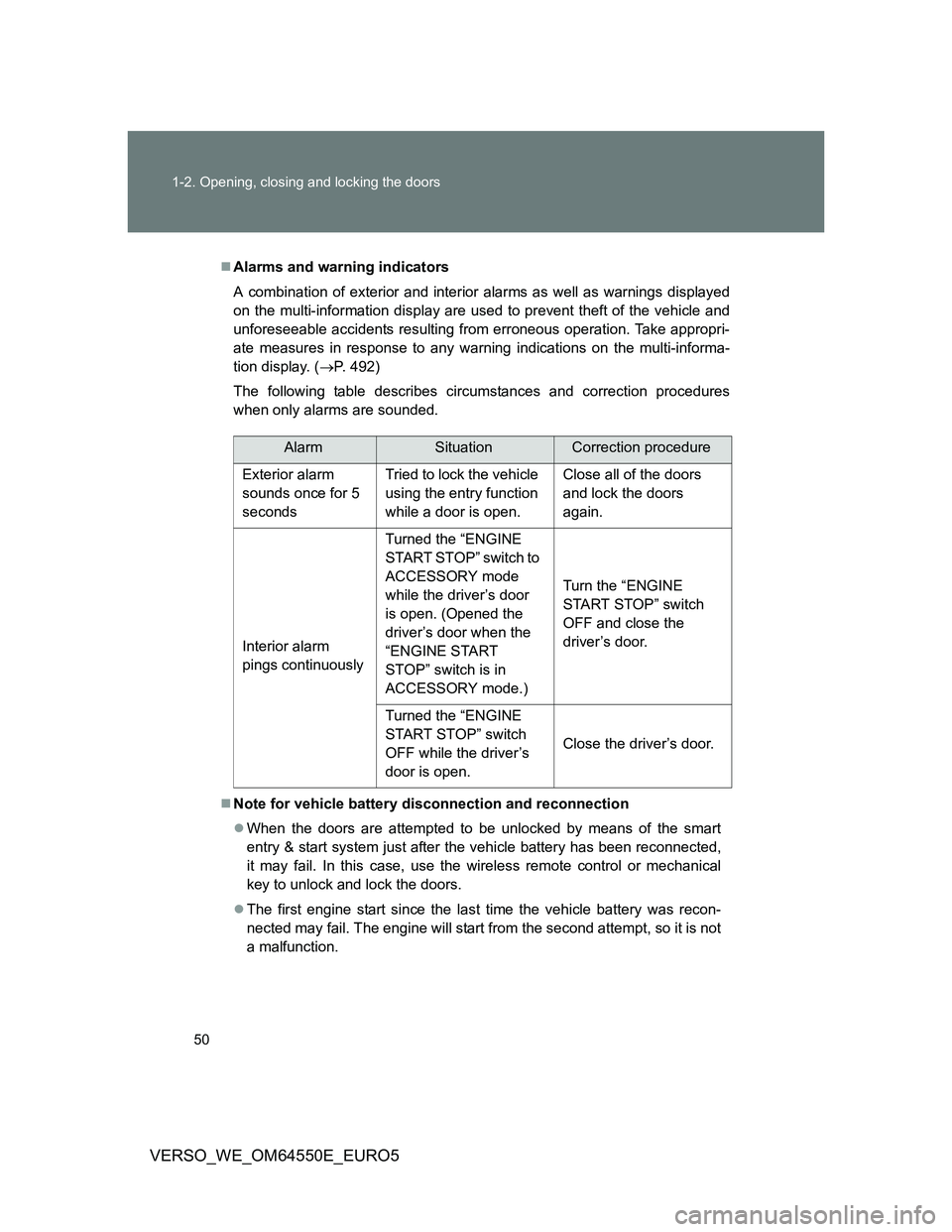
The following table describes circumstances and correction procedures
when only alarms are sounded.
Note for vehicle battery disconnection and reconnection
When the doors are attempted to be unlocked by means of the smart
entry & start system just after the vehicle battery has been reconnected,
it may fail. In this case, use the wireless remote control or mechanical
key to unlock and lock the doors.
The first engine start since the last time the vehicle battery was recon-
nected may fail. The engine will start from the second attempt, so it is not
a malfunction.
AlarmSituationCorrection procedure
Exterior alarm
sounds once for 5
secondsTried to lock the vehicle
using the entry function
while a door is open.Close all of the doors
and lock the doors
again.
Interior alarm
pings continuouslyTurned the “ENGINE
START STOP” switch to
ACCESSORY mode
while the driver’s door
is open. (Opened the
driver’s door when the
“ENGINE START
STOP” switch is in
ACCESSORY mode.)Turn the “ENGINE
START STOP” switch
OFF and close the
driver’s door.
Turned the “ENGINE
START STOP” switch
OFF while the driver’s
door is open.Close the driver’s door.
Page 73 of 616
73
1
1-2. Opening, closing and locking the doors
Before driving
VERSO_WE_OM64550E_EURO5
Side doors
The vehicle can be locked and unlocked using the smart entry &
start system, wireless remote control, key or door lock switch.
Smart entry & start system (if equipped)
P. 4 2
Wireless remote control
P. 6 4
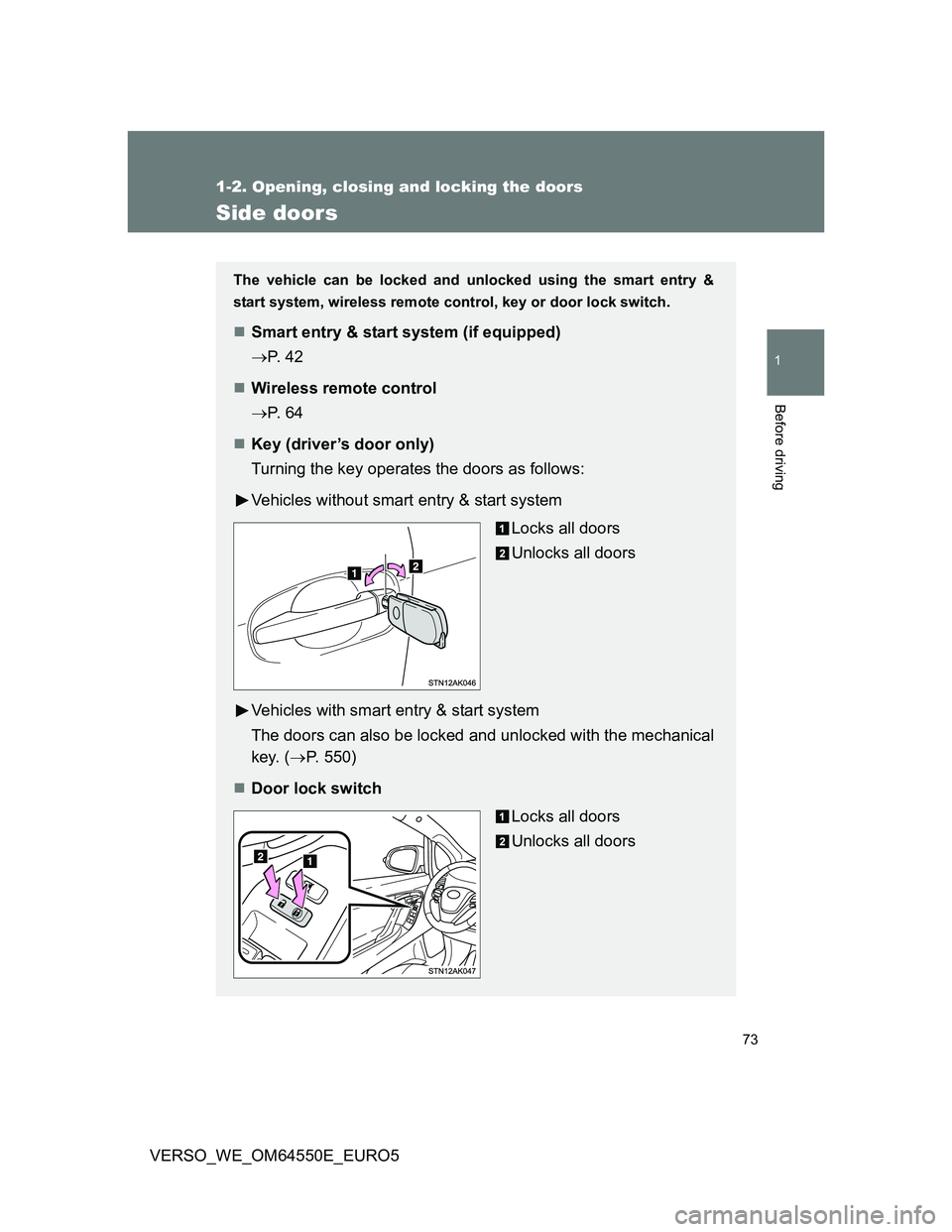
Key (driver’s door only)
Turning the key operates the doors as follows:
Vehicles without smart entry & start system
Locks all doors
Unlocks all doors
Vehicles with smart entry & start system
The doors can also be locked and unlocked with the mechanical
key. (P. 550)
Door lock switch
Locks all doors
Unlocks all doors
Page 74 of 616
74 1-2. Opening, closing and locking the doors
VERSO_WE_OM64550E_EURO5
Locking the driver’s door from the outside without a key
Move the inside door lock button to the lock position.
Close the door while pulling the door handle.
Vehicles without smart entry & start system
The door cannot be locked if the key is in the engine switch.
Vehicles with smart entry & start system
The door cannot be locked if the “ENGINE START STOP” switch is
in the ACCESSORY or IGNITION ON mode, or the electronic key
is left inside the vehicle.
The key may not be detected correctly and the door may be locked.
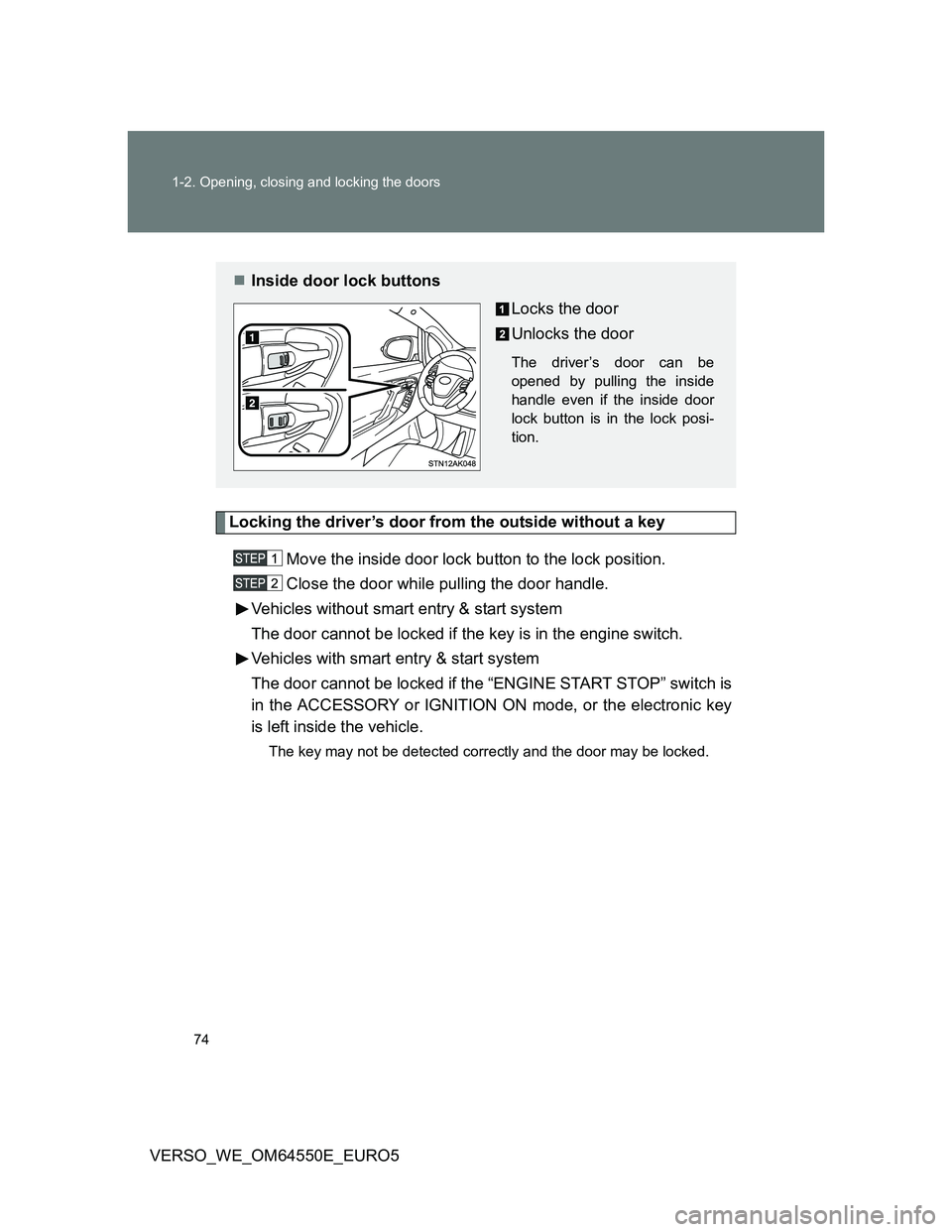
Inside door lock buttons
Locks the door
Unlocks the door
The driver’s door can be
opened by pulling the inside
handle even if the inside door
lock button is in the lock posi-
tion.
Page 76 of 616
76 1-2. Opening, closing and locking the doors
VERSO_WE_OM64550E_EURO5
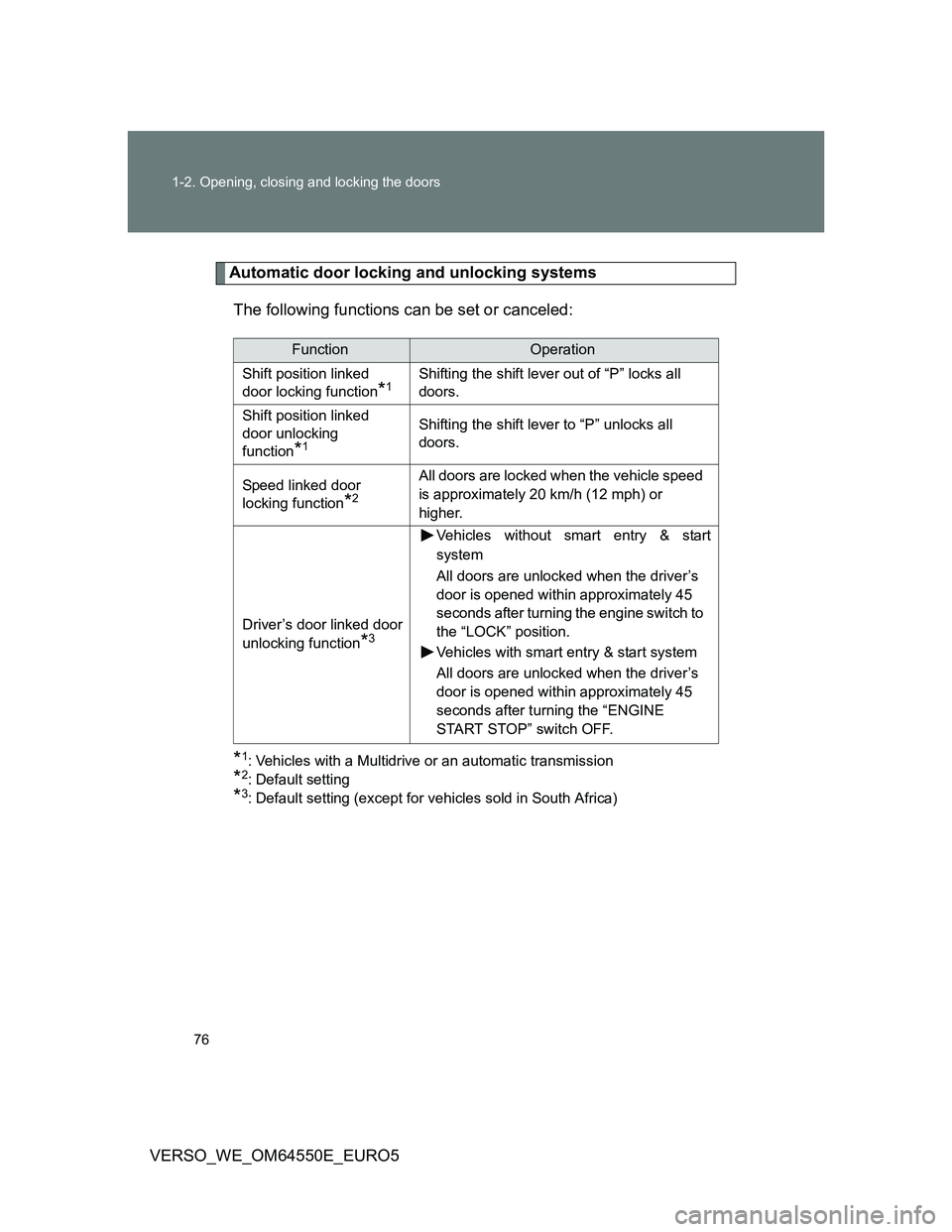
Automatic door locking and unlocking systems
The following functions can be set or canceled:
*1: Vehicles with a Multidrive or an automatic transmission
*2: Default setting
*3: Default setting (except for vehicles sold in South Africa)
FunctionOperation
Shift position linked
door locking function
*1Shifting the shift lever out of “P” locks all
doors.
Shift position linked
door unlocking
function
*1
Shifting the shift lever to “P” unlocks all
doors.
Speed linked door
locking function
*2
All doors are locked when the vehicle speed
is approximately 20 km/h (12 mph) or
higher.
Driver’s door linked door
unlocking function
*3
Vehicles without smart entry & start
system
All doors are unlocked when the driver’s
door is opened within approximately 45
seconds after turning the engine switch to
the “LOCK” position.
Vehicles with smart entry & start system
All doors are unlocked when the driver’s
door is opened within approximately 45
seconds after turning the “ENGINE
START STOP” switch OFF.
Page 77 of 616
77 1-2. Opening, closing and locking the doors
1
Before driving
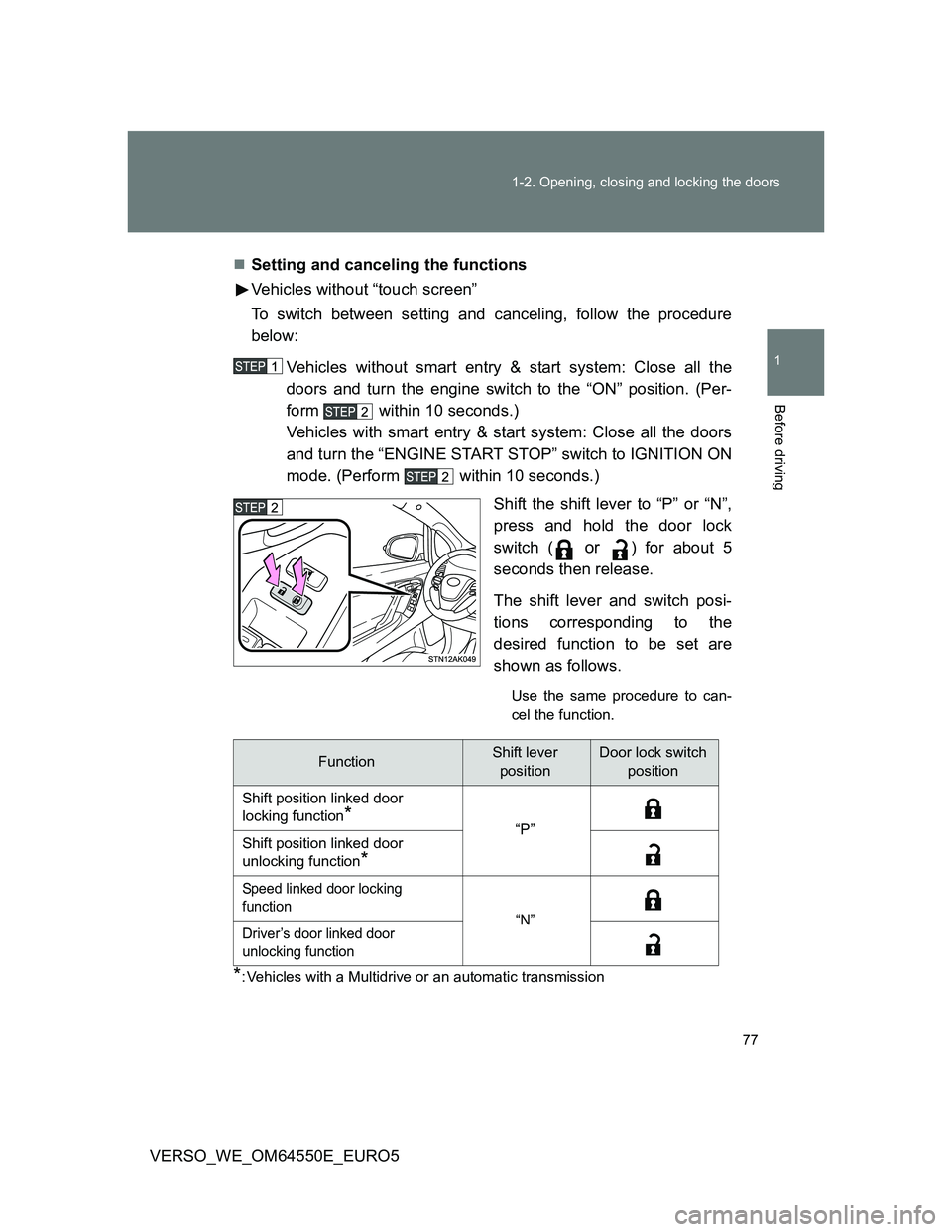
VERSO_WE_OM64550E_EURO5Setting and canceling the functions
Vehicles without “touch screen”
To switch between setting and canceling, follow the procedure
below:
Vehicles without smart entry & start system: Close all the
doors and turn the engine switch to the “ON” position. (Per-
form within 10 seconds.)
Vehicles with smart entry & start system: Close all the doors
and turn the “ENGINE START STOP” switch to IGNITION ON
mode. (Perform within 10 seconds.)
Shift the shift lever to “P” or “N”,
press and hold the door lock
switch (
or ) for about 5
seconds then release.
The shift lever and switch posi-
tions corresponding to the
desired function to be set are
shown as follows.
Use the same procedure to can-
cel the function.
*: Vehicles with a Multidrive or an automatic transmission
FunctionShift lever
positionDoor lock switch
position
Shift position linked door
locking function
*“P”
Shift position linked door
unlocking function
*
Speed linked door locking
function
“N”
Driver’s door linked door
unlocking function